Unveiling Access Control Flaws: How a Viewer Became an Editor
The application only checked that an Authorization bearer token was present, not what role it carried, so a low-privileged Viewer could replay an Editor's update request with their own token and change data. The author reports that the modification succeeded with a 200 response and that the flaw affected all endpoints.

Hope all are good and fine. I’m back with another write-up.
The full write-up lives on its author's site
It belongs to its author, so we link to it rather than copy it. The other two tabs are our own rewrites, checked against it.
Context
During a Gray Box assessment of a web application referred to as test.com, I found a broken access control flaw that let a Viewer account modify data reserved for Editors. The application is a data management portal with three roles: Viewer, Editor and Admin. Editors can modify entries in the portal; Viewers can only view data. The feature involved is the entry update endpoint, which accepts a JSON body describing the record to change.

Setup
I logged in with an Editor account to explore the application's functionality. The only tooling mentioned is the browser and an intercepting proxy used to capture the update request. No versions are given. The precondition for the attack is a valid session for a lower-privileged account (Viewer) and knowledge of the request structure used by a privileged account (Editor).
Finding it
While modifying an entry as an Editor, I captured the corresponding HTTP request. It was a POST to /dir/mis/update?queryid=9361 with a JSON body. The request carried an Authorization: Bearer <token> header and a JSESSIONID cookie. The token contained minimal information, such as the username, expiration time and issuance time.
POST /dir/mis/update?queryid=9361 HTTP/2Host: test.comUser-Agent: Mozilla/5.0 (Windows NT 10.0; Win64; x64; rv:109.0) Gecko/20100101 Firefox/114.0Accept: application/json, text/plain, */*Accept-Language: en-US,en;q=0.5Accept-Encoding: gzip, deflateAuthorization: Bearer <token>Content-Type: application/jsonContent-Length: 392Origin: http://test.comConnection: closeReferer: http://test.com/dir/Cookie: JSESSIONID=<value>{ "STATE CODE":"ALL", "STATE GST CODE":"0", "FILING DATE":"2017-12-01 00:00:00.0", "LAST DATE":"2018-02-10 00:00:00.0", "RETURN YEAR":"2017-18", "TARGET DATE":"2018-01-10", "GSTNOT":"72/2017 Central Tax#2017-12-29", "NOTIFICATION DATE":"2017-12-29", "PERIOD":"122017", "GST NOTIFICATION":"72/2017 Central Tax", "STATE NAME":"ALL", "TYPE":"GSTR1", "PREFERENCE":"N", "REMARK":"Test Data", "dataKeyEdit":6}
The request body is a JSON object with fields such as STATE CODE, FILING DATE, RETURN YEAR, REMARK and dataKeyEdit. The Authorization header carries a bearer token, and the Cookie header carries a JSESSIONID value.
What looked wrong was the authentication design. The application relied heavily on weak cookie implementation for user authentication, and the only check performed was on the presence of the Authorization: Bearer <token> header. The token itself contained minimal information: username, expiration time and issuance time. There was no indication that the server checked the role associated with the token before processing the update.
Exploitation
Step 1: Log out of the Editor account and log in as a Viewer
After logging out from the Editor account, I logged in as a Viewer. Viewers had restricted permissions and could not modify data, but they could still view it. This provided a valid Viewer session with its own Authorization: Bearer <token> and cookies.
Step 2: Craft a new request identical to the Editor request but with the Viewer's credentials
Armed with the knowledge of the HTTP request structure, I crafted a new request identical to the one observed earlier. This time I used the Viewer's Authorization: Bearer <token> and corresponding cookies. The request was sent as a POST to the same endpoint /dir/mis/update?queryid=9361 with the same JSON body structure.
Step 3: Replace the REMARK parameter with a malicious payload
In the crafted request, I replaced the REMARK parameter with a malicious payload, Hello. The rest of the request remained as before, but with the Viewer's credentials.
Step 4: Send the request and observe the response
When I sent the request, I received a 200 OK response, indicating that the modifications were successful.
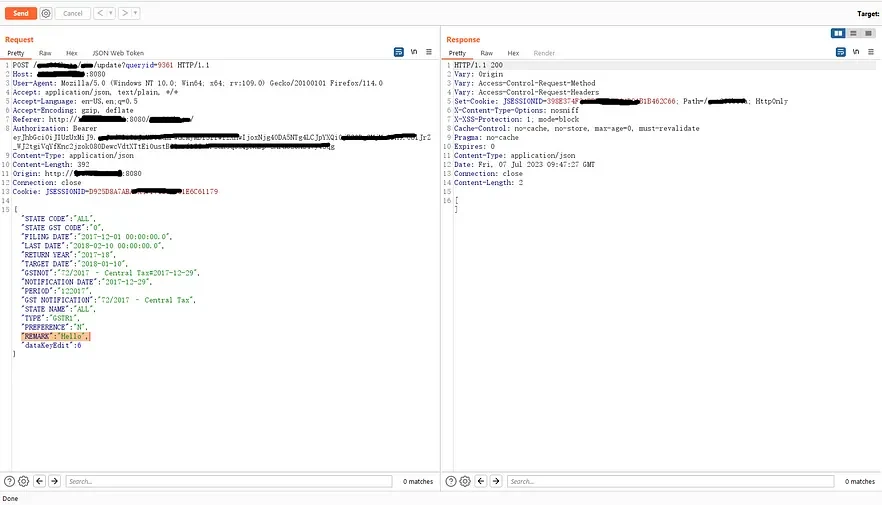
It became apparent that the website only checked the presence of the Authorization: Bearer <token> header in the request. Regardless of whether it belonged to a privileged user or a non-privileged user, the server processed the request without proper authorization. This vulnerability existed on all the endpoints, meaning the entire web app was vulnerable to unauthorized data modification.
Root cause
The mistake is in the access control design: the server authenticated requests by checking only that an Authorization: Bearer <token> header was present, without verifying that the token's user had the role required for the operation. The token contained minimal information such as username, expiration time and issuance time, so role information was either absent or not enforced. The application also relied heavily on weak cookie implementation for user authentication. Existing defences did not stop the attack because no role or permission check was performed on the update endpoint; the presence of any valid token was sufficient. The same pattern applied to all endpoints, as the report states the vulnerability existed on all of them.
Impact
A lower-level user, such as a Viewer, could modify data even though they lacked the necessary permissions. This exposed a significant flaw in the application's access control mechanism and could potentially lead to unauthorized modifications or data tampering. The report states the vulnerability existed on all endpoints, so the entire web app was vulnerable to unauthorized data modification. The impact is limited to authenticated users who hold any valid token; no unauthenticated access is described.
Fix
The report does not describe a fix or any changes made. The fix should be to enforce role-based authorization on every endpoint: after validating the token, the server must check that the authenticated user's role permits the requested operation, not merely that a token is present. The token should carry trustworthy role information, or the server should look up the user's role from a trusted store, and the weak cookie implementation should be replaced with a properly secured session mechanism.
Variants to test
- Role swap on state-changing endpoints: capture a request from a high-privilege account, then replay it with a low-privilege account's token and cookies. A positive result is a
200 OKand a visible change in the data. - Token presence only: send a request with a syntactically valid but low-privilege token to endpoints that should require higher privileges. A positive result is that the server processes the request instead of returning
401or403. - Parameter tampering in the body: change fields such as
REMARKordataKeyEditto values outside the expected range. A positive result is that the server accepts and stores the modified value. - Endpoint enumeration: test other endpoints under
/dir/mis/with the same low-privilege token. A positive result is that any endpoint that should be restricted returns a success response. - Cookie manipulation: modify the
JSESSIONIDcookie value while keeping a valid token. A positive result is that the server still accepts the request, indicating weak session validation.
What happened, in plain words
A security researcher was testing a website, which the write-up calls test.com, that works as a data management portal. Think of it as a shared online filing cabinet: people log in and look at or change records stored inside it. The portal has three kinds of user: Viewer, Editor and Admin. A Viewer is allowed to look at the records but not change them. An Editor is allowed to change them.
The researcher found a mistake in how the portal decides who is allowed to do what. The server only checked that a request carried a login token, not what that token was allowed to do. So a Viewer could send the same change request an Editor would send, and the server would accept it. A Viewer ended up able to edit data.
This kind of mistake is called broken access control. Access control is simply the rule that says who may do what. When the rule is missing or not enforced, the door is unlocked for anyone who is already inside the building, even if they were only given a visitor badge.
The setup
The researcher logged in with an Editor account to explore what the portal could do. The only tools mentioned are a normal browser and an intercepting proxy. A proxy is a program that sits between your browser and the website and lets you read and change the messages going back and forth, a bit like opening a letter, reading it, and putting it back in the envelope before it is delivered.
The plan needed two things: a valid session for a lower-privileged account (a Viewer), and knowledge of the exact request a privileged account (an Editor) sends when it changes a record.
Finding the request
While changing an entry as an Editor, the researcher captured the request that the browser sent. A request is the message your browser sends to a server when you click something, for example "please save this record". The portal's requests go to an API, which is the part of the website that accepts and answers these messages rather than sending back a web page.
The captured request was a POST to /dir/mis/update?queryid=9361, carrying a JSON body. POST is the HTTP method used when you are sending data to the server to create or change something. JSON is a common text format for structured data, using curly braces and quoted field names, a bit like a very strict form with labelled boxes.
POST /dir/mis/update?queryid=9361 HTTP/2Host: test.comUser-Agent: Mozilla/5.0 (Windows NT 10.0; Win64; x64; rv:109.0) Gecko/20100101 Firefox/114.0Accept: application/json, text/plain, */*Accept-Language: en-US,en;q=0.5Accept-Encoding: gzip, deflateAuthorization: Bearer <token>Content-Type: application/jsonContent-Length: 392Origin: http://test.comConnection: closeReferer: http://test.com/dir/Cookie: JSESSIONID=<value>{ "STATE CODE":"ALL", "STATE GST CODE":"0", "FILING DATE":"2017-12-01 00:00:00.0", "LAST DATE":"2018-02-10 00:00:00.0", "RETURN YEAR":"2017-18", "TARGET DATE":"2018-01-10", "GSTNOT":"72/2017 Central Tax#2017-12-29", "NOTIFICATION DATE":"2017-12-29", "PERIOD":"122017", "GST NOTIFICATION":"72/2017 Central Tax", "STATE NAME":"ALL", "TYPE":"GSTR1", "PREFERENCE":"N", "REMARK":"Test Data", "dataKeyEdit":6}
Line by line, in plain words:
POST /dir/mis/update?queryid=9361 HTTP/2is the first line: the method (POST, meaning "save this"), the address of the feature on the server, and the version of the web protocol being used (HTTP/2).Host: test.comtells the server which website the request is meant for. One server can host many sites, so it needs to know which one.User-Agentdescribes the browser that sent the request. It is like a return address on an envelope.Acceptsays which kinds of answer the browser is willing to receive. Here it accepts JSON or plain text.Accept-Languagesays the preferred language for the answer.Accept-Encodingsays the browser can handle compressed answers, which saves bandwidth.Authorization: Bearer <token>is the important one. A token is a short string that proves you logged in, like a wristband at an event. "Bearer" means "whoever carries this token is treated as the user". The real value is replaced with<token>here.Content-Type: application/jsontells the server the body is in JSON format.Content-Length: 392says how many bytes long the body is.OriginandReferersay which page the request came from. Browsers add these automatically.Connection: closeasks the server to close the connection after answering.Cookie: JSESSIONID=<value>is a cookie. A cookie is a small piece of text the website stores in your browser and that your browser sends back with every request, like a coat-check ticket.JSESSIONIDis a common name for a session identifier, a value that ties your requests to your logged-in session.- The block in curly braces is the body: the actual record being saved. Fields like
STATE CODE,FILING DATE,RETURN YEARandREMARKdescribe the record.REMARKis a free-text note.
What looked wrong was the design of the login check. The portal relied heavily on a weak cookie implementation for user authentication, and the only check performed was whether the Authorization: Bearer <token> header was present. The token itself contained minimal information, such as the username, the expiration time and the issuance time. Nothing suggested the server checked the role attached to the token before processing the update.
Exploiting it
Step 1: log out of the Editor account and log in as a Viewer
The researcher logged out of the Editor account and logged in as a Viewer. Viewers had restricted permissions and could not modify data, but they could still view it. This gave a valid Viewer session with its own Authorization: Bearer <token> and cookies. The reason for this step is simple: to prove that a lower-privileged user can do a higher-privileged action, you need to actually be that lower-privileged user.
Step 2: craft the same request with the Viewer's credentials
Using the request structure captured earlier, the researcher built a new request identical to the Editor's, but with the Viewer's Authorization: Bearer <token> and corresponding cookies. It was sent as a POST to the same endpoint /dir/mis/update?queryid=9361 with the same JSON body structure. The idea is to keep everything the same except the identity, so that if the server accepts it, the only possible reason is that it did not check the identity's permissions.
Step 3: replace the REMARK value
In the crafted request, the REMARK parameter was replaced with a malicious payload, Hello. The rest of the request stayed as before, but with the Viewer's credentials. Changing a harmless field like a remark is a safe way to show that the write actually happened, without damaging real data.
Step 4: send it and read the answer
When the request was sent, the server answered 200 OK, which means the modification was successful.
It became clear that the website only checked whether an Authorization: Bearer <token> header was present. Whether the token belonged to a privileged user or a non-privileged one, the server processed the request without proper authorization. The same vulnerability existed on all the endpoints, so the entire web app was open to unauthorised data modification.
Why it worked
The mistake is in the access control design. The server authenticated requests by checking only that an Authorization: Bearer <token> header was there, without checking that the token's user had the role required for the operation. Authentication means proving who you are; authorisation means deciding what you are allowed to do. The portal did the first and skipped the second.
The token contained minimal information such as the username, expiration time and issuance time, so role information was either absent or not enforced. The application also relied heavily on a weak cookie implementation for user authentication. Nothing stopped the attack because no role or permission check was performed on the update endpoint; the presence of any valid token was enough. The report states the vulnerability existed on all endpoints.
What it means
A lower-level user, such as a Viewer, could modify data even though they lacked the necessary permissions. That exposed a significant flaw in the application's access control mechanism and could potentially lead to unauthorised modifications or data tampering. Because the report says the vulnerability existed on all endpoints, the whole web app was open to unauthorised data modification. The impact is limited to users who are already logged in and hold any valid token; no unauthenticated access is described.
How it should be fixed
The report does not describe a fix or any changes made. The fix should be to enforce role-based authorisation on every endpoint: after validating the token, the server must check that the authenticated user's role permits the requested operation, not merely that a token is present. The token should carry trustworthy role information, or the server should look up the user's role from a trusted store, and the weak cookie implementation should be replaced with a properly secured session mechanism.
Things worth trying on your own
If you are learning, these are variations of the same idea. Only test on systems you own or have permission to test.
- Role swap on state-changing endpoints: capture a request from a high-privilege account, then replay it with a low-privilege account's token and cookies. A positive result is a
200 OKand a visible change in the data. - Token presence only: send a request with a syntactically valid but low-privilege token to endpoints that should require higher privileges. A positive result is that the server processes the request instead of returning
401or403. Those two codes mean "you are not logged in" and "you are logged in but not allowed", respectively. - Parameter tampering in the body: change fields such as
REMARKordataKeyEditto values outside the expected range. A positive result is that the server accepts and stores the modified value. - Endpoint enumeration: test other endpoints under
/dir/mis/with the same low-privilege token. A positive result is that any endpoint that should be restricted returns a success response. - Cookie manipulation: modify the
JSESSIONIDcookie value while keeping a valid token. A positive result is that the server still accepts the request, indicating weak session validation.
Glossary
- Access control: the rules that decide who is allowed to do what on a system.
- Admin: one of the three roles in this portal, alongside Editor and Viewer.
- API: the part of a website that accepts and answers structured messages (requests) rather than sending back web pages.
- Authentication: proving who you are, usually by logging in.
- Authorisation: deciding what an authenticated user is allowed to do.
- Bearer token: a token where whoever carries it is treated as the user; no extra proof is required.
- Broken access control: a flaw where the system fails to enforce who may do what.
- Cookie: a small piece of text a website stores in your browser and your browser sends back with each request.
- Editor: a role in this portal that can modify data.
- Endpoint: a specific address on a server that handles one kind of request, such as
/dir/mis/update. - Gray box testing: testing where the tester has some knowledge of the system, more than a pure outsider but not full access.
- HTTP: the protocol browsers and servers use to exchange requests and responses.
- HTTP/2: a version of HTTP.
- Intercepting proxy: a tool that sits between browser and server so you can read and change the messages.
- JSON: a text format for structured data using curly braces and quoted field names.
- JSESSIONID: a common name for a cookie that holds a session identifier.
- Payload: the part of a request that carries the data you are sending, here the JSON body.
- POST: an HTTP method used to send data to the server to create or change something.
- Request: the message a browser sends to a server.
- Response: the message a server sends back.
- Role: a label such as Viewer, Editor or Admin that defines what a user may do.
- Session: the period during which a server remembers that you are logged in.
- Token: a short string that proves you logged in.
- Viewer: a role in this portal, allowed to view data but not modify it.
- 200 OK: the HTTP status code meaning the request succeeded.
- 401: the HTTP status code meaning you are not authenticated.
- 403: the HTTP status code meaning you are authenticated but not allowed.

