A misconfigured Apache Airflow to AWS Account Compromise
An older Apache Airflow instance used a default signing key for session cookies, allowing an attacker to forge an admin session. This led to access to hardcoded credentials, including a Slack token and AWS keys, which gave limited access to the cloud account.
 Published on logicbomb.medium.com
It’s been a long time since I have penned down my findings with the security community and I think this write-up was worth sharing. In summary, this is about how I was able to exploit a security misconfiguration present in the older version of Apache Airflow for authentication bypass which I discovered while recon and…
The full write-up lives on its author's site
It belongs to its author, so we link to it rather than copy it. The other two tabs are our own rewrites, checked against it.
Context
Apache Airflow is an open-source tool for programmatically authoring, scheduling and monitoring workflows. Data engineers use it to orchestrate pipelines and to visualise dependencies, progress, logs, code, triggered tasks and success status. The author notes it is the most starred open-source workflow application on GitHub.
The target of this write-up is the Airflow web interface, specifically the session handling of older 1.x.x releases. Airflow's web interface stores authentication data in Flask's stateless, signed cookies. Because the cookie is stateless, the instance has no record of whether any attribute inside it has been modified. The attribute that matters here is user_id inside the JSON payload, which identifies which user is logged in. Airflow signs that cookie with a default signing key, temporary_key. If the operator never changes it, the cookie can be cracked and re-signed.
The relevant misconfiguration is tracked as CVE-2020-17526. The author also points out that, by default, older versions of Apache Airflow do not provide authentication at all.
Setup
The work started from a list of domains and targets, with subdomain enumeration to find hosts running Apache Airflow. The tools used were:
- Subfinder, plus a quickly written script, to enumerate subdomains and detect Airflow instances.
- A script to determine which of those instances ran an older version.
- Shodan, for a quick search to gauge how many instances are exposed and vulnerable.
- flask-unsign, to crack and re-sign the session cookie.
- SlackPirate, to extract information reachable with a discovered Slack token.
The precondition for the exploit is an Airflow 1.x.x instance reachable from the internet whose [webserver] secret_key still has the default value.
Finding it
The author's hypothesis was that, because CVE-2020-17526 is recent and Airflow is widely deployed, many unpatched older versions would be reachable over the internet. He was fairly sure dozens of these instances were still in use inside organisations, and that is what happened.
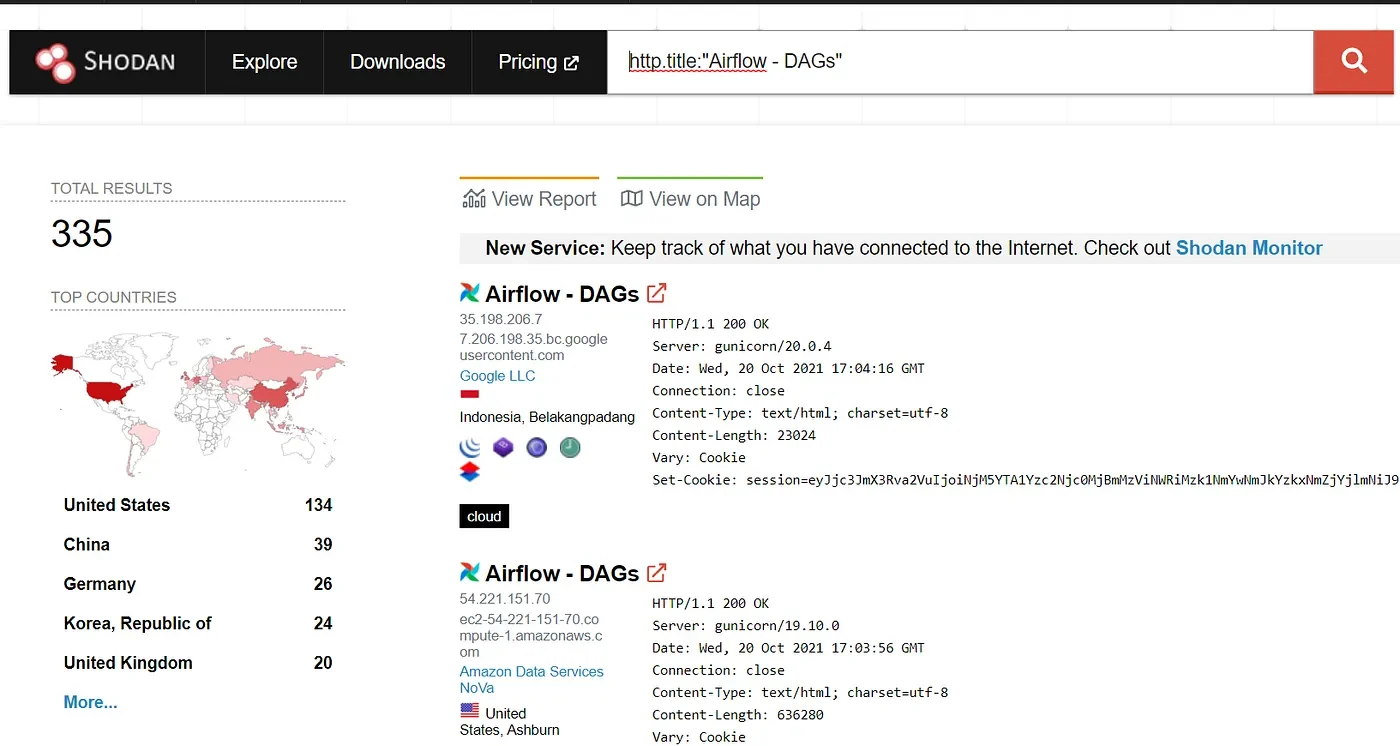
A Shodan search showed more than 300 Airflow instances publicly exposed over the internet without any authentication, since older versions ship without authentication by default.
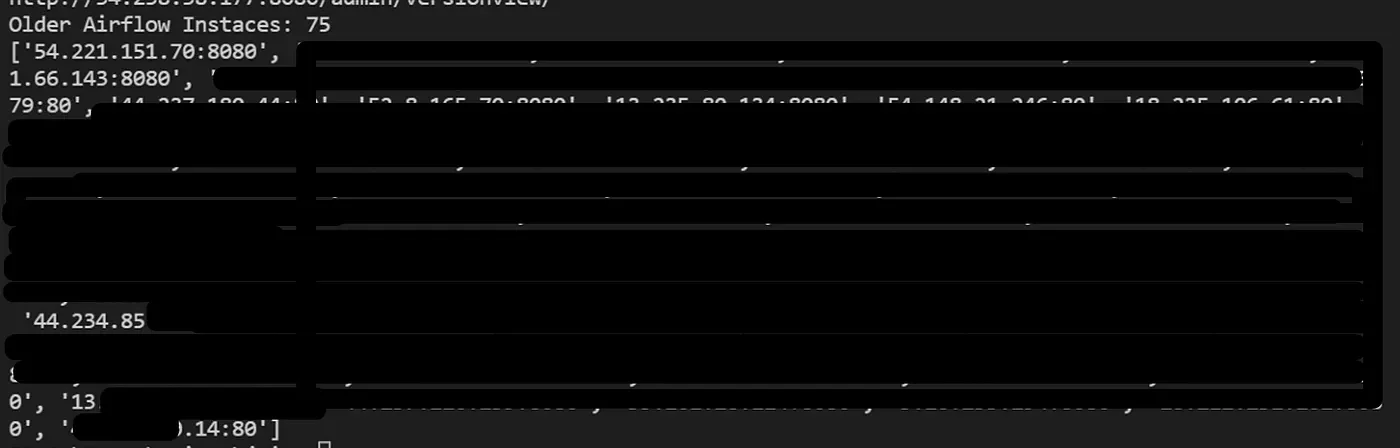
Running the version-detection script against those instances put the count of hosts on an older version as high as 75. Publicly exposed, misconfigured instances with internet-wide access are ideal candidates for exploitation, which the author links to why CVE-2020-17526 was so prominent in the news.
Exploitation
Step 1: Crack and forge the session cookie
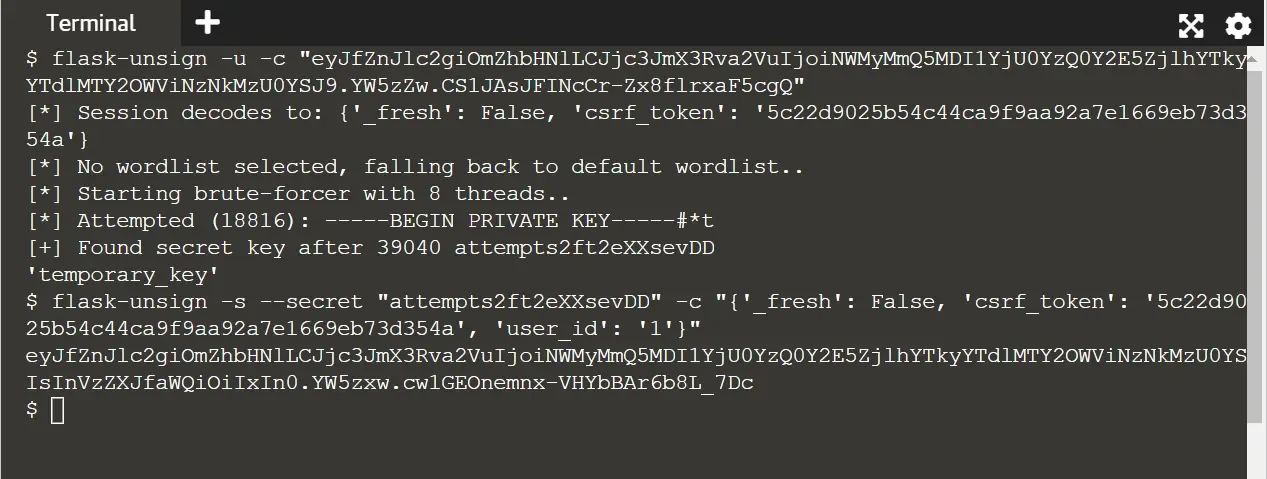
The web interface signs the session cookie with temporary_key by default. If that key was never changed, flask-unsign can crack it, after which the session JSON can be modified to add or change an attribute and re-signed with the same key.
The author decrypted the session cookie, forged the user_id attribute to designate the user ID to log in as, tried 1 for admin, and resigned the cookie.
Step 2: Replace the cookie and log in
The forged cookie was placed into the browser in place of the original session cookie, and the home page was loaded. The author found themselves logged in to the tool as admin.
Step 3: Harvest credentials from DAG code
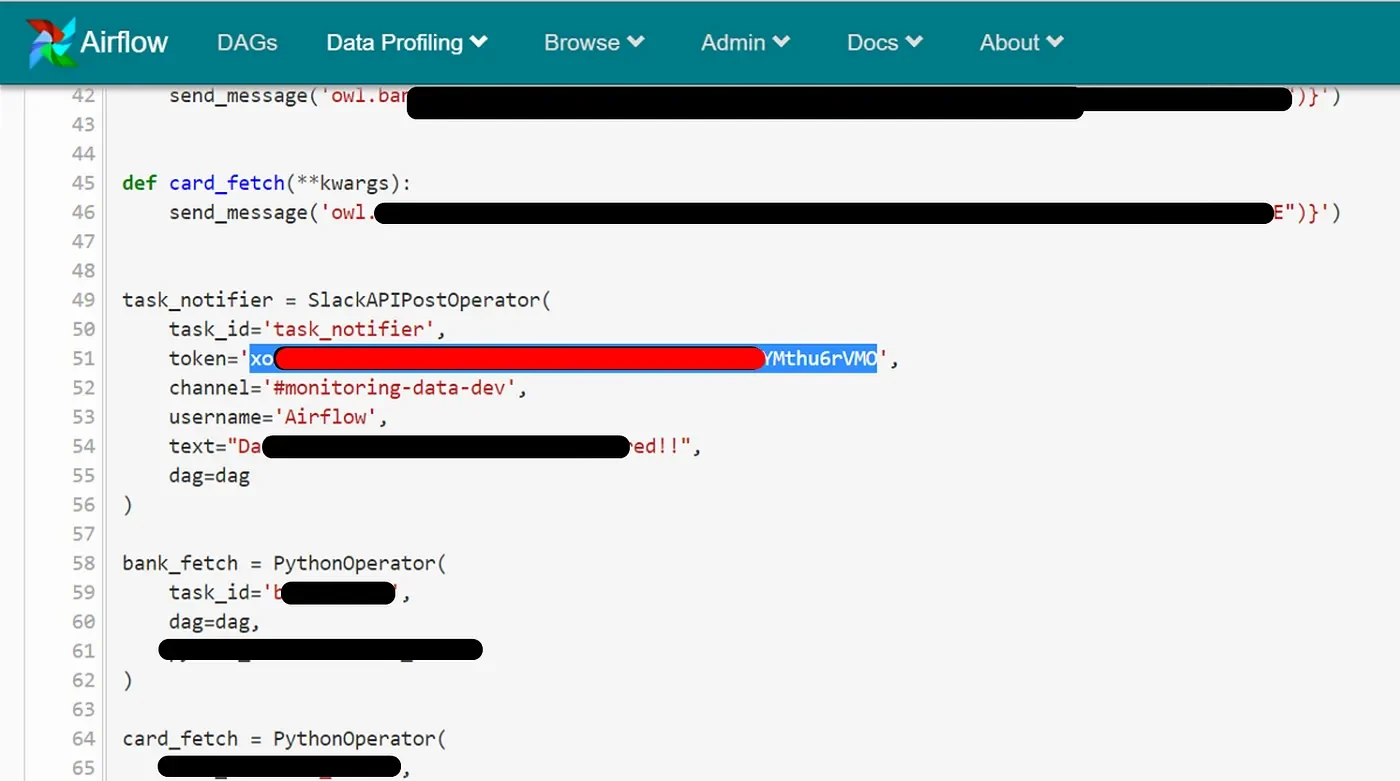
With admin access, the author reviewed each DAG's code looking for the most common developer mistake: hardcoded plain-text credentials. This yielded a Slack token belonging to one of the users.
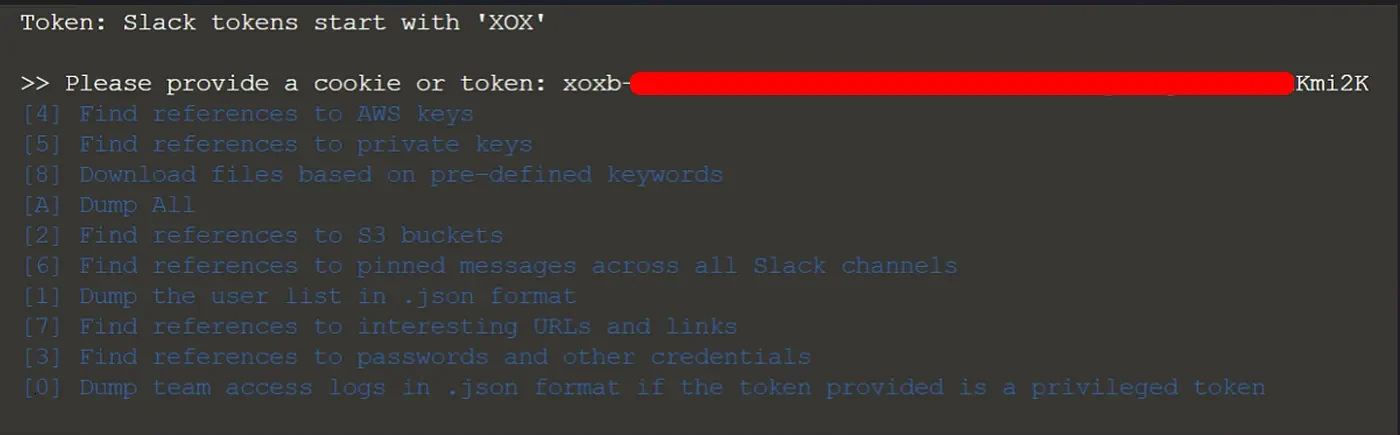
Step 4: Use the Slack token
SlackPirate was used against the token to extract the sensitive information it had access to.
Step 5: Look for more secrets in the instance
Other options in the Airflow instance were explored, which turned up two further exposures:
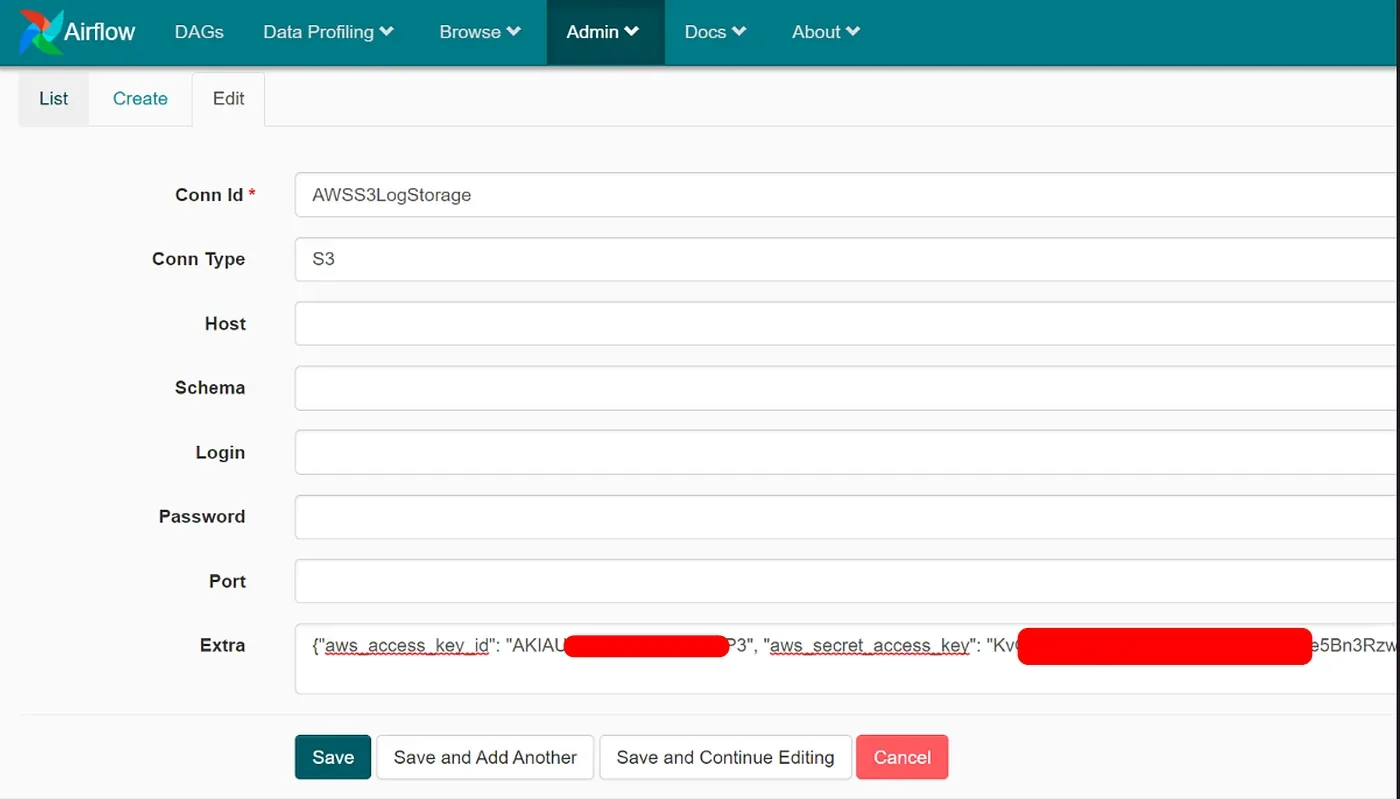
- AWS keys hardcoded in the connection tab.
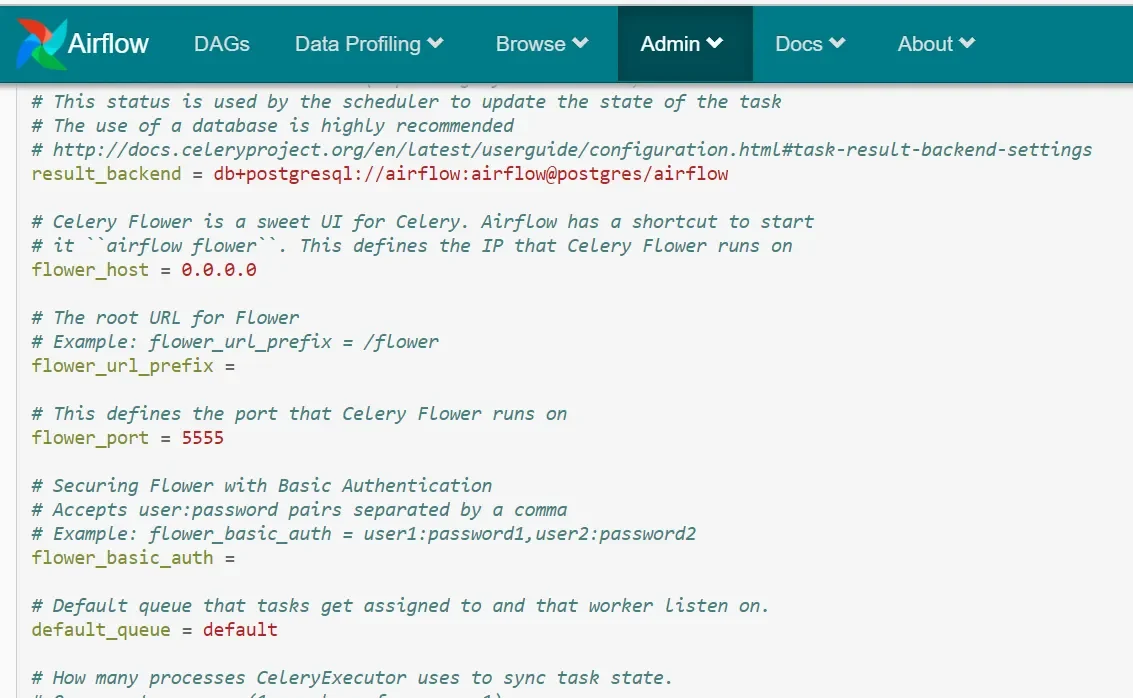
- The
airflow.cfgconfiguration widely open, exposing a Postgres connection string.
Step 6: Use the AWS keys
Logging in with the AWS credentials gave access to the target's AWS account, although that access was limited. The author frames this as an example of how a widely known CVE chained with bad security practices and misconfigurations leads to multiple exposures.
Root cause
Airflow's web interface keeps authentication state entirely in a signed, stateless Flask cookie, so the server trusts whatever user_id the cookie carries as long as the signature verifies. The signature is only as strong as the signing key, and Airflow shipped with a default key, temporary_key. If the default signing key is not changed, it can be cracked using flask-unsign and the session JSON can be modified and re-signed.
Nothing in the design detects modification of the cookie's contents, because the instance keeps no server-side session state to compare against. The escalation beyond the web interface came from separate mistakes: plain-text credentials in DAG code, AWS keys in the connection tab, and an openly readable airflow.cfg with a Postgres connection string. Older versions also default to no authentication at all, which removes even the need to forge a cookie on those hosts.
Impact
On a vulnerable instance, an attacker can forge the user_id in the session cookie to log in as admin. As admin, the attacker can read DAG code and configuration, which in this case exposed a Slack token, AWS keys and a Postgres connection string. The Slack token gave access to sensitive information that the token could reach. The AWS keys gave access to the target's AWS account, though with limited access. The Postgres connection string was exposed through a readable airflow.cfg.
The impact depends on the instance being reachable and on the default signing key being unchanged, and on credentials being stored in the places described. The author notes the AWS access obtained was limited.
Fix
The recommendation is to update Airflow instances to the latest version, or to change the default value of the [webserver] secret_key configuration to mitigate the attack. The author references the Apache mailing list thread at https://lists.apache.org/thread/[redacted].
More broadly, the author asks organisations to harden the tools and services they deploy, review misconfigurations, secure default configurations, and keep track of publicly exposed assets beyond IPs and subdomains through continuous discovery.
Variants to test
- Default signing key on other Flask applications. Look for applications that use Flask signed cookies and ship a default
SECRET_KEY. A positive result is a cookie that flask-unsign cracks to a known default and that, when re-signed with a modified payload, is accepted by the server. - Airflow instances without authentication. Older Airflow versions default to no authentication. A positive result is direct access to the web interface and its DAG and admin views without any cookie.
- Secrets in DAG code. Review DAG definitions for hardcoded plain-text credentials. A positive result is a working token or key for an external service such as Slack or AWS.
- Secrets in the connection tab. Check Airflow connections for hardcoded AWS keys or other credentials. A positive result is credentials that authenticate to the cloud account.
- Exposed
airflow.cfg. Request the configuration file directly. A positive result is a readable file containing a database connection string or other secrets. - Version fingerprinting at scale. Run subdomain enumeration and a version-detection script across a target list to find Airflow 1.x.x hosts. A positive result is a list of hosts on vulnerable versions, which can then be tested with the steps above.
What happened, in plain words
A security researcher found an Apache Airflow instance running an old version and used a known weakness in that old version to log in as an administrator. Once inside, he found credentials that developers had left in the tool, and those let him reach a Slack token and an Amazon Web Services (AWS) cloud account with limited access.
To follow the story you only need a few ideas:
- Apache Airflow is a free tool that companies use to schedule and monitor automatic jobs, called workflows. Think of it as a very advanced alarm clock and to-do list for computers: it runs tasks on a timetable, in the right order, and shows you what succeeded and what failed. Data engineers use it to move and process data. The author notes it is the most starred open-source workflow application on GitHub, which just means it is very popular.
- A web interface is the part of a tool you open in a browser, with pages and buttons, as opposed to something you use only from a command line.
- A cookie is a small piece of text that a website asks your browser to store and send back with every request. It is how a site remembers who you are between page loads. Think of it as a wristband you get at an event: the staff check the wristband instead of asking for your ID at every door.
- A signed cookie is a cookie that the server has stamped with a cryptographic signature, so it can tell whether the contents were changed. It is like a wax seal on an envelope: if the seal is intact, the recipient trusts the letter.
- A signing key is the secret used to make that seal. If an attacker knows the key, they can open the envelope, change the letter, and put a fresh, valid seal back on.
- A vulnerability is a weakness that lets someone make a system do something it should not. CVE-2020-17526 is the official catalogue number for this particular Airflow weakness. CVE stands for Common Vulnerabilities and Exposures; it is a public list where each known flaw gets an ID so everyone can refer to the same thing.
- Recon (reconnaissance) is the information-gathering phase: finding out which systems exist and what software they run, before trying anything.
Recon
The weakness the author went after is catalogued as CVE-2020-17526. It had already been exploited in the wild, and because Airflow is so widely used, the misconfiguration is widespread too. The author's reasoning was simple: the flaw is recent, so plenty of organisations are likely still running old, unpatched versions that are reachable from the internet.
His goal at this stage was modest: find one Apache Airflow instance running a vulnerable 1.x.x version. The "1.x.x" means any release whose version number starts with 1, where the last two numbers can be anything. Software versions work like edition numbers: a newer edition usually fixes problems found in older ones.
He started from a list of domains and targets and gathered subdomains to see whether Airflow was running on any of them. A domain is the name of a site, like example.com. A subdomain is a name in front of it, like shop.example.com or internal.example.com; companies often have many, and some point at internal tools. Two things helped him here: a tool called Subfinder, which automates finding subdomains, and a quickly written script. A script is a short program that automates a repetitive task, so you do not have to check hundreds of sites by hand.
He was fairly sure dozens of these instances were still in use inside organisations, and that is what happened.
His hypothesis got stronger when he did a quick search on Shodan. Shodan is a search engine for internet-connected devices and services rather than for web pages: instead of indexing articles, it indexes what software is answering on the internet. The search showed how many Airflow instances were exposed and vulnerable to CVE-2020-17526. He also points out that, by default, older versions of Apache Airflow do not require any login at all. A simple search revealed more than 300 Airflow instances publicly exposed over the internet without any authentication. Authentication here means proving who you are, usually with a username and password; without it, anyone who finds the page can walk in.
He then ran his script to find how many of those instances were on an older version, and the count came out as high as 75. Instances that are publicly exposed and misconfigured, allowing internet-wide access, are ideal candidates for attackers. That is why CVE-2020-17526 was so prominent in the news.
Exploit CVE-2020-17526
With a bunch of Airflow instances discovered, the next step was to actually run the exploit for CVE-2020-17526. An exploit is the concrete technique or piece of code that takes advantage of a vulnerability; the vulnerability is the hole, the exploit is how you climb through it.
Here is the explanation of the flaw in plain terms. Airflow's web interface uses Flask's stateless, signed cookies to store authentication data. Flask is a toolkit for building websites in the Python programming language, and many web apps use it. Stateless means the server keeps no record of your session on its side: everything it needs to know about you travels inside the cookie itself, on every request. Because of that, the instance has no idea whether any attribute inside the cookie has been modified. The attribute that matters here is user_id inside the JSON payload, which identifies which user is logged in. JSON is just a text format for structured data, like a very strict shopping list with labels; a payload is the meaningful content inside it.
Airflow uses a default signing key, temporary_key, to sign the session cookie. A default is the value a program uses if the person installing it does not choose one, like a phone that ships with the passcode 0000. If that key is never changed, it can be cracked using flask-unsign, a tool that guesses or uses known keys to open and re-seal Flask cookies, and the session JSON value can be modified to include an extra attribute to sign in as admin and then re-signed with the same key.
And this is what he did: decrypt the session cookie, forge the user_id attribute, which designates which user ID you want to log in as, tried 1 for admin, and signed it back.
The next step was to replace the session cookie in the browser and navigate to the home page. In practice, you open the browser's developer tools, find the stored cookie for the site, and paste the forged one in its place. The browser then sends that cookie with every request, and the server, seeing a valid signature, believes it. He found himself successfully logged in to the tool as admin. No password was ever guessed; the server simply trusted a wristband the attacker had printed himself.
Privilege Escalation
Privilege escalation means going from a lower level of access to a higher one. Here the escalation was not about the login itself but about what admin access then exposed: a goldmine in front of him.
He went on to check each DAG's code. A DAG (Directed Acyclic Graph) is Airflow's name for a workflow definition: the file that describes which tasks run, in what order, and how they connect. Because these files are written by developers, they sometimes contain the most common developer mistake: hardcoded plain-text credentials. Hardcoded means the password or key is typed directly into the source code instead of being stored safely elsewhere, and plain text means it is not encrypted or hidden in any way. It is like writing your bank PIN on the back of your card. This got him access to a Slack token belonging to one of the users. A token is a long string that acts like a password for a service; whoever holds it can act as that user, without needing the actual password.
He used slackpirate to extract the sensitive information the token had access to. SlackPirate is a tool that, given a Slack token, queries Slack for the data that token can reach, such as users, channels and messages, so you can see the damage a leaked token allows.
He then explored other options in the Airflow instance and found:
- AWS keys hardcoded in the connection tab. The connection tab is a page in Airflow where you store the details Airflow needs to talk to other systems; it is meant to hold connection settings, but people sometimes paste real cloud credentials there. AWS is Amazon Web Services, Amazon's cloud platform, and AWS keys are the credential pair that lets a program act on an AWS account.
- The
airflow.cfgconfiguration file widely open, exposing a Postgres connection string.airflow.cfgis Airflow's main settings file. Postgres is a popular database system, and a connection string is the line of text containing the address, username and password needed to connect to it. If that file is readable by anyone, the database credentials are effectively public.
He tried logging in using the AWS credentials, which led him to access their AWS account, although that access was limited. He calls this a scary example of how a widely known CVE, chained with bad security practices and misconfigurations, can lead to multiple exposures.
Root cause
Airflow's web interface keeps authentication state entirely in a signed, stateless Flask cookie, so the server trusts whatever user_id the cookie carries as long as the signature verifies. The signature is only as strong as the signing key, and Airflow shipped with a default key, temporary_key. If the default signing key is not changed, it can be cracked using flask-unsign and the session JSON can be modified and re-signed.
Nothing in the design detects modification of the cookie's contents, because the instance keeps no server-side session state to compare against. The escalation beyond the web interface came from separate mistakes: plain-text credentials in DAG code, AWS keys in the connection tab, and an openly readable airflow.cfg with a Postgres connection string. Older versions also default to no authentication at all, which removes even the need to forge a cookie on those hosts.
Impact
Impact means what an attacker can actually do once the weakness is used. On a vulnerable instance, an attacker can forge the user_id in the session cookie to log in as admin. As admin, the attacker can read DAG code and configuration, which in this case exposed a Slack token, AWS keys and a Postgres connection string. The Slack token gave access to sensitive information that the token could reach. The AWS keys gave access to the target's AWS account, though with limited access. The Postgres connection string was exposed through a readable airflow.cfg.
The impact depends on the instance being reachable and on the default signing key being unchanged, and on credentials being stored in the places described. The author notes the AWS access obtained was limited.
Fix
The recommendation is to update Airflow instances to the latest version, or to change the default value of the [webserver] secret_key configuration to mitigate the attack. Mitigate means reduce the risk, even if you cannot remove every trace of the problem. The author references the Apache mailing list thread at https://lists.apache.org/thread/[redacted].
More broadly, the author asks organisations to harden the tools and services they deploy, review misconfigurations, secure default configurations, and keep track of publicly exposed assets beyond IPs and subdomains through continuous discovery. Hardening means tightening a system's settings so fewer things are left open by accident. An IP address is the numeric address of a machine on the internet, the equivalent of a street address; a subdomain is the human-friendly name that points to it.
Variants to test
These are the same ideas applied elsewhere, useful if you want to look for similar problems yourself. Each one lists what to look for and what a positive result looks like.
- Default signing key on other Flask applications. Look for applications that use Flask signed cookies and ship a default
SECRET_KEY. A positive result is a cookie that flask-unsign cracks to a known default and that, when re-signed with a modified payload, is accepted by the server. - Airflow instances without authentication. Older Airflow versions default to no authentication. A positive result is direct access to the web interface and its DAG and admin views without any cookie.
- Secrets in DAG code. Review DAG definitions for hardcoded plain-text credentials. A positive result is a working token or key for an external service such as Slack or AWS.
- Secrets in the connection tab. Check Airflow connections for hardcoded AWS keys or other credentials. A positive result is credentials that authenticate to the cloud account.
- Exposed
airflow.cfg. Request the configuration file directly. A positive result is a readable file containing a database connection string or other secrets. - Version fingerprinting at scale. Run subdomain enumeration and a version-detection script across a target list to find Airflow 1.x.x hosts. Fingerprinting means working out which software and version a server runs from clues it gives off. A positive result is a list of hosts on vulnerable versions, which can then be tested with the steps above.
Glossary
- Apache Airflow: an open-source tool for scheduling and monitoring automated workflows.
- Workflow: a set of tasks that run in a defined order, often on a schedule.
- Web interface: the browser-based part of a tool, with pages and buttons.
- Cookie: a small piece of text a website stores in your browser and receives back on each request, used to remember who you are.
- Signed cookie: a cookie carrying a cryptographic stamp so the server can detect changes to its contents.
- Signing key: the secret used to create that stamp.
- Stateless: the server keeps no record of your session; everything it needs travels in the cookie.
- JSON: a text format for structured data, made of labelled values.
- Payload: the meaningful content carried inside a message or cookie.
- Vulnerability: a weakness that lets someone make a system behave in a way it should not.
- CVE: Common Vulnerabilities and Exposures, a public catalogue where each known flaw gets an ID.
- CVE-2020-17526: the catalogue ID for the Airflow default signing key weakness described here.
- Exploit: the concrete technique or code that takes advantage of a vulnerability.
- Recon: the information-gathering phase before attacking, finding which systems exist and what they run.
- Domain: the name of a site, such as example.com.
- Subdomain: a name in front of a domain, such as internal.example.com.
- Script: a short program that automates a repetitive task.
- Shodan: a search engine that indexes internet-connected devices and services rather than web pages.
- Authentication: proving who you are, usually with a username and password.
- Flask: a toolkit for building websites in the Python programming language.
- flask-unsign: a tool for cracking and re-signing Flask session cookies.
- Default: the value a program uses when the installer does not choose one.
- Privilege escalation: moving from a lower level of access to a higher one.
- DAG: Airflow's name for a workflow definition file describing tasks and their order.
- Hardcoded: a password or key typed directly into source code instead of stored safely.
- Plain text: not encrypted or hidden in any way.
- Token: a long string that acts like a password for a service.
- SlackPirate: a tool that queries Slack with a token to list the data that token can reach.
- Connection tab: the Airflow page where connection settings to other systems are stored.
- AWS: Amazon Web Services, Amazon's cloud platform.
- AWS keys: the credential pair that lets a program act on an AWS account.
- Postgres: a popular database system.
- Connection string: a line of text containing the address, username and password needed to connect to a database.
- Impact: what an attacker can actually do once a weakness is used.
- Mitigate: reduce the risk, even if the problem cannot be fully removed.
- Hardening: tightening a system's settings so fewer things are left open by accident.
- IP address: the numeric address of a machine on the internet.
- Fingerprinting: working out which software and version a server runs from clues it gives off.




