A tale of 0Click Account Takeover and 2FA Bypass
The password reset endpoint accepted an array of email addresses, sending reset links to all of them, allowing an attacker to receive a victim's reset link. Additionally, the login response leaked an API key that could be used to bypass 2FA.
 Published on infosecwriteups.com
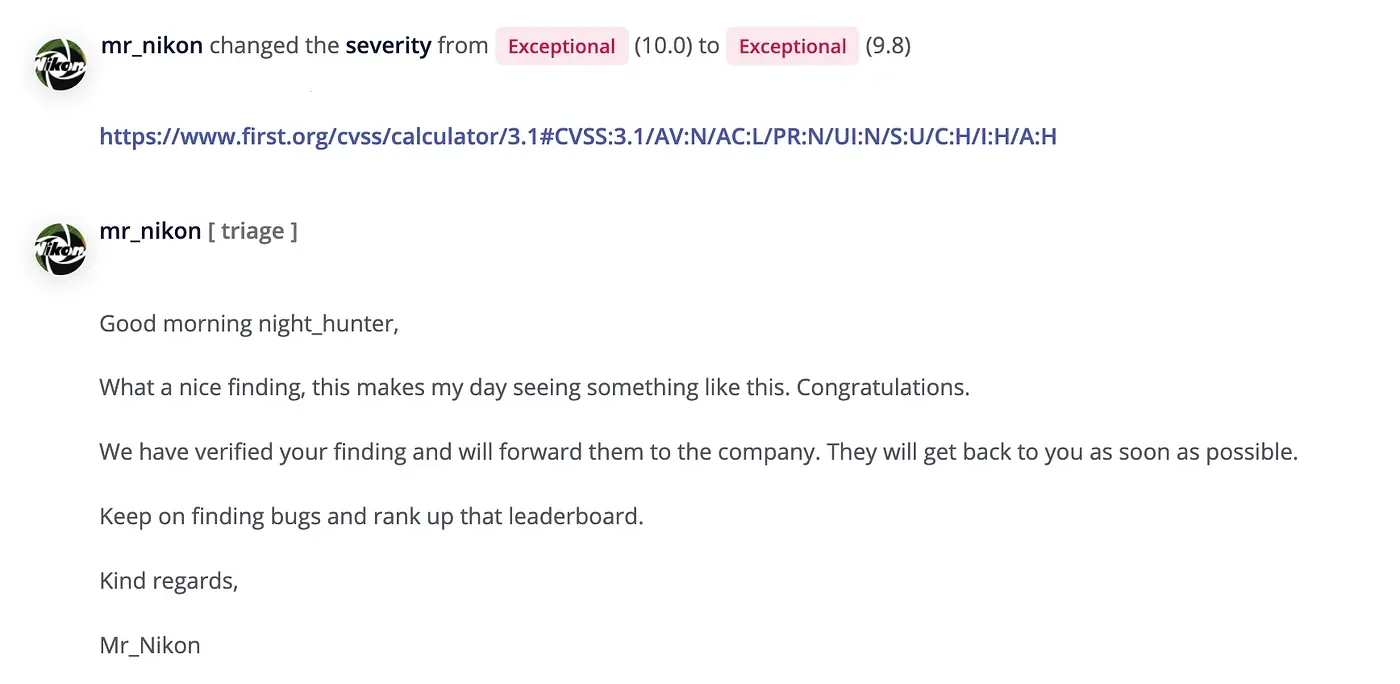
I made a PoC, reported the issue and it made my day seeing a message like this from the triager:
The full write-up lives on its author's site
It belongs to its author, so we link to it rather than copy it. The other two tabs are our own rewrites, checked against it.
Context
This write-up covers two issues found on a single target, referred to throughout as https://redacted.com for NDA reasons: a zero-click account takeover through the password reset function, and a 2FA bypass that did not require guessing a code at all. The researcher is Firas Fatnassi (@Fatnass1F1ras), and the report was published on 12 February 2022.
The two features involved are ordinary ones. The password reset flow takes an email address, sends a reset link to it, and lets the holder of that link set a new password. The login flow is protected by 2FA using the Google Authenticator app, so after a correct email and password the user must supply a 6-digit code.
Setup
For the reset issue, two mailboxes were used, referred to in the payload as [redacted] and [redacted]. For the 2FA work, 2FA was enabled on the researcher's own account with the Google Authenticator app, and the login request was intercepted to inspect the mechanism. No special tooling is described beyond an intercepting proxy, which is implied by the repeated interception of requests and responses.
Finding it
The password reset work started with the usual checks: changing the host header and trying to brute force the token. Neither worked. The researcher then looked at the shape of the reset request itself.
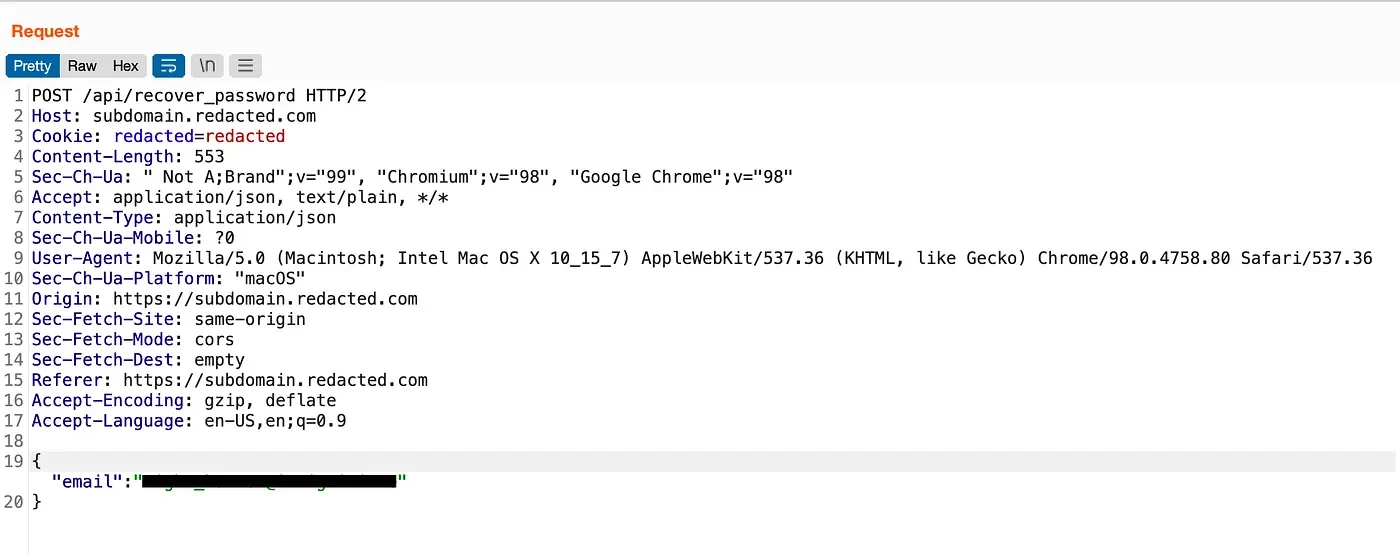
The request sends the address in JSON, in a parameter named email. The observation that led to the bug is simple: the value is a string, and JSON does not force it to stay one. If the server accepts an array where it expects a string, the application may act on every element.
Exploitation
Step 1: change the type of the email parameter
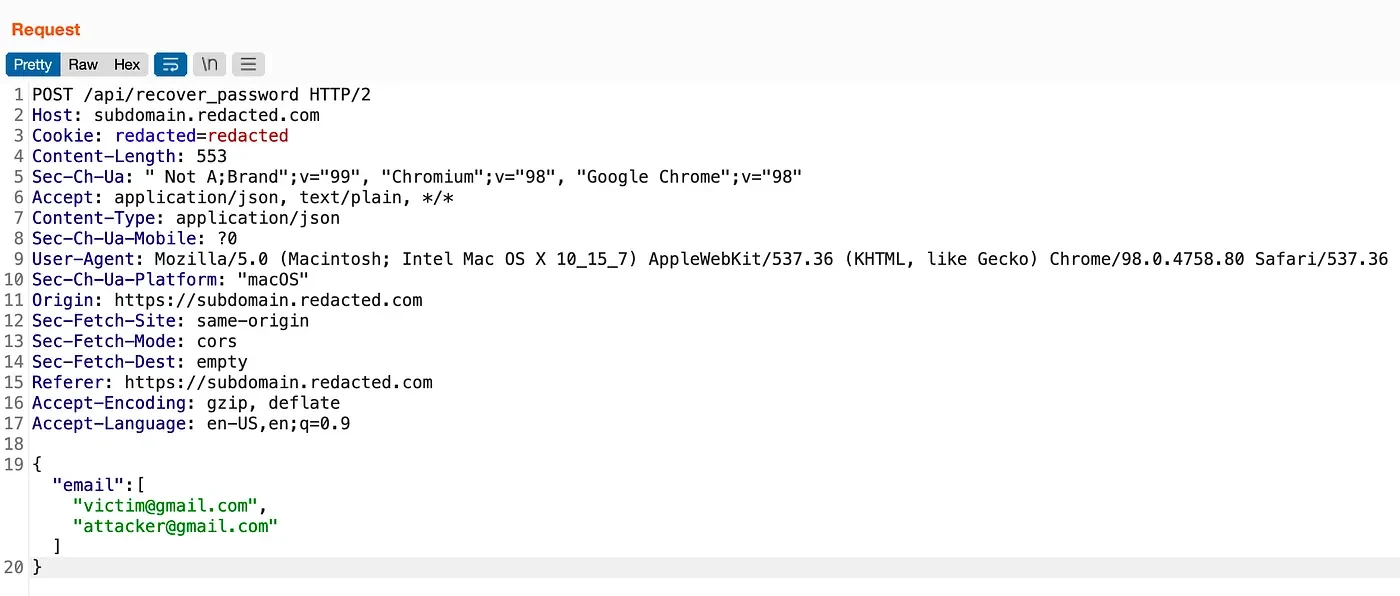
The request body was changed so that email holds an array of two addresses instead of a single string:
"email": ["[redacted]", "[redacted]"]
With that body sent, a password reset link arrived in both mailboxes. The server had processed each element of the array as a separate recipient.
Step 2: the attack scenario
Once the array behaviour is confirmed, the attack needs no interaction from the victim beyond the attacker knowing their address:
- The attacker requests a password reset link and intercepts the request.
- The attacker changes the email parameter value to
["[redacted]", "[redacted]"]. - The reset link is delivered to both the victim's and the attacker's mailboxes, so the attacker can open it and set the victim's password.
The researcher built a PoC and reported the issue.
Step 3: look at the login response
The 2FA work began with an assessment of brute force. The code is 6 digits, so there are 1 million possibilities, and Google Authenticator rotates it roughly every 60 seconds. Combined with rate limiting, brute force was judged not logically possible, and abandoned.
The researcher then logged in with valid credentials, intercepted the login request to understand the 2FA mechanism, and tried four things:
- Response manipulation, for example changing a parameter value from false to true, such as
"success": "true". - Forced browsing, going directly to the dashboard page in a new tab after authenticating.
- Looking for code leakage in the response.
- Searching for parameters such as
2FA_Enabled, in case setting them to false would send the server straight to the dashboard.
None of these worked. The researcher then intercepted the response to the login request itself, and found keys leaked in it, including the API Key.
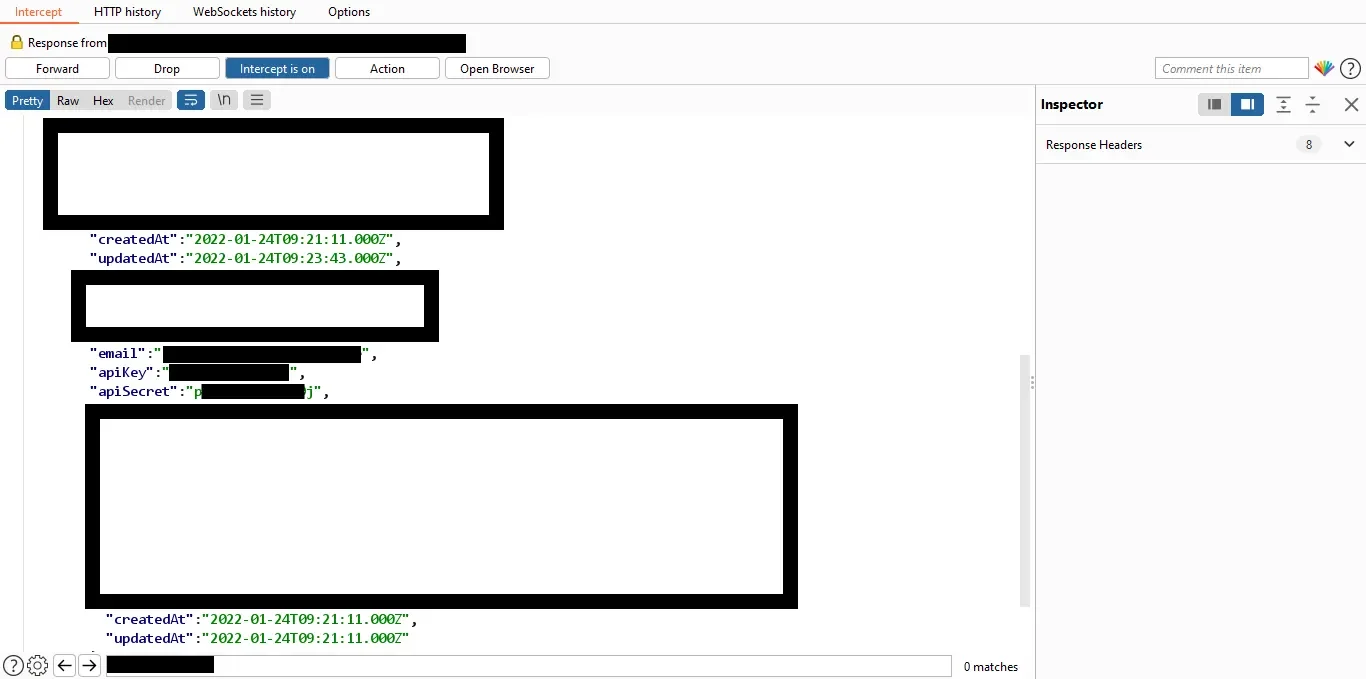
Having already read the target's API documentation, the researcher knew how to use those keys. The consequence is that an attacker who holds the victim's credentials does not need the 2FA code at all: the login response hands over the victim's API Key, and that key allows a wide range of actions through the various API endpoints. The 2FA mechanism is effectively useless in that situation.
Root cause
The reset bug appears to be a type confusion in the request handling: the endpoint expects a single email address, but when an array was sent, each element was treated as a recipient. The reset token is then generated and mailed to every address supplied, including one the attacker controls. The defences that were tried, host header checks and token brute force, are irrelevant to this class of bug because the token itself is never guessed: it is legitimately issued to the attacker.
The 2FA issue is a data exposure problem in the login response: the response to a login request contained keys, including the API Key. An attacker who holds the victim's credentials can obtain the API Key from the login response, making the 2FA mechanism useless in that situation. The report does not describe the server-side code, so the exact reason the keys are included in that response is not stated.
Impact
For the reset issue, any account whose email address the attacker knows can be taken over without any action by the victim, which is why it is described as zero-click. The attacker only needs to send the modified reset request and then use the link that arrives in their own mailbox.
For the 2FA issue, the impact is conditional on the attacker already holding the victim's credentials. In that case the second factor provides no protection, because the API Key in the login response gives access to the actions available through the API endpoints. The report does not enumerate those endpoints or the exact scope of the key.
The researcher notes that the program had been heavily tested by other bug hunters, who missed both issues.
Fix
The report says the development team fixed the issues in less than two hours. It does not describe the changes made. The fixes implied by the two root causes are: enforce that the email parameter is a single string and reject arrays, and stop returning API keys and secrets in the login response, or at least do not return them before the second factor has been satisfied.
Variants to test
- Send an array in any parameter that takes an email address: password reset, email change, invitation, notification settings. A positive result is that the message arrives at every address in the array, including one you control.
- Try other JSON type substitutions on the same parameters, such as an object or a nested array, and watch for errors that reveal how the value is parsed. A positive result is a reset link delivered to an address you supplied inside the structure.
- Intercept the full login response before and after the 2FA step and compare. A positive result is API keys, tokens or secrets present in the pre-2FA response.
- If the target allows API authentication with email and password, or BASIC auth (
base64Encode(username:password)), enable 2FA on your account and try authenticating to the API with only the email and password. A positive result is a successful API session despite 2FA being on, which means the second factor is bypassed for everything the API can do. - Repeat the response manipulation and forced browsing checks on the 2FA step, including parameters such as
2FA_Enabled, to see whether any client-side flag is trusted by the server. A positive result is reaching the dashboard without a valid code.
What happened, in plain words
A security researcher spent some time testing a website (called https://redacted.com here, because the real name was under a non-disclosure agreement) and found two separate problems. The first let an attacker take over an account without the victim doing anything; the second made 2FA useless for an attacker who already had the victim's credentials.
The first problem was in the "forgot my password" feature. Normally you type your email address, the site emails you a special link, and that link lets you set a new password. The researcher found that if you send the email address in a slightly different shape, the site will happily send the reset link to several addresses at once, including one the attacker controls. The attacker then opens the link that lands in their own inbox and sets a new password on the victim's account. The victim does nothing at all, which is why this is called a "zero-click" attack.
The second problem was in the login process. The site offered two-factor authentication (2FA), a second proof of identity on top of the password, in this case a 6-digit code from the Google Authenticator phone app. The researcher tried several ways to get past that code and none worked. But while looking at what the server sends back after a login, the researcher noticed that the response contained secret keys, including an API Key. Those keys let someone use the site's API, a way for programs to talk to the site directly. So if an attacker already had the victim's password, they could grab the API Key from the login response and act as the victim through the API, without ever supplying the 2FA code. The second factor was effectively useless.
The researcher reported both issues, and the development team fixed them in less than two hours. The report was published on 12 February 2022.
Before going further, a few words on the pieces involved, since this write-up is aimed at someone who has never done security testing.
- A request and a response. When you use a website, your browser sends a request to a server ("please give me this page", "please log me in with these details") and the server sends back a response (the page, or a short message saying it worked or failed). Every action on a website is a request and a response.
- An intercepting proxy. A tool that sits between your browser and the server and lets you pause a request or a response, read it, change it, and then let it continue. Think of it as a postal worker who opens your letter, lets you rewrite it, and then seals it again before delivery. The report does not name the tool, but the repeated interception of requests and responses implies one was used.
- JSON. A common text format for sending structured data between programs. It looks like
{"name": "value"}. The value can be a piece of text (a string), a number, a true/false flag, a list of things (an array), or a group of named fields (an object). - An API. A way for one program to talk to another over the internet, without a human clicking buttons. Think of the website's front door as the normal login page, and the API as a side door built for software: same building, same rooms, but you knock differently. An API Key is the password for that side door.
- A token. A short piece of text the server gives you to prove who you are on later requests, so you do not have to send your password every time. A password reset link usually contains a token: the link is just a URL with a long random string in it, and whoever holds that string can set the password.
- Brute force. Trying every possible value until one works. For a 4-digit PIN that is 10,000 tries; for a 6-digit code it is 1,000,000.
- Rate limiting. The server refusing to answer too many requests in a short time, which makes brute force slow or impossible.
- Host header. A line in every request that says which website name you are asking for. Changing it is a classic trick to see whether a server gets confused about which site it is serving.
- Account takeover. Exactly what it sounds like: an attacker ends up in control of someone else's account.
- 2FA / MFA. Two-factor or multi-factor authentication: proving who you are with more than one thing, usually your password plus a code from your phone.
The password reset problem
What the feature does
The "forgot password" feature exists so that people who forget their password can get back in. The site cannot just let anyone set a new password, or anyone could take over any account. So it does this: you tell it your email address, it creates a one-time secret (the token), builds a link containing that token, and emails the link to the address you gave. Only someone who can read that mailbox can use the link. The security of the whole feature rests on one assumption: the link goes to the address the account owner controls, and to nobody else.
The first attempts
The researcher started with the usual checks that people run against a password reset feature. First, changing the host header, to see whether the server could be confused about which site it was serving and perhaps build the reset link pointing somewhere else. Second, trying to brute force the token, guessing the secret string in the link. Neither worked. This is worth noting: the defences that were tried are real defences, but they are irrelevant to the bug that was eventually found, because in that bug the token is never guessed. It is handed out legitimately, to the attacker.
So the researcher stopped attacking the token and looked at the request itself.
The screenshot shows the password reset request as it travels from the browser to the server. The important detail is that the email address is sent in JSON, inside a field named email. In JSON, a value has a type: a string is text in quotes, an array is a list in square brackets. The request sends a string. The researcher's question was simple: what happens if I send a list instead?
Step 1: change the type of the email parameter
The request body was changed so that email holds an array of two addresses instead of a single string:
"email": ["[redacted]", "[redacted]"]
Line by line, in plain words:
"email"is the name of the field the server is expecting, the same name as before.:separates the name from the value.[and]mark the start and end of an array, which is a list of items."[redacted]"is the first item in the list, a string, the researcher's first mailbox.,separates the items."[redacted]"is the second item, the researcher's second mailbox.
So instead of saying "send the reset link to this one address", the request says "send the reset link to this list of addresses". The researcher sent that body and then checked both mailboxes. A reset link arrived in both. The server had taken each item in the list and treated it as a separate recipient.
The screenshot shows the modified request with the array in place of the single string. This is the whole bug in one line: the server expected one address and did not check that it got one, so it processed every address it was given.
Step 2: the attack scenario
Once the array behaviour is confirmed, the attack needs nothing from the victim except that the attacker knows their email address. The steps are:
- The attacker requests a password reset link for the victim's account and intercepts the request before it leaves their browser.
- The attacker changes the email parameter value to
["[redacted]", "[redacted]"]. - The server sends the reset link to both addresses. The victim gets one, and so does the attacker.
- The attacker opens the link in their own mailbox and sets a new password on the victim's account.
The victim does not click anything or approve anything. That is the "zero-click" part. That is the "zero-click" part. The attacker built a proof of concept (a small demonstration that the attack works), reported the issue, and the triage team's reply confirmed it.
The screenshot shows the reply from the triager.
The 2FA problem
What the feature does
2FA is a second lock on the door. After you type the right email and password, the site asks for a 6-digit code from an app on your phone. The code changes every so often, so even someone who saw an old code cannot reuse it. The point is that a stolen password alone should not be enough to get in.
Why brute force was abandoned
The researcher first considered guessing the code. A 6-digit code has 1,000,000 possible values. Google Authenticator changes the code roughly every 60 seconds, and the site applies rate limiting, so the number of guesses you can make in the lifetime of one code is tiny. Brute force was judged not logically possible and abandoned. This is a good instinct: before attacking a mechanism, work out whether the obvious attack can succeed at all.
The four things that were tried
The researcher then logged in with valid credentials, intercepted the login request to understand how the 2FA mechanism actually works, and tried four ideas:
- Response manipulation. Changing a value in the server's response, for example flipping a parameter from false to true, such as
"success": "true", to see whether the browser or the server trusts what the response says. - Forced browsing. Going directly to the dashboard page in a new tab after authenticating, to see whether the page checks for itself whether 2FA was completed.
- Code leakage in the response. Looking at what the server sends back, in case the 2FA code or something equivalent is included there.
- Searching for parameters such as
2FA_Enabled. The idea being that if such a flag exists and can be set to false, the server might skip the second step and send the user straight to the dashboard.
None of these worked. Each one is a reasonable thing to try, and each one failing tells you something: the server is not trusting client-side flags, the dashboard is not reachable without the second step, and no code is being echoed back.
What was actually there
So the researcher intercepted the response to the login request itself, and found keys leaked in it, including the API Key.
The screenshot shows the login response with the leaked keys, including the API Key. This is the finding: the server, in the same response that handles the login, hands back credentials for the API.
Having already read the target's API documentation, the researcher knew what those keys were for and how to use them. The consequence is direct. An attacker who holds the victim's email and password does not need the 2FA code at all. They log in, the response gives them the victim's API Key, and that key allows a wide range of actions through the various API endpoints. The second factor protects the web session, but not the secrets returned alongside it.
Why these bugs exist
The reset bug
This looks like a type confusion in the request handling: the endpoint expects a single email address, but when an array was sent, each item was treated as a recipient. The reset token is then generated and mailed to every address supplied, including one the attacker controls. The defences that were tried, host header checks and token brute force, do not help here, because the token is never guessed: it is legitimately issued to the attacker.
The 2FA bug
This is a data exposure problem in the login response: the response to a login request contained keys, including the API Key. An attacker who holds the victim's credentials can obtain the API Key from the login response, making the 2FA mechanism useless in that situation. The report does not describe the server-side code, so the exact reason the keys are included in that response is not stated.
What the impact was
For the reset issue, any account whose email address the attacker knows can be taken over without any action by the victim, which is why it is described as zero-click. The attacker only needs to send the modified reset request and then use the link that arrives in their own mailbox.
For the 2FA issue, the impact is conditional on the attacker already holding the victim's credentials. In that case the second factor provides no protection, because the API Key in the login response gives access to the actions available through the API endpoints. The report does not enumerate those endpoints or the exact scope of the key.
The researcher notes that the program had been heavily tested by other bug hunters, who missed both issues. The lesson drawn is that everyone has their own methodology and way of thinking, so a program being well tested is not a reason to walk away.
How it was fixed
The report says the development team fixed the issues in less than two hours. The fixes implied by the two root causes are: enforce that the email parameter is a single string and reject arrays, and stop returning API keys and secrets in the login response, or at least do not return them before the second factor has been satisfied.
Things worth trying on other sites
These are the same ideas, written so that someone new can follow them. Each one has a clear positive result to look for.
- Send an array in any parameter that takes an email address: password reset, email change, invitation, notification settings. A positive result is that the message arrives at every address in the array, including one you control.
- Try other JSON type substitutions on the same parameters, such as an object or a nested array, and watch for errors that reveal how the value is parsed. A positive result is a reset link delivered to an address you supplied inside the structure.
- Intercept the full login response before and after the 2FA step and compare. A positive result is API keys, tokens or secrets present in the pre-2FA response.
- If the target allows API authentication with email and password, or BASIC auth (
base64Encode(username:password)), enable 2FA on your account and try authenticating to the API with only the email and password. A positive result is a successful API session despite 2FA being on, which means the second factor is bypassed for everything the API can do. - Repeat the response manipulation and forced browsing checks on the 2FA step, including parameters such as
2FA_Enabled, to see whether any client-side flag is trusted by the server. A positive result is reaching the dashboard without a valid code.
On the fourth point, a word on BASIC auth: it is a very old way of sending a username and password in a request, by joining them with a colon and encoding the result in base64. Base64 is not encryption, it is just a way of writing bytes as text, so anyone who sees the value can read the credentials back. The idea being tested is whether the API accepts that simple form and ignores the fact that 2FA is switched on for the account.
Glossary
- 2FA / MFA: Two-factor or multi-factor authentication; proving your identity with more than one thing, usually a password plus a code from a phone app.
- Account takeover: An attacker gaining control of someone else's account.
- API: A way for programs to talk to a website or service over the internet, without a human clicking through pages.
- API Key: A secret string that acts as the password for an API.
- Array: In JSON, a list of values written between square brackets, separated by commas.
- BASIC auth: An old authentication scheme that sends the username and password joined by a colon and encoded in base64.
- Base64: An encoding that turns bytes into text characters; it is reversible and is not encryption.
- Dashboard: The logged-in home page of an application, usually showing the user's data and actions.
- Forced browsing: Requesting a page directly by its address, skipping the steps the site expects you to go through first.
- Host header: A line in an HTTP request that names the website being requested.
- HTTP request / response: The message your browser sends to a server, and the message the server sends back.
- Intercepting proxy: A tool that pauses requests and responses between browser and server so they can be read and modified.
- JSON: A text format for structured data, using names, strings, numbers, true/false, arrays and objects.
- Object: In JSON, a group of named fields written between curly braces.
- Parameter: A named value sent in a request, such as
email. - PoC (proof of concept): A small demonstration that a vulnerability really works.
- Rate limiting: A server refusing to answer too many requests in a short period.
- Response manipulation: Changing values in a server's response to see whether anything trusts them.
- Root cause: The underlying reason a bug exists, as opposed to its visible symptom.
- String: A piece of text, in JSON written inside double quotes.
- Token: A secret string issued by a server to prove identity or authorise an action, such as the secret inside a password reset link.
- Triage / triager: The person or team who first reviews a security report and decides whether it is valid.
- Type confusion: A bug where a program expects one kind of value (for example a single string) but receives another (for example a list) and mishandles it.
- Zero-click: An attack that succeeds without the victim doing anything at all.




