A03:2021 — [Injection] SQL Injection through internal directory disclose
A survey submission endpoint accepted a survey identifier parameter that was passed into a database query without proper handling, allowing SQL injection. The author also found that a directory misconfiguration exposed internal web directory locations, and used the injection to enumerate databases.

My name is Tushar Vaidya, a cybersecurity enthusiast and pentester. Handles —Linkedin, Website
The full write-up lives on its author's site
It belongs to its author, so we link to it rather than copy it. The other two tabs are our own rewrites, checked against it.
Context
The target is a survey and assessment application hosted at assessment.redacted.com. The feature under review is the survey submission flow: a visitor fills in a survey form, submits it, and the application redirects to a result page whose URL ends in a numeric identifier. The survey form posts to /welcome/survey_result and carries a surveyId field alongside the answers and the respondent's details. The result page lives under the /people-excellence/ path and is named with the numeric identifier, for example result-721.php.
Two weaknesses are described in this write-up: an SQL injection in the surveyId parameter, and a directory misconfiguration that exposed an internal web directory location. The researcher's stated objective was to find the SQL injection by changing the directory, and to note the misconfiguration that exposed an internal web directory location.
Setup
The researcher worked manually in a browser, capturing the survey submission request. The only tool named in the report is sqlmap, used after the vulnerable parameter had been identified by hand. The request was saved to a file called sql_submit.txt for sqlmap to replay. The browser used, according to the captured request, was Firefox 107.0 on Linux x86_64. No account, role or authentication precondition is described, and the captured request carries only analytics cookies and a ci_session cookie.
Finding it
The researcher submitted one survey result and was redirected to a URL ending in a unique number. Changing that number produced a server error. Going back to the survey form, the researcher noticed a parameter that was reflected in the response with the same number seen in the redirected URL. That parameter was surveyId.
Before attacking surveyId, the researcher first played with the email field, on the reasoning that email parameters are often interesting. Two email addresses were placed in the email field to see what changed, and the redirected URL came back with new content. After submitting the form, the target was rescanned with a directory search, which surfaced a new URL. The report calls this the key finding of the day but does not print the URL itself; it is shown only in a screenshot.
Exploitation
Step 1: capture the survey submission
The request below was captured while visiting https://assessment.redacted.com/welcome/survey_result. Two email addresses were placed in the email field.
POST /welcome/survey_result HTTP/1.1
Host: assessment.redacted.com
Cookie: _ga=BOOM; _gid=BOOM; _ga=BOOM; _gid=BOOM; ln_or=d; ci_session=BOOM
User-Agent: Mozilla/5.0 (X11; Linux x86_64; rv:107.0) Gecko/20100101 Firefox/107.0
Accept: application/json, text/javascript, */*; q=0.01
Accept-Language: en-US,en;q=0.5
Accept-Encoding: gzip, deflate
X-Requested-With: XMLHttpRequest
Content-Type: multipart/form-data; boundary= — — — — — — — — — — — — — -5213360898382474
Content-Length: 1588
Origin: https://assessment.redacted.com
Referer: https://assessment.redacted.com/people-excellence/assessment
Sec-Fetch-Dest: empty
Sec-Fetch-Mode: cors
Sec-Fetch-Site: same-origin
Te: trailers
Connection: close
 — — — — — — — — — — — — — — -52133608983824741126631511
Content-Disposition: form-data; name=”***surveyId***”
46
 — — — — — — — — — — — — — — -52133608983824741126631511
Content-Disposition: form-data; name=”bcpTest1"
0.5
 — — — — — — — — — — — — — -52133608983824741126631511
Content-Disposition: form-data; name=”bcpTest2"
0
 — — — — — — — — — — — — — — -52133608983824741126631511
Content-Disposition: form-data; name=”bcpTest3"
1
 — — — — — — — — — — — — — — -52133608983824741126631511
Content-Disposition: form-data; name=”bcpTest4"
0
 — — — — — — — — — — — — — — -52133608983824741126631511
Content-Disposition: form-data; name=”bcpTest5"
0.5
 — — — — — — — — — — — — — — -52133608983824741126631511
Content-Disposition: form-data; name=”bcpTest6"
1
 — — — — — — — — — — — — — — -52133608983824741126631511
Content-Disposition: form-data; name=”bcpTest7"
0
 — — — — — — — — — — — — — — -52133608983824741126631511
Content-Disposition: form-data; name=”bcpTest8"
1
 — — — — — — — — — — — — — — -52133608983824741126631511
Content-Disposition: form-data; name=”bcpTest9"
0.5
 — — — — — — — — — — — — — — -52133608983824741126631511
Content-Disposition: form-data; name=”company-name”
Ba2man
 — — — — — — — — — — — — — — -52133608983824741126631511
Content-Disposition: form-data; name=”username”
Ba1man
 — — — — — — — — — — — — — — -52133608983824741126631511
Content-Disposition: form-data; name=”***email***”
***[redacted]***

 — — — — — — — — — — — — — — -52133608983824741126631511 —
The body is multipart/form-data. The fields of interest are surveyId (value 46), the nine bcpTest answer fields, company-name, username and email. The email field holds two addresses separated by &, which is what the researcher used to see how the application handled multiple values. The request is an XHR (X-Requested-With: XMLHttpRequest) with Accept: application/json, text/javascript, */*; q=0.01, so the response is expected to be JSON or JavaScript rather than a full page.
Step 2: read the redirect and tamper with the number
After the submission, the server responded with this URL:
Changing 721 to 720 produced a server error.
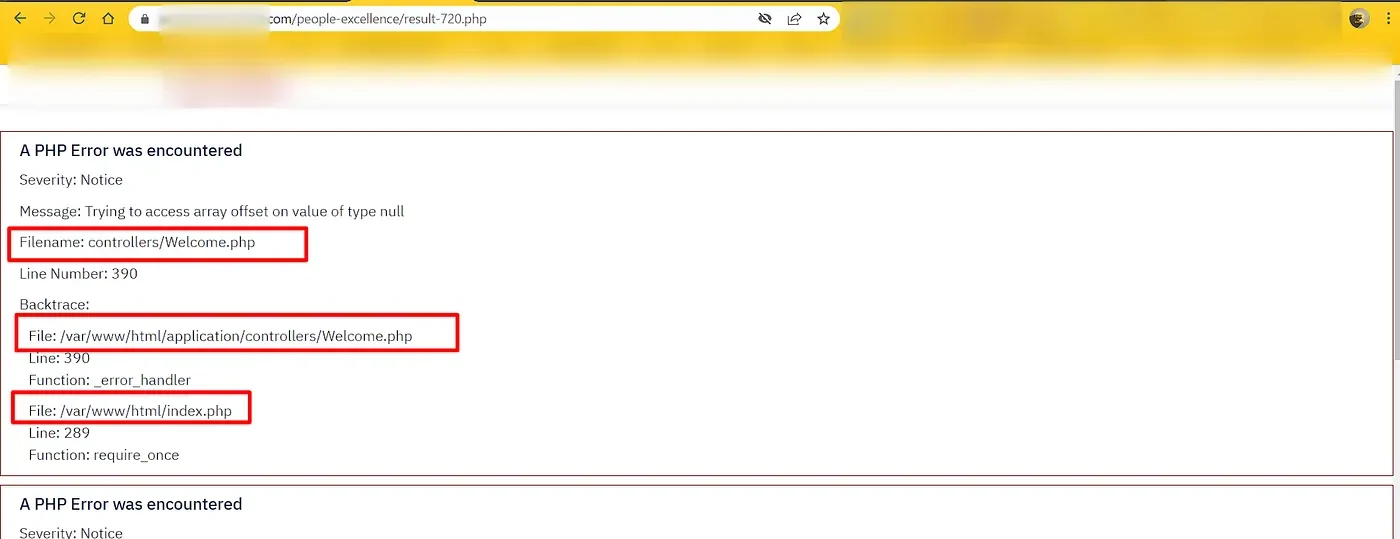
The screenshot shows the server error returned after the number in the result URL was changed.
Step 3: revisit the survey form
Opening the survey form link in the browser to look at the GUI returned the error again:
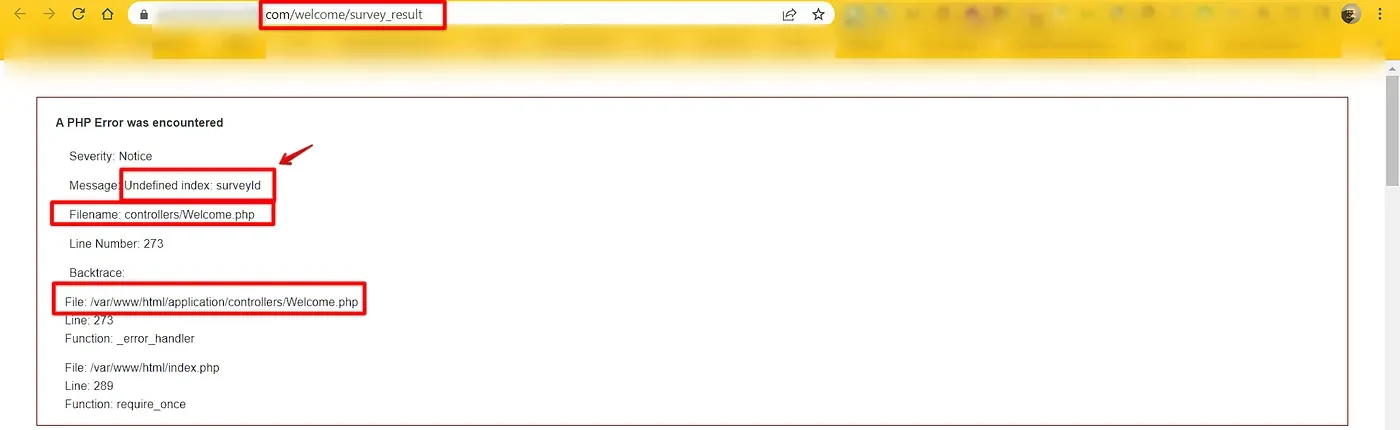
The screenshot shows that error page. Note the doubled .com.com in the URL as written in the report.
Step 4: probe surveyId and rescan directories
With the application understood, the researcher played with surveyId and ran a directory search again, which surfaced a new URL.
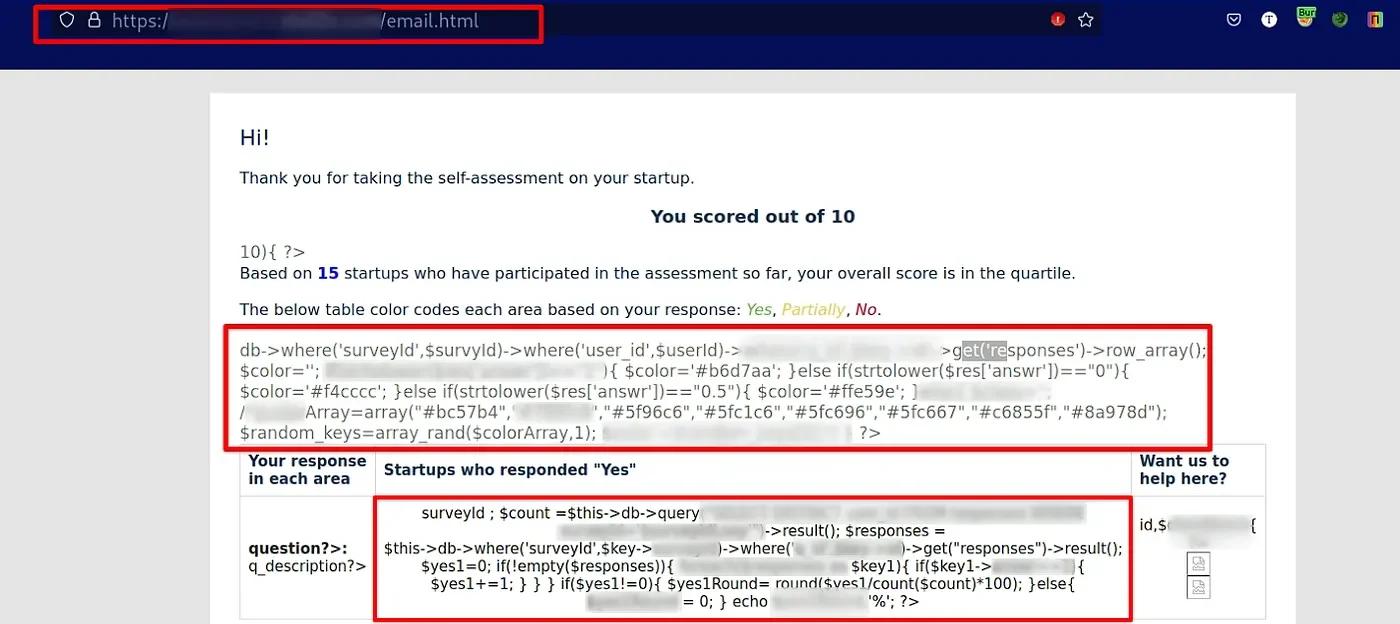
The screenshot shows the new URL found by the directory search. The report does not print that URL in text.
Step 5: hand the parameter to sqlmap
Having identified the vulnerable parameter manually, the researcher saved the original request to sql_submit.txt and ran sqlmap against surveyId only. The -p flag restricts testing to that parameter, which saves time. The final command was:
sqlmap -r sql_submit.txt -p surveyId — level=5 — risk=3 — batch — dbs — time-sec=10
-r loads the saved request, -p surveyId targets the parameter, --level=5 and --risk=3 widen the set of tests, --batch runs without prompts, --dbs enumerates databases, and --time-sec=10 sets the delay used by time-based tests. The report shows the command with em-dash style separators as published; on a real command line these are the usual double hyphens.

The screenshot shows the results sqlmap returned. The report does not reproduce the output as text.
Boom!!!

The second screenshot shows further output from the same run.
Root cause
The report does not analyse the server-side code. What it shows is that the numeric value in the result URL and the surveyId field in the submission are tied together, and that a value which does not exist produces a server error rather than a clean not-found response. The researcher then ran sqlmap against the surveyId parameter. The directory misconfiguration is separate: a directory search exposed an internal web directory location. The report does not say which server or framework produced the error page.
Impact
The report does not state the severity, the data reached, or how many records were exposed. In the author's framing, the concern is that one small bug can expose a whole company's sensitive data, which is why the finding was reported rather than kept.
Fix
The measures implied by the findings are parameterised queries or prepared statements for surveyId so the value is never concatenated into SQL, generic error pages so a bad identifier does not reveal server-side failure details, and removal of the directory listing or path disclosure that exposed the internal web directory.
Variants to test
- Sequential identifiers in result URLs. Submit a form, note the numeric identifier in the redirect, and step it up and down by one. A server error on a neighbouring value is worth following up.
- Reflected identifiers in form fields. Compare the number in the redirect with the values in the submitted body. A field that carries the same number, here
surveyId, is the one to test next. - Multi-value fields. Put two values separated by
&in an email or similar field and watch the redirect and response for changes. A changed redirect or new content is worth following up. - Directory searches after each submission. Rescan the host after interacting with the form; a new URL appearing in the results, especially one that reveals an internal path, is a positive result.
- sqlmap against a saved request. Save the captured request, target the single suspicious parameter with
-p, and raise--leveland--risk. The report shows the command and screenshots of sqlmap output. - Error-based confirmation by hand. Change the identifier to a value that cannot exist and observe whether the response is a generic 404 or a stack-trace style error. The latter is worth following up.
What happened, in plain words
A security researcher found a SQL injection bug in a survey website. SQL injection is a way to sneak database commands into a form field so the website runs them by mistake. The researcher also found a misconfiguration that exposed the location of an internal web directory. The researcher reported both issues and received a reward. This article walks through the same steps for someone who has never done security testing before. You only need a browser and a computer to follow along.
Background: the survey application
The target is a website at assessment.redacted.com. It hosts surveys and assessments. A visitor fills in a survey form, submits it, and the site sends them to a result page. The result page URL ends with a number, for example result-721.php. The form sends its data to /welcome/survey_result. One of the fields in that form is called surveyId. The researcher's goal was to find an SQL injection by changing the directory, and to note the misconfiguration that exposed an internal web directory location.
What is a cookie?
A cookie is a small piece of text that a website stores in your browser. The browser sends it back with every request to that site. Cookies often hold session identifiers, which let the site remember who you are between page loads. In the captured request you will see cookies named _ga, _gid, ln_or and ci_session. The captured request carries cookies named _ga, _gid, ln_or and ci_session.
What is an API?
An API (Application Programming Interface) is a way for software to talk to other software. In a web application, an API endpoint is a URL that accepts data and returns data, often in JSON format, rather than a full HTML page. The survey form submits to an endpoint, and the request headers ask for JSON or JavaScript.
What is SQL injection?
SQL is the language used to talk to most databases. A website often builds an SQL query by inserting user input into a template. If the input is not handled safely, an attacker can insert SQL code that changes the query's meaning. For example, instead of a number, the attacker might send a string that makes the database return extra data or wait for a specified time. This is SQL injection. It can lead to reading, changing or deleting data.
What is a directory search?
A directory search (also called directory brute-forcing) is trying many common folder and file names on a website to see which ones exist. Tools can do this automatically. The goal is to find pages or folders that are not linked from the main site but are still accessible. Sometimes these reveal internal paths or forgotten features.
Setup
The researcher worked manually in a browser. The only tool named in the report is sqlmap, which was used after the vulnerable parameter was found by hand. The captured request was saved to a file called sql_submit.txt so sqlmap could replay it. The browser used, according to the request, was Firefox 107.0 on Linux x86_64. No login or account is described, and the captured request carries only analytics cookies and a ci_session cookie.
Finding it
- The researcher submitted one survey result and was redirected to a URL ending in a unique number.
- Changing that number produced a server error.
- Going back to the survey form, the researcher noticed a parameter that was reflected in the response with the same number seen in the redirected URL. That parameter was
surveyId. - Before attacking
surveyId, the researcher first played with the email field, because email parameters are often interesting. Two email addresses were placed in the email field to see what changed, and the redirected URL came back with new content. - After submitting the form, the researcher ran a directory search again, which surfaced a new URL. The report calls this the key finding of the day but does not print the URL itself; it is shown only in a screenshot.
Exploitation
Step 1: capture the survey submission
The request below was captured while visiting https://assessment.redacted.com/welcome/survey_result. Two email addresses were placed in the email field.
POST /welcome/survey_result HTTP/1.1
Host: assessment.redacted.com
Cookie: _ga=BOOM; _gid=BOOM; _ga=BOOM; _gid=BOOM; ln_or=d; ci_session=BOOM
User-Agent: Mozilla/5.0 (X11; Linux x86_64; rv:107.0) Gecko/20100101 Firefox/107.0
Accept: application/json, text/javascript, */*; q=0.01
Accept-Language: en-US,en;q=0.5
Accept-Encoding: gzip, deflate
X-Requested-With: XMLHttpRequest
Content-Type: multipart/form-data; boundary= — — — — — — — — — — — — — -5213360898382474
Content-Length: 1588
Origin: https://assessment.redacted.com
Referer: https://assessment.redacted.com/people-excellence/assessment
Sec-Fetch-Dest: empty
Sec-Fetch-Mode: cors
Sec-Fetch-Site: same-origin
Te: trailers
Connection: close
 — — — — — — — — — — — — — — -52133608983824741126631511
Content-Disposition: form-data; name=”***surveyId***”
46
 — — — — — — — — — — — — — — -52133608983824741126631511
Content-Disposition: form-data; name=”bcpTest1"
0.5
 — — — — — — — — — — — — — -52133608983824741126631511
Content-Disposition: form-data; name=”bcpTest2"
0
 — — — — — — — — — — — — — — -52133608983824741126631511
Content-Disposition: form-data; name=”bcpTest3"
1
 — — — — — — — — — — — — — — -52133608983824741126631511
Content-Disposition: form-data; name=”bcpTest4"
0
 — — — — — — — — — — — — — — -52133608983824741126631511
Content-Disposition: form-data; name=”bcpTest5"
0.5
 — — — — — — — — — — — — — — -52133608983824741126631511
Content-Disposition: form-data; name=”bcpTest6"
1
 — — — — — — — — — — — — — — -52133608983824741126631511
Content-Disposition: form-data; name=”bcpTest7"
0
 — — — — — — — — — — — — — — -52133608983824741126631511
Content-Disposition: form-data; name=”bcpTest8"
1
 — — — — — — — — — — — — — — -52133608983824741126631511
Content-Disposition: form-data; name=”bcpTest9"
0.5
 — — — — — — — — — — — — — — -52133608983824741126631511
Content-Disposition: form-data; name=”company-name”
Ba2man
 — — — — — — — — — — — — — — -52133608983824741126631511
Content-Disposition: form-data; name=”username”
Ba1man
 — — — — — — — — — — — — — — -52133608983824741126631511
Content-Disposition: form-data; name=”***email***”
***[redacted]***

 — — — — — — — — — — — — — — -52133608983824741126631511 —
This is an HTTP request. The first line says it is a POST request to /welcome/survey_result using HTTP version 1.1. POST means the browser is sending data to the server, usually to create or update something. The Host header tells the server which website the request is for. The Cookie header contains cookies the browser is sending. The User-Agent header identifies the browser and operating system. The Accept header says what types of response the browser will accept; here it accepts JSON and JavaScript. The X-Requested-With: XMLHttpRequest header indicates the request was made by JavaScript (an XHR) rather than by clicking a link. The Content-Type header says the body is multipart/form-data, which is the format used when a form contains files or when the browser encodes fields in separate parts. The boundary parameter is a string that separates the parts. The Content-Length header gives the size of the body in bytes. The Origin and Referer headers tell the server where the request came from. The Sec-Fetch-* headers are security-related headers added by modern browsers. The Te and Connection headers are connection details.
The body is divided into parts by the boundary string. Each part starts with a Content-Disposition header that gives the field name. The fields are:
surveyIdwith value46bcpTest1throughbcpTest9with values like0.5,0,1company-namewith valueBa2manusernamewith valueBa1manemailwith two addresses separated by&
The email field holds two addresses separated by &. The researcher used this to see how the application handled multiple values. The request is an XHR, so the response is expected to be JSON or JavaScript rather than a full page.
Step 2: read the redirect and tamper with the number
After the submission, the server responded with this URL:
Changing 721 to 720 produced a server error.
The screenshot shows the server error returned after the number in the result URL was changed.
Step 3: revisit the survey form
Opening the survey form link in the browser to look at the GUI returned the error again:
The screenshot shows that error page. Note the doubled .com.com in the URL as written in the report.
Step 4: probe surveyId and rescan directories
With the application understood, the researcher played with surveyId and ran a directory search again, which surfaced a new URL.
The screenshot shows the new URL found by the directory search. The report does not print that URL in text.
Step 5: hand the parameter to sqlmap
Having identified the vulnerable parameter manually, the researcher saved the original request to sql_submit.txt and ran sqlmap against surveyId only. The -p flag restricts testing to that parameter, which saves time. The final command was:
sqlmap -r sql_submit.txt -p surveyId — level=5 — risk=3 — batch — dbs — time-sec=10
This is a command line for sqlmap, a tool that automates SQL injection detection and exploitation. The -r option tells sqlmap to load an HTTP request from a file; here the file is sql_submit.txt. The -p surveyId option tells sqlmap to test only the surveyId parameter. The --level=5 option increases the number of tests performed (the default is 1, and higher levels test more parameters and payloads). The --risk=3 option increases the risk of the tests (higher risk may include tests that can cause problems on the server). The --batch option runs sqlmap without asking for user input, using default answers. The --dbs option tells sqlmap to enumerate the databases. The --time-sec=10 option sets the delay in seconds used by time-based tests. The report shows the command with em-dash style separators as published; on a real command line these are the usual double hyphens.
The screenshot shows the results sqlmap returned. The report does not reproduce the output as text.
Boom!!!
The second screenshot shows further output from the same run.
Root cause
The report does not analyse the server-side code. What it shows is that the numeric value in the result URL and the surveyId field in the submission are tied together, and that a value which does not exist produces a server error rather than a clean not-found response. The researcher then ran sqlmap against the surveyId parameter. The directory misconfiguration is separate: a directory search exposed an internal web directory location. The report does not say which server or framework produced the error page.
Impact
The researcher reported the vulnerability to the programmer and received a reward. The report does not state the severity, the data reached, or how many records were exposed. In the author's framing, the concern is that one small bug can expose a whole company's sensitive data, which is why the finding was reported rather than kept.
Fix
The measures implied by the findings are parameterised queries or prepared statements for surveyId so the value is never concatenated into SQL, generic error pages so a bad identifier does not reveal server-side failure details, and removal of the directory listing or path disclosure that exposed the internal web directory.
Variants to test
- Sequential identifiers in result URLs. Submit a form, note the numeric identifier in the redirect, and step it up and down by one. A server error on a neighbouring value is worth following up.
- Reflected identifiers in form fields. Compare the number in the redirect with the values in the submitted body. A field that carries the same number, here
surveyId, is the one to test next. - Multi-value fields. Put two values separated by
&in an email or similar field and watch the redirect and response for changes. A changed redirect or new content is worth following up. - Directory searches after each submission. Rescan the host after interacting with the form; a new URL appearing in the results, especially one that reveals an internal path, is a positive result.
- sqlmap against a saved request. Save the captured request, target the single suspicious parameter with
-p, and raise--leveland--risk. The report shows the command and screenshots of sqlmap output. - Error-based confirmation by hand. Change the identifier to a value that cannot exist and observe whether the response is a generic 404 or a stack-trace style error. The latter is worth following up.
Glossary
- API: A set of rules that lets one piece of software talk to another. In a web application, an API endpoint is a URL that accepts and returns data, often in JSON.
- Cookie: A small piece of text stored by a website in your browser and sent back with requests to that site. Often used to remember who you are.
- Directory search: Trying many common folder and file names on a website to find ones that exist but are not linked.
- HTTP request: A message a browser sends to a server asking for a resource or sending data.
- JSON: A text format for structured data, often used by APIs.
- Multipart/form-data: A format for sending form data, especially when files are involved. The body is split into parts by a boundary string.
- Parameter: A named value sent to a server, either in the URL (query string) or in the request body.
- POST: An HTTP method used to send data to a server, often to create or update something.
- SQL: Structured Query Language, the language used to talk to most databases.
- SQL injection: A vulnerability where user input is inserted into an SQL query without proper handling, allowing an attacker to change the query's meaning.
- sqlmap: A tool that automates the detection and exploitation of SQL injection vulnerabilities.
- XHR (XMLHttpRequest): A JavaScript object used to send HTTP requests from a web page without reloading the page.
- 404: The HTTP status code meaning "Not Found".
- Boundary: A string that separates parts in a multipart/form-data body.
- Content-Type: An HTTP header that tells the server or browser what type of data is being sent.
- User-Agent: An HTTP header that identifies the browser and operating system.
- Session: A period of interaction between a user and a website, often tracked by a session cookie.
- Misconfiguration: A setting or setup mistake that leaves a system less secure than intended, such as exposing a directory listing.




