Access to staging environment via User-Agent string
A staging environment was protected by basic authentication, but the server accepted any request with a specific User-Agent string containing the company name, bypassing the authentication. An attacker could access the staging environment by spoofing that User-Agent.
 Published on medium.com
This article demonstrates a Authentication bypass using special User-Agent string.
The full write-up lives on its author's site
It belongs to its author, so we link to it rather than copy it. The other two tabs are our own rewrites, checked against it.
Context
This is a short account of how a staging environment was reached by combining two mistakes: credentials left inside an Android application package, and a server-side rule that let any request through when it carried a particular User-Agent string. The company is referred to as Redigido because the program did not allow public disclosure, so hostnames, credentials and addresses in this article are the redacted placeholders used in the write-up.
The target is the staging deployment of a company that also runs a public website and ships an Android application. The staging site was protected with Basic Authentication. The public website upgrades HTTP connections and sets the STS header, so browsers are expected to use HTTPS for it.
Setup
The researcher did reconnaissance across the program's assets, which produced a large list of subdomains and the Android application. The tools used were:
- dex2jar, to decompile the dex files of the APK into JAR files.
- A custom tool that reads every file, splits lines and looks for strings matching
email / url / secret/password/key/token/accessaccording to its default configuration. - Firefox with a user-agent switcher extension.
- Local control of the hosts file, to point a hostname at an address of the researcher's choosing.
Finding it
The APK was extracted and its dex files were decompiled to JAR with dex2jar, then the JAR files were extracted again. The researcher notes not knowing why that last step was done. The result was a folder of dozens of files taking 160 MB on disk.

The custom scanner was run over that folder. It reads all files, splits lines and looks for any string matching email / url / secret/password/key/token/access according to the default configuration.
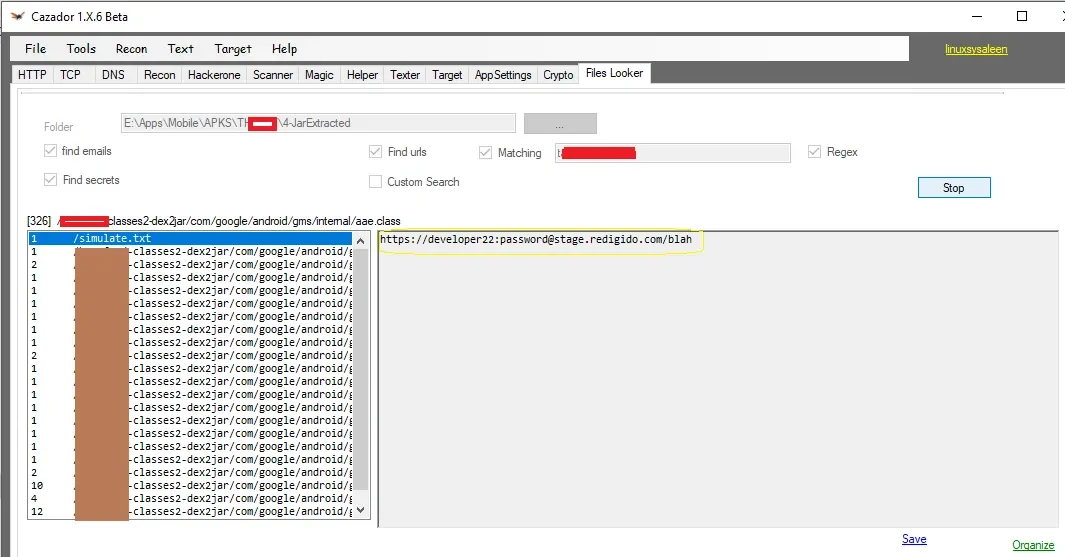
When the tool finished, credentials were found leaked inside a URL:
https://developer22:[redacted]/
Navigating to stage.redigido.com failed: the subdomain was not resolvable from the researcher's network.
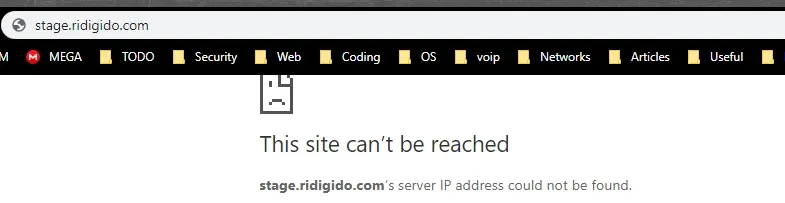
Exploitation
Step 1: Resolve the staging host manually
The idea was to resolve the main website's IP address and put the staging hostname next to it in the hosts file. In the write-up, x.x.x.x stands for one of the company's IP addresses:
x.x.x.x stage.ridigido.com`
After refreshing the browser, the server accepted the request.
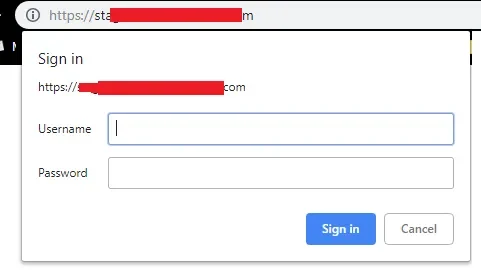
Step 2: Meet Basic Authentication
The staging site was now reachable, but it was protected with Basic Authentication.

Submitting the leaked credentials failed. The researcher guessed that someone had found the same leak earlier and the developer had changed the password, so a brute-force attempt on the new password was made, and it also failed.
Step 3: Look for unauthenticated paths
Requesting /robots.txt also required Basic Authentication. The request was then modified so that the Host header was www.redigido.com, and the response came from the main website. Trying the same with the staging host failed again. The behaviour observed was that, for any requested resource, if the Host header equals stage.redigido.com, the server responds with Restricted Authentication Required.
At this point the researcher had no further plans and gave up on that path.
Step 4: Compare the mobile application's traffic
The APK was installed on a machine and the application was used normally. The HTTP requests it made used http://, even though the website upgrades HTTP connections and sets the STS header, which means all HTTP requests must use HTTPS.
A request was captured and the question asked was why HTTP was not being upgraded to HTTPS. After fuzzing all parts of the requests, the User-Agent turned out to be the key. The Android application sends a User-Agent string containing the company name:
User-Agent: Redigido.com
The server side accepts any connection containing this user-agent regardless of the scheme.
Step 5: Spoof the User-Agent in the browser
Firefox was opened and its user-agent was edited with the switcher extension:
User-Agent: Redigido.com
Then the browser was pointed at:
http://stage.redigido.com
And the staging environment was reached.

Root cause
Two weaknesses combine here.
- Secret material shipped in the client. The APK contained a URL with embedded credentials for the staging host. Anything packaged in an application can be extracted by anyone who downloads it, and decompiling the dex files is enough to recover it.
- Authentication decided by a client-controlled header. The server treated the presence of the company name inside the
User-Agentas sufficient to accept a connection, and did so regardless of the scheme. A header that any client can set is not an authentication factor. The server accepts any connection containing this user-agent regardless of the scheme, which is why the application's plainhttp://requests were accepted.
Impact
With a resolvable hostname and a spoofed User-Agent, an unauthenticated attacker can reach the staging environment that is otherwise protected by Basic Authentication. The write-up does not describe what was accessible once inside staging, so the impact beyond reaching it is not stated. The leaked credentials themselves no longer worked, so the access obtained in the end came from the header rule alone.
Fix
The write-up does not say what the company changed. If the mobile application needs a privileged path, it should authenticate with a real credential and the server should enforce HTTPS for it rather than exempting it from the upgrade.
Variants to test
- Secrets in mobile packages. Decompile an APK or IPA and scan the extracted files for URLs, tokens and passwords. A positive result is a credential or internal hostname that is not meant to be public.
- Unresolvable hosts. When a hostname from a leak does not resolve, resolve the main site and add the hostname to the hosts file against that address. A positive result is a response from the target instead of a connection error.
- Header-based access rules. Capture the mobile application's requests and replay them from a browser or proxy with the same
User-Agent, then vary other headers. A positive result is a different response, such as staging content instead of an authentication prompt. - Scheme handling. Send the same request over
http://andhttps://with the mobileUser-Agent. A positive result is the plain HTTP request being served when the site otherwise upgrades or redirects. - Host header behaviour. Change the
Hostheader on requests to a protected host and observe whether the response comes from a different virtual host. A positive result is content from another site behind the same address.
What happened, in plain words
A security researcher was looking at everything a company puts on the internet: its public website, its subdomains, and its Android app. The company is called Redigido here because the program did not allow public disclosure, so it is redacted.
The researcher downloaded the company's Android app, opened it up, and searched the files inside it for anything that looked like a secret. That search turned up a web address with a username and password baked into it, pointing at the company's staging environment. Staging is a private copy of a website used for testing before changes go live.
The staging address would not load at first, because the name did not resolve on the researcher's network. By pointing that name at the company's main web server in a local file on the researcher's own computer, the staging site became reachable. It then asked for a username and password (the classic browser pop-up), and the leaked pair did not work, probably because someone had already found the leak and the password had been changed.
The researcher then installed the app and watched the traffic it sent. The app was talking to the server over plain http://, even though the website insists on the encrypted https://. By changing one part of the request, the User-Agent (a label the browser or app sends to say what software it is), the researcher found that the server let any request through as long as that label contained the company name. Setting the same label in Firefox and visiting the staging address over plain HTTP opened the staging environment.
Two mistakes combined: a password hidden inside the app, and a server rule that trusted a label the client controls.
Background you need
A few ideas come up again and again below, so here they are from zero.
- Subdomain. A name in front of a company's main domain, like
stage.example.comnext toexample.com. Companies use them for separate services: shop, blog, support, staging. - Staging environment. A test copy of a website. Developers try changes there before releasing them to real users. It often holds test data and weaker protections, which is why it is interesting to an attacker.
- APK. The file format of an Android app. It is a kind of zip archive: inside are the app's code, images, text and configuration files. Anyone can download it and open it, so nothing secret should ever be inside.
- Dex and JAR. Android apps store their compiled code in files called dex files. A JAR is the equivalent container used by ordinary Java programs. Converting one to the other is a common way to read Android code with desktop tools.
- Decompiling. Turning compiled code back into something a human can read. It is not always perfect, but it exposes strings, addresses and sometimes credentials.
- Credentials. A username and password pair.
- Basic Authentication. The old browser pop-up that asks for a username and password. The browser sends them with every request, encoded (not encrypted) in a header. It is a lock on the door, but a weak one if the password leaks.
- HTTP and HTTPS. HTTP is the language browsers and servers speak. HTTPS is the same language inside an encrypted tunnel, so nobody in between can read or change it. Sites that care about safety redirect HTTP to HTTPS.
- STS header. Also called HSTS. A header a site sends to tell browsers: always use HTTPS for me, never plain HTTP. Browsers remember this.
- Header. Extra information sent alongside every web request or response, such as what browser you use, what site you want, or what data format you accept. Headers are just text lines.
- User-Agent. A header where the browser or app announces itself, for example
Mozilla/5.0 ... Firefox. Servers often use it to decide what to send back. Because the client writes it, it can say anything. - Host header. The header that says which website name the request is for. One server can host many sites, and this header tells it which one you want.
- Hosts file. A small file on your own computer that maps names to addresses before the internet's normal lookup is consulted. Editing it lets you send a name to an address of your choosing.
- IP address. The numeric address of a machine on the internet, like a street address for computers.
- Resolve. Turning a name like
example.cominto an IP address. If a name does not resolve, the browser cannot find the server. - Fuzzing. Trying many small variations of a request automatically to see which one changes the response.
- Brute force. Guessing a password by trying many candidates in a row.
- robots.txt. A small public file at the root of a site that tells search engines what not to crawl. It is not a security control, but people check it during reconnaissance.
- Reconnaissance (recon). Collecting information about a target before attacking: subdomains, apps, addresses, technologies.
- Authentication bypass. Getting in without proving who you are, by finding a way around the check that is supposed to stop you. That is the class of weakness in this story.
The setup
The researcher did reconnaissance across everything the programme listed. That produced a long list of subdomains and the Android application. The tools involved were:
- dex2jar, a free tool that converts Android dex files into JAR files so desktop tools can read them.
- A custom scanner written by the researcher. It reads every file, splits it into lines, and looks for any line matching
email / url / secret/password/key/token/accessaccording to its default configuration. In plain words: it hunts for anything that looks like an email address, a web address, or a secret. - Firefox with a user-agent switcher extension, which lets you change the User-Agent the browser sends.
- The ability to edit the hosts file on the researcher's own machine.
Finding the leak
The APK was extracted, its dex files were decompiled to JAR with dex2jar, and then the JAR files were extracted again. The write-up says the researcher does not know why that last step was done. The result was a folder of dozens of files taking 160 MB on disk.
The custom scanner was then run over that folder. As described above, it reads all files, splits lines and looks for any string matching email / url / secret/password/key/token/access according to the default configuration.
When the tool finished, credentials were found leaked inside a URL:
https://developer22:[redacted]/
Line by line, this is one web address with three parts glued together:
https://is the encrypted web protocol.developer22:passwordis a username and password placed before the@. Browsers understand this format and will use those credentials automatically when the site asks.stage.redigido.comis the staging hostname, and the trailing/is the site root.
So the app shipped with a username and password for the staging host written into a string. Anyone who downloads the app can find it the same way.
Navigating to stage.redigido.com failed: the subdomain was not resolvable from the researcher's network.
Getting in
Step 1: Make the staging name resolve
The idea was to look up the main website's IP address and put the staging hostname next to it in the hosts file. In the write-up, x.x.x.x stands for one of the company's IP addresses:
x.x.x.x stage.ridigido.com`
This is a line in the hosts file. The first column is the address, the second is the name you want that address to answer to. After this line, whenever the browser asks for stage.ridigido.com, the computer answers with the company's main server address instead of asking the internet. The trailing backtick is a stray character from the write-up's formatting; the meaningful part is the address and the name.
After refreshing the browser, the server accepted the request.
Step 2: Meet Basic Authentication
The staging site was now reachable, but it was protected with Basic Authentication.
Submitting the leaked credentials failed. The researcher guessed that someone had found the same leak earlier and the developer had changed the password, so a brute-force attempt on the new password was made, and it also failed.
Step 3: Look for a way in without a password
Requesting /robots.txt also required Basic Authentication. The request was then modified so that the Host header was www.redigido.com, and the response came from the main website. Trying the same with the staging host failed again. The behaviour observed was that, for any requested resource, if the Host header equals stage.redigido.com, the server responds with Restricted Authentication Required.
At this point the researcher had no further plans and gave up on that path.
Step 4: Watch what the app sends
The APK was installed on a machine and the application was used normally. The HTTP requests it made used http://, even though the website upgrades HTTP connections and sets the STS header, which means all HTTP requests must use HTTPS.
A request was captured and the question asked was why HTTP was not being upgraded to HTTPS. After fuzzing all parts of the requests, the User-Agent turned out to be the key. The Android application sends a User-Agent string containing the company name:
User-Agent: Redigido.com
This is a single header line. The name on the left is the header, the value on the right is what the app claims to be. The server side accepts any connection containing this user-agent regardless of the scheme, meaning it does not care whether the request arrived over HTTP or HTTPS.
Why this matters: a header is written by the client. Anyone can put any text there. If a server treats a particular value as proof of identity, then anyone who knows the value can pretend to be the app.
Step 5: Pretend to be the app from a browser
Firefox was opened and its user-agent was edited with the switcher extension:
User-Agent: Redigido.com
Same line as before, now sent by the browser instead of the app. Then the browser was pointed at:
http://stage.redigido.com
This is the staging address over plain HTTP, not HTTPS. Because the server's rule only checks the User-Agent, the request is accepted and the staging environment is reached.
Why it worked
Two weaknesses combine here.
- Secret material shipped in the client. The APK contained a URL with embedded credentials for the staging host. Anything packaged in an application can be extracted by anyone who downloads it, and decompiling the dex files is enough to recover it.
- Authentication decided by a client-controlled header. The server treated the presence of the company name inside the
User-Agentas sufficient to accept a connection, and did so regardless of the scheme. A header that any client can set is not an authentication factor. The server accepts any connection containing this user-agent regardless of the scheme, which is why the application's plainhttp://requests were accepted.
What it means
With a resolvable hostname and a spoofed User-Agent, an unauthenticated attacker can reach the staging environment that is otherwise protected by Basic Authentication. The write-up does not describe what was accessible once inside staging, so the impact beyond reaching it is not stated. The leaked credentials themselves no longer worked, so the access obtained in the end came from the header rule alone.
How to fix it
The write-up does not say what the company changed. If the mobile application needs a privileged path, it should authenticate with a real credential and the server should enforce HTTPS for it rather than exempting it from the upgrade.
Things to try on your own targets
- Secrets in mobile packages. Decompile an APK or IPA and scan the extracted files for URLs, tokens and passwords. A positive result is a credential or internal hostname that is not meant to be public.
- Unresolvable hosts. When a hostname from a leak does not resolve, resolve the main site and add the hostname to the hosts file against that address. A positive result is a response from the target instead of a connection error.
- Header-based access rules. Capture the mobile application's requests and replay them from a browser or proxy with the same
User-Agent, then vary other headers. A positive result is a different response, such as staging content instead of an authentication prompt. - Scheme handling. Send the same request over
http://andhttps://with the mobileUser-Agent. A positive result is the plain HTTP request being served when the site otherwise upgrades or redirects. - Host header behaviour. Change the
Hostheader on requests to a protected host and observe whether the response comes from a different virtual host. A positive result is content from another site behind the same address.
Glossary
- APK: the file format of an Android app; a zip-like archive containing code, images and configuration.
- Authentication: proving who you are, usually with a username and password.
- Authentication bypass: getting in without proving who you are, by going around the check that should stop you.
- Basic Authentication: the browser pop-up that asks for a username and password and sends them with every request.
- dex file: the compiled code format used inside Android apps.
- dex2jar: a free tool that converts Android dex files into JAR files.
- Header: an extra line of text sent with a web request or response, such as the browser name or the requested site.
- Host header: the header that says which website name a request is for, so one server can host many sites.
- Hosts file: a local file on your computer that maps names to addresses before the internet's normal lookup is used.
- HTTP: the plain, unencrypted language browsers and servers use to talk.
- HTTPS: the same language inside an encrypted tunnel.
- IP address: the numeric address of a machine on the internet.
- JAR: the container format used by ordinary Java programs.
- Reconnaissance (recon): collecting information about a target before attacking.
- robots.txt: a small public file at a site's root that tells search engines what not to crawl.
- Staging environment: a test copy of a website used before changes go live.
- STS header (HSTS): a header telling browsers to always use HTTPS for a site.
- Subdomain: a name in front of a main domain, like
stage.example.com. - User-Agent: a header where the browser or app announces what software it is; the client writes it, so it can say anything.
- Virtual host: one of several websites served by the same server, chosen by the Host header.

