Account Takeover: An Epic Bug Bounty Story
 Published on infosecwriteups.com
Hello Folks! I am back after a long time with an interesting (pre) Account Takeover bug and how I chained this with XSS.
The full write-up lives on its author's site
It belongs to its author, so we link to it rather than copy it. The other two tabs are our own rewrites, checked against it.
Context
This is a story about a pre-account takeover that the researcher chained with stored XSS, found while hunting on an old private bug bounty program. The target was a web application with a profile section where users could edit their name and password. There was no option in the interface to change the email address associated with the account.
The researcher's stated goal was to find something unique to avoid duplicates. The write-up describes the bug as arising from broken access control, and the researcher later notes that the application had only basic protection against XSS.
Setup
The researcher used Burp Suite to intercept and modify requests, and worked with two email addresses:
| Role | |
|---|---|
| Attacker | [redacted] |
| Victim (unregistered account) | [redacted] |
The victim's address was described in the report as an unregistered account. The attacker had a normal account with a known password. No other preconditions, versions or roles are described.
Finding it
Browsing the profile section, the researcher saw that only names and passwords could be edited, not emails.
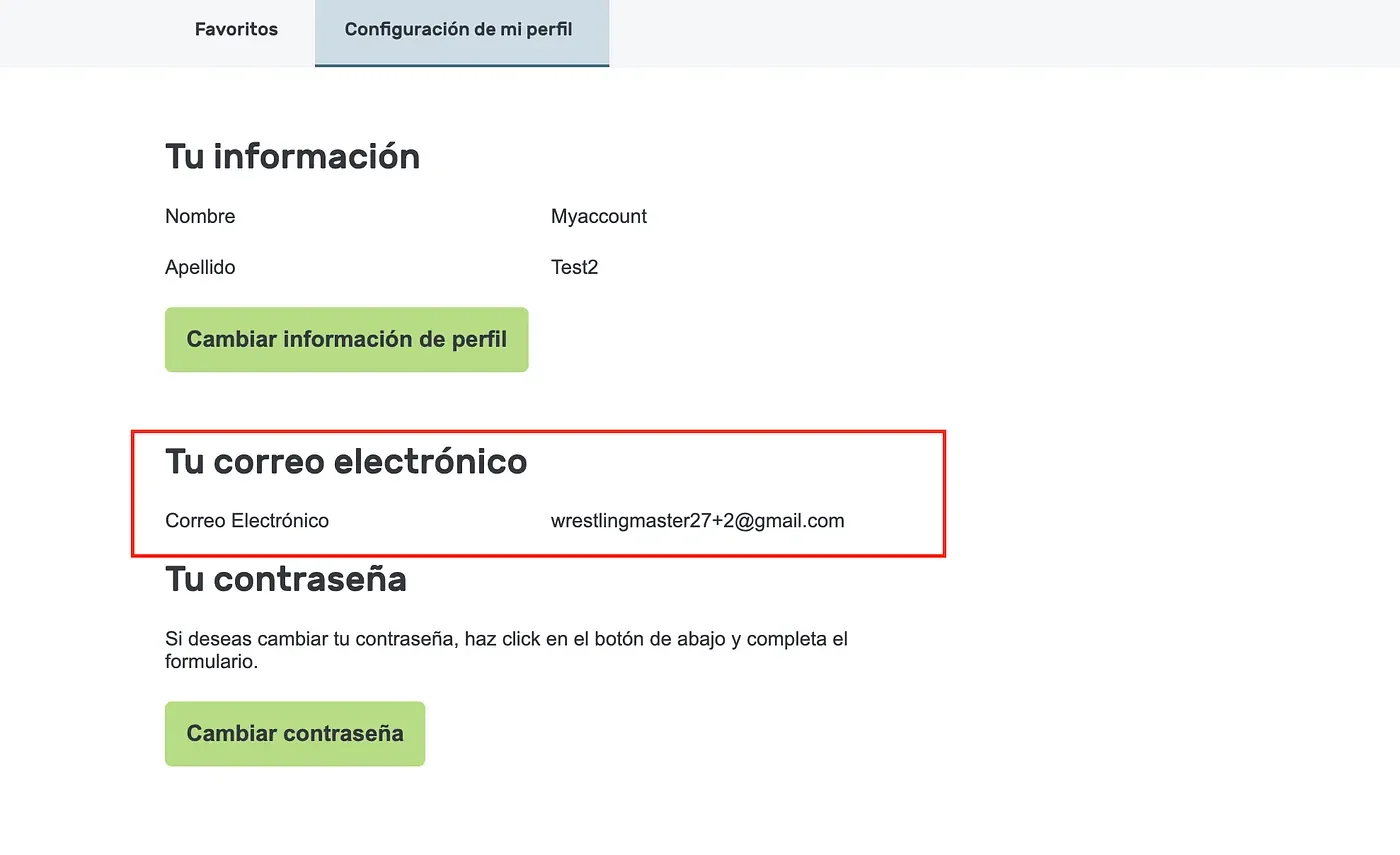
No option to change the email
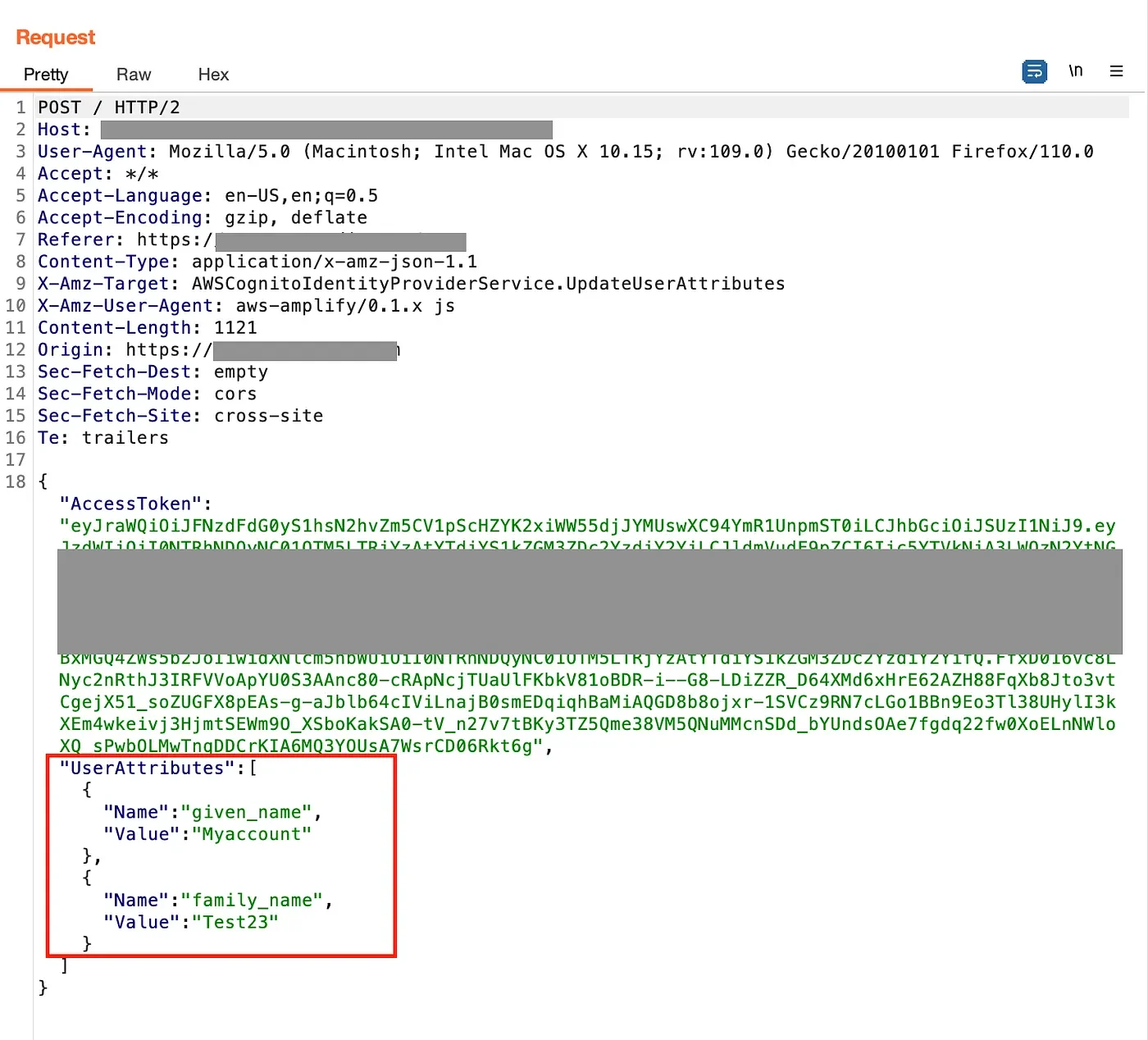
The researcher decided to try changing the email anyway. Changing the name field and capturing the request in Burp revealed a UserAttributes structure in the request body.
Exploitation
Step 1: probing the UserAttributes schema
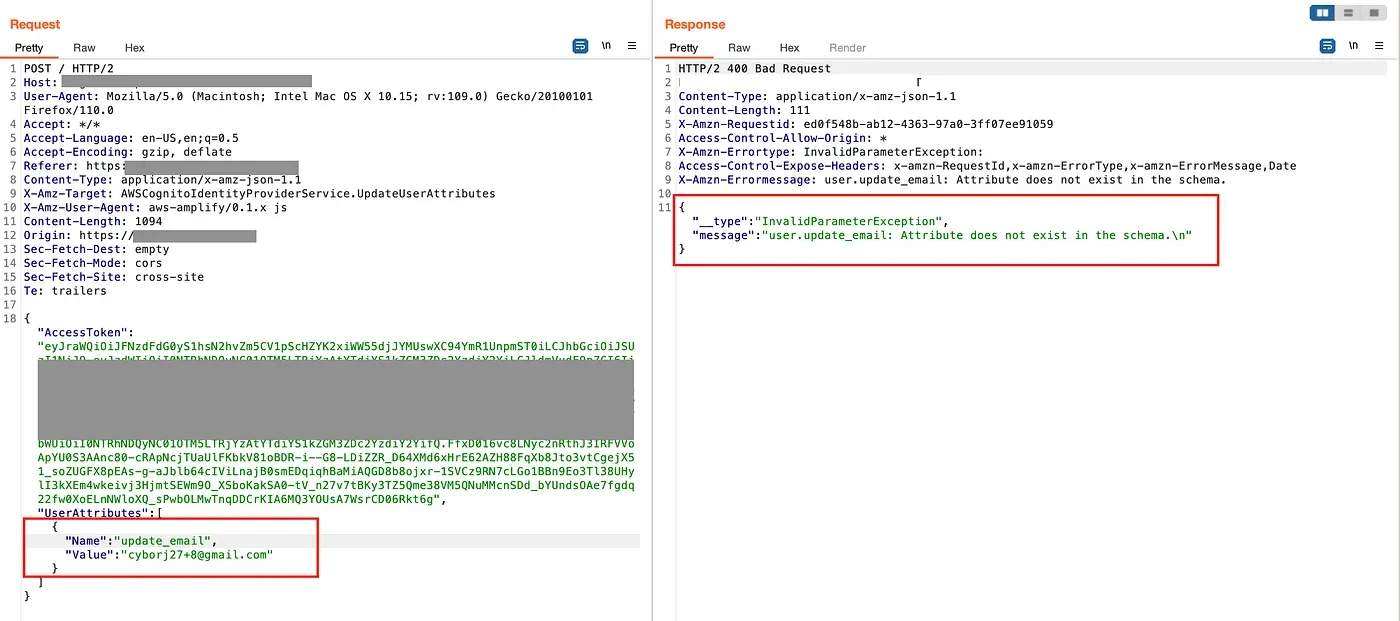
The researcher started manipulating the UserAttributes value. First, the name was changed to update_email and the value set to an existing account's mail. The application returned:
{
"__type":"InvalidParameterException",
"message":"user.update_email: Attribute does not exist in the schema.\n"
}
Next, the name was changed to change_email, with the same result:
{
"__type":"InvalidParameterException",
"message":"user.change_email: Attribute does not exist in the schema.\n"
}
The researcher then went back to the signup flow request and noticed that the application sent the new email address in the Username attribute during signup. Changing the name to Username produced the same error again:
{
"__type":"InvalidParameterException",
"message":"user.Username: Attribute does not exist in the schema.\n"
}
Step 2: a request with only an email
About to give up, the researcher sent a request again with only an email and got a new error.
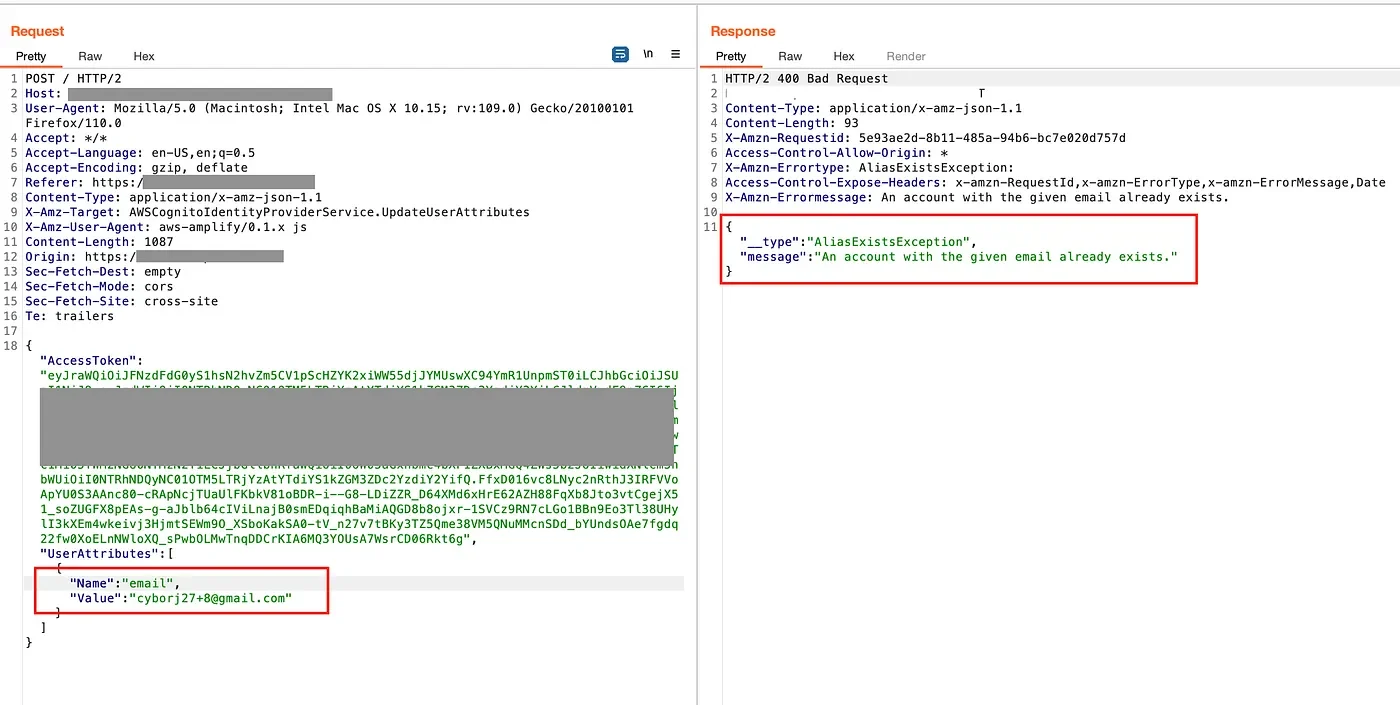
The researcher switched focus to a pre-account takeover, noting that the error confirmed another user's account could not be taken over directly. The email address was changed to an unregistered email, and it worked.
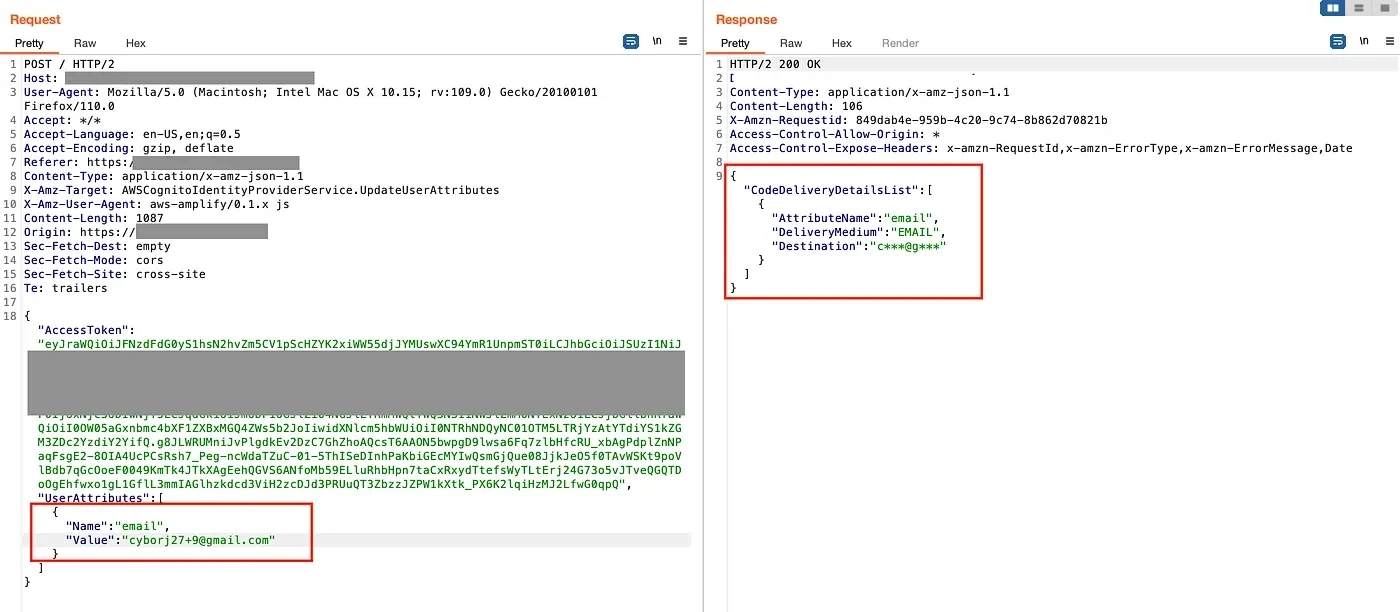
Step 3: email changed without verification
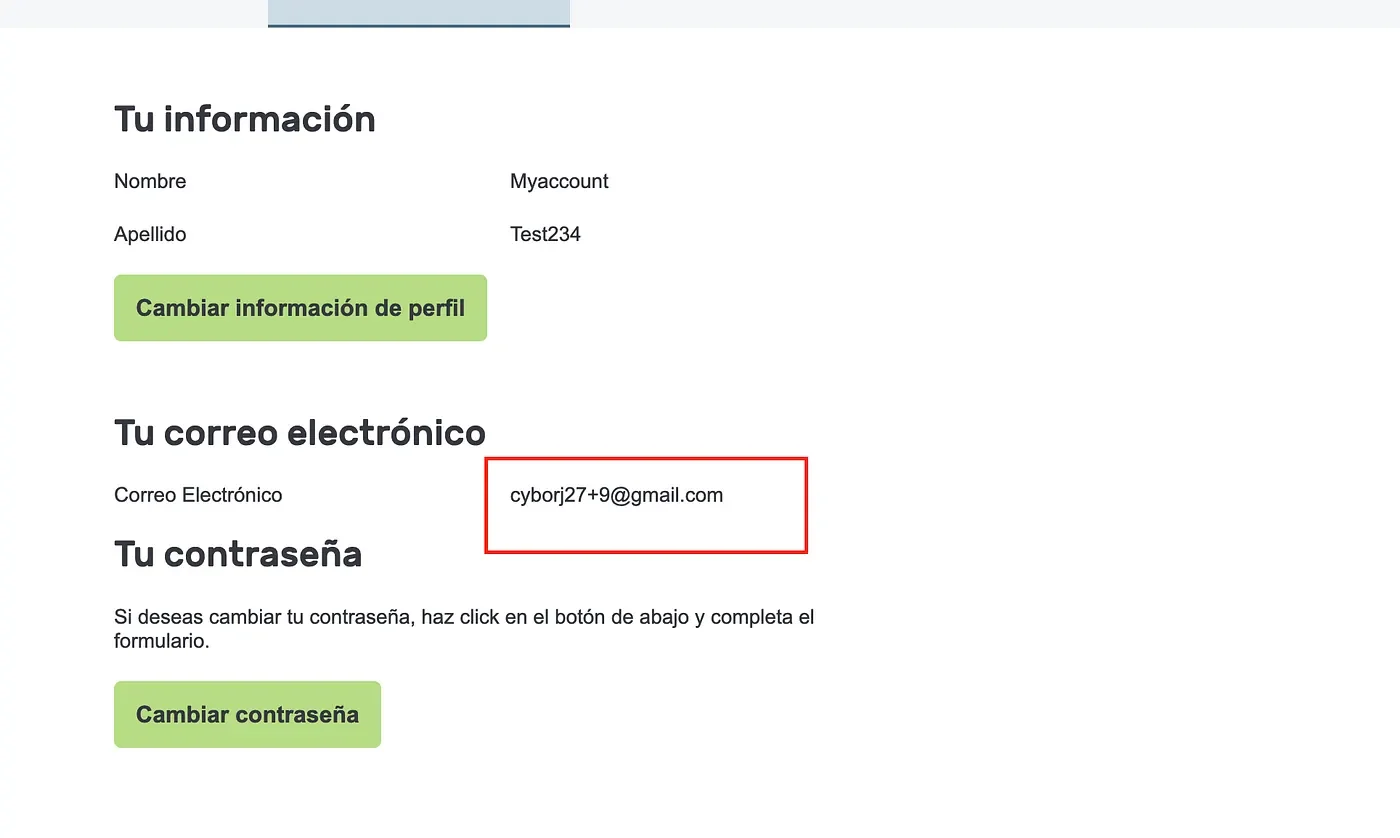
A verification OTP arrived at the new email address. However, the researcher was able to change the email address to the new one without going through the verification process, ending up with an account that had no verification.
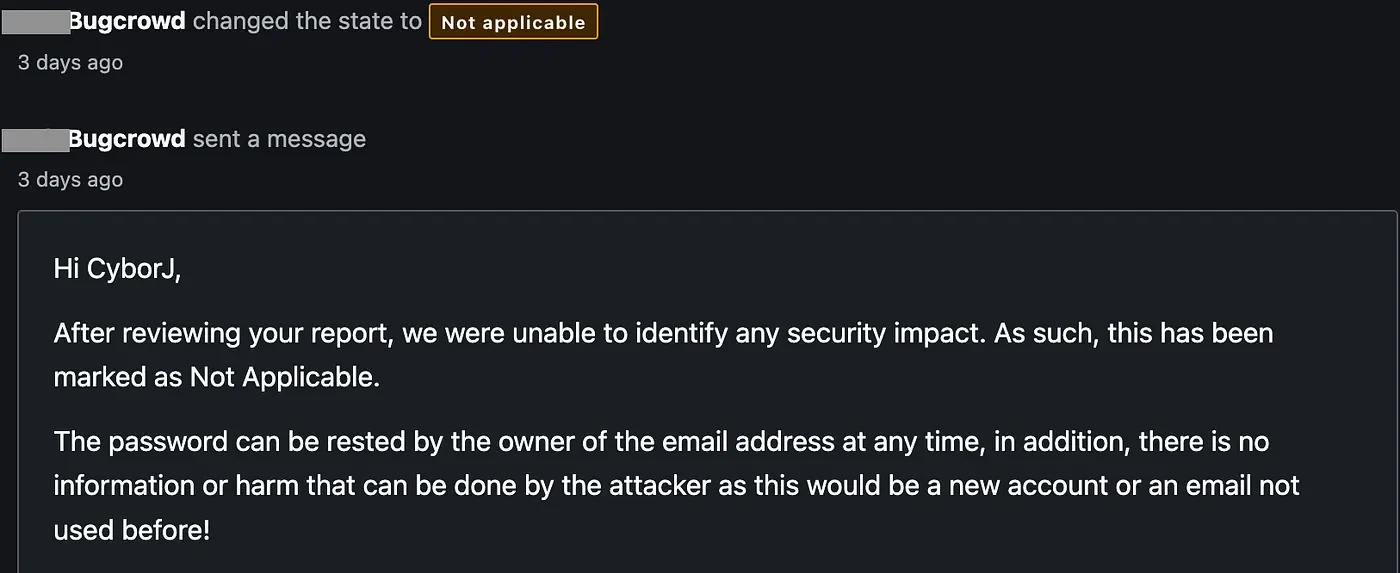
The researcher submitted a report. Within some hours it was changed to Not Applicable, with a reply from the program.
Step 4: testing what the change actually gave
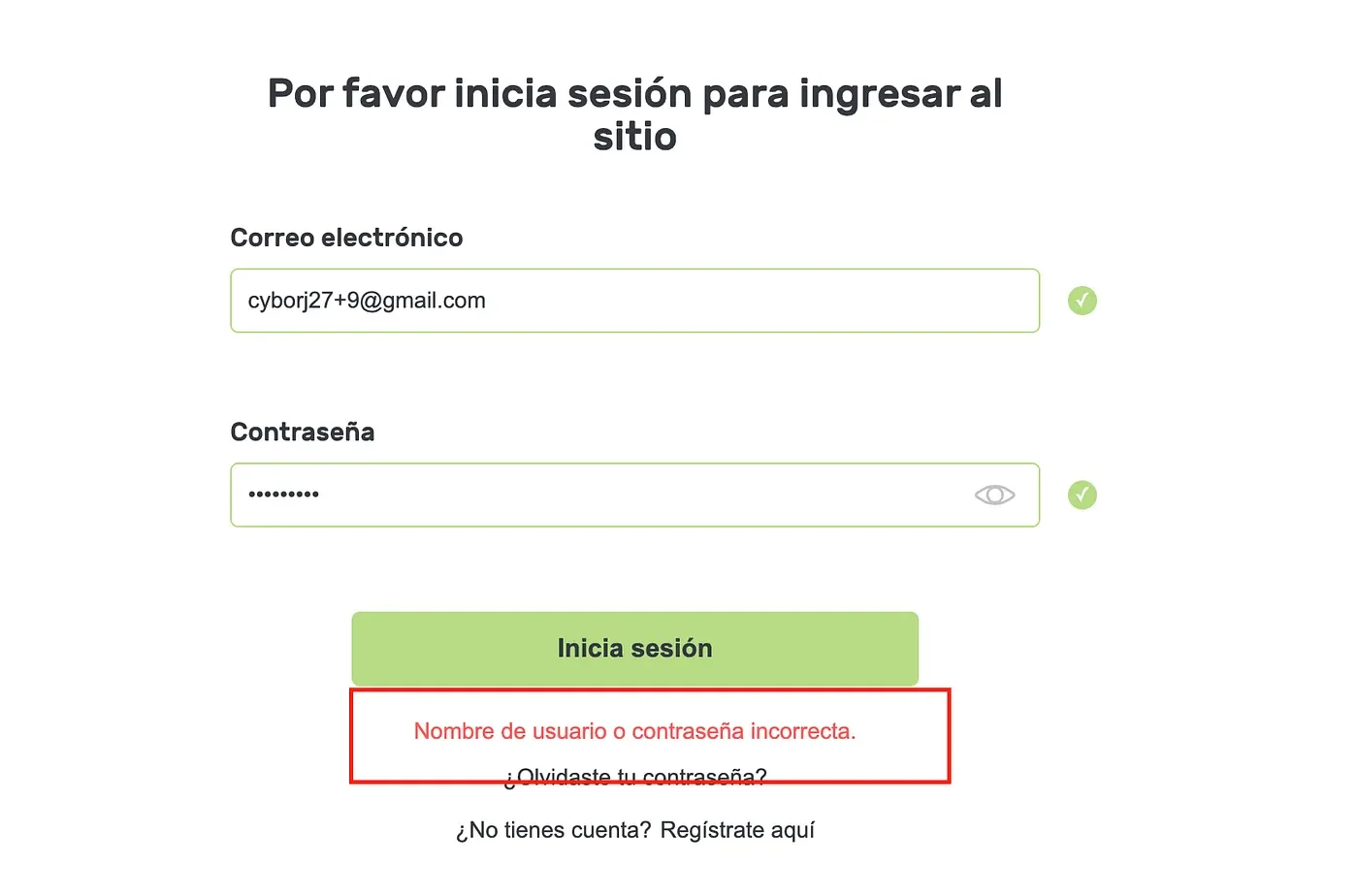
After that response, the researcher tried to log in with the victim's mail ([redacted]) and the attacker's password, and got:
username or password is incorrect
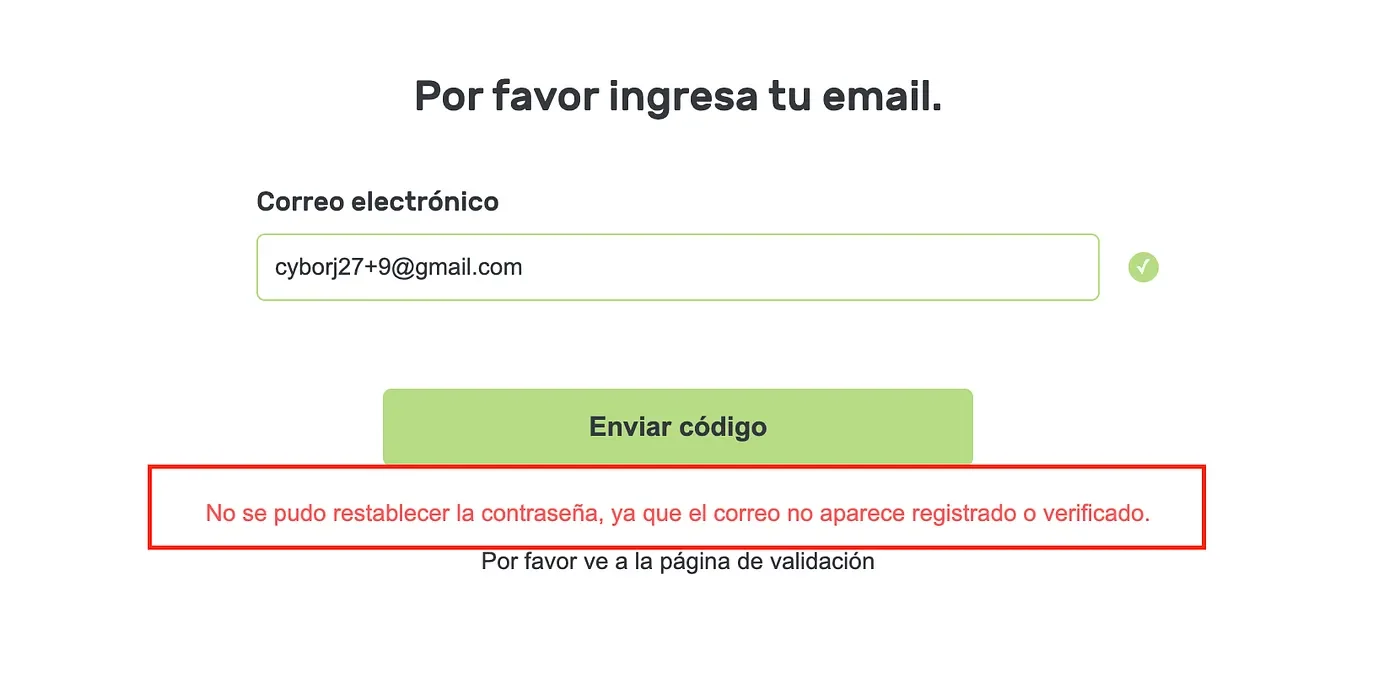
A password reset attempt was made to see whether an OTP was sent, but returned a new error:
The password could not be reset, since the email is not registered or verified.
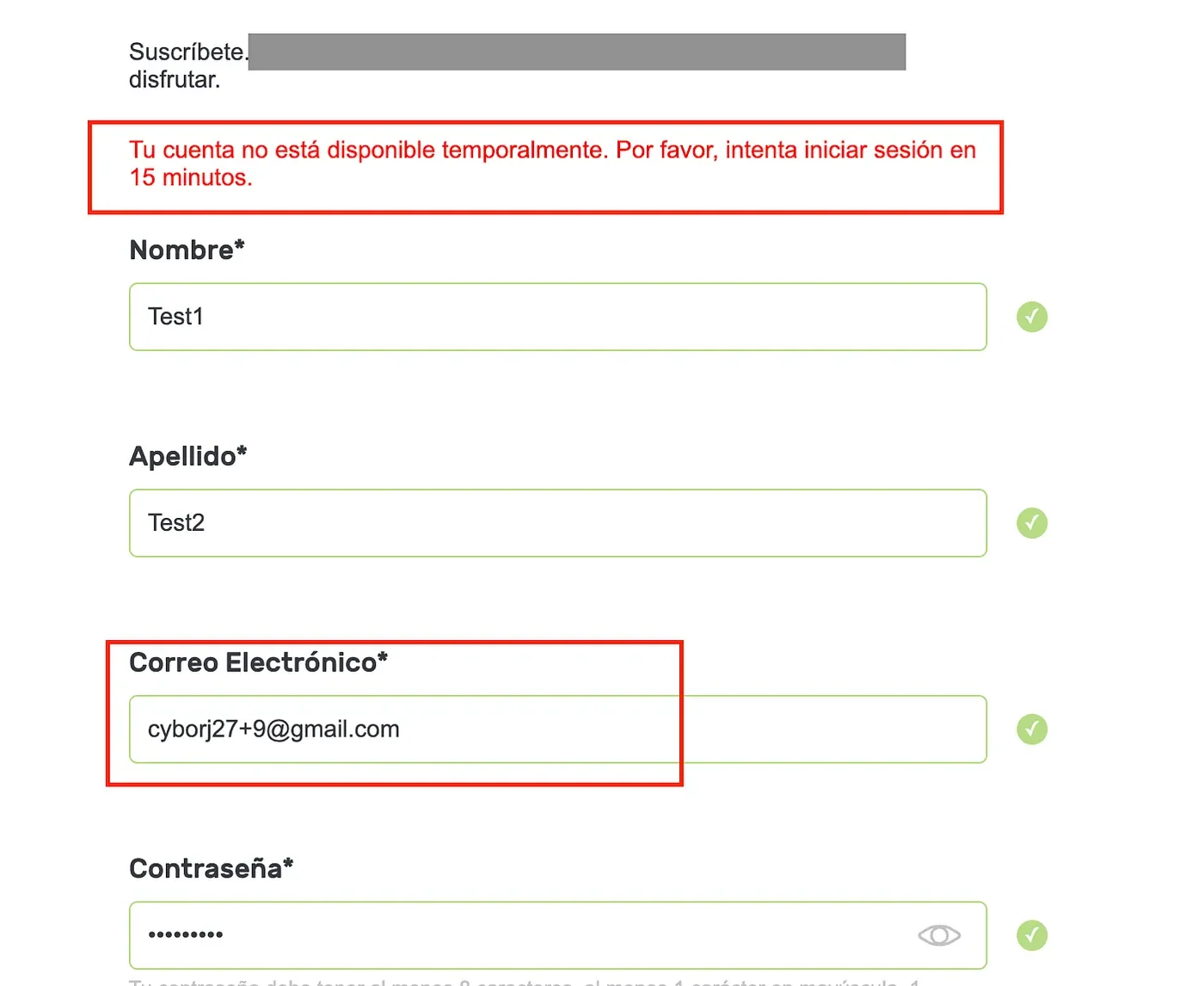
The researcher made notes of all the errors and returned the next day, starting again from the beginning without finding anything new. Re-reading the notes, the password reset error stood out, and the researcher decided to try registering with the victim's email. Registration returned:
Your account is temporarily not available. Please try to log in in 15 minutes.
After 15 minutes, logging in with the victim's email and the password used during registration still returned username or password is incorrect. Logging in with the victim's email ([redacted]) and the attacker's password ([redacted]) instead gave access to the account.
Step 5: closing the recovery paths
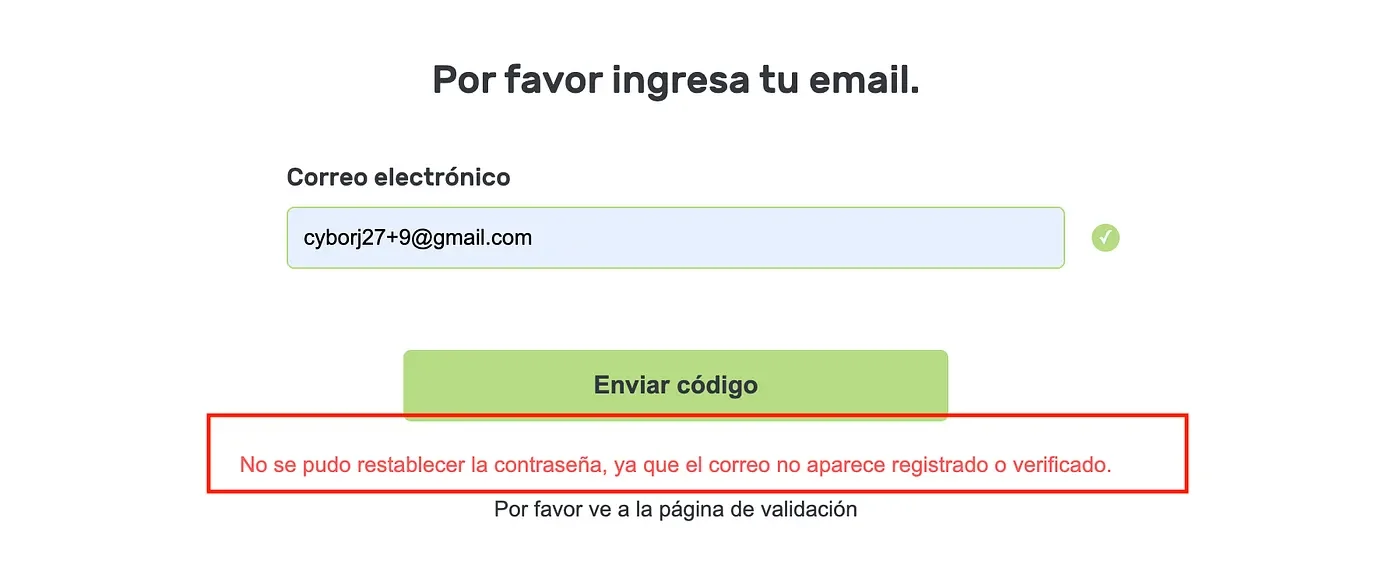
The remaining concern, as the report puts it, was that the password can be reset by the owner of the email address at any time. Going back to the reset password feature, the researcher tried to reset the password and got:
The password could not be reset, since the email is not registered or verified.
Trying to get a new verification code on the victim's email returned:
Invalid username.
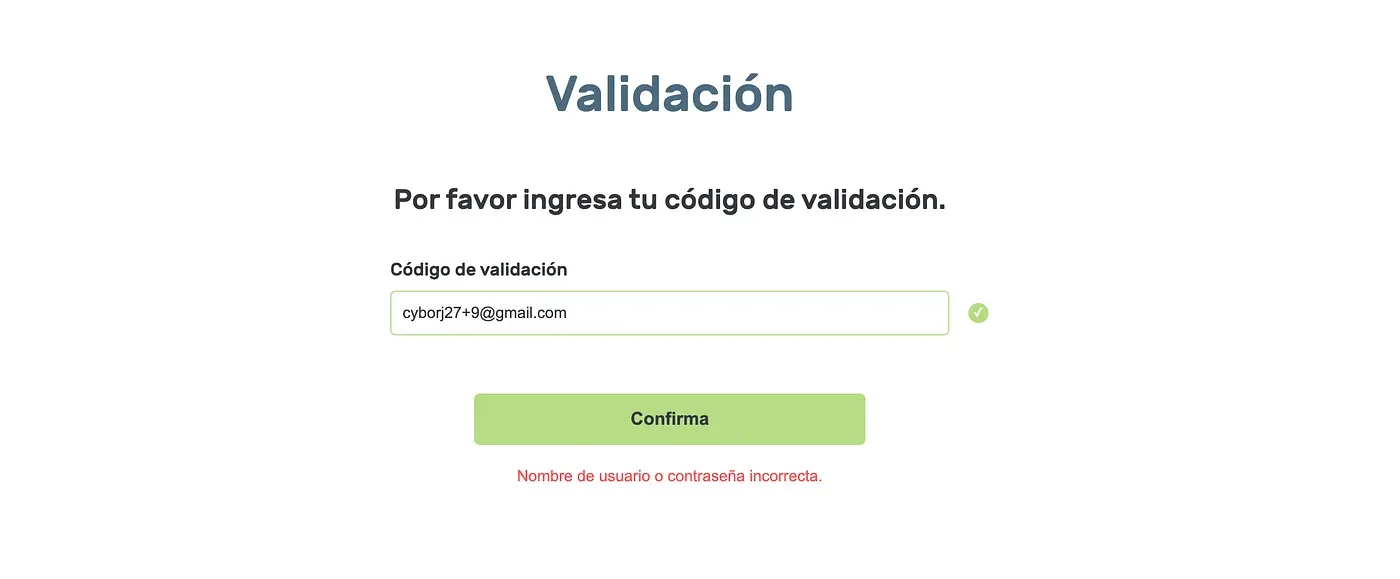
With that, the victim could not reset their password through the password reset link.
The chain, as summarised in the report
- Two emails: attacker
[redacted], victim (unregistered account)[redacted]. - The application does not have the functionality to change the email.
- From the attacker account, change the email address to the victim's by enumerating the
UserAttributesvalue:
"UserAttributes":[
{"Name":"email",
"Value":"[redacted]"
}
- When the attacker changes the mail, the victim receives the OTP code for verification.
- No need to verify the mail: the attacker already has the victim's email linked to their account.
- The attacker logs out and tries to log in with the victim's email and the attacker's password. The application does not allow this because the victim's email is not registered yet.
- The attacker navigates to registration and registers with the victim's email. The application throws
Your account is temporarily not available. Please try to log in in 15 minutes. - After 15 minutes, the attacker goes back to the login panel and logs in successfully with the victim's email and the attacker's password.
- When the victim tries to reset their password or verify the account, the application throws
Invalid username, meaning the victim has lost all ways to retrieve their account. - Due to the heavy misconfiguration (broken access control), the attacker has the account linked to the victim's email. The attacker only registered the email and did not verify the account, which is why, in the researcher's guess, the backend server has no record of the victim's email.
Step 6: stored XSS as a fallback
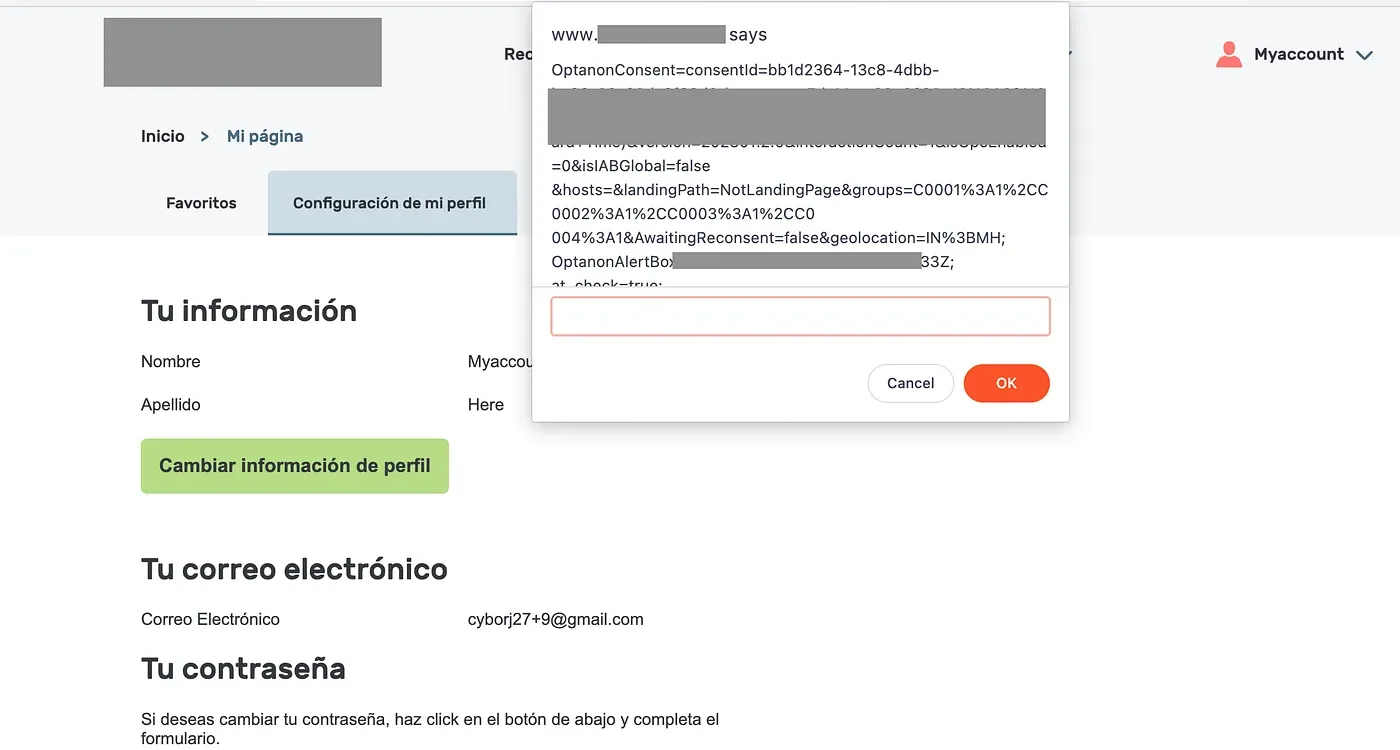
One if remained: what if the victim manages to regain the account? The researcher had previously found an HTML injection in the name field and ignored it because there was no impact. The idea was to turn it into stored XSS and place a payload in the victim's account, so that it would trigger whenever the victim recovered the account.
A basic XSS payload was placed in the last name field, but the application showed blank white space and no alert.

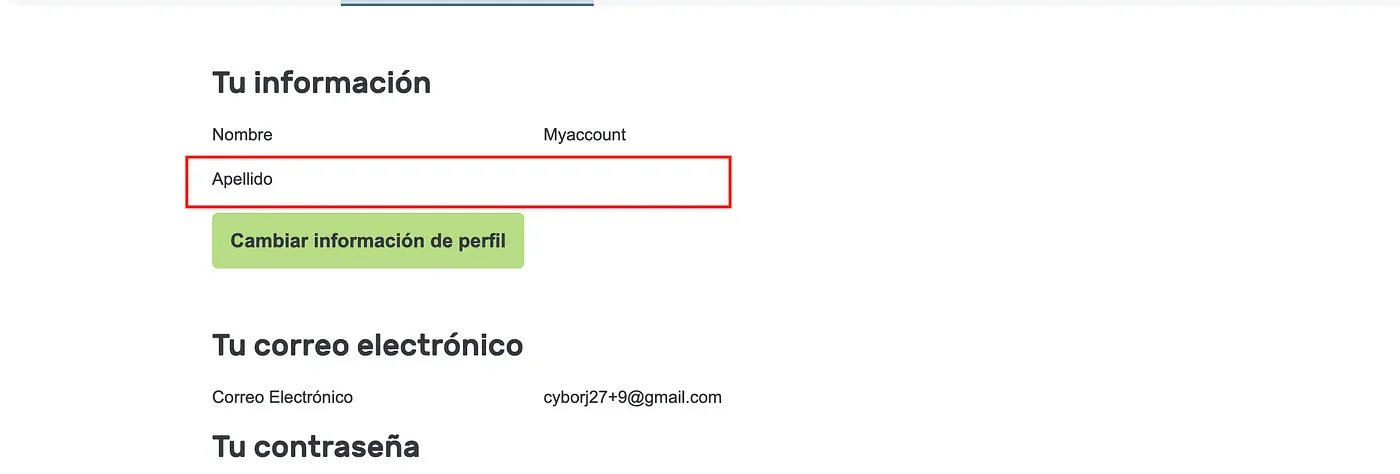
After trying for some hours, the researcher found that the application had only basic protection against XSS, filtering only <script>, <img>, alert and similar. Replacing alert with prompt produced a working payload:
<a onmouseover=”prompt(document.cookie)”>Here</a>
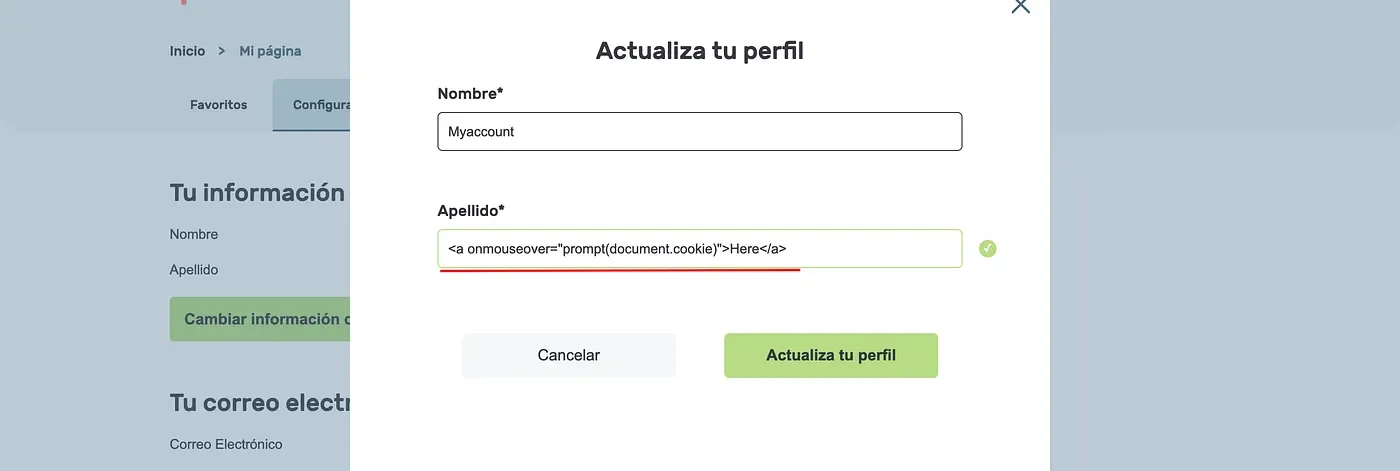
As soon as the victim scrolls over the last name, the XSS triggers.
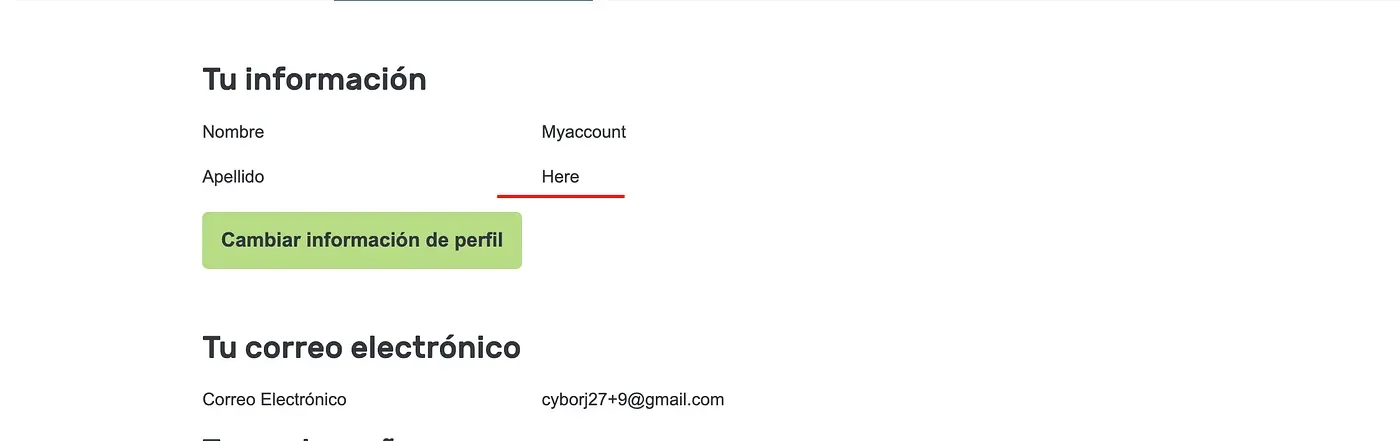
Root cause
The report attributes the issue to broken access control and heavy misconfiguration: the UserAttributes structure accepted an email attribute that the interface never exposed, so an authenticated user could link an arbitrary, unregistered email address to their own account without completing verification. The application's own error messages show that the schema rejected update_email, change_email and Username; a request with only an email returned a different error. The researcher's explanation for why the victim's email then had no backend record is a guess: the attacker registered the email but never verified the account, so the server did not hold a record of it.
The researcher found the application had only basic protection against XSS, filtering only <script>, <img>, alert and similar, which an event handler with prompt bypassed.
Impact
According to the report, the vulnerability allows attackers to bypass authentication mechanisms and create an account without OTP verification. It also allows abuse of functionality that is not intentionally exposed, such as changing the email address in the profile section. As an attacker, the researcher could set the name of a victim to stored XSS payloads; when the victim resets their password (which the researcher calls almost impossible) and logs in, the payload triggers and exposes cookies. Bypassing authentication allows a pre-account takeover: any victim's email address can be used to register or link the account, and actions can be performed on the victim's behalf.
The victim's recovery paths are blocked: password reset through the reset password functionality fails, and the researcher expects, based on the errors seen during password reset and verification resend, that support would not find the victim's email in the backend because it is unverified. That support point is stated as a guess.
Fix
The report does not describe any fix applied by the program. Based on the findings, the email attribute should not be accepted through UserAttributes unless the change is authorised and verified, and the XSS filter should not rely on a blacklist of tags and keywords.
Variants to test
- Hidden attributes in profile update bodies. Capture a profile update and add or rename attributes in structures such as
UserAttributes. A positive result is a new error naming the attribute, or a successful change of a field the interface does not expose. - Email change without verification. Change the account email to an address you control and check whether the change takes effect before the OTP is entered. A positive result is the new address being linked while the OTP is still pending.
- Registration with an unverified linked email. After linking an address, try logging in, resetting the password and registering with it. A positive result is a login with the linked email and your own password after the temporary lockout message expires.
- Recovery path enumeration. For the linked address, try password reset and verification resend. A positive result is errors such as
Invalid usernameornot registered or verifiedthat show the owner cannot recover the account. - Blacklist bypass in name fields. Submit HTML with event handlers and keywords other than the filtered ones, such as
promptinstead ofalert. A positive result is execution when the profile is viewed or the field is hovered.
What happened, in plain words
A security researcher was hunting for bugs on a private bug bounty program, which is a scheme where a company invites selected testers to look for weaknesses in its website and pays them for reporting what they find. The researcher wanted to find something unusual, because if several people report the same bug, the report is marked as a duplicate and earns nothing.
The target was a website with a profile page. On that page you could change your display name and your password, but there was no button or field to change the email address tied to your account. The researcher decided to try changing the email anyway, by editing the hidden data that the browser sends to the server when you save your profile. That hidden data is called a request, and the tool used to look at and change it is Burp Suite, a program that sits between your browser and the website and lets you see and edit everything that travels between them.
By fiddling with one part of that request, a list of account details called UserAttributes, the researcher found that a request with only an email entry returned a different error. That let the researcher change the account's email to an unregistered address without proving ownership of it. The email address belonged to a person who had not yet signed up, so the researcher called it a "pre-account takeover": the attacker gets control of the account before the real owner ever creates it.
The first report was rejected as Not Applicable. The researcher kept testing, worked out a sequence of steps that ended with logging in using the victim's email address and the attacker's own password, and also blocked the victim's ways of getting the account back. As a final safety net, the researcher planted a stored cross-site scripting payload in the profile name field, so that if the victim ever did recover the account, the payload would run in their browser.
This article walks through the same steps in the same order, explaining each idea from scratch. Nothing here is invented: every request, error message and payload is quoted exactly as it appeared in the report.
The pieces you need to know first
Before following the story, here are the basic ideas it relies on.
- A web request is the message your browser sends to a website when you click something or submit a form. The website answers with a response, which is usually a page or a short piece of data.
- An API is the part of a website that answers requests with data rather than full pages. Think of a restaurant: the menu and the dining room are the website you see, and the kitchen is the API that actually prepares what you ordered. You normally never see the kitchen, but your order goes there.
- Burp Suite is a tool that lets you pause a request in mid-air, read it, change it and then send it on. It is like intercepting a letter, rewriting a line, and posting it again.
- A cookie is a small piece of text a website stores in your browser so it can recognise you on the next request. It works like a cloakroom ticket: whoever holds the ticket gets the coat. If someone steals your cookie, they can often act as you.
- An OTP (one-time password) is a short code sent to your email or phone to prove that you really own that address or number. It is the code you type when a site says "verify your email".
- Broken access control means the website lets someone do something they should not be allowed to do, usually because the server trusts whatever the browser sends instead of checking permissions itself. It is like a hotel where the reception desk checks your key card, but the room doors are unlocked.
- Cross-site scripting (XSS) is when an attacker manages to get their own code (usually JavaScript, the language browsers run) into a page that other people view. The browser cannot tell the attacker's code from the site's own code, so it runs it. Stored XSS means the malicious code is saved on the server, for example in a profile field, and runs every time someone views that saved content.
- HTML injection is a milder relative of XSS: you can get HTML tags into a page, but not code that actually runs. On its own it often has no impact, which is why the researcher first ignored it.
- A blacklist filter is a defence that blocks a list of known bad words or tags. It only stops what is on the list, so anything not listed gets through.
The setup
The researcher worked with two email addresses:
| Role | |
|---|---|
| Attacker | [redacted] |
| Victim (unregistered account) | [redacted] |
The attacker had a normal account with a password the researcher knew. The victim's address was not registered on the site at the start. The report does not describe any other preconditions, software versions or user roles.
Finding the opening
Browsing the profile section, the researcher saw that only names and passwords could be edited, not emails.
No option to change the email
The researcher decided to try changing the email anyway. The trick was to change the name field, save it, and capture the request in Burp to see what the browser actually sent.
That request contained a structure called UserAttributes. Think of it as a form with rows: each row has a Name (which detail you are setting) and a Value (what to set it to). The website's own form only ever fills in the rows it knows about, but nothing stops a person with Burp from adding or renaming rows by hand. That is the whole idea behind the next steps.
Trying to change the email
Step 1: guessing the right attribute name
The researcher started playing with UserAttributes. First, the name was changed to update_email and the value set to an existing account's mail. The application answered with an error:
{
"__type":"InvalidParameterException",
"message":"user.update_email: Attribute does not exist in the schema.\n"
}
Line by line:
__typeis the kind of error.InvalidParameterExceptionmeans "you gave me a parameter (a named value) that I do not accept".messageis the human-readable explanation.user.update_email: Attribute does not exist in the schemameans the server keeps a fixed list (a schema) of allowed attribute names, andupdate_emailis not on it. The\nis just a newline character at the end of the text.
This is useful information: the server is telling the researcher which names it does not recognise, which is a bit like a locked door that tells you every key that does not fit.
Next, the name was changed to change_email, with the same result:
{
"__type":"InvalidParameterException",
"message":"user.change_email: Attribute does not exist in the schema.\n"
}
Same reading: change_email is also not on the list.
The researcher then went back to the signup flow request and noticed that during signup the application sent the new email address in the Username attribute. So the name was changed to Username, and the same error came back again:
{
"__type":"InvalidParameterException",
"message":"user.Username: Attribute does not exist in the schema.\n"
}
Three guesses, three rejections. The pattern is clear: the server checks the name against its schema and refuses anything unknown.
Step 2: a request with only an email
About to give up, the researcher sent a request again with only an email, and got a new error.
A different error is a signal. It means the request failed somewhere else than the earlier schema check, though the report does not say what the new error was. That new error also confirmed that another user's existing account could not be taken over directly, so the researcher switched focus to a pre-account takeover: instead of stealing an account that already exists, aim at an email address that has not signed up yet. The email address was changed to an unregistered email, and it worked.
Step 3: the email changed without verification
A verification OTP arrived at the new email address. But the researcher was able to change the email address to the new one without going through the verification process, ending up with an account that had no verification.
In plain terms: the site sent the code, as it should, but it did not wait for the code to be entered before linking the address. The lock was fitted but never turned. The researcher submitted a report. Within some hours it was changed to Not Applicable, with a reply from the program.
Working out what the change actually gave
After that response, the researcher tried to log in with the victim's mail ([redacted]) and the attacker's password, and got:
username or password is incorrect
This is the site's normal login check: it looks up the email, compares the password, and refuses if either does not match. At this point the email was linked to the attacker's account, but the login still failed, which is confusing until you see the next error.
A password reset attempt was made to see whether an OTP was sent, but returned a new error:
The password could not be reset, since the email is not registered or verified.
Read that carefully: the site says the email is "not registered or verified". So from the site's point of view, the victim's address does not count as a real, confirmed account, even though the attacker had just attached it to one. That mismatch is the clue.
The researcher made notes of all the errors and returned the next day, starting again from the beginning without finding anything new. Re-reading the notes, the password reset error stood out, and the researcher decided to try registering with the victim's email. Registration returned:
Your account is temporarily not available. Please try to log in in 15 minutes.
The site returned this message when the researcher tried to register with the victim's email.
After 15 minutes, logging in with the victim's email and the password used during registration still returned username or password is incorrect. Logging in with the victim's email ([redacted]) and the attacker's password ([redacted]) instead gave access to the account.
That is the moment the bug becomes serious. The attacker's own password now opens an account identified by the victim's email address. The victim's address had not been registered, and the attacker's password now opened the account.
Closing the victim's ways back in
The remaining problem was that the password can be reset by the owner of the email address at any time. If the real owner of the address ever used the "forgot password" link, they could take the account back. So the researcher tested that path. Going back to the reset password feature, the researcher tried to reset the password and got:
The password could not be reset, since the email is not registered or verified.
Trying to get a new verification code on the victim's email returned:
Invalid username.
With that, the victim could not reset their password through the password reset link. The two error messages show the site would not reset the password or send a fresh code to that address. The attacker, meanwhile, can still log in with it.
The chain, as summarised in the report
- Two emails: attacker
[redacted], victim (unregistered account)[redacted]. - The application does not have the functionality to change the email.
- From the attacker account, change the email address to the victim's by enumerating the
UserAttributesvalue:
"UserAttributes":[
{"Name":"email",
"Value":"[redacted]"
}
This snippet is the edited part of the profile request. UserAttributes is a list (the square brackets). Inside it is one entry with two fields: Name set to email, and Value set to the victim's address. "Enumerating" here means trying candidate names one after another until one is accepted, which is exactly what the earlier error messages allowed.
- When the attacker changes the mail, the victim receives the OTP code for verification.
- No need to verify the mail: the attacker already has the victim's email linked to their account.
- The attacker logs out and tries to log in with the victim's email and the attacker's password. The application does not allow this because the victim's email is not registered yet.
- The attacker navigates to registration and registers with the victim's email. The application throws
Your account is temporarily not available. Please try to log in in 15 minutes. - After 15 minutes, the attacker goes back to the login panel and logs in successfully with the victim's email and the attacker's password.
- When the victim tries to reset their password or verify the account, the application throws
Invalid username, meaning the victim has lost all ways to retrieve their account. - Due to the heavy misconfiguration (broken access control), the attacker has the account linked to the victim's email. The attacker only registered the email and did not verify the account, which is why, in the researcher's guess, the backend server has no record of the victim's email.
Point 10 is explicitly a guess in the report, not a confirmed explanation. What is confirmed is the behaviour: the attacker could log in, and the victim could not recover.
The fallback: stored XSS
One if remained: what if the victim manages to regain the account anyway? The researcher had previously found an HTML injection in the name field and ignored it because there was no impact. HTML injection alone just puts tags on a page; it does not run code. The idea now was to turn it into stored XSS and place a payload in the victim's account, so that it would trigger whenever the victim recovered the account.
A basic XSS payload was placed in the last name field, but the application showed blank white space and no alert.
An "alert" is the simplest test in XSS: a small pop-up box. If the box appears, your code ran. Here the field went blank and nothing popped, which usually means a filter removed the payload.
After trying for some hours, the researcher found that the application had only basic protection against XSS, filtering only <script>, <img>, alert and similar. Replacing alert with prompt produced a working payload:
<a onmouseover=”prompt(document.cookie)”>Here</a>
Line by line:
<a ...>Here</a>is a link tag with the visible text "Here".onmouseoveris an event attribute: the browser runs the code inside it when the mouse pointer moves over the element. No click is needed.prompt(...)is a browser function that shows a small input box. It is not on the filter's list, so it survived.document.cookieis the browser's way of reading the cookies for the current page. Showing them in a prompt box proves the attacker's code can read them, and a real attacker would instead send them somewhere.
As soon as the victim scrolls over the last name, the XSS triggers.
Why it worked
The report attributes the issue to broken access control and heavy misconfiguration: the UserAttributes structure accepted an email attribute that the interface never exposed, so a logged-in user could link an arbitrary, unregistered email address to their own account without completing verification. The application's own error messages show that the schema rejected update_email, change_email and Username, but not the plain email attribute. The researcher's explanation for why the victim's email then had no backend record is a guess: the attacker registered the email but never verified the account, so the server did not hold a record of it.
The researcher found the application had only basic protection against XSS, filtering only <script>, <img>, alert and similar, which an event handler with prompt bypassed. A blacklist is always a race: the defender has to list every dangerous word, and the attacker only has to find one that is missing.
What it means for the site and its users
According to the report, the vulnerability allows attackers to bypass authentication mechanisms and create an account without OTP verification. It also allows abuse of functionality that is not intentionally exposed, such as changing the email address in the profile section. As an attacker, the researcher could set the name of a victim to stored XSS payloads; when the victim resets their password (which the researcher calls almost impossible) and logs in, the payload triggers and exposes cookies. Bypassing authentication allows a pre-account takeover: any victim's email address can be used to register or link the account, and actions can be performed on the victim's behalf.
The victim's recovery paths are blocked: password reset through the reset password functionality fails, and the researcher expects, based on the errors seen during password reset and verification resend, that support would not find the victim's email in the backend because it is unverified. That support point is stated as a guess.
What a fix would look like
Based on the findings, the email attribute should not be accepted through UserAttributes unless the change is authorised and verified, and the XSS filter should not rely on a blacklist of tags and keywords.
Things worth trying on a site you are allowed to test
- Hidden attributes in profile update bodies. Capture a profile update and add or rename attributes in structures such as
UserAttributes. A positive result is a new error naming the attribute, or a successful change of a field the interface does not expose. - Email change without verification. Change the account email to an address you control and check whether the change takes effect before the OTP is entered. A positive result is the new address being linked while the OTP is still pending.
- Registration with an unverified linked email. After linking an address, try logging in, resetting the password and registering with it. A positive result is a login with the linked email and your own password after the temporary lockout message expires.
- Recovery path enumeration. For the linked address, try password reset and verification resend. A positive result is errors such as
Invalid usernameornot registered or verifiedthat show the owner cannot recover the account. - Blacklist bypass in name fields. Submit HTML with event handlers and keywords other than the filtered ones, such as
promptinstead ofalert. A positive result is execution when the profile is viewed or the field is hovered.
Glossary
- API: the part of a website that receives requests and returns data, as opposed to the pages you see.
- Attribute: a named value inside a request, such as
NameorValueinUserAttributes. - Blacklist filter: a defence that blocks a list of known bad words or tags and lets everything else through.
- Broken access control: a flaw where the server lets a user do something they should not be permitted to do, often because it trusts data sent by the browser.
- Burp Suite: a tool that intercepts, displays and lets you edit the requests and responses between your browser and a website.
- Cookie: a small piece of text stored by the browser that lets a site recognise you; stealing it can let an attacker act as you.
- Cross-site scripting (XSS): getting attacker-supplied code into a page so that a browser runs it.
- Duplicate: a bug report that repeats something already reported, usually earning nothing.
- HTML injection: getting HTML tags into a page without necessarily getting code to run.
- JavaScript: the programming language that browsers run to make pages interactive.
- Misconfiguration: a setting or design choice that leaves a system less protected than intended.
- Not Applicable: a report status meaning the program decided the issue does not qualify.
- OTP (one-time password): a short code sent to an email address or phone to prove ownership.
- Payload: the piece of code or data an attacker submits to try to trigger a bug.
- Pre-account takeover: taking control of an account identified by an email address before its real owner has registered it.
- Private bug bounty program: a bounty scheme open only to invited researchers.
- Prompt: a browser function that shows a small input box; used here as an alternative to
alert. - Request: the message a browser sends to a website.
- Response: the message a website sends back.
- Schema: a fixed list of allowed names or fields that a server checks incoming data against.
- Stored XSS: XSS where the malicious code is saved on the server and runs whenever the saved content is viewed.
- UserAttributes: the list in the profile request that holds account details as name and value pairs.
- Verification: the step where a user proves they own an email address, usually by entering an OTP.


