Account Takeover via Parameter Confusion in Login Authentication
The login flow generated a nonce that was not uniquely bound to a single identifier (email or phone), allowing the same nonce to be reused across different authentication contexts. An attacker could obtain an OTP for their own phone number, then reuse the same nonce and OTP to authenticate as another user's email, resulting in full account takeover.

One day, while testing an application, I came across a relatively simple login flow.
The full write-up lives on its author's site
It belongs to its author, so we link to it rather than copy it. The other two tabs are our own rewrites, checked against it.
Context
The target was an application with a login flow that accepted either a phone number or an email address as the authentication identifier. The flow had two steps. The first request took one identifier and returned a dynamically generated "nonce", described in the report as a GUID bound to the generated OTP. The second request carried the nonce and the OTP to a verification endpoint, and on success the server returned an authentication token.
At first glance the flow was unremarkable: identifier in, nonce out, OTP delivered out of band, nonce plus OTP verified, token issued. The report does not name the application, the program or the platform beyond the login feature itself.
Setup
The researcher worked against the live login flow with identifiers they controlled, and only moved to a target account once the behaviour had been confirmed on their own accounts. No specific tooling, versions or special preconditions are described. The report notes that the verification request appeared to rely solely on the nonce and OTP, without carrying the identifier itself.
Finding it
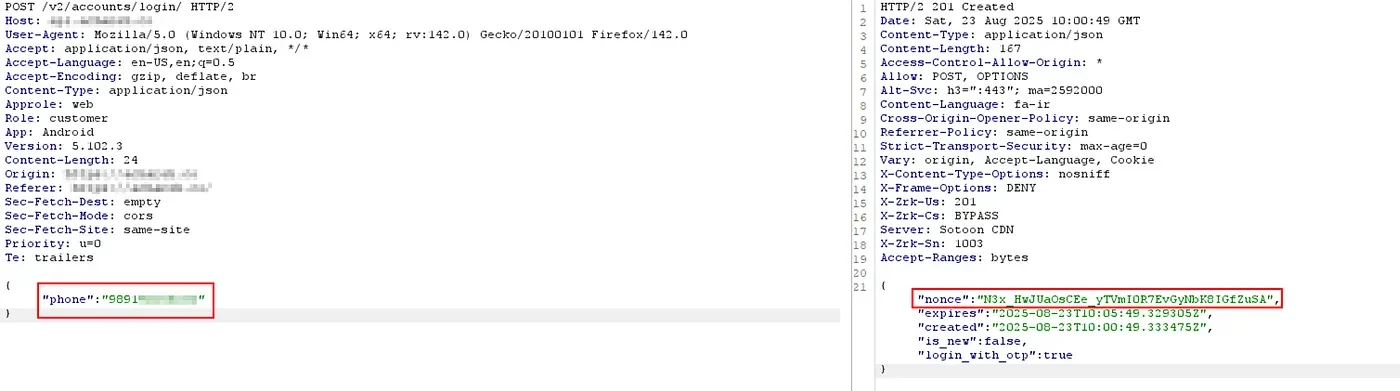
The first request accepts a phone number or an email address and generates a nonce. That nonce is a GUID bound to the generated OTP and is used later during OTP verification.
Figure 1, Login request containing the mobile number and generated "nonce"
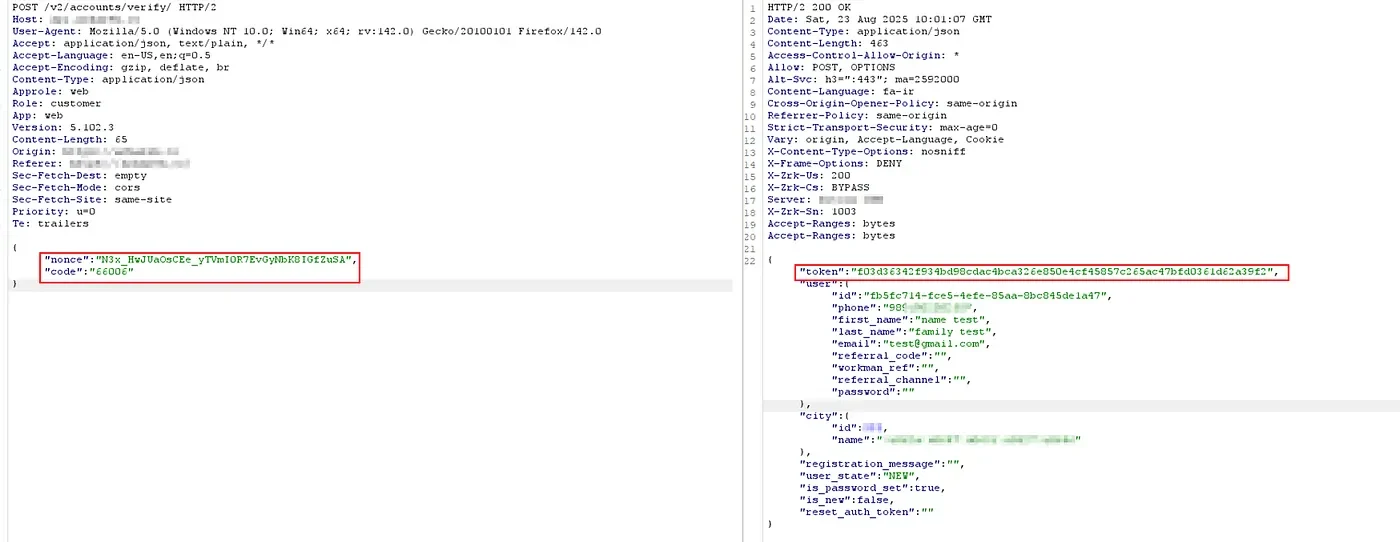
After the OTP is received, a second request carries the nonce and the OTP. If verification succeeds, the server returns an authentication token.
Figure 2, OTP and "nonce" verification request returning the authentication token
What caught the researcher's attention was that the verification request appeared to rely solely on the nonce and the OTP, without carrying the authentication identifier itself. That raised the obvious question: what exactly is the nonce bound to? If it were associated only with the OTP rather than strictly tied to the identifier that started the flow, it might be possible to cross the boundary between different authentication identifiers.
The first idea was to generate the same nonce for two different phone numbers, which could potentially confuse the flow so that an OTP verification was associated with the wrong account. Considerable time went into attempting a nonce collision between two phone numbers, and it did not work. After several attempts the researcher concluded that this approach was not going anywhere.
Exploitation
Step 1: send both identifiers in one request
The application supported two identifiers, mobile and email, and under normal circumstances the user was expected to supply one at a time. The intended flows were:
mobile → Login → "nonce"
or:
email → Login → "nonce"
Breaking away from the intended flow, the researcher sent both parameters together:
mobile + email → Login → "nonce"
Figure 3, Sending both mobile and email parameters in the same request and receiving the OTP on the mobile number
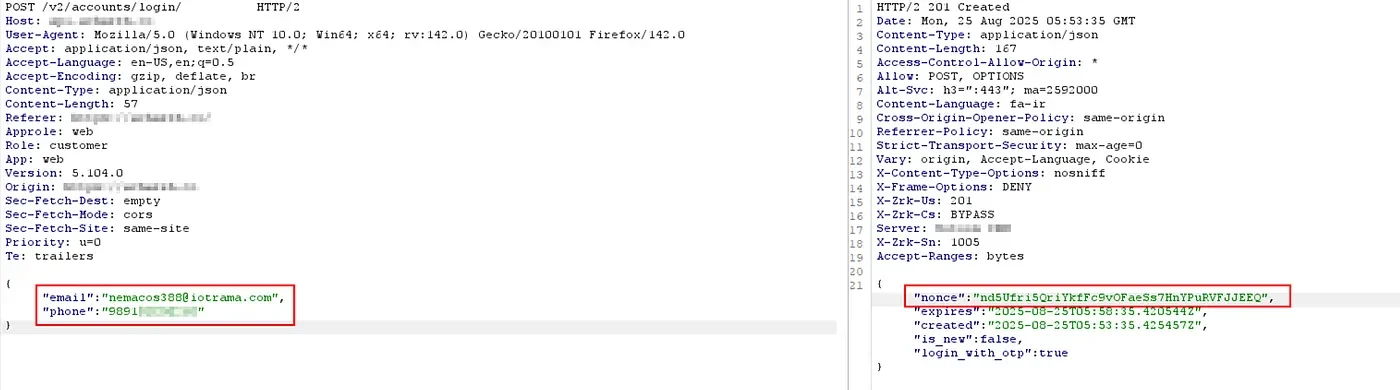
The application responded in an interesting way: the OTP was sent to the phone number.

At first this looked like a failure. But the phone number had been added as the second parameter in the JSON body, which prompted a closer look at how the backend handled the two identifiers.
Step 2: reproduce the nonce with the email alone
The phone number was removed and the same email address was sent again, this time as the only identifier. The application generated the exact same nonce again.
Figure 4, Sending the email alone and receiving the previously generated "nonce" again
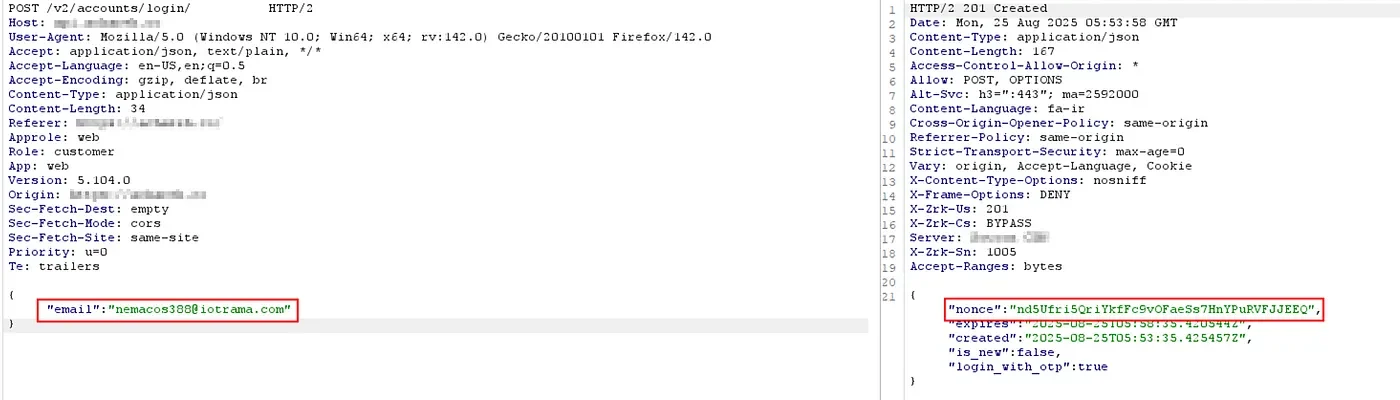
This was the first major breakthrough: the application had generated the same nonce for the authentication flow involving the different login parameters. The new hypothesis was whether the OTP generated in the previous flow could also be reused.
Step 3: reuse the OTP across the two flows
Before touching another account, the researcher validated the behaviour using identifiers they controlled. An OTP had already been generated through the mobile-based flow, and the test was whether that same OTP would be accepted by the email-based flow associated with the same authentication state.
Figure 5, Reusing the OTP obtained through the mobile flow with the email-based flow
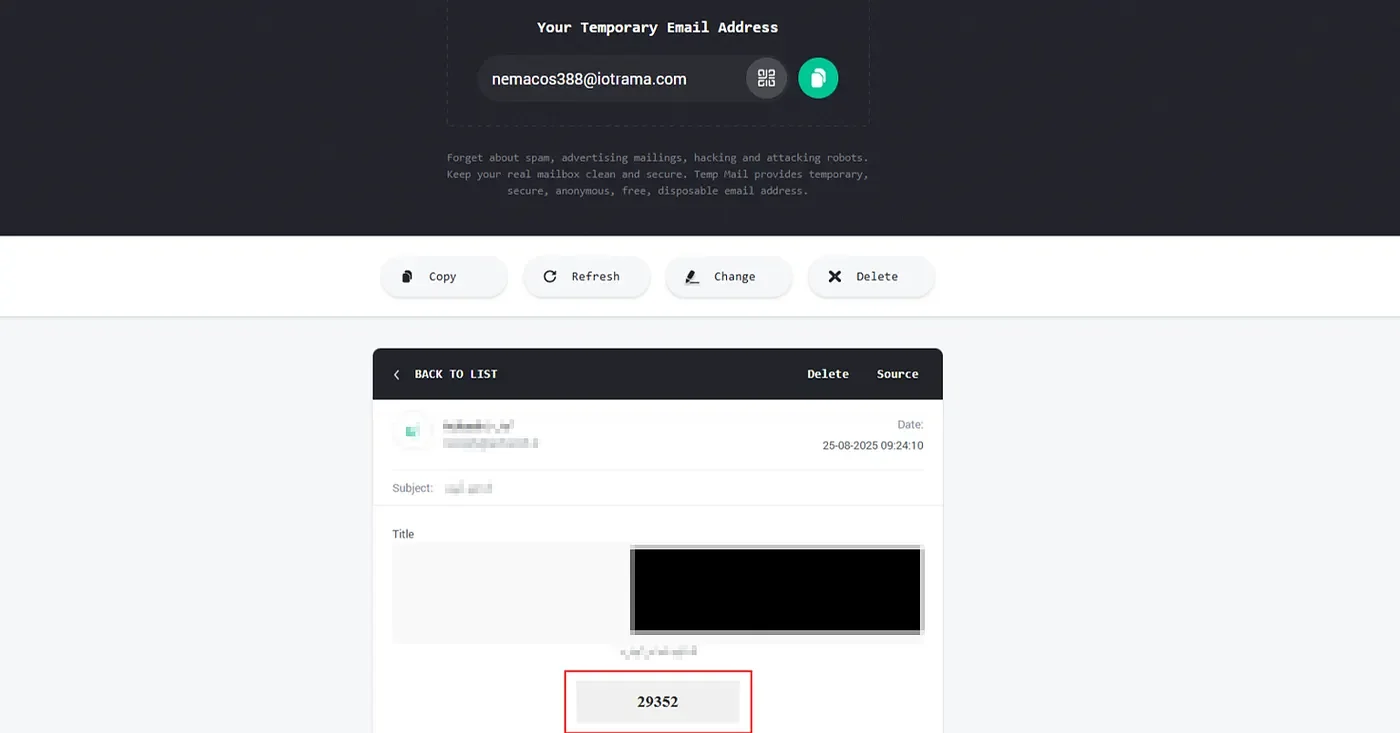
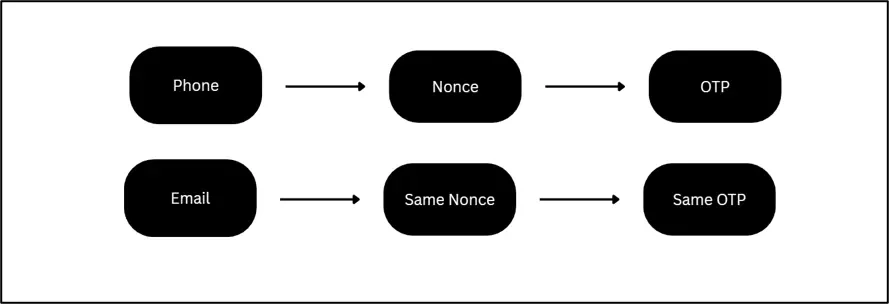
The OTP was accepted. This was the second major breakthrough: the nonce and OTP were not strictly bound to a single login identifier. The authentication flow could therefore be represented as:
Step 4: reproduce the flow against the target account
With the behaviour confirmed on controlled accounts and identifiers, the final step was to reproduce the same flow using the target account's identifier. The application allowed the authentication request to be constructed using both mobile and email, and the nonce was not uniquely bound to a single identifier. Once the appropriate nonce and OTP were available, they were sent to the verification endpoint.
Figure 6, Sending the OTP and "nonce" to the verification endpoint and receiving the victim's authentication token
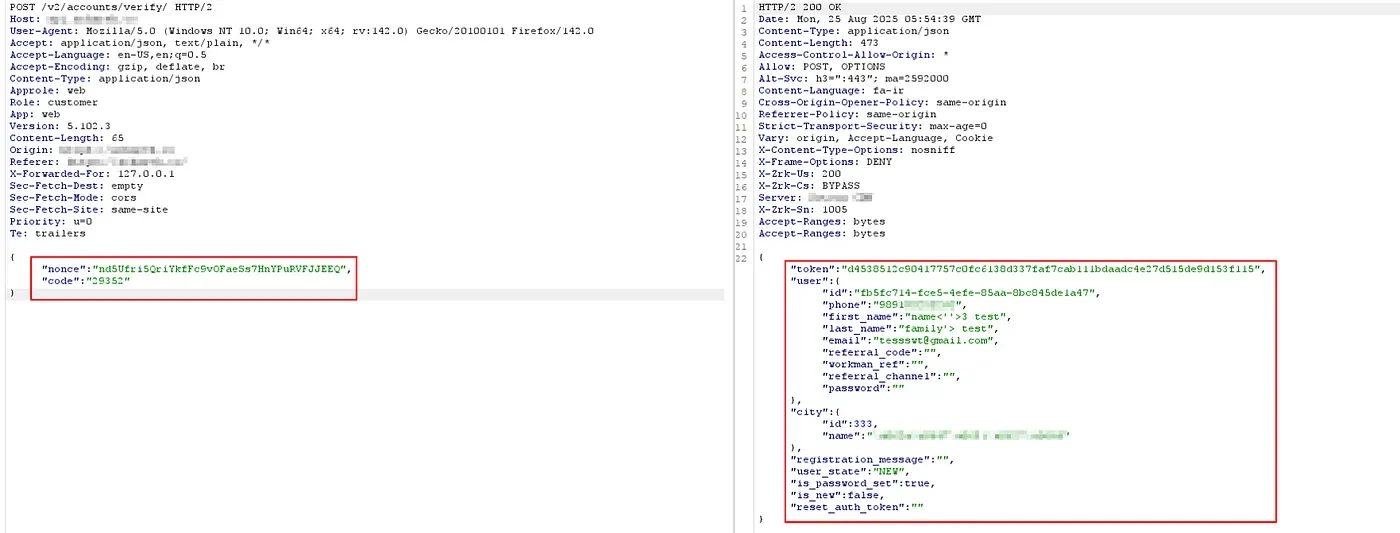
The server accepted the verification request and returned a valid authentication token associated with the target account. The token was then used to authenticate to the application: it was valid, and the researcher was fully authenticated as the victim. The impact was no longer theoretical, and the result was a full account takeover.
Root cause
The root cause was the way the application generated and associated the nonce with the login identifiers. The application supported two authentication identifiers, email and mobile, but when both parameters were supplied it generated a single nonce that could be associated with both authentication contexts. Conceptually, the vulnerable behaviour looked like this:
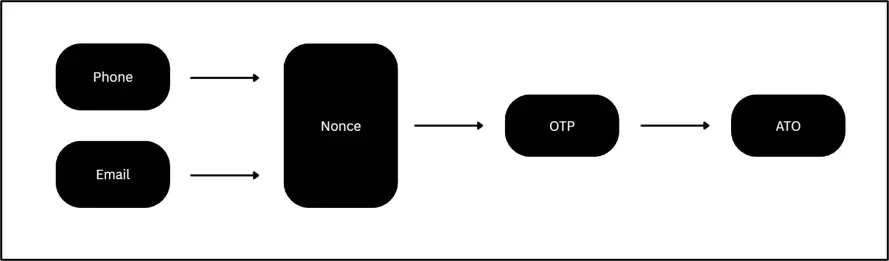
The critical issue was that the nonce was not uniquely bound to one specific authentication identifier and one authentication attempt. The intended behaviour was to accept either an email address or a phone number for a login attempt, but the backend allowed both identifiers to participate in the same authentication flow. As a result, the same authentication state could be reproduced across the email and mobile login parameters. Because the subsequent verification endpoint relied on the nonce and OTP, this parameter confusion allowed the authentication flow to be manipulated and resulted in the issuance of a valid authentication token for another user's account.
Impact
An unauthenticated attacker could bypass the intended authentication flow and obtain a valid authentication token for another user's account. The impact included:
- Authentication bypass
- Unauthorized access to another user's account
- Valid session/token issuance
- Full account takeover
The issue was therefore not merely a parameter-validation problem: the vulnerable parameter handling directly affected the application's authentication boundary and allowed an attacker to authenticate as another user.
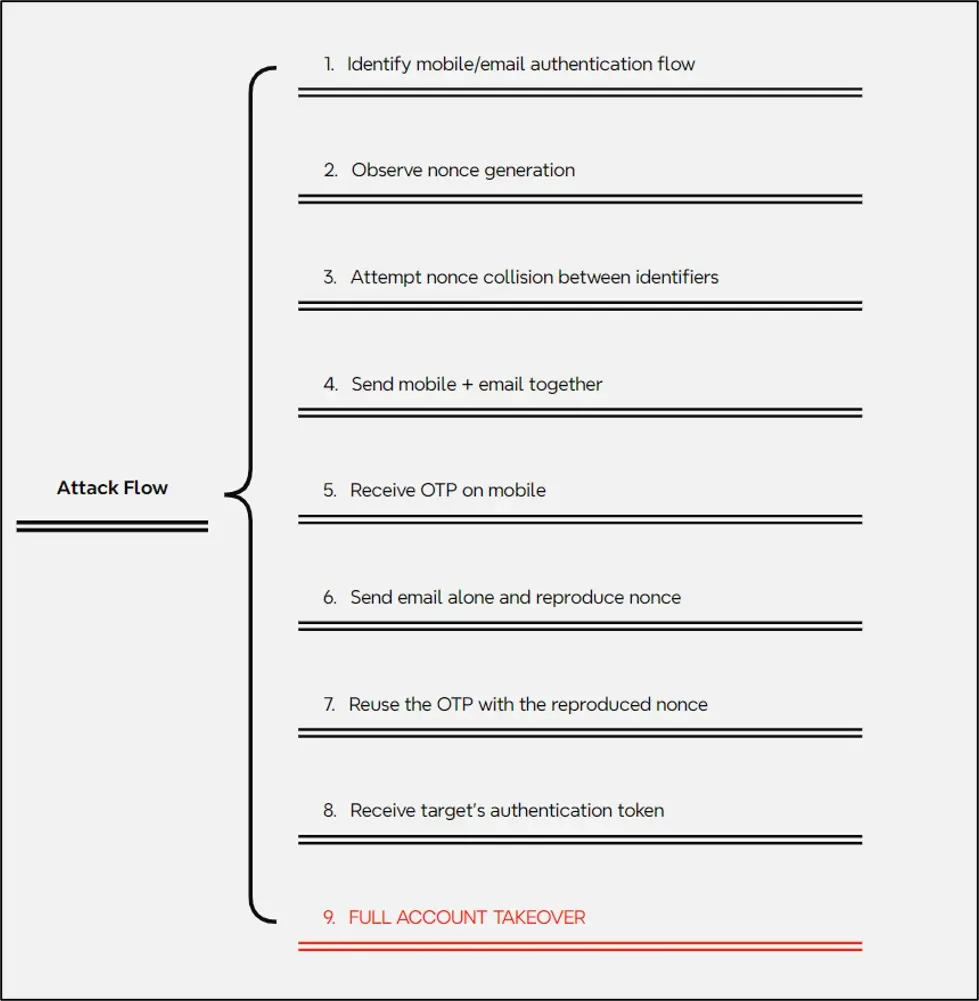
The complete attack chain can be summarised as follows:
Fix
The report does not describe any remediation or confirm that a fix was applied. Based on the root cause, the nonce should be bound to exactly one authentication identifier and one authentication attempt, and the backend should reject requests that supply more than one identifier for a single login attempt. The verification endpoint should also confirm that the nonce, the OTP and the identifier belong to the same authentication state rather than trusting the nonce and OTP alone.
Variants to test
- Multiple identifiers in one request. Send both the mobile and email parameters in the same login body, then repeat the flow with each identifier alone and compare the returned nonces. A positive result is the same nonce being issued for both identifiers.
- Cross-identifier OTP reuse. Generate an OTP through one identifier and submit it against the flow started with the other identifier for the same account. A positive result is the OTP being accepted where it should not be.
- Parameter ordering. Place the identifier you want the OTP delivered to as the second parameter in the JSON body, as the researcher did, and observe which identifier receives the OTP. A positive result is delivery to the second parameter while the nonce remains valid for both.
- Other identifier pairs. Where an application supports more than one login identifier (username, email, phone, user ID), try combinations in a single request and check whether one nonce spans both contexts.
- Nonce collision attempts. Try to obtain the same nonce for two different accounts of the same identifier type. The report notes this did not work for two phone numbers, but it is worth testing on other targets where the nonce generation logic may differ.
What happened, in plain words
An application let people log in with either a phone number or an email address. Logging in happened in two steps: first you told the app who you are and it sent you a one-time code (a short number, usually by SMS or email), then you typed that code back in and the app let you in.
The researcher found that if you sent the app both a phone number and an email address in the same first request, the app created a single internal ticket (called a "nonce") that could be associated with both. The one-time code was sent to the phone, but the same ticket could then be used with the email side of the flow, and the code from the phone side was accepted there too. Because the second step appeared to rely only on the ticket and the code, an attacker could point this at someone else's account and receive a valid login token for that account. That is a full account takeover: logging in as another person without knowing their password.
This article walks through the whole thing from zero. You only need to be comfortable using a browser.
The pieces you need to know first
Before the story makes sense, here are the basic ideas, explained as if you have never seen them.
API. An API is the part of a website that the page talks to behind the scenes. When you type your phone number into a login box and press a button, your browser does not reload the whole page; it quietly sends a small message to the server and gets a small answer back. That message-and-answer channel is the API. Think of a restaurant: the menu and the waiter are the API, the kitchen is the server. You never walk into the kitchen yourself; you tell the waiter what you want and the waiter brings back a plate.
Request and response. A request is the message your browser sends ("here is my phone number, please send me a code"). A response is what comes back ("done, code sent" or "here is your token"). Every step in this article is one request and one response.
JSON body. Many requests carry their details in a small structured text format called JSON. It looks like a list of labels and values in curly brackets, for example {"mobile": "..."}. The "body" is simply the part of the request that carries this data, as opposed to the address (URL) or the headers.
Parameter. A parameter is one labelled piece of data inside that body. In {"mobile": "...", "email": "..."} there are two parameters: one called mobile and one called email. The name of the parameter is the label; the value is what you put next to it.
OTP. A one-time password. A short code, valid once, that the app sends you to prove you really control the phone number or email address you claim. It is the "something you have" half of logging in.
Nonce. A made-up word meaning "number used once". It is a random-looking string the server creates for a single login attempt, so that when you come back with your OTP the server can tell which attempt you are continuing. The report describes it as a GUID, which is just a long random identifier in a standard format. Think of a cloakroom ticket: you hand in your coat, you get a ticket with a number, and later you hand the ticket back to collect the coat. The ticket itself proves nothing about who you are; it only links the two halves of one visit.
Token (authentication token). After a successful login, the server gives your browser a token: a long secret string that says "this person is already logged in". Your browser sends it with every later request so you do not have to type your password again. It works like a wristband at an event: once you have it, staff let you back in without checking your ID again. Anyone who steals the wristband can walk in as you, which is exactly why this bug matters.
Out of band. The OTP arrives through a different channel from the one you are using. You are on a website, but the code comes by SMS or email. That separation is supposed to make life harder for an attacker.
Account takeover. The security term for an attacker getting into someone else's account. It is the worst outcome for a login system, because everything the real user can do, the attacker can now do too.
Parameter confusion. The name of the vulnerability class here. It means the application receives more than one piece of data where it expected exactly one, and it mixes them up: it uses one of them for one decision and the other for a different decision, so the two no longer line up. A everyday comparison: a form asks for your name and your date of birth, and the clerk writes your name in the date-of-birth box. Each field is filled in, but the record is now wrong in a way nobody notices until it matters.
The login flow as designed
The target was an application whose login accepted either a phone number or an email address. The flow had two steps.
- The first request takes one identifier (phone number or email) and returns a freshly generated nonce.
- The second request carries the nonce and the OTP to a verification endpoint. If it succeeds, the server returns an authentication token.
At first glance there was nothing unusual: identifier in, nonce out, OTP delivered out of band, nonce plus OTP verified, token issued. The report does not name the application, the program or the platform beyond the login feature itself.
Step by step through the normal flow
The first request
The first request in the flow accepts a phone number or an email address and generates a nonce. That nonce is a GUID bound to the generated OTP and is used later during OTP verification.
Figure 1, Login request containing the mobile number and generated "nonce"
What this shows: you send your phone number, and the server replies with a nonce. The nonce is the cloakroom ticket. The server also quietly generates an OTP and sends it to your phone. At this point the server has generated an OTP and sent it to your phone, and the nonce is bound to that OTP.
The second request
After the OTP is received, a second request carries the nonce and the OTP. If verification succeeds, the server returns an authentication token.
Figure 2, OTP and "nonce" verification request returning the authentication token
What this shows: you hand back the ticket (nonce) and the code (OTP). The server checks them and, if they match, gives you the wristband (token). Notice what is not in this second request: your phone number or email address. The server relies on the nonce to know which login attempt this is.
The observation that started it
What caught the researcher's attention was that the verification request appeared to rely solely on the nonce and the OTP, without carrying the authentication identifier itself. That raised the obvious question: what exactly is the nonce bound to?
If the nonce were associated only with the OTP rather than strictly tied to the identifier that started the flow, it might be possible to cross the boundary between different authentication identifiers. In plain words: if the cloakroom ticket is only linked to the coat and not to the person who handed it in, then anyone holding the ticket can collect the coat.
The first idea, and why it failed
The first idea was to generate the same nonce for two different phone numbers. If that worked, the flow could be confused so that an OTP verification was associated with the wrong account. Considerable time went into attempting a nonce collision between two phone numbers, and it did not work. After several attempts the researcher concluded that this approach was not going anywhere.
Why try it: if two different phone numbers could share one nonce, then a code sent to your own phone might be accepted for someone else's. It is the most direct version of the attack. It failed, which is useful information: the nonce generation was not that weak.
Exploitation
Step 1: send both identifiers in one request
The application supported two identifiers, mobile and email, and under normal circumstances the user was expected to supply one at a time. The intended flows were:
mobile → Login → "nonce"
or:
email → Login → "nonce"
Line by line: the first block means "send a mobile number to the login request, get a nonce back". The second block means the same thing with an email address. The arrow is just "then". These are the two paths the app was designed for, and you are meant to pick one.
Breaking away from the intended flow, the researcher sent both parameters together:
mobile + email → Login → "nonce"
Line by line: this is one single login request that contains both a mobile number and an email address at the same time. The app was never designed to receive both, which is exactly why it is worth trying. Software often behaves strangely when it gets input it did not expect.
Figure 3, Sending both mobile and email parameters in the same request and receiving the OTP on the mobile number
The application responded in an interesting way: the OTP was sent to the phone number.
At first this looked like a failure. The code went to the phone, which is what would have happened if only the phone number had been sent. But the phone number had been added as the second parameter in the JSON body, which prompted a closer look at how the backend handled the two identifiers.
Why the ordering matters: in a JSON body the parameters appear in a sequence. The phone number had been added as the second parameter in the JSON body, which prompted a closer look at how the backend handled the two identifiers.
Step 2: reproduce the nonce with the email alone
The phone number was removed and the same email address was sent again, this time as the only identifier. The application generated the exact same nonce again.
Figure 4, Sending the email alone and receiving the previously generated "nonce" again
This was the first major breakthrough: the application had generated the same nonce for the authentication flow involving the different login parameters. In cloakroom terms, the same ticket number came back out for a different coat. The new hypothesis was whether the OTP generated in the previous flow could also be reused.
Why this matters: a nonce is supposed to be unique to one attempt. If the same one comes back for a different identifier, then the two identifiers are sharing one authentication state, and anything tied to that state is shared too.
Step 3: reuse the OTP across the two flows
Before touching another account, the researcher validated the behaviour using identifiers they controlled. An OTP had already been generated through the mobile-based flow, and the test was whether that same OTP would be accepted by the email-based flow associated with the same authentication state.
Figure 5, Reusing the OTP obtained through the mobile flow with the email-based flow
The OTP was accepted. This was the second major breakthrough: the nonce and OTP were not strictly bound to a single login identifier. The authentication flow could therefore be represented as:
Why test on your own accounts first: it proves the behaviour is real and repeatable without touching anyone else's data. It also gives you a clean, honest demonstration for the eventual report.
Step 4: reproduce the flow against the target account
With the behaviour confirmed on controlled accounts and identifiers, the final step was to reproduce the same flow using the target account's identifier. The application allowed the authentication request to be constructed using both mobile and email, while generating a nonce that was not uniquely bound to a single identifier. Once the appropriate nonce and OTP were available, they were sent to the verification endpoint.
Figure 6, Sending the OTP and "nonce" to the verification endpoint and receiving the victim's authentication token
The server accepted the verification request and returned a valid authentication token associated with the target account. The token was then used to authenticate to the application: it was valid, and the researcher was fully authenticated as the victim. The impact was no longer theoretical, and the result was a full account takeover.
In plain words: once the appropriate nonce and OTP were available, they were sent to the verification endpoint and the server returned a token for the victim's account. The server hands back a wristband with the victim's name on it.
Root cause
The root cause was the way the application generated and associated the nonce with the login identifiers. The application supported two authentication identifiers, email and mobile, but when both parameters were supplied it generated a single nonce that could be associated with both authentication contexts. Conceptually, the vulnerable behaviour looked like this:
The critical issue was that the nonce was not uniquely bound to one specific authentication identifier and one authentication attempt. The intended behaviour was to accept either an email address or a phone number for a login attempt, but the backend allowed both identifiers to participate in the same authentication flow. As a result, the same authentication state could be reproduced across the email and mobile login parameters. Because the subsequent verification endpoint relied on the nonce and OTP, this parameter confusion allowed the authentication flow to be manipulated and resulted in the issuance of a valid authentication token for another user's account.
In everyday terms: the app was supposed to write one name on one cloakroom ticket. Instead it wrote two names on the same ticket, and the person collecting the coat only had to show the ticket.
Impact
An unauthenticated attacker could bypass the intended authentication flow and obtain a valid authentication token for another user's account. The impact included:
- Authentication bypass
- Unauthorized access to another user's account
- Valid session/token issuance
- Full account takeover
The issue was therefore not merely a parameter-validation problem: the vulnerable parameter handling directly affected the application's authentication boundary and allowed an attacker to authenticate as another user.
The complete attack chain can be summarised as follows:
Why "not merely a parameter-validation problem" matters: it is tempting to file this as "the app should have rejected two parameters". But the real damage is that the login boundary itself was crossed. The severity comes from what the bug lets you do, not from how small the coding mistake looks.
Fix
The report does not describe any remediation or confirm that a fix was applied. Based on the root cause, the nonce should be bound to exactly one authentication identifier and one authentication attempt, and the backend should reject requests that supply more than one identifier for a single login attempt. The verification endpoint should also confirm that the nonce, the OTP and the identifier belong to the same authentication state rather than trusting the nonce and OTP alone.
In plain words: one ticket per coat, and the person collecting has to show both the ticket and something that ties them to that coat.
Variants to test
If you want to look for the same pattern elsewhere, these are the variations worth trying. Each one is a small change to the same idea.
- Multiple identifiers in one request. Send both the mobile and email parameters in the same login body, then repeat the flow with each identifier alone and compare the returned nonces. A positive result is the same nonce being issued for both identifiers.
- Cross-identifier OTP reuse. Generate an OTP through one identifier and submit it against the flow started with the other identifier for the same account. A positive result is the OTP being accepted where it should not be.
- Parameter ordering. Place the identifier you want the OTP delivered to as the second parameter in the JSON body, as the researcher did, and observe which identifier receives the OTP. A positive result is delivery to the second parameter while the nonce remains valid for both.
- Other identifier pairs. Where an application supports more than one login identifier (username, email, phone, user ID), try combinations in a single request and check whether one nonce spans both contexts.
- Nonce collision attempts. Try to obtain the same nonce for two different accounts of the same identifier type. The report notes this did not work for two phone numbers, but it is worth testing on other targets where the nonce generation logic may differ.
Glossary
- API: the behind-the-scenes channel a web page uses to send requests to a server and receive answers, without reloading the page.
- Request: a message sent from your browser to a server, asking it to do something.
- Response: the message the server sends back.
- JSON: a simple text format for structured data, using labels and values in curly brackets.
- Body: the part of a request that carries data such as parameters, as opposed to the address or headers.
- Parameter: one labelled piece of data in a request, such as
mobileoremail. - Identifier: the thing you use to say who you are when logging in, here a phone number or an email address.
- OTP (one-time password): a short code valid for a single use, sent to you to prove you control a phone number or email address.
- Nonce: a random value created for one login attempt so the server can recognise that attempt later; the report describes it as a GUID.
- GUID: a long random identifier in a standard format.
- Token (authentication token): a secret string issued after a successful login that proves you are already authenticated on later requests.
- Session: the state of being logged in, carried between requests usually by a token or cookie.
- Cookie: a small piece of data a website stores in your browser and gets back on later requests, often used to keep you logged in.
- Endpoint: a specific address on a server that performs one job, such as the login endpoint or the verification endpoint.
- Out of band: delivered through a different channel from the one you are using, for example an SMS code while you are on a website.
- Verification: the step where the server checks that the code you typed matches the one it sent.
- Authentication: proving who you are, usually by logging in.
- Authentication bypass: getting past the login check without completing it properly.
- Account takeover: an attacker gaining control of another person's account.
- Parameter confusion: a bug where an application receives more than one piece of data where it expected one, and mixes them up so its decisions no longer line up.
- Nonce collision: two different login attempts ending up with the same nonce.
- Root cause: the underlying reason a bug exists, as opposed to its visible symptom.
- Impact: what an attacker can actually do because of the bug.
- Unauthenticated attacker: someone who is not logged in and has no account privileges on the target.
- Victim: the person whose account is attacked.
- Remediation: the fix applied to close a vulnerability.
- Vulnerability: a weakness in software that an attacker can use to do something harmful.



