Admin Panel? Pwned!
An admin dashboard's JavaScript file contained hardcoded credentials in a comment, which the researcher used to log in. An attacker could access the admin panel and view and download data.
 Published on infosecwriteups.com
Hello everyone, welcome to my first writeup about a funny story of how some admins store their passwords nowadays.
The full write-up lives on its author's site
It belongs to its author, so we link to it rather than copy it. The other two tabs are our own rewrites, checked against it.
Context
This is a story about a subdomain that turned out to expose an admin login panel, and about what was sitting in the source code behind that panel. The target was picked on HackerOne and the author does not disclose which company it belongs to; the subdomain is written as dashboard.redacted.com throughout. The finding was closed as a duplicate, so credit for the first report goes to another researcher.
The feature involved is a dashboard subdomain. The report does not describe what the dashboard normally does beyond the fact that, once logged in, the author could view and download data. There was no upload endpoint and nothing else to interact with.
Setup
The author does not name any accounts, roles or credentials used during the work. The tooling was deliberately simple:
assetfinderandsubfinderfor subdomain enumeration.httpxto probe the results, collecting title, status code and content length.
That pipeline produced around 60 alive unique subdomains. The author notes that this is the workflow everyone uses and that he does not recommend it, since being different from others helps avoid duplicates.
Finding it
The author's habit is to review the subdomain list without taking screenshots. Title, status code and content length are treated as enough to triage, and the argument is that screenshots produce blank images or redirects that hide what is actually there.
Scrolling through the list, one entry stood out: dashboard.redacted.com, returning a 301 redirect. The name plus the redirect was enough to justify a quick look.
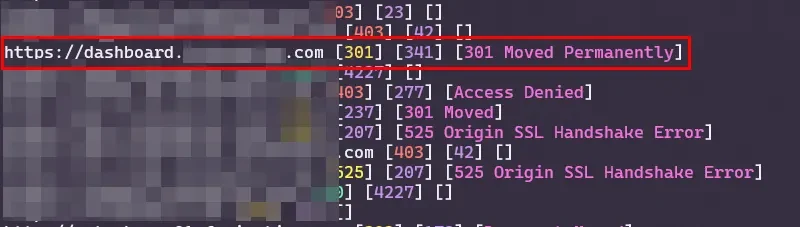
The screenshot shows the subdomain in the enumeration output, with the caption interesting subdomain!.
The plan was to intercept the redirect and work from there, but opening the URL led straight to an admin login page instead.
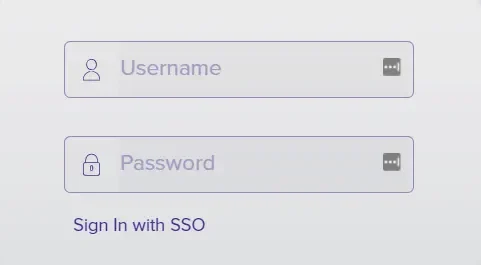
The screenshot shows the login panel, captioned login panel.
Exploitation
Step 1: Try the obvious attacks on the login page
The author started with the usual set: guessing default credentials, looking for hidden unsanitized parameters for XSS, and injecting single and double quotes for SQLi. None of it worked.
Step 2: Read the page source
The next step, described as the one most people skip, is reading the source code of the page. The advice given is to do this on every endpoint visited, because a one minute check sometimes pays off.
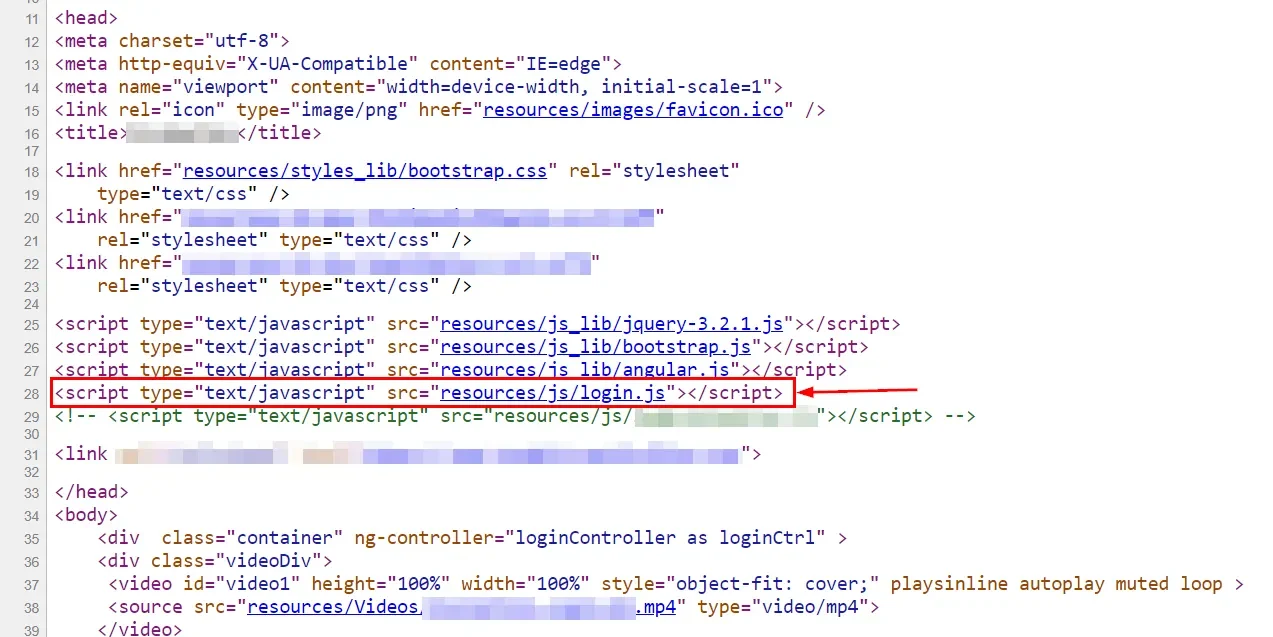
The screenshot shows the page source of the login panel.
Step 3: Follow the JavaScript file
In the source there was a JavaScript file whose name, according to the author, should really get your attention. Rather than moving on to the next subdomain, the author opened the file.
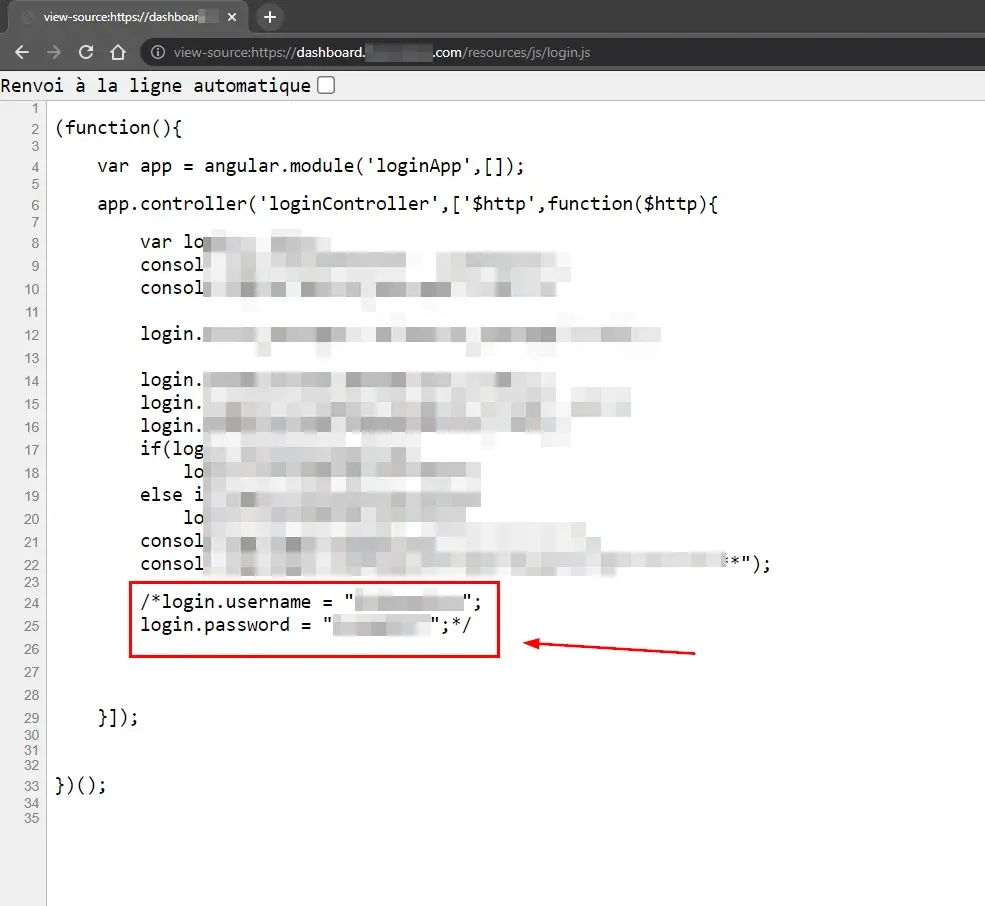
The screenshot shows the JavaScript file the author opened.
Step 4: Use the credentials found in a comment
The file contained credentials stored inside a JavaScript comment. The author was sceptical that they would be valid, then tried them.
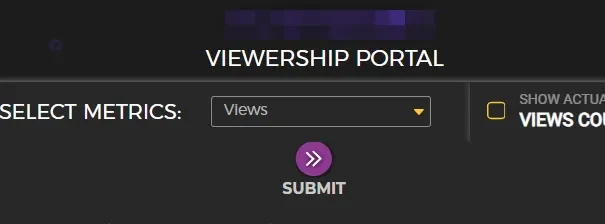
The screenshot is captioned Pwned :D.
The credentials worked and the author got into the admin account. The author deliberately does not screenshot the whole dashboard, because the design would make the company easy to identify. Inside, there was nothing to escalate with: no upload endpoint, only the ability to view data and download it.
Root cause
Credentials were placed inside a comment in a client-side JavaScript file served by the dashboard subdomain. Anything a browser can fetch is public, so a comment is not a hiding place: it is delivered to every visitor who opens the file, whether or not they are authenticated. The author's attempts at default credentials, parameter probing and quote injection did not work, but the secret that unlocked the panel was sitting next to the door.
The report does not describe how the file was referenced or whether the comment was meant to be temporary. The weakness is best described as information disclosure leading to hardcoded credentials.
Impact
An unauthenticated visitor who reads the JavaScript file obtains working admin credentials and can log in to the dashboard. In this case the account could view and download data; there was no upload functionality and no further escalation was found. The author notes that the dashboard design would identify the company, which is why the screenshots stop at the login.
The finding was closed as a duplicate, so credit went to the first researcher who reported it.
Fix
The fix that follows from the finding is to remove the credentials from the JavaScript file and rotate them, since anything served to the browser must be assumed public. Secrets belong on the server side, and admin panels should not rely on a password that ships with the front end.
Variants to test
- JavaScript files on every subdomain. Fetch each
.jsreferenced by a page and search for comments,password,token,apiKeyand internal paths. A positive result is a credential or key that authenticates against a real endpoint. - Subdomains with redirects and telling names. Names like
dashboard,admin,internalorstagingcombined with a 301 are worth a manual look. A positive result is a login panel or an internal tool that is not meant to be public. - Source code of login pages. View source before attacking the form. A positive result is a reference to a script, a hidden field or a comment that reveals how authentication works.
- Triage without screenshots. Use title, status code and content length from
httpxto spot outliers. A positive result is an entry whose title or size does not match the rest of the fleet. - Post-login surface. Once inside, enumerate what the account can do. A positive result is an upload, an export of other users' data, or an API call the UI does not expose.
Takeaways
- Recon done properly, with a quick manual look at anything unusual, is what produced this finding.
- Read the source code, and especially the JavaScript files: credentials, API keys and hidden endpoints end up there.
- Trust the gut feeling that says a one minute check is worth it.
- A duplicate is not the end; the author kept going and had another bug triaged afterwards.
What happened, in plain words
A security researcher was looking for bugs on a company's website, as part of a bug bounty programme on HackerOne. A bug bounty programme is a deal where a company says: if you find a security problem in our systems and tell us about it responsibly, we may pay you a reward and we will not be angry with you. The researcher does not say which company it was, so the address in this story is written as dashboard.redacted.com.
While listing the company's subdomains (smaller sites that sit under the main domain, like separate buildings on one campus), the researcher noticed one called dashboard.redacted.com. The word "dashboard" suggests a control panel, the kind of page where staff manage things. Opening it led to an admin login page: a form asking for a username and password.
The researcher tried the obvious tricks on that login form and none of them worked. Then came the step most people skip: reading the page's source code, the raw text a browser receives before it draws the page. In that source there was a reference to a JavaScript file, and inside that file, in a comment, were credentials. A comment is text a programmer leaves in code for humans to read; the browser ignores it, but anyone can still see it. The researcher tried those credentials on the login form and got in.
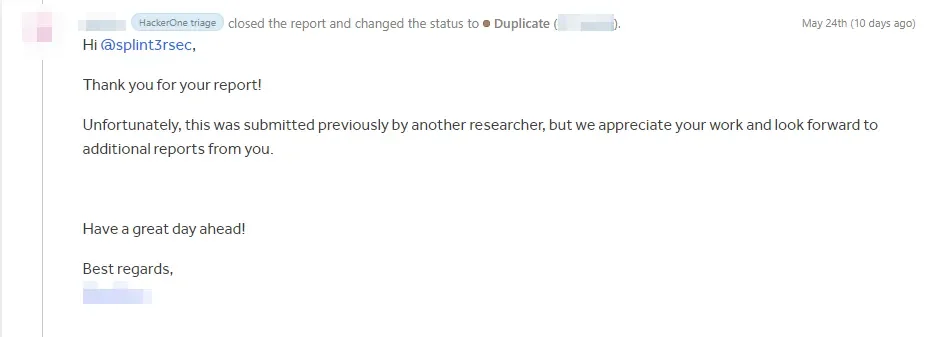
The finding was closed as a duplicate, meaning someone else had reported the same problem first, so the first reporter got the credit. The lesson still stands: a secret written into a file that every visitor's browser downloads is not a secret at all.
Recon phase: finding the pieces
"Recon" is short for reconnaissance: the information-gathering stage before any testing. Think of a burglar walking around a building first, noting doors and windows, before touching anything. In web security, recon means finding out which parts of a company's online presence exist and are reachable.
The researcher picked a target on HackerOne and started enumerating subdomains. A subdomain is a name that comes before the main domain, for example shop.example.com versus example.com. Companies often run many of them: one for the shop, one for support, one for internal tools. Each is a possible way in, and some are forgotten or less carefully protected.
The tooling was deliberately simple, in this order:
assetfinderandsubfinderfor subdomain enumeration. These are command-line programs that collect subdomain names from public sources and other clues.httpxto probe the results, collecting title, status code and content length.
httpx here is a probing tool: for each subdomain name it makes a request and records what comes back. The three things it records are worth explaining, because the whole method depends on them:
- Title: the text shown in the browser tab, taken from the page's HTML. It often says what the page is, for example "Admin Login".
- Status code: a three-digit number the server sends with every response.
200means "here is the page".301means "this page has moved, go to this other address instead" (a redirect).404means "not found".403means "forbidden". - Content length: how big the response is, in bytes. A tiny page and a large application look very different by size alone.
That pipeline produced around 60 alive unique subdomains. "Alive" means the server actually answered; "unique" means duplicates were removed. The researcher notes that this is the workflow everyone uses and that he does not recommend it, since being different from others helps avoid duplicates.
Subdomain analysis: spotting the odd one out
The researcher's habit is to review the subdomain list without taking screenshots. A screenshot means opening each subdomain in a browser and capturing the picture. The argument against relying on screenshots is practical: you get blank images, or you land on redirects that hide what is actually there, and you probably miss something. Title, status code and content length are treated as enough to triage, that is, to sort the list into "worth a look" and "ignore".
Scrolling through the list, one entry stood out: dashboard.redacted.com, returning a 301 redirect. Two signals combined here. The name suggests an admin area, and a redirect suggests the server is sending visitors somewhere specific, possibly a login page. Either alone might be nothing; together they were enough to justify a quick look.
The screenshot shows the subdomain in the enumeration output, with the caption interesting subdomain!.
The plan was to intercept the redirect and work from there. Intercepting means pausing the browser's request and response so you can inspect or change them, usually with a proxy tool. But opening the URL led straight to an admin login page instead, so there was no redirect trick to play.
The screenshot shows the login panel, captioned login panel.
Pwn phase: from login form to admin access
"Pwn" is informal security slang for defeating or taking over a system. The heading is a joke about how the story ends.
Step 1: Try the obvious attacks on the login page
The researcher started with the usual set of attacks on a login form. Each one targets a different weakness:
- Guessing default credentials. Many systems ship with well-known default usernames and passwords, such as
admin/admin, and some are never changed. Trying them costs seconds. - Looking for hidden unsanitized parameters for XSS. A parameter is a piece of information in a URL or form, for example the
qinsearch?q=hello. "Unsanitized" means the site takes what you typed and puts it into the page without cleaning it. XSS, cross-site scripting, is the attack that follows: if you can get your own text, including code, into a page other people view, that code runs in their browser. On a login page, a hidden parameter might reflect your input somewhere. - Injecting single and double quotes for SQLi. SQL is the language databases speak. SQL injection means slipping database instructions into an input field so the database runs them. A single quote (
') or double quote (") is the classic probe: in SQL these characters mark the start and end of text, so an unhandled quote often causes an error, and an error is a hint that the input reaches the database.
None of it worked. The login form held up against all three.
Step 2: Read the page source
The next step, described as the one most people skip, is reading the source code of the page. Every browser can show it: you right-click and choose to view the page source, or open the developer tools. What you see is the raw HTML, CSS and JavaScript the server sent, before the browser turned it into the page on screen.
The advice given is to do this on every endpoint visited. An endpoint is simply an address the server answers on, a URL that does something. The reasoning is that a one minute check sometimes pays off, and it costs almost nothing.
The screenshot shows the page source of the login panel.
Step 3: Follow the JavaScript file
In the source there was a reference to a JavaScript file whose name, according to the author, should really get your attention. JavaScript is the programming language of the browser: it makes pages interactive, and it is delivered to the browser as a file the page loads. Because the browser must download it to run it, anyone can read it.
Rather than moving on to the next subdomain, the researcher opened the file. This is the key habit: when the source points at another file, follow the pointer.
The screenshot shows the JavaScript file the researcher opened.
Step 4: Use the credentials found in a comment
The file contained credentials stored inside a JavaScript comment. A comment is text the programmer writes for other humans; the browser skips it when running the code, but it is still part of the file and still arrives at every visitor. The researcher was sceptical that the credentials would be valid, then tried them on the login form.
The screenshot is captioned Pwned :D.
The credentials worked and the researcher got into the admin account. The researcher deliberately does not screenshot the whole dashboard, because its design would make the company easy to identify. Inside, there was nothing to escalate with: no upload endpoint, only the ability to view data and download it. "Escalate" means turning a small access into a bigger one, for example from viewing data to changing it or reaching other systems.
Why it worked
Credentials were placed inside a comment in a client-side JavaScript file served by the dashboard subdomain. "Client-side" means the code runs in the visitor's browser, not on the company's server. Anything a browser can fetch is public: the file is downloaded by every visitor who opens the page, whether or not they are logged in, and anyone can save it and read it at leisure.
A comment is therefore not a hiding place. It is like writing the door code on a note taped to the door: the lock may be strong, but the code is right there for anyone who looks. The researcher's attempts at default credentials, parameter probing and quote injection did not work, but the secret that unlocked the panel was sitting next to the door.
The report does not describe how the file was referenced or whether the comment was meant to be temporary. The weakness is best described as information disclosure leading to hardcoded credentials. Information disclosure means the system reveals something it should keep private. Hardcoded credentials means a username and password written directly into code, rather than stored safely on the server and changed when needed.
Impact
An unauthenticated visitor, meaning someone who has not logged in, who reads the JavaScript file obtains working admin credentials and can log in to the dashboard. In this case the account could view and download data; there was no upload functionality and no further escalation was found. The researcher notes that the dashboard design would identify the company, which is why the screenshots stop at the login.
The finding was closed as a duplicate, so credit went to the first researcher who reported it.
Fix
The fix that follows from the finding is to remove the credentials from the JavaScript file and rotate them, that is, replace them with new ones, because the old ones must be assumed to be in other people's hands. Secrets belong on the server side, where visitors cannot download them, and admin panels should not rely on a password that ships with the front end.
Variants to test
These are the same ideas generalised, so a beginner can try them on their own targets.
- JavaScript files on every subdomain. Fetch each
.jsfile referenced by a page and search it for comments,password,token,apiKeyand internal paths. A positive result is a credential or key that authenticates against a real endpoint. - Subdomains with redirects and telling names. Names like
dashboard,admin,internalorstagingcombined with a 301 are worth a manual look. A positive result is a login panel or an internal tool that is not meant to be public. - Source code of login pages. View the source before attacking the form. A positive result is a reference to a script, a hidden field or a comment that reveals how authentication works.
- Triage without screenshots. Use title, status code and content length from
httpxto spot outliers. A positive result is an entry whose title or size does not match the rest of the fleet. - Post-login surface. Once inside, list what the account can do. A positive result is an upload, an export of other users' data, or an API call the interface does not expose. An API is the set of addresses a program uses to talk to a server directly, without a human clicking buttons.
Takeaways
- Recon done properly, with a quick manual look at anything unusual, is what produced this finding.
- Read the source code, and especially the JavaScript files: credentials, API keys and hidden endpoints end up there.
- Trust the gut feeling that says a one minute check is worth it.
- A duplicate is not the end; the researcher kept going and had another bug triaged afterwards.
Glossary
- 301 redirect: a status code meaning the requested page has moved permanently; the server tells the browser to go to another address.
- API: the set of addresses and rules a program uses to talk to a server directly, without a human clicking through pages.
- Assetfinder: a command-line tool that collects subdomain names from public sources.
- Bug bounty programme: a scheme where a company invites researchers to report security problems, often with a reward, instead of punishing them.
- Client-side: code that runs in the visitor's browser rather than on the company's server, and is therefore downloadable by anyone.
- Comment (in code): text a programmer writes for humans; the browser ignores it when running the code, but it is still delivered in the file.
- Content length: the size of a server's response in bytes, used as a quick signal of what kind of page it is.
- Credentials: a username and password (or similar) used to prove who you are when logging in.
- Cross-site scripting (XSS): an attack where text you control, including code, ends up in a page other people view and runs in their browser.
- Default credentials: the well-known username and password a system ships with, which are sometimes never changed.
- Duplicate: a report of a problem that someone else already reported first; credit goes to the first reporter.
- Endpoint: an address the server answers on, a URL that does something.
- Enumeration: systematically listing things that exist, such as all subdomains of a domain.
- Escalate: to turn a small level of access into a bigger one.
- Hardcoded credentials: a username and password written directly into code instead of being stored safely on the server.
- HackerOne: a platform where companies run bug bounty programmes and researchers submit reports.
- HTML: the language that describes the structure of a web page; the browser reads it to draw the page.
- httpx: a command-line probing tool that requests each subdomain and records its title, status code and content length.
- Information disclosure: a weakness where a system reveals something it should keep private.
- Intercept: to pause a request or response, usually with a proxy tool, so you can inspect or change it.
- JavaScript: the programming language browsers run to make pages interactive; it is delivered as files anyone can read.
- Parameter: a piece of information passed in a URL or form, such as the
qinsearch?q=hello. - Proxy: a tool that sits between your browser and the server so you can see and modify the traffic.
- Pwn: informal slang for defeating or taking over a system.
- Recon (reconnaissance): the information-gathering stage before testing, finding out what exists and is reachable.
- Rotate (credentials): replace a secret with a new one, because the old one must be assumed compromised.
- Screenshot: a picture of what a page looks like in a browser.
- Source code (of a page): the raw HTML, CSS and JavaScript the server sends, which the browser turns into the visible page.
- SQL: the language databases use to store and retrieve data.
- SQL injection (SQLi): slipping database instructions into an input field so the database runs them; a single or double quote is the classic probe.
- Status code: a three-digit number sent with every response, such as 200 (OK), 301 (moved), 403 (forbidden) or 404 (not found).
- Subdomain: a name that sits before the main domain, such as
shop.example.comversusexample.com. - Subfinder: a command-line tool that collects subdomain names from public sources.
- Title: the text shown in the browser tab, taken from the page's HTML, often describing what the page is.
- Triage: sorting findings into worth-a-look and ignore, usually quickly.
- Unauthenticated: not logged in, with no account or session proving who you are.
- Unsanitized: input that is used without being cleaned, so special characters keep their meaning.