Russian roulette XSS
A file upload feature accepted a filename containing a blind XSS payload, which later executed in an administrator's browser. An attacker could steal the administrator's session cookies and potentially take over their account.
 Published on splint3rsec.medium.com
It all happened during an exhaustive week of studying, the night before having a tough exam in Datascience, where I have to remember all kind of complex math formulas. 10 pm, tired of studying and don’t feel sleepy yet, I decided to hunt on Synack for 1 hour before going to bed.
The full write-up lives on its author's site
It belongs to its author, so we link to it rather than copy it. The other two tabs are our own rewrites, checked against it.
Context
This is a blind XSS found on a Synack target during a Blitz, a short promotion in which hunters receive an extra cash bonus depending on the severity of the report. The researcher does not name the target or the product. What the report does describe is a website that handles money transactions and runs in a foreign language the researcher could not speak, with a hidden section, reachable by digging through the settings, where users send documents to the site's administrators for verification.
The vulnerable feature is that document upload. A user picks a file, the browser sends it to the server, and the server stores it so an administrator can later review and approve it. The interesting property, from an attacker's point of view, is who eventually looks at the uploaded material: a privileged user, in a context the attacker cannot see. That is exactly the setting blind XSS is made for.
Setup
The researcher was hunting on Synack with LaunchPoint+, looking for new targets, and picked one that had a Blitz running. The session described here lasted about an hour, on the night before an 8 am exam, so time was the main constraint on how the testing was prioritised.
Tools and preconditions:
- Burp Suite, used as the intercepting proxy for the whole session, so every HTTP request was logged.
- A translation browser extension, because the site was in a language the researcher did not speak. The report notes that foreign language sites tend to be less tested by other hunters.
- A blind XSS payload hosted on XSS Hunter, appended to a filename.
- A Synack account with access to the target, and the target's scope, which the report stresses must be read before involving any third party service.
Finding it
The researcher logged in and clicked through every button and section, testing functionality until familiar with the platform. Back in Burp, the API requests in the log looked the most interesting, so the first attempts went after business logic, since the site deals with money: paying negative amounts, withdrawing a different amount than requested, changing POST requests to GET, and similar combinations. None of them worked. IDOR was the next idea, because the requests carried numerical IDs, but a hash value calculated in the cookies prevented tampering with them.
What did work was a hidden section of the site, found by digging through the settings. It contained an upload button for sending documents to the administrators so they could verify them. Two details made it a good attack point: the button did not disappear after documents were sent, so the same upload could be repeated as many times as needed, and the only limit was that this lasted until the admins approved the documents.
Exploitation
Step 1: behave like a normal user
The researcher uploaded a dummy file through the interface and clicked upload, then inspected the request in Burp. The file goes to the website in a JSON POST request with two keys: filename, the name of the document, and data, which holds the base64 value of the document itself.
Step 2: put the payload in the filename
With the session nearly over, the researcher appended a blind XSS payload to the filename, on the reasoning that even if it did not fire, the site would be familiar ground for testing the next day.
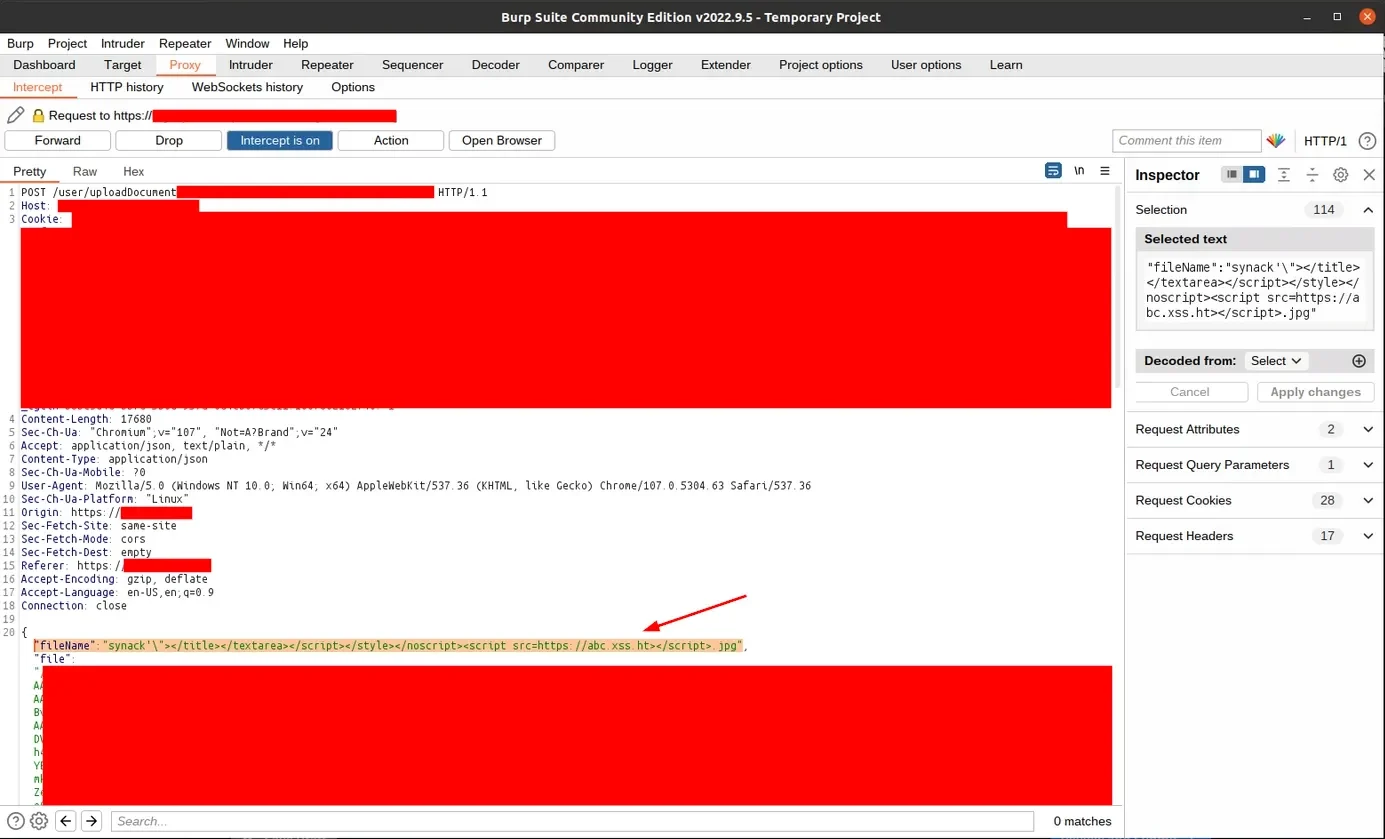
The screenshot shows the XSS Hunter payload in the filename field. The researcher notes that the XSS Hunter URL visible in it is not theirs.
Step 3: wait for the callback
The payload was sent and the researcher went to sleep. The next day was a normal one, with nothing in the inbox: an exam at 6 am revision, the university, then home and study for the next exam. Wifi on the phone was off during study, and when it was switched back on there were five consecutive Gmail notifications that the payload had fired somewhere on the internet. The researcher checked whether it was a false positive, concluded it was not, and rushed to report before the finding could be duplicated.
Step 4: report, then expand the report
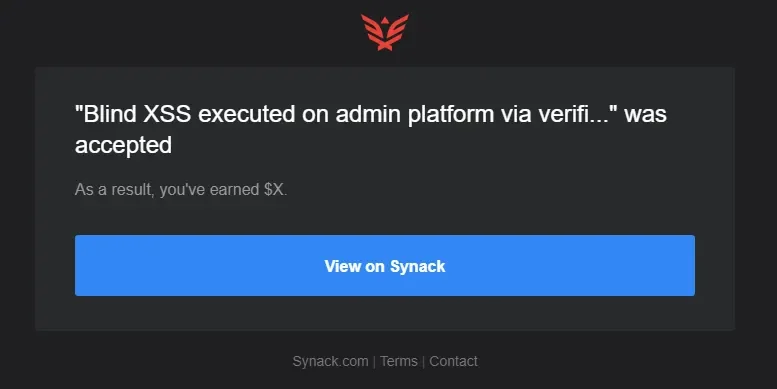
A fast report went in at 11 pm with PoC screenshots, cookies and steps. Two days later the VO asked for more: what an attacker can actually do with the cookies, XSS Hunter screenshots, and more detailed steps. The researcher rewrote it at length, being as specific as possible so the client would understand every detail. That same evening an email confirmed the vulnerability was accepted.
Root cause
The report does not describe the server-side code, so the mechanism can only be inferred. The upload endpoint accepts a JSON body in which filename is fully attacker controlled, and the value is stored and later rendered somewhere without output encoding, so the payload executes in a browser when the document is reviewed. The upload form itself is not the execution point: the researcher never saw the payload fire, only the XSS Hunter callback.
Why the existing defences did not stop it is not stated. What the report does show is that the upload could be repeated until an administrator approved the documents, which gave the payload more than one chance to be viewed.
Impact
The payload fired somewhere on the internet, and the report's own follow-up with the VO centred on what an attacker can do with the cookies captured that way. In practice that means an attacker who can get a document in front of an administrator may be able to run script in that administrator's browser, which on a site that handles money transactions and document verification is a serious step up from a normal user account. The report does not enumerate the specific actions taken with the captured session, and the exact privileges of the reviewing administrator are not described.
The conditions are worth stating plainly: the payload only fires when an administrator opens the uploaded document's details, and the window for repeated uploads closes once the documents are approved.
Fix
The fix that addresses the root cause is to treat filename as untrusted data everywhere it is displayed: encode it on output in the administrative interface, and validate or normalise it on upload, for example by restricting it to a safe character set or by storing the original name as data and displaying a generated identifier instead. Content Security Policy would reduce the impact of any missed sink but would not remove the injection itself.
Variants to test
- Other metadata fields in the same JSON body. The upload carries
filenameanddata; try payloads in any other field the endpoint accepts, such as a description or document type. A positive result is an XSS Hunter callback when an administrator views the record. - Filename in other upload features. Profile pictures, support attachments, import features and CSV uploads often reuse the same storage and admin review code. A positive result is the same callback pattern from a different endpoint.
- The approval workflow itself. If administrators can comment on or reject documents, test whether the filename or other submitted values are reflected in those notifications. A positive result is a callback triggered by an action other than opening the document.
- Repeated submission before approval. The report notes the upload button stayed available until approval; check whether other targets allow the same, since it multiplies the chances of the payload being rendered.
- Scope check first. Before using any third party blind XSS service, read the programme's scope: the report explicitly warns that if third parties are not allowed, services like XSS Hunter must not be used.
What happened, in plain words
A security researcher spent an evening hunting for bugs on a bug bounty platform called Synack. Bug bounty platforms are places where companies invite independent testers to look for security problems in their websites and pay them for the ones they find. That night the researcher picked a website that was running a "Blitz", which the report describes as a short promotion where testers get extra cash on top of the normal reward, depending on how serious the bug turns out to be.
The website was in a language the researcher could not speak, and it dealt with money transactions. After clicking around and trying a few ideas that did not work, the researcher found a hidden section where users upload documents so that the site's administrators can check them. The researcher uploaded a normal file, watched what the browser actually sent to the server, and then put a small piece of malicious code into the file's name instead. That kind of code is called a cross-site scripting payload, or XSS for short.
The trick is that the researcher never saw the code run. The code was designed to run later, in someone else's browser, when an administrator opened the uploaded document to review it. That is why it is called "blind": you fire it and wait for a signal that it went off. The signal came the next day, as five notifications on the researcher's phone. The report was accepted.

The setup
Before any of that, a few things had to be in place. The report lists them, and each one matters for understanding the rest.
- A bug bounty platform account. Synack is the platform. The researcher used a tool called LaunchPoint+ to browse the list of available targets. A target is a company website that the platform's client has agreed to have tested.
- A proxy tool called Burp Suite. A proxy sits between your browser and the website and records every request and response that passes through it. Think of it as a recording device on the phone line between you and the site: you still have a normal conversation, but afterwards you can read the whole transcript. Burp is how the researcher saw what the upload button really sent.
- A translation extension in the browser. The site was in a foreign language. The report notes that foreign language sites tend to be tested less by other hunters, because many are too lazy to translate the content. That is a useful observation for a beginner: less competition means a better chance of finding something first.
- A blind XSS payload hosted on a service called XSS Hunter. XSS Hunter is a third party website that gives you a special URL. When your payload runs in a victim's browser, it quietly contacts that URL and the service records the event and notifies you. You do not need to see the victim's screen; the callback tells you it happened.
- The target's scope. Scope is the written list of what you are allowed to test and how. The report stresses that you must read it before involving any third party service, because some programmes forbid sending data to outside websites.
Finding it
The researcher logged in and clicked through every button and section, testing functionality until familiar with the platform. This is deliberate: you cannot spot something unusual until you know what normal looks like.
Back in Burp, the log of all requests was available. The API requests looked the most interesting. An API is the part of a website that the browser talks to behind the scenes, exchanging data rather than whole pages. If a website is a restaurant, the API is the kitchen: you order from the menu, but the actual work happens out of sight. Watching API traffic is often more revealing than watching the pages themselves.
Because the site deals with money, the first attempts went after business logic. Business logic bugs are flaws in the rules of the site rather than in its code: for example, paying a negative amount, or withdrawing a different amount than you asked for. The researcher tried those, and also tried changing POST requests to GET. A POST request is the kind a browser sends when you submit a form; a GET request is the kind it sends when you simply open a page. Switching one to the other sometimes bypasses checks. None of these worked.
Next came IDOR. IDOR stands for Insecure Direct Object Reference: it is when a site uses a simple number to identify something, like invoice=1234, and does not check that you are allowed to see that particular invoice. You change the number and see someone else's data. The requests here carried numerical IDs, so it looked promising, but a hash value calculated in the cookies prevented tampering. A cookie is a small piece of data the site stores in your browser so it can recognise you on the next request, like a cloakroom ticket. A hash is a fingerprint of some data: change the data and the fingerprint no longer matches. The site was checking that fingerprint, so editing the ID broke the check.
What did work was a hidden section of the site, found by digging through the settings. It contained an upload button for sending documents to the administrators so they could verify them. Two details made it a good attack point: the button did not disappear after documents were sent, so the same upload could be repeated as many times as needed, and the only limit was that this lasted until the admins approved the documents.
Exploitation
Step 1: behave like a normal user
The researcher uploaded a dummy file through the interface and clicked upload, then inspected the request in Burp. The file goes to the website in a JSON POST request with two keys: filename, the name of the document, and data, which holds the base64 value of the document itself.
JSON is a way of writing data as labelled pairs, so a computer can read it unambiguously. Base64 is a way of turning any file, including a picture or a PDF, into a long string of ordinary text characters, so it can travel inside a text-based request. The point of doing this first with a harmless file is to learn the shape of the request without risking anything: you see exactly which fields exist and what they contain.
Step 2: put the payload in the filename
With the session nearly over, the researcher appended a blind XSS payload to the filename, on the reasoning that even if it did not fire, the site would be familiar ground for testing the next day.
The screenshot shows the XSS Hunter payload in the filename field. The researcher notes that the XSS Hunter URL visible in it is not theirs.
Why the filename? Because the filename is text that the site stores and later shows to an administrator. If the site displays that text without escaping it, the browser treats it as code rather than as a name. Escaping means converting characters that have special meaning, such as < and >, into harmless equivalents so they are shown as text. When that conversion is missing, the browser runs what it is given. That is the whole idea behind XSS: getting your text into a place where someone else's browser will read it as instructions.
Step 3: wait for the callback
The payload was sent and the researcher went to sleep. The next day was a normal one, with nothing in the inbox: an exam at 6 am revision, the university, then home and study for the next exam. Wifi on the phone was off during study, and when it was switched back on there were five consecutive Gmail notifications that the payload had fired somewhere on the internet. The researcher checked whether it was a false positive, concluded it was not, and rushed to report before the finding could be duplicated.
A duplicate is a report of a bug that someone else already reported. Platforms usually pay only the first reporter, so speed matters once you have proof. The five notifications are the callback: each one means the payload ran in a browser somewhere, and the XSS Hunter service recorded it.
Step 4: report, then expand the report
A fast report went in at 11 pm with PoC screenshots, cookies and steps. PoC means proof of concept: evidence that the bug is real, not theoretical. Two days later the VO asked for more. A VO is a vulnerability operations person on the platform, the person who reviews submissions before they reach the client. They wanted to know what an attacker can actually do with the cookies, XSS Hunter screenshots, and more detailed steps. The researcher rewrote it at length, being as specific as possible so the client would understand every detail. That same evening an email confirmed the vulnerability was accepted.
Root cause
The report does not describe the server-side code, so the mechanism can only be inferred. The upload endpoint accepts a JSON body in which filename is fully attacker controlled, and the value is stored and later rendered somewhere without output encoding, so the payload executes in a browser when the document is reviewed. The upload form itself is not the execution point: the researcher never saw the payload fire, only the XSS Hunter callback.
In plain words: the site took whatever name the user typed, saved it, and later put it on a page for an administrator to read, without neutralising the special characters in it. The browser of the administrator then did what the text told it to do.
Why the existing defences did not stop it is not stated. What the report does show is that the upload could be repeated until an administrator approved the documents, which gave the payload more than one chance to be viewed.
Impact
The payload fired somewhere on the internet, and the report's own follow-up with the VO centred on what an attacker can do with the cookies captured that way. In practice that means an attacker who can get a document in front of an administrator may be able to run script in that administrator's browser, which on a site that handles money transactions and document verification is a serious step up from a normal user account. The report does not enumerate the specific actions taken with the captured session, and the exact privileges of the reviewing administrator are not described.
A session is the period during which a site remembers that you are logged in. The cookie is the ticket that proves it. If someone else gets your ticket, they can act as you without knowing your password. That is why a bug that runs code in an administrator's browser is more serious than one that runs in an ordinary user's browser: the administrator can see and do more.
The conditions are worth stating plainly: the payload only fires when an administrator opens the uploaded document's details, and the window for repeated uploads closes once the documents are approved.
Fix
The report does not say what the vendor changed. The fix that addresses the root cause is to treat filename as untrusted data everywhere it is displayed: encode it on output in the administrative interface, and validate or normalise it on upload, for example by restricting it to a safe character set or by storing the original name as data and displaying a generated identifier instead. Content Security Policy would reduce the impact of any missed sink but would not remove the injection itself.
A Content Security Policy is a set of rules a site sends to the browser saying which sources of script are allowed. It is a seatbelt, not a repair: it can stop some payloads from running, but the unsafe display of the filename is still there.
Variants to test
- Other metadata fields in the same JSON body. The upload carries
filenameanddata; try payloads in any other field the endpoint accepts, such as a description or document type. A positive result is an XSS Hunter callback when an administrator views the record. - Filename in other upload features. Profile pictures, support attachments, import features and CSV uploads often reuse the same storage and admin review code. A positive result is the same callback pattern from a different endpoint.
- The approval workflow itself. If administrators can comment on or reject documents, test whether the filename or other submitted values are reflected in those notifications. A positive result is a callback triggered by an action other than opening the document.
- Repeated submission before approval. The report notes the upload button stayed available until approval; check whether other targets allow the same, since it multiplies the chances of the payload being rendered.
- Scope check first. Before using any third party blind XSS service, read the programme's scope: the report explicitly warns that if third parties are not allowed, services like XSS Hunter must not be used.
Glossary
- API: the part of a website that exchanges data with the browser behind the scenes, rather than serving whole pages.
- Base64: a way of encoding any file as a string of ordinary text characters so it can be sent inside a text request.
- Blind XSS: cross-site scripting where the attacker cannot see the result directly and relies on a callback to learn that the payload ran.
- Blitz: a short promotion on the platform where testers receive an extra cash bonus depending on the severity of the report.
- Bug bounty platform: a service that connects companies with independent testers who look for security problems for a reward.
- Burp Suite: a proxy tool that records and lets you inspect the requests and responses between your browser and a website.
- Business logic bug: a flaw in the rules a site follows rather than in its code, such as accepting a negative payment amount.
- Callback: a signal sent by a payload to a server the attacker controls, confirming that the payload ran.
- Content Security Policy: rules a site sends to the browser stating which sources of script are allowed to run.
- Cookie: a small piece of data a site stores in your browser so it can recognise you on later requests.
- Cross-site scripting (XSS): getting text you control into a page in a way that makes another user's browser run it as code.
- Duplicate: a report of a bug that someone else has already reported.
- Escaping (output encoding): converting characters with special meaning into harmless equivalents so they are displayed as text rather than run as code.
- GET request: the kind of request a browser sends when you simply open a page.
- Hash: a fingerprint calculated from data; changing the data changes the fingerprint, so it can be used to detect tampering.
- IDOR (Insecure Direct Object Reference): a flaw where a site uses a simple identifier such as a number and does not check that you are allowed to access that particular object.
- JSON: a way of writing data as labelled pairs so a computer can read it unambiguously.
- LaunchPoint+: the tool the researcher used on the platform to browse available targets.
- Payload: the piece of text or code an attacker sends in order to trigger a vulnerability.
- PoC (proof of concept): evidence that a bug is real and can be triggered, rather than a theoretical claim.
- POST request: the kind of request a browser sends when you submit a form or upload data.
- Proxy: a tool that sits between your browser and a website and records the traffic passing through it.
- Scope: the written list of what a tester is allowed to test and under what conditions.
- Session: the period during which a site remembers that you are logged in, usually proven by a cookie.
- Target: a company website that a platform's client has agreed to have tested.
- VO (vulnerability operations): the platform staff member who reviews submissions before they reach the client.
- XSS Hunter: a third party service that hosts a URL which records when a blind XSS payload runs and notifies the researcher.




