Alternative link
The password reset functionality used the X-Forwarded-Host header to build the reset link, so an attacker could inject their own domain and receive the victim's reset token. By tricking the victim into clicking the poisoned link, the attacker could take over the account.

infosecwriteups.com
Published on infosecwriteups.com
Bug Bounty
The full write-up lives on its author's site
It belongs to its author, so we link to it rather than copy it. The other two tabs are our own rewrites, checked against it.
Context
This is a write-up of a vulnerability found in a HackerOne private program. The researcher, Saajan Bhujel, does not name the target because it is private, and refers to it throughout as site.com. The affected feature is the account password reset flow: a user enters their email address, clicks reset password, and receives an email containing a password reset token link of the form:
https://site.com/action-token?key=[redacted]
The token in that link is what the application uses to authorise the password change. The vulnerability is that the host used to build that link can be influenced by the requester, so the token can be delivered to an attacker-controlled domain.
Setup
The researcher was invited into a HackerOne private program and accepted the invitation. The tools used were an intercepting proxy to capture and modify the password reset request, and an ngrok server to provide a domain under the researcher's control that would receive the leaked token. No versions or further configuration are given.
Finding it
After 5 to 6 days of hunting on the program for Cross-Site-Scripting (XSS), IDOR, SQL injection, flaws on the login page, information disclosure and subdomain takeover without success, the researcher took a break and came back to the domain. This time a functionality that had not been noticed before stood out: the password reset functionality.


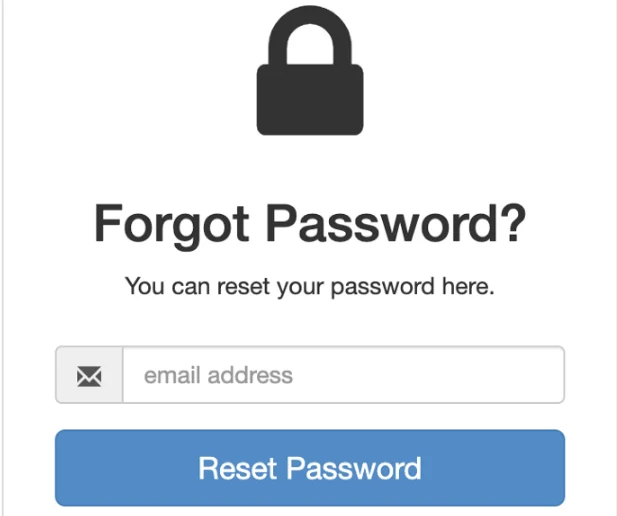
The reset page took an email address and, on submission, sent an email with a password reset token link. The researcher decided to intercept the reset request and started an ngrok server alongside it.
Exploitation
Step 1: Capture the original reset request
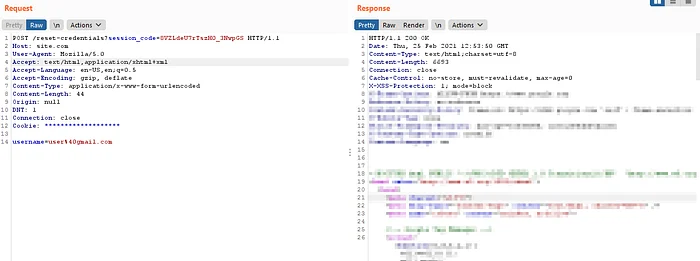
The password reset request was intercepted in the proxy. The original request looked like this:
Step 2: Add the X-Forwarded-Host header
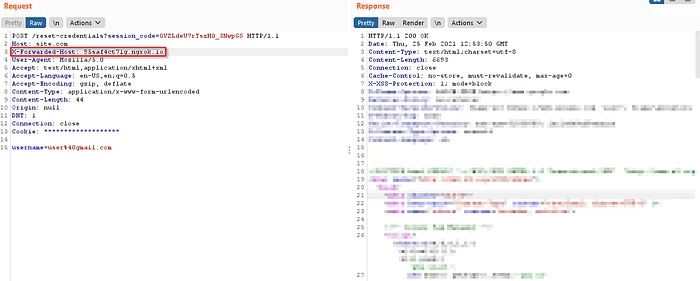
A second header, X-Forwarded-Host, was added to the original request with the ngrok server domain as its value. The modified request looked like this:
Step 3: Observe the poisoned reset link
The email that arrived this time still contained a password reset link, but built on the ngrok domain instead of site.com:
https://95saf4ct71g.ngrok.io/action-token?key=[redacted]
Simply adding X-Forwarded-Host to the reset request changed the host used in the link. The link now points at the ngrok domain instead of site.com.
Step 4: Apply it to a victim
The researcher then reasoned through the attack against another user: enter the victim's email address on the password reset page, intercept that request, and add X-Forwarded-Host with a malicious domain. The victim receives a password reset email whose token link points at the malicious domain. When the victim clicks the link, they are redirected to the attacker's website and the token leaks to the attacker. The attacker then uses the leaked token to change the victim's password.
Root cause
The application builds the absolute URL for the password reset link from a host value taken from the incoming request rather than from a fixed, configured hostname. Because it trusts X-Forwarded-Host, a header intended to tell the application which host the client originally requested when it sits behind a proxy or load balancer, any client that can reach the reset endpoint can set that host to a domain it controls. The reset token itself is generated correctly; the flaw is only in where the link points. The report does not describe any validation of the header.
Impact
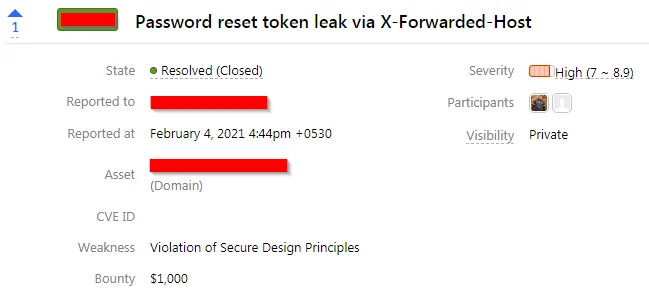
The impact described is full account takeover: anyone with an account on site.com can be targeted by submitting their email address to the reset form with the poisoned header, and once the victim clicks the emailed link the token leaks and the attacker can reset the password. The attack depends on the victim clicking the link in the email. The researcher submitted the vulnerability with a full proof of concept, and the HackerOne private program rewarded it with $1000.
Fix
The report does not state what fix, if any, the program applied. The change needed is for the reset link to be built from a fixed, configured hostname rather than from a request header, or for any forwarded host value to be validated against an allow-list of known hosts before it is used.
Variants to test
- Send a password reset request with
X-Forwarded-Hostset to a domain you control and check whether the emailed link uses that domain. A positive result is a reset email whose link host is your domain. - Try the same with other forwarding headers the application or its proxy may honour, such as
X-Forwarded-Server,ForwardedorX-Host, and compare the host in the resulting email. A positive result is any of them changing the link host. - Try the same technique on other features that email links containing tokens, such as email verification, invitation and magic-login flows. A positive result is a token-bearing link pointing at your domain.
- Check whether the reset link host can be changed through the
Hostheader itself when the request is sent directly to the application. A positive result is the same poisoned link without any forwarding header.

What happened, in plain words
A security researcher found a bug in a website's password reset feature. When you forget your password, most sites email you a special link that lets you set a new one. That link contains a long secret code, called a token, which proves the email really belongs to you. The bug meant that an attacker could make the site send that link to a web address the attacker controlled, instead of to the real site. If the victim clicked the link in the email, the secret code would arrive at the attacker's server, and the attacker could then use it to change the victim's password and take over the account. The researcher reported it and was paid $1000.
The researcher's name is Saajan Bhujel, and this was his first blog post. He found the bug in a private program on HackerOne, a platform where companies invite selected researchers to test their systems. Because the program is private, he does not name the company and calls the target site.com throughout.
Before the story starts, a little background is needed, because the whole bug depends on one small piece of every web request: the Host header.
What is the HTTP Host header?
When your browser asks a web server for a page, it sends a short text message called an HTTP request. That message has a first line saying what is wanted, then a list of lines called headers, each one a label and a value. One of those headers is the Host header. It tells the server which website name you typed, because one server can host many websites and needs to know which one you mean.
The researcher explains that the Host header is a mandatory request header as of HTTP/1.1, the version of the web protocol in common use. It specifies the domain name that the user wants to access.
For example, if a user visits https://example.com, then their browser will make a request containing a Host Header as below:
GET / HTTP/1.1
Host: example.com
Line by line:
GET / HTTP/1.1is the request line.GETmeans "give me something"./means the main page of the site.HTTP/1.1is the version of the language the browser and server use to talk.Host: example.comis the header. The label isHostand the value isexample.com, the site name the browser is asking for.
A simple comparison: think of a large office building with one reception desk and many companies inside. The Host header is the visitor saying which company they have come to see. The receptionist (the server) uses that name to send the visitor to the right office.
Now let's start the blog.

Getting into the program
Some days before the story, the researcher got a notification in HackerOne saying he had been invited into a private program. He accepted the invitation and started hunting on that private program. Hunting means looking for security bugs, in the hope of reporting them and being paid a reward, called a bounty.
At the start he spent 5 to 6 days looking for several well-known kinds of bug: Cross-Site-Scripting (XSS), IDOR, SQL injection, flaws on the login page, information disclosure and subdomain takeover. He found nothing.
A quick word on each of those, since they come up again:
- Cross-Site Scripting (XSS): tricking a site into showing text that your browser treats as a program, so that program runs in someone else's browser.
- IDOR (Insecure Direct Object Reference): changing a number or name in a web address to reach someone else's data, for example changing
?id=5to?id=6. - SQL injection: slipping database commands into a form field so the database does something it should not.
- Information disclosure: the site accidentally revealing private data, such as error messages or files it should not serve.
- Subdomain takeover: a company owns a name like
shop.example.combut no longer uses the service behind it, so an attacker can claim that service and answer requests for the name.
After a break of some hours, he started hunting on the domain again. This time he noticed an interesting feature he had not seen before: the password reset functionality. He decided to play with it.
The password reset feature
He cannot disclose the name of the target because it is a private program, so the target is called site.com. Their password reset feature works like this:
You type your email address into a form and click a button to request a reset. The site then sends you an email containing a link. That link contains a password reset token. A token is a long random-looking string of characters that the site generates and remembers. It works like a temporary key: whoever presents the right token is allowed to set a new password for that account. It is a secret, and it should only ever reach the person who owns the email address.
The password reset token link looks like this:
https://site.com/action-token?key=[redacted]
Line by line:
https://is the scheme: the browser will use an encrypted connection.site.comis the host, the name of the website. This is the part the bug is about./action-tokenis the path, the page on the site that handles the reset.?key=starts the query string, the part of a web address that carries extra information to the page. Everything after the equals sign is the token value.[redacted]is the token itself. It looks like a jumble of letters and numbers, which is exactly what a secret should look like.
So the link is really two things joined together: a host, which says where to go, and a token, which says who you are. The site builds this link when it sends the email. The bug is in how it chooses the host part.
Capturing the request
This time the researcher decided to intercept the password reset request, and he also started his ngrok server.
Two tools need explaining:
- Intercepting proxy: a program that sits between your browser and the website. Instead of the browser talking straight to the site, it talks to the proxy, and the proxy passes the message on. Because the proxy sees every message, you can pause one, read it, change it, and then send it. It is like a postal worker who is allowed to open your letter, edit it, and seal it again before delivery.
- ngrok: a service that gives your own computer a public web address on the internet, so that traffic from anywhere can reach a small server you are running. The researcher used it to have a domain he controlled, ready to receive anything sent to it. The report does not give the exact setup steps.
The original request is something that looks like this:
This is the message the browser sends when the reset form is submitted. It carries the email address the user typed, and it is the message the site uses to decide to send the reset email. The researcher paused it in the proxy so he could look at it and change it before it reached the site.
Adding the X-Forwarded-Host header
Then he added another header, X-Forwarded-Host, with his ngrok server domain in the original request. So now the modified request is something that looks like this:
What is X-Forwarded-Host? Many large websites do not have one server doing all the work. A front machine, called a proxy or load balancer, receives the visitor's request and passes it on to one of many servers behind it. When it passes the request on, the original Host header may be replaced with the internal name of the server. To avoid losing the visitor's original site name, the front machine adds an extra header recording it. X-Forwarded-Host is one of the common names for that extra header. The X- prefix is a convention for headers that are not part of the official standard.
The important point is that this header is just text in the request. Anyone who can send a request can write it. It is not a password and it is not checked by the browser. It is like a note attached to a parcel saying "deliver to this address instead". If the receiving system believes the note without checking who wrote it, it will do what the note says.
If that were true, the link in the email would point at his ngrok domain, and the token would come to him.
The poisoned link
This time he got an email for changing the password, but with his ngrok server domain in the link. The password reset token link looked like this:
https://95saf4ct71g.ngrok.io/action-token?key=[redacted]
Line by line:
https://95saf4ct71g.ngrok.iois now the host. It is not site.com. It is the researcher's own ngrok address./action-token?key=is the same path and query label as before.[redacted]is the token value. It is a token value in the link sent to the ngrok domain.
So simply adding X-Forwarded-Host to the reset request changed the host used in the link. The site had taken the host from the request instead of using its own name. This is the whole bug in one line: the site trusted a value the visitor supplied.
Turning it into an attack on a victim
The researcher then worked out how to use this against another person. The plan:
- Go to the password reset page and type the victim's email address.
- Intercept that request in the proxy before it reaches the site.
- Add
X-Forwarded-Hostwith a domain you control. - Let the request go. The site sends the victim an email whose reset link points at your domain.
- The victim clicks the link. Their browser goes to your website, and the token in the link arrives at your server.
- Use the leaked token to set a new password for the victim's account.
The victim only needs to click the link in the email.
The impact is a full account takeover. Anyone with an account on site.com can be targeted this way, and once the attacker has the token, they can reset that person's password.
Reporting it
Without wasting any time, the researcher submitted the vulnerability with a full proof of concept. A proof of concept is the evidence that the bug is real: the exact steps, the requests, and the result, so the company can reproduce it themselves. The HackerOne private program rewarded him with $1000.
Why it worked, and what would stop it
The site built the full web address for the reset link from a host value taken from the incoming request, instead of from a fixed, configured name. The token itself was generated correctly. The flaw was only in where the link pointed.
The fix is to build the link from a fixed, configured hostname, or to check any forwarded host value against a list of known, allowed hosts before using it. The report does not say what fix, if any, the program applied.
Other places to try the same idea
- Send a password reset request with
X-Forwarded-Hostset to a domain you control and check whether the emailed link uses that domain. A positive result is a reset email whose link host is your domain. - Try the same with other forwarding headers the site or its proxy may honour, such as
X-Forwarded-Server,ForwardedorX-Host, and compare the host in the resulting email. A positive result is any of them changing the link host. - Try the same technique on other features that email links containing tokens, such as email verification, invitations and magic-login flows. A positive result is a token-bearing link pointing at your domain.
- Check whether the reset link host can be changed through the
Hostheader itself when the request is sent directly to the site. A positive result is the same poisoned link without any forwarding header.
Glossary
- Account takeover: gaining control of someone else's account, usually by learning or changing their password.
- Bounty: a reward, often money, paid for reporting a security bug.
- Cross-Site Scripting (XSS): making a site display text that a browser runs as a program in someone else's session.
- Domain: a name on the internet, such as
example.com, that points to a server. - Header: a labelled line in an HTTP request or response carrying extra information, such as the site name or the type of content.
- Host header: the header that tells the server which website name the visitor asked for.
- HTTP: the language browsers and web servers use to exchange requests and responses.
- HTTP/1.1: a version of HTTP in which the Host header is mandatory.
- HackerOne: a platform where companies run bug bounty programs and researchers report bugs.
- IDOR (Insecure Direct Object Reference): reaching another user's data by changing an identifier in a request.
- Information disclosure: a site accidentally revealing data it should keep private.
- Intercepting proxy: a tool that sits between browser and site, letting you read and change messages in transit.
- Load balancer: a front machine that spreads incoming requests across several servers.
- ngrok: a service that gives a computer a public web address so traffic from the internet can reach it.
- Password reset token: a secret string sent by email that authorises setting a new password for an account.
- Path: the part of a web address after the host, naming the page, such as
/action-token. - Private program: a bug bounty program open only to invited researchers.
- Proof of concept: the exact steps and evidence that show a bug is real and reproducible.
- Proxy: a machine or program that passes requests on behalf of a client, sometimes adding or changing headers.
- Query string: the part of a web address after
?, carrying extra values to the page. - SQL injection: inserting database commands through user input so the database does something unintended.
- Subdomain takeover: claiming an unused subdomain by registering the service it still points to.
- Token: a secret string used to prove identity or permission, like a temporary key.
- X-Forwarded-Host: a non-standard header used by proxies to record the original host a visitor requested.
- XSS: see Cross-Site Scripting.