Amazon Cognito misconfiguration lead to account takeover
A hidden endpoint allowed changing the email attribute without confirmation, and the Cognito API allowed setting an email already used by another user. An attacker could link a victim's email to their own account, causing the victim's account to become unverified and suspended, and then use a non-expiring refresh token to regain access to the now-victim account.
 Published on medium.com
Hello reader, I hope you are doing well. Today I want to talk about one of my findings.
The full write-up lives on its author's site
It belongs to its author, so we link to it rather than copy it. The other two tabs are our own rewrites, checked against it.
Context
The target is a public bug bounty program that the author refers to as redirect.com. The program was public and, at the time of writing, the bug was not fixed, so the author withholds the program's identity. The site uses Amazon Cognito for authentication and authorisation, organised around a user pool. Within a user pool there are user pool attributes, pieces of information that help the developer identify individual users, such as name, email address and phone number. Some attributes are read-only and cannot be modified; others can be modified, and the developer controls which.
The feature under examination is the ordinary account lifecycle: registration, login, and changing the email address on an account. The author's interest is in how the site's front end and the Cognito API behind it handle the email attribute, and in what happens to the identity of an account when that attribute is changed.
Setup
The work was done with a browser against the site's normal functions and with Burp Suite to inspect and replay requests and responses. No special accounts beyond the author's own are described. The preconditions that matter later are all properties of Cognito as the author observed them: a stable user_id per account, a long-lived refreshToken, and an accessToken that is accepted by the Cognito API for attribute changes.
Finding it
The author started on the main domain, collected the various functions available on the website and wrote them down in Notepad++. Each function was used one by one, and the requests and responses were then analysed in Burp Suite to understand how account creation, login and email change are performed, and to follow the developer's logic.
Four observations came out of that analysis.
- During registration a random
user_idis generated automatically. Once registration is complete, thatuser_iddoes not change if the user changes the current email to another one.
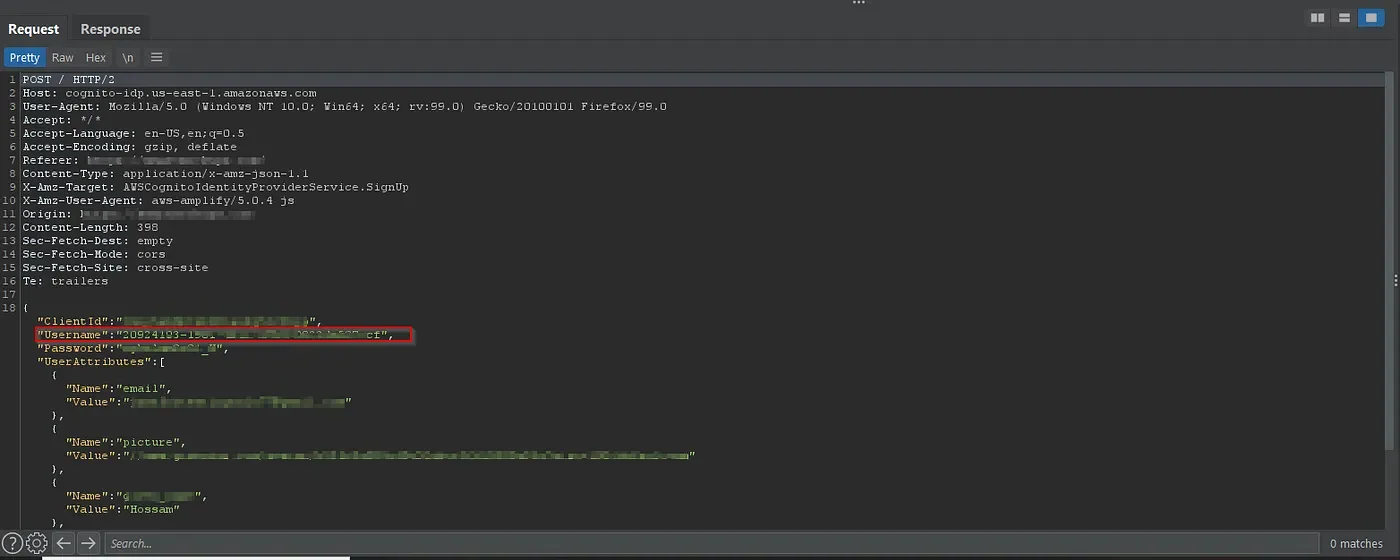
The screenshot shows part of the registration process, where the user_id is generated.
- Every login returns an
accessToken, anidTokenand arefreshToken. TherefreshTokenis long-lived: it can be used to retrieve anotheraccessToken,idTokenandrefreshTokenwithout logging in again with email and password. These tokens are linked to theuser_idof an account, and they remain valid even after the user logs out.
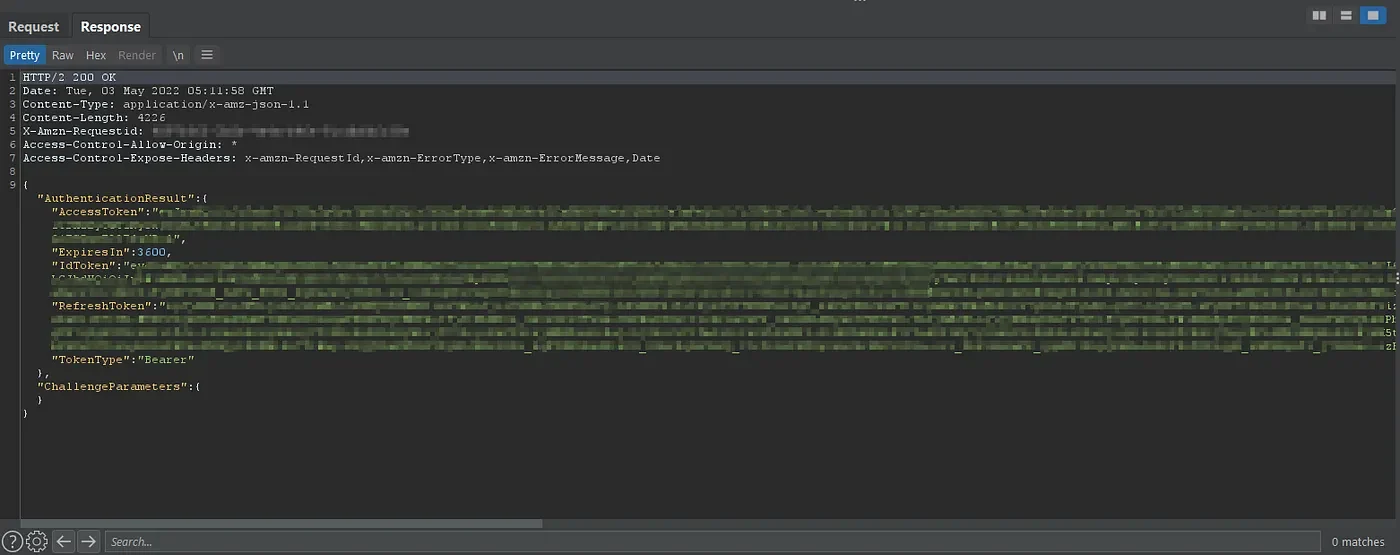
The screenshot shows the different tokens generated after a successful login.
- The author found a hidden endpoint responsible for changing the email without confirming the change with a code sent to the current email.
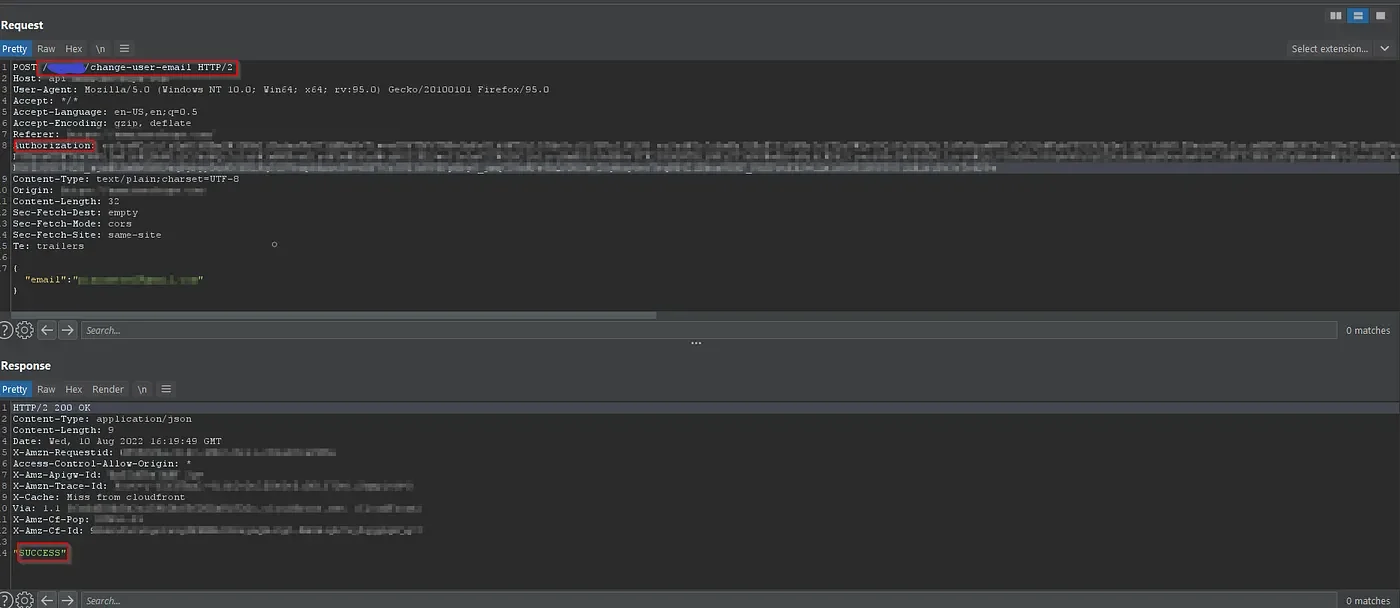
The screenshot shows the request and response for that hidden endpoint.
- The current email cannot be changed to another email that is already in use, even through the hidden endpoint.
That last limit is what makes the finding interesting rather than trivial: the obvious path, taking over an account by pointing its email at the victim's address, is blocked at the front door. The question the author then pursues is whether the same result can be reached through the Cognito API directly, where the check may not exist.
Exploitation
Step 1: change the email attribute through the Cognito API
From the attacker's perspective, the plan is to use the Amazon Cognito API to change the current email to one that already exists, namely the victim's email.

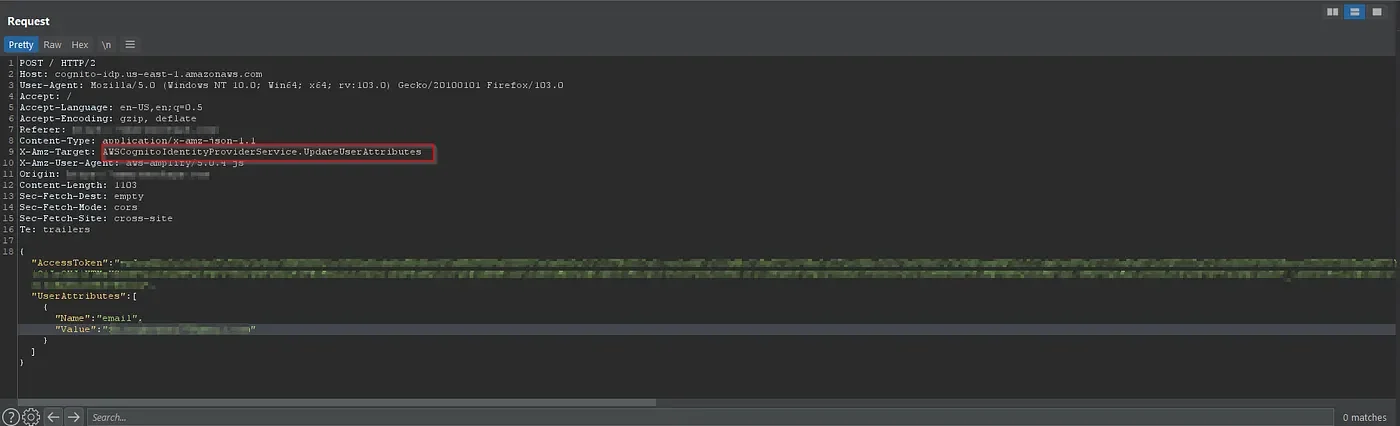
The screenshot shows UpdateUserAttributes, the endpoint responsible for changing user attributes using the accessToken.
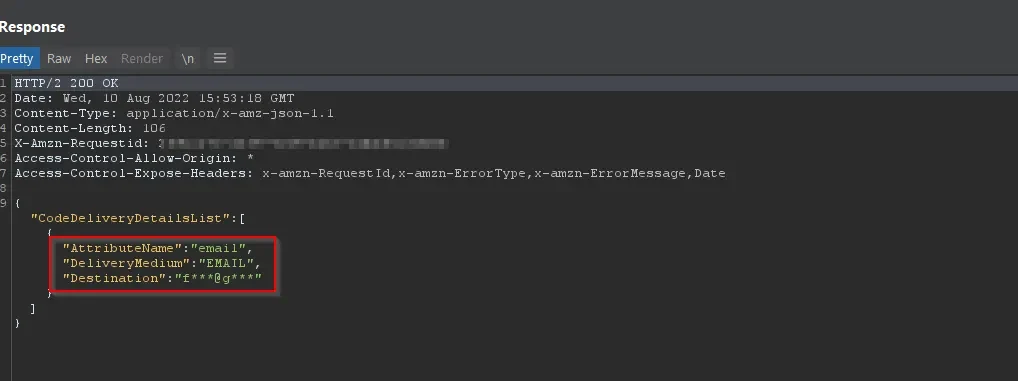
The screenshot shows the response.
It worked. In the author's words, UpdateUserAttributes, and in particular the email attribute, is not protected from manipulation by the user through the accessToken. The same change that the hidden endpoint refused succeeded through the Cognito API.

Step 2: the account becomes unverified
After the change, the attacker's own account is unverified. The author cannot log in to it using the unverified email, nor using the previous email and current password.
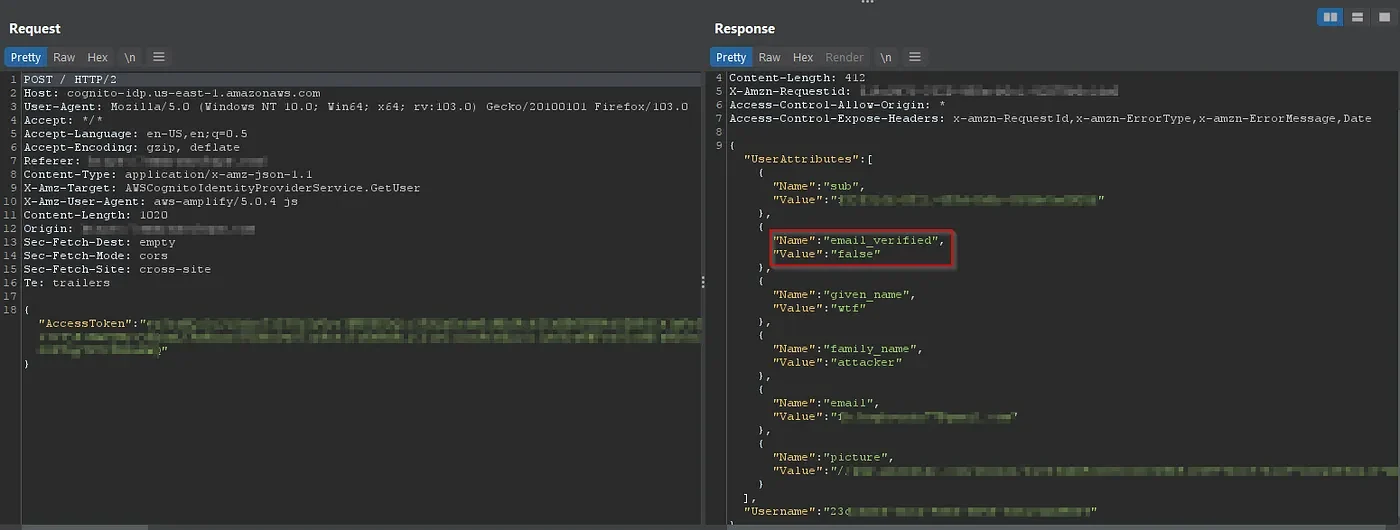
The screenshot shows the email marked as unverified.
The open question is whether the current email, now the victim's address, can be confirmed. If it can, the same email address in the victim's account will become unverified, and the victim will not be able to log in with the unverified email and password because the account is now suspended.
Step 3: confirming the victim's email by abandoning the flow
The challenge is how to confirm the victim's email that is now linked to the attacker's account. The author changes the current email to another address they own but does not complete the confirmation process, then returns to Burp Suite to analyse the requests and responses. The result was not what was expected: the current email, the victim's email, had been verified.
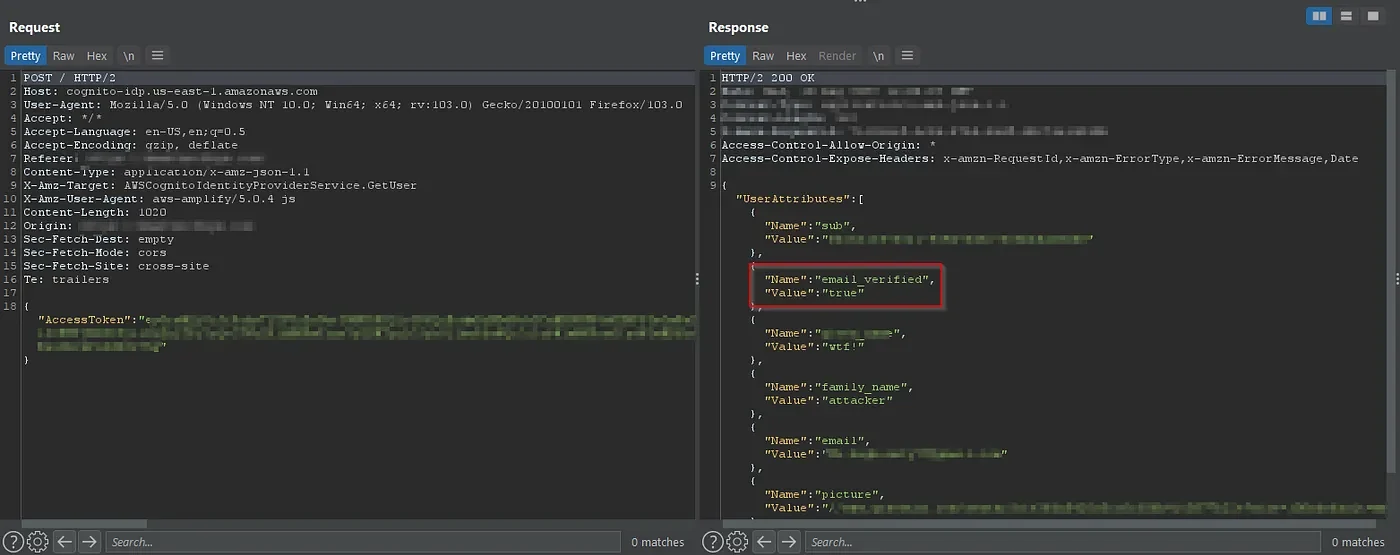
The screenshot shows the victim's email has been verified.
Step 4: what the victim sees
From the victim's perspective, logging in with their email, now unverified, and current password does not work, for the reason above. The victim then resets the password through their email. After the reset, logging in with the current email and the new password succeeds, but lands in an account different from their own.
Two things explain this. First, the account belongs to the attacker. Second, the victim's account had been suspended, so when the victim used the password reset feature with the email that the attacker had confirmed, the password that was changed belonged to the email linked to the attacker's account, which is also linked to the user_id belonging to the attacker and not to the victim's account. A suspended account cannot use the various features of the site, and that includes password reset.
Step 5: escalating to account takeover
The attacker tries to log in but cannot, because the victim changed the password. The escalation relies on the earlier observation that the refreshToken does not expire on logout, on ending the session, on a password change, or on an email change. The old refreshToken belonging to the attacker's account, which has now become the victim's account, can still mint a new accessToken and idToken.
This is done with the InitiateAuth endpoint, passing specific parameters that include that refreshToken, to generate a new idToken and accessToken.
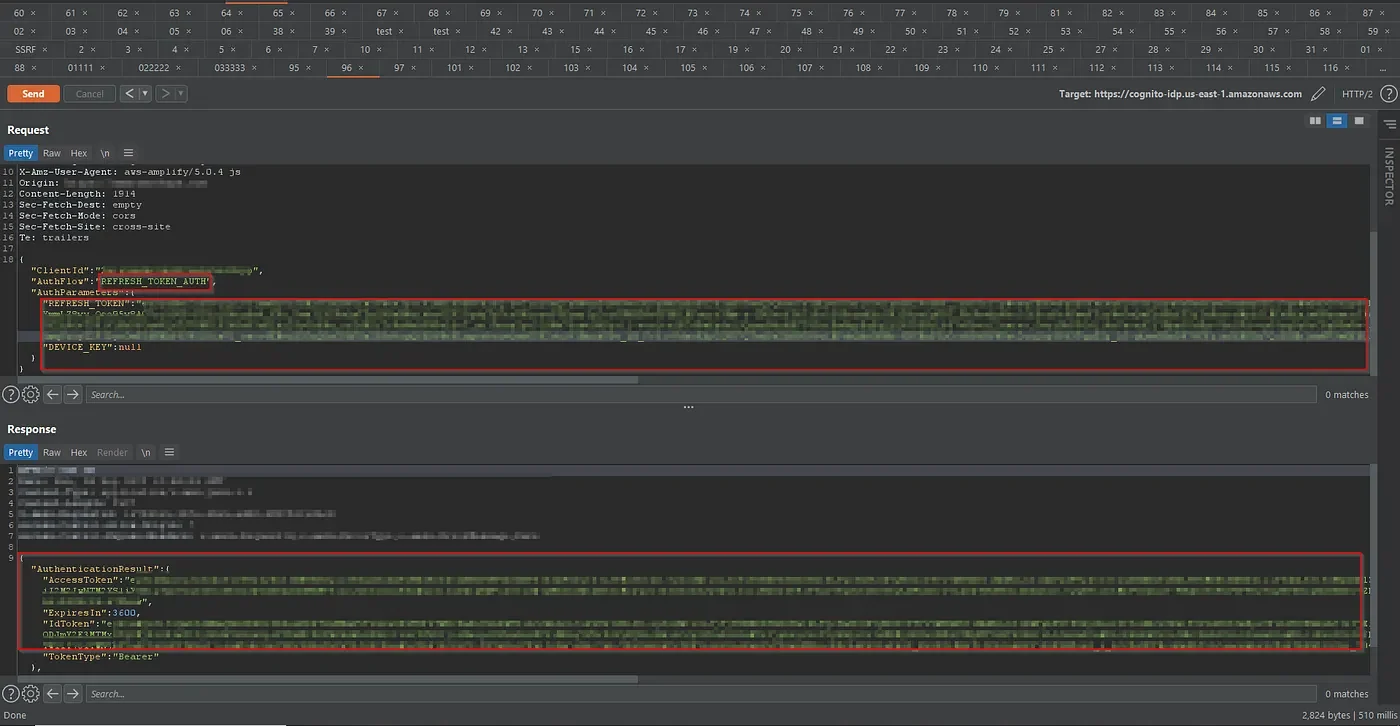
The screenshot shows the InitiateAuth request and response.
With the fresh tokens, the attacker can use the hidden endpoint to change the victim's email without entering the confirmation code that arrives at the victim's email, or track the victim and observe changes in the account, which may include credit card information.

The author closes by noting that this amounts to a duplicate of "Change the email without entering a confirmation code".
Root cause
The core mistake is that the email attribute is writable through UpdateUserAttributes using the account's own accessToken, without the uniqueness check that the site's hidden endpoint applies. The site refused a duplicate email through its hidden endpoint, but the Cognito API accepted the same value.
The second component is the confirmation logic. Changing the email to another address the attacker owns, without completing that confirmation, resulted in the previous address, the victim's, being marked verified. The report does not explain the mechanism behind this; it only records the observed outcome. Whatever the cause, it let the attacker obtain a verified victim email on an account whose user_id is the attacker's.
The third component is token lifetime. The refreshToken survives logout, session end, password change and email change, and it is bound to the user_id, not to the email. Because the user_id never changes when the email changes, the attacker's refresh token continued to represent the account that now carried the victim's verified email, and it could still mint access tokens after the victim's password reset.
Impact
An attacker with an ordinary account on the site can attach a victim's email address to their own account and have that address marked verified, leaving the victim unable to log in with that email. The victim can no longer log in with their email and password, and cannot use password reset, because the reset applies to the email now linked to the attacker's user_id. When the victim resets the password, the new password is set on the attacker's account, not their own.
The attacker then uses the old refreshToken through InitiateAuth to obtain new accessToken and idToken values. From there the attacker can change the victim's email without the confirmation code sent to the victim, or monitor the account, which may expose credit card information. The report does not state how many accounts were affected or whether the issue was fixed.
Fix
Based on the behaviour shown, the email attribute should be validated for uniqueness on every path that can write it, including UpdateUserAttributes called directly with an accessToken, so that the check enforced by the site's own endpoint cannot be bypassed. The confirmation flow should not mark a previously set address as verified when a new address is left unconfirmed. Refresh tokens should be invalidated on password change and on email change, or at least the account state should not allow a token issued before those events to keep minting access tokens for an account whose identity attributes have changed.
Variants to test
- Call
UpdateUserAttributesdirectly with your ownaccessTokenand set the email to an address already registered on the target. A positive result is a successful response and the attribute changing, where the site's own UI refuses the same value. - Start an email change to an address you control and abandon it before confirmation, then inspect the account state. A positive result is the previous address being marked verified without any code being entered.
- After a password change, replay the old
refreshTokenagainstInitiateAuth. A positive result is a newaccessTokenandidTokenbeing issued. - After logout and after an email change, repeat the same
refreshTokenreplay. A positive result is tokens still being issued for the sameuser_id. - Compare the
user_idbefore and after an email change. A positive result is the identifier staying the same while the email changes, which is the condition that makes the token replay meaningful. - On other Cognito-backed sites, check whether the front end's uniqueness check exists only client-side or only in a custom endpoint, and whether the raw API accepts the same values.
What happened, in plain words
A website used a login service called Amazon Cognito to manage its user accounts. Cognito is a product made by Amazon that handles sign-up, sign-in and the storage of user details for other companies' websites, so the website's developers do not have to build all of that themselves.
The researcher found that the website's own screens refused to let you change your account's email address to one that another person already used. That looks like a sensible safety rule. But the same change could be made by talking to Cognito directly, skipping the website's screens, and Cognito did not apply the same rule. So the researcher could attach a victim's email address to their own account.
Then something stranger happened. By starting an email change to an address the researcher controlled and never finishing it, the victim's address on the researcher's account became marked as verified. The victim's real account, which used the same address, was left unverified, and the victim could no longer log in with that email and password. When the victim tried to recover their account by resetting their password, the reset applied to the researcher's account instead, because that account now held the victim's email.
The researcher still had a long-lived credential called a refresh token from before all this. That token kept working after the password change, so the researcher could mint fresh credentials for the account that now carried the victim's email. The report describes the impact as account takeover.
The report does not name the website. The author calls it redirect.com and says the program was public and the bug was not fixed at the time of writing.
Background: what the pieces are
Before walking through the steps, here are the ideas you need. None of them require any security knowledge, only a rough picture of how websites work.
Amazon Cognito and user pools
When you sign up to a website, the site has to remember who you are. Many sites hand that job to a specialist service. Amazon Cognito is one such service. It stores your account, checks your password when you log in, and hands out the little passes that prove who you are on later requests.
Cognito groups accounts into a user pool. Think of a user pool as a filing cabinet: every account on the site is one folder in that cabinet. Inside each folder are attributes: labelled pieces of information about the person, such as their name, their email address and their phone number. Some attributes are read-only, meaning they are set once and cannot be changed. Others are writable, and the developer decides which is which.
The report links to Amazon's own documentation for Cognito, which is the place to read more if you want the full picture.
Tokens
A token is a short string of characters that a server gives to your browser after you log in, and that your browser sends back on later requests to prove it is still you. The everyday comparison is a cloakroom ticket: you hand in your coat, you get a ticket, and later the ticket gets your coat back. You do not have to prove who you are again; the ticket is the proof.
Cognito hands out three tokens at login:
- accessToken: the pass you show when you want to do something, such as change your account details.
- idToken: a small bundle describing who you are, used by the website to display your name and similar details.
- refreshToken: a long-lived pass whose only job is to get you a new accessToken and idToken when the old ones expire. It is like a season ticket rather than a single-day one.
APIs and endpoints
An API (application programming interface) is the set of doors a program can knock on to ask a server to do something. Each door is called an endpoint: a specific address that accepts a specific kind of request. When you click a button on a website, your browser is usually sending a request to an endpoint behind the scenes.
A hidden endpoint in this context means an endpoint that the website's own screens do not visibly use, but that still exists and still answers if you send the right request to it. It is like a service door at the back of a shop: customers are not shown it, but it is not locked.
Burp Suite
Burp Suite is a tool that sits between your browser and the website and lets you read every request and response, and replay or edit them. It is the standard way to see what a website is really sending, as opposed to what its screens suggest it is sending. The researcher used it throughout.
The vulnerability class: account takeover
Account takeover means one person gaining control of another person's account. It is one of the most serious kinds of web vulnerability because the attacker then sees and does everything the real owner could. The report's weakness category is exactly this.
Setup
The work was done with a browser against the site's normal functions, and with Burp Suite to inspect and replay requests and responses. No special accounts beyond the author's own are described. The preconditions that matter later are all properties of Cognito as the author observed them: a stable user_id per account, a long-lived refreshToken, and an accessToken that is accepted by the Cognito API for attribute changes.
Finding it
The researcher started on the main domain, collected the various functions available on the website and wrote them down in Notepad++. Each function was used one by one, and the requests and responses were then analysed in Burp Suite to understand how account creation, login and email change are performed, and to follow the developer's logic.
Why do this? Because you cannot spot a gap in a rule until you know what the rule is meant to be. Using every feature once and reading the traffic gives you a map of how the site is built, and where the checks live.
Four observations came out of that analysis.
- During registration a random
user_idis generated automatically. Once registration is complete, thatuser_iddoes not change if the user changes the current email to another one.
The screenshot shows part of the registration process, where the user_id is generated. This matters because the user_id is the account's real name tag inside Cognito. The email is just a label on the folder. Changing the label does not change which folder it is.
- Every login returns an
accessToken, anidTokenand arefreshToken. TherefreshTokenis long-lived: it can be used to retrieve anotheraccessToken,idTokenandrefreshTokenwithout logging in again with email and password. These tokens are linked to theuser_idof an account, and they remain valid even after the user logs out.
The screenshot shows the different tokens generated after a successful login. The point to hold on to is that the tokens belong to the user_id, not to the email. If the email changes but the user_id does not, the old tokens still point at the same account.
- The researcher found a hidden endpoint responsible for changing the email without confirming the change with a code sent to the current email.
The screenshot shows the request and response for that hidden endpoint. Normally, changing the email on an account requires proving you still control the old address, by typing a code that is sent to it. This endpoint skipped that step.
- The current email cannot be changed to another email that is already in use, even through the hidden endpoint.
That last limit is what makes the finding interesting rather than trivial: the obvious path, taking over an account by pointing its email at the victim's address, is blocked at the front door. The question the researcher then pursues is whether the same result can be reached through the Cognito API directly, where the check may not exist.
Exploitation
Step 1: change the email attribute through the Cognito API
From the attacker's perspective, the plan is to use the Amazon Cognito API to change the current email to one that already exists, namely the victim's email.
The screenshot shows UpdateUserAttributes, the endpoint responsible for changing user attributes using the accessToken. In plain words: this is the Cognito door that lets an account change its own details, and it accepts the account's own accessToken as the key.
The screenshot shows the response.
It worked. In the researcher's words, UpdateUserAttributes, and in particular the email attribute, is not protected from manipulation by the user through the accessToken. The check that stopped the hidden endpoint from assigning an email already in use did not apply here.
The website's own screens refused a duplicate email, but the Cognito API accepted the same value.
Step 2: the account becomes unverified
After the change, the attacker's own account is unverified. The researcher cannot log in to it using the unverified email, nor using the previous email and current password.
The screenshot shows the email marked as unverified. An unverified email is one the service has not confirmed belongs to the account holder. Many sites refuse to let you log in or reset a password with an unverified address, because otherwise anyone could claim any address.
The open question is whether the current email, now the victim's address, can be confirmed. If it can, the same email address in the victim's account will become unverified, and the victim will not be able to log in with the unverified email and password because the account is now suspended.
Step 3: confirming the victim's email by abandoning the flow
The challenge is how to confirm the victim's email that is now linked to the attacker's account. The researcher changes the current email to another address they own but does not complete the confirmation process, then returns to Burp Suite to analyse the requests and responses. The result was not what was expected: the current email, the victim's email, had been verified.
The screenshot shows the victim's email has been verified. The report does not explain the mechanism behind this; it only records the observed outcome. Whatever the cause, it let the attacker obtain a verified victim email on an account whose user_id is the attacker's.
Step 4: what the victim sees
From the victim's perspective, logging in with their email, now unverified, and current password does not work, for the reason above. The victim then resets the password through their email. After the reset, logging in with the current email and the new password succeeds, but lands in an account different from their own.
Two things explain this. First, the account belongs to the attacker. Second, the victim's account had been suspended, so when the victim used the password reset feature with the email that the attacker had confirmed, the password that was changed belonged to the email linked to the attacker's account, which is also linked to the user_id belonging to the attacker and not to the victim's account. A suspended account cannot use the various features of the site, and that includes password reset.
In everyday terms: the victim's name was on the attacker's folder, so when the victim asked to change the password for that name, the change landed in the attacker's folder. The victim's own folder was locked and could not be reached.
Step 5: escalating to account takeover
The attacker tries to log in but cannot, because the victim changed the password. The escalation relies on the earlier observation that the refreshToken does not expire on logout, on ending the session, on a password change, or on an email change. The old refreshToken belonging to the attacker's account, which has now become the victim's account, can still mint a new accessToken and idToken.
This is done with the InitiateAuth endpoint, passing specific parameters that include that refreshToken, to generate a new idToken and accessToken.
The screenshot shows the InitiateAuth request and response. InitiateAuth is the Cognito door you knock on to start a login or to trade a refresh token for fresh access tokens. Because the refresh token is tied to the user_id and not to the email or the password, it kept working after the victim's reset.
With the fresh tokens, the attacker can use the hidden endpoint to change the victim's email without entering the confirmation code that arrives at the victim's email, or track the victim and observe changes in the account, which may include credit card information.
The researcher closes by noting that this amounts to a duplicate of "Change the email without entering a confirmation code".
Root cause
The core mistake is that the email attribute is writable through UpdateUserAttributes using the account's own accessToken, without the uniqueness check that the site's hidden endpoint applies. The site enforced "this email is already in use" in one code path and not in the API path that the same token can reach, so the restriction was cosmetic.
The second component is the confirmation logic. Changing the email to another address the attacker owns, without completing that confirmation, resulted in the previous address, the victim's, being marked verified.
The third component is token lifetime. The refreshToken survives logout, session end, password change and email change, and it is bound to the user_id, not to the email. Because the user_id never changes when the email changes, the attacker's refresh token continued to represent the account that now carried the victim's verified email, and it could still mint access tokens after the victim's password reset.
Impact
An attacker with an ordinary account on the site can attach a victim's email address to their own account and have that address marked verified, leaving the victim unable to log in with that email. The victim can no longer log in with their email and password, and cannot use password reset, because the reset applies to the email now linked to the attacker's user_id. When the victim resets the password, the new password is set on the attacker's account, not their own.
The attacker then uses the old refreshToken through InitiateAuth to obtain new accessToken and idToken values. From there the attacker can change the victim's email without the confirmation code sent to the victim, or monitor the account, which may expose credit card information.
Fix
Based on the behaviour shown, the email attribute should be validated for uniqueness on every path that can write it, including UpdateUserAttributes called directly with an accessToken, so that the check enforced by the site's own endpoint cannot be bypassed. The confirmation flow should not mark a previously set address as verified when a new address is left unconfirmed. Refresh tokens should be invalidated on password change and on email change, or at least the account state should not allow a token issued before those events to keep minting access tokens for an account whose identity attributes have changed.
Variants to test
If you want to look for the same pattern on other sites, these are the checks to try. Each one is a small experiment, and each has a clear "positive" result that tells you something is wrong.
- Call
UpdateUserAttributesdirectly with your ownaccessTokenand set the email to an address already registered on the target. A positive result is a successful response and the attribute changing, where the site's own UI refuses the same value. - Start an email change to an address you control and abandon it before confirmation, then inspect the account state. A positive result is the previous address being marked verified without any code being entered.
- After a password change, replay the old
refreshTokenagainstInitiateAuth. A positive result is a newaccessTokenandidTokenbeing issued. - After logout and after an email change, repeat the same
refreshTokenreplay. A positive result is tokens still being issued for the sameuser_id. - Compare the
user_idbefore and after an email change. A positive result is the identifier staying the same while the email changes, which is the condition that makes the token replay meaningful. - On other Cognito-backed sites, check whether the front end's uniqueness check exists only client-side or only in a custom endpoint, and whether the raw API accepts the same values.
Glossary
- Account takeover: one person gaining control of another person's account, seeing and doing everything the real owner could.
- accessToken: the short-lived pass a browser sends to prove it may perform an action on an account.
- API: the set of doors a program can knock on to ask a server to do something.
- Attribute: a labelled piece of information about a user, such as name, email or phone number, stored in a user pool.
- Burp Suite: a tool that sits between browser and website to read, replay and edit requests and responses.
- Cognito: Amazon's service for handling sign-up, sign-in and user details on behalf of a website.
- Endpoint: a specific address on a server that accepts a specific kind of request.
- Hidden endpoint: an endpoint the website's own screens do not visibly use, but which still answers if you send the right request.
- idToken: a small bundle describing who the user is, used by the website to display details.
- InitiateAuth: the Cognito endpoint used to start a login or to trade a refresh token for fresh access and ID tokens.
- Notepad++: a plain text editor used to jot down notes.
- refreshToken: a long-lived pass whose only job is to get new access and ID tokens without logging in again.
- Registration: the process of creating a new account.
- Suspended account: an account that cannot use the site's features, including password reset.
- Token: a short string a server gives your browser after login, sent back later to prove it is still you.
- Unverified email: an email address the service has not confirmed belongs to the account holder.
- UpdateUserAttributes: the Cognito endpoint that lets an account change its own attributes using its accessToken.
- user_id: the stable identifier Cognito gives an account at registration, which does not change when the email changes.
- User pool: Cognito's container for all the accounts of one website.
- Verification code: a short code sent to an email address to prove the account holder controls it.



