An Email Address Was Enough: Two Account Deletion Findings Worth $850
Support workflows on two bug bounty programs allowed a requester to ask for deletion of an account without proving ownership of that account. An attacker who knew an account's email address could get support to delete that account.

Cybersecurity
The full write-up lives on its author's site
It belongs to its author, so we link to it rather than copy it. The other two tabs are our own rewrites, checked against it.
Context
Account deletion testing usually starts with an endpoint. Can I change the account ID? Does the application check ownership? Can a request from another session delete my account?
But there is another route worth examining: customer support. Across two bug bounty programs, I found that support workflows allowed someone to request deletion of an account without proving ownership. Both findings involved accounts I controlled, and they earned me a combined $850. The companies, domains, email addresses, and staff identities in this story have been redacted.
The feature under test is the manual account deletion process handled by customer support, rather than the self-service deletion endpoint. The question is whether that manual route verifies ownership at all.
Setup
For the first test, I created two accounts and completed their registration procedures. Both accounts were mine, which is the precondition for testing a destructive action safely: the only account that can be harmed is one I control.
For the second finding, I used a support form with separate fields for:
- The email address where support should contact the requester.
- Confirmation of that contact address.
- The email address associated with the account, if different.
I entered an email address I controlled as the contact address and the address of a second test account as the account to be deleted.
Finding it
The first test started from a simple observation: support is part of the authorization process for a sensitive action. If support will delete an account on request, the security question becomes how support verifies that the requester is allowed to ask for that deletion.
I sent a message to customer support from the email address associated with Account A, asking them to delete Account B. The important detail was the mismatch: the sender's address was different from the address of the account being deleted.
Support replied to the requesting address. After further processing, the deletion procedure began, and Account B was eventually deleted. The missing check was ownership verification. Before acting, support had not required confirmation through Account B's registered email address or an authenticated session belonging to that account.
I repeated the test using another account I controlled and supplied screenshots and a recording with the report. The program acknowledged the issue and said it was reviewing its account deletion process. It assessed the finding as medium severity, with a CVSS score of 4.5.
The second finding came from the structure of the support form itself. The separation between a contact address and an account address can serve legitimate purposes. The security question is what happens before support carries out a destructive action. Support sent its correspondence to the contact address I supplied. I continued the conversation from that address, and support ultimately deleted the second account. A notification reached the deleted account's registered address afterward.
A notification after deletion does not provide authorization before deletion. The workflow established where to contact the requester, but it did not adequately establish that the requester controlled the account being deleted.
Exploitation
Step 1: Create two accounts
I created two accounts and completed their registration procedures. Account A is the one I will speak from; Account B is the one I will ask to have deleted.
Step 2: Request deletion of the other account from Account A's address
The request was straightforward:
Hello, I would like to close my account registered under [redacted]
The sender's address was different from the address of the account being deleted. That mismatch is the whole test: if support acts on it, the address of the account was treated as sufficient authority to request its deletion.
Step 3: Observe where support replies and what it asks for
No confirmation through Account B's registered email address and no authenticated session belonging to Account B was required before the deletion procedure began.
Step 4: Confirm the deletion
Step 5: Use the separate contact and account fields
The second finding involved a support form with separate fields for the contact address, confirmation of that contact address, and the account address if different.
Step 6: Continue the conversation from the contact address
A notification reached the deleted account's registered address afterward, but only after the action had already been taken.
Root cause
Both findings crossed the same trust boundary: knowing an account's email address was treated as sufficient authority to request its deletion. An email address identifies an account. It does not prove ownership.
Authorization checks need to cover every route to a sensitive action, including actions performed manually by support staff. A protected account deletion endpoint cannot compensate for a support process that performs the same action without equivalent verification. In the second case the workflow established where to contact the requester, but it did not adequately establish that the requester controlled the account being deleted. A requester-supplied contact address should not become proof of account ownership.
Impact
In my tests, I showed that I could cause deletion of another account I controlled without confirming the request through that account. That established an account availability and data integrity risk. It did not demonstrate access to the account's confidential information.
The first program assessed the finding as medium severity, with a CVSS score of 4.5.
Fix
Before deleting an account, support should require confirmation through a trusted channel already associated with that account, such as its registered email address or an authenticated session. If the requester cannot access that channel, the request should go through a defined account recovery process. Requests from authorized representatives also need an appropriate verification process.
The first program acknowledged the issue and said it was reviewing its account deletion process.
Variants to test
Only test within a program's rules and use accounts you own. Account deletion is destructive, so keep disposable test accounts separate from anything you need. Check the program's policy before contacting support: some programs restrict social engineering or support interactions.
- Same display name, similar addresses. Create Account A and Account B with the same display name and similar email addresses. This can help reveal whether support relies on superficial similarities when deciding who owns an account. Repeat with clearly different addresses to establish whether the underlying problem is missing ownership verification rather than confusion.
- Contact versus account address. On any support form with separate contact and account fields, supply a contact address you control and the address of a second test account as the account to be deleted.
- Reply routing. Record where support sends its replies and any confirmation requests.
- Final state. Verify the final account state and preserve a minimal evidence trail. Be precise about the result: a support acknowledgment, a scheduled deletion, and a completed deletion are different outcomes.
Keep the initial request simple and truthful. You do not need an elaborate impersonation story to demonstrate a missing authorization check. The clearest evidence is the relationship between three things: the address that submitted the request, the address registered to the account being deleted, and the verification performed before deletion. Include the relevant correspondence and evidence of the final account state, and redact unrelated personal information.
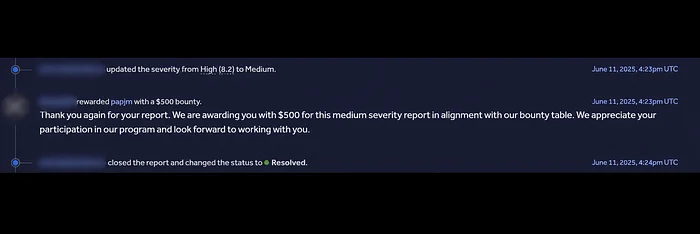
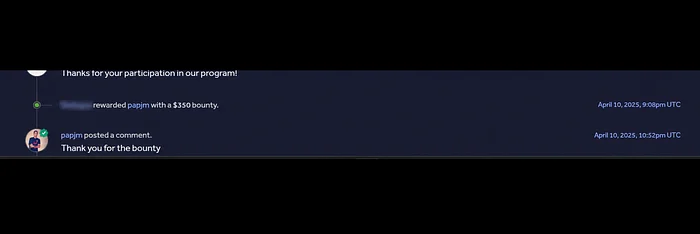
These two reports earned me a combined $850, but the broader lesson changed where I look for authorization flaws. I now ask: who else can perform the same sensitive action, and how do they verify that the requester is allowed to ask for it? Sometimes the missing authorization check is in a support workflow.
What happened, in plain words
Most websites let you delete your own account. Usually there is a button somewhere in your settings, and the website checks that you are really the owner of the account before it removes anything. Security testers (people who are paid to find weaknesses in websites) often start by poking at that button: can I change the account number in the request? Does the site check that the account belongs to me? Can a request from someone else's session delete my account?
This story is about a different road to the same result: the customer support desk. Many websites will delete an account for you if you write to support and ask. That is convenient, but it creates a question. When support receives such a request, how do they check that the person asking is really the owner of the account?
Across two bug bounty programs (a bug bounty program is a scheme where a company pays researchers for reporting security problems in its products), the author found that support workflows let someone ask for an account to be deleted without proving they owned it. Both tests used accounts the author controlled, and together the two findings earned $850. The companies, domains, email addresses and staff identities in the story have been redacted, meaning the identifying details were removed before publication.
The feature being tested is the manual account deletion process handled by customer support, not the self-service deletion button. The question is whether that manual route verifies ownership at all.
Setting up the test
For the first test, the author created two accounts and completed their registration procedures. Both accounts belonged to the author. That is the precondition for testing a destructive action safely: the only account that can be harmed is one you control. Deleting an account is destructive, so you never want to point this kind of test at somebody else's account.
For the second finding, the author used a support form with separate fields for:
- The email address where support should contact the requester.
- Confirmation of that contact address.
- The email address associated with the account, if different.
The author entered an email address they controlled as the contact address, and the address of a second test account as the account to be deleted.
Finding it
The first test started from a simple observation: support is part of the authorization process for a sensitive action. Authorization means deciding whether a person is allowed to do something. If support will delete an account on request, the security question becomes how support verifies that the requester is allowed to ask for that deletion.
The author sent a message to customer support from the email address associated with Account A, asking them to delete Account B. The important detail was the mismatch: the sender's address was different from the address of the account being deleted.
Support replied to the requesting address. After further processing, the deletion procedure began, and Account B was eventually deleted. The missing check was ownership verification. Before acting, support had not required confirmation through Account B's registered email address or an authenticated session belonging to that account. An authenticated session means being logged in as that account, the way a browser remembers you after you sign in.
The author repeated the test using another account they controlled and supplied screenshots and a recording with the report. The program acknowledged the issue and said it was reviewing its account deletion process. It assessed the finding as medium severity, with a CVSS score of 4.5. CVSS is a standard scoring system for the seriousness of a security flaw; 4.5 sits in the medium band.
The second finding came from the structure of the support form itself. The separation between a contact address and an account address can serve legitimate purposes. The security question is what happens before support carries out a destructive action. Support sent its correspondence to the contact address the author supplied. The author continued the conversation from that address, and support ultimately deleted the second account. A notification reached the deleted account's registered address afterward.
A notification after deletion does not provide authorization before deletion. The workflow established where to contact the requester, but it did not adequately establish that the requester controlled the account being deleted.
Walking through the attack, step by step
Step 1: Create two accounts
The author created two accounts and completed their registration procedures. Account A is the one the author will speak from; Account B is the one they will ask to have deleted. Having both accounts under your own control is what makes the test safe and ethical.
Step 2: Request deletion of the other account from Account A's address
The request was straightforward:
Hello, I would like to close my account registered under [redacted]
Line by line, in plain words:
- The first line is an ordinary polite greeting, the kind anyone would write to a support desk.
- The second line says what the sender wants: to close (delete) an account.
- The address
[redacted]is the account to be deleted. It is written in the message body, not in the sender field. - The sender field of the email is Account A's address, which is different from the address named in the message.
The sender's address was different from the address of the account being deleted. That mismatch is the whole test: if support acts on it, the address of the account was treated as sufficient authority to request its deletion. In other words, simply knowing an email address was enough to get that account removed.
Step 3: Observe where support replies and what it asks for
No confirmation through Account B's registered email address and no authenticated session belonging to Account B was required before the deletion procedure began. Watching where the reply goes matters: if every reply goes to the person who asked, and nothing is ever sent to the account being deleted, then the account owner never gets a chance to say no.
Step 4: Confirm the deletion
Repeating the test shows the result was not a one-off accident, and screenshots plus a recording give the company clear evidence of what happened.
Step 5: Use the separate contact and account fields
The second finding involved a support form with separate fields for the contact address, confirmation of that contact address, and the account address if different. The form was designed to keep "where we reply to you" apart from "which account this is about". That design can be perfectly reasonable, but it means the reply address proves nothing about who owns the account.
Step 6: Continue the conversation from the contact address
A notification reached the deleted account's registered address afterward, but only after the action had already been taken. A message that arrives after the account is gone cannot protect it.
Why it worked
Both findings crossed the same trust boundary: knowing an account's email address was treated as sufficient authority to request its deletion. An email address identifies an account. It does not prove ownership. Anyone can type an address into a message; that does not mean they can read the mail sent to it.
Authorization checks need to cover every route to a sensitive action, including actions performed manually by support staff. A protected account deletion endpoint cannot compensate for a support process that performs the same action without equivalent verification. Think of a building with a locked front door and an open back window: securing one entrance means nothing if another entrance is left open. In the second case the workflow established where to contact the requester, but it did not adequately establish that the requester controlled the account being deleted. A requester-supplied contact address should not become proof of account ownership.
What the impact was
In these tests, the author showed they could cause deletion of another account they controlled without confirming the request through that account. That established an account availability and data integrity risk. Availability means the account and its data are there when the owner needs them; data integrity means the data has not been wrongly changed or removed. The finding did not demonstrate access to the account's confidential information: the author could get an account deleted, not read what was inside it.
The first program assessed the finding as medium severity, with a CVSS score of 4.5.
How to fix it
Before deleting an account, support should require confirmation through a trusted channel already associated with that account, such as its registered email address or an authenticated session. If the requester cannot access that channel, the request should go through a defined account recovery process. Requests from authorized representatives also need an appropriate verification process.
The first program acknowledged the issue and said it was reviewing its account deletion process.
Other versions of the test worth trying
Only test within a program's rules and use accounts you own. Account deletion is destructive, so keep disposable test accounts separate from anything you need. Check the program's policy before contacting support: some programs restrict social engineering or support interactions. Social engineering means manipulating people, here support staff, into doing something they should not.
- Same display name, similar addresses. Create Account A and Account B with the same display name and similar email addresses. This can help reveal whether support relies on superficial similarities when deciding who owns an account. Repeat with clearly different addresses to establish whether the underlying problem is missing ownership verification rather than confusion.
- Contact versus account address. On any support form with separate contact and account fields, supply a contact address you control and the address of a second test account as the account to be deleted.
- Reply routing. Record where support sends its replies and any confirmation requests.
- Final state. Verify the final account state and preserve a minimal evidence trail. Be precise about the result: a support acknowledgment, a scheduled deletion, and a completed deletion are different outcomes.
Keep the initial request simple and truthful. You do not need an elaborate impersonation story to demonstrate a missing authorization check. The clearest evidence is the relationship between three things: the address that submitted the request, the address registered to the account being deleted, and the verification performed before deletion. Include the relevant correspondence and evidence of the final account state, and redact unrelated personal information.
These two reports earned a combined $850, but the broader lesson changed where the author looks for authorization flaws. The question to ask now is: who else can perform the same sensitive action, and how do they verify that the requester is allowed to ask for it? Sometimes the missing authorization check is in a support workflow.
Glossary
- Account: a person's registered profile on a website, usually reached with an email address and a password.
- Authenticated session: the state of being logged in as a particular account, which the site uses to recognise you on later requests.
- Authorization: the decision about whether a person is allowed to perform a particular action.
- Availability: the property that an account and its data are present and usable when the owner needs them.
- Bug bounty program: a scheme where a company pays researchers for reporting security problems in its products, within agreed rules.
- Contact address: the email address a person gives support so that support can reply to them.
- Cookie: a small piece of data a website stores in your browser so it can recognise you on later visits, often used to keep you logged in.
- Customer support workflow: the process, partly manual, by which support staff handle requests from users, such as deleting an account.
- CVSS: a standard scoring system for the seriousness of a security flaw; higher scores mean more serious flaws.
- Data integrity: the property that data has not been wrongly changed or removed.
- Destructive action: an action that removes or irreversibly changes something, such as deleting an account.
- Endpoint: a specific address on a server that accepts requests and performs an action, such as the one behind a delete button.
- Medium severity: a middle category of seriousness, below high and critical.
- Ownership verification: checking that the person making a request really controls the account or resource the request is about.
- Redacted: with identifying details removed before publication.
- Registration procedure: the steps a new user completes to create an account.
- Requester: the person who sends a request, here the person asking support to delete an account.
- Self-service deletion: deleting your own account through a button or form on the website, without involving support staff.
- Social engineering: manipulating people into doing something they should not, for example by telling support a convincing story.
- Support form: a web page with fields for contacting customer support.
- Trust boundary: the line between parties who trust each other and parties who do not; checks must happen where that line is crossed.
- Vulnerability: a weakness in a system that allows someone to do something they should not be able to do.

