An exciting journey to find SSRF , Bypass Cloudflare , and extract AWS metadata !
A PDF-download endpoint accepted a user-supplied URL and fetched it server-side, so the author could make the server issue requests to arbitrary hosts. A localhost block was bypassed by pointing the parameter at an attacker-controlled server that replied with a redirect to the cloud metadata address, which returned AWS instance credentials.
 Published on hosein-vita.medium.com
This is my first write-up, and in this write-up i’m gonna share with you my recent exciting finding which led me to extract aws metadata !
The full write-up lives on its author's site
It belongs to its author, so we link to it rather than copy it. The other two tabs are our own rewrites, checked against it.
Context
The author has no permission to disclose the target's name, so he refers to it only as redacted.com. While working through the program he came across an endpoint that takes a URL from the user and fetches it server-side, the endpoint name suggests it produces a PDF:
A parameter that makes the server fetch an arbitrary URL is the classic shape of a server-side request forgery (SSRF) candidate, so the author stopped to test it.
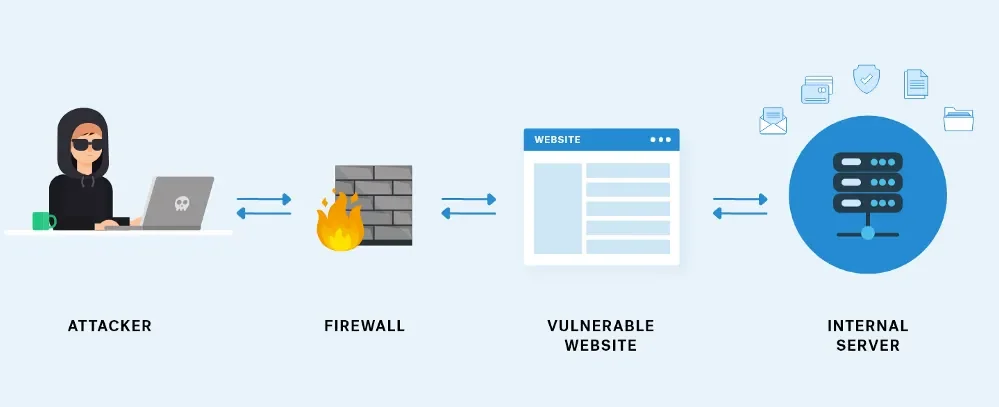
Setup
The only tooling described is Burp Collaborator, used to confirm that the server makes outbound requests, and later a Django server exposed through ngrok, used to serve a redirect. No account details, roles or versions are given.
Finding it
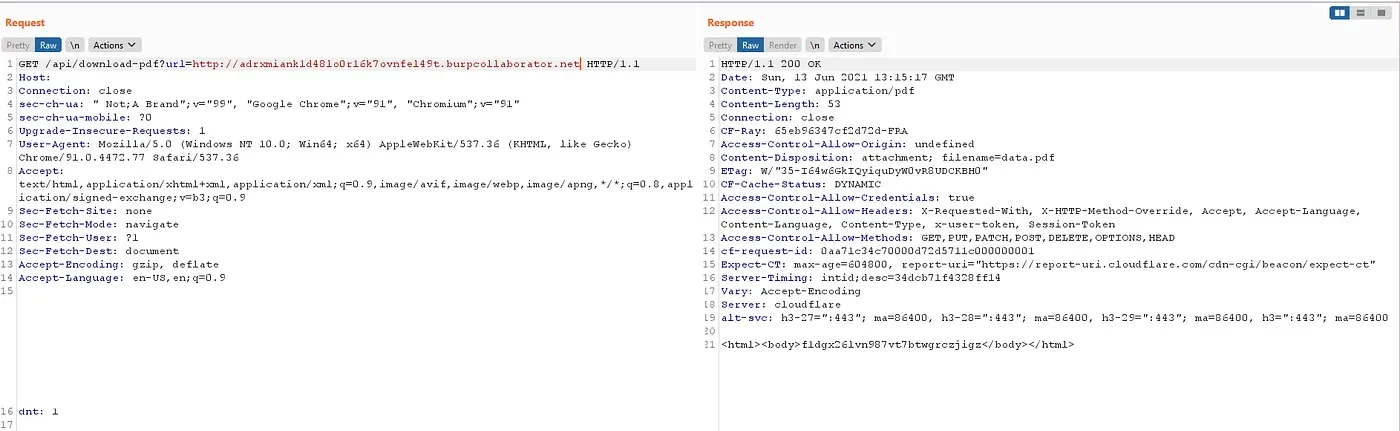
The url parameter of /api/download-pdf accepts a full URL. The author replaced the default value with a Burp Collaborator URL and the Collaborator received both HTTP and DNS interactions, and the response he got back was the Collaborator page. The Collaborator received HTTP and DNS requests, and the response he got back was the Collaborator page.
Exploitation
Step 1: confirm the fetch
Pointing url at a Collaborator domain produced HTTP and DNS requests on the Collaborator side and the Collaborator page in the response. The server made the request and the Collaborator page came back in the response.
Step 2: try localhost
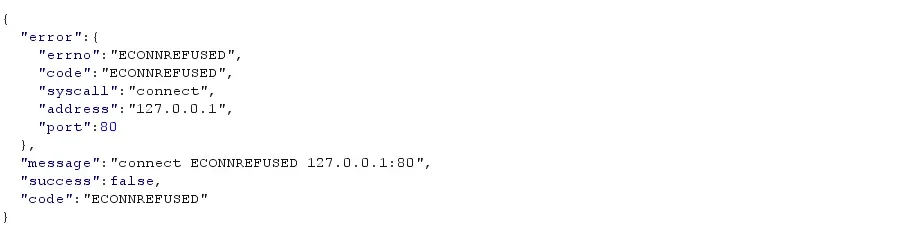
The next obvious target was http://localhost, but the request was blocked. The request was blocked.
Step 3: try localhost bypass payloads
He then went through the usual alternative representations of the loopback address:
http://[redacted]:80
http://[redacted]:443
http://[redacted]:22
http://127.1:80
http://0
http://[redacted]:80
http://localhost:80
http://[::]:80/
http://[::]:25/ SMTP
http://[::]:3128/ Squid
http://[0000::1]:80/
http://[[redacted].0.0.1]/thefile
None of them worked. He also tried other schemes, file:///, sftp://, gopher:// and others, with the same result. None of the payloads or schemes worked.
Step 4: try the AWS metadata address
He then tried the instance metadata endpoint directly:
http://[redacted]/
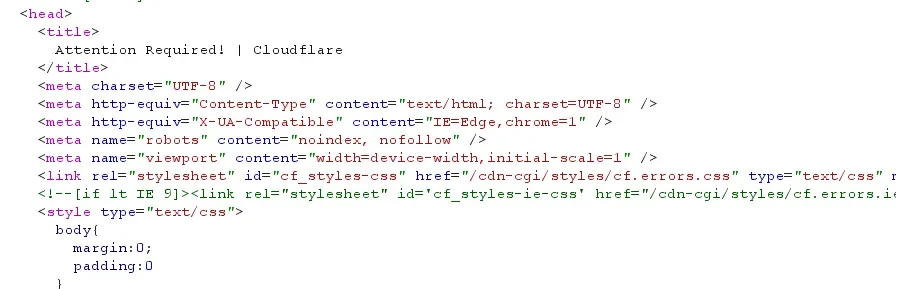
The response was a Cloudflare page rather than metadata.
Step 5: redirect around the filter
The idea that moved things forward is that a server may filter the URL supplied in the parameter but not the destination of a redirect returned for that URL. If the attacker controls a server that answers with a 302 to the blocked address, the application follows the redirect itself and the filter never sees the final target.
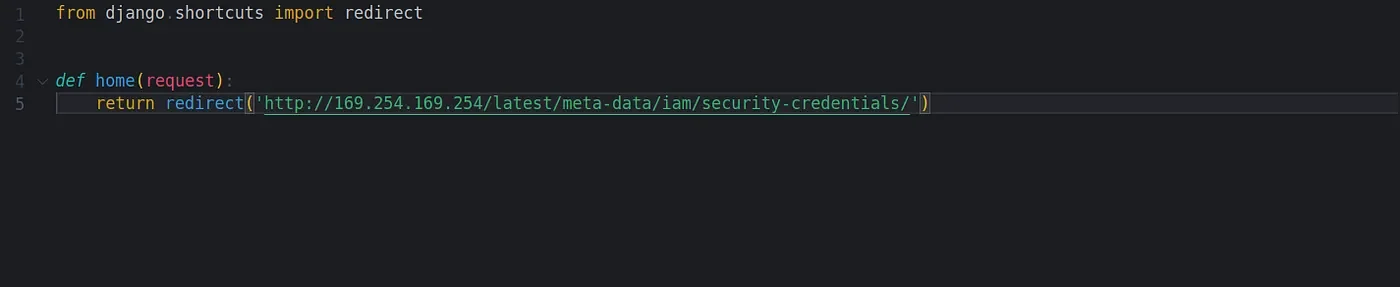
He started a Django server, reachable through ngrok, that responds with a redirect, and sent the application a URL pointing at it. The redirect target was the metadata credentials path:
http://[redacted]/latest/meta-data/iam/security-credentials/YOUR-PROD-HERE
Step 6: read the credentials
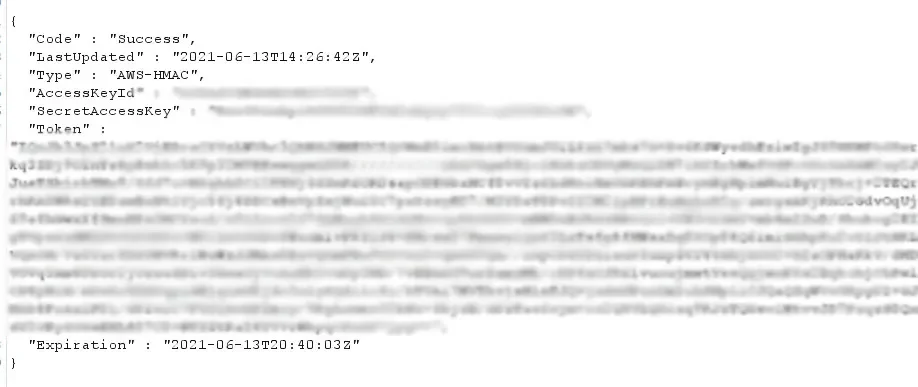
Following the redirect, the application fetched the metadata path and returned its contents. He sent the request, got the prod value, put it in the metadata credentials path, and got a response.

Root cause
The endpoint validates the URL it is given, but the validation is applied only to the original value of url. When the fetched resource answers with a redirect, the HTTP client follows it without re-checking the destination against the same rules. The block on localhost, on alternative loopback representations, on non-HTTP schemes and on [redacted] is therefore bypassed by a single hop through an attacker-controlled server. The report does not explain why the direct request returned a Cloudflare page.
Impact
An unauthenticated attacker who can reach the endpoint can make the server issue requests to hosts the filter is meant to protect, including the instance metadata service, and read the responses. In this case he reached the metadata credentials path. What those credentials allow is not described in the report.
Fix
The report does not describe a fix applied by the program. The measure that would address the root cause is to re-validate every redirect hop against the same allow/deny rules as the original URL, or to disable automatic redirect following for this fetch entirely, and to resolve and check the destination address after DNS resolution rather than only the literal string supplied by the user.
Variants to test
- Serve a 302 from your own server to
http://[redacted]/latest/meta-data/and pass your server's URL in the parameter. A positive result is metadata content in the response instead of a block page. - Redirect to
http://[redacted]:<port>for common internal ports. A positive result is a response body or error that differs from the blocked case. - Redirect to a
gopher://URL from your server. A positive result is the application following the scheme it refuses when supplied directly. - Chain two redirects, one to your server and one onward to the blocked host, to see whether only the first hop is checked. A positive result is the final content arriving in the response.
- Use a redirect to a hostname that resolves to a blocked address, to test whether validation happens before DNS resolution. A positive result is the internal content being returned.
What happened, in plain words
A security researcher was working on a program. A bug bounty programme is a scheme where a company invites outside people to look for security weaknesses in its systems and report them, often for a reward. The researcher has no permission to disclose the name, so he calls it redacted.com.
While exploring the programme's website, he found a feature that takes a web address (a URL) from the user and fetches that page on the server side. The endpoint name suggests it produces a PDF file. That kind of feature is a classic candidate for a vulnerability called server-side request forgery, or SSRF. In plain terms: if the server will fetch any address you give it, you can ask it to fetch addresses you are not supposed to reach, such as internal machines or the server's own private services.
The researcher confirmed the server really does fetch the address by pointing it at a server he controlled. Then he tried to make it fetch internal addresses, which were blocked. He tried many tricks to get around the block, and none worked. Eventually he used a redirect: his own server answered with a message saying "go and fetch this other address instead", and the application followed that instruction without re-checking it. That let him reach a special internal address that cloud servers use to hand out their own credentials, and he was able to read those credentials.
This article walks through the same steps in the same order, explaining each concept from scratch.
Some background concepts first
Before the story, a few ideas that come up again and again.
- Server and client. When you open a website, your browser (the client) asks a computer somewhere else (the server) for a page. The server does the work and sends the page back. In this story, the important point is that the server can also make requests of its own, to other computers, on your behalf.
- URL. A URL is a web address, like
https://example.com/page. It has a scheme at the front (https://), a host (example.com), and often a path (/page). - API. An API is a way for one piece of software to talk to another. On a website, an API endpoint is a URL that returns data or performs an action rather than showing a normal page. For example,
/api/download-pdfis an endpoint that produces a PDF. - Query parameter. The part of a URL after a question mark, made of name and value pairs, like
?url=http://example.com. The server reads these values and uses them. If a parameter is calledurl, it is a strong hint that the server will fetch whatever address you put there. - SSRF (server-side request forgery). A vulnerability where an attacker can make the server send requests to addresses of the attacker's choosing. The attacker does not need to reach those addresses directly; the server does it for them, from inside the network where it lives.
- Loopback address. The address
[redacted](and its many alternative spellings) always means "this same computer". If a server fetcheshttp://[redacted], it is talking to itself. That is often interesting because internal services listen there and are not meant to be reachable from outside. - Cloud metadata service. Cloud providers such as AWS run a small internal service on every virtual machine at the address
[redacted]. It hands out information about the machine, including temporary credentials for the cloud account. It is only reachable from inside the machine, which is exactly why SSRF is dangerous: the server can reach it even though you cannot. - Credentials and tokens. A credential is something that proves who you are, like a password or a key. A token is a short-lived credential, often a long string of characters, that a service accepts in place of a password. If you steal one, you can act as the machine that owns it, at least until it expires.
- Redirect. When you ask a web server for a page and it answers with a redirect (HTTP status code 302 is the common one), it is telling your browser "the thing you want is somewhere else, go there instead". Browsers follow redirects automatically. So do many server-side HTTP clients.
- Filter. A filter is a check in the application that looks at input and refuses it if it looks dangerous. In this story, the filter refuses URLs that point at internal addresses.
- Burp Collaborator. A service that gives you a unique domain name and records any request that arrives at it. If you put that domain in a parameter and the server fetches it, you see the request arrive, which proves the server made the request.
- ngrok. A tool that gives your own computer a public web address, so that a server on the internet can reach a service running on your laptop.
- Django. A framework for building web applications in the Python programming language. The researcher used it to run a tiny server that answers with a redirect.
The story begins
The researcher was working through a private bug bounty programme. He cannot name the target, so he calls it redacted.com. After some time exploring the programme's website, he came to an endpoint that looked like this:
Line by line:
https://redacted.comis the site he is testing./api/download-pdfis the endpoint. The name suggests it produces a PDF file for download.?url=starts the query string. The parameter is calledurl, and its value is a web address.”http://SomeThing.com”is the value. The curly quotes around it are how the researcher wrote it in his notes; the important part is that the value is a full URL.
Why this matters: a parameter called url that the server fetches is the classic shape of an SSRF candidate. If the server will fetch any address you put there, you can ask it to fetch addresses you should not be able to reach. So the researcher stopped and tested it.
Confirming the server really fetches the URL
To test whether the server actually makes the request, the researcher used Burp Collaborator. He replaced the default URL with his own Collaborator address. The Collaborator received both HTTP and DNS requests, and the response he got back was the Collaborator page itself.
What this means, step by step:
- He put a Collaborator domain in the
urlparameter. - The application took that value and made a request to it from the server side.
- The Collaborator recorded the request, which proves the server made it.
- The application then returned the fetched page to the researcher as the response.
The response he got back was the Collaborator page itself.
Trying localhost
The next obvious target was http://localhost, which means the same machine the server is running on. If the server fetches that, the researcher might see internal services that are not meant to be reachable from outside.
But the request was blocked. The request was blocked.
So there is a filter. It refuses URLs that point at the server itself.
Trying to get around the localhost filter
The researcher did not give up. He went through the usual alternative spellings of the loopback address, because filters often only check for the most obvious form:
http://[redacted]:80
http://[redacted]:443
http://[redacted]:22
http://127.1:80
http://0
http://[redacted]:80
http://localhost:80
http://[::]:80/
http://[::]:25/ SMTP
http://[::]:3128/ Squid
http://[0000::1]:80/
http://[[redacted].0.0.1]/thefile
Line by line:
http://[redacted]:80is the loopback address on port 80, the usual web port.http://[redacted]:443is the same address on port 443, the usual secure web port.http://[redacted]:22is the same address on port 22, the usual SSH port (remote login).http://127.1:80is a shortened form of the same address; some systems accept it.http://0is another shorthand that some systems treat as the local machine.http://[redacted]:80is the "all interfaces" address, which on many systems also means the local machine.http://localhost:80is the hostname form, on port 80.http://[::]:80/is the IPv6 form of the loopback address, on port 80.http://[::]:25/ SMTPis the same IPv6 form on port 25, the mail port. TheSMTPat the end is a note from the researcher about what usually listens there.http://[::]:3128/ Squidis the same IPv6 form on port 3128, where a proxy called Squid often listens.http://[0000::1]:80/is another IPv6 spelling of the loopback address.http://[[redacted].0.0.1]/thefileis an IPv6 address that wraps the IPv4 loopback address, a common trick to slip past filters that only look for the IPv4 form.
None of them worked. The researcher also tried other schemes, file:///, sftp://, gopher:// and others, with the same result. A scheme is the part before :// in a URL; file:/// reads local files, sftp:// is secure file transfer, and gopher:// is an old protocol that is often abused in SSRF because it can send arbitrary bytes to a service. None of the payloads or schemes worked.
Trying the cloud metadata address
After a while, the researcher thought of something else: why not try the address that cloud servers use to hand out their own information? On AWS, that address is [redacted]. It is a special address that only the machine itself can reach, and it can return details about the machine, including temporary credentials.
He tried:
http://[redacted]/
Line by line:
http://is the scheme.[redacted]is the metadata service address used by AWS.- The trailing
/is the root path.
The response was a Cloudflare block page rather than metadata. Cloudflare is a service that sits in front of websites and can block suspicious traffic. The response was a Cloudflare page rather than metadata.
The idea that moved things forward
The researcher kept reading and found an idea: a server might filter the URL you supply in the parameter, but not the destination of a redirect that the URL returns. In other words, the filter checks the first address, but when the server follows a redirect to a second address, nobody checks that second address.
If the attacker controls a server that answers with a redirect to the blocked address, the application follows the redirect itself, and the filter never sees the final target.
So the researcher started a Django server, reachable through ngrok, that responds with a redirect. He sent the application a URL pointing at his server. The redirect target was the metadata credentials path:
http://[redacted]/latest/meta-data/iam/security-credentials/YOUR-PROD-HERE
Line by line:
http://is the scheme.[redacted]is the AWS metadata service address./latest/meta-data/is the path where the metadata service publishes information about the machine.iam/security-credentials/is the path where it publishes the names of the IAM roles attached to the machine. IAM stands for Identity and Access Management, AWS's system for permissions.YOUR-PROD-HEREis a placeholder for the role name. The researcher first fetched the list of role names, saw one calledprod, and then put that name in the path.
Reading the credentials
Following the redirect, the application fetched the metadata path and returned its contents. He sent the request, got the prod value, put it in the metadata credentials path, and got a response.
So the chain was:
- The researcher sent the application a URL pointing at his own server.
- His server answered with a redirect to the metadata service.
- The application followed the redirect, because the filter only checked the first URL.
- The metadata service returned the role name and then the credentials.
- The application passed the response back to the researcher.
Why it worked
The endpoint validates the URL it is given, but the validation is applied only to the original value of url. When the fetched resource answers with a redirect, the HTTP client follows it without re-checking the destination against the same rules. The block on localhost, on alternative loopback representations, on non-HTTP schemes and on [redacted] is therefore bypassed by a single hop through an attacker-controlled server.
The report does not explain why the direct request returned a Cloudflare page.
What an attacker could do with this
An unauthenticated attacker who can reach the endpoint can make the server issue requests to hosts the filter is meant to protect, including the instance metadata service, and read the responses. In this case he reached the metadata credentials path. What those credentials allow is not described in the report.
How to fix it
The measure that would address the root cause is to re-validate every redirect hop against the same allow and deny rules as the original URL, or to disable automatic redirect following for this fetch entirely. It is also important to resolve and check the destination address after DNS resolution, rather than only checking the literal string supplied by the user.
Variants to test
If you want to try this kind of test yourself, here are some variations:
- Serve a 302 from your own server to
http://[redacted]/latest/meta-data/and pass your server's URL in the parameter. A positive result is metadata content in the response instead of a block page. - Redirect to
http://[redacted]:<port>for common internal ports. A positive result is a response body or error that differs from the blocked case. - Redirect to a
gopher://URL from your server. A positive result is the application following the scheme it refuses when supplied directly. - Chain two redirects, one to your server and one onward to the blocked host, to see whether only the first hop is checked. A positive result is the final content arriving in the response.
- Use a redirect to a hostname that resolves to a blocked address, to test whether validation happens before DNS resolution. A positive result is the internal content being returned.
Glossary
- API: a way for one piece of software to talk to another; on a website, an endpoint that returns data or performs an action rather than showing a normal page.
- AWS: Amazon Web Services, a cloud provider that runs virtual machines and other services.
- Burp Collaborator: a service that gives you a unique domain and records any request that arrives at it, used to confirm that a server makes outbound requests.
- Cloudflare: a service that sits in front of websites and can block suspicious traffic.
- Credential: something that proves who you are, such as a password or a key.
- DNS: the system that turns a hostname like
example.cominto an IP address. - Endpoint: a specific URL on a website that performs an action or returns data.
- Filter: a check in an application that looks at input and refuses it if it looks dangerous.
- gopher://: an old internet protocol, often abused in SSRF because it can send arbitrary bytes to a service.
- HTTP: the protocol browsers and servers use to exchange web pages and data.
- IAM: Identity and Access Management, AWS's system for permissions and roles.
- Instance: a virtual machine running in a cloud provider.
- IPv4 and IPv6: two versions of the addressing system used on the internet. IPv6 addresses are written in square brackets in URLs.
- Loopback address: the address
[redacted](and its many alternative spellings), which always means "this same computer". - Metadata service: a small internal service on cloud machines, at
[redacted]on AWS, that hands out information about the machine, including temporary credentials. - ngrok: a tool that gives your own computer a public web address so a server on the internet can reach it.
- Port: a numbered channel on a computer; different services listen on different ports, such as 80 for web and 22 for SSH.
- Query parameter: the name and value pairs after a question mark in a URL, like
?url=http://example.com. - Redirect: a response from a web server (status code 302 is common) telling the client to go to a different address instead.
- Scheme: the part of a URL before
://, such ashttp,https,file,sftporgopher. - SMTP: the protocol used to send email.
- Squid: a common proxy server software.
- SSH: a protocol for logging into a remote computer securely.
- Token: a short-lived credential, often a long string of characters, that a service accepts in place of a password.
- URL: a web address, made of a scheme, a host and often a path.




