Kubernetes pentest — Bypassing load balancer
A Kubernetes ingress port was exposed directly on node IPs, allowing attackers to bypass the load balancer and reach backend services directly. This could circumvent traffic filtering, authentication, and rate limiting enforced at the load balancer.
 Published on infosecwriteups.com
As organizations increasingly adopt Kubernetes for their containerized applications, securing these deployments becomes paramount. However, even with robust security measures in place, misconfigurations can introduce vulnerabilities that put critical services at risk.
The full write-up lives on its author's site
It belongs to its author, so we link to it rather than copy it. The other two tabs are our own rewrites, checked against it.
Context
This write-up describes a load balancer bypass found during a Kubernetes security assessment. In a typical Kubernetes deployment, services are published through a load balancer, and the load balancer is where traffic filtering, authentication and authorisation, session management, SSL termination and rate limiting are enforced. The exposed services in this assessment were reached through hostnames such as service-1.kube.com and service-2.kube.com, with an ingress controller acting as the reverse proxy behind the load balancer.
The misconfiguration found during the assessment allowed the load balancer to be bypassed completely, so that requests could be sent directly to the reverse proxy and from there to the desired service. The author lists four consequences of this:
- Traffic filtering bypass. Traffic can circumvent filtering or security measures implemented at the load balancer level, letting an attacker talk directly to the reverse proxy and skip restrictions intended to protect the exposed services.
- Authentication and authorisation circumvention. Mechanisms typically enforced at the load balancer level may be bypassed or circumvented.
- Loss of load balancer features. Session management, SSL termination and rate limiting are all provided by the load balancer, and bypassing it means those protections are not applied to the exposed services.
- Increased attack surface. Direct access to the reverse proxy exposes a new entry point and adds risk factors that need to be considered and mitigated.
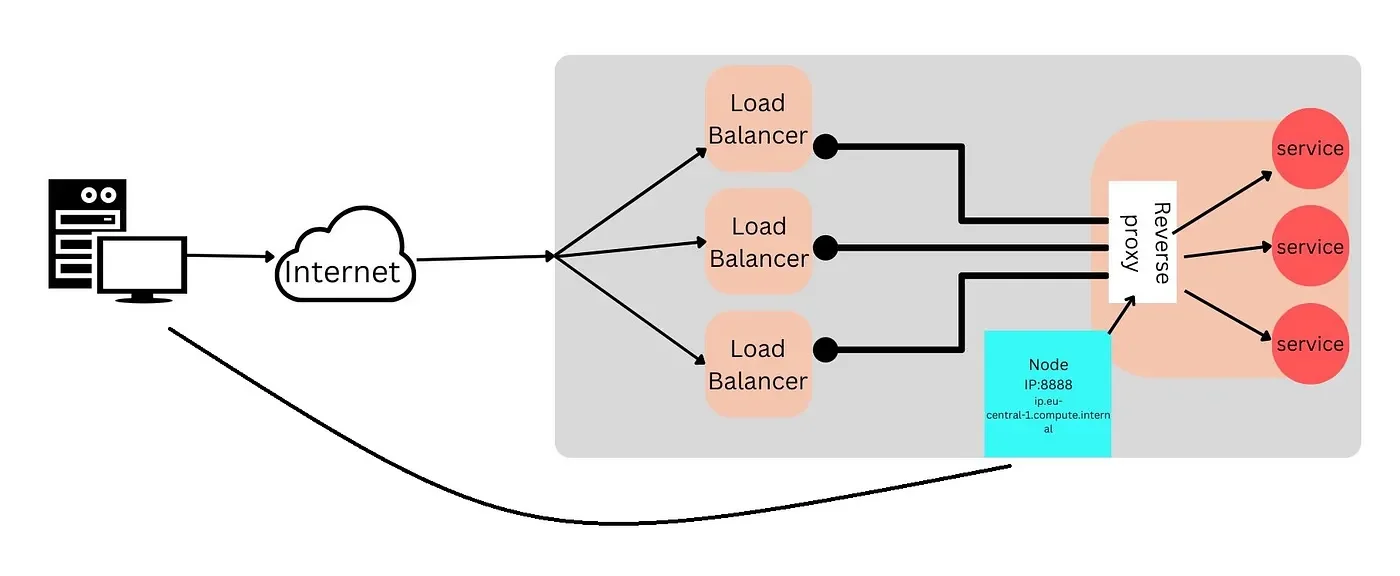
Setup
The report describes the assessment from a penetration tester's perspective and shows kubectl commands for enumerating services, ingress and nodes. The tools used were kubectl, nslookup, curl and nmap. No account roles, cluster versions or specific product versions are given in the report.
The precondition for the finding is a cluster in which services are exposed through a load balancer and an ingress controller, and in which the ingress is reachable on the nodes themselves.
Finding it
The first task was to identify which services in the cluster are exposed to the internet. The report gives two ways to do this:
- List all services and look for those with a type of
LoadBalancerorNodePort:
kubectl get services --all-namespaces
- If an ingress controller is set up, list the ingress resources:
kubectl get ingress --all-namespaces
For the purposes of the walkthrough, the exposed services found are assumed to be service-1.kube.com and service-2.kube.com.
Exploitation
Step 1: Resolve the hostnames
The next step was to resolve the exposed hostnames to IP addresses with nslookup, in order to retrieve the IP addresses associated with the hostname.

Step 2: Send a request to the load balancer IP
With the addresses in hand, the tester sent a request directly to the load balancer IP while setting the desired hostname in the Host header:
curl -i -s -k -X $'GET' \ -H $'Host: service-1.kube.com' \ $'https://<load-balancer>/'
The -k flag skips certificate verification, -i includes the response headers and -s silences the progress output. The Host header selects which service the load balancer should route the request to. This sends the request through the normal path, via the load balancer.
Step 3: Enumerate the node IPs
To look for ways around the load balancer, the tester performed a port scan across all of the node IPs in the cluster. The node addresses were obtained with:
kubectl describe nodes
This command provides detailed information about the nodes, including their IP addresses.
Step 4: Port scan the nodes
Each node IP was then scanned across all ports:
nmap -sV -Pn -p- <node-IPs>
-sV enables service and version detection, -Pn skips host discovery and treats the hosts as up, and -p- scans all ports.
Step 5: Reach the ingress directly
While analysing the Nmap output, the tester found that certain node IPs had port 8888 open. Further investigation showed that these open ports were associated with the ingress functionality. This allowed direct communication with the reverse proxy by sending requests to the node IP and port combination, bypassing the load balancer entirely:
curl -i -s -k -X $'GET' \ -H $'Host: service-1.kube.com' \ $'https://<NODE-IP:8888>/'
The request is identical to the one sent to the load balancer, except that it targets the node's IP on port 8888. The Host header still names the service, but the load balancer is no longer in the path.
Root cause
The report attributes the issue to a misconfiguration of ingress ports on some of the node IPs. The ingress was reachable directly on port 8888 on the nodes, so the load balancer was not the only way to reach the reverse proxy. Because the load balancer is where filtering, authentication and authorisation, session management, SSL termination and rate limiting are applied, any request that reaches the ingress directly skips all of those controls. The report does not describe the specific configuration change that produced this state.
Impact
Under the conditions found, an attacker who can reach the node IPs can communicate directly with the reverse proxy and the services behind it, bypassing the load balancer. The report frames the consequences as traffic filtering bypass, circumvention of authentication and authorisation enforced at the load balancer, loss of load balancer features such as session management, SSL termination and rate limiting, and an increased attack surface through the new entry point. The report does not quantify the impact further or state which specific services were reachable.
Fix
The report does not describe a fix that was applied. The mitigation implied by the finding is to remove direct external reachability of the ingress ports on the nodes, so that the load balancer is the only path to the reverse proxy.
Variants to test
- Scan node IPs for ingress ports. Run
nmap -sV -Pn -p- <node-IPs>against the nodes of a cluster and look for open ports that serve the ingress. A positive result is an open port on a node IP that answers requests with the service'sHostheader. - Send a request to a node IP and port with the service hostname. Use the same
curlpattern with-H $'Host: <service-hostname>'against the node IP and port. A positive result is a response from the service reached directly on the node IP and port. - Compare responses through the load balancer and directly.
- Check other exposed services.
What happened, in plain words
Imagine a large office building with a single front desk at the main entrance. Every visitor has to walk past that desk: the receptionist checks who you are, writes down your name, and only then lets you through to the offices inside. That front desk is a load balancer. In a computer network it is the piece of equipment (or software) that all outside traffic passes through before it reaches the actual services. Because everything goes through it, it is also the natural place to put security checks: who is allowed in, how fast they can come in, and whether their connection is encrypted.
Now imagine someone discovers that the building also has a side door that leads straight into the offices, with nobody sitting at it. Anyone who finds that door can walk in without ever passing the receptionist. That is exactly what was found in this assessment: a misconfiguration (a setting that was left in a state it should not be in) in a Kubernetes environment let a tester reach the services directly, skipping the load balancer and all the checks that live there.
Kubernetes is a system for running and managing lots of small programs (called containers) across many computers (called nodes). It is very common in modern companies. The report describes a security assessment of such an environment, and the finding is that the load balancer could be bypassed completely.
The picture above illustrates the idea: traffic that should have gone through the load balancer found another way in, because of a misconfiguration in the Kubernetes environment.
The author lists four reasons why this matters. Each one is worth understanding on its own:
- Traffic filtering bypass. A load balancer can be configured to block certain kinds of traffic, the way a receptionist might turn away people without an appointment. If you can reach the services without going through the load balancer, those blocks never apply to you.
- Authentication and authorisation circumvention. Authentication means proving who you are (like showing an ID card). Authorisation means deciding what you are allowed to do once you are known. If the load balancer is where these checks happen, skipping it means skipping the checks.
- Loss of load balancer features. The load balancer does more than check people. It also manages sessions (keeping track of a visitor across several requests), handles SSL termination (the encryption of the connection, explained below), and applies rate limiting (a cap on how many requests someone can make in a given time, like a bouncer letting only a few people in per minute). Bypassing it means none of these protections are applied.
- Increased attack surface. Attack surface is the total number of ways an attacker could try to get in. Every extra door you leave open adds to it. A direct route to the internal proxy is a new door.
The Story
Step 1: Find out which services are exposed
The tester's first job was to identify which services in the cluster are exposed. You cannot attack what you cannot see, and you cannot defend what you have not listed. The report gives two commands for this.
The first lists every service in every part of the cluster:
kubectl get services --all-namespaces
Line by line:
kubectlis the command-line tool used to talk to a Kubernetes cluster. Think of it as the remote control for the whole system.get servicesasks Kubernetes to show the list of services. A service in Kubernetes is a stable address that points at a group of running programs, so other things can find them without knowing exactly which computer they run on.--all-namespacesmeans "look everywhere". Kubernetes groups things into namespaces, which are like separate folders or departments inside the same cluster. Without this flag you would only see one department.
The report says to look for services whose type is LoadBalancer or NodePort. A LoadBalancer service is one that Kubernetes arranges to be published through a load balancer. A NodePort service is one that is published on a fixed port on every node (every computer) in the cluster. Both mean the service is reachable from outside.
The second command is for clusters that use an ingress controller:
kubectl get ingress --all-namespaces
get ingresslists the ingress resources. An ingress is a set of rules that says "requests for this web address should go to that service". The ingress controller is the program that reads those rules and actually forwards the traffic. It acts as a reverse proxy: a server that sits in front of other servers and passes requests along to the right one.
For the rest of the walkthrough, the report assumes the exposed services found were service-1.kube.com and service-2.kube.com. These are hostnames, human-friendly names for a server, like a contact name in your phone instead of a phone number.
Step 2: Turn the names into IP addresses
Computers do not actually use names like service-1.kube.com to find each other. They use IP addresses, which are numeric addresses, roughly like a postal address for a machine. The job of turning a name into an address is called DNS resolution, and the tool nslookup does exactly that.
The screenshot shows the nslookup command being run to retrieve the IP addresses associated with the hostname. In plain terms: the tester asked "what address does this name point to?" and got an answer back. That answer is the address of the load balancer, the front desk.
Step 3: Send a request to the load balancer
With the address in hand, the tester sent a normal web request to the load balancer, naming the service they wanted in the request itself:
curl -i -s -k -X $'GET' \ -H $'Host: service-1.kube.com' \ $'https://<load-balancer>/'
This is a curl command. curl is a tool for sending requests to web servers from a terminal, essentially a browser without a window. Line by line:
curlis the program being run.-itells it to include the response headers in the output. Headers are the small lines of metadata that come with every web response, before the actual content, like the label on a parcel.-smeans silent: do not print the progress bar and other chatter, just the result.-kmeans insecure: do not verify the server's certificate. A certificate is what proves a website is really who it claims to be, and browsers check it automatically.-kturns that check off, which is common in testing because test servers often use certificates that are not trusted by the public system.-X $'GET'sets the HTTP method toGET. The method is the verb of a web request:GETmeans "give me this page".-H $'Host: service-1.kube.com'adds a header calledHost. This is the key part. When many websites share one address, theHostheader is how the server knows which website you meant. It is like writing the department name on an envelope sent to a shared office building.$'https://<load-balancer>/'is the address being contacted, overhttps, the encrypted version of the web protocol. The angle brackets are a placeholder for the real address.
This sends the request through the load balancer, the normal path.
Step 4: Find the addresses of the nodes
To look for a way around the load balancer, the tester needed to know the addresses of the individual computers in the cluster, the nodes. The command for that is:
kubectl describe nodes
describeasks Kubernetes for detailed information about something, rather than a short list.nodesmeans the machines themselves.
The report says this command provides detailed information about the nodes, including their IP addresses. The reasoning is simple: if the load balancer is the front desk, the nodes are the individual offices. If an office has its own door to the street, that is worth knowing about.
Step 5: Scan every port on every node
Computers have many ports. A port is a numbered channel on a single machine, like the many numbered windows at a ticket office: the building has one address, but each window serves a different purpose. A port scan means knocking on every window to see which ones are open and who answers.
The tester scanned all ports on each node address:
nmap -sV -Pn -p- <node-IPs>
nmapis the port-scanning tool.-sVmeans service and version detection: not just "is this window open?" but "what service is behind it, and which version?".-Pntells nmap to skip the initial "are you alive?" check and treat the hosts as up. Some machines do not answer that check even when they are running, so this avoids false negatives.-p-means scan all ports, not just the common ones. The trailing dash is what makes it the full range.<node-IPs>is a placeholder for the node addresses found in the previous step.
Why scan everything? Because the interesting door is often not the obvious one. If you only check the usual ports, you may miss a service that was published on an unusual one.
Step 6: Reach the ingress directly
While reading the scan output, the tester noticed that certain node addresses had port 8888 open. Further investigation showed that these open ports were the ingress itself, the reverse proxy that normally sits behind the load balancer. In other words, the side door was not just open, it led straight to the same receptionist's desk, but without the front desk in front of it.
So the tester sent the same request as before, but to the node address and port 8888 instead of the load balancer:
curl -i -s -k -X $'GET' \ -H $'Host: service-1.kube.com' \ $'https://<NODE-IP:8888>/'
Every flag is the same as in the earlier request, and the only difference is the destination: <NODE-IP:8888> instead of <load-balancer>. The Host header still names service-1.kube.com, so the ingress still knows which service the request is for and forwards it to the same place. But the load balancer is no longer in the path. The request has gone around the front desk entirely.
That is the bypass: the request reaches the ingress directly, with the load balancer no longer in the path.
Why it happened
The report puts the cause down to a misconfiguration of the ingress ports on some of the node addresses. The ingress was reachable directly on port 8888 on the nodes, so the load balancer was not the only route to the reverse proxy. Since the load balancer is where filtering, authentication and authorisation, session management, SSL termination and rate limiting are applied, any request that reaches the ingress directly skips all of those controls. The report does not describe the specific configuration change that produced this state.
What it means in practice
Under the conditions found, anyone who can reach the node addresses can talk directly to the reverse proxy and the services behind it, bypassing the load balancer. The consequences are the four listed at the start: traffic filtering bypass, circumvention of authentication and authorisation enforced at the load balancer, loss of load balancer features such as session management, SSL termination and rate limiting, and an increased attack surface through the new entry point. The report does not quantify the impact further or state which specific services were reachable.
How to fix it
The report does not describe a fix that was applied. The mitigation implied by the finding is to remove direct external reachability of the ingress ports on the nodes, so that the load balancer is the only path to the reverse proxy.
Things to try on your own cluster
If you are learning, these are the checks the report suggests, in the same spirit:
- Scan node addresses for ingress ports. Run
nmap -sV -Pn -p- <node-IPs>against the nodes of a cluster and look for open ports that serve the ingress. A positive result is an open port on a node address that answers requests carrying the service'sHostheader. - Send a request to a node address and port with the service hostname. Use the same
curlpattern with-H $'Host: <service-hostname>'against the node address and port. A positive result is a response from the service reached directly on the node address and port. - Compare responses through the load balancer and directly.
- Check other exposed services.
Glossary
- Load balancer: a piece of equipment or software that all outside traffic passes through before reaching the services behind it, and where security checks are often applied.
- Kubernetes: a system for running and managing many small programs (containers) across many computers.
- Container: a packaged program with everything it needs to run, kept separate from other programs on the same machine.
- Node: one of the individual computers that make up a Kubernetes cluster.
- Cluster: the whole collection of nodes managed together.
- Namespace: a way of grouping things inside a cluster, like a folder or department.
- Service (Kubernetes): a stable address that points at a group of running programs so other things can find them.
- LoadBalancer (service type): a Kubernetes service that is published through a load balancer.
- NodePort (service type): a Kubernetes service that is published on a fixed port on every node.
- Ingress: a set of rules saying which web address should go to which service.
- Ingress controller: the program that reads ingress rules and forwards traffic accordingly; it acts as a reverse proxy.
- Reverse proxy: a server that sits in front of other servers and passes requests along to the right one.
- Misconfiguration: a setting left in a state it should not be in.
- Hostname: a human-friendly name for a server, like
service-1.kube.com. - IP address: the numeric address a computer uses to find another computer.
- DNS resolution: turning a hostname into an IP address.
- Port: a numbered channel on a single machine, so one address can serve many purposes.
- Port scan: knocking on every port on a machine to see which are open and what answers.
- HTTP method: the verb of a web request, such as
GET(give me this page). - Header: a small line of metadata sent with a web request or response.
- Host header: the header that tells a shared server which website the request is for.
- HTTPS: the encrypted version of the web protocol.
- Certificate: what proves a website is really who it claims to be.
- Authentication: proving who you are.
- Authorisation: deciding what you are allowed to do once you are known.
- Session management: keeping track of a visitor across several requests.
- SSL termination: the point where an encrypted connection is decrypted, often at the load balancer.
- Rate limiting: a cap on how many requests someone can make in a given time.
- Attack surface: the total number of ways an attacker could try to get in.
- Traffic filtering: blocking or allowing certain kinds of network traffic according to rules.
- Bypass: getting around a control instead of going through it.
kubectl: the command-line tool for talking to a Kubernetes cluster.nslookup: a tool that turns a hostname into an IP address.curl: a tool for sending web requests from a terminal.nmap: a tool for scanning ports and detecting services on a machine.