How i was able to bypass Cloudflare for XSS!
 Published on infosecwriteups.com
This is my second write-up and if you’ve read my previous one it was about bypassing cloudflare to achieve ssrf , but this time we are going to bypass cloudflare for XSS !
The full write-up lives on its author's site
It belongs to its author, so we link to it rather than copy it. The other two tabs are our own rewrites, checked against it.
Context
This is a write-up about bypassing Cloudflare's web application firewall (WAF) to achieve cross-site scripting. The researcher had previously written about bypassing Cloudflare to reach SSRF, and this follow-up covers the same defensive layer, this time in front of an XSS sink.
The target was a login page on a bug bounty program. The login page accepted a parameter named rurl, whose purpose was to redirect the user to another location after login. The report does not name the program, the hostname or the application.
Setup
No accounts, roles, tool versions or special tooling are described. The work was done against the login page's rurl parameter, using a browser and hand-crafted payloads. The only precondition that matters is that the parameter's value ended up inside the href attribute of an a tag.
Finding it
The rurl parameter looked like a redirect target, so the researcher first tested it for open redirect. That worked: the parameter would send the user to an arbitrary location. The submission was marked as a duplicate.

The screenshot is captioned ":'(".
An open redirect is interesting beyond itself because the value is reflected into a link. Since the value lands in the href attribute of an a tag, a javascript: scheme in that attribute would execute script when the link is clicked. That is the pivot from open redirect to XSS.
Exploitation
Step 1: confirm the sink with a basic payload
The first XSS attempt used the simplest scheme payload:
javascript:alert(1)
Cloudflare blocked it. The response the researcher received is shown below.
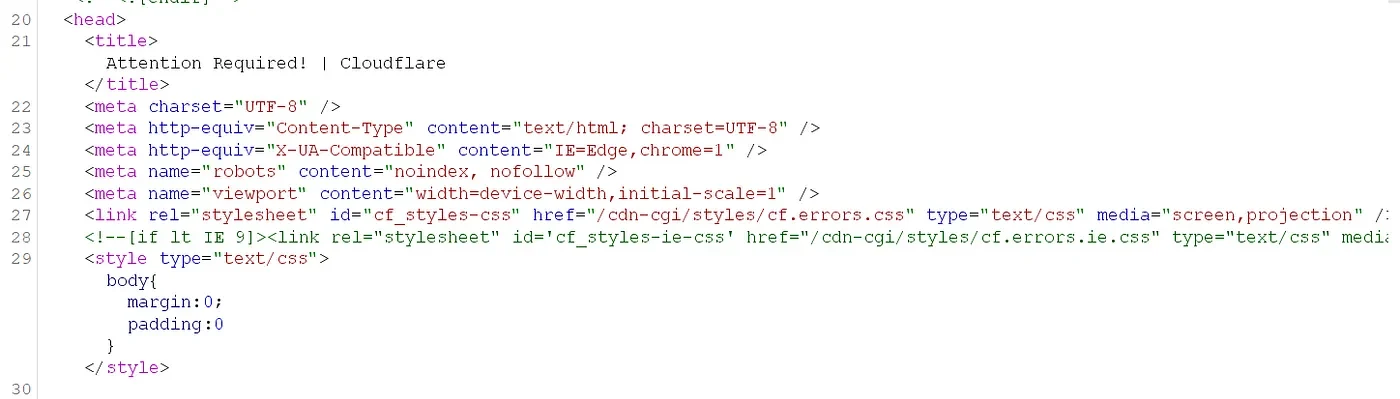
The screenshot is captioned "Cloudflare everywhere ! :@".
Step 2: probe which parts of the payload the filter removes
The researcher's approach was to test assumptions one at a time rather than guessing whole payloads. The first probe was the bare scheme:
javascript:
Two questions were being answered: was the whole javascript keyword stripped, and was the : part stripped? This returned a 200 response, so the scheme and colon survived the filter.
Step 3: probe the function call
With the scheme confirmed, the next probe was:
javascript:alert
This narrowed the question to whether the alert keyword was stripped, and whether the parentheses around the argument were stripped. The conclusion was that the main obstacle was the parentheses.
Step 4: try parenthesis-free invocation
The first bypass attempt used tagged template syntax, which invokes a function without parentheses:
javascript:alert`1`
This did not succeed; Cloudflare still blocked it.
Step 5: try the throw technique
The researcher then turned to the throw technique, which passes arguments to a function without parentheses by abusing the onerror event handler: an error is triggered, and the handler is assigned a function that receives the thrown value. The payload tried was:
javascript:window.onerror=alert;throw 1
Cloudflare caught this one as well.
Step 6: encoding and the working payload
After further attempts with different payloads and encoding techniques, including base64, URL encoding and HTML encoding, the researcher arrived at a payload that got through:
javascript%3avar{a%3aonerror}%3d{a%3aalert}%3bthrow%2520document.cookie
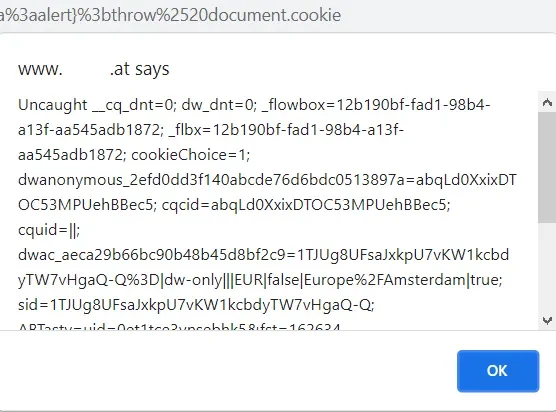
The screenshot is captioned "Cloudflare ?".
Breaking the payload down: %3a is an encoded colon, %3d an encoded equals sign and %3b an encoded semicolon, so the decoded form is a javascript: URL containing var{a:onerror}={a:alert};throw%20document.cookie. The %2520 is a double-encoded space, which decodes to %20 and then to a space at the next decoding stage.
The researcher then posted a screenshot captioned "^_^".

The screenshot is captioned "^_^".
Root cause
The application reflected the rurl parameter into the href attribute of an a tag without restricting the URL scheme, so a javascript: URL became a script execution sink. The open redirect finding was the same missing validation seen from a different angle.
Cloudflare's WAF sat in front of the application and blocked the obvious payloads: the plain javascript:alert(1), the tagged template form and the throw form. The report does not explain why this encoded form got through.
Impact
An attacker who can get a victim to follow a crafted link to the login page can execute JavaScript in the victim's session on that origin. Exploitation depends on the victim clicking the crafted link, since the payload lives in an href attribute.
Fix
The fix implied by the root cause is to validate the rurl value against an allowlist of permitted destinations and schemes, rejecting anything that is not a plain http or https URL, and to encode the value for the HTML attribute context when rendering it. Relying on the WAF alone is not sufficient, as this bypass shows.
Variants to test
- Other parenthesis-free invocations. Try tagged templates such as
javascript:alert1`` andthrow-based forms on any parameter reflected into anhref. A positive result is the dialog firing in the browser. - Encoding layers. Apply URL encoding, double encoding and HTML entity encoding to a payload the WAF blocks and see whether the decoded form still executes. A positive result is execution with the encoded form accepted by the server.
- Object-literal identifier references. Replace bare keywords such as
onerrorandalertwith object-literal references like{a:onerror}and{a:alert}to avoid keyword-based signatures. A positive result is the handler firing on a thrown value. - Scheme probing. Send the bare scheme (
javascript:) and then the scheme plus function name without parentheses to learn which parts the filter removes. A 200 response at each stage tells you the filter is not stripping that component. - Open redirect as a pivot. Whenever a redirect parameter is found, check whether its value is reflected into an
hrefand whether ajavascript:scheme is accepted. A positive result is script execution on click, even if the redirect itself was already reported.
What happened, in plain words
A security researcher found a login page on a bug bounty program that took a value from the address bar and used it to send you somewhere else after you log in. The parameter was called rurl, short for redirect URL. Because the page put that value straight into a link, the researcher could make the link point anywhere, which is called an open redirect. That report was marked as a duplicate, meaning someone else had already reported it.
But the same weakness had a second face. If the value goes into a link, and the link can start with javascript: instead of https:, then clicking the link runs code in the browser. That is cross-site scripting, or XSS. A product called Cloudflare, which sits in front of the website and inspects incoming requests, blocked the obvious attempts. The researcher then worked out which characters Cloudflare was removing, and built an encoded version of the payload that slipped past the filter and still ran in the browser.
This article walks through that story from the beginning, explaining each idea as it appears.
The pieces you need to know first
Before the steps make sense, here are the basic building blocks, in everyday terms.
- A URL is the address you type in the browser, like
https://example.com/login. The part before the first colon, such ashttpsorjavascript, is called the scheme. It tells the browser what kind of address this is and what to do with it. - A parameter is a named value attached to a URL, usually after a question mark. In
https://example.com/login?rurl=home, the parameter name isrurland its value ishome. Web pages read these values and often use them to decide what to show or where to send you. - An open redirect is when a site takes a parameter meant to hold a destination and accepts any destination at all, including one an attacker chooses. The site becomes a trusted-looking stepping stone to somewhere else.
- Cross-site scripting (XSS) is when an attacker gets their own code to run inside someone else's website, in that visitor's browser. The code then behaves as if the website itself had written it.
- A web application firewall (WAF) is a filter placed in front of a website. It reads incoming requests and blocks ones that look like known attacks, a bit like a bouncer checking names against a list at the door.
- Cloudflare is a company that provides this kind of protective layer, among other services. In this story it is the bouncer.
- An
atag is the HTML element that makes a clickable link. Itshrefattribute holds the address the link points to. - A cookie is a small piece of data a website stores in your browser, often used to remember that you are logged in. If someone else can read your cookies, they may be able to act as you.
- Encoding means rewriting characters in a form that means the same thing to a computer but looks different as text. For example,
%3ais an encoded colon. A browser decodes it back to:before using it. This is why filters and browsers can disagree about what a string actually says.
The story
The researcher was working on a bug bounty program, which is a scheme where companies invite people to test their systems and pay for valid findings. On the login page there was a parameter called rurl. Its job was to redirect the user to another location, presumably after a successful login.
Because the parameter clearly held a destination, the first thing to test was whether it accepted any destination. It did. The researcher could make the login page send a visitor to an arbitrary place. That is an open redirect, and it was submitted. The program marked it as a duplicate, meaning another researcher had reported the same issue first.
The screenshot is captioned ":'(".
Why keep going after a duplicate? Because the same value was being placed into a link. The researcher knew that when a redirect value is inserted into the href attribute of an a tag, the scheme matters. If the value can start with javascript: instead of http or https, the browser will treat the link as code to run when clicked, not as a place to go. So the open redirect and the XSS are two consequences of the same missing check: the site never asked what kind of address it was being given.
Trying the obvious payload
The simplest test for this kind of link-based XSS is to put a javascript: address in the parameter and see whether the browser runs it. The researcher used:
javascript:alert(1)
Line by line: javascript: tells the browser this is not a normal web address but a piece of script. alert is a built-in browser function that shows a small pop-up dialog. (1) passes the number 1 to that function, so the dialog would display 1. If the dialog appears, code is running.
Cloudflare blocked it. Instead of the page, the researcher got a block page.
The screenshot is captioned "Cloudflare everywhere ! :@".
At this point the payload is known to be recognised as an attack. The question becomes: what exactly does the filter dislike? Guessing whole new payloads is slow. A better approach is to send pieces and watch which pieces survive.
Finding out what the filter removes
The researcher's method was to test one assumption at a time. Each test answers a small question, and the answers narrow down what the filter is doing.
Step 1: does the scheme survive?
The first probe was just the scheme, with nothing after it:
javascript:
Line by line: this is the word javascript followed by a colon, and nothing else. It is not a working attack on its own. It is a question. Two questions, actually: is the whole javascript word being stripped out, and is the colon being stripped out?
The response was a normal 200, meaning the page loaded rather than being blocked. So both the word and the colon got through. The filter is not removing the scheme itself.
Step 2: does the function name survive?
Next, the researcher added the function name but not the call:
javascript:alert
Line by line: this is the scheme plus the name of the pop-up function, but without the parentheses and argument that would actually call it. Again it is a probe, not a working payload.
This narrowed the question to two things: is the word alert being stripped, and are the parentheses being stripped? The conclusion was that the main obstacle was the parentheses. The filter was removing or blocking the ( and ) characters, which are what actually invoke a function and pass it a value.
Trying to call a function without parentheses
If parentheses are the problem, the next move is to find a way to run a function without writing them. JavaScript has a few tricks for this.
The tagged template attempt
The first attempt used a syntax where a function name is followed by a backtick-quoted string instead of parentheses:
javascript:alert`1`
Line by line: alert is the function, and the backticks around 1 form a template literal. When a function is written directly before a template literal, JavaScript calls the function and passes it the string inside the backticks. So this should show a dialog containing 1, without any parentheses.
It did not work. Cloudflare still blocked it.
The throw technique
The researcher then tried a technique that abuses error handling. In JavaScript, when an error occurs, the browser can call a function you have assigned to handle it. The throw statement creates an error with a value you choose. If you have set the error handler to be the alert function, then throwing a value causes alert to be called with that value, again without parentheses.
The payload tried was:
javascript:window.onerror=alert;throw 1
Line by line: window.onerror=alert sets the browser's error handler to the alert function. The semicolon ends that statement. throw 1 creates an error carrying the value 1, which triggers the handler, so alert is called with 1. The result should be a dialog showing 1.
Cloudflare caught this one as well. The filter was not only looking for parentheses; it also recognised this pattern.
Encoding, and the payload that worked
After more attempts with different payloads and different encoding techniques, including base64, URL encoding and HTML encoding, the researcher found a form that got through:
javascript%3avar{a%3aonerror}%3d{a%3aalert}%3bthrow%2520document.cookie
The screenshot is captioned "Cloudflare ?".
This looks unreadable, so it is worth decoding it piece by piece. The browser will decode it before running it, which is the whole point: the filter sees one string, and the browser sees another.
%3ais an encoded colon. Sojavascript%3adecodes tojavascript:.%3dis an encoded equals sign. So%3ddecodes to=.%3bis an encoded semicolon. So%3bdecodes to;.%2520is a double-encoded space. The first decoding turns%25into%, giving%20, and the next decoding turns%20into a space. So the browser ends up with a space where the filter saw%2520.
After decoding, the payload is a javascript: address containing var{a:onerror}={a:alert};throw%20document.cookie. The throw then passes the thrown value to the handler, just as in the earlier attempt, and the thrown value is document.cookie, which is the browser's way of reading the site's cookies.
The researcher then posted a screenshot captioned "^_^", shown below.
The screenshot is captioned "^_^".
Why it worked
The application took the rurl value and placed it into the href attribute of an a tag without checking what kind of address it was. A javascript: address in that attribute is not a destination; it is code that runs when the link is clicked. The open redirect finding was the same missing check seen from a different angle.
Cloudflare sat in front of the application and blocked the obvious forms: the plain javascript:alert(1), the backtick form, and the throw form. The encoded, object-literal form got through, though the report does not explain why. The report does not describe the specific filter rule that was evaded, so the exact matching logic is not stated. The implication is that the filter looked at the raw request and did not account for the encoding layers the browser would apply.
What an attacker could do with it
If an attacker can get a victim to follow a crafted link to the login page, the attacker's JavaScript runs in the victim's session on that site. The payload throws document.cookie, which suggests reading cookies was the intended demonstration. Exploitation depends on the victim clicking the crafted link, because the payload lives in an href attribute.
How to fix it
The fix implied by the root cause is to check the rurl value against a list of permitted destinations and schemes, rejecting anything that is not a plain http or https URL, and to encode the value for the HTML attribute context when rendering it. Relying on the WAF alone is not enough, as this bypass shows.
Things to try on other sites
- Other parenthesis-free calls. Try backtick forms such as
javascript:alert1`` andthrow-based forms on any parameter that ends up in anhref. A positive result is the dialog firing in the browser. - Encoding layers. Apply URL encoding, double encoding and HTML entity encoding to a payload the filter blocks, and see whether the decoded form still runs. A positive result is execution with the encoded form accepted by the server.
- Object-literal name references. Replace bare words such as
onerrorandalertwith object-literal references like{a:onerror}and{a:alert}to avoid filters that look for those words. A positive result is the handler firing on a thrown value. - Scheme probing. Send the bare scheme (
javascript:) and then the scheme plus function name without parentheses to learn which parts the filter removes. A 200 response at each stage tells you the filter is not stripping that component. - Open redirect as a pivot. Whenever you find a redirect parameter, check whether its value ends up in an
hrefand whether ajavascript:scheme is accepted. A positive result is script execution on click, even if the redirect itself was already reported.
Glossary
- Bug bounty program: a scheme where a company invites people to test its systems and pays for valid findings.
- Cloudflare: a company that provides a protective layer in front of websites, among other services.
- Cookie: a small piece of data a website stores in your browser, often used to remember that you are logged in.
- Cross-site scripting (XSS): getting attacker-written code to run inside someone else's website, in that visitor's browser.
- Duplicate: a report marked as already submitted by someone else.
- Encoding: rewriting characters in a form that means the same thing to a computer but looks different as text, such as
%3afor a colon. hrefattribute: the part of anatag that holds the address a link points to.- HTML entity encoding: writing characters as named or numbered codes, such as
<for<. javascript:scheme: a URL scheme that tells the browser the address is a piece of script to run rather than a place to go.- Object literal: a way of writing a value in JavaScript using curly braces and a name, such as
{a:onerror}. - Open redirect: when a site accepts any destination in a redirect parameter, including one an attacker chooses.
- Parameter: a named value attached to a URL, usually after a question mark.
- Parentheses: the
(and)characters, used in JavaScript to call a function and pass it a value. - Payload: the crafted input an attacker sends to trigger a vulnerability.
- Scheme: the part of a URL before the first colon, such as
httpsorjavascript, that tells the browser what kind of address it is. - Tagged template: a JavaScript syntax where a function name is followed by a backtick-quoted string, which calls the function without parentheses.
throwtechnique: a way of calling a function without parentheses by throwing a value that an assigned error handler receives.- URL: the address you type in the browser.
- URL encoding: writing characters as percent codes, such as
%3afor a colon. - Web application firewall (WAF): a filter placed in front of a website that reads incoming requests and blocks ones that look like known attacks.