Attack and Security Series: Episode 6
Elementor Pro's file upload validation and processing loops handled empty file entries differently, so a validation loop stopped early while the processing loop continued to the next file. An unauthenticated attacker could therefore upload a PHP file that was never validated, and because it was stored in a web-accessible directory, it could be executed as code.

medium.com
Published on medium.com
Secuirty
The full write-up lives on its author's site
It belongs to its author, so we link to it rather than copy it. The other two tabs are our own rewrites, checked against it.
Context
This episode of the Attack and Security Series looks at CVE-2026-32475, a vulnerability in Elementor Pro's Forms module. Elementor Pro is a WordPress plugin, and its Forms module provides a File Upload field. That field is the kind of feature used for resumes, ID documents, screenshots, support attachments and job applications: ordinary functionality that accepts a file from an anonymous visitor and stores it.
The plugin's job is to answer two questions about each upload: is this file allowed, and where should it be stored? The intended flow is validation followed by a move into the plugin's forms upload directory:
wp-content/uploads/elementor/forms/
That directory is web-accessible. The report describes the flaw as an unauthenticated arbitrary file upload leading to remote code execution, citing Patchstack's description.
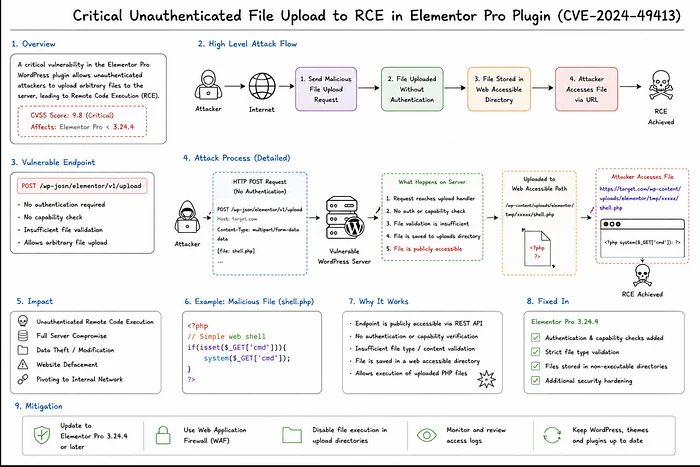
The article's framing is that the bug is not a broken blocklist or a clever filename trick. It is a disagreement between two pieces of code about what an empty upload entry means.
Setup
The report does not describe a lab, accounts, roles or tooling. It presents the vulnerability conceptually, through the code paths and the HTTP and PHP mechanics involved. The conditions the report describes are:
- A WordPress installation running Elementor Pro with the Forms module and a form containing a File Upload field.
- A vulnerable version of Elementor Pro: 4.2.1 and earlier.
- A web server configuration that hands
.phpfiles to a PHP interpreter, for example Apache withmod_phpor Nginx with PHP-FPM. - The uploads directory being reachable over the web and able to execute PHP.
The fix is Elementor Pro 4.2.2, released on 19 August 2026. The vulnerability is tracked as CVE-2026-32475 with a CVSS score of 9.0, Critical.
Finding it
The researcher starts from the mechanics of a file upload rather than from the plugin. A form like this:
<form method="POST" enctype="multipart/form-data">
    <input type="file" name="resume">
    <button type="submit">
        Upload
    </button>
</form>
produces a request whose body is split into parts by a boundary:
POST /upload HTTP/1.1
Content-Type: multipart/form-data
POST
 │
 ▼
multipart/form-data
 │
 ├── field 1
 ├── field 2
 └── file
       │
       ├── filename
       ├── content-type
       └── binary data
PHP parses those parts and exposes the result through $_FILES. For a single field, the metadata looks conceptually like this:
$_FILES['resume']

name     → resume.pdf
type     → application/pdf
tmp_name → /tmp/phpXXXXXX
error    → 0
size     → 123456
The key value is error. A successful upload gives UPLOAD_ERR_OK, which is 0. The full set of error constants listed in the report is:
UPLOAD_ERR_INI_SIZE
UPLOAD_ERR_FORM_SIZE
UPLOAD_ERR_PARTIAL
UPLOAD_ERR_NO_FILE
UPLOAD_ERR_NO_TMP_DIR
UPLOAD_ERR_CANT_WRITE
UPLOAD_ERR_EXTENSION
The one that matters here is UPLOAD_ERR_NO_FILE: there was no file uploaded for that particular file input. So a real file and an absent file look different:
name = document.pdf
error = UPLOAD_ERR_OK
versus:
name = ""
error = UPLOAD_ERR_NO_FILE
PHP also does not write uploads straight into the web root. It stores them in a temporary location first, for example /tmp/phpABC123, and the application decides where to move them. That separation is good design; the problem arises when the application makes a mistake while deciding whether the file is safe.
In Elementor Pro, the vulnerable code handled uploaded files with two separate loops. One loop validated:
foreach ($files as $file) {
    validate($file);
}
and a later loop processed and moved:
foreach ($files as $file) {
    move($file);
}
Two loops are not inherently wrong. What was wrong is that the two loops did not treat an empty upload entry the same way. The validator used return on an empty entry, which exits the whole function; the processor used continue, which skips only that iteration and carries on with the next file:
foreach ($files as $file) {
    if ($empty) {
        return;
    }
    validate($file);
}
foreach ($files as $file) {
    if ($empty) {
        continue;
    }
    move($file);
}
With a submitted file list like:
[0] Empty entry
[1] Another file
the validator stops at [0] and never reaches [1], while the processor skips [0] and processes [1]. The two stages develop what the report calls two different realities:
VALIDATOR                 PROCESSOR

[0] Empty                 [0] Empty
   │                         │
   ▼                         ▼
 return                    continue
   │                         │
   ▼                         ▼
 STOP                      [1]
                             │
                             ▼
                          process
The security assumption should have been that a file is processed only if it passes validation. Instead, file A stops validation and file B is never validated but is still processed. An unvalidated file is moved.
Exploitation
The report deliberately does not provide a copy-paste exploit. It reconstructs the chain conceptually, and the steps below follow that reconstruction.
Step 1: Reach the public form
An unauthenticated user submits the Elementor form that carries the File Upload field. No account or role is needed according to the report's description of the flaw as unauthenticated.
Step 2: Send a multipart request with an empty entry first
The attacker crafts a multipart/form-data request in which the first file entry is empty, so PHP reports UPLOAD_ERR_NO_FILE for it, and a second entry carries the dangerous file. The report does not publish the exact request body, so the shape is the one it describes: an empty entry at index [0] and the payload at index [1].
Step 3: Let validation stop early
The validation loop hits the empty entry and executes return. The function exits, and the second file is never examined. The extension blocklist, which correctly rejects PHP-related extensions, is never consulted for that file.
Step 4: Let processing continue
The processing loop hits the same empty entry and executes continue. It skips that entry and moves on to the second file, which it processes and moves into the forms upload directory.
Step 5: The file lands in a web-accessible directory
The destination is:
wp-content/uploads/elementor/forms/
Step 6: The web server executes it
If the server is configured to pass .php requests to a PHP interpreter, the uploaded file is not merely stored: it becomes code the server executes. The report's full chain is:
Anonymous Visitor
       │
       ▼
Elementor Form
       │
       ▼
File Upload
       │
       ▼
Validation Bypass
       │
       ▼
PHP File Written
       │
       ▼
Public Directory
       │
       ▼
PHP Interpreter
       │
       ▼
Remote Code Execution
What does not work
The classic double extension does not help here. Elementor discards the original filename and builds its own destination name from the extension, so a name like:
shell.php.jpg
is treated according to its final extension, something.jpg, not as shell.php.jpg. Patchstack specifically notes that double extensions and .htaccess tricks do not solve the vulnerability. The lesson is to understand the actual code path before attacking based on assumptions.
Recovering the stored filename
Elementor generates the stored name with PHP's uniqid(), conceptually as uniqid() + "." + extension, producing something like random-looking-string.php. uniqid() is primarily time-based and is not a cryptographically secure random source; it is not equivalent to random_bytes() or a secure token generator. Patchstack also discusses recovering the filename because of that time-based nature, including situations where form notification emails reveal the uploaded URL.
Root cause
The flaw is a desynchronisation between the validation logic and the processing logic, as Patchstack describes it. One component believes everything has been validated; the other believes everything is ready to process; the two do not agree.
The existing defence, the extension blocklist, was not wrong. It correctly blocked PHP and other executable extensions:
Allowed?
   │
   ├── pdf  → YES
   ├── jpg  → YES
   ├── png  → YES
   │
   └── php  → NO ❌
The dangerous file simply reached the processing stage without the validation stage examining it. The report compares it to airport security: the guard is not broken, the boarding system is. Passenger 1 has no luggage, security closes the entire process, but boarding skips that passenger and boards Passenger 2, who never went through security.
The same class of thinking appears elsewhere in security: parser differentials, authentication inconsistencies, proxy confusion, request smuggling, validation bypasses and canonicalisation bugs. Different technology, same fundamental idea: two parts of the system interpret the same input differently.
Impact
Patchstack describes the flaw as an unauthenticated arbitrary file upload leading to RCE, where the server executes PHP from the uploads directory. The report is careful about the distinction: a file upload vulnerability does not automatically mean RCE. Several conditions must line up:
Arbitrary File Upload
        │
        ▼
Executable File Type
        │
        ▼
File Stored
        │
        ▼
Web Accessible
        │
        ▼
Server Executes File
        │
        ▼
       RCE
If PHP execution is disabled in the uploads directory, the chain breaks: the upload is still a serious file-upload vulnerability, but not necessarily RCE. The report also discusses recovering the stored filename, given the time-based uniqid() and notification emails that may reveal the uploaded URL.
Fix
Elementor Pro fixed the vulnerability in version 4.2.2, released on 19 August 2026. Versions 4.2.1 and earlier are vulnerable. According to Patchstack, the patched version added an additional extension check directly in the processing path, so the sink validates again even if an earlier layer is bypassed.
Beyond patching, the report lays out defence layers:
- Allowlist, not blocklist. Blocking
.php,.php3,.phtml,.php5and similar is fragile because executable formats are complicated. Allow only what is needed, such as.pdf,.png,.jpg,.docx, and deny everything else. - Do not trust the filename. The filename, MIME type, extension and content are separate things. Check the actual content and generate names server-side.
- Store uploads outside executable web paths. Prefer object storage with private and controlled downloads, or configure the web server so upload directories cannot execute server-side scripts. Then a stored PHP file does not execute and the RCE chain breaks.
- Validate again at the sink. If the dangerous operation is moving a file, the final processing function should carry its own security check, so a bypassed earlier layer does not matter.
- Patch, and then investigate. If a system was vulnerable before patching, check
wp-content/uploads/elementor/forms/for unexpected executable files and review web server logs, PHP logs, WordPress logs, form submission activity and suspicious files. The question is not only whether you patched, but whether you were already compromised before you patched.
A secure upload pipeline, as the report sketches it, runs authentication, authorisation, size validation, type validation, content validation, filename generation, non-public storage and malware scanning before storing the file, and keeps uploads in a non-executable directory.
Variants to test
- Empty-entry desynchronisation in other upload handlers. Submit a multipart request where the first file part has no filename and a second part carries a disallowed extension. A positive result is that the application stores the second file even though its extension should be rejected.
returnversuscontinuein validation loops. Review plugins and frameworks that validate in one loop and move in another. A positive result is any early exit in the validator that the processor does not mirror, letting later entries through unchecked.- Filename regeneration checks. Upload a file named
shell.php.jpgand inspect the stored name. A positive result is a stored name that preserves the dangerous extension rather than the final one. - Predictable stored names. Where names come from
uniqid()or similar time-based functions, attempt to recover or predict the stored path, including via notification emails that contain the uploaded URL. A positive result is a working path to the uploaded file. - Execution policy in upload directories. Request a stored
.phpfile directly. A positive result is that the server executes it rather than serving it as text or refusing it. - Sink-level validation. Look for processing functions that move files without re-checking the extension. A positive result is a move that succeeds for a type the earlier validation layer would have rejected.
What happened, in plain words
A popular plugin for the WordPress website builder, called Elementor Pro, lets a website owner put a form on their site with a file upload button. Visitors can use that button to send in a CV, a scan of an ID document, a screenshot or a job application. That is completely ordinary, everyday website behaviour.
In versions 4.2.1 and earlier of Elementor Pro, an attacker who never logs in could use that same button to send a file that, where the server runs PHP from that folder, the website would later run as a program. When a website runs a program that an outsider sent, that is remote code execution, or RCE for short. Security people call that remote code execution, or RCE for short.
The bug was not a broken list of forbidden file types, and it was not a cleverly disguised filename. It was a disagreement between two pieces of code about what it means when a form arrives with an empty file slot. One piece of code stopped checking at that point. The other piece carried on and saved the next file anyway. The file that got saved was never checked.
The vulnerability is tracked as CVE-2026-32475. CVE stands for Common Vulnerabilities and Exposures: it is a public catalogue number that lets everyone refer to the same bug. It has a CVSS score of 9.0, Critical. CVSS is a standard way of scoring how serious a vulnerability is, from 0 to 10, and 9.0 sits in the top band. Elementor Pro fixed it in version 4.2.2, released on 19 August 2026.
The pieces involved
Before the bug makes sense, you need to know what each layer in the chain does. The report walks through them in order, so we will too.
The browser and the form
A web page is just text that your browser turns into something you can look at and click. A form is a part of a page with boxes you fill in and a button you press. When you press the button, your browser packages up whatever you typed or selected and sends it to the website's server.
A server is simply another computer, somewhere else, that holds the website's files and answers requests from browsers. Your browser asks; the server answers.
HTTP
HTTP is the language browsers and servers use to talk. Every time you load a page, your browser sends an HTTP request and the server sends back an HTTP response. A request has a method (what you want to do, such as GET to fetch something or POST to send something), a path (which thing on the server you want), some headers (extra information about the request) and sometimes a body (the data you are sending).
PHP
PHP is a programming language used to build websites. When you request a page ending in .php, the server does not send you the PHP code itself. It hands the file to a PHP interpreter, a program that reads the code and works out what the page should contain, and then sends you the result. That is why you never see the code behind a website: you only see what the code produced.
WordPress
WordPress is a system for building and running websites without writing everything from scratch. It is used by a very large share of the web. It provides the login system, the pages, the posts and a way to add extra features through plugins.
Plugins
A plugin is an add-on that gives WordPress extra abilities. Elementor is a plugin that lets people build pages by dragging and dropping instead of writing code. Elementor Pro is its paid version, and it includes a Forms module: a feature for putting contact forms, application forms and similar on a page.
The File Upload field
Inside the Forms module there is a field type called File Upload. The website owner drops it into a form and visitors can attach a file. The report lists the normal uses: resumes, ID documents, screenshots, support attachments and job applications. This is the feature the whole story is about.
The uploads directory
Websites keep files in folders on the server. WordPress puts files that visitors upload into a folder called wp-content/uploads/. Elementor's forms put their files into a subfolder:
wp-content/uploads/elementor/forms/
That folder is web-accessible, meaning anyone with a browser can request a file from it by its address. That is normal for images and documents you want people to see. It becomes dangerous when the folder can also hold programs.
Remote code execution
Remote code execution means an attacker, sitting at their own computer somewhere else, gets the server to run code of their choosing. It is usually the worst outcome of a web vulnerability, because from there the attacker can often read files, change the site or take it over.
What happens when you upload a file
The report starts from the mechanics rather than from the plugin, because the bug lives in those mechanics. Consider this form:
<form method="POST" enctype="multipart/form-data">
    <input type="file" name="resume">
    <button type="submit">
        Upload
    </button>
</form>
Line by line:
<form method="POST" enctype="multipart/form-data">opens a form.method="POST"says the browser should send data to the server rather than just asking for a page.enctype="multipart/form-data"says the data will be packaged in a special way that can carry files, not just text.<input type="file" name="resume">creates the file chooser.type="file"makes it a file picker instead of a text box.name="resume"is the label the server will use to refer to this field.<button type="submit">Upload</button>is the button that sends the form.
You click Choose File, pick resume.pdf, and press Upload. It feels like the browser sends a file called resume.pdf. It does not. The browser builds an HTTP request that looks roughly like this:
POST /upload HTTP/1.1
Content-Type: multipart/form-data
Line by line:
POST /upload HTTP/1.1is the request line.POSTis the method, meaning "I am sending you data"./uploadis the path on the server that should handle it.HTTP/1.1is the version of the protocol.Content-Type: multipart/form-datais a header telling the server how the body is packaged.multipartmeans "several parts";form-datameans "the parts are form fields".
The body is then split into parts, separated by a boundary, which is a line of characters the browser invents to mark where one part ends and the next begins:
POST
 │
 ▼
multipart/form-data
 │
 ├── field 1
 ├── field 2
 └── file
       │
       ├── filename
       ├── content-type
       └── binary data
Reading the diagram: the request body is one multipart/form-data package. Inside it there are several parts. Some are ordinary fields, such as a name or an email address. One part is the file, and that part carries its own little set of details: the filename the user chose, a content type (a label saying what kind of file it is, such as application/pdf), and the actual bytes of the file.
Why does this matter? Because the vulnerability abuses something that exists inside this multipart structure: the ability to send a part that is a file slot but has no file in it.
What multipart/form-data really is
The report uses a parcel analogy. If you had to post several different things, you would not throw them all loose into one box. You would divide the box into sections, each labelled:
PACKAGE
│
├── SECTION 1
│     name = username
│     value = saurabh
│
├── SECTION 2
│     name = email
│     value = [redacted]
│
└── SECTION 3
      name = resume
      filename = resume.pdf
      data = ........
Each section has a name and a value. The first two hold text. The third holds a file, so it also has a filename and the file's bytes. The boundary is the tape between sections:
------BOUNDARY
field
------BOUNDARY
another field
------BOUNDARY
file
------BOUNDARY--
The first block is the marker itself. The second shows how markers sit between parts: after the first field, after the second field, after the file, and the final one ends with -- to say there are no more parts. The server reads the body, splits it at each boundary, and gets back the individual fields and the file.
How PHP hands the upload to the application
PHP does not just say "here is your file". It parses the multipart body and gives the application a structured summary through a special variable called $_FILES. The $_ prefix is a PHP convention for built-in variables that the language fills in for you.
For a single field named resume, the application reads $_FILES['resume'], which contains something conceptually like this:
$_FILES['resume']

name     → resume.pdf
type     → application/pdf
tmp_name → /tmp/phpXXXXXX
error    → 0
size     → 123456
Line by line:
nameis the filename the browser said the user chose. It comes from the client, so it can be anything the client wants to claim.typeis the content type the browser reported. Also client-supplied, so also not to be trusted blindly.tmp_nameis where PHP actually put the file on the server's disk for now. This is a real path on the server, chosen by PHP.erroris a status code saying whether the upload worked.sizeis how many bytes the file is.
So PHP gives the application three things: metadata about the file, a temporary location where the file currently sits, and an error status. The application then decides what to do.
The error field, and the one value that matters
$_FILES['resume']['error'] is the most important value in this story. When everything goes well, PHP sets it to UPLOAD_ERR_OK, which is the number 0. The report lists the full set of error constants:
UPLOAD_ERR_INI_SIZE
UPLOAD_ERR_FORM_SIZE
UPLOAD_ERR_PARTIAL
UPLOAD_ERR_NO_FILE
UPLOAD_ERR_NO_TMP_DIR
UPLOAD_ERR_CANT_WRITE
UPLOAD_ERR_EXTENSION
These are named constants, which just means PHP gives friendly names to particular numbers so code is readable. Each one describes a different way an upload can fail: the file was bigger than the server allows, bigger than the form allows, only partly received, missing entirely, had nowhere temporary to go, could not be written, or was stopped by an extension.
The one that matters here is UPLOAD_ERR_NO_FILE: there was no file uploaded for that particular file input. So a real file and an absent file look different:
name = document.pdf
error = UPLOAD_ERR_OK
versus:
name = ""
error = UPLOAD_ERR_NO_FILE
In the first case there is a file and the error says all is well. In the second the name is empty and the error says there was no file. That tiny distinction is what the whole vulnerability turns on.
Why PHP uses a temporary file first
PHP does not write uploads straight into the website's public folder. It puts them somewhere temporary first, for example /tmp/phpABC123, and the application decides whether and where to move them.
This is good design. It means the application gets a chance to look at the file before it becomes reachable by anyone with a browser. The report's diagram:
Browser
   │
   ▼
HTTP Request
   │
   ▼
PHP
   │
   ▼
Temporary File
   │
   ▼
Application decides where to move it
Reading it: the browser sends the request, PHP receives it, PHP writes the file to a temporary spot, and then the application makes the decision about the final home. The problem in this story is not the temporary file. It is the decision the application makes about whether the file is safe.
Where Elementor fits in
The report draws the full stack:
                INTERNET
                    │
                    ▼
                Web Server
                    │
                    ▼
                   PHP
                    │
                    ▼
               WordPress
                    │
                    ▼
             Elementor Pro
                    │
                    ▼
                Form
                    │
                    ▼
              File Upload
Reading from the top: a visitor on the internet reaches the web server, which hands PHP files to PHP, which runs WordPress, which loads Elementor Pro, which renders the form, which includes the File Upload field.
Elementor's job, when a file arrives, is to answer two questions:
- Is this file allowed?
- Where should it be stored?
The intended answer to the second is the forms upload folder, wp-content/uploads/elementor/forms/. The intended answer to the first is validation, which blocked dangerous extensions such as PHP.
The two loops
In the vulnerable code, Elementor handled uploaded files with two separate loops. A loop is a piece of code that repeats the same steps for each item in a list. One loop validated:
foreach ($files as $file) {
    validate($file);
}
Line by line:
foreach ($files as $file) {means "for each item in the list$files, call the current one$file, and do the following".validate($file);runs the validation check on that item.}closes the loop.
A later loop processed and moved:
foreach ($files as $file) {
    move($file);
}
Same shape, but the body calls move($file) instead of validate($file). So the first loop validates files, and the second loop moves them, but they handle empty entries differently.
Two loops are not inherently wrong. Many programs separate checking from acting. The problem was that the two loops did not treat an empty upload entry the same way.
return versus continue
This is the heart of the bug, and it is a detail of programming that beginners often find confusing, so it is worth slowing down.
Inside a loop, code can decide to stop early. There are two different ways to do that, and they mean very different things.
return exits the whole function. Not just the loop: the entire function the loop lives in. Everything after it is skipped.
continue skips only the current item and moves on to the next one. The loop keeps going.
The validator used return:
foreach ($files as $file) {
    if ($empty) {
        return;
    }
    validate($file);
}
Line by line:
foreach ($files as $file) {starts the loop over the files.if ($empty) {checks whether this entry is empty.return;if it is empty, leave the whole function immediately.}closes theif.validate($file);only runs if the entry was not empty.}closes the loop.
The processor used continue:
foreach ($files as $file) {
    if ($empty) {
        continue;
    }
    move($file);
}
Line by line:
foreach ($files as $file) {starts the loop.continue;if it is empty, skip this item and go to the next one.}closes theif.move($file);runs for any entry that was not empty.}closes the loop.
So return means "stop everything", and continue means "skip this one, next". In a normal program that difference is small. In a security check it is enormous, because the two loops are now doing different things with the same list.
The desynchronisation
Suppose the submitted file list looks like this:
[0] Empty entry
[1] Another file
[0] and [1] are positions in the list, like seats in a row. The first seat is an empty file slot. The second seat holds a real file.
The validator reaches [0], sees it is empty, and runs return. The whole function exits. It never looks at [1]. The processor reaches [0], sees it is empty, and runs continue. It skips [0] and moves on to [1], which it processes and saves.
The report draws it like this:
VALIDATOR                 PROCESSOR

[0] Empty                 [0] Empty
   │                         │
   ▼                         ▼
 return                    continue
   │                         │
   ▼                         ▼
 STOP                      [1]
                             │
                             ▼
                          process
Reading it: both sides start at the same empty entry. The validator takes the return branch and stops. The processor takes the continue branch, reaches [1], and processes it. The two stages now have what the report calls two different realities.
The security assumption should have been: a file is processed only if it passes validation. Instead, file A stops validation, and file B is never validated but is still processed. An unvalidated file is moved.
Why the extension blocklist was not the problem
Elementor's validation correctly blocked dangerous extensions, including PHP-related ones. Conceptually:
Allowed?
   │
   ├── pdf  → YES
   ├── jpg  → YES
   ├── png  → YES
   │
   └── php  → NO ❌
Reading it: the check looks at the extension and says yes for PDF, JPEG and PNG, and no for PHP. That is a blocklist: a list of things to refuse. It was doing its job.
The bug was not that the blocklist was wrong. The bug was that the dangerous file could reach the processing stage without the validation stage ever examining it. The check was fine; it just never ran on the file that mattered.
The airport analogy
The report compares it to airport security. Every passenger is supposed to go through a security check before boarding:
SECURITY CHECK
      ↓
Allowed?
      ↓
BOARD PLANE
Now imagine Passenger 1 arrives with no luggage. Security says "I don't have luggage", and the security process closes for the day. But boarding says "no luggage, skip", and moves on to Passenger 2, who boards without ever being checked.
The security guard is not broken. The boarding system is. That is exactly the shape of this bug: the check works, but the flow around it lets something slip past.
Where the file ends up
The processing code places the uploaded file in Elementor's forms upload directory:
wp-content/uploads/elementor/forms/
That directory is web-accessible. So the chain becomes:
Anonymous Visitor
       │
       ▼
Elementor Form
       │
       ▼
File Upload
       │
       ▼
Validation Bypass
       │
       ▼
PHP File Written
       │
       ▼
Public Directory
       │
       ▼
PHP Interpreter
       │
       ▼
Remote Code Execution
Reading it: a visitor who never logged in submits the form, the upload is accepted, validation is bypassed, a PHP file is written to disk, it lands in a public folder, the server's PHP interpreter is asked to run it, and the attacker gets code execution. Patchstack, a security firm that tracks WordPress vulnerabilities, describes this as an unauthenticated arbitrary file upload leading to RCE. Unauthenticated means no login is needed; arbitrary file upload means the attacker can upload a file of their choosing.
Why a .php file actually runs
A .php file sitting on disk is not automatically executed. Something has to be configured to send requests for it to a PHP interpreter. The report's simplified architecture:
Browser
   │
   │ GET /something.php
   ▼
Web Server
   │
   │ "This is PHP"
   ▼
PHP Handler
   │
   ▼
PHP Interpreter
   │
   ▼
Execute PHP
   │
   ▼
HTTP Response
Reading it: the browser asks for a .php address. The web server recognises the extension and does not send the file as-is. It passes the request to a PHP handler, which hands it to the PHP interpreter, which runs the code and produces output. That output becomes the HTTP response the browser sees.
Historically this might involve Apache with mod_php, where the web server itself contains the PHP interpreter. Or Nginx with PHP-FPM. Modern deployments commonly use PHP-FPM.
PHP-FPM in plain words
FPM stands for FastCGI Process Manager. FastCGI is a protocol for passing requests from a web server to a separate program that handles them. A process manager is a program that keeps a pool of worker processes ready to do work.
So PHP-FPM is a pool of PHP workers waiting for jobs. The report's diagram:
                 NGINX
                   │
                   │ FastCGI
                   ▼
              ┌──────────┐
              │ PHP-FPM  │
              │ Workers  │
              └────┬─────┘
                   │
                   ▼
             PHP Interpreter
Reading it: Nginx, the web server, receives the request and speaks FastCGI to PHP-FPM. PHP-FPM has workers standing by. One of them picks up the job and runs the PHP interpreter. The result goes back:
PHP
 ↓
HTML Response
 ↓
Web Server
 ↓
Browser
So if an attacker manages to place executable PHP in a web-accessible directory, the file is not merely stored. It may become code the server executes. That is the jump from file upload to remote code execution.
Upload vulnerability versus RCE
This distinction matters, and the report is careful about it. A file upload vulnerability does not automatically mean RCE. Several conditions have to line up:
Arbitrary File Upload
        │
        ▼
Executable File Type
        │
        ▼
File Stored
        │
        ▼
Web Accessible
        │
        ▼
Server Executes File
        │
        ▼
       RCE
Reading it as a chain: the attacker must be able to upload a file of their choosing, the file must be of a type the server can execute, it must actually be stored, it must be reachable over the web, and the server must be configured to execute it. If any link breaks, the chain stops.
For example, if PHP execution is disabled in the uploads directory:
Upload
 ↓
PHP file
 ↓
No execution
You still have a serious file-upload vulnerability, but not necessarily RCE. The report stresses this because it is easy to overstate an upload bug.
The WordPress layer in detail
The report zooms in on the full stack with the two paths side by side:
                  Browser
                    │
                    ▼
                   HTTP
                    │
                    ▼
                 Web Server
                    │
                    ▼
                   PHP
                    │
                    ▼
                WordPress
                    │
                    ▼
              Elementor Pro
                    │
                    ▼
              Forms Module
                    │
                    ▼
              Upload Field
                    │
             ┌──────┴──────┐
             ▼             ▼
         Validation     Processing
             │             │
             │             ▼
             │          File Move
             │             │
             └──────X──────┘
                    │
                    ▼
              Public Uploads
                    │
                    ▼
               PHP Handler
                    │
                    ▼
                  RCE
The X is the important part. The two paths were not synchronised. Validation and processing both exist, but they do not agree about what happened.
The name for this class of bug
Patchstack describes the flaw as a desynchronisation between the validation logic and the processing logic. Desynchronisation means two parts of a system that are supposed to stay in step have drifted apart.
One component believes "everything is validated". Another believes "everything here is ready to process". They do not agree, and the gap between them is where the attacker lives.
The report points out that the same idea appears all over security, under different names:
- Parser differentials: two programs read the same input and understand it differently.
- Authentication inconsistencies: two parts of a system disagree about whether someone is logged in.
- Proxy confusion: a proxy and a server disagree about what a request means.
- Request smuggling: two servers disagree about where one request ends and the next begins.
- Validation bypasses: a check exists but can be avoided.
- Canonicalisation bugs: two pieces of code normalise the same input into different forms.
Different technology, same fundamental idea: two parts of the system interpret the same input differently.
The filename trick that does not work
A beginner's first instinct on an upload bug is the double extension. You name a file shell.php.jpg, hoping the check sees .jpg and the server sees .php. The report explains why that does not help here:
shell.php.jpg
Elementor discards the original filename and builds its own destination name from the extension. So a name like shell.php.jpg is treated according to its final extension, something.jpg, not as shell.php.jpg. Patchstack specifically notes that double extensions and .htaccess tricks do not solve the vulnerability. .htaccess is a configuration file that Apache reads to change how a folder behaves; attackers sometimes try to upload one to make a folder execute scripts.
The lesson: do not attack based on assumptions. Understand the actual code path first.
The stored filename and uniqid()
Elementor generates the stored name with PHP's uniqid(), conceptually as uniqid() + "." + extension, producing something like random-looking-string.php.
uniqid() is a PHP function that produces a unique-looking string, primarily based on the current time. It is not a cryptographically secure random source. Cryptographically secure means the output is unpredictable even to someone who knows how the generator works. uniqid() is not equivalent to random_bytes(), which is PHP's secure random generator, or to a secure token generator.
Why does this matter? Because if the attacker can guess or recover the stored filename, they can request the file, and where the server executes PHP there, that triggers execution. Patchstack also discusses recovering the filename because of the time-based nature of uniqid(), including situations where form notification emails reveal the uploaded URL. Notification emails are the messages a form sends to the site owner when someone submits it; if they include a link to the uploaded file, they hand the attacker the path.
move_uploaded_file()
PHP provides a function called move_uploaded_file() specifically for moving an uploaded file from its temporary location to its final home:
/tmp/phpXXXX
      │
      │ move_uploaded_file()
      ▼
/uploads/document.pdf
Reading it: the file starts in the temporary location PHP chose, and move_uploaded_file() puts it where the application wants it. This is normal and correct.
But move_uploaded_file() does not magically determine whether your business logic is secure. It moves a file. It does not decide whether the file should be moved. The application still has to validate the extension, the MIME type (the label describing the file's type), the content, the permissions, the destination and the execution policy before deciding what happens next. A secure primitive can still be used inside insecure logic.
How a secure upload system should look
The report sketches a better pipeline:
                 FILE UPLOAD
                      │
                      ▼
                Authentication
                      │
                      ▼
                 Authorization
                      │
                      ▼
                Size Validation
                      │
                      ▼
                Type Validation
                      │
                      ▼
              Content Validation
                      │
                      ▼
              Filename Generation
                      │
                      ▼
             Non-Public Storage
                      │
                      ▼
             Malware Scanning
                      │
                      ▼
               Store File
Reading it top to bottom: first check who is uploading (authentication) and whether they are allowed to (authorisation). Then check the size, the type and the actual content. Then generate a safe filename on the server. Then store the file somewhere not directly reachable by browsers. Then scan it for malware. Only then keep it.
And most importantly:
UPLOADS
   │
   ▼
NON-EXECUTABLE DIRECTORY
Do not put user-controlled uploads somewhere the web server can execute them as application code. If the folder cannot run scripts, a stored PHP file does not execute and the RCE chain breaks.
Defence layer 1: allowlist, not blocklist
A blocklist says "these things are forbidden". A bad version looks like:
Block:
.php
.php3
.phtml
.php5
...
Why is that fragile? Because executable formats are complicated, and there are many extensions that servers can be configured to run. Miss one and the blocklist fails.
An allowlist says "only these things are permitted":
Allowed:
.pdf
.png
.jpg
.docx
Everything else is denied. That is much safer, because the default is refusal.
Defence layer 2: do not trust the filename
The user says the file is resume.pdf. That does not mean the content is actually a PDF. Treat the filename, the MIME type, the extension and the content as four separate things, and check the content itself. Generate the stored name on the server so the user cannot choose it.
Defence layer 3: store uploads outside executable web paths
This is huge. Instead of:
/var/www/html/uploads/
where the server might execute PHP, prefer an architecture where uploaded content is not directly executable. For example:
Application
    │
    ▼
Object Storage
    │
    ├── private
    └── controlled downloads
Object storage is a service for holding files, separate from the web server. Files can be private, and downloads go through the application, which can check who is asking. Or configure the web server so upload directories cannot execute server-side scripts. Then even if validation fails:
Attacker uploads PHP
        │
        ▼
File stored
        │
        ▼
PHP execution disabled
        │
        ▼
RCE chain breaks
That is defence in depth: several independent layers, so one failure does not become a disaster.
Defence layer 4: validate again at the sink
This is perhaps the biggest lesson. Do not assume that validation() will always happen before process_field(). If the dangerous operation is moving a file, the final processing function should carry its own security check:
                 Upload
                    │
                    ▼
               Validation
                    │
                    ▼
              Business Logic
                    │
                    ▼
             FINAL CHECK 🔐
                    │
                    ▼
                 Move
A sink is the place where the dangerous action actually happens, such as writing a file or running a query. If the sink checks for itself, a bypassed earlier layer does not matter. According to Patchstack, the patched Elementor version added an additional extension check directly in the processing path.
Defence layer 5: patch
Elementor Pro fixed the vulnerability in version 4.2.2. The vulnerable versions are 4.2.1 and earlier. The vulnerability is tracked as CVE-2026-32475 with CVSS 9.0, Critical. The patch was released on 19 August 2026. If you run Elementor Pro:
UPDATE
      ↓
4.2.2+
And do not stop there. If the system was vulnerable before patching, investigate whether suspicious files were already uploaded.
Incident response
If you are investigating a potentially affected system, look at wp-content/uploads/elementor/forms/ and investigate unexpected executable files. Also review:
Web Server Logs
       │
       ▼
PHP Logs
       │
       ▼
WordPress Logs
       │
       ▼
Form Submission Activity
       │
       ▼
Suspicious Files
Logs are records that servers and programs keep of what happened. Reading them in order tells you who submitted what and when. The question is not only "did I patch?" but "was I already compromised before I patched?". That is the difference between patch management and incident response.
The whole attack in one picture
The report reconstructs the chain without providing a copy-paste exploit:
             UNAUTHENTICATED USER
                      │
                      ▼
               Public Form
                      │
                      ▼
              Multipart Request
                      │
                      ▼
                 PHP $_FILES
                      │
                      ▼
             Elementor Upload
                      │
          ┌───────────┴───────────┐
          ▼                       ▼
      Validator                Processor
          │                       │
      Empty entry               Empty entry
          │                       │
       return                 continue
          │                       │
          ▼                       ▼
        STOP                  Next file
                                  │
                                  ▼
                            File processed
                                  │
                                  ▼
                            PHP written
                                  │
                                  ▼
                       Public web directory
                                  │
                                  ▼
                            PHP execution
                                  │
                                  ▼
                                 RCE
Reading it: an unauthenticated user submits the public form. The request is multipart. PHP fills $_FILES. Elementor's upload handling splits into two paths. Both see the empty entry. The validator returns and stops. The processor continues to the next file, processes it, writes a PHP file into a public directory, the server executes it, and the attacker gets RCE.
How small the actual bug is
The report's favourite part: the entire disaster does not require 10,000 lines of code. Sometimes the difference between secure and vulnerable code is as small as return versus continue. One means "stop the function". The other means "skip this item". When you are working with security-sensitive loops, you had better know exactly which one you mean.
What this teaches about code review
When reviewing upload code, do not just ask "does it check the extension?". Ask where the check is, and what happens around it:
- Who calls it?
- Can the check return early?
- What happens to the next item?
- Is processing using the same collection?
- Does processing revalidate?
- Where is the file written?
- Can the destination execute code?
- Who can reach the endpoint?
- Is authentication required?
- Is the uploaded content publicly accessible?
That is a much stronger security review than a single yes/no question.
The real vulnerability was not "PHP upload"
People might summarise CVE-2026-32475 as "Elementor lets users upload PHP". That describes the result, but it does not teach you the vulnerability. The deeper explanation:
Two independent processing stages
             │
             ▼
Different handling of empty entries
             │
             ▼
Validation stops early
             │
             ▼
Processing continues
             │
             ▼
Unvalidated file reaches sink
             │
             ▼
Executable file written
             │
             ▼
RCE
That is the actual security lesson.
From PHP to RCE, end to end
BROWSER
                       │
                       ▼
                  HTTP POST
                       │
                       ▼
             multipart/form-data
                       │
                       ▼
                      PHP
                       │
                       ▼
                    $_FILES
                       │
                       ▼
                  WordPress
                       │
                       ▼
                Elementor Pro
                       │
                       ▼
                 Upload Field
                       │
                       ▼
                 Validation
                       │
                       X
             validation bypass
                       │
                       ▼
                  Processing
                       │
                       ▼
             move_uploaded_file()
                       │
                       ▼
             Public Upload Directory
                       │
                       ▼
                    Web Server
                       │
                       ▼
                  PHP-FPM
                       │
                       ▼
                PHP Interpreter
                       │
                       ▼
                      RCE
This is why security researchers do not stop at "I found a file upload". They ask: what can this upload become?
The castle analogy
The report reuses an analogy from an earlier episode about trust boundaries. A trust boundary is a line in a system where one part stops trusting another and starts checking for itself.
                    CASTLE
                      │
             ┌────────┴────────┐
             ▼                 ▼
          Security           Storage
           Guard               Room
             │                 │
             ▼                 ▼
         Validation          File
             │
             ▼
          Allowed?
The security guard says "everyone has been checked". The storage room says "I'll take whoever comes through". And the guard accidentally left halfway through. The storage room does not know whether a file was validated. It simply processes it. That is why security checks need to be enforced at security-sensitive boundaries, not merely assumed to have happened somewhere earlier.
PHP internals cheat sheet
The report ends with a quick reference for anyone learning PHP for security:
$_FILES
    ↓
Uploaded file metadata
UPLOAD_ERR_OK
    ↓
Upload succeeded
UPLOAD_ERR_NO_FILE
    ↓
No file uploaded for that entry
tmp_name
    ↓
Temporary uploaded file
name
    ↓
Client-provided filename
type
    ↓
Client/request-reported MIME type
    ↓
Don't blindly trust it
size
    ↓
Reported upload size
move_uploaded_file()
    ↓
Move uploaded file to destination
PHP-FPM
    ↓
PHP process manager
PHP Interpreter
    ↓
Executes PHP code
And the most important one:
User Input
    ↓
NEVER TRUST
Attack versus defence
The report's usual battle map:
ATTACK DEFENSE
Unauthenticated form       →       Authentication where appropriate
Multipart manipulation     →       Robust request parsing
Validation bypass          →       Consistent validation logic
Dangerous extension        →       Strict allowlist
User-controlled filename   →       Server-generated filename
Executable upload          →       Non-executable storage
Public PHP file            →       Block script execution
Single validation layer    →       Validate again at sink
Old plugin version         →       Patch management
Existing compromise        →       File + log investigation
Each row pairs a way an attacker can push with a way a defender can push back.
Final lesson
The report's closing thought: the author started thinking this episode would be about PHP file uploads, and ended up learning about the whole stack:
HTTP
 ↓
Multipart Parsing
 ↓
PHP Internals
 ↓
$_FILES
 ↓
WordPress
 ↓
Plugin Architecture
 ↓
Control Flow
 ↓
Validation
 ↓
File Handling
 ↓
Web Server
 ↓
PHP-FPM
 ↓
Code Execution
An attack rarely belongs to one technology. A vulnerability can begin in PHP, cross WordPress, pass through Elementor, reach the filesystem, and finally become remote code execution. That is why it helps to look at attacks as chains: one bug, multiple layers, one final impact.
The actual vulnerability was not a cryptographic failure, not quantum computing, not AI, not a massive memory corruption bug. It was basically return versus continue: two different interpretations of "there is no file here". And somewhere between those two interpretations, the security boundary disappeared. Sometimes the biggest vulnerabilities hide inside the smallest lines of code.
Glossary
- Allowlist: a list of things that are permitted; everything not on the list is refused.
- Apache: a widely used web server program.
- Authentication: checking who someone is, usually by making them log in.
- Authorisation: checking whether an identified person is allowed to do a particular thing.
- Blocklist: a list of things that are forbidden; everything not on the list is allowed.
- Boundary (multipart): a line of characters that separates the parts of a multipart request body.
- Browser: the program you use to view web pages, such as Chrome or Firefox.
- Canonicalisation: converting an input into a standard form; bugs arise when two pieces of code standardise the same input differently.
- Content type / MIME type: a label describing what kind of data something is, such as
application/pdf. continue: a programming instruction that skips the current item in a loop and moves to the next one.- CVE: Common Vulnerabilities and Exposures, a public catalogue number for a known vulnerability.
- CVSS: a standard scoring system for how serious a vulnerability is, from 0 to 10.
- Defence in depth: using several independent security layers so one failure does not become a disaster.
- Desynchronisation: two parts of a system that should stay in step drifting apart.
- Double extension: a filename with two extensions, such as
shell.php.jpg, used to try to fool a check. - Elementor Pro: a paid WordPress plugin for building pages visually, including a Forms module with a File Upload field.
- Extension: the part of a filename after the last dot, such as
.pdfor.php. - FastCGI: a protocol for passing requests from a web server to a separate program that handles them.
- File Upload field: a form field that lets a visitor attach a file.
- Form: the part of a web page with boxes to fill in and a button to send them.
$_FILES: the PHP variable that holds information about uploaded files.- Header: extra information attached to an HTTP request or response.
- HTTP: the language browsers and servers use to talk to each other.
- Incident response: investigating and handling a security incident that has already happened.
- Loop: a piece of code that repeats the same steps for each item in a list.
mod_php: a way of running PHP inside the Apache web server itself.move_uploaded_file(): a PHP function that moves an uploaded file from its temporary location to its final destination.- Multipart/form-data: a way of packaging a request body into several parts, so it can carry files as well as text.
- Nginx: a widely used web server program.
- Object storage: a service for holding files separately from the web server.
- Patch: an update that fixes a vulnerability.
- PHP: a programming language used to build websites.
- PHP-FPM: FastCGI Process Manager, a pool of PHP worker processes that run PHP code on behalf of a web server.
- PHP interpreter: the program that reads PHP code and runs it.
- Plugin: an add-on that gives a website extra features.
- Remote code execution (RCE): when an attacker gets a server to run code of their choosing.
return: a programming instruction that exits the whole function immediately.- Server: a computer that holds a website's files and answers requests from browsers.
- Sink: the place in code where a dangerous action actually happens, such as writing a file.
- Trust boundary: a line in a system where one part stops trusting another and starts checking for itself.
- Unauthenticated: without logging in.
uniqid(): a PHP function that produces a unique-looking string, mainly based on the current time.UPLOAD_ERR_NO_FILE: the PHP error value meaning no file was uploaded for that entry.UPLOAD_ERR_OK: the PHP error value meaning the upload succeeded, equal to0.- Web-accessible: reachable by anyone with a browser who knows the address.
- WordPress: a widely used system for building and running websites.


