Mass Assignment Leading to Pre Account Takeover
The profile update endpoint accepted an extra email parameter that the UI did not expose, letting an attacker change their account's email to a victim's address. After verifying that address, the attacker could log in as the victim, achieving pre-account takeover.

API also called as Application Programmable Interface is used everywhere from modern automotive (smart), mobile, web and IOT devices etc. They are the building block of application now a days.
The full write-up lives on its author's site
It belongs to its author, so we link to it rather than copy it. The other two tabs are our own rewrites, checked against it.
Context
APIs sit between components that speak different languages, the way a translator sits between two people who do not share a tongue. They are the building blocks of modern applications across automotive, mobile, web and IoT devices, and moving from web2.0 to web3.0 you find them everywhere. This write-up is about one API-level finding on a private program, made while the author was learning API testing and working through the API OWASP top 10, which they had studied on VAmPI Lab.
The target was under development and the scope was limited. The author's stated aim was to break the scope while staying inside it. The feature in question is the profile edit screen. On this screen two things were restricted:
- Email Edit.
- Profile Photo.
Only the Name field could be changed.
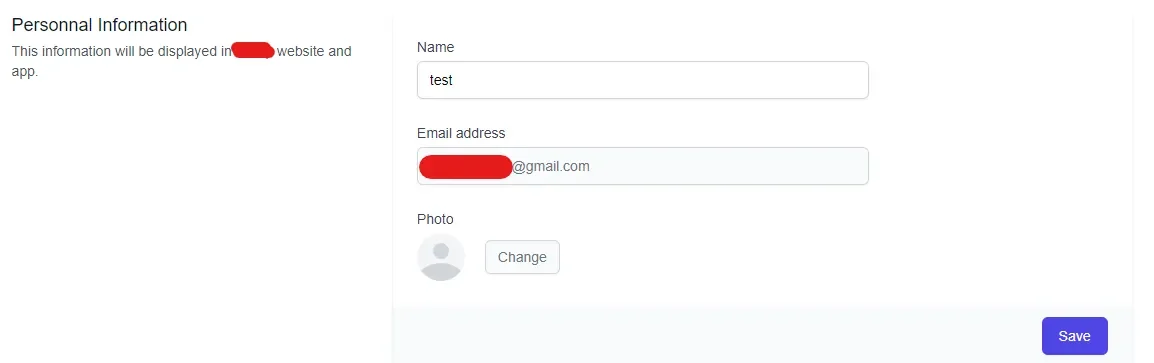
The screenshot shows the profile information of the target account.
Setup
- Create an account on the target domain.
- Navigate to the Edit Profile option and look closely at what the functionality allows. In this case the change email option was not available for editing.
- Change the Name field and turn on Burp Suite proxy intercept.
No versions, roles or other preconditions are given beyond a normal registered account and Burp Suite as the intercepting proxy.
Finding it
The author was looking for something else to do at this endpoint. While reviewing the OWASP top 10 they settled on Mass Assignment.
Mass assignment is the case where the developer leaves an open window for a normal user to manipulate the request post body and add sensitive parameters such as is_Admin, email or new_password. Guessing the parameter names and their values is the challenging part; once a parameter is guessed, the exploit is easy. It is essentially guessing an object's properties and exploring the options an endpoint accepts.
On this target the attacker can register and verify on behalf of other users without their knowledge. The profile record has no option for changing the email address, but because of mass assignment the attacker can inject a custom key value "email":"victims_email" to register on the victim's account. After injecting the victim's email, the attacker can also verify it: clicking verify account sends an email with a verification link, and clicking that link verifies the account. Then log out and try to log in with the attacker's credentials: login fails. Change the email to the new (victim's) email and you are logged in.
Exploitation
Step 1: Create an account
Register a normal account on the target domain. This is the account whose profile will be edited.
Step 2: Map the edit profile functionality
Navigate to Edit Profile and note precisely which fields can be edited and which are restricted. Here the change email option was not allowed.
Step 3: Change the Name field with interception on
Step 4: Capture the request
Click the submit button and capture the request in Burp Suite.
Step 5: Send to repeater and add the email parameter
In the proxy tab, right click and send the request to repeater. Add a parameter named email in the request body and click send.
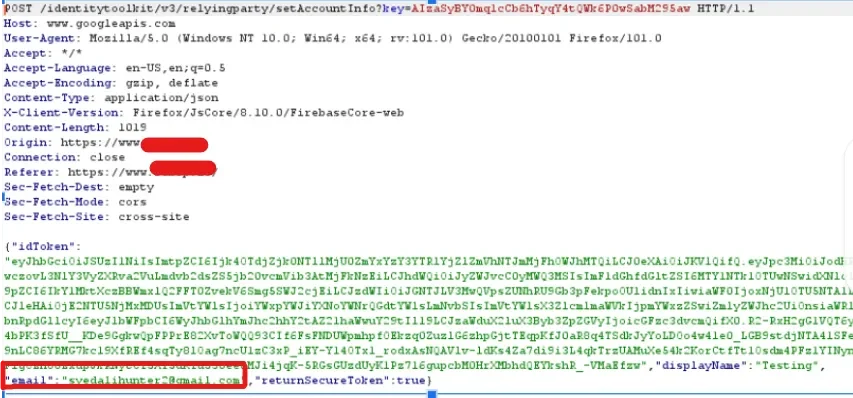
The screenshot shows the request captured in Burp Suite.
Step 6: Confirm the change
The request completes successfully and the attacker receives a confirmation link in his account, asking whether he wants to change the email. After the attacker confirms the link, the victim's email is added to the attacker's account.
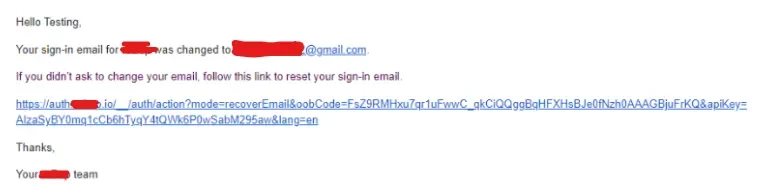
The screenshot shows the confirmation link the attacker receives.
Root cause
The endpoint accepts more fields in the request body than the profile edit screen exposes. The endpoint processed a parameter the UI never offers, email, even though the interface hid email editing.
Impact
An attacker with a normal registered account can register and verify on behalf of other users without their knowledge. After verification the attacker can no longer log in with their original credentials, but can log in using the new (victim's) email. The report describes this as registering and verifying on behalf of other users. The target was under development and the scope limited, so how far this reaches in production is not stated.
Fix
The report does not say what was changed. The report does not describe a fix.
Variants to test
- Add
emailto a profile update body where the UI hides email editing. A positive result is a confirmation link sent to the new address and the address attached to your account. - The report lists
is_Adminandnew_passwordas typical sensitive parameters in mass assignment, but onlyemailwas tested here. - Repeat the update with the added parameter and then attempt login with the original credentials, then with the new email, to confirm the account state actually changed.
Closing note
The author's advice is not to stick to the available functionality: think out of the box and try to make the application behave abnormally. The normal behaviour was one thing, and the bug was closed on a different functionality that was not apparently present on the system.
Bounty:
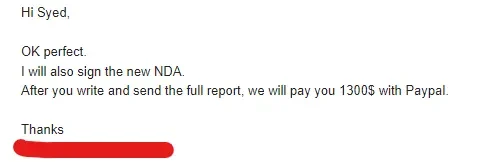
The screenshot shows the bounty received, 1300.00 USD.
What happened, in plain words
A security researcher found a way to register and verify on behalf of other users on a website, using a normal browser and a tool that lets you look at and change the messages your browser sends. The website's profile page only let you change your name. The email address field was hidden and not meant to be editable. But the server behind the page was not checking that. When the researcher added an extra line to the message saying "here is my new email address", the server accepted it. The researcher could then put someone else's email address onto their own account and confirm it.
This kind of bug is called mass assignment. The rest of this article explains, from zero, what an API is, what a request is, what mass assignment means, and exactly how the researcher did it, step by step, so that someone who has never done security testing can follow along.
Background: what an API is
An API (Application Programming Interface) is the part of a system that lets two pieces of software talk to each other. The report uses a simple comparison: imagine two people who speak different languages and want to understand each other. You bring in a third person who translates between them. That translator is acting as an API.
APIs are everywhere: in cars, phones, websites and connected home devices. They are the building blocks of modern applications. As the web moved from web2.0 to web3.0, APIs became even more common. They let different programs use each other's resources easily.
For this article, the important thing is that when you use a website, your browser is constantly sending messages to the website's server through an API. Those messages are called requests. The server sends back responses. A request usually contains:
- A URL: the address of the thing you are asking for.
- A method: a verb like GET (give me something) or POST (here is some data, please process it).
- Headers: extra information about the request, such as what kind of data is inside.
- A body: the actual data, for example the new name you typed into a form.
When you fill in a form on a website and click Submit, your browser packages up what you typed into the body of a request and sends it to the server. The server reads the body, updates its database, and sends back a response.
The target and the restricted feature
This finding was made on a private program. A private program is a bug bounty programme where only invited researchers can take part, and the details are not public. The researcher was learning API testing at the time and wanted to practise finding API-level vulnerabilities. They had been studying the API OWASP top 10, a well-known list of the ten most common security mistakes in APIs, using a practice lab called VAmPI Lab.
The target website was still under development, and the scope (the list of things a researcher is allowed to test) was limited. The researcher's stated aim was to "break the scope while being in the scope", meaning to find a serious bug using only features that were officially in scope.
The feature in question is the profile edit screen, the page where a logged-in user can change their account details. On this screen, two things were restricted:
- Email Edit.
- Profile Photo.
Only the Name field could be changed. In other words, the website's designers had decided that users should not be able to change their email address or their profile picture from this page. The email edit option was restricted, so a normal user had no way to edit it.
The screenshot shows the profile information of the target account.
Why the researcher looked here
A beginner might think: if the button is not there, there is nothing to test. The researcher thought the opposite. The question was: what else could this endpoint do?
An endpoint is a specific address on a server that accepts requests, for example the address that handles profile updates. The profile edit page is just a friendly face on top of that endpoint. The page decides which boxes to show you. But the endpoint itself is a separate thing, and it might accept more than the page offers.
While reviewing the OWASP top 10, the researcher settled on mass assignment as the thing to try.
What mass assignment is
Mass assignment happens when a developer leaves an "open window" that lets a normal user manipulate the request body and add sensitive parameters. A parameter is simply a named piece of data in a request, like name or email. A sensitive parameter is one that controls something important, such as whether you are an administrator, what email address is on the account, or what the password is.
The report lists typical sensitive parameter names:
is_Adminemailnew_password
The hard part is guessing which parameter names the server will accept. Once you guess one correctly, the exploit itself is easy. The report describes mass assignment as guessing an object's properties and exploring the options an endpoint accepts.
A useful everyday comparison: imagine a hotel check-in form that only has a box for your name. But the clerk behind the desk also has a list of other things they will happily write down if you mention them, such as "room upgrade" or "free breakfast". The form does not show those boxes, but the clerk accepts them anyway. Mass assignment is finding out which extra words the clerk will accept.
What the attacker could do on this target
On this website, the attacker could register and verify on behalf of other users without their knowledge. Here is the chain in plain words:
- The profile record has no option for changing the email address.
- Because of mass assignment, the attacker can inject a custom key value
"email":"victims_email"into the profile update request. This tells the server: "set the email on this account to the victim's email address." - After injecting the victim's email, the attacker can also verify it. Clicking "verify account" sends an email with a verification link to that address. Clicking the link verifies the account.
- Then the attacker logs out and tries to log in with their own original credentials. Login fails.
- The attacker changes the email to the new (victim's) email and is logged in.
In effect, the victim's email address has been added to the attacker's account.
Step-by-step: how it was done
Step 1: Create an account
Register a normal account on the target domain. This is the account whose profile will be edited. You need to be logged in because the profile edit endpoint only works for a logged-in user.
Step 2: Map the edit profile functionality
Navigate to the Edit Profile page and look carefully at what the page allows. Note precisely which fields can be edited and which are restricted. In this case, the change email option was not available for editing.
Why do this? Because you need to know what the website intends to allow. That tells you what the server should be checking. Anything the page hides is a candidate for a mass assignment test.
Step 3: Change the Name field with interception on
Change the Name field to something, and turn on Burp Suite proxy intercept.
Burp Suite is a tool that sits between your browser and the website. A proxy is a middleman: instead of your browser talking directly to the server, it talks to Burp, and Burp passes the message on. Intercept means Burp pauses each message so you can read it and change it before it reaches the server. Think of it as a postal worker who opens your letter, lets you rewrite it, and then seals it and delivers it.
Step 4: Capture the request
Click the submit button and capture the request in Burp Suite. The request that leaves your browser contains the new name you typed. Burp holds it so you can inspect it.
Step 5: Send to repeater and add the email parameter
In the proxy tab, right click the captured request and send it to Repeater. Repeater is a part of Burp where you can edit a request and send it again and again, seeing the server's response each time, without touching your browser.
Add a parameter named email in the request body and click send.
The screenshot shows the request captured in Burp Suite.
What this means in practice: the original body probably looked something like a list of field names and values, for example name=YourName. The researcher added an extra pair, email=..., alongside it. The server received a request that the profile page would never have produced, and it processed it anyway.
Step 6: Confirm the change
The request completes successfully, and the attacker receives a confirmation link in his account. The link asks whether he wants to change the email. After the attacker confirms the link, the victim's email is added to the attacker's account.
The screenshot shows the confirmation link the attacker receives.
Why a confirmation link? Websites usually send a verification email when someone changes the email address on an account, to make sure the person actually owns the new address. Here, that safety step worked as designed, but it was confirming a change that should never have been allowed in the first place.
Why the bug exists (root cause)
The endpoint accepts more fields in the request body than the profile edit screen exposes. The endpoint accepted a field the interface never offered. An allow-list is a list of the fields that are permitted, such as only name. Anything not on the list should be rejected or ignored.
A parameter the interface never offers, email, was still processed. The page hid the box, but the server did not check.
A useful comparison: a building with a locked front door but an open back door. The lock on the front door is the hidden email field. The back door is the endpoint accepting any field you send.
Impact
An attacker with a normal registered account can register and verify on behalf of other users without their knowledge. After verification, the attacker can no longer log in with their original credentials, but can log in using the new (victim's) email. The report describes this as registering and verifying on behalf of other users.
The target was under development and the scope was limited, so how far this reaches in production is not stated.
Fix
The report does not say what was changed. The report does not describe a fix.
In plain words: the server should keep its own list of allowed fields and refuse everything else, no matter what the page shows.
Variants to test
If you want to practise this on a lab or an authorised target, here are the variations the report suggests:
- Add
emailto a profile update body where the UI hides email editing. A positive result is a confirmation link sent to the new address and the address attached to your account. - The report lists
is_Adminandnew_passwordas typical sensitive parameters in mass assignment, but onlyemailwas tested here. - Repeat the update with the added parameter and then attempt login with the original credentials, then with the new email, to confirm the account state actually changed.
Closing note
The author's advice is not to stick to the available functionality. Think out of the box and try to make the application behave abnormally. The normal behaviour was one thing, and the bug was closed on a different functionality that was not apparently present on the system.
Bounty:
The screenshot shows the bounty received, 1300.00 USD.
Glossary
- API (Application Programming Interface): the part of a system that lets two pieces of software talk to each other, like a translator between two people who speak different languages.
- Request: a message your browser sends to a server, containing a URL, a method, headers and usually a body.
- Response: the message the server sends back after processing a request.
- Method: the verb of a request, such as GET (fetch something) or POST (send data to be processed).
- Header: extra information attached to a request or response, such as the type of data being sent.
- Body: the part of a request that carries the actual data, such as the values you typed into a form.
- Endpoint: a specific address on a server that accepts requests, for example the address that handles profile updates.
- Parameter: a named piece of data in a request, such as
nameoremail. - Sensitive parameter: a parameter that controls something important, such as admin status, email address or password.
- Mass assignment: a vulnerability where the server accepts and applies fields in a request body that the user interface never offers, letting a user change things they should not be able to change.
- Allow-list: a list of the only values or fields that are permitted; anything not on the list is rejected.
- Private program: a bug bounty programme that only invited researchers can take part in.
- Scope: the list of systems and features a researcher is allowed to test.
- Bug bounty: a programme where organisations pay researchers for reporting security bugs.
- OWASP top 10: a well-known list of the ten most common security risks, with a version specifically for APIs.
- VAmPI Lab: a practice lab used to learn API security testing.
- Burp Suite: a tool that sits between your browser and a website so you can inspect and modify requests.
- Proxy: a middleman that passes messages between two parties.
- Intercept: a mode in which the proxy pauses each message so you can read and change it before it is forwarded.
- Repeater: a part of Burp Suite where you can edit a request and resend it repeatedly to see the server's response.
- Root cause: the underlying reason a vulnerability exists, as opposed to its visible symptom.
- UI (user interface): the part of a website you see and interact with in the browser.
- Server-side: happening on the server, as opposed to in the browser; server-side checks cannot be bypassed by changing what the page shows.
- Verification link: a link sent by email to confirm that the person controls that email address.
- Credentials: the information used to log in, such as an email address and password.



