Privilege Escalation to stored XSS
A normal user could bypass partner verification by changing a response parameter from false to true, gaining partner privileges. Later, an XSS payload entered in a partner form field executed when the real partner visited the account, allowing session cookie theft.
 Published on rohit443.medium.com
I am writing my second bug bounty write-up which is privilege escalation to stored xss.In which i am able to bypass privilege from a normal user to partner user and successfully exploit xss to existing partner.
The full write-up lives on its author's site
It belongs to its author, so we link to it rather than copy it. The other two tabs are our own rewrites, checked against it.
Context
This write-up covers a chain that starts as a privilege escalation and ends as stored cross-site scripting. The target is a website with a partner programme: alongside the normal user login there is a partner login function that gives access to all the partner resources. A normal user is not supposed to reach those resources, and the partner area is meant to be used only by accounts that have been verified as an existing partner.
The two concepts involved are defined in the report as follows. Privilege escalation is an attack that involves gaining illicit access of elevated rights, or privileges, beyond what is intended or entitled for a user, and it can involve an external threat actor or an insider. Stored XSS is a common attack vector that injects malicious code into a vulnerable web application; it does not directly target the application itself, instead the users of the web application are the ones at risk.
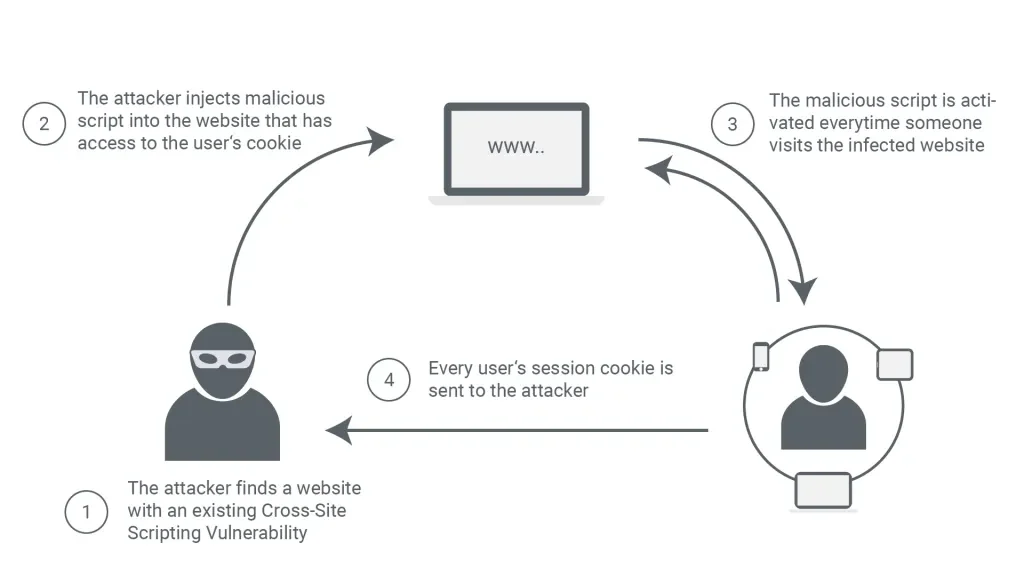
The stored cross-site scripting payload in this case is stored in a partner profile form, so the people at risk are the real partner users who view that account.
Setup
No special tooling is described beyond a browser and Burp Suite, which is used to intercept the verification response. The researcher already had a normal user account on the site, and used their own email address during the partner verification flow. The precondition for the second half of the chain is that the account that was escalated to partner privilege still works as a partner ID months later.
Finding it
After submitting three or four low level bugs to the program, the researcher decided to look for something more serious and started exploring all the dynamic functions of the website. That exploration turned up the partner login function, which is used to access all the partner resources.
Clicking that function presents a choice of partner and asks for an email id. The researcher tried to verify and got an error saying it was unable to verify the information. The researcher sent a verification code again and captured the request in Burp Suite with response interception enabled.
Exploitation
Step 1: Reach the partner verification flow
Log in as a normal user, go to the partner user functionality, choose an existing partner and enter your own email address to verify it. A verification code is sent to that email.
Step 2: Intercept the verification response
Enter the valid code received by email and capture the request in Burp Suite, with response interception enabled for this request. The response contains a parameter whose value is true or false. The researcher changed it from false to true and clicked go.
Step 3: Bypass the verification
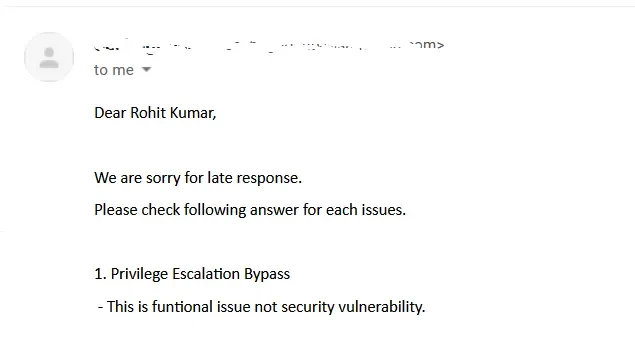
With the response parameter flipped to true, the verification is bypassed and the account now has partner privilege as their existing partner, with access to all the resources of partners. A video proof of concept was recorded and the report was submitted to the program.
Step 4: Return to the target months later
Some days after submission the researcher checked and saw that the issue was fixed, so the target was left alone. Three months later the researcher came back and found that the id still worked as a partner ID. The id still worked as a partner ID three months later.
Step 5: Store the payload in the partner form
After verifying the email id, the partner flow presents a long form to fill in. The researcher inserted an XSS payload into one of the fields of the form and it executed successfully. Whenever the partner account was visited, the payload executed. The payload used was:
RK”><svg/onmouseover=alert(document.cookie)>
The payload was:
Step 6: Reproduce from scratch
The report gives the full sequence as follows:
- After login as a normal user.
- Now you can go to partner user functionality. and choose existing partner and enter your own email to verify this.
- Enter the valid code which you receive on email and capture the request in burp-suite-Do-intercept response to this request.
- In the response change parameter from false->true and click on go.
- Here you bypass the verification.
- Now here you have a form to fill all the detail including your address and phone number. insert xss payload in the address field and submit this. and xss payload fired successfully.
- Whenever the real partner user visited this. attacker can get their session cookies.

Root cause
The verification response contained a parameter with a true or false value, and changing it from false to true bypassed the verification. Anyone who can intercept their own response can set it to true.
The stored XSS comes from the partner profile form: the payload was inserted in the address field and executed whenever the partner account was visited. The report does not describe any output encoding or content security policy that would have stopped it.
The researcher's id still worked as a partner ID three months later, which kept the partner form within reach. The researcher's id still worked as a partner ID three months later, which kept the partner form, and therefore the stored payload, within reach.
Impact
An attacker with only a normal user account can become a partner user of an existing partner and access all of the resources of partners. From there, the attacker can store a payload in the partner profile form; whenever the real partner user visits that account, the payload executes and the attacker can get their session cookies. The report does not state which fields beyond the address were tested, nor which partner resources were accessed.
Fix
The report only records that the issue was fixed some days after submission, without describing the change. Based on the root cause, the verification result should be decided and stored server-side, so that the response parameter cannot be flipped by the client, and the partner form fields should be encoded on output so that stored markup cannot execute. Revoking the escalated privilege from affected accounts is also needed: the researcher's id still worked as a partner ID three months after the fix.
Variants to test
- Flip boolean fields in verification and approval responses. Intercept the response of an email or code verification and change a
falsetotrue; a positive result is that the account gains the role or access without a valid server-side check. - Re-check old escalated accounts after a fix. Log back into an account that was escalated in an earlier test; a positive result is that the elevated role still works months later.
- Store payloads in profile fields that other users view. Submit the same style of attribute-breaking payload into address, phone and similar fields; a positive result is execution when the partner account is opened.
- Test the payload against different rendering contexts. Try breaking out of attributes and tags where the value is reflected; a positive result is an event handler firing on mouse movement or page load.
What happened, in plain words
A security researcher found a way to turn a normal user account into a partner account on a website that runs a partner programme. He did this by intercepting a message that the website sent back to his browser and changing a single word in it from false to true. That gave him access to everything a real partner can see and do. Months later, after he had seen the problem was fixed, he discovered his account still had partner powers. He then used a form in the partner area to store a small piece of malicious code, and that code ran in the browser of anyone who looked at the account. This kind of attack is called stored cross-site scripting, and it can let an attacker steal the login cookies of real partner users.
This article explains every step in plain language, assuming you have never done security testing before. You only need a computer, a browser, and the ability to follow instructions.
The two main ideas
Before we dive into the steps, let's understand the two vulnerabilities involved.
Privilege escalation means finding a way to get more rights than you are supposed to have. Imagine you have a regular membership card for a gym that only lets you use the cardio room, but you find a trick that lets you into the weight room and the pool as well. In computer terms, a normal user might be able to become an administrator or, in this case, a partner with extra access. The report defines it as "an attack that involves gaining illicit access of elevated rights, or privileges, beyond what is intended or entitled for a user. This attack can involve an external threat actor or an insider."
Stored cross-site scripting (XSS) is a type of attack where malicious code is saved on a website and later shown to other people who visit that site. The code runs in their browsers, not on the server. The report explains: "Cross site scripting (XSS) is a common attack vector that injects malicious code into a vulnerable web application. In that it does not directly target the application itself. Instead, the users of the web application are the ones at risk." Think of it like leaving a booby-trapped note in a public message board: anyone who reads the note triggers the trap.
Stored cross-site-scripting
In this case, the stored XSS payload was placed in a partner profile form, so the people at risk are the real partner users who view that account.
What you need
You do not need any special software beyond a web browser and a tool called Burp Suite. Burp Suite is a program that sits between your browser and the website, letting you see and change the requests and responses that travel back and forth. The researcher already had a normal user account on the site and used his own email address during the partner verification flow. The second part of the attack relies on the fact that the account he escalated to partner privilege still worked as a partner ID months later.
How the researcher found the flaw
After submitting three or four low-level bugs to the program, the researcher decided to look for something more serious. He started exploring all the interactive features of the website. That exploration turned up the partner login function, which is used to access all the partner resources.
When you click that function, you are asked to choose a partner and enter an email address. The researcher tried to verify and got an error saying it was unable to verify the information. He sent a verification code again and captured the request in Burp Suite with response interception enabled.
Step-by-step exploitation
Step 1: Reach the partner verification flow
Log in as a normal user, go to the partner user functionality, choose an existing partner and enter your own email address to verify it. A verification code is sent to that email.
Step 2: Intercept the verification response
Enter the valid code you received by email and capture the request in Burp Suite, with response interception enabled for this request. The response contains a parameter whose value is true or false. The researcher changed it from false to true and clicked go.
Step 3: Bypass the verification
With the response parameter flipped to true, the verification is bypassed and the account now has partner privilege as their existing partner, with access to all the resources of partners. A video proof of concept was recorded and the report was submitted to the program.
Step 4: Return to the target months later
Some days after submission the researcher checked and saw that the issue was fixed, so he left the target alone. Three months later he came back and found that the id still worked as a partner ID. The id still worked as a partner ID three months later.
Step 5: Store the payload in the partner form
After verifying the email id, the partner flow presents a long form to fill in. The researcher inserted an XSS payload into one of the fields of the form and it executed successfully. Whenever the partner account was visited, the payload executed. The payload used was:
RK”><svg/onmouseover=alert(document.cookie)>
RK”>: This part tries to close any surrounding HTML attribute or tag. TheRKis just some text, and the”>(a double quote followed by a greater-than sign) attempts to end an attribute value and close a tag, so that the following code is treated as new HTML.<svg/onmouseover=alert(document.cookie)>: This creates an SVG element (a type of image container) with an event handler. When the mouse moves over this element, the JavaScript codealert(document.cookie)runs.document.cookieis a browser property that contains the cookies for the current site, andalertdisplays them in a pop-up box. In a real attack, the attacker would send these cookies to themselves instead of showing them.
The payload fires when a victim moves the mouse over the injected element.
Step 6: Reproduce from scratch
The report gives the full sequence as follows:
- After login as a normal user.
- Now you can go to partner user functionality. and choose existing partner and enter your own email to verify this.
- Enter the valid code which you receive on email and capture the request in burp-suite-Do-intercept response to this request.
- In the response change parameter from false->true and click on go.
- Here you bypass the verification.
- Now here you have a form to fill all the detail including your address and phone number. insert xss payload in the address field and submit this. and xss payload fired successfully.
- Whenever the real partner user visited this. attacker can get their session cookies.
Why it worked
The verification response contained a parameter with a true or false value, and changing it from false to true bypassed the verification. Anyone who can intercept their own response can set it to true.
The stored XSS comes from the partner profile form: the payload was inserted in the address field and executed whenever the partner account was visited. The report does not describe any output encoding or content security policy that would have stopped it.
The researcher's id still worked as a partner ID three months later, which kept the partner form within reach. The researcher's id still worked as a partner ID three months later, which kept the partner form, and therefore the stored payload, within reach.
What an attacker could do
An attacker with only a normal user account can become a partner user of an existing partner and access all of the resources of partners. From there, the attacker can store a payload in the partner profile form; whenever the real partner user visits that account, the payload executes and the attacker can get their session cookies. The report does not state which fields beyond the address were tested, nor which partner resources were accessed.
How to fix it
The report only records that the issue was fixed some days after submission, without describing the change. Based on the root cause, the verification result should be decided and stored server-side, so that the response parameter cannot be flipped by the client, and the partner form fields should be encoded on output so that stored markup cannot execute. Revoking the escalated privilege from affected accounts is also needed: the researcher's id still worked as a partner ID three months after the fix.
Other things to test
- Flip boolean fields in verification and approval responses. Intercept the response of an email or code verification and change a
falsetotrue; a positive result is that the account gains the role or access without a valid server-side check. - Re-check old escalated accounts after a fix. Log back into an account that was escalated in an earlier test; a positive result is that the elevated role still works months later.
- Store payloads in profile fields that other users view. Submit the same style of attribute-breaking payload into address, phone and similar fields; a positive result is execution when the partner account is opened.
- Test the payload against different rendering contexts. Try breaking out of attributes and tags where the value is reflected; a positive result is an event handler firing on mouse movement or page load.
Glossary
- Privilege escalation: An attack that involves gaining illicit access of elevated rights, or privileges, beyond what is intended or entitled for a user.
- Stored XSS: A common attack vector that injects malicious code into a vulnerable web application; the code is stored on the server and runs in the browsers of users who view the affected page.
- Burp Suite: A tool that intercepts and modifies HTTP requests and responses between your browser and a website.
- Parameter: A piece of data sent in a request or response, often as a name-value pair.
- Payload: The malicious code or data that an attacker injects.
- Session cookies: Small pieces of data stored by the browser that identify a logged-in user; stealing them can allow an attacker to impersonate the user.
- SVG: A type of image format that can contain interactive elements and event handlers.
- Event handler: Code that runs in response to a user action, such as moving the mouse over an element.
- Output encoding: The process of converting special characters into a safe form so that they are displayed as text rather than executed as code.
- Content Security Policy (CSP): A security mechanism that tells the browser which sources of content are allowed to run, helping to prevent XSS.



