Breaking the Trust Boundary: A Mobile Security Assessment of a Healthcare Application
The mobile healthcare app allowed an authenticated user to set their own premium status via a writable database field, and stored authentication refresh tokens in plaintext preferences. An attacker with device access could extract the refresh token to hijack a session, and medical exports remained on the device after logout, exposing data to other users of a shared device.
 Published on medium.com
Bug Bounty
The full write-up lives on its author's site
It belongs to its author, so we link to it rather than copy it. The other two tabs are our own rewrites, checked against it.
Context
This is a mobile penetration test of a healthcare platform: an Android application that lets users centralise medical documents and patient information, backed by Supabase (REST API, Edge Functions, Storage) and a physician-facing web viewer. The application handles medical records, prescriptions, patient profiles, allergies and medical history, and integrates external services including a payment provider and WhatsApp-related functionality.
The assessment covered the Android client, the backend APIs, authentication, file storage, payment-related functionality and the physician viewer, following the OWASP Mobile Security Testing Guide (MSTG). It produced 8 findings: 3 High, 1 Medium, 3 Low and 1 Informational. The three High findings were a Premium authorization bypass, insecure authentication token storage, and medical data surviving logout. Several controls held up: Row Level Security, medical-data isolation, IDOR protection, XSS protection and the sharing mechanism.
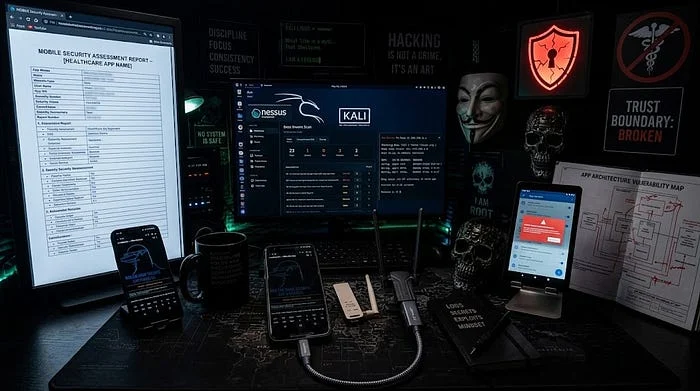
The high-level architecture identified during the assessment:
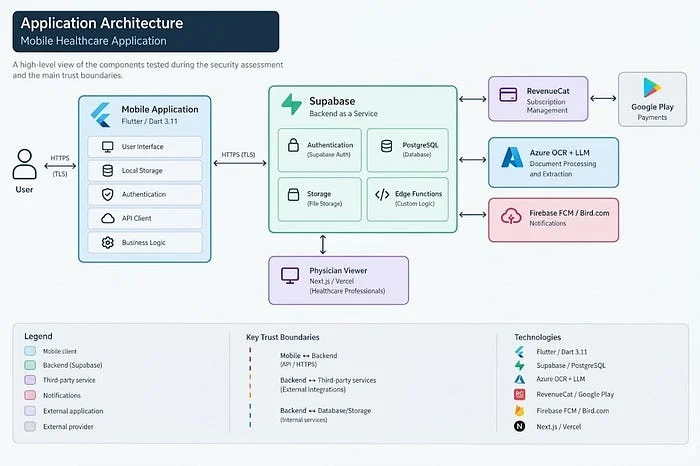
APPLICATION ARCHITECTURE DIAGRAM
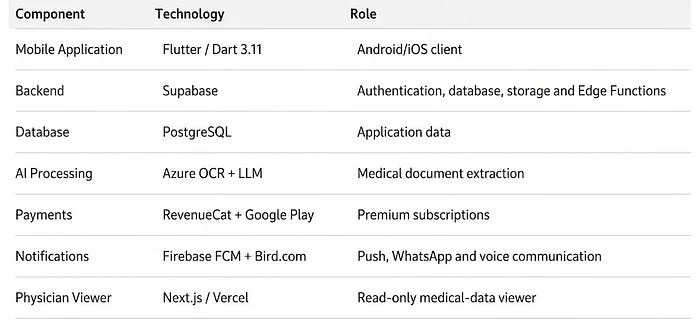
The main components identified during the assessment were:
Setup
The testing environment consisted of:
- Burp Suite for HTTP/HTTPS interception and request manipulation
- Frida for runtime instrumentation
- Android Emulator with a rooted testing environment
- ADB for filesystem and application analysis
- JADX for APK analysis
- reFlutter for Flutter application analysis
- Burp Repeater for API manipulation and replay
The attack surface tested was the Android application, the Supabase REST API, authentication endpoints, Supabase Edge Functions, Supabase Storage, premium/subscription logic, medical document upload and download, the physician viewer and the sharing functionality.
Two dedicated test accounts were created for cross-account and authorization testing. No real user data was intentionally accessed or modified. The stated objective was not only to find vulnerabilities inside the app but to determine whether security decisions were enforced server-side; that distinction became particularly important during the assessment.
Finding it
The Premium finding started from a simple observation: the application relied on a database field representing a user's Premium status, and that field could be modified through the backend API by an authenticated user. The critical issue was not merely that the field was writable, but that the application treated it as a trusted authorization primitive.
Exploitation
Step 1: modify the Premium field through the REST API
A test account was configured as a non-Premium user. The Premium field was then modified through the REST API:
PATCH /rest/v1/notification_preferences?id=eq.<ROW_ID>Content-Type: application/json
{ "is_premium": true}
The request targets the notification_preferences table and filters on a row identifier with id=eq.<ROW_ID>. The body sets is_premium to true. The API accepted the modification, and the response confirmed the new value:
{ "is_premium": true}
Step 2: check the payment provider
The payment provider was then queried for the same account. It returned:
{ "entitlements": {}, "subscriptions": {}}
No active subscription existed. Nevertheless, the application considered the account Premium.
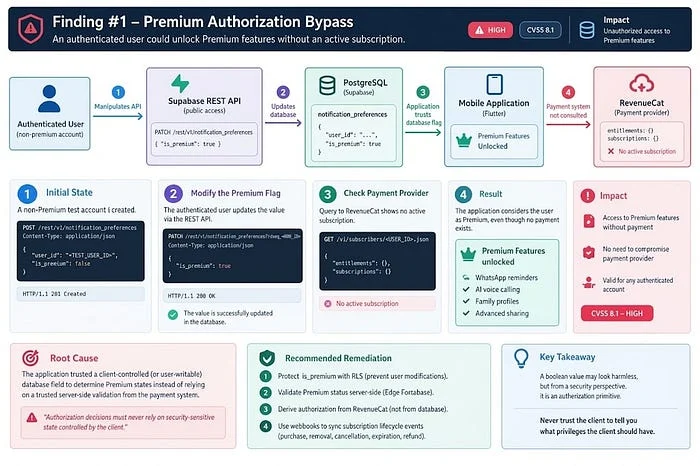
PREMIUM AUTHORIZATION BYPASS DIAGRAM
Root cause
The root cause is that authorization was based on a mutable application state instead of a trusted server-side payment validation mechanism. The client could write the field, and the backend then trusted it when deciding whether to grant Premium functionality. The attacker did not need to compromise the payment system: manipulating a client-accessible authorization state was enough.
Impact
An authenticated user could access Premium functionality without purchasing a subscription. According to the assessment, the affected functionality included Premium features, WhatsApp reminders, AI voice calling, family profiles and advanced sharing functionality. The issue is an authorization failure, not a payment-provider compromise.
Fix
The assessment recommended:
- Protect the Premium field with RLS, so users cannot arbitrarily modify their own Premium authorization state.
- Validate Premium status server-side: Premium-only backend operations should verify the subscription before executing privileged functionality.
- Derive authorization from the payment provider rather than from a client-controlled database field.
- Use payment webhooks so that subscription events (purchase, renewal, cancellation, expiration, refund) synchronise the authorization state securely.
Finding it: token storage
The second High finding came from inspecting local storage. The application stored Supabase authentication material, including access_token and refresh_token, inside Android SharedPreferences without encryption, at:
/data/data/<application>/shared_prefs/FlutterSharedPreferences.xml
The tokens were stored in plaintext.
Exploitation: session hijacking
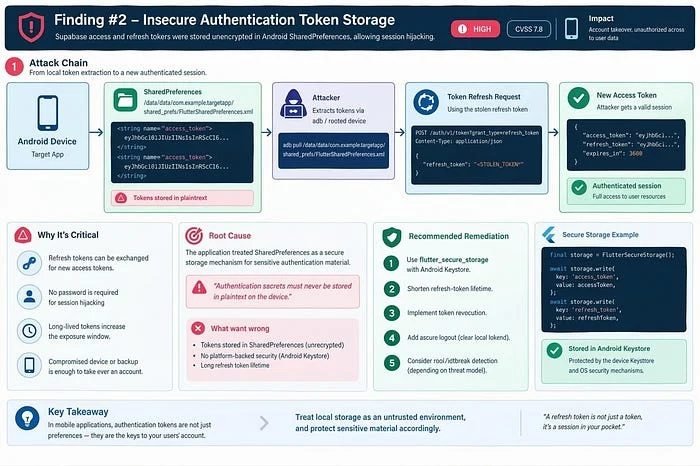
TOKEN STORAGE / SESSION HIJACKING DIAGRAM
In the tested environment, a refresh token could be extracted from the application storage and replayed against the authentication service to obtain a new access token. A refresh token is not just another preference: it represents the ability to obtain new authentication credentials. With a valid refresh token, an attacker may be able to establish a new authenticated session without knowing the victim's password, which for a healthcare application can lead to sensitive medical information.
Root cause
The application treated standard local preferences as a secure storage mechanism for authentication secrets. Sensitive authentication material should not be stored in plaintext application preferences.
Fix
Sensitive authentication material should be stored using a secure storage mechanism backed by Android Keystore. For Flutter applications, for example:
final storage = FlutterSecureStorage();
await storage.write( key: 'refresh_token', value: refreshToken,);
The exact implementation should follow the application's authentication architecture and threat model. Additional recommendations: reduce refresh-token lifetime where appropriate, implement token revocation, securely clear tokens during logout, and consider detection and handling of rooted devices depending on the threat model.
Finding it: data after logout
The third High finding concerned local medical-data persistence. Medical exports generated by the application remained on the device after logout or account switching. During testing, files belonging to different test accounts were found simultaneously in the application's local storage.
Exploitation: shared-device scenario
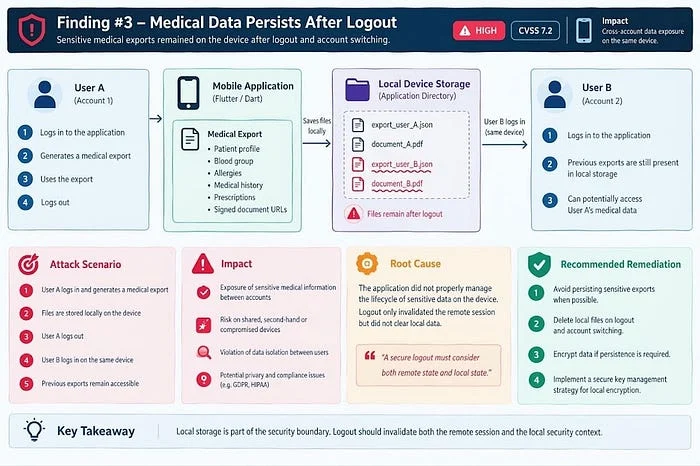
MEDICAL DATA PERSISTENCE DIAGRAM
Consider a shared device. User A logs in and accesses medical documents; the application generates local exports. User A logs out. User B logs into the same device. If User A's medical exports remain locally accessible, User B may potentially recover information belonging to the previous account. The exported data could contain patient profiles, blood group, allergies, medical history, prescriptions and links to medical documents.
Root cause
The problem is not only storage encryption but data lifecycle management: logout should invalidate the local security context and remove sensitive cached data belonging to the previous account.
Fix
- Delete temporary medical exports immediately after use if they are only needed for display or temporary processing.
- Purge sensitive local data on logout, invalidating the local security context.
- If medical information must remain on the device, protect it with an appropriate encryption mechanism and secure key management.
Finding it: account enumeration
The signup API returned different response structures depending on whether an email address was already registered. This lets an unauthenticated attacker determine whether an account exists. In a healthcare context this is more sensitive, because knowledge that a person uses a particular healthcare service can itself reveal potentially sensitive information.
Fix
The signup endpoint should return a consistent response regardless of account existence, for example:
HTTP 200Generic response
The application should avoid exposing whether a particular email address is already registered.
Finding it: technical error exposure
Several backend operations returned raw technical errors to the client, revealing PostgreSQL, PostgREST, database constraints, table information and RLS-related errors. These messages do not necessarily result in direct compromise, but they provide useful information about the backend implementation.
Fix
Technical errors should be split:
Client → Generic errorServer → Detailed technical logs
Users should receive a controlled message such as:
An unexpected error occurred.
while detailed database information remains available exclusively through server-side logging.
Finding it: file type validation
The medical-document upload mechanism relied on the declared Content-Type when processing PDF files. During testing, a file that was not actually a PDF could be stored while being declared as a PDF, which shows why checking only the HTTP MIME type is insufficient.
Fix
The backend should validate the actual file content, inspecting the file's magic bytes before accepting it. For example:
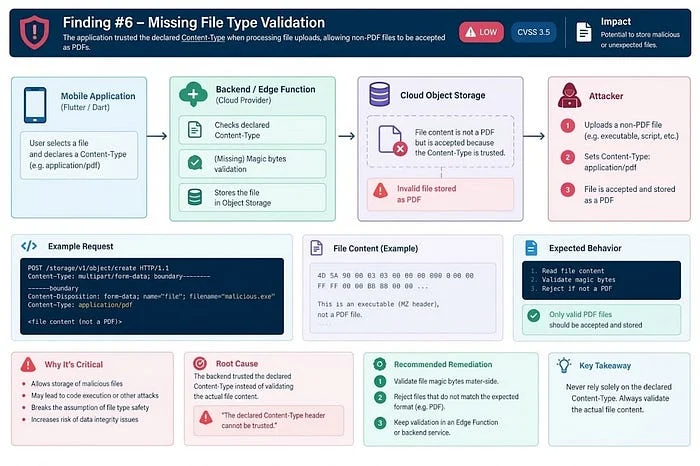
Validation should occur server-side before the file reaches permanent storage.
Finding it: missing Content-Disposition
Medical files stored in the application's storage infrastructure did not consistently specify:
Content-Disposition: attachment
Depending on the browser or WebView behaviour, a document could potentially be rendered inline instead of being treated strictly as a downloadable file.
Fix
For sensitive medical documents, the server should explicitly configure an appropriate response header, for example:
Content-Disposition: attachment;filename="document.pdf"
The exact configuration should match the application's intended document-delivery behaviour.
Finding it: test endpoint in production
A test-oriented backend endpoint remained accessible in the production environment. It was associated with testing a Premium/WhatsApp-related functionality. Production environments should not expose unnecessary testing functionality.
Fix
Test endpoints should be removed before production deployment, disabled, restricted to internal environments, or protected by strong administrative authentication. The rule: if an endpoint is not required by production users, it should not be exposed to production users.
Controls that held
Several mechanisms resisted testing and are worth recording:
- Row Level Security: correctly implemented on critical tables including prescriptions, patient profiles, profiles and share tokens. No cross-user medical-data leakage was identified.
- SQL injection: PostgREST parameterisation and existing WAF controls prevented the tested attempts.
- XSS: the physician viewer escaped HTML through React/JSX rendering; stored XSS payloads were rendered as inert text.
- Rate limiting: authentication endpoints returned
429 Too Many Requestswhen limits were exceeded, protecting against brute force and large-scale email abuse. - No IDOR in medical sharing: the sharing mechanism verified profile ownership before generating sharing tokens, so a user could not request a token for another patient's profile.
- Server-side sharing filters: the server respected the categories and permissions associated with generated sharing links.
- Hashed share tokens: tokens were stored as SHA-256 hashes rather than plaintext.
- Physician viewer architecture: a Next.js Server Component validated sharing tokens server-side, and the token was not exposed to client-side JavaScript.
- Storage isolation: storage-level authorization prevented authenticated users from directly accessing another user's medical documents.
The trust-boundary lesson
A mobile application contains many values that look authoritative:
is_premium = trueuser_id = ...authenticated = truerole = doctordocument_owner = ...
None of them should automatically be considered trustworthy, because the client is controlled by the user. A determined attacker can intercept requests, modify parameters, replay requests, instrument the application, inspect local storage, modify application state and interact directly with backend APIs. The client should request authorization, not define authorization. That principle explains why the Premium vulnerability was possible: the application trusted a value that should have been derived from a trusted backend or payment source.
Mobile security also cannot be reduced to static analysis. A secure mobile application requires several layers:
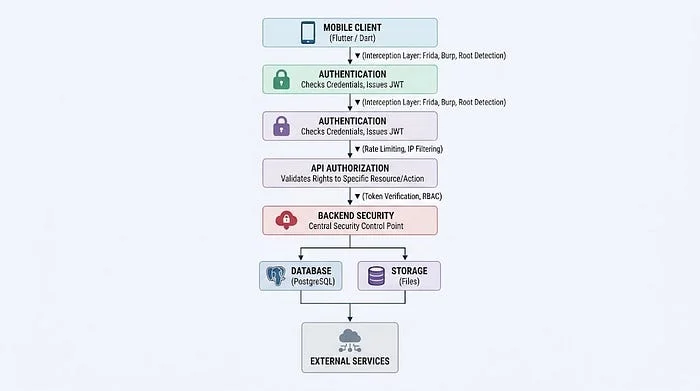
A vulnerability at any trust boundary can undermine the overall security model. Static analysis can reveal insecure storage, dynamic testing can reveal authorization failures, API testing can reveal backend weaknesses, and filesystem analysis can reveal sensitive-data persistence.
Remediation priorities
The remediation roadmap was organised as follows, with the three P1 findings representing the most immediate risks:
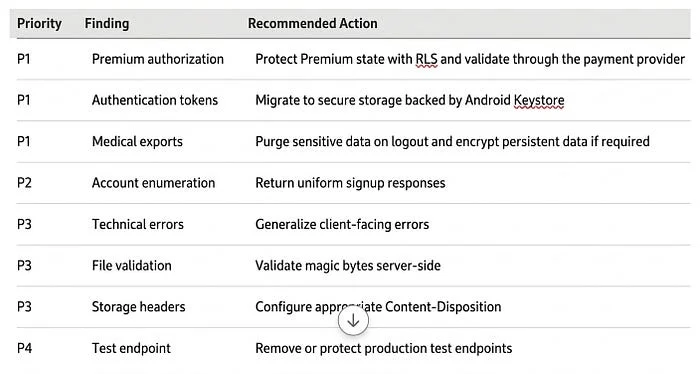
Variants to test
- Writable entitlement fields. Enumerate tables reachable through the REST API and try to
PATCHany column that looks like a plan, tier, role or entitlement flag. A positive result is a 2xx response echoing the new value while the payment provider shows no matching subscription. - Client-side authorization flags. Look for booleans such as
authenticated,is_adminorrolein local storage or request bodies and replay them with modified values. A positive result is privileged functionality becoming available without a server-side check. - Plaintext token storage. Inspect
shared_prefsand other app-private files foraccess_tokenandrefresh_token. A positive result is a readable token that can be replayed against the auth service to mint a new session. - Data surviving logout. Log in with two accounts in sequence on one device and diff the app's local storage. A positive result is files from the first account still present and readable after the second login.
- Signup response differences. Submit the same signup request with a registered and an unregistered address and compare status codes and bodies. A positive result is a distinguishable response for existing accounts.
- Raw backend errors. Send malformed or constraint-violating requests to API endpoints. A positive result is a response naming the database engine, table, constraint or RLS policy.
- Upload content mismatch. Upload a non-PDF file declared as
application/pdf. A positive result is the file being stored and served as a PDF. - Inline rendering of documents. Request stored medical files and inspect response headers. A positive result is a missing
Content-Disposition: attachmentcombined with a content type the browser or WebView renders inline. - Leftover test endpoints. Probe for test-oriented routes referenced in the client or in error messages. A positive result is a reachable endpoint in production that is not needed by production users.
What happened, in plain words
A security tester was hired to look at a healthcare app for Android phones. The app lets people keep their medical documents and patient information in one place. The tester was allowed to attack it, and then wrote down what he found.
He found eight problems. Three of them were serious. The most serious one let a user give themselves the paid "Premium" version of the app for free, just by changing one value. The second one was that the app kept the user's login keys in a file that is not protected, so anyone who can read that file could take over the account. The third one was that medical files stayed on the phone even after the user logged out, so the next person using the same phone could potentially read them.
The tester also found five smaller problems, and he found a lot of things the app did right. This article walks through all of it in the same order he did, explaining each idea from scratch.
The app and what it does
Before the technical details, it helps to know what kind of product this is.
A healthcare platform is software that stores and shares medical information. This particular one is a mobile app for Android phones. Users upload medical documents, keep patient profiles, and share information with doctors. The app handles medical records, prescriptions, patient profiles, allergies and medical history. It also connects to outside services, including a payment provider (the company that handles subscriptions and money) and something related to WhatsApp (the messaging app).
There is also a web viewer for physicians: a website that doctors open in a browser to look at the documents a patient has shared with them.
Behind the phone app sits a backend. The backend is the part of the system that runs on the company's servers, not on the user's phone. The phone app talks to the backend over the internet. In this case the backend is built on Supabase, a service that provides a database, an API, file storage and small server-side programs called Edge Functions.
A few words you will meet constantly:
- An API (Application Programming Interface) is the set of addresses and rules a program uses to ask another program to do something. Think of a restaurant: the menu and the waiter are the API. You do not walk into the kitchen yourself; you ask the waiter, and the kitchen decides what to send back.
- A REST API is a common style of API that uses ordinary web requests. Each request has a method (what you want to do), a URL (what you want to do it to), and sometimes a body (the data you send).
- HTTP is the language browsers and apps use to talk to servers. Every time you load a web page, you are making HTTP requests.
- A request is one message from the app to the server. A response is the server's reply.
- A token is a small piece of text that proves who you are, a bit like a wristband at a festival. You show it, and you get in without showing your ID again.
- A database is an organised store of information, usually arranged in tables (like spreadsheets). Each table has rows (one record each) and columns (the fields of each record).
The architecture
The tester first drew a map of how the pieces fit together.
APPLICATION ARCHITECTURE DIAGRAM
The main components he identified were:
In plain words: the phone app talks to the Supabase API, which talks to the database and to file storage. Some logic lives in Edge Functions, which are small programs that run on the server when called. The payment provider is a separate outside company. The physician viewer is a separate website. Each arrow between two boxes is a place where data crosses from one system to another, and each of those places is a possible weak point.
How the test was set up
The tester used a set of tools. You do not need to install any of them to follow the story, but knowing what each one does makes the rest easier:
- Burp Suite: a program that sits between the phone and the internet and lets the tester see and change every request. Think of it as a post office clerk who opens every letter, reads it, and can rewrite it before sending it on.
- Frida: a tool that lets the tester look inside a running app and change what it does while it runs.
- Android Emulator: a fake Android phone running on a computer. It can be rooted, meaning the tester has full administrator control over it, like having the master key to the building.
- ADB: a command-line tool for talking to an Android device or emulator, including browsing its files.
- JADX: a tool that opens an Android app package (the APK, the file you download when you install an app) and shows the code inside.
- reFlutter: a tool for apps built with Flutter, a framework for writing one app that runs on several platforms. Flutter apps hide some of their internals, and this tool helps open them up.
- Burp Repeater: part of Burp Suite that lets you take one captured request and send it again and again with small changes.
The attack surface is the full list of things an attacker could try to interact with. Here it was: the Android app, the Supabase REST API, the login endpoints, the Edge Functions, file storage, the Premium and subscription logic, medical document upload and download, the physician viewer, and the sharing feature.
The tester created two dedicated test accounts. This matters: to test whether one user can see another user's data, you need two users. He states that no real user data was intentionally accessed or modified.
The goal was not only to find bugs inside the app. It was also to find out whether the important security decisions were made on the server. This distinction is the heart of the whole article, so it is worth an everyday comparison. Imagine a nightclub where the bouncer checks your age at the door. If the bouncer is on the street, anyone can walk around the building. If the bouncer is inside, at the bar, then getting past the door does not help you. In software, the phone is the street and the server is inside the club. Anything the phone decides can be changed by the person holding the phone.
Finding 1: giving yourself Premium for free
What the tester noticed
The app has a paid tier called Premium. Whether a user is Premium was stored in a database field, that is, a column in a table. The app read that field and decided what to show.
The problem: an ordinary logged-in user could change that field through the API.
Why that is worse than it sounds
It is one thing for a field to be writable. It is much worse that the app treated that field as the final word on who is allowed to use paid features. In security language, the field was being used as an authorization primitive: a value the system trusts when deciding what you are allowed to do.
Step 1: change the field
The test account was first set up as a normal, non-Premium user. Then the tester sent this request:
PATCH /rest/v1/notification_preferences?id=eq.<ROW_ID>Content-Type: application/json
Line by line:
PATCHis the HTTP method that means "change part of an existing record". Other common methods areGET(read),POST(create) andDELETE(remove)./rest/v1/notification_preferencesis the address of a table callednotification_preferencesin the Supabase REST API. The/rest/v1/part is the standard prefix Supabase uses for database access.?id=eq.<ROW_ID>is a filter. The?starts the list of conditions,idis the column,eqmeans "equals", and<ROW_ID>is a placeholder for the identifier of the row. So: "the row whose id equals this value". The angle brackets show it is a placeholder, not a real value.Content-Type: application/jsonis a header, a small piece of information attached to the request. It tells the server that the body is formatted as JSON, a text format for structured data that looks like{"key": value}.
The body of the request was:
{ "is_premium": true}
This says: set the field is_premium to true. In JSON, true is a real boolean value, not the text "true".
The server accepted the change and replied with the new value:
{ "is_premium": true}
That reply is the confirmation: the database now says this account is Premium.
Step 2: check whether the user actually paid
The tester then asked the payment provider, the outside company that handles subscriptions, about the same account. It answered:
{ "entitlements": {}, "subscriptions": {} }
What this means:
entitlementsare the things a customer is entitled to, the features they have bought. The value{}is an empty JSON object, meaning there are none.subscriptionsare the recurring payment plans. Again{}means none.
So the payment provider had no record of this user paying for anything. And yet the app treated the account as Premium.
PREMIUM AUTHORIZATION BYPASS DIAGRAM
Why it worked
The app based its decision on a value that could be changed, instead of asking the payment provider, which is the only party that actually knows who paid. The payment provider was never consulted. An attacker did not need to break into the payment system at all. Changing one field was enough.
What an attacker could get
According to the assessment, the paid features included Premium features in general, WhatsApp reminders, AI voice calling, family profiles and advanced sharing functionality. All of these became available without a purchase.
This is an authorization failure, not a payment-provider compromise. Authorization means "what are you allowed to do", as opposed to authentication, which means "who are you". Logging in is authentication. Getting into the VIP area is authorization.
The fix
The tester recommended four changes:
- Protect the Premium field with RLS. RLS stands for Row Level Security, a database feature where each row carries a rule about who may read or change it. Think of each row having its own tiny guard. With RLS, a user cannot simply rewrite their own Premium status.
- Check Premium status on the server. Any operation that is only for paying users should verify the subscription before doing the work.
- Take the answer from the payment provider, not from a database field the user can reach.
- Use payment webhooks. A webhook is an automatic message one system sends to another when something happens. Here, the payment provider would tell the app when a subscription is bought, renewed, cancelled, expires or is refunded, and the app would update the user's status from that trusted message.
Finding 2: login keys stored in the open
What the tester found
The app stored its Supabase login material, including access_token and refresh_token, in Android SharedPreferences without encryption.
SharedPreferences is a standard Android mechanism for storing small settings, such as your preferred language or whether you want notifications. It is a simple file of key and value pairs. It is convenient, but it is not a safe.
The two tokens are worth explaining:
- An access token is the short-lived pass you show with each request. It is like a ticket that is valid for a short time.
- A refresh token is a longer-lived key you use to get a new access token when the old one expires. It is like the receipt you show at the ticket desk to get a fresh ticket. Because it can produce new tickets, it is very valuable to an attacker.
The file was at this location:
/data/data/<application>/shared_prefs/FlutterSharedPreferences.xml
Line by line:
/data/data/is the part of an Android phone's file system where each app's private data lives.<application>is a placeholder for the app's package name, the unique identifier of the app on the phone./shared_prefs/is the folder where SharedPreferences files are kept.FlutterSharedPreferences.xmlis the file itself. The.xmlending means it is written in XML, a text format that uses tags like<name>value</name>.
The tokens inside were stored in plaintext, meaning readable text with no scrambling at all.
What an attacker could do with it
TOKEN STORAGE / SESSION HIJACKING DIAGRAM
In the test environment, the tester extracted a refresh token from the app's storage and sent it to the authentication service. The service accepted it and handed back a new access token. This is called session hijacking: taking over someone else's logged-in session.
The key point is that the attacker never needed the victim's password. The refresh token was enough. For a healthcare app, that can lead to sensitive medical information.
Why it worked
The app treated ordinary local preferences as if they were a secure vault. They are not. The principle the tester states is simple: sensitive authentication material should not be stored in plaintext application preferences.
The fix
The recommendation was to use a secure storage mechanism backed by the Android Keystore. The Keystore is a protected area of the phone, managed by the operating system, where keys can be kept so that ordinary apps cannot simply read them out.
For Flutter apps, the example given was:
final storage = FlutterSecureStorage();
Line by line:
final storagecreates a variable namedstorage. In programming, a variable is a named box that holds a value.=assigns the value on the right to that box.FlutterSecureStorage()creates an object that talks to the platform's secure storage. The empty parentheses mean it is created without extra settings.
Then:
await storage.write( key: 'refresh_token', value: refreshToken,);
Line by line:
awaitmeans "wait here until this finishes before continuing". Writing to storage takes a moment, and the code needs the result before moving on.storage.write(starts a write operation on the secure storage object.key: 'refresh_token'is the name under which the value will be saved, like a label on a drawer.value: refreshTokenis the actual token, held in a variable calledrefreshToken.);closes the call.
The tester notes that the exact implementation should follow the app's own login design and its threat model. A threat model is a written answer to the question: who might attack us, what do they want, and what can they realistically do? It decides how far you need to go.
Other recommendations:
- Make refresh tokens expire sooner where that makes sense.
- Support token revocation, which means being able to cancel a token so it stops working, for example after a logout or a suspected theft.
- Clear tokens securely at logout.
- Consider detecting rooted devices, meaning phones where the owner has taken full administrator control, since such phones make it easier to read app files. Whether to do this depends on the threat model.
Finding 3: medical files that outlive the logout
What the tester found
The app generated exports: files containing medical information, created on the phone so the user can view or process them. These files stayed on the device after logout or after switching accounts. During testing, files belonging to different test accounts were found at the same time in the app's local storage.
Why this matters: the shared phone
MEDICAL DATA PERSISTENCE DIAGRAM
Picture a phone used by more than one person, or a phone that is sold or lent. User A logs in, opens medical documents, and the app creates local export files. User A logs out. User B logs in on the same phone. If User A's exports are still there, User B may be able to recover them.
This is a failure of a privacy boundary: the line that should separate one person's information from another's.
What was in those files
The exported data could contain patient profiles, blood group, allergies, medical history, prescriptions and links to medical documents. In a healthcare context, that is about as sensitive as data gets.
Why it worked
The problem is not only whether files are encrypted. It is also data lifecycle management: knowing where data is created, how long it lives, and when it is destroyed. Logout should clear the local security context and remove the previous account's cached data, but the exports remained.
The fix
- Delete temporary exports immediately after use if they are only needed for display or short processing.
- Purge sensitive local data at logout, so the previous account's information is gone.
- If medical information really must stay on the device, protect it with proper encryption and careful key management, meaning the keys used to encrypt it are themselves stored safely.
Finding 4: finding out who has an account
What the tester found
The signup API, the endpoint used when someone creates an account, replied differently depending on whether the email address was already registered. This lets someone who is not logged in work out whether an account exists. The technique is called account enumeration: listing valid accounts by observing differences in responses.
In healthcare this is more sensitive than usual, because simply knowing that a person uses a particular healthcare service can itself reveal something private.
The fix
The signup endpoint should give the same answer whether or not the account exists, for example:
HTTP 200Generic response
Line by line:
HTTP 200is the status code, a three-digit number in every response.200means "OK, everything went fine".Generic responsestands for a neutral message that does not reveal whether the address was already registered.
The application should avoid exposing whether a particular email address is already registered.
Finding 5: the server telling attackers too much
What the tester found
Several backend operations returned raw technical errors to the client. These errors revealed PostgreSQL (the database engine), PostgREST (the component that turns web requests into database queries), database constraints (rules about what data is allowed), table information and RLS-related errors.
An error message is like a shop assistant shouting the stockroom layout to a customer. It does not by itself let anyone steal anything, but it is a useful map for someone planning to.
The fix
Errors should be split into two paths:
Client → Generic errorServer → Detailed technical logs
Line by line:
Client → Generic error: the user's app receives a vague, safe message.Server → Detailed technical logs: the full technical detail goes into the server's own records, where developers can read it but outsiders cannot.
Users should see something controlled, such as:
An unexpected error occurred.
while the detailed database information stays in server-side logging.
Finding 6: a file that says it is a PDF but is not
What the tester found
The upload feature for medical documents relied on the declared Content-Type when handling PDF files. Content-Type is a header in which the sender states what kind of file it is sending, for example application/pdf for a PDF. It is a claim, not a proof. During testing, a file that was not actually a PDF could be stored while being declared as one.
This shows why checking only the HTTP MIME type is not enough. MIME type is the official name for those content-type labels.
The fix
The backend should check the actual content of the file. A robust implementation inspects the file's magic bytes: the first few bytes of a file, which follow fixed patterns for each real format. A real PDF starts with a known signature, so the server can look at the bytes rather than trusting the label. For example:
Validation should happen on the server, before the file reaches permanent storage.
Finding 7: documents that open in the browser instead of downloading
What the tester found
Medical files in the app's storage did not consistently send this header:
Content-Disposition: attachment
Line by line:
Content-Dispositionis a response header that tells the browser what to do with the file.attachmentmeans "download this; do not display it in the page".
Without it, depending on the browser or WebView behaviour, a document could be shown inline, meaning displayed inside the page, instead of being treated strictly as a download. A WebView is a small browser built into an app so it can show web content.
The fix
For sensitive medical documents, the server should set the header explicitly, for example:
Content-Disposition: attachment;filename="document.pdf"
Line by line:
attachmentagain means download rather than display.filename="document.pdf"suggests the name the browser should use when saving the file.
The exact configuration should match how the app intends to deliver documents.
Finding 8: a test door left open in production
What the tester found
A backend endpoint meant for testing was still reachable in the production environment, meaning the live system real users use. The endpoint was associated with testing a Premium and WhatsApp-related feature.
The fix
Test endpoints should be removed before deployment, disabled, restricted to internal environments, or protected by strong administrative authentication. The rule the tester gives is: if an endpoint is not required by production users, it should not be exposed to production users.
What the app got right
A good test records not only what broke but what held. Several controls resisted the testing:
- Row Level Security was correctly implemented on critical tables, including prescriptions, patient profiles, profiles and share tokens. No cross-user medical-data leakage was found.
- SQL injection protection held. SQL injection is an attack where someone slips database commands into an input field, hoping the server runs them. Here, PostgREST's parameterisation (a way of passing values so they can never be read as commands) and the existing WAF (Web Application Firewall, a filter that inspects incoming web traffic) stopped the attempts.
- XSS protection held. XSS, or cross-site scripting, is an attack where someone plants code in content that other users later view, hoping their browser runs it. The physician viewer escaped HTML through React/JSX rendering, so stored payloads appeared as harmless text.
- Rate limiting worked: authentication endpoints returned
429 Too Many Requestswhen limits were exceeded. A status code is the three-digit number in every response;429means "you are asking too often, slow down". This protects against brute force, which is guessing passwords over and over, and against large-scale email abuse. - No IDOR in medical sharing. IDOR stands for Insecure Direct Object Reference: changing an identifier in a request to reach someone else's data. The sharing mechanism checked who owned the profile before creating a sharing token, so a user could not ask for a token for another patient's profile.
- Server-side sharing filters were enforced: the server respected the categories and permissions attached to each sharing link.
- Hashed share tokens: sharing tokens were stored as SHA-256 hashes rather than plaintext. A hash is a one-way scramble: you can turn a value into a hash, but you cannot turn the hash back into the value. If the stored hashes leak, the original tokens are not directly usable.
- Secure physician viewer architecture: a Next.js Server Component validated sharing tokens on the server, and the token was never exposed to client-side JavaScript, the code that runs in the visitor's browser.
- Storage isolation: storage-level authorization stopped logged-in users from directly opening another user's medical documents.
The bigger lesson: trust boundaries
A trust boundary is a line in a system where information passes from one party to another and where trust must be checked. The door of a bank is a trust boundary: outside, anyone can stand; inside, only authorised people.
A mobile app contains many values that look authoritative:
is_premium = trueuser_id = ...authenticated = truerole = doctordocument_owner = ...
Line by line:
is_premium = truesays the user has the paid plan.user_id = ...is the identifier of the user.authenticated = truesays the user is logged in.role = doctorsays the user is a doctor.document_owner = ...says who owns a document.
None of these should be trusted just because they appear in the app. The client, meaning the app on the user's phone, is controlled by the user. A determined attacker can intercept requests, modify parameters, replay requests (send the same request again later), instrument the app (watch and change it while it runs), inspect local storage, modify app state and talk directly to the backend APIs.
The rule is: the client should request authorization, not define it. The app may ask "may I do this?", but the server must decide.
Mobile security is more than reading the app's code
Another lesson is that mobile security cannot be reduced to static analysis, which means reading the code without running it. A secure mobile app needs several layers:
A weakness at any trust boundary can undermine the whole model. Static analysis can reveal insecure storage. Dynamic testing, which means testing the app while it runs, can reveal authorization failures. API testing can reveal backend weaknesses. Filesystem analysis can reveal sensitive data that persists.
Fix order
The remediation roadmap was organised as follows, with the three P1 findings as the most immediate risks:
Patterns worth testing again
- Writable entitlement fields. List the tables reachable through the REST API and try to
PATCHany column that looks like a plan, tier, role or entitlement flag. A positive result is a successful response echoing the new value while the payment provider shows no matching subscription. - Client-side authorization flags. Look for booleans such as
authenticated,is_adminorrolein local storage or request bodies, and replay them with changed values. A positive result is privileged functionality becoming available without a server-side check. - Plaintext token storage. Inspect
shared_prefsand other app-private files foraccess_tokenandrefresh_token. A positive result is a readable token that can be replayed against the auth service to create a new session. - Data surviving logout. Log in with two accounts in sequence on one device and compare the app's local storage. A positive result is files from the first account still present and readable after the second login.
- Signup response differences. Submit the same signup request with a registered and an unregistered address and compare status codes and bodies. A positive result is a response that differs for existing accounts.
- Raw backend errors. Send malformed or rule-breaking requests to API endpoints. A positive result is a response naming the database engine, table, constraint or RLS policy.
- Upload content mismatch. Upload a non-PDF file declared as
application/pdf. A positive result is the file being stored and served as a PDF. - Inline rendering of documents. Request stored medical files and inspect response headers. A positive result is a missing
Content-Disposition: attachmentcombined with a content type the browser or WebView displays inline. - Leftover test endpoints. Probe for test-oriented routes mentioned in the client or in error messages. A positive result is a reachable endpoint in production that production users do not need.
Final takeaways
A strong architecture can still contain dangerous trust-boundary failures. This app already had Row Level Security, server-side sharing controls, SQL injection protection, XSS protection, rate limiting, storage isolation and hashed sharing tokens. Yet three serious weaknesses showed gaps elsewhere:
- Authorization must be server-controlled. Premium status should never depend on a value the client can change.
- Login secrets need secure storage. A refresh token in plaintext is a direct path to taking over a session.
- Sensitive data needs a defined lifecycle. Logging out is not enough if medical data stays on the device.
The most important findings were not exotic attacks. They were failures to enforce trust boundaries:
Client-controlled state ≠Trusted authorization
Local storage ≠Secure secret storage
Logout ≠Automatic data destruction
Line by line:
Client-controlled state ≠ Trusted authorization: something the app can change is not the same as a permission the server has granted.Local storage ≠ Secure secret storage: an ordinary file on the phone is not a vault.Logout ≠ Automatic data destruction: logging out does not, by itself, delete anything.
These principles matter especially in healthcare, because a security failure affects the confidentiality of highly sensitive personal information.
Responsible disclosure
The write-up was intentionally anonymised. The application name, client identity, production domains, identifiers, credentials, tokens and other potentially sensitive information were removed. The aim was to share methodology, technical lessons, vulnerability patterns and remediation strategies without exposing the organisation's confidential information. All testing was performed within an authorised security assessment scope.
Tools and methodology
Mobile security
- OWASP Mobile Security Testing Guide
- Burp Suite
- Frida
- ADB
- JADX
- reFlutter
- Android Emulator
Backend and API testing
- REST API analysis
- Authentication testing
- Authorization testing
- Supabase/PostgreSQL analysis
- Storage security testing
- Edge Function testing
Focus areas
- Authentication
- Authorization
- Local data storage
- API security
- Sensitive data exposure
- File upload security
- Access control
- Mobile application architecture
Final thought
The most valuable finding in a penetration test is not always the one with the highest CVSS score. CVSS is a standard scoring system for the severity of a vulnerability. Sometimes the most valuable thing is the security assumption behind it.
If the client can change it, do not trust it. If the device can expose it, protect it. If the data is sensitive, define its entire lifecycle.
Glossary
- Access token: a short-lived piece of text the app sends with requests to prove the user is logged in.
- Account enumeration: working out which accounts exist by noticing differences in how a system responds.
- ADB: Android Debug Bridge, a command-line tool for interacting with an Android device, including its files.
- Android Emulator: software that imitates an Android phone on a computer.
- Android Keystore: a protected area managed by Android where apps can keep cryptographic keys safely.
- API: the set of addresses and rules one program uses to ask another program to do something.
- APK: the file format of an Android app, the thing you install.
- Attack surface: everything an attacker could try to interact with.
- Authentication: proving who you are, for example by logging in.
- Authorization: what you are allowed to do once you are known.
- Authorization primitive: a value the system trusts when deciding what you may do.
- Backend: the part of a system that runs on the company's servers rather than on the user's device.
- Body: the data sent along with an HTTP request or response.
- Brute force: guessing passwords or codes over and over until one works.
- Burp Repeater: a Burp Suite tool for resending a captured request with changes.
- Burp Suite: a tool that intercepts and lets you edit web traffic between an app and a server.
- Client: the program on the user's side, here the phone app.
- Content-Type: a header in which the sender states what kind of data is being sent.
- Content-Disposition: a response header that tells the browser whether to display a file or download it.
- Cross-user leakage: one user seeing another user's data.
- CVSS: a standard scoring system for the severity of a vulnerability.
- Database: an organised store of information, usually in tables.
- Data lifecycle management: knowing where data is created, how long it lives and when it is destroyed.
- Dynamic testing: testing a program while it runs.
- Edge Functions: small programs that run on a server when called, here part of Supabase.
- Entitlements: the features or rights a customer has paid for.
- Exports: files the app generates locally from stored data.
- Filter: a condition in a request that selects which records to act on.
- Flutter: a framework for building apps that run on several platforms from one codebase.
- Frida: a tool for inspecting and changing a running app.
- Hash: a one-way scramble of a value; you can create it but not reverse it.
- Header: a small piece of information attached to an HTTP request or response.
- HTTP: the language browsers and apps use to talk to servers.
- IDOR: Insecure Direct Object Reference, changing an identifier in a request to reach someone else's data.
- JADX: a tool that opens an APK and shows the code inside.
- JSON: a text format for structured data, written as key and value pairs.
- Magic bytes: the first few bytes of a file, which follow fixed patterns for each real file format.
- Method: the part of an HTTP request that says what to do, such as GET, POST, PATCH or DELETE.
- MIME type: the official label for a kind of content, such as
application/pdf. - OWASP MSTG: the OWASP Mobile Security Testing Guide, a widely used checklist and methodology for testing mobile apps.
- PATCH: the HTTP method that means change part of an existing record.
- Payment provider: an outside company that handles subscriptions and payments.
- Plaintext: readable text with no encryption.
- PostgREST: a component that turns web requests into database queries.
- PostgreSQL: a widely used database engine.
- Privacy boundary: the line that should keep one person's information separate from another's.
- Production: the live system that real users use.
- Rate limiting: refusing requests once someone sends too many in a period.
- reFlutter: a tool for analysing apps built with Flutter.
- Refresh token: a longer-lived key used to obtain new access tokens.
- Request: one message from a client to a server.
- Response: the server's reply to a request.
- REST API: a common style of API that uses ordinary web requests.
- RLS (Row Level Security): a database feature where each row has rules about who may read or change it.
- Rooted: a phone where the owner has taken full administrator control.
- Session hijacking: taking over someone else's logged-in session.
- SHA-256: a widely used hashing function that produces a fixed-length hash.
- SharedPreferences: Android's standard mechanism for storing small settings as key and value pairs.
- Signup API: the endpoint used when someone creates an account.
- SQL injection: an attack where database commands are slipped into input fields in the hope the server runs them.
- Static analysis: examining a program's code without running it.
- Status code: the three-digit number in every HTTP response, such as 200 or 429.
- Supabase: a service providing a database, API, file storage and server-side functions.
- Table: a collection of records in a database, like a spreadsheet.
- Threat model: a written answer to who might attack a system, what they want and what they can do.
- Token: a piece of text that proves identity or permission.
- Token revocation: cancelling a token so it stops working.
- Trust boundary: a line where information passes between parties and trust must be checked.
- URL: the address of a resource on the web.
- WAF: Web Application Firewall, a filter that inspects incoming web traffic.
- Webhook: an automatic message one system sends to another when an event happens.
- WebView: a small browser built into an app to display web content.
- XSS: cross-site scripting, an attack where code is planted in content other users view, hoping their browser runs it.

