Broken Access Control Missing Server-Side Authorization Allows Member to Access Billing Data and Modify Any User Profile Including Admins
A workspace member could bypass a frontend-only role check by editing a role value in the server response, then use the revealed administrative interface to modify other users' profiles, including an admin's name, picture and sending email address. The backend did not verify the member's actual role before processing these administrative operations.
 Published on medium.com
Bug Bounty
The full write-up lives on its author's site
It belongs to its author, so we link to it rather than copy it. The other two tabs are our own rewrites, checked against it.
Context
The target is a collaborative workspace application in which every user is assigned one of two roles:
- Admin: administrative privileges, including managing team members and modifying their information.
- Member: restricted permissions, not supposed to view or modify other workspace members.
According to the application's documentation and to the behaviour observed during testing, Member accounts are not allowed to access the team management functionality. The application appeared to enforce this correctly: when a Member opened the relevant section, the frontend blocked navigation and displayed a permission warning.
The question the researcher set out to answer was whether the application was actually enforcing authorization on the server, or merely hiding the functionality from unauthorised users.
Setup
Two accounts were created inside a test workspace:
| Account | Role | Purpose |
|---|---|---|
| Admin | Workspace administrator | Target of the attempted modification |
| Member | Regular workspace member | The low-privileged attacker account |
The objective was to determine whether the Member account could perform administrative operations against other workspace members without obtaining actual administrative privileges. Traffic was inspected and modified with Burp Suite, using its Match & Replace rule on response bodies.
Finding it
Logged in as the Member, the researcher first tried to reach the team management section. The application blocked access through its frontend interface:
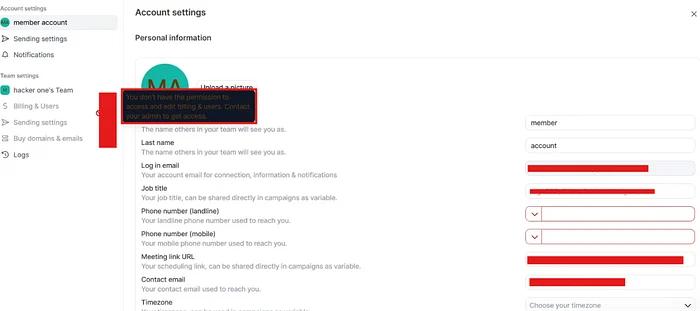
The Member could not normally view or manage other workspace members. At this point the expected authorization boundary looked clear: Admins could manage workspace members, Members could not view or modify other members' profiles. The restriction was working at the interface level, which by itself does not establish whether the backend enforces it.
While inspecting the application's HTTP traffic through Burp Suite, the researcher identified a role-related property in the server response that controlled the administrative interface. The response contained the following JSON property:
Original response:
{ "tea_wRu2**********": "member"}
Instead of treating the hidden interface as an authorization boundary, the researcher examined how the frontend decided which features to display. The role value in the response is what drives that decision, so changing it locally would change what the browser renders.
Exploitation
Step 1: Rewrite the role in the response
A Burp Suite Match & Replace rule was configured on the response body to change the role value locally:
Modified response:
{ "tea_wRu2**********": "admin"}
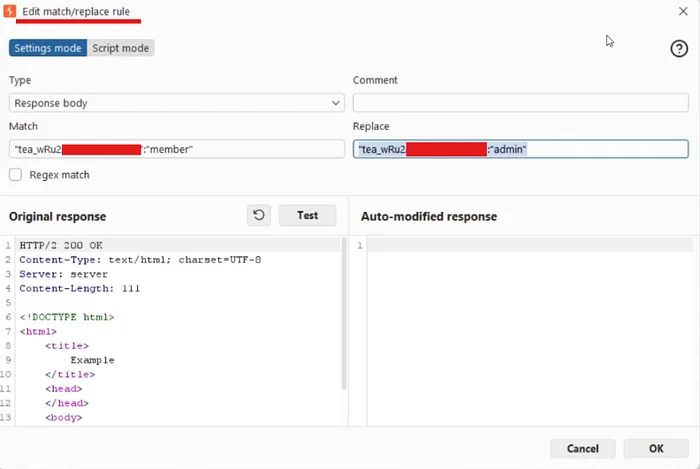
This caused the application to render the previously restricted administrative interface. The modification affected only the response received by the browser: the actual account remained a Member, and its server-side role was never changed. The first restriction, the interface-level one, had been bypassed.
Step 2: Reach the hidden interface
With the modified response in place, the researcher navigated to:
[TEAM MANAGEMENT / BILLING & USERS PAGE]
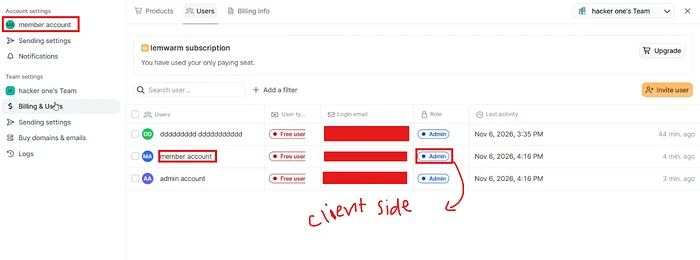
The application now displayed functionality that had previously been inaccessible to the Member account. The permission warning no longer prevented access to the interface, and the application loaded the relevant management functionality, including the team members section.
Revealing a hidden interface is not, by itself, a security vulnerability. A properly implemented application should independently validate the authenticated user's permissions whenever a sensitive backend operation is requested. The next step was to determine whether that authorization check actually existed.
Step 3: Perform an administrative action as the Member
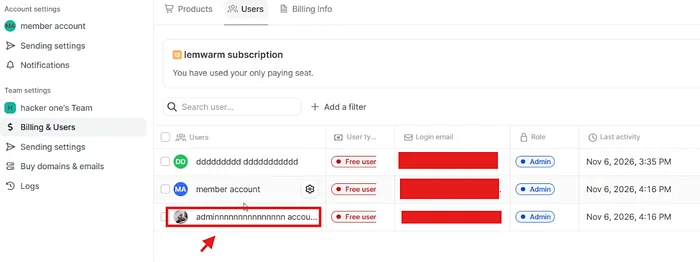
Still using the Member account, the researcher edited the Admin's profile. The changes made were:
- Changed the Admin's name.
- Changed the Admin's profile picture.
- Added a new sending email address.
All changes were saved successfully and remained after removing the Burp Suite Match & Replace rule and refreshing the page. This confirmed that the changes were actually saved on the server.
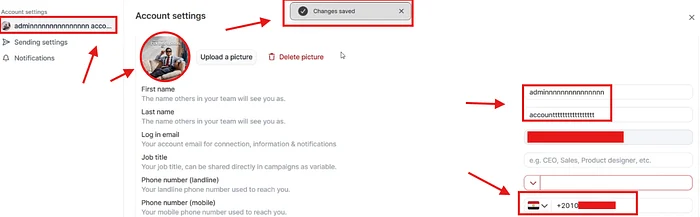
and it works
Root cause
The vulnerability resulted from missing server-side authorization checks on administrative operations. Although the frontend restricted Members from accessing team management functionality, the backend failed to consistently verify the authenticated user's actual role before processing sensitive requests.
The existing defence was purely presentational: the interface hid the management features and showed a permission warning, and the role value in the response body decided what the frontend rendered. Because the backend failed to consistently verify the caller's role before processing sensitive requests, the interface restriction did not stop the Member's actions. The account never became an Admin; its role remained unchanged throughout the test. The interface restriction was bypassed, but the real failure was deeper: the backend accepted operations that the Member was never authorised to perform.
Impact
A Member could modify the profiles of other workspace users, including Admins, access their available personal information, and modify supported account settings. The issue allowed a lower-privileged user to perform administrative operations without actually obtaining an Admin role. The report's title refers to billing data, though the described test covered profile editing.
The Member never had administrative privileges; the server simply failed to enforce them.
Fix
The vulnerability was reported and subsequently fixed. The report does not describe the specific change made. The fix that addresses the root cause is server-side authorization: every sensitive administrative operation must independently verify the authenticated user's actual role before processing the request, rather than relying on the frontend hiding the interface or on the role value returned to the client.
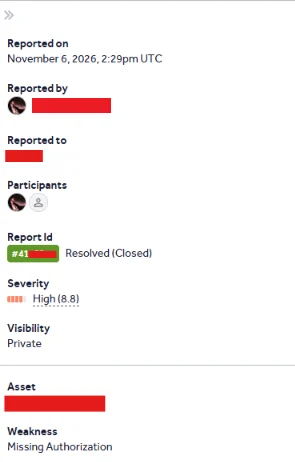
The report was submitted through a Vulnerability Disclosure Program (VDP) and was successfully fixed. It was the researcher's first resolved report.
Variants to test
- Role flag in a profile or session response. Intercept responses that contain a role or permission field and flip it to the privileged value with a Match & Replace rule, then exercise the management endpoints directly. A positive result is a state-changing request that succeeds and persists after the rule is removed and the page is refreshed.
- Direct requests to management endpoints without touching the UI. Enumerate the endpoints the privileged interface calls (member listing, profile update, email address addition) and replay them with the Member's session. A positive result is a 2xx response with the change reflected on the server.
- Horizontal access between same-role users. With two Member accounts, try to read and modify the other Member's profile by substituting its identifier. A positive result is another user's data returned or their profile changed.
- Privilege escalation on the attacker's own record. Attempt to set the role field to the privileged value in an update request for your own account. A positive result is the role change surviving a fresh login.
- Billing and settings endpoints. Test the billing and account-settings operations exposed by the hidden interface with the low-privileged session. A positive result is billing data returned or settings modified.
"I never guess. It is a shocking habit, destructive to the logical faculty."
Sherlock Holmes, The Sign of the Four (1890), Chapter 1.

What happened, in plain words
A website offered shared workspaces, the kind of place where several people work together in one account. Every person in a workspace has a role. An Admin can manage the team: add people, change their details, look after the workspace. A Member is an ordinary participant and is not supposed to see or touch anyone else's profile.
The website looked like it respected that rule. When the researcher signed in as a Member and clicked towards the team management area, the page refused and showed a warning. But looking correct is not the same as being correct. The researcher asked a simple question: does the server itself check who is asking, or does the website only hide the buttons and hope nobody looks behind them?
It turned out to be the second. The browser was told, in a small piece of data sent back by the server, that this user was a "member". The page used that value to decide which screens to show. By changing that value on its way to the browser, the researcher made the page draw the admin screens. The account was still a Member on the server, but the server never checked that when the Member then asked it to change the Admin's name, picture and sending email address. The changes were accepted and saved.
This class of problem is called Broken Access Control: the application knows who you are but fails to check whether you are allowed to do what you are asking. The report was sent through a Vulnerability Disclosure Program (a scheme where researchers can report problems to an organisation safely) and was fixed. It was the researcher's first resolved report.
The case: two roles, one question
The application is a collaborative workspace. Users are assigned one of two roles:
- Admin: has administrative privileges, including managing team members and modifying their information.
- Member: has restricted permissions and is not supposed to view or modify other workspace members.
According to the application's documentation and the behaviour seen during testing, Member accounts are not allowed to access the team management functionality. The application appeared to enforce this correctly: when a Member opened the relevant section, the frontend blocked navigation and displayed a permission warning.
A frontend is everything that runs in your browser: the pages, buttons and menus you see. The backend (or server) is the computer elsewhere that stores the data and does the real work. When you click something, your browser sends a request to the backend and draws whatever comes back. Hiding a button in the frontend is like putting a curtain in front of a door: it stops honest people walking through, but it does not lock the door.
So the question worth investigating was:
Was the application actually enforcing authorization on the server, or was it merely hiding the functionality from unauthorized users?
Authorization means deciding whether a signed-in user is allowed to do a particular thing. It is different from authentication, which is only about proving who you are (usually with a username and password). You can be perfectly authenticated as a Member and still not be authorized to edit an Admin.
The characters: two accounts in a test workspace
Two accounts were created within a test workspace:
- Admin: the workspace administrator.
- Member: a regular workspace member.
The objective was to determine whether the Member account could perform administrative operations against other workspace members without obtaining actual administrative privileges.
Why two accounts? Because to test whether a low-privileged user can act on a high-privileged one, you need both: one to attack from and one to attack. Using a workspace you control means no real customer is affected.
Traffic was inspected and modified with Burp Suite, a tool that sits between your browser and the website. Think of it as a post office clerk who can open every letter going both ways, read it, and put it back in a slightly different envelope before delivering it. The specific feature used here is Match & Replace, which finds a piece of text in a message and swaps it for something else automatically.
Act I: establishing the baseline
The researcher first logged in using the Member account and attempted to access the team management section.
The application blocked access through its frontend interface:
The Member could not normally view or manage other workspace members. At this point, the expected authorization boundary appeared clear:
- Admins could manage workspace members.
- Members could not view or modify other members' profiles.
The restriction was working at the interface level. That alone, however, did not establish whether the backend enforced it.
This step is called establishing a baseline: writing down what normal, correct behaviour looks like before changing anything. Without it, you cannot tell later whether something you did made a difference.
Act II: the first clue
While inspecting the application's HTTP traffic through Burp Suite, the researcher identified a role-related property in the server response that controlled the administrative interface.
HTTP is the language browsers and servers use to talk. Your browser sends a request ("please give me this page" or "please save this change") and the server sends back a response (the page, or a confirmation, or an error). A response body is the content of that response, which is often JSON: a simple text format for structured data, made of names and values in curly brackets, like a labelled form.
The response contained the following JSON property:
Original response:
{ "tea_wRu2**********": "member"}
Line by line:
- The outer
{and}mark the start and end of one JSON object, a bundle of named values. "tea_wRu2**********"is the name of the field. The asterisks are where the report hides part of the real name, probably an account or workspace identifier. The exact name does not matter for understanding the idea; what matters is that it is a field describing this user's role."member"is the value: this account is a Member, not an Admin.
Instead of treating the hidden interface as an authorization boundary, the researcher examined how the frontend determined which features should be displayed. The role value in the response is what drives that decision, so changing it locally would change what the browser renders.
In other words: the browser was being told "this person is a member", and the page believed it. If the page could be told "this person is an admin", it would draw the admin screens. That is a client-side decision, made in the browser, and anything the browser decides can be influenced by whoever controls the browser, which is you.
By configuring a Burp Suite Match & Replace rule on the response body, the researcher modified the role value locally:
Modified response:
{ "tea_wRu2**********": "admin"}
Line by line:
- The structure is identical to the original response.
- Only the value changed:
"member"became"admin". - The rule lives in Burp Suite, on the researcher's own machine. It rewrites the response as it travels from the server to the browser. The server sent
member; the browser receivedadmin.
This caused the application to render the previously restricted administrative interface.
An important distinction: the modification affected only the response received by the browser. The actual account remained a Member, and its server-side role was never changed.
This is the heart of the trick. Nothing was hacked on the server. The researcher simply lied to their own browser about what the server had said, and the browser believed the lie. The first restriction, the interface-level one, had been bypassed.
Act III: exposing the hidden interface
With the modified response, the researcher navigated to:
[TEAM MANAGEMENT / BILLING & USERS PAGE]
The application now displayed functionality that had previously been inaccessible to the Member account. The previously displayed permission warning was no longer preventing access to the interface. The application also loaded the relevant management functionality, including the team members section.
However, revealing a hidden interface is not, by itself, a security vulnerability. A properly implemented application should independently validate the authenticated user's permissions whenever a sensitive backend operation is requested. The next step was to determine whether that authorization check actually existed.
This is the most important idea in the whole report, so it is worth saying slowly. Seeing a page you were not meant to see is embarrassing but harmless, like finding an unlocked door that leads to an empty room. The real question is what happens when you press the buttons on that page. If the server checks your role every time you ask it to do something important, the hidden page is just decoration. If it does not check, then the page is a working control panel for someone who should not have one.
Act IV: performing an administrative action as the Member
Still using the Member account, the researcher edited the Admin's profile. The changes made were:
- Changed the Admin's name.
- Changed the Admin's profile picture.
- Added a new sending email address.
All changes were saved successfully and remained after removing the Burp Suite Match & Replace rule and refreshing the page. This confirmed that the changes were actually saved on the server.
and it works
Why does removing the rule and refreshing matter so much? Because it rules out the possibility that the browser was only pretending. If the changes had been a local illusion, they would have vanished the moment the lie stopped and the page reloaded from the server. They did not vanish. That means the server itself accepted the requests and stored the new values. The server, in other words, never asked "is this person an Admin?" before doing what it was told.
The root cause and impact
The vulnerability resulted from missing server-side authorization checks on administrative operations. Although the frontend restricted Members from accessing team management functionality, the backend failed to consistently verify the authenticated user's actual role before processing sensitive requests.
The existing defence was purely presentational: the interface hid the management features and showed a permission warning, and the role value in the response body decided what the frontend rendered. Because the backend failed to consistently verify the caller's role before processing sensitive requests, the interface restriction did not stop the Member's actions. An endpoint is a specific address on the server that does one job, such as "list team members" or "update a profile".
As a result, a Member could modify the profiles of other workspace users, including Admins, access their available personal information, and modify supported account settings. The issue allowed a lower-privileged user to perform administrative operations without actually obtaining an Admin role. The report's title refers to billing data, though the described test covered profile editing.
- The account never became an Admin. Its role remained unchanged throughout the test.
- The interface restriction was bypassed, but the real failure was deeper: the backend accepted operations that the Member was never authorized to perform.
The Member never had administrative privileges. The server simply failed to enforce them.
The final deduction
The vulnerability was reported and subsequently fixed.
This vulnerability was reported through a Vulnerability Disclosure Program (VDP) and was successfully fixed. It also marks the researcher's first resolved report, making it an important milestone in the bug bounty journey.
The report does not describe the specific change made to fix it. The fix that addresses the root cause is server-side authorization: every sensitive administrative operation must independently verify the authenticated user's actual role before processing the request, rather than relying on the frontend hiding the interface or on the role value returned to the client.
"I never guess. It is a shocking habit, destructive to the logical faculty."
Sherlock Holmes, The Sign of the Four (1890), Chapter 1.
Variants to test
Once you understand the pattern, you can look for it elsewhere. These are the same ideas applied in slightly different places.
- Role flag in a profile or session response. Intercept responses that contain a role or permission field and flip it to the privileged value with a Match & Replace rule, then exercise the management endpoints directly. A positive result is a state-changing request that succeeds and persists after the rule is removed and the page is refreshed.
- Direct requests to management endpoints without touching the UI. Enumerate the endpoints the privileged interface calls (member listing, profile update, email address addition) and replay them with the Member's session. A positive result is a 2xx response with the change reflected on the server. A 2xx response is an HTTP status code in the 200s, meaning the server says the request succeeded.
- Horizontal access between same-role users. With two Member accounts, try to read and modify the other Member's profile by substituting its identifier. A positive result is another user's data returned or their profile changed. This is called horizontal access because both users are at the same level, as opposed to vertical access, where a lower level reaches a higher one.
- Privilege escalation on the attacker's own record. Attempt to set the role field to the privileged value in an update request for your own account. A positive result is the role change surviving a fresh login. Privilege escalation means gaining more power than you were given.
- Billing and settings endpoints. Test the billing and account-settings operations exposed by the hidden interface with the low-privileged session. A positive result is billing data returned or settings modified.
Glossary
- Admin: a user role with administrative privileges, including managing team members and modifying their information.
- Authentication: proving who you are, usually with a username and password.
- Authorization: deciding whether a signed-in user is allowed to perform a particular action.
- Backend (server): the remote computer that stores data and processes requests; it is where real checks must happen.
- Baseline: a record of normal, correct behaviour taken before you change anything, so you can compare later.
- Broken Access Control: a vulnerability class where the application fails to check whether a user is allowed to do what they are asking.
- Burp Suite: a tool that sits between browser and website, letting you read and modify requests and responses.
- Client-side: happening in the browser, on the user's own machine, and therefore under the user's control.
- Endpoint: a specific server address that performs one job, such as listing members or updating a profile.
- Frontend: the part of the application that runs in your browser: pages, buttons, menus.
- Horizontal access: reaching another user's data at the same privilege level as yourself.
- HTTP: the language browsers and servers use to exchange requests and responses.
- JSON: a text format for structured data, made of named values inside curly brackets.
- Match & Replace: a Burp Suite feature that automatically swaps a piece of text in requests or responses.
- Member: a restricted user role that is not supposed to view or modify other workspace members.
- Privilege escalation: gaining more power or access than you were granted.
- Request: a message your browser sends to a server asking it to do something.
- Response: the message the server sends back, including a status code and usually a body.
- Response body: the content of a response, often a page or JSON data.
- Role: the label that says what a user is allowed to do, such as Admin or Member.
- 2xx response: an HTTP status code in the 200s, meaning the server reports the request succeeded.
- VDP (Vulnerability Disclosure Program): a scheme through which researchers can report security problems to an organisation safely.
- Vertical access: reaching functionality or data belonging to a higher privilege level than your own.

