I Wasn’t Supposed to Be Here, But Nobody Stopped Me
Adding a user's email to a team without consent forcibly moved them into the attacker's team, allowing workspace takeover and permanent data deletion.
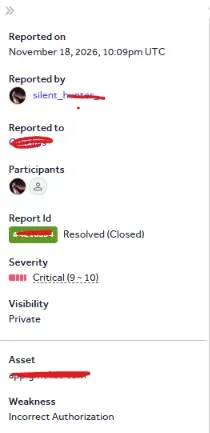
 Published on medium.com
The platform provides a collaborative email environment where teams can manage shared inboxes, organize conversations, and coordinate their daily workflows through shared workspaces.
The full write-up lives on its author's site
It belongs to its author, so we link to it rather than copy it. The other two tabs are our own rewrites, checked against it.
Context
The target was a collaborative email platform where teams manage shared inboxes, organise conversations and coordinate their daily workflows through shared workspaces. Users collaborate within teams, and administrative controls govern team membership and workspace management.
The feature at the centre of this write-up is team management: an administrator can add another user to their team by entering that user's email address. In a correctly built product, that action should create an invitation the recipient can accept or decline. Here it did something else entirely: it forcibly moved the user into the attacker's team, transferred control of the user's existing workspaces, and left those workspaces open to deletion by the attacker.
The report describes the issue as a Broken Access Control vulnerability, published on a HackerOne VDP program and classified as Critical severity. It was published on a HackerOne VDP program and classified as Critical severity, and it was resolved.
Setup
Two separate accounts were created for the investigation:
- ATTACKER: an account with its own team and administrative privileges.
- VICTIM: an independent account with its own team and at least one existing workspace.
Before testing, the Victim had full control over its original workspace. The objective was to determine whether an administrator could add another user to their team without that user's consent, and what would happen to the resources the user already owned.
No specific tooling, software versions or request captures are given in the report; the work was done through the application's own web interface, switching between the two accounts.
Finding it
The researcher started from the team settings of the Attacker account and tried to add the Victim by email address. The expectation was an invitation flow: the recipient should have the chance to accept or decline before becoming a member. Instead, the application immediately added the Victim to the Attacker's team, with no confirmation, no invitation acceptance and no interaction from the Victim at all. No consent was requested, and the action completed directly from the Attacker's account.
That immediate, silent membership change is what made the behaviour look wrong. The rest of the investigation followed the consequences: what happened to the Victim's account and to the resources it already owned.
Exploitation
Step 1: Force-add the Victim to the Attacker's team
From the Attacker's account, the researcher opened the team settings and added the Victim's email address to the team. The application added the Victim immediately, without an invitation or any confirmation from the Victim.
Step 2: Inspect the Victim's account
The researcher then logged in as the Victim. The Victim had been automatically removed from its original team and moved into the Attacker's team. Its previously existing workspace was now listed under the Attacker's team, and the Victim had lost control over it.
Attempting to edit or manage the original workspace produced this message:
You can’t edit this workspace: Editing has been restricted by the admin <attacker-email>
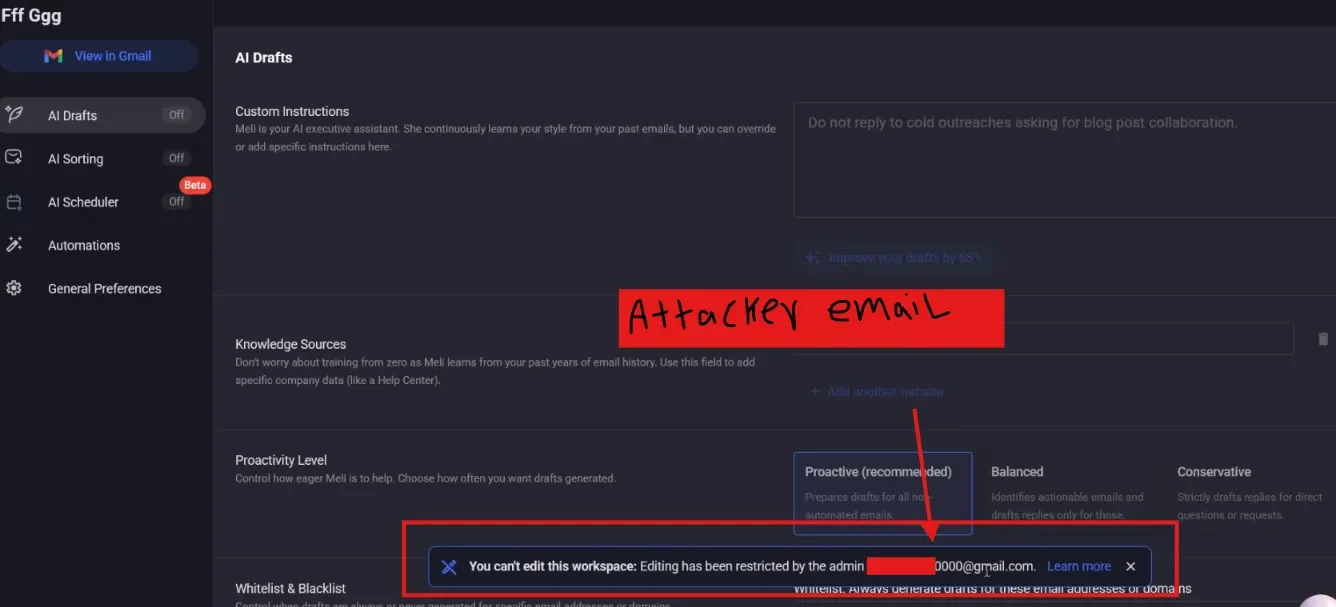
The message names the attacker's email address as the admin who restricted editing. The Victim could no longer manage the workspace it had originally created. At this point the issue was no longer just an unauthorised team membership change: the application had transferred control of an existing workspace to another user without the owner's consent.
Step 3: Confirm the Attacker's control
The researcher logged back into the Attacker's account, navigated to the team settings and located the Victim's original workspace there.
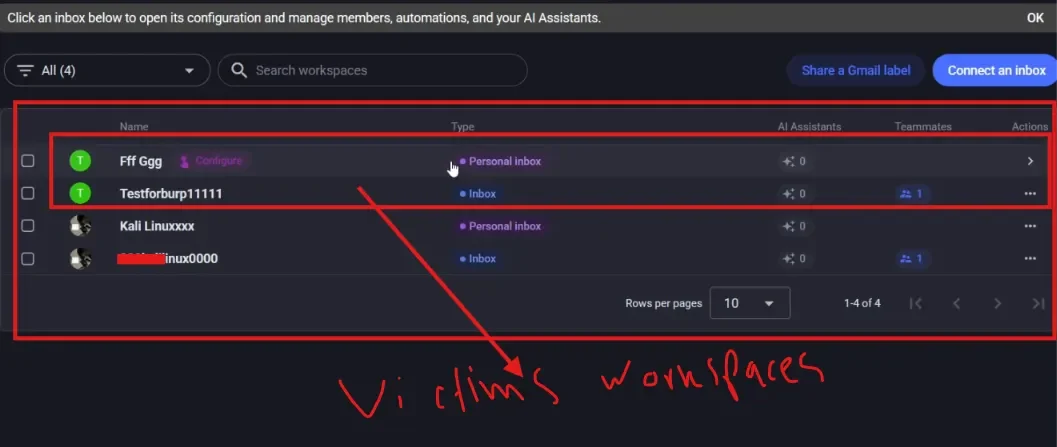
The Attacker now had administrative privileges over that workspace, including the ability to delete it. The account that had created the workspace could no longer manage it, while the account that had force-added its owner now controlled it. Ownership and access boundaries had broken down completely.
Step 4: Delete the Victim's workspace
To confirm the full impact, the researcher used the Attacker's account to delete the Victim's original workspace.
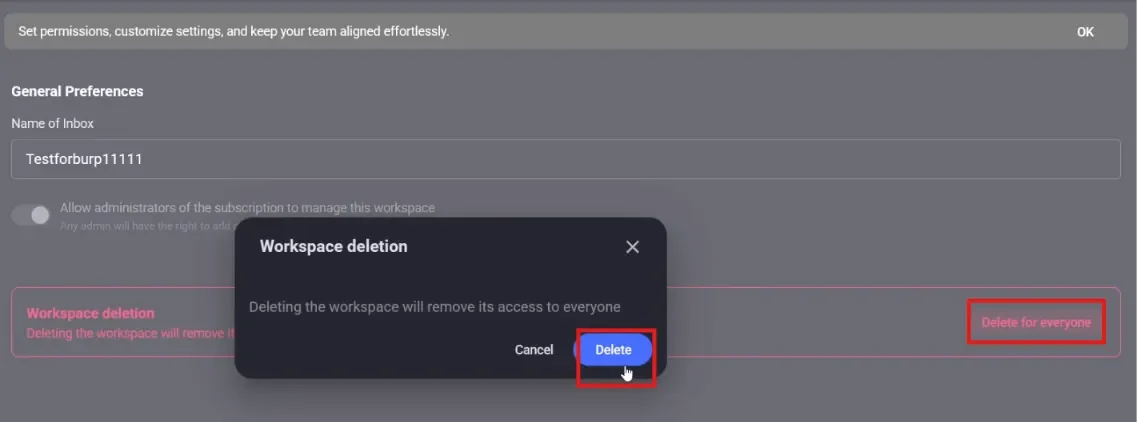
The deletion succeeded. The workspace and its associated data were permanently deleted, and the Victim could not recover them.
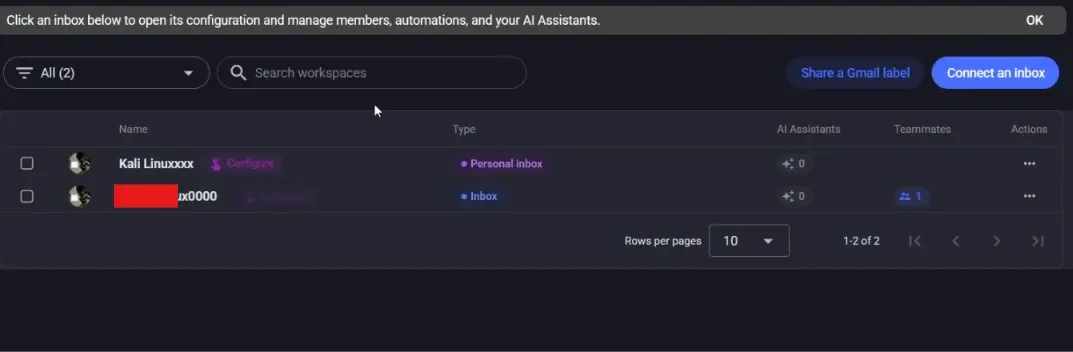
A single team management action had resulted in the complete destruction of another user's workspace. The sequence was:
ATTACKER → Force-adds VICTIM → Workspace transferred → Administrative control gained → Workspace permanently deleted.
The Attacker never needed the Victim's password, permission or approval. The application itself made the transfer possible.
Step 5: Bypass the trial credit card requirement
While investigating the same team addition mechanism, the researcher found a second consequence. New accounts were normally required to provide a credit card before starting a trial.
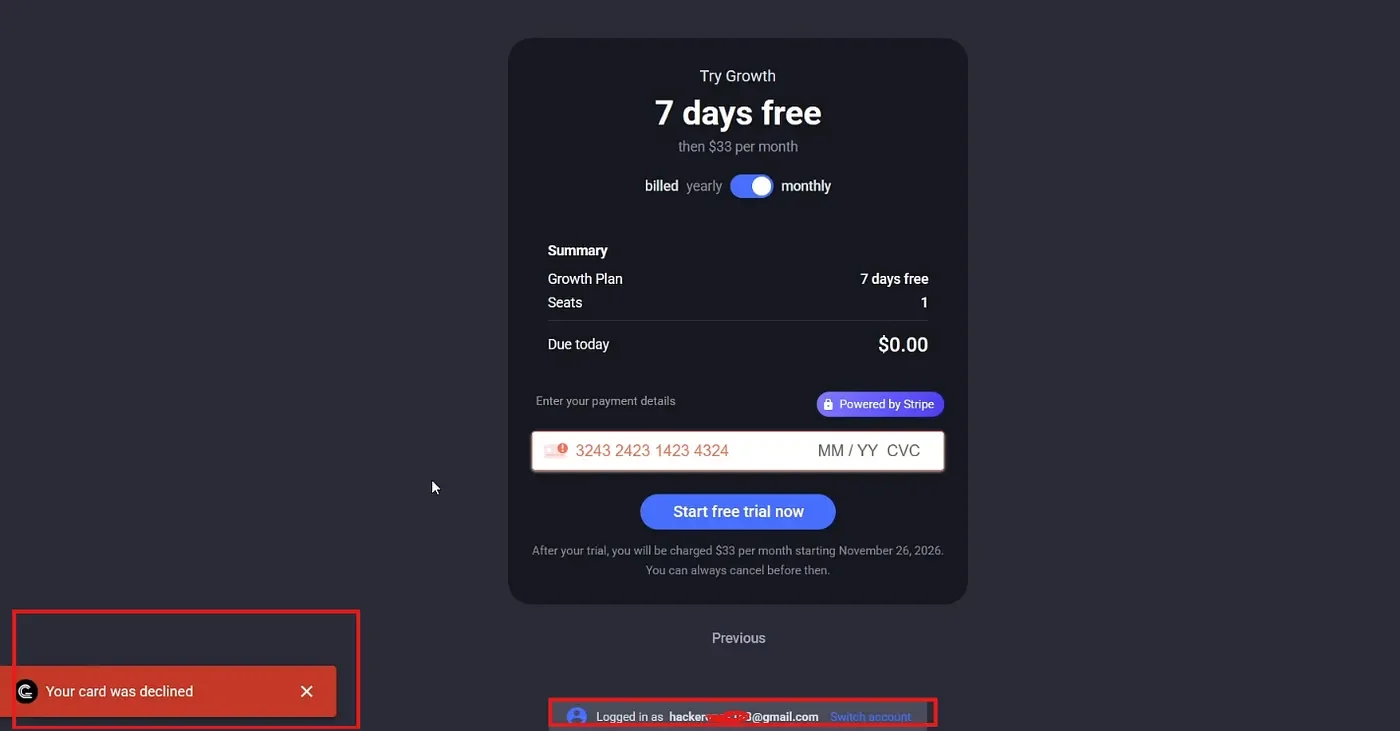
The test was straightforward:
- Open an incognito window and register a completely new account.
- During registration, the application required a credit card to start the trial.
- From the existing Attacker account, add the new account's email address to the team using the same vulnerability.
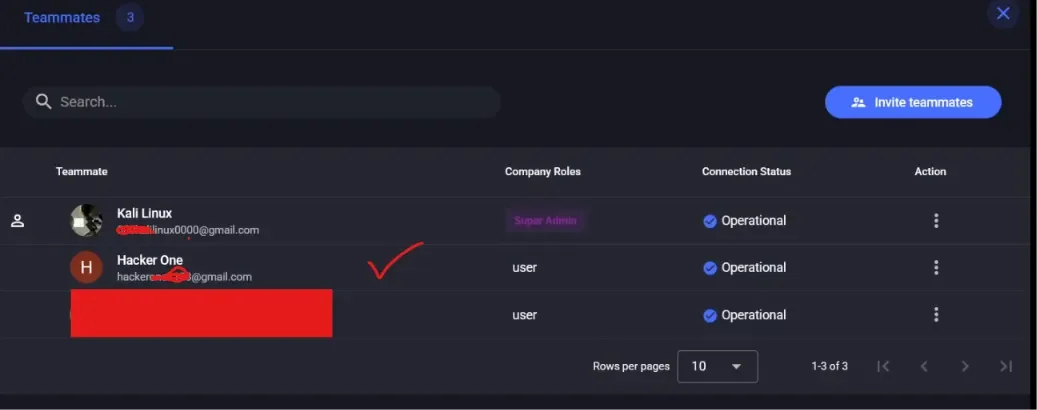
- Log in using the newly created account.
The new account gained access to the platform without being prompted to provide a credit card. The researcher then removed the new account from the Attacker's team and tested again: the application still did not require a credit card for that account to keep using the platform.
The same vulnerability therefore also bypassed the normal trial and payment requirement. This additional impact was reported within the original report rather than as a separate vulnerability, because it originated from the same team addition mechanism.
Root cause
The underlying problem was a failure in the application's team membership and workspace access control mechanisms. The application treated adding an email address to a team as an immediate membership change, without requiring the recipient's consent. That allowed the system to move an existing user into another team and to transfer administrative control over the user's existing workspaces.
The expected behaviour would have been different:
- Adding a user should create a pending invitation.
- The recipient should be able to accept or decline.
- Existing workspace ownership and access should not be transferred without proper authorisation.
- Trial and payment requirements should not be bypassed through unauthorised team membership changes.
The application failed to maintain these boundaries. The report does not describe the server-side code, so the precise implementation mistake is not shown; what is clear is that the membership change was applied directly, without the recipient's consent.
Impact
The vulnerability resulted in several security consequences:
- Workspace hijacking. An attacker could forcibly move another user's account into their team and gain administrative control over the victim's existing workspaces.
- Permanent data destruction. The attacker could delete the transferred workspaces and permanently destroy their associated data, resulting in unrecoverable loss for the victim.
- Forced account migration. The victim could be removed from their original team without consent and lose the ability to manage its own workspaces.
- Trial and payment requirement bypass. The same mechanism allowed newly registered accounts to access the platform without completing the normal credit card requirement for starting a trial.
Fix
The report does not describe the specific change made by the vendor; it records only that the issue was resolved. Based on the root cause, the fix should make team addition an invitation flow: adding an email address creates a pending invitation, and membership only takes effect when the recipient accepts. Workspace ownership and administrative control should not follow a membership change without explicit authorisation from the workspace owner, and trial and payment checks should not be satisfiable through an unauthorised team membership change.
Variants to test
- Invitation-less team joins on other collaboration products. Try adding an email address that belongs to an existing account on another tenant. A positive result is that the target account is moved into your team without accepting anything, and its existing resources appear under your team.
- Ownership transfer through membership. After a forced join, check whether you can edit, share or delete resources the other user created. A positive result is an administrative action succeeding on a resource you never owned.
- Trial and payment gating. Register a fresh account that is blocked by a credit card requirement, then force-add it to an existing team and log in again. A positive result is access to the platform without the payment step, including after the account is removed from the team.
- Removal and re-addition. Remove the forced member and re-add them, checking whether the state persists or whether resources are transferred again. A positive result is repeated control over the same victim resources.
- Notification and consent checks. Observe whether the victim receives any email or in-app notice of the membership change. A positive result is a silent change, which makes the issue harder for the victim to detect and respond to.
“An innocent man would’ve punched me by now.”

What happened, in plain words
A website that lets teams share email inboxes had a serious flaw in how it added people to a team. Normally, if you want someone to join your team, you send them an invitation and they choose to accept or decline. Here, an administrator could type any email address into the team settings and that person was pulled into the team instantly, with no warning and no consent. Worse, if that person already had their own workspace (a shared area for conversations and files), control of that workspace was handed to the administrator who added them. The administrator could then delete the workspace and everything in it, permanently. The same trick also let brand new accounts skip the credit card step that was normally required to start a free trial. The researcher reported it on a HackerOne VDP program, where it was classified as Critical severity and marked as resolved.
This article walks through the same steps the researcher took, but explains every idea from scratch. You only need to know how to use a browser.
The setting: what the product does
The target is a collaborative email platform. Think of it as a shared inbox for a team: instead of everyone having their own separate email account, the team has shared inboxes, conversations are organised together, and the work happens inside shared workspaces. A workspace is like a shared folder or project area: it holds the team's conversations and settings, and it has an owner.
Users work inside teams. Teams have administrators, who can manage who is in the team and what workspaces exist. That administrative control is the feature at the centre of this story: an administrator can add another user to their team by entering that user's email address.
In a well-built product, that action should create an invitation. The person receives it and can accept or decline. Here, the application did something very different: it forcibly moved the user into the attacker's team, transferred control of the user's existing workspaces, and left those workspaces open to deletion by the attacker.
The report describes this as a Broken Access Control vulnerability. Access control is the part of an application that decides who is allowed to do what. When it is broken, someone can do things they should not be allowed to do, such as managing or deleting another person's resources. The report was published on a HackerOne VDP program (a vulnerability disclosure programme, a place where security researchers can report bugs to organisations) and classified as Critical severity. It was resolved.
The characters and the setup
Two separate accounts were created for the investigation:
- ATTACKER: an account with its own team and administrative privileges.
- VICTIM: an independent account with its own team and at least one existing workspace.
Before the test, the Victim had full control over its original workspace. The goal was to find out whether an administrator could add another user to their team without that user's consent, and what would happen to the resources the user already owned.
The report does not mention any special tools, software versions or captured network requests. The work was done through the application's own web interface, switching between the two accounts. That is an important point for beginners: you do not always need fancy tools to find a serious bug. Sometimes you just need to use the product the way it is meant to be used and notice when it behaves in a way that does not make sense.
Finding it: the invitation that required no permission
The researcher started from the team settings of the Attacker account and tried to add the Victim by email address. The expectation was an invitation flow: the recipient should have the chance to accept or decline before becoming a member. Instead, the application immediately added the Victim to the Attacker's team. There was no confirmation, no invitation acceptance, and no interaction from the Victim at all. No consent was requested, and the action completed directly from the Attacker's account.
That immediate, silent membership change is what made the behaviour look wrong. The rest of the investigation followed the consequences: what happened to the Victim's account and to the resources it already owned.
Exploitation, step by step
Step 1: Force-add the Victim to the Attacker's team
From the Attacker's account, the researcher opened the team settings and added the Victim's email address to the team. The application added the Victim immediately, without an invitation or any confirmation from the Victim.
Why this step matters: the researcher is testing the core feature. If adding an email address immediately creates a membership instead of an invitation, that is the first sign of broken access control. The rest of the test checks how far the consequences go.
Step 2: Inspect the Victim's account
The researcher then logged in as the Victim. The Victim had been automatically removed from its original team and moved into the Attacker's team. Its previously existing workspace was now listed under the Attacker's team, and the Victim had lost control over it.
Attempting to edit or manage the original workspace produced this message:
You can’t edit this workspace: Editing has been restricted by the admin <attacker-email>
Line by line: this is a message shown by the application when the Victim tries to edit the workspace. It says the Victim cannot edit the workspace because editing has been restricted by the admin, and it names the attacker's email address as that admin. In other words, the application itself confirms that control has moved to the attacker. The Victim could no longer manage the workspace it had originally created.
At this point the issue was no longer just an unauthorised team membership change: the application had transferred control of an existing workspace to another user without the owner's consent.
Step 3: Confirm the Attacker's control
The researcher logged back into the Attacker's account, navigated to the team settings and located the Victim's original workspace there.
The Attacker now had administrative privileges over that workspace, including the ability to delete it. The account that had created the workspace could no longer manage it, while the account that had force-added its owner now controlled it. Ownership and access boundaries had broken down completely.
Why this step matters: seeing the workspace in the Attacker's team settings proves that the transfer is real and that the Attacker has administrative rights over it. It is not just a display glitch on the Victim's side.
Step 4: Delete the Victim's workspace
To confirm the full impact, the researcher used the Attacker's account to delete the Victim's original workspace.
The deletion succeeded. The workspace and its associated data were permanently deleted, and the Victim could not recover them.
A single team management action had resulted in the complete destruction of another user's workspace. The sequence was:
ATTACKER → Force-adds VICTIM → Workspace transferred → Administrative control gained → Workspace permanently deleted.
The Attacker never needed the Victim's password, permission or approval. The application itself made the transfer possible.
Why this step matters: deleting the workspace shows the worst-case impact. It is not just that the attacker can see or edit the workspace; the data can be destroyed permanently. For a beginner, this is the difference between a bug that is annoying and a bug that causes real harm.
Step 5: Bypass the trial credit card requirement
While investigating the same team addition mechanism, the researcher found a second consequence. New accounts were normally required to provide a credit card before starting a trial.
The test was straightforward:
- Open an incognito window and register a completely new account.
- During registration, the application required a credit card to start the trial.
- From the existing Attacker account, add the new account's email address to the team using the same vulnerability.
- Log in using the newly created account.
The new account gained access to the platform without being prompted to provide a credit card. The researcher then removed the new account from the Attacker's team and tested again: the application still did not require a credit card for that account to keep using the platform.
The same vulnerability therefore also bypassed the normal trial and payment requirement. This additional impact was reported within the original report rather than as a separate vulnerability, because it originated from the same team addition mechanism.
Why this step matters: it shows that the same broken access control has more than one consequence. A flaw in team membership can also affect billing and trial rules. The researcher checked that the bypass persisted even after the account was removed from the team, which makes the impact stronger.
Root cause
The underlying problem was a failure in the application's team membership and workspace access control mechanisms. The application treated adding an email address to a team as an immediate membership change, without requiring the recipient's consent. That allowed the system to move an existing user into another team and to transfer administrative control over the user's existing workspaces.
The expected behaviour would have been different:
- Adding a user should create a pending invitation.
- The recipient should be able to accept or decline.
- Existing workspace ownership and access should not be transferred without proper authorisation.
- Trial and payment requirements should not be bypassed through unauthorised team membership changes.
The application failed to maintain these boundaries. The report does not describe the server-side code, so the precise implementation mistake is not shown. What is clear is that the membership change was applied directly, without the recipient's consent.
For a beginner, the key idea is that access control should be checked at every step. It is not enough to check who can add a member; the application must also check who owns a workspace and who is allowed to change that ownership.
Impact
The vulnerability resulted in several security consequences:
- Workspace hijacking. An attacker could forcibly move another user's account into their team and gain administrative control over the victim's existing workspaces.
- Permanent data destruction. The attacker could delete the transferred workspaces and permanently destroy their associated data, resulting in unrecoverable loss for the victim.
- Forced account migration. The victim could be removed from its original team without consent and lose the ability to manage its own workspaces.
- Trial and payment requirement bypass. The same mechanism allowed newly registered accounts to access the platform without completing the normal credit card requirement for starting a trial.
Fix
Based on the root cause, the fix should make team addition an invitation flow: adding an email address creates a pending invitation, and membership only takes effect when the recipient accepts. Workspace ownership and administrative control should not follow a membership change without explicit authorisation from the workspace owner, and trial and payment checks should not be satisfiable through an unauthorised team membership change.
Variants to test
If you want to look for similar bugs in other products, here are some ideas based on the same pattern. Always test only on systems where you have permission, such as a bug bounty programme or your own test environment.
- Invitation-less team joins on other collaboration products. Try adding an email address that belongs to an existing account on another tenant. A positive result is that the target account is moved into your team without accepting anything, and its existing resources appear under your team.
- Ownership transfer through membership. After a forced join, check whether you can edit, share or delete resources the other user created. A positive result is an administrative action succeeding on a resource you never owned.
- Trial and payment gating. Register a fresh account that is blocked by a credit card requirement, then force-add it to an existing team and log in again. A positive result is access to the platform without the payment step, including after the account is removed from the team.
- Removal and re-addition. Remove the forced member and re-add them, checking whether the state persists or whether resources are transferred again. A positive result is repeated control over the same victim resources.
- Notification and consent checks. Observe whether the victim receives any email or in-app notice of the membership change. A positive result is a silent change, which makes the issue harder for the victim to detect and respond to.
“An innocent man would’ve punched me by now.”
Glossary
- Access control: the part of an application that decides who is allowed to do what. When it is broken, users can do things they should not be allowed to do.
- Broken Access Control: a vulnerability where the application fails to enforce those rules, allowing unauthorised actions.
- Workspace: a shared area inside a team where conversations, settings and data are kept. It belongs to a team and has an owner.
- Team: a group of users who collaborate. Teams have administrators who manage membership and workspaces.
- Administrator: a user with special permissions to manage a team, its members and its workspaces.
- Invitation flow: the normal process where adding someone to a team creates a pending invitation that the person can accept or decline.
- Consent: the person's agreement to join a team or have their resources moved. Without it, the action is unauthorised.
- HackerOne VDP program: a vulnerability disclosure programme hosted on HackerOne, where organisations receive security reports from researchers.
- Critical severity: a rating that indicates the most serious kind of vulnerability, usually because it allows major harm such as data destruction or takeover.
- Incognito window: a private browsing window that does not keep your normal session, useful for testing with a fresh account.
- Trial: a free period of access to a product, often requiring a credit card to start.
- Bypass: getting around a restriction, such as a payment requirement, without satisfying it.
- Root cause: the underlying reason the vulnerability exists, as opposed to its symptoms.
- Impact: the harm that can result from exploiting the vulnerability, such as data loss or unauthorised access.
- Variant: a similar bug or test idea that follows the same pattern in a different place or product.

