Broken Link Hijacking - Mr. User-Agent
A website served a Google Play Store link only to Android user agents, and that link pointed to a non-existent app package. An attacker could register that package name on Google Play and publish a malicious app, so Android users following the link would install the attacker's app instead of the intended one.
 Published on shahjerry33.medium.com
Broken Link Hijacking (BLH) is a web-based attack where it exploits external links that are no longer valid. The attackers take over this expired, stale, and invalid external links on credible websites or web applications for malicious or fraudulent purposes.
The full write-up lives on its author's site
It belongs to its author, so we link to it rather than copy it. The other two tabs are our own rewrites, checked against it.
Context
Broken link hijacking (BLH) is a web-based attack that exploits external links which are no longer valid. An attacker takes over an expired, stale or invalid external link on a credible website or web application for malicious or fraudulent purposes. The classic example is a company that uses an external link shortening service to include short links in tweets: if the shortener goes out of business, all the old links break, and an attacker who purchases the domain used by that shortener can substitute the original content with their own malicious content.
The write-up describes a different variant of the same idea. On the target site, only Android mobile users were affected. The researcher notes that broken link hijacking was out of scope for the programme, but considered the issue unique enough to document in a blog post.
Setup
When the researcher first visited the website, there were no external link services such as Twitter, Instagram or LinkedIn visible. Testing therefore moved on to other vulnerabilities, and the User-Agent was switched using a Firefox extension called User-Agent Switcher.
To complete the takeover, the researcher needed a Google developer account. They did not have one, so they purchased it and built an application whose package name matched the value of the id parameter in the broken Play Store link.
Finding it
After changing the User-Agent from the default to Android Phone/Firefox, the site displayed an external link to the Google Play Store that was not present for the default browser. Clicking it redirected to https://play.google.com and returned an error saying "We're sorry, the requested URL was not found on this server."
Looking at the URL, the researcher saw an id= parameter whose value was com.target.androidappname. That value is the Android package name, and the Play Store listing did not exist, so the researcher registered that package name. The plan was to take it over by publishing an app under that package name.
Exploitation
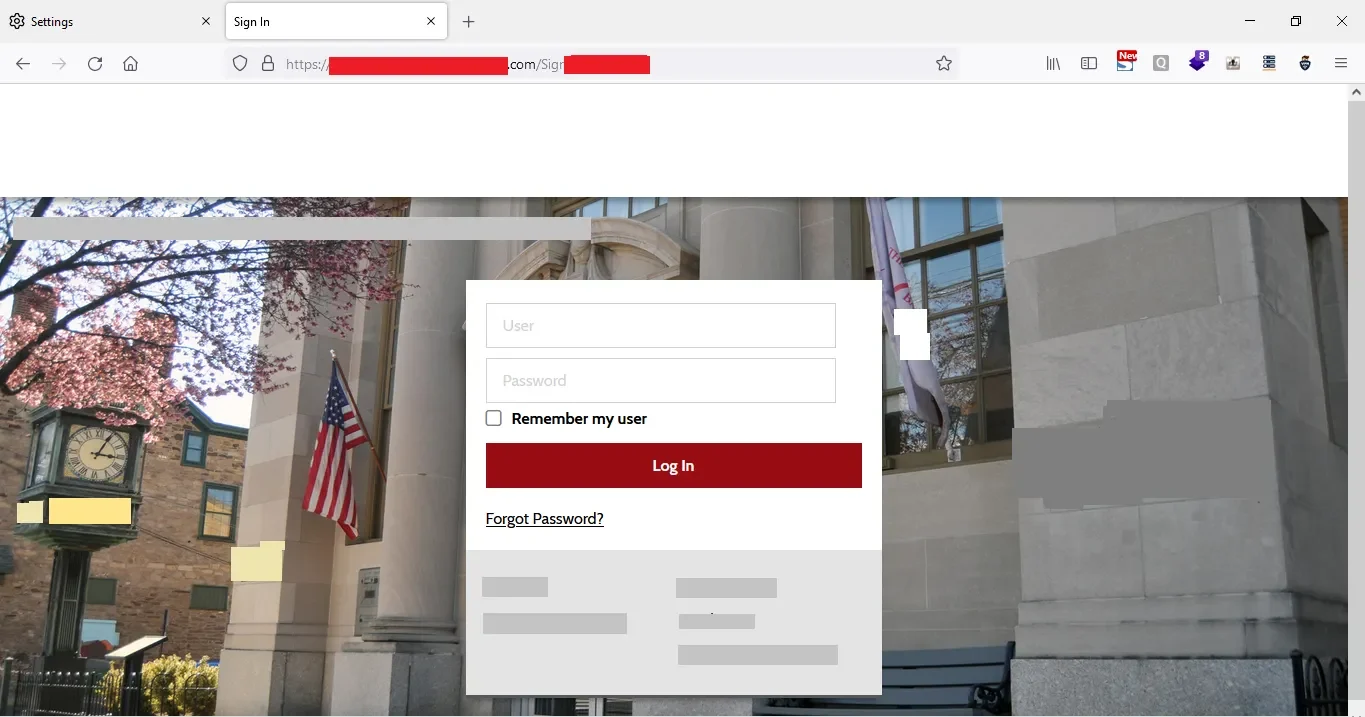
Step 1: Visit the target
The researcher went to the target site.
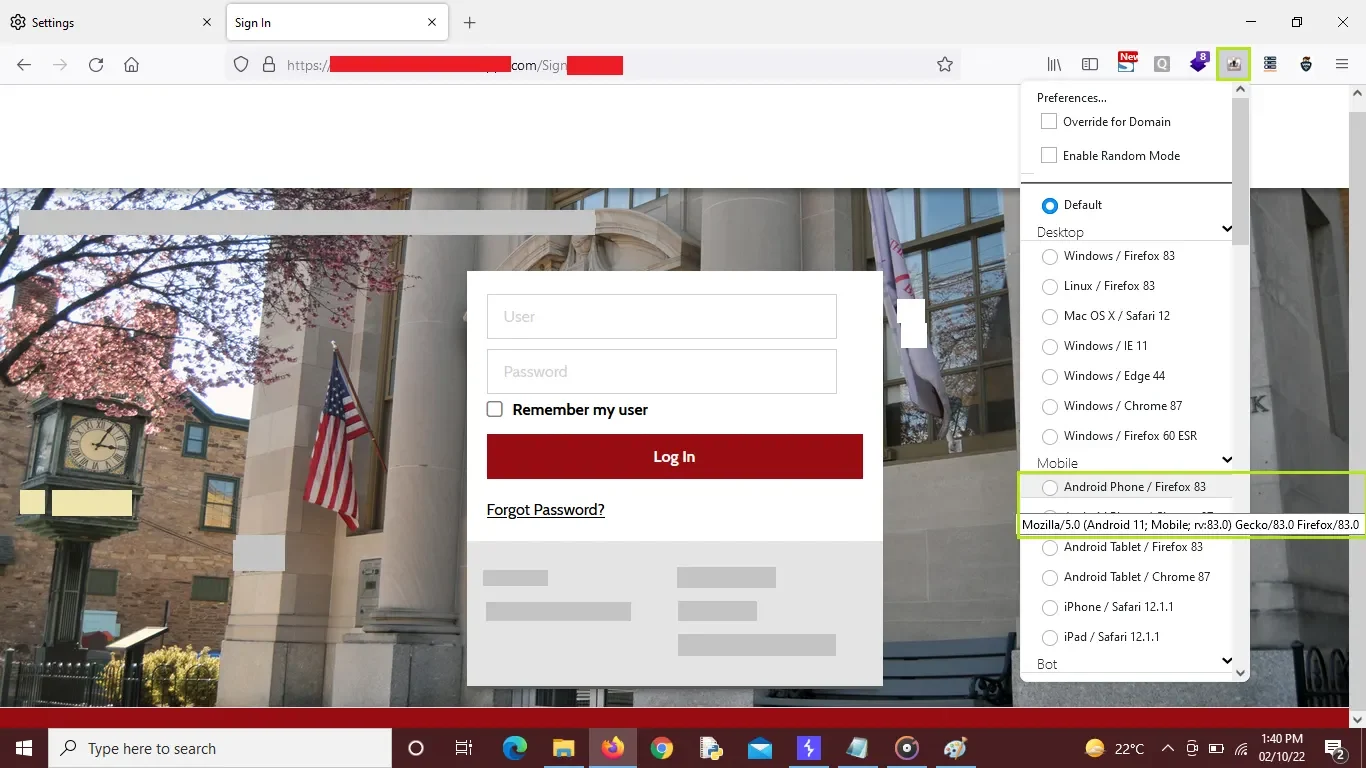
Step 2: Switch the User-Agent
The User-Agent was changed from the default to Android Phone/Firefox using the User-Agent Switcher extension.
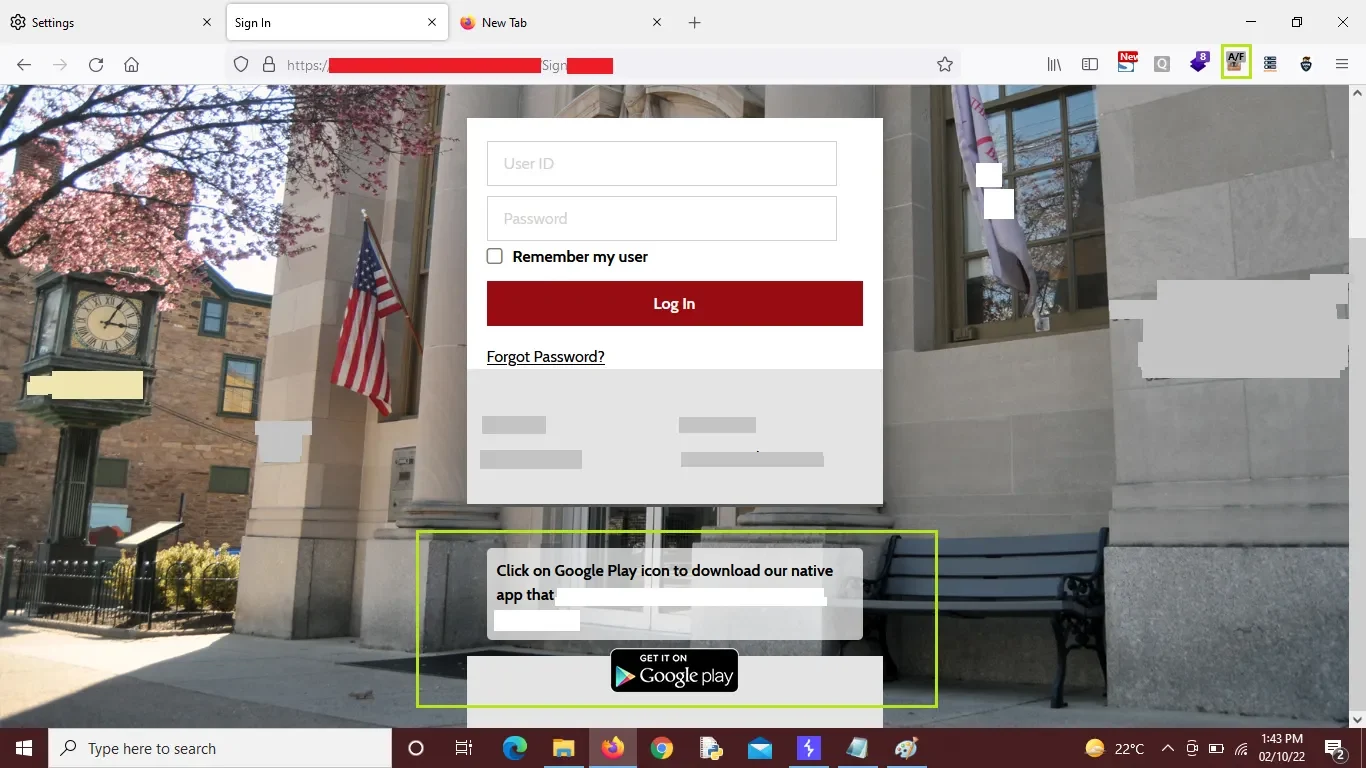
Step 3: Reload and observe the new link
After changing the User-Agent, the page was reloaded and a Google Play Store option appeared below.
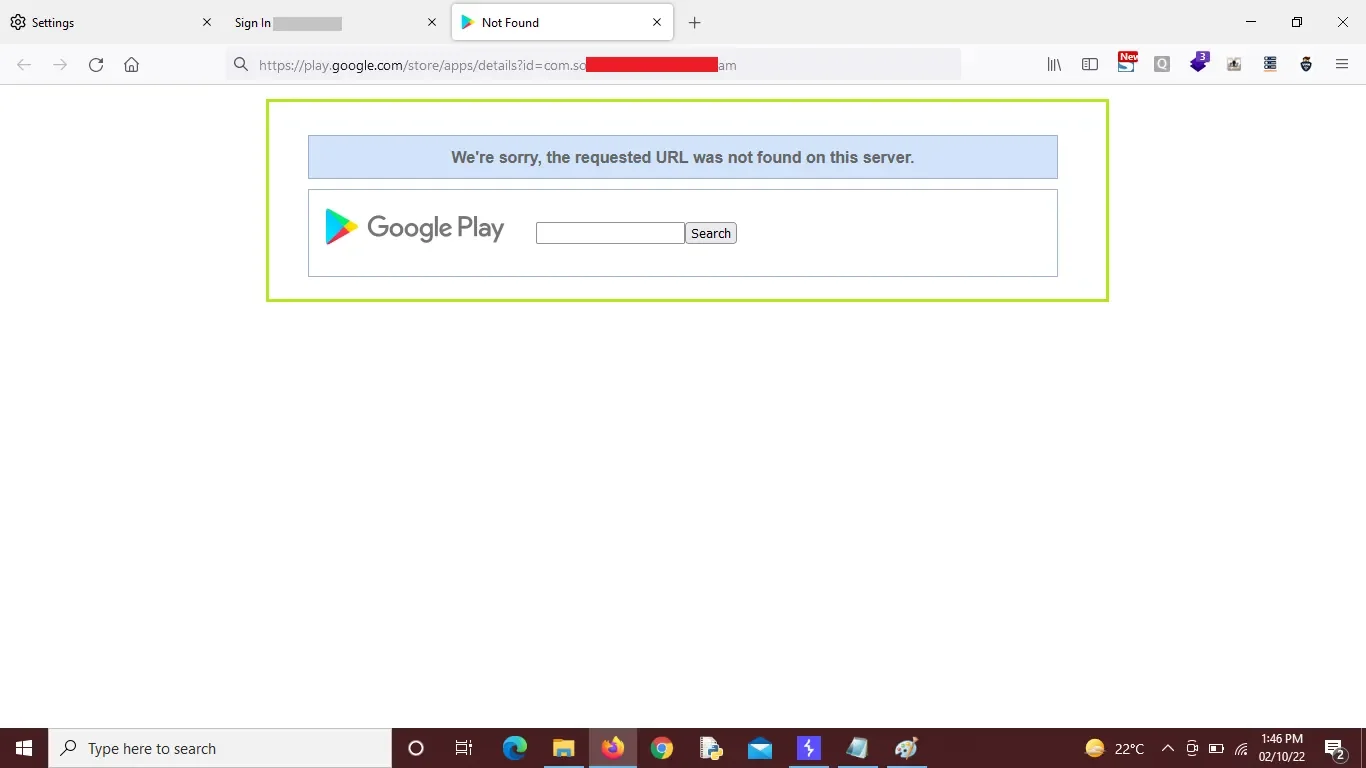
Step 4: Follow the link
Clicking Google Play redirected to the Play Store, which returned an error saying "We're sorry, the requested URL was not found on this server."
The URL followed the usual Play Store shape:
https://play.google.com/store/apps/details?id=com.target.appname
Here id carries the Android package name. Because no app with that package name was published, the listing returned the not-found error, and the package name was unclaimed.
Step 5: Build and upload an app with the same package name
An app was created with the same package name as the id value (com.so_____.___am) and uploaded to the Play Store for release. When building an app in Android Studio for the Play Store, the package name must be identical to the id parameter value for the takeover to work.
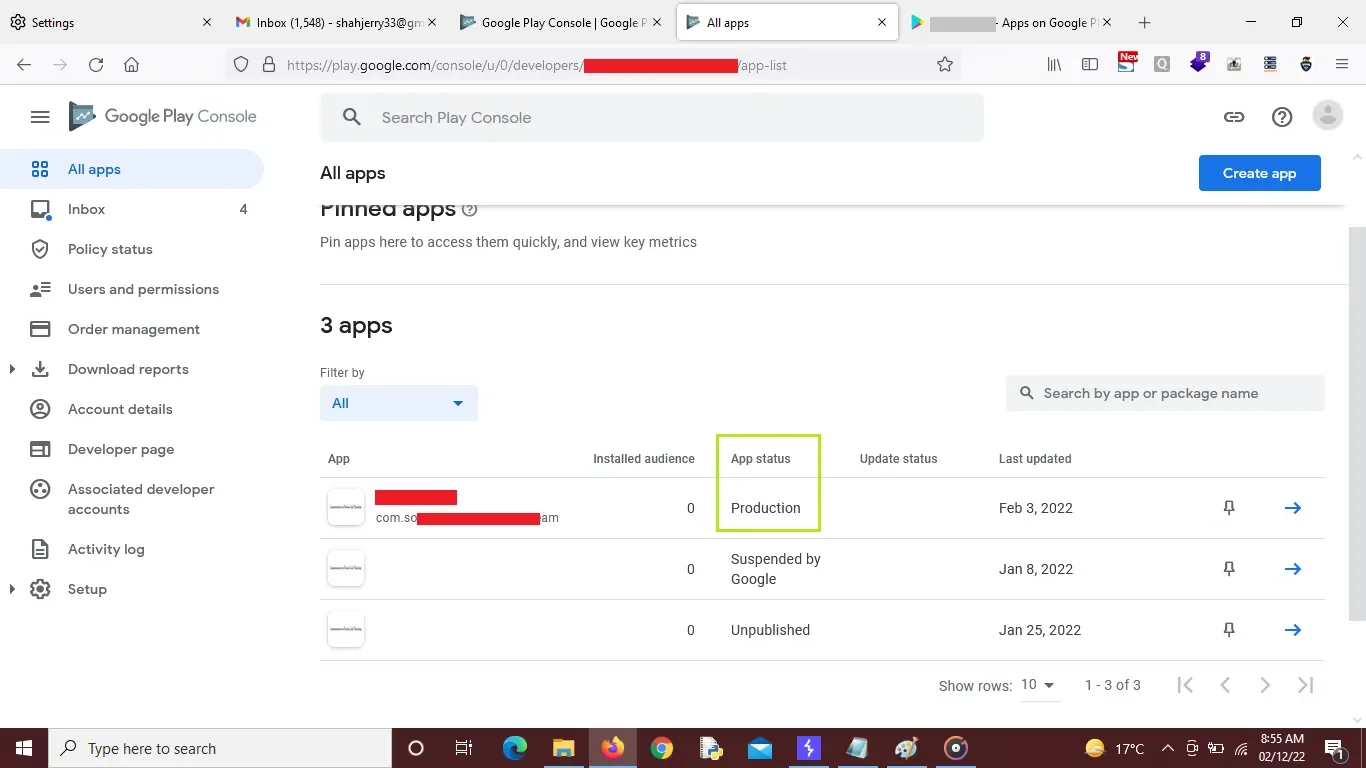
Step 6: The app is published
After some days the app was published on the Play Store.
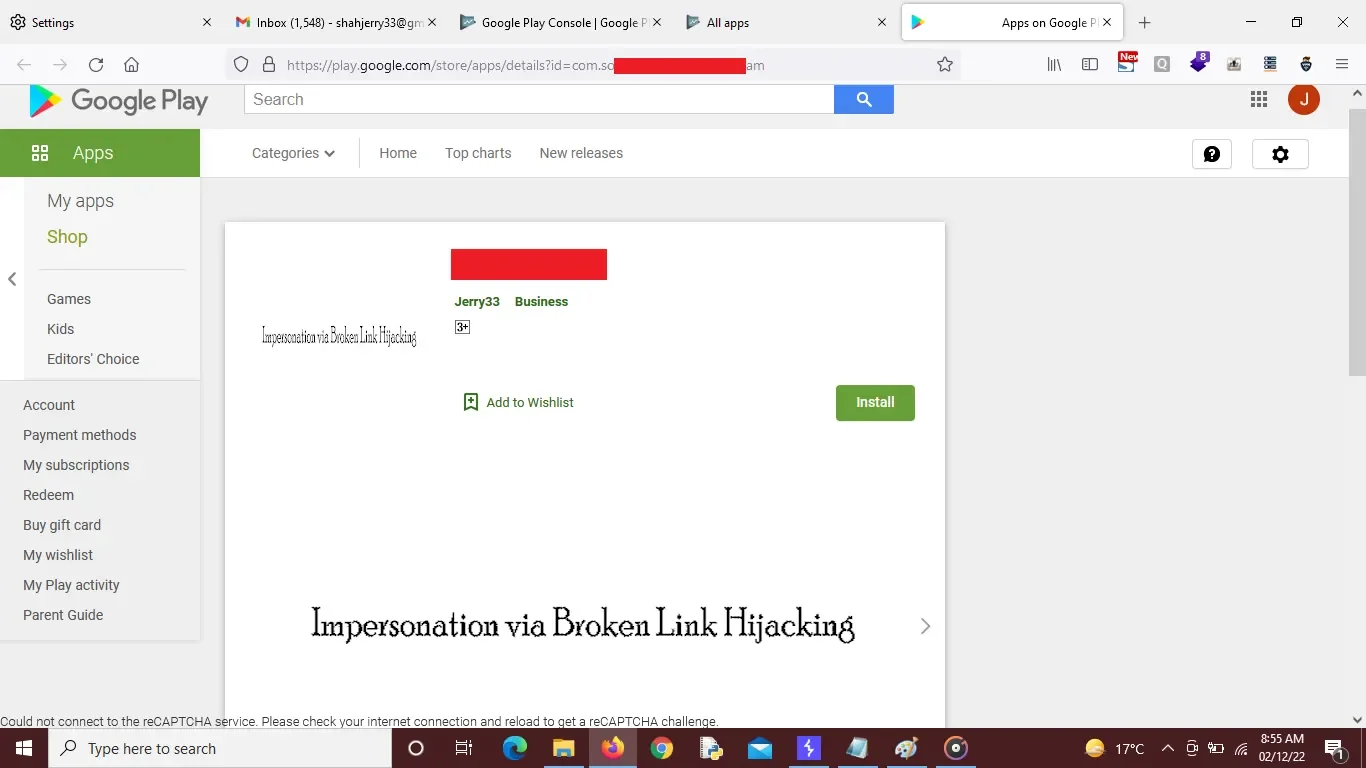
The app has since been removed from the Play Store because it existed only as a proof of concept.
Root cause
The researcher's opinion is that the issue happened because content served to the User-Agent of desktop browsers such as Firefox and Chrome differed from content served to the User-Agent of Android devices. Switching the User-Agent changed the content served, which is abnormal behaviour and led to the broken link hijacking.
In other words, the Android-specific rendering of the page included a Play Store link pointing at a package name that had never been registered. The report does not describe any check on whether the listing existed. The report does not describe any server-side validation or monitoring that would have caught this.
Impact
The report frames the impact in general terms. A broken link can affect search engine rankings and the site's user experience, result in lost customers and revenue, or in the worst case all of the above. This kind of attack can also lead to phishing scams.
The researcher calculated the severity as follows:
| Field | Value |
|---|---|
| Vector string | CVSS:3.0/AV:L/AC:H/PR:N/UI:R/S:U/C:L/I:L/A:N |
| Score | 3.6 (Low) |
Fix
The report gives three general ways to prevent the issue:
- Use short, simple, easy-to-read and easy-to-type URLs. When creating links to a specific page, product, event, download or any other content on your website, make it easy for everyone involved.
- Check your links. Test them.
- Use a link checker.
For this particular case, the researcher's mitigation is that content should be served the same on all User-Agents, and if different content is being served, it should be checked using the mitigations above.
Variants to test
- User-Agent-specific external links. Request pages with desktop and mobile User-Agents and diff the rendered links. A positive result is an external link (app store, social profile, documentation) that appears only for one User-Agent and returns a not-found error when followed.
- Unclaimed app store package names. For any Play Store link of the form
https://play.google.com/store/apps/details?id=<package>, check whether the listing resolves. A not-found error means the package name is unclaimed and can be registered. - Other app stores and platforms. The same reasoning applies to any store where an identifier can be registered by anyone, such as other mobile app stores. A positive result is a dead listing whose identifier you can claim.
- Dead link scanning. The researcher suggests a tool called dead link checker to find broken link hijacking issues. A positive result is an external link on the target that no longer resolves and whose destination can be acquired.
- Expired link shorteners and domains. Look for links through third-party shorteners or domains that have lapsed. A positive result is a short link whose domain is available for registration, allowing you to serve your own content under the target's original link.
Special thanks from the researcher go to the app developer droppyy33.

What happened, in plain words
A website had a button that only appeared for people browsing on an Android phone. The button was meant to send those visitors to the website's own app in the Google Play Store, the shop where Android apps are downloaded. But the app it pointed to did not exist: the link led to an error page saying the requested URL was not found.
That error is the opening. In the Play Store, every app is identified by a unique name called a package name, written in a dotted style such as com.target.appname. The broken link contained such a name in its address. Because no app had been published under that name, the researcher registered it, built an app, and published it under that exact name.
This is a variant of an attack called broken link hijacking. The idea is simple: a trusted website points at something outside itself, that something disappears or was never there, and an attacker quietly takes its place. The website keeps looking trustworthy while handing its visitors to the attacker.
The researcher who found this notes that broken link hijacking was out of scope for the programme, meaning the organisation had said this kind of issue was not eligible for a reward. They still found the case unusual enough to write about. The report does not say which company or website was involved; the target is referred to only as target.com.
The general idea: broken link hijacking
Before the specific case, it helps to understand the classic version of the problem.
A website often links to things it does not control: a Twitter profile, an Instagram page, a LinkedIn company page, or a link shortening service. A link shortening service is a site that turns a long web address into a short one, a bit like a nickname for a street address. Companies use them so that links fit neatly in a tweet.
Now suppose the shortening service goes out of business. The short links still exist on the company's website and in old tweets, but they no longer lead anywhere. The domain, the registered name of the service on the internet, eventually expires and can be bought by anyone. An attacker buys it, and every old short link that the trusted company published now leads to the attacker's page. The visitor clicked a link from a company they trust, so they are inclined to believe what they see.
The report describes this as taking over an expired, stale or invalid external link on a credible website for malicious or fraudulent purposes. The key ingredients are always the same: a link the site does not own, a destination that has become available, and an attacker willing to claim it.
The case in this write-up is a twist on that recipe. The destination is not a shortening service but an app listing in the Play Store, and the link is not visible to everyone: it only appears for visitors whose browser identifies itself as an Android phone.
What a User-Agent is, and why it matters here
Every time your browser asks a website for a page, it sends a short line of text along with the request. That line is the User-Agent string. It is the browser introducing itself: roughly, "I am Firefox version such and such, running on this kind of device and operating system."
Websites read that introduction and can choose what to send back. This is called content negotiation: the server picks the version of the content that suits the client. A common everyday example is a shop site that shows a big desktop layout to a laptop and a narrow, touch-friendly layout to a phone. The site is not being sneaky; it is trying to be helpful.
The User-Agent string is just text sent by the browser, and text can be changed. Browser extensions exist that let you pretend to be a different browser or device. The researcher used one of these, a Firefox extension called User-Agent Switcher, to make their ordinary desktop browser claim to be an Android phone running Firefox. To the website, the request looked like it came from a phone.
That is the whole trick behind finding this issue: ask the same website for the same page while pretending to be different devices, and compare what comes back.
Setting up
When the researcher first visited the website as a normal desktop visitor, they saw no external links of the usual kind: no Twitter, Instagram or LinkedIn buttons. With nothing obvious to test there, they moved on to other kinds of testing, and then tried changing the User-Agent.
To actually take over the broken link, the researcher needed a Google developer account, the account Google requires before you can publish an app in the Play Store. They did not have one, so they purchased a Google developer account. They then built an app whose package name matched the value in the broken link.
A package name, in Android, is the unique identifier of an app. Think of it as a student number for software: two apps cannot share one, and the store uses it to tell them apart.
Finding it, step by step
Step 1: Visit the target
The researcher went to the target site as an ordinary visitor.
This first look matters because it establishes the baseline. On a normal desktop browser there was no Play Store link at all. Anything that appears later, after the disguise is put on, is a difference caused by the User-Agent.
Step 2: Switch the User-Agent
The User-Agent was changed from the default to Android Phone/Firefox using the User-Agent Switcher extension.
The extension simply rewrites the introduction line the browser sends. Nothing about the computer changed; only the claim about what kind of device it is.
Step 3: Reload and observe the new link
After changing the User-Agent, the page was reloaded and a Google Play Store option appeared below.
This is the moment the issue becomes visible. The same page, from the same site, now offers a link that desktop visitors never see. The site is deliberately serving different content to Android users.
Step 4: Follow the link
Clicking Google Play redirected to the Play Store, which returned an error saying "We're sorry, the requested URL was not found on this server."
The link is dead. The site is advertising an app that is not there. The URL followed the usual Play Store shape:
https://play.google.com/store/apps/details?id=com.target.appname
Line by line, in plain words:
https://is the secure web protocol, the padlock kind of address.play.google.comis Google's Play Store site./store/apps/detailsis the path that shows the detail page of one app.?starts the query string, the part of the address that carries extra information.id=is the name of the parameter, the label for that extra information.com.target.appnameis the value of the parameter: the Android package name of the app being asked for.
So the address is simply saying: show me the app whose package name is com.target.appname. Because no app with that package name had been published, the store had nothing to show and returned the not-found error. That error is the proof that the package name was unclaimed, and an unclaimed package name is exactly what an attacker needs.
Step 5: Build and upload an app with the same package name
An app was created with the same package name as the id value (com.so_____.___am) and uploaded to the Play Store for release. When building an app in Android Studio for the Play Store, the package name must be identical to the id parameter value for the takeover to work.
Android Studio is the official program for building Android apps. When you create a project in it, you choose the package name, and the store will only accept your app under that name if nobody else has claimed it. The researcher chose the exact name from the broken link, so the store now associated that name with their app. The name in the report is partly masked, which is normal when writing publicly about a live or recently live issue.
Step 6: The app is published
After some days the app was published on the Play Store.
In this case the app was harmless, a demonstration, but the mechanism is the same one a real attacker would use.
The app has since been removed from the Play Store because it existed only as a proof of concept. A proof of concept is a demonstration that shows a problem is real without doing harm.
Why it happened
The researcher's opinion is that the issue happened because content served to the User-Agent of desktop browsers such as Firefox and Chrome differed from content served to the User-Agent of Android devices. Switching the User-Agent changed the content served, which is abnormal behaviour and led to the broken link hijacking.
Put another way: the Android version of the page included a Play Store link pointing at a package name that had never been registered. The report does not describe any check on whether the listing existed.
Impact
The report frames the impact in general terms. A broken link can affect search engine rankings and the site's user experience, result in lost customers and revenue, or in the worst case all of the above. This kind of attack can also lead to phishing scams. Phishing is when an attacker impersonates something trusted to trick people into handing over information or installing something harmful.
The trust the site has built is effectively lent to the attacker.
The researcher calculated the severity as follows:
| Field | Value |
|---|---|
| Vector string | CVSS:3.0/AV:L/AC:H/PR:N/UI:R/S:U/C:L/I:L/A:N |
| Score | 3.6 (Low) |
CVSS is a standard scoring system for security issues. The vector string is the recipe behind the score, and each part is a short code:
AV:Lmeans the attacker needs local access to the vulnerable component.AC:Hmeans the attack is hard to carry out, with conditions that are not always present.PR:Nmeans no privileges are required beforehand.UI:Rmeans the victim must do something, here tapping the link.S:Umeans the scope is unchanged: the impact stays within the same security authority.C:L,I:L,A:Nmean low impact on confidentiality, low impact on integrity, and no impact on availability.
The result is 3.6, rated Low. That rating reflects how many conditions must line up, not that the issue is harmless.
Fix
The report gives three general ways to prevent the issue:
- Use short, simple, easy-to-read and easy-to-type URLs. When creating links to a specific page, product, event, download or any other content on your website, make it easy for everyone involved.
- Check your links. Test them.
- Use a link checker.
For this particular case, the researcher's mitigation is that content should be served the same on all User-Agents, and if different content is being served, it should be checked using the mitigations above.
In everyday terms: if your site shows a link, make sure the thing it points at exists, and keep checking. If you show different links to different devices, check those too, because they are easy to forget.
Variants to test
If you want to look for this kind of issue yourself, the report suggests several angles:
- User-Agent-specific external links. Request pages with desktop and mobile User-Agents and compare the rendered links. A positive result is an external link (app store, social profile, documentation) that appears only for one User-Agent and returns a not-found error when followed.
- Unclaimed app store package names. For any Play Store link of the form
https://play.google.com/store/apps/details?id=<package>, check whether the listing resolves. A not-found error means the package name is unclaimed and can be registered. - Other app stores and platforms. The same reasoning applies to any store where an identifier can be registered by anyone, such as other mobile app stores. A positive result is a dead listing whose identifier you can claim.
- Dead link scanning. The researcher suggests a tool called dead link checker to find broken link hijacking issues. A positive result is an external link on the target that no longer resolves and whose destination can be acquired.
- Expired link shorteners and domains. Look for links through third-party shorteners or domains that have lapsed. A positive result is a short link whose domain is available for registration, allowing you to serve your own content under the target's original link.
Special thanks from the researcher go to the app developer droppyy33.
Glossary
- Broken link hijacking (BLH): an attack where someone takes over an external link on a trusted site after the thing it pointed to has expired, disappeared or was never there.
- User-Agent: the short line of text a browser sends to a website to say what browser, version and device it is.
- User-Agent Switcher: a browser extension that lets you change that line, so the browser can pretend to be a different browser or device.
- Content negotiation: a website choosing which version of a page to send based on what the visitor's browser says about itself.
- Package name: the unique identifier of an Android app, written in dotted form such as
com.target.appname; no two apps in the store can share one. - Google Play Store: Google's shop for downloading Android apps.
- Google developer account: the account Google requires before you can publish an app in the Play Store.
- Android Studio: the official program used to build Android apps.
- Parameter: the labelled piece of extra information in a web address, such as
id=in a query string. - Query string: the part of a web address after the
?that carries extra information. - Domain: the registered name of a site on the internet, such as example.com.
- Link shortening service: a site that turns a long web address into a short one.
- Proof of concept: a harmless demonstration that shows a security problem is real.
- Phishing: tricking people by impersonating something they trust, usually to get information or get them to install something harmful.
- CVSS: a standard scoring system for security issues, made of a vector string and a numeric score.
- Vector string: the coded recipe behind a CVSS score, with one short code per factor.
- Out of scope: said of an issue that a bug bounty programme has declared not eligible for a reward.
- Bug bounty programme: an arrangement where an organisation invites people to report security issues, sometimes for a reward.





