Broken Link Hijacking — My Second Finding on Hackerone!
 Published on mehedishakeel.medium.com
Now let’s discuss how i get my second bug and what are the tools and technique i use,
The full write-up lives on its author's site
It belongs to its author, so we link to it rather than copy it. The other two tabs are our own rewrites, checked against it.
Broken Link Hijacking (BLH), also called link takeover, is a simple idea: if a site points at a link that no longer exists and that link can be claimed by anyone, the claimer controls where the site's visitors end up. It is close to subdomain takeover, with one difference: in subdomain takeover you take over the subdomain, in broken link hijacking you take over the link.
The technique applies to several kinds of dangling reference: broken social media links (social media takeover), links to files or scripts, and short links such as tinyurl, bitly and tinycc. Finding them is partly a matter of keeping your eyes open and partly luck while hunting.
Context
The target was a private program, so the company name, domain, screenshots and other identifying information cannot be shared. The program marked the report confidential even after resolving it. The in-scope surface was large, so for the purposes of this write-up the scope can be represented with an example wildcard:
*.mehedishakeel.com
The affected feature was a set of test environments published on subdomains. On a later visit, all of them showed a short message telling visitors that the test environment is only up during business hours and pointing them at a short link for more support information. That short link is the dangling reference.
Setup
No accounts on the target were needed. The work was done from the outside with two standard reconnaissance tools:
- subfinder, for subdomain enumeration.
- httpx, for collecting basic information about the discovered hosts.
A browser with the Wappalyzer add-on was used to look at what the blank pages were serving. The only account involved was the researcher's own HackerOne profile, whose URL was used as the destination when claiming the short link.
Finding it
With a large scope, the starting point was subdomain enumeration, the usual approach for this kind of program. Running subfinder and httpx produced a set of subdomains that looked interesting:
https://sr5-demo05.mehedishakeel.com/https://sr6-demo06.mehedishakeel.com/https://sr7-demo09.mehedishakeel.com/https://sr8-demo08.mehedishakeel.com/https://sr9-demo10.mehedishakeel.com/
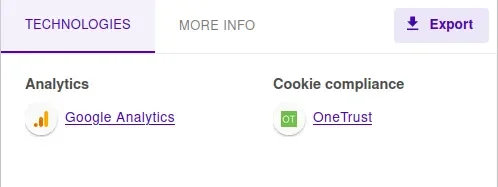
Opening these URLs in a browser showed nothing: a completely blank page. Wappalyzer was used to see what the pages were built with, and returned the following result.
At that point a power cut interrupted the work: load shedding for almost eight hours.
The next day the researcher started again where he had left off and opened all the URLs. This time every one of the subdomains showed the same message, along the lines of:
These test environment is only up during business hours..... and more support visit http://tiny.cc/this_is_not_the_exact_link
The researcher understood it as timing: on the first visit it was business hours and the environments were up for some kind of testing; on the second visit they were outside business hours and the environments were down, so the message was served instead. The link in that message was opened and redirected to the tiny.cc website, and the link was broken. That is the broken link.
Exploitation
Step 1: claim the short link
The next step was to take over the link by creating a short link with the same custom name. The first attempt used one of the researcher's own GitHub pages as the destination, with the custom name taken from the message:
tiny.cc/this_is_not_the_exact_link
That attempt failed with the error "Domain is not trusted". Not every destination domain is accepted by tinycc.
Step 2: retry with an accepted destination
The second attempt used the researcher's HackerOne profile URL as the destination, and tinycc accepted it. The short link was created, which means the broken link in the target's fallback message now pointed at a page controlled by the researcher. That is the hijack.
Step 3: report
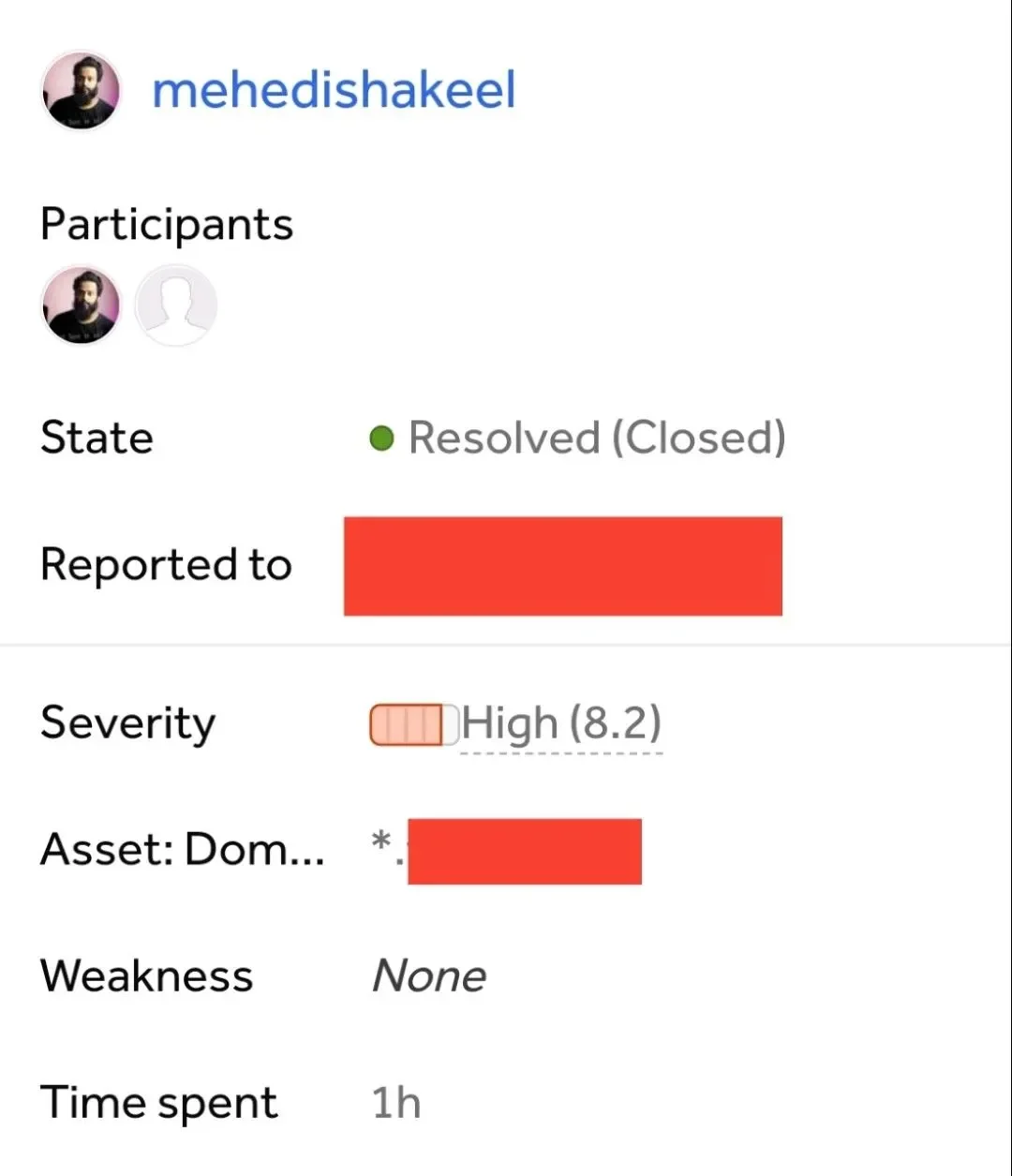
The hijack was documented and submitted as a report on HackerOne. The report was resolved in just 30 minutes, making this the researcher's second resolved bug on the platform.
Root cause
The target's fallback page hard-codes a short link that no longer resolves. Short-link services hand out custom names on a first-come, first-served basis, so a name that no longer resolves may be registrable by someone else, though the service refused one destination in this case. The target's page keeps sending visitors to that name, so control of the destination passes silently to whoever claimed it.
Impact
Anyone visiting the affected subdomains outside business hours would follow the support link and land on a page chosen by the researcher. In this case the destination was the researcher's own HackerOne profile, which demonstrates control without doing harm.
Fix
The report does not describe what the program changed.
Variants to test
- Social media links: look for profile links to social accounts that no longer exist.
- Short links in error and maintenance pages: check fallback, maintenance and "service unavailable" pages for tinyurl, bitly or tinycc links. A positive result is a short link that no longer resolves and whose custom name you can register.
- Links to files or scripts: look for references to hosted files or scripts that have been removed.
- Timing-dependent pages: revisit hosts at different times of day, as here, because some environments only serve their fallback content outside business hours. A positive result is a different page or message appearing on the second visit.
- Destination restrictions: when a short-link service rejects your first destination with an error such as "Domain is not trusted", retry with a domain it does accept. A positive result is the same custom name being created successfully.
What happened, in plain words
A company ran some test websites on its own subdomains. Outside working hours those test sites were switched off, and instead of the test application visitors got a short message saying the environment was only available during business hours, with a link to a short web address for more support information. That short address was a tiny.cc link, and the link was broken, so it no longer led anywhere. The researcher tried to register the same custom name, and tiny.cc accepted it when the destination was his HackerOne profile. The researcher registered it and pointed it at his own HackerOne profile, proving he now controlled where the company's visitors would end up. He reported it and the report was resolved in 30 minutes.
This kind of bug is called broken link hijacking, or link takeover. It is very close to a better-known bug called subdomain takeover, and the difference is easy to picture. Imagine a shop that prints a sign saying "for deliveries, use the back door". In subdomain takeover, someone else takes over the back door itself. In broken link hijacking, someone else takes over the address written on the sign, so the delivery driver still follows the shop's own instructions but ends up somewhere the shop does not control. The shop's sign is genuine; only the destination has changed hands.
The same idea applies to several kinds of dangling reference: broken social media links (sometimes called social media takeover), links to files or scripts that have been removed, and short links from services such as tinyurl, bitly and tinycc. Finding them is partly a matter of keeping your eyes open and partly luck while hunting.
The background you need
Before the steps, a few ideas from zero, because the rest of the article leans on them.
- A subdomain is a name that sits in front of a company's main domain. If the main domain is
example.com, thenshop.example.comandtest.example.comare subdomains. Companies often run many of them, one per service, team or test environment, and they are easy to forget about. - A wildcard scope is how bug bounty programs describe "everything under this name". A scope written as
*.example.commeans every subdomain ofexample.comis fair game to test. The star is the wildcard. - Subdomain enumeration is the job of discovering those subdomains. You cannot test what you cannot find, so hunters use tools that try huge lists of common names and see which ones exist.
- A short link is a long web address squeezed into a few characters, like
tiny.cc/abc. The short-link service keeps a table: this short name goes to that long address. When you visit the short name, the service looks it up and forwards (redirects) your browser to the long address. The custom part after the slash is called the custom name, and on services like tiny.cc you can choose it yourself. - A redirect is simply the web server telling your browser "not here, go there instead". Your browser follows it automatically, which is why a short link feels like it takes you straight to the destination.
- A browser add-on is a small extra program you install into your browser to add features. Wappalyzer is one: it inspects the page you are on and tries to guess which software built it (web server, framework, analytics and so on).
- A private program is a bug bounty program you can only see and report to if the company invites you. Reports there are often kept confidential, which is why the company name, domain and screenshots are not shared here.
The setup
The target was a private program, so the company name, domain, screenshots and other identifying information cannot be shared. The program marked the report confidential even after resolving it. The in-scope surface was large, so for the purposes of this write-up the scope can be represented with an example wildcard:
*.mehedishakeel.com
Read that line as: every subdomain of mehedishakeel.com was in scope. The real domain has been swapped for this example so the private program stays private.
The affected feature was a set of test environments published on subdomains. Outside business hours those environments are not serving an application; instead they return a short message telling visitors that the test environment is only up during business hours and pointing them at a short link for more support information. That short link is the dangling reference, the loose thread the whole bug hangs on.
No accounts on the target were needed. The work was done from the outside with two standard reconnaissance tools:
- subfinder, for subdomain enumeration. You give it a domain and it goes looking for subdomains that exist.
- httpx, for collecting basic information about the discovered hosts. Once you have a list of names, httpx visits each one and reports back what it finds (whether it responds, what it looks like and so on).
A browser with the Wappalyzer add-on was used to look at what the blank pages were serving. The only account involved was the researcher's own HackerOne profile, whose URL was used as the destination when claiming the short link. HackerOne is the bug bounty platform where the report was eventually submitted.
Finding it
With a large scope, the starting point was subdomain enumeration, the usual approach for this kind of program. Running subfinder and httpx produced a set of subdomains that looked interesting:
https://sr5-demo05.mehedishakeel.com/https://sr6-demo06.mehedishakeel.com/https://sr7-demo09.mehedishakeel.com/https://sr8-demo08.mehedishakeel.com/https://sr9-demo10.mehedishakeel.com/
This block is the tool output pasted as it came, so the addresses run together on one line. Read it as five separate URLs, each starting at https://:
https://sr5-demo05.mehedishakeel.com/https://sr6-demo06.mehedishakeel.com/https://sr7-demo09.mehedishakeel.com/https://sr8-demo08.mehedishakeel.com/https://sr9-demo10.mehedishakeel.com/
Opening these URLs in a browser showed nothing: a completely blank page. A blank page is not proof of anything by itself, but it is a signal. It could be a broken application, a placeholder, or something that only appears at certain times. Wappalyzer was used to see what the pages were built with, and returned the following result.
Wappalyzer reads the page and its responses and lists the technologies it recognises. The point of running it here was to understand what those blank pages actually were, rather than guessing.
At that point a power cut interrupted the work: load shedding for almost eight hours. Load shedding is a planned, rolling cut to the electricity supply, common in some countries, where power is switched off for hours at a time.
The next day the researcher started again where he had left off and opened all the URLs. This time every one of the subdomains showed the same message, along the lines of:
These test environment is only up during business hours..... and more support visit http://tiny.cc/this_is_not_the_exact_link
Line by line, in plain words:
These test environment is only up during business hourstells the visitor the test environment is only available while the company is working. Outside those hours, there is nothing to see...... and more support visitis the page telling the visitor where to go for more help.http://tiny.cc/this_is_not_the_exact_linkis the short link itself.tiny.ccis the short-link service, andthis_is_not_the_exact_linkis the custom name chosen by the company. The name is a placeholder in this write-up, not the real one.
The researcher understood the change between visits as timing: on the first visit it was business hours and the environments were up for some kind of testing; on the second visit they were outside business hours and the environments were down, so the message was served instead. This is why the first visit showed a blank page and the second showed text: the same address behaved differently depending on the time of day.
The link in that message was opened and redirected to the tiny.cc website, and the link was broken. That is the broken link.
Taking it over
Step 1: claim the short link
The next step was to take over the link by creating a short link with the same custom name. The idea is simple: if the name is free, register it yourself, and then the company's own page will send its visitors wherever you choose. The first attempt used one of the researcher's own GitHub pages as the destination, with the custom name taken from the message:
tiny.cc/this_is_not_the_exact_link
Read this as the short address to be created: the service tiny.cc, followed by the custom name this_is_not_the_exact_link, which is the exact name the company's fallback page was pointing at. The destination chosen for this attempt was a GitHub page belonging to the researcher, so that if it worked, the short link would lead to a page he controlled.
That attempt failed with the error "Domain is not trusted". Not every destination domain is accepted by tinycc. Short-link services sometimes restrict which destinations they will forward to, to cut down on abuse, so a destination they do not recognise is refused.
Step 2: retry with an accepted destination
The second attempt used the researcher's HackerOne profile URL as the destination, and tinycc accepted it. The short link was created, which means the broken link in the target's fallback message now pointed at a page controlled by the researcher. That is the hijack. Nothing on the company's side changed; its page still showed the same short link, but the meaning of that link had quietly changed hands.
Step 3: report
The hijack was documented and submitted as a report on HackerOne. The report was resolved in just 30 minutes, making this the researcher's second resolved bug on the platform.
Why it works
The target's fallback page hard-codes a short link that no longer resolves. Short-link services hand out custom names on a first-come, first-served basis, so a name that no longer resolves may be registrable by someone else, though the service refused one destination in this case. The target's page keeps sending visitors to that name, so control of the destination passes silently to whoever claimed it.
A useful comparison: it is like a company printing business cards with a phone number it no longer pays for. The cards still look official, but whoever takes over the number now answers the calls.
What could go wrong
Anyone visiting the affected subdomains outside business hours would follow the support link and land on a page chosen by the researcher. In this case the destination was the researcher's own HackerOne profile, which demonstrates control without doing harm. Phishing means a fake page built to look trustworthy so that visitors hand over passwords or other details.
The fix
The report does not describe what the program changed.
Other places to look
- Social media links: look for profile links to social accounts that no longer exist.
- Short links in error and maintenance pages: check fallback, maintenance and "service unavailable" pages for tinyurl, bitly or tinycc links. A positive result is a short link that no longer resolves and whose custom name you can register.
- Links to files or scripts: look for references to hosted files or scripts that have been removed.
- Timing-dependent pages: revisit hosts at different times of day, as here, because some environments only serve their fallback content outside business hours. A positive result is a different page or message appearing on the second visit.
- Destination restrictions: when a short-link service rejects your first destination with an error such as "Domain is not trusted", retry with a domain it does accept. A positive result is the same custom name being created successfully.
Glossary
- Broken link hijacking (BLH): taking over a link that a site still points at but that no longer belongs to anyone, so you decide where it leads.
- Link takeover: another name for broken link hijacking.
- Subdomain takeover: taking over a subdomain that a company has stopped using but still points at, so you control what it serves.
- Subdomain: a name in front of a main domain, such as
test.example.comunderexample.com. - Wildcard scope: a program scope written with a star, meaning every subdomain of a domain is in scope.
- Subdomain enumeration: discovering which subdomains of a domain exist.
- subfinder: a tool that finds subdomains for a given domain.
- httpx: a tool that visits a list of hosts and reports basic information about each.
- Short link: a long web address replaced by a short one that redirects to it.
- Custom name: the part of a short link after the slash that you choose yourself.
- Redirect: a server instruction telling the browser to go to a different address.
- tiny.cc: a short-link service where the researcher registered a custom name.
- Wappalyzer: a browser add-on that guesses which software a page is built with.
- Browser add-on: a small extra program installed into a browser to add features.
- Private program: a bug bounty program visible only to invited researchers, often with confidential reports.
- HackerOne: the bug bounty platform where the report was submitted and resolved.
- Load shedding: a planned, rolling cut to the electricity supply.
- Fallback page: the page shown when the real application is unavailable, here the business-hours message.
- Dangling reference: a link or name that a site still uses but that no longer belongs to anyone.
- Phishing: a fake page or message built to look trustworthy so people hand over sensitive information.
- Malware: software written to cause harm, such as stealing data or taking over a machine.
- Root cause: the underlying reason a bug is possible, as opposed to its visible symptom.
- Impact: what an attacker could actually do or affect by exploiting the bug.
- Confidential report: a report kept private between the researcher and the program.




