Information Exposure — My Fourth Finding on Hackerone!
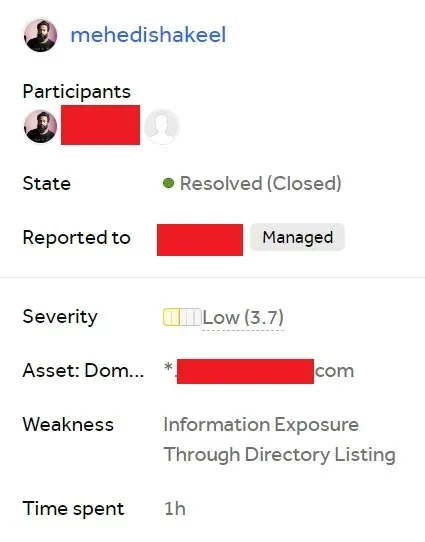
A web server exposed a directory listing under a TYPO3 extension path, and within it two SQL files were publicly downloadable. An attacker could read the SQL queries and static data contained in those files, which the author describes as sensitive.
 Published on mehedishakeel.medium.com
Now let’s discuss how i get my fourth bug and what are the tools and technique i use,
The full write-up lives on its author's site
It belongs to its author, so we link to it rather than copy it. The other two tabs are our own rewrites, checked against it.
Context
This is a write-up of an information exposure bug found through directory listing, on a private bug bounty program. The author describes it as a different version of sensitive information disclosure: instead of a single leaked file, the weakness is a directory whose contents are browsable, and the sensitive material is reached by navigating that listing.
The target was a private program, so the real domain and company name are not included. The scope contained 30+ domains, and one of them followed this pattern:
*.mehedishakeel.com
The main domain used throughout the write-up is:
https://mehedishakeel.com
Setup
The work was done manually in a browser, with a small set of well-known tools:
- subfinder for subdomain enumeration.
- httpx for basic information collection on the discovered hosts.
- The Wappalyzer browser add-on to fingerprint the technologies in use.
- dirsearch for directory searching.
No accounts, roles or special preconditions are described. The only precondition is that the target is in scope and reachable.
Finding it
Subdomain enumeration with subfinder and httpx produced a large list of active subdomains. That result changed the author's usual approach: rather than moving on quickly, the decision was to stay on these targets for a long time, starting from the main domain.
https://mehedishakeel.com
Every page was visited manually in the browser and nothing interesting turned up. The next step was a common juicy file name, robots.txt:
https://mehedishakeel.com/robots.txt
That file contained nothing special. The author's advice from this step is to always visit every URL that is disallowed in /robots.txt.
Wappalyzer was then opened on the site and returned a long list of technologies, several of which the author did not know well. Rather than spend time learning all of them, the author moved to searching for sensitive information with dirsearch. The write-up points to an earlier article of theirs for the details of using dirsearch for this purpose.
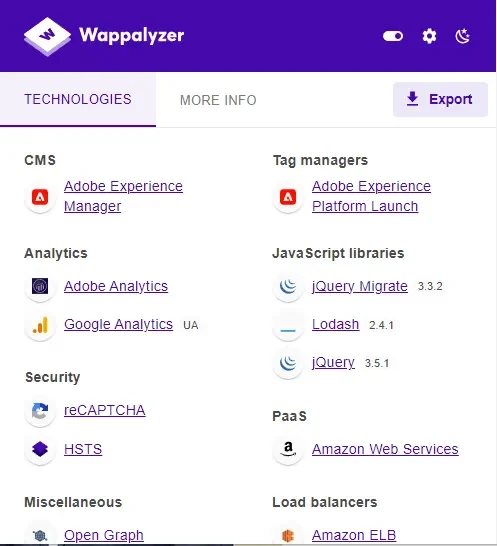
The screenshot shows the Wappalyzer result for the site: the fingerprint of technologies the author then worked from.
Exploitation
Step 1: directory search
Running dirsearch against the target produced an interesting directory:
https://www.mehedishakeel.com/typo3conf/ext/
The path sits under typo3conf/ext/. Visiting it showed that directory listing was enabled.
Step 2: manual navigation of the listing
With the listing open, every possible directory was navigated by hand. One of them stood out:
ext/static_info_tables
Step 3: the files in the directory
The directory contained two files:
tables.sql tables_static.sql
Both were downloaded and opened in Notepad. They contained SQL queries and some sensitive static data.
The screenshot shows the directory listing with the two SQL files, the point at which the exposure became clear.
Step 4: report
The bug was reported immediately. The author notes this became their fourth resolved bug on HackerOne.
Root cause
Directory listing was enabled on the server, so a request to typo3conf/ext/ returned a browsable index of its contents. Because the extension directory of the TYPO3 installation was reachable and browsable, the SQL files inside static_info_tables could be enumerated and downloaded directly.
The report does not describe any server configuration or code change, so the exact reason the listing was enabled is not stated.
Impact
The exposed files contained SQL queries and sensitive static data. The files could be browsed and downloaded from the directory listing. The author does not enumerate what the static data covered, so the practical value of the leak beyond the SQL content is not described. The exposure is limited to what was reachable under that browsable directory.
Fix
The report does not say what the program changed. The measures that address this class of issue are to disable automatic directory listing on the web server and to deny direct access to non-public paths such as the TYPO3 extension directory and to .sql files.
Variants to test
- Check
robots.txtand visit every disallowed path. A positive result is a path that returns content rather than a 403 or a redirect. - Run a directory search against the main domain and subdomains. A positive result is a directory that returns a listing instead of an index page or an error.
- Request known framework directories such as
typo3conf/ext/. A positive result is a browsable index of extension folders. - Navigate each listed subdirectory by hand. A positive result is a folder containing database dumps, SQL files, backups or configuration files.
- Download any
.sqlfile found and inspect it. A positive result is SQL statements or static data that should not be public. - A positive result is a listing on a path specific to that product.
What happened, in plain words
A security researcher was hunting for bugs on a private bug bounty program, which is a scheme where companies invite testers to look for weaknesses in their systems and pay or credit them for reporting what they find. On one of the program's many domains, the researcher found a folder on the website that was open for anyone to browse, like a filing cabinet with the door left open and every drawer labelled. Inside that folder were two database files that should never have been public. The researcher downloaded them, saw database queries and sensitive data inside, and reported the problem.
The author calls this an information exposure bug reached through directory listing. It is a close relative of sensitive information disclosure, which is when private data leaks out of a system. The difference is the route: instead of one file being accidentally served, a whole folder is browsable, and you reach the sensitive material by clicking through that folder's contents.
Because the program was private, the real domain and company name are not in the write-up. The author substitutes an example domain, mehedishakeel.com, so the steps can be followed without revealing the target. The scope, meaning the list of systems the researcher was allowed to test, contained more than 30 domains, and one of them followed this pattern:
*.mehedishakeel.com
The asterisk is a wildcard. It means "anything in front of .mehedishakeel.com", so shop.mehedishakeel.com, mail.mehedishakeel.com and blog.mehedishakeel.com would all match. The main domain used throughout the write-up is:
https://mehedishakeel.com
https:// is the secure version of the address scheme your browser uses, the one with the padlock. The part after it is the domain name, the human-readable address of a site.
The tools, and why each one was used
All the work was done by hand in a browser, helped by four well-known tools:
- subfinder, for subdomain enumeration. A subdomain is a smaller site that sits under a main domain, like a room inside a building. Enumeration means listing as many of them as possible, because each one is another door to try.
- httpx, for basic information collection on the hosts that were discovered. A host is a machine or site that answers on the network. httpx checks which of the discovered names actually respond and what they respond with.
- The Wappalyzer browser add-on, to fingerprint the technologies in use. Fingerprinting means working out what software a site is built from, the way you might guess a car's make from its shape. Knowing the software tells you which folders and files that software usually creates.
- dirsearch, for directory searching. A directory is a folder on a web server. dirsearch tries a long list of common folder and file names against a site and reports which ones exist.
No accounts, roles or special preconditions are described. The only precondition is that the target is in scope, meaning the program allows testing it, and reachable, meaning it answers in a browser.
Finding it
Subdomain enumeration with subfinder and httpx produced a large list of active subdomains. That result changed the author's usual approach. Instead of moving on quickly to the next target, the decision was to stay on these targets for a long time, starting from the main domain:
https://mehedishakeel.com
This line is simply the address typed into the browser's address bar. The plan was to open every page of the site by hand and look around. Nothing interesting turned up that way.
The next step was a common juicy file name, robots.txt:
https://mehedishakeel.com/robots.txt
robots.txt is a plain text file that site owners put at the top of a site to tell search engines and other automated visitors which paths they should not crawl. It is a set of polite requests, not a lock, so anyone can read it. That makes it useful to a tester: it often names folders the owner would rather not advertise. In this case the file contained nothing special. The author's advice from this step is to always visit every URL that is disallowed in /robots.txt, because a path the owner wants hidden is a path worth checking.
Wappalyzer was then opened on the site and returned a long list of technologies, several of which the author did not know well. Rather than spend time learning all of them, the author moved to searching for sensitive information with dirsearch. The write-up points to an earlier article of theirs for the details of using dirsearch for this purpose.
The screenshot shows the Wappalyzer result for the site: the fingerprint of technologies the author then worked from.
Exploitation
Step 1: directory search
Running dirsearch against the target produced an interesting directory:
https://www.mehedishakeel.com/typo3conf/ext/
This is a full web address pointing at a folder. Reading it from left to right: https:// is the secure scheme, www.mehedishakeel.com is the site, and /typo3conf/ext/ is the path to a folder on that site. The trailing slash matters, because it tells the server you are asking for a folder rather than a file.
The path sits under typo3conf/ext/. An extension is an add-on that gives the system extra features, and typo3conf/ext/ is where TYPO3 keeps those add-ons. Visiting the address showed that directory listing was enabled. Directory listing is a server behaviour: when a folder has no default page to show, the server can either refuse the request or print a list of everything in the folder. Here it printed the list.
Step 2: manual navigation of the listing
With the listing open, every possible directory was navigated by hand. One of them stood out:
static_info_tables
This is the name of a subfolder inside the extension directory. Clicking into it is the same as opening a drawer inside the open cabinet.
Step 3: the files in the directory
The directory contained two files:
tables.sql tables_static.sql
These are two file names, both ending in .sql. The .sql ending marks a file written in SQL, the language used to talk to databases. A file like this usually holds a set of database commands, often used to create tables or fill them with data. Both files were downloaded and opened in Notepad, a plain text editor that comes with Windows. They contained SQL queries and some sensitive static data. A query is an instruction sent to a database, and static data is information that does not change often, such as reference lists or lookup values.
The screenshot shows the directory listing with the two SQL files, the point at which the exposure became clear.
Step 4: report
The bug was reported immediately. The author notes this became their fourth resolved bug on HackerOne, a platform where researchers and companies manage bug bounty reports.
Why it worked
The web server was configured to generate directory listings, so a request to typo3conf/ext/ returned a browsable index of its contents. When that file is missing, the server has a choice: refuse the request, redirect somewhere else, or list the folder's contents. Here it listed them. So a request to typo3conf/ext/ returned a browsable index of its contents instead of a refusal or a redirect.
Because the extension directory of the TYPO3 installation was reachable and browsable, the SQL files inside static_info_tables could be enumerated, meaning listed one by one, and downloaded directly. No password, no account, no trick was needed beyond clicking.
The report does not describe any server configuration or code change, so the exact reason the listing was enabled is not stated.
Impact
The exposed files contained SQL queries and sensitive static data. The files could be browsed and downloaded from the directory listing. The author does not enumerate what the static data covered, so the practical value of the leak beyond the SQL content is not described. The exposure is limited to what was reachable under that browsable directory.
Fix
The report does not say what the program changed. The measures that address this class of issue are to disable automatic directory listing on the web server and to deny direct access to non-public paths such as the TYPO3 extension directory and to .sql files.
Variants to test
These are the same checks, phrased as things to try on a target you are allowed to test:
- Check
robots.txtand visit every disallowed path. A positive result is a path that returns content rather than a refusal or a redirect. - Run a directory search against the main domain and subdomains. A positive result is a directory that returns a listing instead of an index page or an error.
- Request known framework directories such as
typo3conf/ext/. A positive result is a browsable index of extension folders. - Navigate each listed subdirectory by hand. A positive result is a folder containing database dumps, SQL files, backups or configuration files.
- Download any
.sqlfile found and inspect it. A positive result is SQL statements or static data that should not be public. - A positive result is a listing on a path specific to that product.
Glossary
-
Bug bounty program: a scheme where a company invites testers to look for weaknesses in its systems and rewards reports of what they find.
-
Private program: a bug bounty program that only invited researchers can see and test, rather than one open to everyone.
-
Scope: the list of systems a researcher is allowed to test.
-
Domain: the human-readable address of a site, such as
mehedishakeel.com. -
Subdomain: a smaller site that sits under a main domain, such as
shop.mehedishakeel.com. -
Wildcard: a symbol, here
*, that stands for anything, so*.mehedishakeel.commatches every subdomain. -
Host: a machine or site that answers on the network.
-
Subdomain enumeration: listing as many subdomains of a domain as possible.
-
Fingerprinting: working out what software a site is built from by looking at its responses.
-
Directory: a folder on a web server.
-
Directory listing: a server behaviour where visiting a folder with no default page prints a list of everything inside it.
-
Directory search: trying a long list of common folder and file names against a site to see which exist.
-
robots.txt: a plain text file at the top of a site that tells automated visitors which paths not to crawl; it is a request, not a lock. -
Extension: an add-on that gives a content management system extra features.
-
SQL: the language used to talk to databases.
-
.sqlfile: a file containing SQL commands, often used to create or fill database tables. -
Query: an instruction sent to a database.
-
Static data: information that does not change often, such as reference lists or lookup values.
-
Index file: the default page a server shows when you visit a folder, usually something like
index.html. -
Authentication: proving who you are, for example with a password.
-
Information exposure: a weakness where private data leaks out of a system.
-
Sensitive information disclosure: a weakness where data that should stay private is shown to someone who should not see it.
-
HackerOne: a platform where researchers and companies manage bug bounty reports.




