Found SQL Injection Vulnerability on Government Organization Website!
A website parameter was vulnerable to SQL injection, allowing an attacker to retrieve sensitive database information including admin credentials and password hashes. The author used automated tools to dump the database.
 Published on mehedishakeel.medium.com
Last night before going to sleep i make a quick search on google a dork to find vulnerable websites and found some interesting result and from one of those website i found the SQL injection vulnerability & successfully able to exploit and retrieve sensitive information from the MySQL db.
The full write-up lives on its author's site
It belongs to its author, so we link to it rather than copy it. The other two tabs are our own rewrites, checked against it.
Context
This is a short account of finding and exploiting a SQL injection on a website belonging to a government organisation. The researcher does not name the site and refers to it throughout as example.org. The vulnerable feature is a news page that takes an id parameter in the query string, in the form news.php?id=45.
The researcher describes the issue as a high severity SQL injection and says the backend database is MySQL. No CVSS score, bounty amount or disclosure timeline is given.
Setup
The work was done from a Kali Linux machine with three tools:
- Google dork to find candidate sites
- Burpsuite to capture the request
- sqlmap to automate exploitation
No account, role or authentication is mentioned. The only precondition is a reachable news.php endpoint that accepts an id parameter.
Finding it
The researcher searched Google with the following dork:
_news/news.php?id=
Among the results was a site the researcher calls example.org. The interesting part was the id parameter, which the researcher judged vulnerable to SQL injection. The URL tested was:
http://example.org/news.php?id=45'
A single quote is appended to the numeric value. If the value is concatenated into a SQL statement without sanitisation, that quote breaks out of the string or numeric context and the database returns a syntax error, which the application may render in the response.

The screenshot is captioned as the SQL injection error.
The earlier image is captioned as the SQL injection attack.
Exploitation
Step 1: capture the request
With the injectable URL identified, the researcher started Burpsuite on the Kali machine, captured the request to news.php?id=45 and saved it to a text file called req.txt.
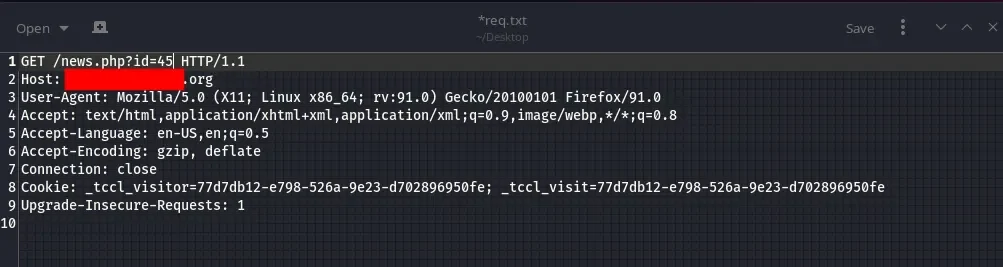
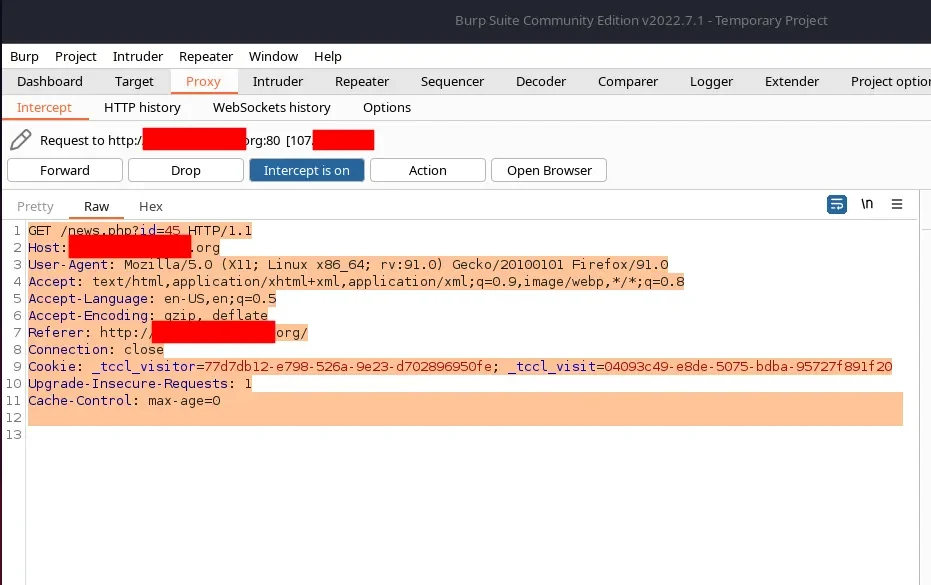
The two screenshots are captioned as the request being saved and the captured request. Saving the raw request lets sqlmap replay the exact method, headers and parameters rather than reconstructing them.
Step 2: enumerate databases
The saved request is passed to sqlmap with the -r flag:
sqlmap -r req.txt -dbs
-r tells sqlmap to read the HTTP request from the file, and -dbs asks it to list the databases on the server. According to the researcher, sqlmap dumped all the databases and sensitive information including admin and user records, email addresses and MD5 hashed passwords.
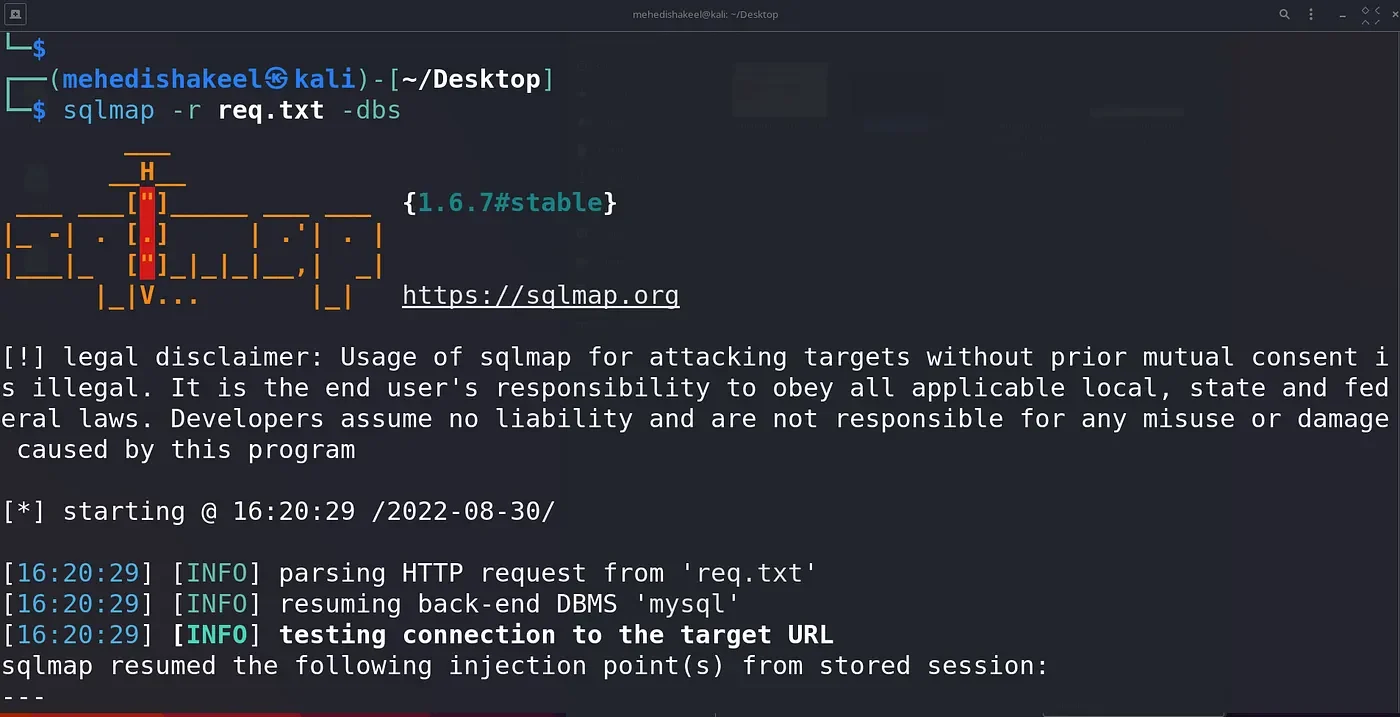
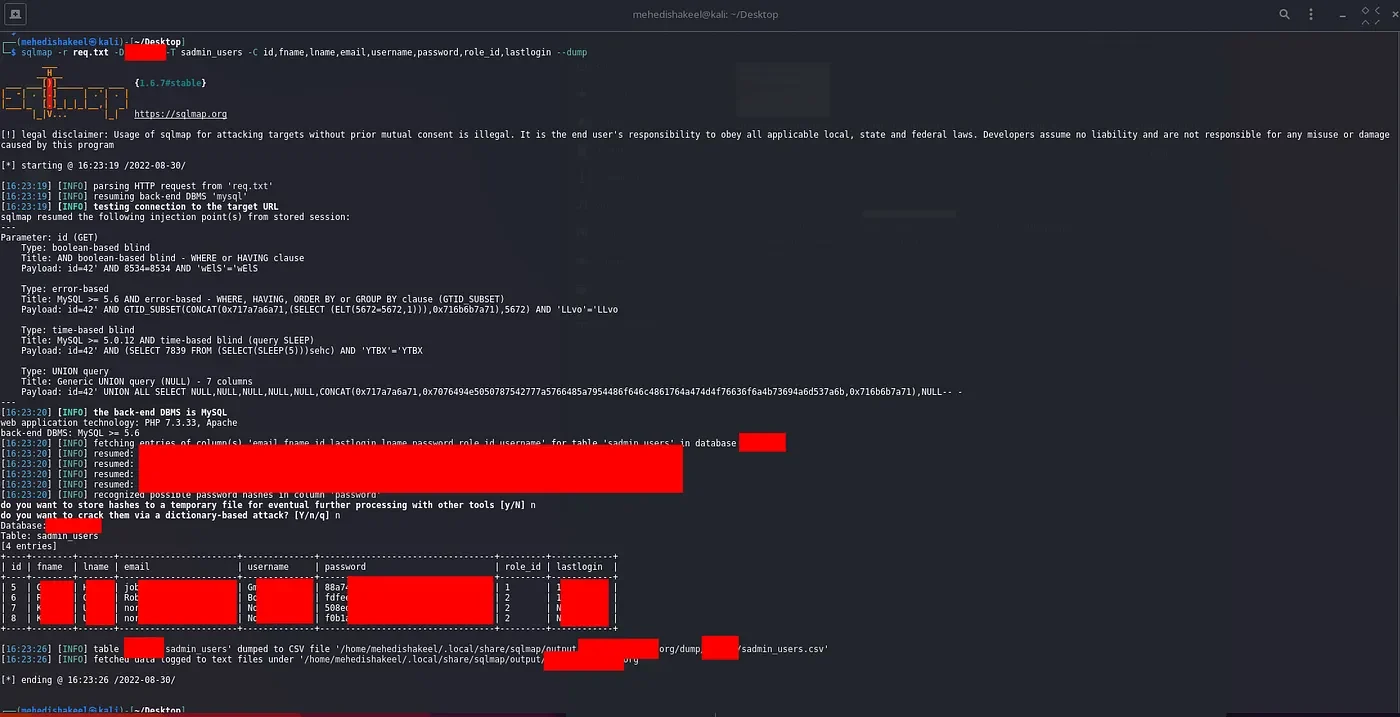
The screenshots are captioned as sqlmap database exploitation.
Step 3: enumerate tables, columns and data
The researcher then lists the commands used to move from database to table to column to data:
sqlmap -r req.txt -D db_name --tables
sqlmap -r req.txt -D db_name -T table_name --columns
sqlmap -r req.txt -D db_name -T table_name -C column_name --dump
-D db_nameselects the database.--tableslists its tables.-T table_nameselects a table and--columnslists its columns.-C column_nameselects a column and--dumpextracts its contents.
The researcher reports that the dump included admin and user records, email addresses and MD5 hashed passwords.
Root cause
The report does not show the server-side code, so the exact mistake is not visible. The behaviour is consistent with the id value being concatenated into a SQL query without parameterisation, so a quote in the input changes the query structure and produces a database error.
Impact
The researcher states that the injection allowed retrieval of sensitive information from the MySQL database, including admin and user records, email addresses and MD5 hashed passwords. Because the site belongs to a government organisation, the exposure of admin and user records, email addresses and MD5 hashed passwords is the main concern.
Fix
The appropriate remediation is to use parameterised queries or prepared statements for the id parameter so that user input is never concatenated into SQL, and to stop returning database error messages to clients.
Variants to test
- Other numeric parameters on news and article pages. Try appending a single quote to parameters such as
id,news_idorarticleand look for a database error or a change in page content. - Dork-driven discovery. Search for other paths matching the same pattern, for example
news.php?id=, and test each result the same way. - Request-file replay. Capture the request in Burpsuite and run sqlmap with
-rso that cookies, headers and method are preserved; a positive result is sqlmap identifying the backend and listing databases with--dbs. - Error-based confirmation. A positive result is a database error rendered in the response after a single quote is added, which is the signal seen here.
What happened, in plain words
A security researcher went looking for websites that might have a particular kind of flaw, using a normal Google search with a special search phrase. One of the results was a website belonging to a government organisation. The researcher does not name the site and calls it example.org throughout.
On that site there is a news page that takes a number from the address bar, in the form news.php?id=45. That number is called a parameter. The researcher added a single quote character to the end of the number, and the report shows a screenshot captioned as the SQL injection error. That error is the sign that the number is being pasted straight into a database command, which is the flaw known as SQL injection.
From there the researcher captured the request in a tool called Burpsuite, saved it to a file, and fed that file to another tool called sqlmap, which automated the rest. According to the researcher, sqlmap listed all the databases on the server and pulled out sensitive information including admin and user records, email addresses and MD5 hashed passwords. The researcher describes this as a high severity SQL injection and says the backend database is MySQL.
No CVSS score, bounty amount or disclosure timeline is given.
The tools, and what each one is for
Three tools were used, and it helps to know what each one does before following the steps.
- Google dork: a Google search that uses special syntax to narrow results down to a very specific pattern. Think of it as asking a librarian not for "books about cars" but for "books whose title ends in the word carburettor". It is still ordinary Google, just a more precise question.
- Burpsuite: a program that sits between your browser and a website and lets you look at, and save, the exact request the browser sends. A useful comparison is a postal clerk who lets you read and photocopy a letter before it goes in the post.
- sqlmap: a program that automates SQL injection testing. Once you give it a request, it tries many variations on its own and reports what it can extract from the database.
No account, role or login is mentioned anywhere. The only precondition is a reachable news.php page that accepts an id parameter.
Finding it
The researcher searched Google with the following dork:
_news/news.php?id=
This is a plain text search phrase, not code. It asks Google for pages whose address contains the text _news/news.php?id=. The idea is that any site matching this pattern has a news page that takes an id number, which is exactly the kind of page worth testing. It is a way of narrowing millions of websites down to a shortlist.
Among the results was a site the researcher calls example.org. The interesting part was the id parameter, which the researcher judged vulnerable to SQL injection. The URL tested was:
http://example.org/news.php?id=45'
Line by line:
http://is the ordinary, unencrypted web protocol. The browser uses it to talk to the server.example.orgis the placeholder name for the site. The real name is not disclosed./news.phpis the page being requested. The.phpending tells you the page is generated by a program written in the PHP language, which runs on the server and usually talks to a database.?id=45is the parameter. Everything after the?is extra information handed to the page. Here the page is told "show news item number 45".'at the very end is a single quote character, added by the researcher. This is the actual test.
Why a single quote? A database command that fetches a news item often looks something like "select the article where the id equals 45". If the program builds that command by gluing the number from the address bar straight into the text, then adding a quote character breaks the command's grammar, the same way an extra quotation mark in the middle of a sentence confuses a reader. The database then complains with a syntax error, and if the website shows that error to the visitor, you have proof that your input reached the database unaltered. That is the flaw called SQL injection: your input is being treated as part of the database command rather than as plain data.
The screenshot is captioned as the SQL injection error.
The earlier image is captioned as the SQL injection attack.
Exploitation
Step 1: capture the request
With the injectable URL identified, the researcher started Burpsuite on the Kali machine, captured the request to news.php?id=45 and saved it to a text file called req.txt.
Why bother? When your browser loads a page it sends more than just the address: it sends a method (usually GET or POST), a set of headers describing the browser, and often cookies. A cookie is a small piece of text the site stored in your browser earlier, typically to remember who you are. If you retype the URL by hand in another tool, you may lose some of that context and get a different response. Saving the raw request and replaying it exactly avoids that problem.
The two screenshots are captioned as the request being saved and the captured request.
Step 2: enumerate databases
The saved request is passed to sqlmap with the -r flag:
sqlmap -r req.txt -dbs
Line by line:
sqlmapis the name of the program being run.-r req.txttells sqlmap to read the HTTP request from the filereq.txtinstead of you describing the URL again. It replays exactly what Burpsuite captured.-dbsasks sqlmap to list the databases on the server. A database server usually holds several databases, each a container of tables, so listing them is the first look around.
According to the researcher, sqlmap dumped all the databases and sensitive information including admin and user records, email addresses and MD5 hashed passwords. An MD5 hash is the result of running a password through a one way scrambling formula: you cannot read the password back out of it directly, but common passwords can often be guessed by hashing candidates and comparing.
The screenshots are captioned as sqlmap database exploitation.
Step 3: enumerate tables, columns and data
The researcher then lists the commands used to move from database to table to column to data:
sqlmap -r req.txt -D db_name --tables
sqlmap -r req.txt -D db_name -T table_name --columns
sqlmap -r req.txt -D db_name -T table_name -C column_name --dump
Line by line:
-D db_nameselects one database by name. Think of a database as a filing cabinet.--tableslists the tables inside it. A table is a drawer in the cabinet, holding one kind of record, such as users or articles.-T table_nameselects one table, and--columnslists its columns. A column is a labelled field in the drawer, such asemailorpassword.-C column_nameselects one column, and--dumpextracts its contents, row by row.
The researcher reports that the dump included admin and user records, email addresses and MD5 hashed passwords.
Root cause
The report does not show the server-side code, so the exact mistake is not visible. The behaviour is consistent with the id value being concatenated into a SQL query without parameterisation, so a quote in the input changes the query structure and produces a database error.
Impact
The researcher states that the injection allowed retrieval of sensitive information from the MySQL database, including admin and user records, email addresses and MD5 hashed passwords. Because the site belongs to a government organisation, the exposure of admin and user records, email addresses and MD5 hashed passwords is the main concern.
Fix
The appropriate remediation is to use parameterised queries or prepared statements for the id parameter so that user input is never concatenated into SQL, and to stop returning database error messages to clients.
Variants to test
- Other numeric parameters on news and article pages. Try appending a single quote to parameters such as
id,news_idorarticleand look for a database error or a change in page content. - Dork-driven discovery. Search for other paths matching the same pattern, for example
news.php?id=, and test each result the same way. - Request-file replay. Capture the request in Burpsuite and run sqlmap with
-rso that cookies, headers and method are preserved; a positive result is sqlmap identifying the backend and listing databases with--dbs. - Error-based confirmation. A positive result is a database error rendered in the response after a single quote is added, which is the signal seen here.
Glossary
- Parameter: a named value passed to a web page in the address bar (after the
?) or in the body of a request, used to tell the page what to show or do. - Query string: the part of a URL after the
?, made up of parameters and their values. - SQL: the language used to ask a database for information or to change it.
- SQL injection: a flaw where user input is treated as part of a database command instead of as plain data, letting the input change what the command does.
- MySQL: a widely used database server program.
- Database: a container that holds tables of records.
- Table: a set of records of one kind, arranged in rows and columns.
- Column: a labelled field in a table, such as
emailorpassword. - Dump: to extract and print the contents of a database, table or column.
- Google dork: a Google search using special syntax to match a very specific pattern in page addresses or content.
- Burpsuite: a tool that sits between browser and website so you can inspect and save the exact requests and responses.
- Kali Linux: a Linux distribution that ships with security testing tools preinstalled.
- sqlmap: a tool that automates SQL injection testing and data extraction.
- Request: the message a browser sends to a server asking for a page or data.
- Header: extra information attached to a request or response, such as the browser type.
- Cookie: a small piece of text a site stores in your browser, often to remember who you are.
- GET and POST: two common request methods; GET puts data in the URL, POST puts it in the request body.
- MD5 hash: a one way scrambling of a value such as a password; you cannot reverse it directly, but common values can be guessed by hashing candidates.
- Parameterised query / prepared statement: a way of building database commands where user input is passed separately from the command text, so it cannot change the command's structure.
- Input validation: checking user input before using it, for example to reject characters that should not appear.
- WAF: web application firewall, a filter placed in front of a site that tries to block malicious requests.
- Verbose error handling: showing detailed internal error messages to visitors, which can reveal how the system works.
- CVSS: a standard scoring system for rating the severity of a vulnerability.
- Severity: a rough rating of how serious a flaw is, such as low, medium, high or critical.



