Improper Access Control — My Third Finding on Hackerone!
An API endpoint exposed through a Swagger UI accepted email-sending requests without any authentication token or key. An attacker could send emails to anyone from the company's business address, with attachments and injected HTML in the message body.
 Published on mehedishakeel.medium.com
What is Swagger UI? It’s a set of open-source tools built around the OpenAPI Specification that can help you design, build, document and consume REST APIs.
The full write-up lives on its author's site
It belongs to its author, so we link to it rather than copy it. The other two tabs are our own rewrites, checked against it.
Context
Improper access control, as the author frames it, means that a web application or software function does not restrict, or incorrectly restricts, access to a hidden resource or private functionality from an unauthorised actor. The bug described here sits in an API documented through Swagger UI: an endpoint that sends email on behalf of the company was reachable without any authorisation token or key, and the message body it accepted was rendered as HTML in the delivered mail.
Swagger UI is a set of open-source tools built around the OpenAPI Specification for designing, building, documenting and consuming REST APIs. The Swagger Editor is a browser-based editor for writing OpenAPI definitions, and the UI itself is a collection of HTML, JavaScript and CSS assets that dynamically generate documentation from a Swagger-compliant API. That generated documentation is what exposed the endpoint in this case.
The target was a private program, the same one where the author had previously reported broken link hijacking, so the company name is withheld. The scope was large; the author uses the following as an example scope:
*.mehedishakeel.com
Setup
The subdomains were already collected during the earlier work on the same program, using subfinder and httpx. During subdomain enumeration the author ran httpx with the -status-code and -title -tech-detect flags, which is how the target subdomain stood out as running a Swagger UI API:
api.mehedishakeel.com
No accounts, roles or credentials were needed for the finding itself: the whole point is that the endpoint used below required none.
Finding it
Opening the subdomain in a browser returned the Swagger UI page:
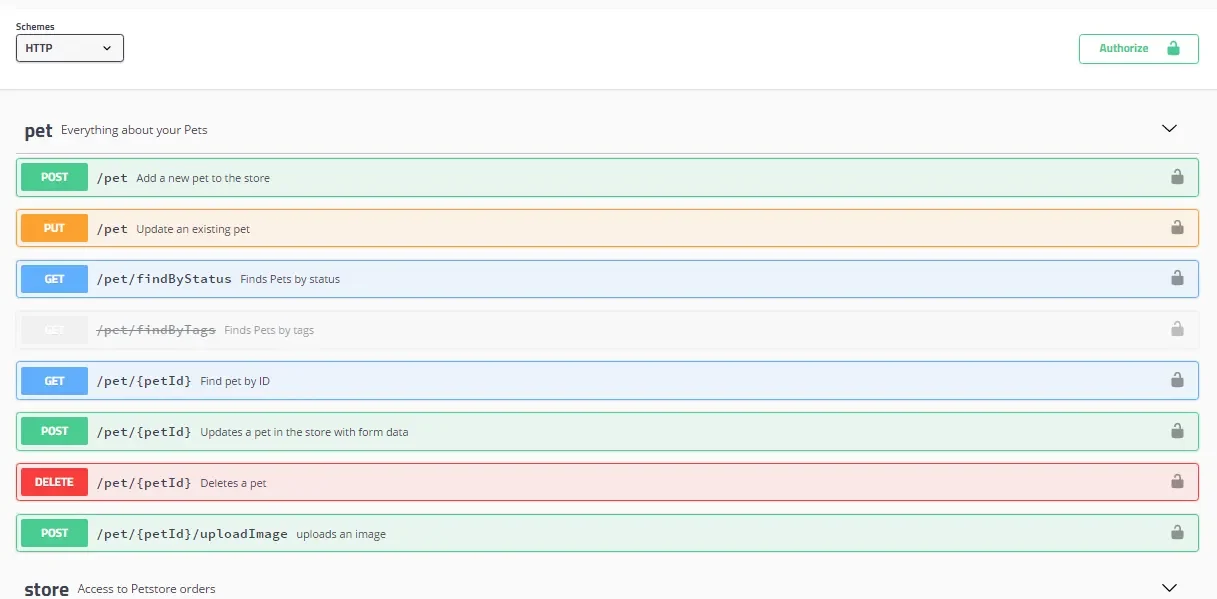
The author then expanded every option exposed in the API documentation. Every API call required an authorisation token, or some sort of key, except for one option. That single endpoint required no keys and no token to be used.

Expanding that option showed the request shape the endpoint accepts: a message body, a recipient address, and an array of attachments, each with a name and an encoded image. Nothing in the documented request carried an authorisation header or key.
{ "messageBody": "string", "emailTo": "string", "attachment": [ { "name": "string", "encodedImage": "string" } ]}
Exploitation
Step 1: send a test email through the UI
The first request was a simple one made through the Swagger UI, sending a test message to the researcher's HackerOne email address:
{ "messageBody": "this is a test from hackerone", "emailTo": "[redacted]", "attachment": [ { "name": "This is a Test PoC", "encodedImage": "testing" } ]}
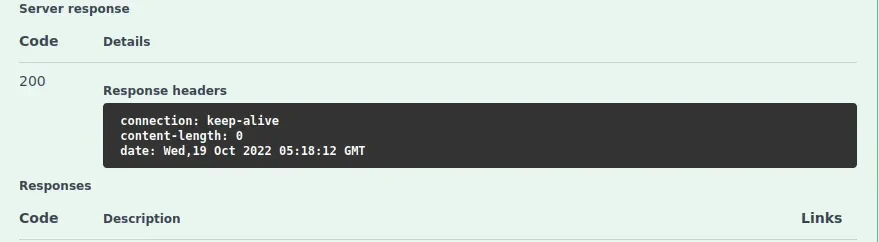
The response came back with status code 200. Checking the inbox confirmed an email arriving from the business email address of the targeted company's domain name, Checking the inbox confirmed an email arriving from the business email address of the targeted company's domain name..
Step 2: inject HTML into the message body
The successful send prompted further testing: if the body is delivered as mail content, does it accept HTML? The request was changed so that the message body carried a button element:
{ "messageBody": "<button>Click Me!</button>", "emailTo": "[redacted]", "attachment": [ { "name": "This is a Test PoC", "encodedImage": "testing" } ]}
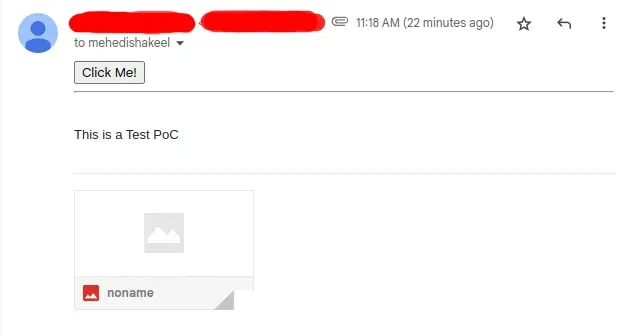
The injected markup was a simple button tag, <button>Click Me!</button>. A second email arrived containing the HTML injection together with the text attachment.
Step 3: report and outcome
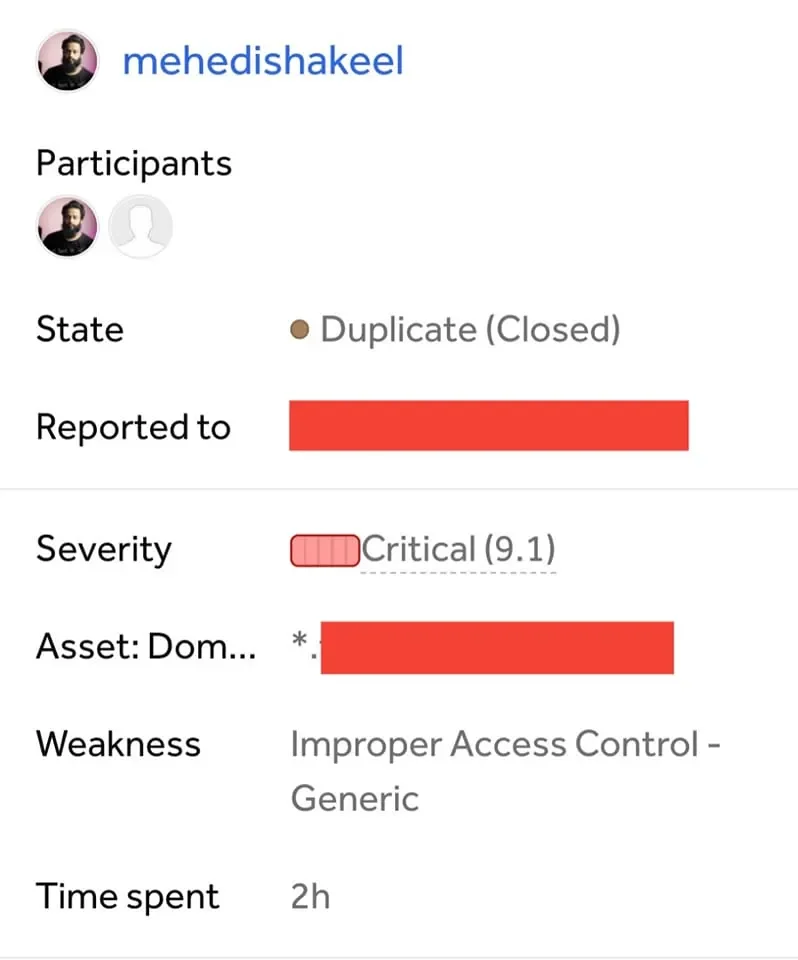
With both behaviours confirmed, the author prepared a detailed report walking through every step taken, and recorded a video proof of concept with a voiceover explaining how the vulnerability works and what the impact is, then submitted the bug. The report was marked as a duplicate: someone else had submitted a report for the same bug previously.
Root cause
Likely, the endpoint that sends mail was deployed without the authentication and authorisation checks that the rest of the documented API enforces. Every other option in the Swagger UI required a token or key, so the missing check on this one endpoint is a gap in access control rather than a deliberate public feature. On top of that, the delivered email contained the HTML markup from messageBody rather than plain text. The report does not describe the server-side implementation, so the exact location of either mistake is not stated.
Impact
An unauthenticated actor who can reach the API documentation can send email to anyone, from the company's own business email address, with arbitrary body content and attachments. Because the body accepts HTML, the mail can carry injected markup. The practical weight of that depends on how the recipient's mail client handles HTML in email, which the report does not analyse. The author's own demonstration used a harmless button tag and a test attachment, and the report does not show any attempt to abuse the trusted sender address beyond delivery to the researcher's own inbox.
Fix
What the behaviour calls for is enforcing the same authentication and authorisation on the email endpoint that the other API options already require, and encoding or sanitising messageBody before it is placed into the outgoing mail so that HTML is not rendered.
Variants to test
- Enumerate API documentation hosts during subdomain work, for example by running httpx with
-status-code -title -tech-detectas above. A positive result is a subdomain whose title or detected technology points at Swagger UI or another API console. - Expand every documented operation and compare their security requirements. A positive result is one operation that accepts a request with no token or key while its neighbours reject the same request.
- For any unauthenticated operation that sends mail, submit a body containing a benign tag such as
<button>Click Me!</button>. A positive result is a delivered email in which the element renders rather than appearing as literal text. - Exercise the attachment fields with a name and an encoded value to see whether arbitrary attachments are accepted and delivered. A positive result is the attachment arriving in the inbox as specified in the request.
- Check whether the sender address is the organisation's real business address. A positive result is mail arriving from the company domain.
What happened, in plain words
A security researcher found a web page that documented a company's API, including an operation that sends email. The page listed all the things the company's computers could be asked to do, like a menu in a restaurant. Most items on the menu required a password or a special key before the kitchen would cook them. One item did not. That item let anyone send an email to anyone else, and the email would appear to come from the company's own business address. The researcher could also put HTML markup into the email body, and a button tag appeared in the delivered message. The researcher reported it, but someone else had already reported the same problem, so the report was marked as a duplicate.
This article walks through exactly how that was found, step by step, assuming you have never done security testing before. You only need to know how to use a browser and a computer.
The idea behind the bug: improper access control
The researcher describes improper access control as a situation where a web application or software function does not restrict, or incorrectly restricts, access to a hidden resource or private functionality from an unauthorised actor. In everyday terms: a building has a staff-only door, but the lock is missing, so anyone walking past can open it. The door is not hidden, it is just not guarded. In this case the "door" was a feature that sends email, and the missing lock was the absence of any password or key check.

What Swagger UI is
Before the steps, you need to know what the researcher was looking at. Swagger UI is a set of open-source tools built around something called the OpenAPI Specification. That specification is a standard way for programmers to describe what their API can do, in a machine-readable file. Swagger UI takes that description and turns it into a friendly web page you can open in a browser.
The major Swagger tools include the Swagger Editor, a browser-based editor where you can write OpenAPI definitions. The UI itself is a collection of HTML, JavaScript and CSS assets that dynamically generate documentation from a Swagger-compliant API. In plain words: it is a web page that lists every action an API offers, shows what information each action expects, and often lets you try each action with a click. Think of it as the instruction manual for a machine, except the manual also has buttons that operate the machine.
An API (Application Programming Interface) is the set of rules that lets one piece of software talk to another. When you use a website, your browser is often asking an API behind the scenes to fetch data or perform an action. A REST API is a common style of API that uses standard web requests, the same kind your browser makes when it loads a page.
The setup: finding the target
The researcher had already worked on this same private program before, where they had found a second bug called broken link hijacking. Because the program is private, the company name cannot be shared. The scope, meaning the list of systems the researcher was allowed to test, was large. The author uses this as an example of what a scope looks like:
*.mehedishakeel.com
This line means "every subdomain of mehedishakeel.com". A subdomain is a prefix added to a domain name, like shop.example.com or api.example.com. The * is a wildcard meaning "anything".
During the earlier work the researcher had already collected the subdomains using two tools: subfinder and httpx. Subfinder is a program that discovers subdomains for a given domain. Httpx is a program that takes a list of addresses and checks which ones respond, and reports details about each response. The researcher ran httpx with the -status-code and -title -tech-detect flags during the subdomain enumeration. These flags tell httpx to report the HTTP status code (a number like 200 meaning "OK"), the page title, and the technologies it detects on each site. That is how the target subdomain stood out as running a Swagger UI API:
api.mehedishakeel.com
No accounts, roles or credentials were needed for the finding itself. The whole point is that the endpoint used below required none.
Opening the page
Opening the subdomain in a browser returned the Swagger UI page:
This is the documentation page generated from the API description. It lists every operation the API offers. Each operation is shown as a collapsible section you can expand to see its details and try it out.
Expanding every option
The researcher then expanded every option exposed in the API documentation. Expanding an option is like opening a drawer in a filing cabinet: you see what is inside, what information the operation expects, and whether it asks for a key. Every API call required an authorisation token, or some sort of key, except for one option. That single endpoint required no keys and no token to be used.
A token or key here is a short piece of text that proves who you are, like a wristband at an event. The server checks the wristband before letting you in. If one operation has no wristband check, anyone can use it.
The request shape
Expanding that option showed the request shape the endpoint accepts: a message body, a recipient address, and an array of attachments, each with a name and an encoded image. Nothing in the documented request carried an authorisation header or key.
{ "messageBody": "string", "emailTo": "string", "attachment": [ { "name": "string", "encodedImage": "string" } ]}
Line by line:
- The outer curly braces
{and}mark the start and end of a single object, which is a bundle of named values. Think of it as a form with labelled fields. "messageBody": "string"is the field for the text of the email. The wordstringis a placeholder meaning "some text goes here"."emailTo": "string"is the field for the recipient's email address, again a placeholder for text."attachment": [opens a list (the square brackets) of attachments. Each attachment is itself an object with two fields."name": "string"is the attachment's name."encodedImage": "string"is the attachment's content, encoded as text. Encoding is a way of turning binary data like an image into plain characters so it can travel inside a text-based request.- The closing
]ends the list, and the final}ends the whole object.
This shape is the API's way of saying "give me these three things and I will send an email". The researcher noticed that none of these fields is a password or a key. The request itself carries no proof of identity.
Step 1: send a test email through the UI
The first request was a simple one made through the Swagger UI, sending a test message to the researcher's HackerOne email address:
{ "messageBody": "this is a test from hackerone", "emailTo": "[redacted]", "attachment": [ { "name": "This is a Test PoC", "encodedImage": "testing" } ]}
Line by line:
"messageBody": "this is a test from hackerone"is the text that will appear in the email body. It is a harmless test message."emailTo": "[redacted]"is the recipient. The researcher sent it to their own HackerOne email address, which is a safe way to test without bothering anyone else."attachment": [starts the list of attachments."name": "This is a Test PoC"names the attachment. PoC stands for proof of concept, meaning a small demonstration that proves the bug is real."encodedImage": "testing"is the attachment content. Here it is just the word "testing", not a real image, which is enough to see whether the field is accepted.- The closing brackets end the list and the object.
The response came back with status code 200. A status code is a three-digit number the server sends back to say how the request went. 200 means "OK, it worked". Checking the inbox confirmed an email arriving from the business email address of the targeted company's domain name. That last detail matters: it shows the endpoint was genuinely sending mail as the organisation, not merely accepting the request and doing nothing.
Step 2: inject HTML into the message body
The successful send prompted further testing. If the body is delivered as mail content, does it accept HTML? HTML is the language used to describe the structure of a web page: tags in angle brackets tell a browser (or an email program) how to display things. A <button> tag, for example, draws a clickable button. That is what HTML injection means: getting your own markup interpreted where only plain text was expected.
The request was changed so that the message body carried a button element:
{ "messageBody": "<button>Click Me!</button>", "emailTo": "[redacted]", "attachment": [ { "name": "This is a Test PoC", "encodedImage": "testing" } ]}
Line by line:
"messageBody": "<button>Click Me!</button>"is the only change from the previous request. Instead of plain words, the body now contains an HTML tag.<button>opens a button element,Click Me!is the label shown on it, and</button>closes it."emailTo": "[redacted]"is still the researcher's own address, so the test stays safe.- The attachment fields are unchanged from the first request.
The injected markup was a simple button tag, <button>Click Me!</button>. A second email arrived containing the HTML injection together with the text attachment.
Step 3: report and outcome
With both behaviours confirmed, the author prepared a detailed report walking through every step taken, and recorded a video proof of concept with a voiceover explaining how the vulnerability works and what the impact is, then submitted the bug. The report was marked as a duplicate: someone else had submitted a report for the same bug previously.
Why it worked
Likely, the endpoint that sends mail was deployed without the authentication and authorisation checks that the rest of the documented API enforces. Authentication is proving who you are; authorisation is what you are allowed to do once you have proved it. Every other option in the Swagger UI required a token or key, so the missing check on this one endpoint is a gap in access control rather than a deliberate public feature. On top of that, the delivered email contained the HTML markup from messageBody rather than plain text. The report does not describe the server-side implementation, so the exact location of either mistake is not stated.
What the impact is
An unauthenticated actor who can reach the API documentation can send email to anyone, from the company's own business email address, with arbitrary body content and attachments. Because the body accepts HTML, the mail can carry injected markup. The practical weight of that depends on how the recipient's mail client handles HTML in email, which the report does not analyse. The author's own demonstration used a harmless button tag and a test attachment, and the report does not show any attempt to abuse the trusted sender address beyond delivery to the researcher's own inbox.
How to fix it
What the behaviour calls for is enforcing the same authentication and authorisation on the email endpoint that the other API options already require, and encoding or sanitising messageBody before it is placed into the outgoing mail so that HTML is not rendered. Sanitising means cleaning input so that dangerous characters or tags cannot take effect.
Variants to test
If you want to look for similar problems yourself, here is the same approach written as a checklist. Each item says what to do and what a positive result looks like.
- Enumerate API documentation hosts during subdomain work, for example by running httpx with
-status-code -title -tech-detectas above. A positive result is a subdomain whose title or detected technology points at Swagger UI or another API console. - Expand every documented operation and compare their security requirements. A positive result is one operation that accepts a request with no token or key while its neighbours reject the same request.
- For any unauthenticated operation that sends mail, submit a body containing a benign tag such as
<button>Click Me!</button>. A positive result is a delivered email in which the element renders rather than appearing as literal text. - Exercise the attachment fields with a name and an encoded value to see whether arbitrary attachments are accepted and delivered. A positive result is the attachment arriving in the inbox as specified in the request.
- Check whether the sender address is the organisation's real business address. A positive result is mail arriving from the company domain.
Glossary
- API: the set of rules that lets one piece of software talk to another, like a menu of actions a program can request.
- REST API: a common style of API that uses standard web requests, the same kind a browser makes when loading a page.
- OpenAPI Specification: a standard, machine-readable way for programmers to describe what an API can do.
- Swagger UI: a web page generated from an OpenAPI description that lists every API operation and often lets you try them with a click.
- Swagger Editor: a browser-based editor for writing OpenAPI definitions.
- Subdomain: a prefix added to a domain name, such as
apiinapi.example.com. - Wildcard (
*): a symbol meaning "anything", used in scope lists like*.example.comto mean every subdomain. - subfinder: a tool that discovers subdomains for a given domain.
- httpx: a tool that checks which addresses respond and reports details such as status code, page title and detected technologies.
- Status code: a three-digit number a server returns to say how a request went; 200 means OK.
- Token / key: a short piece of text that proves who you are, like a wristband at an event.
- Authentication: proving who you are.
- Authorisation: what you are allowed to do once you have proved who you are.
- Improper access control: a situation where a system does not restrict, or incorrectly restricts, access to a hidden resource or private functionality from an unauthorised actor.
- Endpoint: a specific address on a server that performs one particular action.
- HTML: the language of tags in angle brackets that describes how a web page or email should be displayed.
- HTML injection: getting your own HTML markup interpreted where only plain text was expected.
- Encoding: turning data into a different form, such as turning binary data into plain characters so it can travel inside a text request.
- Sanitising: cleaning input so that dangerous characters or tags cannot take effect.
- PoC (proof of concept): a small demonstration that proves a bug is real.
- Duplicate: a bug report that describes a problem someone else has already reported.

