Broken links hijacking and CDN takeover
The site contained external links pointing to a non-existent domain and to an Azure CDN subdomain that could be claimed. An attacker could register the expired domain or create an Azure CDN profile to serve content from those links, potentially hosting malicious PDFs or misleading information.
 Published on bergee.it
This time I want to tell you about the broken links hijacking technique which I decided to give a chance after reading some blog posts about it. The whole process consists of grabbing all the external links from the site and checking if they point to either non-existent (NXDOMAIN) or to some domain where we can take…
The full write-up lives on its author's site
It belongs to its author, so we link to it rather than copy it. The other two tabs are our own rewrites, checked against it.
Context
This write-up is about broken link hijacking: taking over external links on a site that point to domains or accounts that no longer exist or that can be re-registered. The target here is the author's own site, bergee.it, and the goal is to find external links on it that can be controlled by someone else. The author notes that only external links are interesting: if you scan https://example.com, you cannot control links on https://example.com itself, except subdomains of example.com that can be taken over.
Two findings came out of the scan. The first was a link to an expired domain that could be bought. The second was a subdomain of azureedge.net, Microsoft's Azure CDN service, which could be recreated as a new CDN profile and endpoint. The author was rewarded 100 USD for each finding.
Setup
The author started with two free online link checkers:
https://www.deadlinkchecker.com/website-dead-link-checker.asphttps://www.brokenlinkcheck.com
These are limited: they check only up to 2000 links and cannot exclude internal links. The author therefore moved to a console tool, the npm package broken-link-checker:
https://www.npmjs.com/package/broken-link-checker
It is installed with the npm package manager. It can exclude internal links and has several filtering options. The search level can be chosen from:
- clickable links
- clickable links, media, iframes, meta refreshes
- clickable links, media, iframes, meta refreshes, stylesheets, scripts, forms
- clickable links, media, iframes, meta refreshes, stylesheets, scripts, forms, metadata
For the Azure part, the author used a personal Azure account, logged in to the Azure portal, and worked with "Front doors and CDN profiles". No other accounts or roles are described.
Finding it
The scan command used to gather all broken links from the site was:
$ blc -r –filter-level 2 -i https://example.com –user-agent “Mozilla/5.0 (Windows NT 10.0; Win64; x64; rv:109.0) Gecko/20100101 Firefox/109.0” | grep BROKEN | tee -a broken_links
What the parts do:
-rscans the site recursively. If it finds a link to something likehttps://helloworld.example.comonhttps://example.com, it follows it and starts checking all the links on that site too. This makes the process much slower, but it is the only way to scan all the links on the site.–filter-level 2selects the second search level (clickable links, media, iframes, meta refreshes).-i https://example.comsets the site to scan.--user-agentsets a browser user agent string.grep BROKENkeeps only the broken entries.tee -a broken_linksappends the output to a file calledbroken_linkswhile also printing it.
The author points out a practical problem with -r: if the site has several sections and a footer with links pointing outside, all the sections are scanned and the footer links are checked over and over again. A better approach would be to gather all links first, deduplicate them, and scan only the unique ones.
The interesting results are links that return some kind of ERROR, especially ERRNO_ENOTFOUND, which usually indicates the domain does not exist. Statuses such as 500, 404, 403 and 999 mean the link is not broken and cannot be taken over.
Exploitation
Step 1: the expired domain
After the script finished, the author analysed the output file and found two ERRNO_ENOTFOUND entries. The first pointed to someexpireddomain.com. The author examined the domain with dig to confirm it is a non-existent domain.
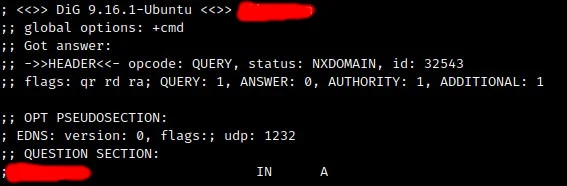
The image shows the dig output for the domain, confirming the NXDOMAIN result.
The author then went to https://ovh.com and checked whether the domain could be bought. It could, so the issue was reported. The link was removed and the author was rewarded 100 USD.
Step 2: the CDN takeover
The second finding was more interesting: a subdomain of azureedge.net.
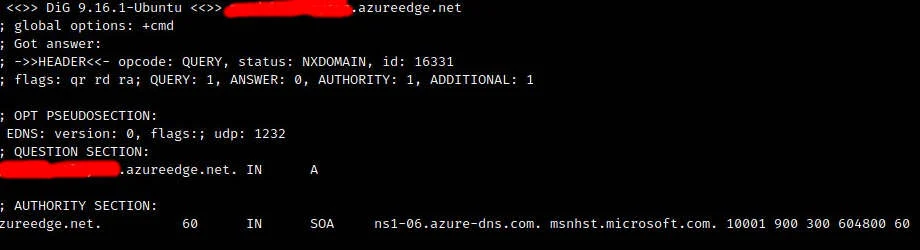
The image shows the broken link entry pointing at the azureedge.net subdomain.
The author is not an Azure specialist, so after some searching identified the domain as part of the Microsoft Azure CDN service. The steps taken in the Azure portal were:
- Log in to the Azure account.
- Select "Front doors and CDN profiles".
- Select "Explore other offers" and then "Azure CDN Standard".
- Check whether the profile can be created.
The author saw the green tick confirming the profile could be created. The report notes that sometimes even if dig shows NXDOMAIN status, the resource cannot be taken over, so this check matters.
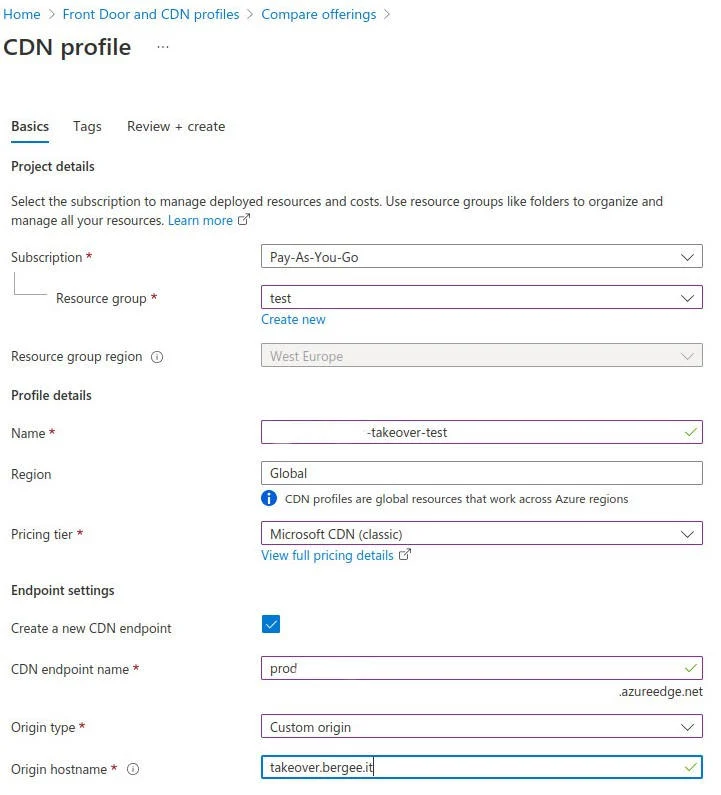
The image shows the green tick in the Azure portal after checking that the CDN profile could be created.
To build the proof of concept, the author set the origin hostname to their own subdomain. The next step was to create the endpoint for the CDN, which is where the files are served from. The endpoint can be edited by entering the CDN profile and going to "Sources", where the source for the endpoint can be changed. No screenshot of this step is included. After these steps, prodcdnexample.azureedge.net was taken over, and the author could serve files from it simply by putting them on their own VPS.
The broken links pointing to the CDN were only PDF files, so the damage there was limited. The author could, however, serve malicious PDFs containing, for example, malicious links or misleading information. If the CDN had been used for serving JavaScript code, the author notes, much more harm would have been possible.
The issue was reported and rewarded with 100 USD.
Root cause
The site linked to external resources that were no longer under anyone's control: an expired domain and an Azure CDN subdomain whose profile no longer existed. Because the links stayed on the page, whoever re-registered the domain or recreated the CDN profile could control the content served through those links. The report does not describe any server-side validation or monitoring that would have caught this; the only defence mentioned is the manual check that the resource can actually be recreated, since NXDOMAIN alone does not guarantee a takeover is possible.
Impact
For the expired domain, the impact was that the author could buy the domain and control whatever the link pointed to. For the CDN, the author could serve arbitrary files from prodcdnexample.azureedge.net by hosting them on their own VPS. In this case the affected links were only PDFs, so the realistic impact was limited to malicious PDFs with malicious links or misleading information. The author notes that if the CDN had been used to serve JavaScript, the impact would have been much greater. Both findings were on the author's own site, bergee.it.
Fix
For the expired domain the report states the link was removed; for the CDN issue it only says the issue was reported and rewarded. The author does not describe any other change.
Variants to test
- Run the same scan on other sites with
blc -rand a chosen filter level, then look forERRNO_ENOTFOUNDentries. A positive result is an external link whose domain returns NXDOMAIN and can be registered at a registrar. - Check links to cloud CDN subdomains such as
azureedge.net. A positive result is a subdomain for which the provider lets you create a new profile and endpoint with a matching name, confirmed by the green tick in the portal. - Check links to social media profiles and other account-based services. A positive result is a link to a profile or account name that is no longer registered and can be claimed.
- Deduplicate links before scanning, as the author suggests, to avoid repeated checks of footer links and to make recursive scans practical on larger sites.
- Remember the limit: statuses such as 500, 404, 403 and 999 mean the link is not broken, and NXDOMAIN alone does not guarantee takeover, so always verify that the resource can actually be recreated before reporting.
What happened, in plain words
A website is made of pages, and pages contain links. Most links point to other pages on the same site, but some point outwards, to other websites, to files stored somewhere else, or to profiles on social media. When one of those outside destinations stops existing, the link on the page still sits there, pointing at nothing. That is what people call a broken link.
Normally a broken link is just an annoyance. But there is a catch: if the thing the link points to can be registered again by anyone, then someone else can claim it and decide what appears when a visitor clicks that link. The visitor trusts the original site, clicks the link, and lands on content that a stranger now controls. This trick is called broken link hijacking.
This write-up is about hunting for exactly that on a website. The author scanned their own site, bergee.it, looking for outside links whose destination no longer exists. Two such links turned up. One pointed to a domain name that had expired and could simply be bought again. The other pointed to a piece of Microsoft's cloud content delivery service, which could be recreated under the same name. Each finding earned 100 USD.
One important rule before we start: only outside links matter. If you scan https://example.com, you cannot take control of links that stay inside https://example.com, because that site belongs to its owner. The exception is subdomains of example.com that can be taken over, but that is a different story. Here we care about links that leave the site.
The tools
The author began with two free websites that check links for you:
https://www.deadlinkchecker.com/website-dead-link-checker.asphttps://www.brokenlinkcheck.com
You paste a web address, the service visits the pages and tells you which links are dead. Handy, but with two limits: they check only up to 2000 links, and they cannot skip the site's own internal links. On a real site that is not enough, because you want to focus on the outside links and you may have far more than 2000 of them.
So the author switched to a program that runs on your own computer, a package called broken-link-checker, published on npm:
https://www.npmjs.com/package/broken-link-checker
npm is a public library of ready-made programs for JavaScript, and installing a package means downloading that program so you can run it from a terminal. This particular program can be told to ignore internal links and has several filtering options. You choose how deep it looks, from this list:
- clickable links
- clickable links, media, iframes, meta refreshes
- clickable links, media, iframes, meta refreshes, stylesheets, scripts, forms
- clickable links, media, iframes, meta refreshes, stylesheets, scripts, forms, metadata
In plain terms, level 1 only looks at things a visitor can click. Higher levels also look at images and videos (media), embedded pages (iframes), automatic redirects written into the page (meta refreshes), style files, scripts, forms and page metadata. The higher the level, the more links you find, and the longer the scan takes.
For the second finding the author also needed a personal Microsoft Azure account. Azure is Microsoft's cloud platform: you rent storage, servers and services there and pay for what you use. The author logged in to the Azure portal, the web dashboard for managing those services, and worked in a section called "Front doors and CDN profiles". No other accounts or roles are mentioned.
Finding it
This is the command the author used to collect all broken links from the site:
$ blc -r –filter-level 2 -i https://example.com –user-agent “Mozilla/5.0 (Windows NT 10.0; Win64; x64; rv:109.0) Gecko/20100101 Firefox/109.0” | grep BROKEN | tee -a broken_links
Line by line, in plain words:
blcis the short name of the installed program. Running it starts the scan.-rmeans recursive. If the program finds a link to something likehttps://helloworld.example.comonhttps://example.com, it follows that link and starts checking all the links on that site too. This makes the process much slower, but it is the only way to scan all the links on the site.–filter-level 2picks the second search level from the list above: clickable links, media, iframes and meta refreshes.-i https://example.comis the site to scan.--user-agentsets the browser identification string the program sends. Websites often behave differently for unknown programs, so pretending to be Firefox makes the scan look like a normal visitor.grep BROKENis a filter: out of everything the program prints, keep only the lines containing the word BROKEN.tee -a broken_linkswrites those lines into a file calledbroken_linksand also shows them on screen. The-ameans append, so a second run adds to the file instead of wiping it.
The author points out a practical problem with -r. If the site has several sections and a footer with links pointing outside, all the sections get scanned and the footer links get checked over and over again, once per page. A better approach would be to gather all links first, remove duplicates, and scan only the unique ones.
The results worth looking at are links that return some kind of ERROR, especially ERRNO_ENOTFOUND, which usually means the domain does not exist at all. Statuses such as 500, 404, 403 and 999 mean the link is not broken: the server answered, so there is nothing to take over. A 404, for example, is the familiar "page not found" reply, but the server itself is alive and owned by someone.
Exploitation
Step 1: the expired domain
When the script finished, the author opened the output file and read through it. Two ERRNO_ENOTFOUND entries stood out. The first pointed to someexpireddomain.com. To be sure the domain really does not exist, the author checked it with dig.
dig is a small command-line tool that asks the internet's address book, the DNS system, what a domain name resolves to. DNS is what turns a name like example.com into the numeric address of a server. If the answer is NXDOMAIN, short for non-existent domain, the name is not registered by anyone.
The image shows the dig output for the domain, confirming the NXDOMAIN result.
With the domain confirmed as non-existent, the author went to https://ovh.com, a company that sells domain names, and checked whether the name could be bought. It could. That is the whole finding: anyone could register that domain and then control whatever the link on the site pointed to. The issue was reported, the link was removed, and the author was rewarded 100 USD.
Step 2: the CDN takeover
The second finding was more interesting. This time the broken link pointed to a subdomain of azureedge.net.
The image shows the broken link entry pointing at the azureedge.net subdomain.
A subdomain is a name that sits under a larger one, like a room inside a building. Here the building is azureedge.net, which belongs to Microsoft. A CDN, short for content delivery network, is a service that stores copies of files in many places around the world so that visitors download them quickly from a nearby location. Think of it as a chain of local warehouses instead of one central depot. Microsoft's version is called Azure CDN, and customers create a profile and an endpoint inside it, then serve their files through a name under azureedge.net.
The author is not an Azure specialist, so after some searching identified the domain as part of the Microsoft Azure CDN service. The steps taken in the Azure portal were:
- Log in to the Azure account.
- Select "Front doors and CDN profiles".
- Select "Explore other offers" and then "Azure CDN Standard".
- Check whether the profile can be created.
The author saw the green tick confirming the profile could be created. That check matters because sometimes even if dig shows NXDOMAIN status, the resource cannot be taken over. Seeing the green tick is the proof that this particular name is available.
The image shows the green tick in the Azure portal after checking that the CDN profile could be created.
To build the proof of concept, the author set the origin hostname to their own subdomain. The origin is the place the CDN fetches the real files from, so pointing it at a server the author controls means the CDN will serve whatever the author puts there. The next step was to create the endpoint for the CDN, which is where the files are served from. The endpoint can be edited by entering the CDN profile and going to "Sources", where the source for the endpoint can be changed. No screenshot of this step is included. After these steps, prodcdnexample.azureedge.net was taken over, and the author could serve files from it simply by putting them on their own VPS.
A VPS is a virtual private server: a rented machine on the internet that you fully control, which is where the author hosted the files. So the chain was: the site's link pointed at the Azure name, the Azure name now belonged to the author's new profile, and that profile pulled its files from the author's own server.
The broken links pointing to the CDN were only PDF files, so the damage there was limited. The author could, however, serve malicious PDFs containing, for example, malicious links or misleading information. A visitor who trusts the original site would click the link and receive a document that looks official but is not. If the CDN had been used for serving JavaScript code, the author notes, much more harm would have been possible, because JavaScript is code that runs in the visitor's browser and can do far more than a document.
The issue was reported and rewarded with 100 USD.
Root cause
The site linked to outside resources that were no longer under anyone's control: an expired domain and an Azure CDN subdomain whose profile no longer existed. Because the links stayed on the page, whoever re-registered the domain or recreated the CDN profile could control the content served through those links. The report does not describe any server-side validation or monitoring that would have caught this; the only defence mentioned is the manual check that the resource can actually be recreated, since NXDOMAIN alone does not guarantee a takeover is possible.
Impact
For the expired domain, the impact was that the author could buy the domain and control whatever the link pointed to. For the CDN, the author could serve arbitrary files from prodcdnexample.azureedge.net by hosting them on their own VPS. In this case the affected links were only PDFs, so the realistic impact was limited to malicious PDFs with malicious links or misleading information. The author notes that if the CDN had been used to serve JavaScript, the impact would have been much greater. Both findings were on the author's own site, bergee.it.
Fix
For the expired domain the report states the link was removed; for the CDN issue it only says the issue was reported and rewarded. The author does not describe any other change.
Variants to test
- Run the same scan on other sites with
blc -rand a chosen filter level, then look forERRNO_ENOTFOUNDentries. A positive result is an outside link whose domain returns NXDOMAIN and can be registered at a registrar, a company that sells domain names. - Check links to cloud CDN subdomains such as
azureedge.net. A positive result is a subdomain for which the provider lets you create a new profile and endpoint with a matching name, confirmed by the green tick in the portal. - Check links to social media profiles and other account-based services. A positive result is a link to a profile or account name that is no longer registered and can be claimed.
- Remove duplicate links before scanning, as the author suggests, to avoid repeated checks of footer links and to make recursive scans practical on larger sites.
- Remember the limit: statuses such as 500, 404, 403 and 999 mean the link is not broken, and NXDOMAIN alone does not guarantee takeover, so always verify that the resource can actually be recreated before reporting.
Glossary
- Broken link: a link on a page whose destination no longer exists.
- Broken link hijacking: claiming a broken link's destination so that you control what visitors see when they click it.
- Domain name: the readable name of a website, such as
example.com, which is rented from a registrar. - Subdomain: a name placed under a larger domain, such as
shop.example.comunderexample.com. - DNS: the internet's address book, which turns domain names into server addresses.
- NXDOMAIN: the DNS answer meaning the domain name does not exist.
dig: a command-line tool that queries DNS for a domain name.- Registrar: a company that sells and manages domain names, such as the one used in this report.
- npm: a public library of ready-made JavaScript programs that you can download and run.
- Terminal / console: a text window where you type commands instead of clicking buttons.
- Recursive scan (
-r): a scan that follows links to other sites and checks those too. - User agent: the identification string a browser or program sends to a website to say what it is.
grep: a command that keeps only the lines matching a word or pattern.tee: a command that writes output to a file while also showing it on screen.- HTTP status code: the short number a server replies with, such as 404 for not found or 500 for a server error.
- CDN (content delivery network): a service that stores copies of files in many locations so visitors download them quickly.
- Azure: Microsoft's cloud platform for renting servers, storage and services.
- Azure CDN profile and endpoint: the customer's container and public name inside Azure's CDN service.
- Origin hostname: the server a CDN fetches the real files from.
- Proof of concept (POC): a small, safe demonstration that a weakness is real.
- VPS (virtual private server): a rented machine on the internet that you fully control.
- PDF: a document file format, often used for reports and brochures.
- JavaScript: code that runs inside a visitor's browser and can change what the page does.
- Root cause: the underlying reason a weakness exists.
- Impact: what an attacker could realistically do because of the weakness.
- Reward / bounty: money paid for reporting a valid security issue.