Blind account takeover
The signup form accepted two email addresses separated by a semicolon, and the activation link was sent to both addresses but led to the same account. An attacker could craft a link with the victim's email and their own email hidden by spaces, so that when the victim signed up, the attacker could also open the activation link and take over the account.
 Published on bergee.it
In this story, I’m gonna tell you how I was able to take over an account due to a lack of server-side email verification. To register an account, the user had to enter an email and then got the activation link.
The full write-up lives on its author's site
It belongs to its author, so we link to it rather than copy it. The other two tabs are our own rewrites, checked against it.
Context
The target was a site whose main page offered account registration. To register, a user entered an email address and then received an activation link by email. That registration and activation flow was the whole of the feature under test: enter an email, get a link, click it, and land in the account.
The researcher, Bartłomiej Bergier (@bergee), spent time on this functionality on the main site. The format of the activation link itself is not described as important to the finding. What mattered was how the email address was carried into the signup page and how the server handled it.
Setup
No special tooling is described. The work was done by hand against the live registration feature, using two mailboxes to observe what the server sent. The researcher used a private browser window to open the second activation link while keeping the first session separate, which is how the shared account became visible.
The precondition for the attack is simply that the registration form accepts an email address and that the activation link is delivered to whatever address or addresses the server parses out of it.
Finding it
The researcher entered an email, received the activation link, and played with it without finding anything of interest. The idea that broke it open was simple: what happens if two email addresses are submitted separated by a semicolon?
[redacted];[redacted]
After submitting that, two identical messages arrived, one in each mailbox. Opening the first link from [redacted] and editing some account details, then opening the link from the second mailbox in a private window, led to the same account with the edited details still in place. Both addresses had been treated as belonging to one registration.
That is the point where it looked wrong: two distinct addresses should not resolve to a single account, and an activation link sent to one of them should not grant access to an account whose data was set up through the other.
The researcher also noticed that the entered email address is encoded in BASE64 and placed into the URL as the value of the user parameter. For a single address such as [redacted], the link looks like this:
https://target.com/signup/?user=YWNjb3VudEBtYWlsLmNvbQ==
Exploitation
Step 1: craft the link with both addresses
To abuse the behaviour for account takeover, one address has to belong to the attacker and the other to the victim. The pair is BASE64 encoded and placed in the user parameter. With:
[redacted];[redacted]
the link becomes:
https://target.com/signup/?user=[redacted]

The image relates to the crafted signup URL with the BASE64 value in the user parameter.
Step 2: hide the attacker address from the victim
A victim who opens that URL sees both email addresses in the input form and will immediately notice that something is wrong. The researcher's trick was to hide the attacker address by putting spaces before the second email. Those spaces are probably trimmed on the server side anyway. The payload is:
[redacted]; [redacted]
The researcher notes that spaces could probably also be inserted after the first email so that the semicolon would not be visible to the victim either, but that was not tested at the time. The resulting URL is:
https://target.com/signup/?user=[redacted]==
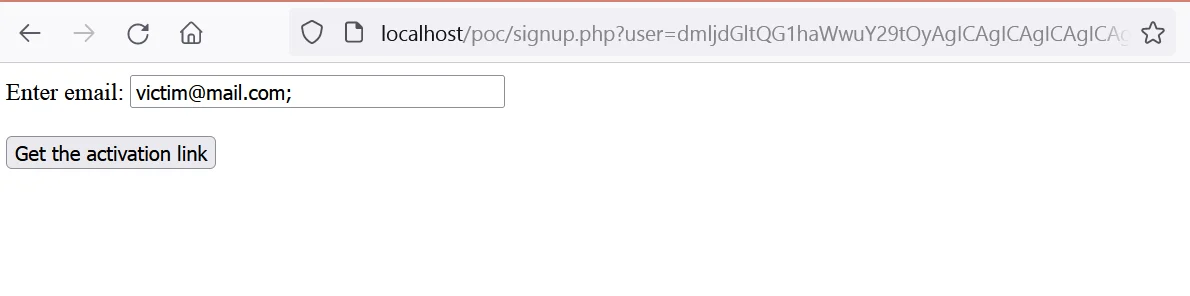
The image relates to the padded BASE64 value in the signup URL.
Step 3: deliver the link and let the victim submit the form
The attacker creates the link containing the BASE64 encoded addresses as above and delivers it to the victim. The victim opens the link and submits the form. The activation link is then delivered to both the attacker's and the victim's mailbox.
Step 4: wait, then activate
The activation link is valid for 3 hours. The attacker therefore has to wait as long as possible for the victim to sign up and enter personal data before using the link. When the attacker opens the activation link, the victim's account is taken over.
Root cause
The server accepted a single user value containing two addresses separated by a semicolon and treated both as belonging to the same registration, sending the same activation link to each. The activation link then authorised access to the account regardless of which of the two addresses it had been sent to. In other words, the email verification step did not bind the activation to exactly one verified address, and the account created through the form was shared between both addresses.
The BASE64 encoding of the user parameter is only a transport detail; it does not prevent the semicolon from being interpreted after decoding. The padding with spaces worked because the server likely trims whitespace before parsing the addresses, so the attacker address remained part of the value while being pushed out of the visible input field.
Impact
An attacker can take over a newly created account by getting the victim to register through a crafted link. The attacker then opens the activation link, which was also delivered to the attacker's mailbox, and gains access to the account with whatever personal data the victim entered.
The attack is not perfect, for the reasons the researcher gives:
- The attacker does not know whether the victim has already signed up and entered personal data. If the attacker opens the activation link before the victim does, the attack fails. This is why the post is titled "Blind account takeover".
- When the victim opens the URL with the crafted GET
userparameter, a red error message saying "The email is invalid" is visible just below the input field. This might alert the victim, although users tend not to read messages. - Only newly created accounts can be taken over with this method.
Because of these limits, the severity was marked as low and the reward was 250 USD.
Fix
The report does not describe any fix that was applied. The behaviour that needs to change is the server-side handling of the user value: it should accept exactly one email address, reject values containing a semicolon or multiple addresses, and bind the activation link to that single address so that possession of the link sent to one mailbox cannot authorise an account registered with another.
Variants to test
- Submit two addresses separated by a semicolon in any registration or email-change form and check whether both mailboxes receive the same activation link. A positive result is two identical messages and one account reachable from either link.
- Try other separators and combinations, such as commas or multiple semicolons, where the application parses an address list. A positive result is the same shared-account behaviour with a different delimiter.
- Pad the second address with spaces or other whitespace to hide it in the rendered input, and check whether the server trims it and still parses both addresses. A positive result is a form that shows one address while the server acts on two.
- Apply the same idea to password reset and email change flows, where a link is sent to an address taken from user input. A positive result is a reset or confirmation link delivered to an attacker-controlled mailbox for an account the attacker does not own.
- Test whether the activation link is bound to the address it was sent to, for example by requesting it for one address and using it against an account registered with another. A positive result is a link that works across addresses.
What happened, in plain words
A website let people create an account by typing in an email address. The site then sent an activation link to that address. Clicking the link confirmed the address and opened the account.
The researcher, Bartłomiej Bergier (@bergee), was poking at this registration form on the main site. He tried one simple idea: what if you type two email addresses into the box, separated by a semicolon (the ; character)? The server accepted it, sent the same activation link to both mailboxes, and both links opened the same account. That meant an attacker could put their own address next to the victim's, get the victim to register through a crafted link, and then use the activation link that also arrived in the attacker's own mailbox to get into the victim's account.
This is called an account takeover: someone else ends up in control of an account that is not theirs. The report calls it a blind account takeover because the attacker cannot see when the victim has finished registering, so the timing is a gamble.
The reward was 250 USD and the severity was marked as low, because the attack has several limits.
The feature under test
To understand the bug you only need to know what the registration flow looked like:
- You open the main page of the site.
- You type an email address into a form.
- The site sends you an email containing an activation link.
- You click the link and you are inside your new account.
That is the whole feature. There is no mention of a password, a username, or anything else in the flow. The email address is the identity.
A useful everyday comparison: think of the activation link as a claim ticket at a cloakroom. You hand in your coat (your email address), you get a ticket (the link), and whoever holds the ticket can collect the coat. The question the researcher asked was: what happens if two people hand in coats and both get the same ticket?
How the researcher worked
The work was done by hand, in a normal browser, against the live registration feature. No special tools are described. Two mailboxes were used so the researcher could see what the server sent to each address. A private browser window was used to open the second activation link while keeping the first session separate.
A private window (often called incognito) is a browser window that does not share cookies or logged-in state with your normal windows. Cookies are small pieces of data a site stores in your browser to remember who you are between page loads. Keeping the two windows separate meant the researcher could tell whether the second link really opened the same account, rather than just seeing a session that was already logged in.
The only precondition for the attack is that the registration form accepts an email address and that the activation link is delivered to whatever address or addresses the server picks out of it.
Finding it
The researcher entered an email, received the activation link, and played with it for a while without finding anything interesting. The format of the link itself is not described as important to the finding.
Then came a very simple idea: what if two email addresses are submitted, separated by a semicolon? Like this:
[redacted];[redacted]
Line by line: this is just a single line of text containing two email addresses with a ; between them. It is what you would type into the email field of the registration form. The semicolon is a common way to separate items in a list, so the researcher was testing whether the server would read this as a list of two addresses rather than reject it.
After submitting that, two identical messages arrived, one in each mailbox. The researcher opened the first link from [redacted] and edited some account details. Then, in a private window, he opened the link from the second mailbox. He was taken to the same account, with the edited details still in place. Both addresses had been treated as belonging to one registration.
That is the point where it looked wrong. Two distinct addresses should not resolve to a single account, and an activation link sent to one of them should not grant access to an account whose data was set up through the other.
The researcher also noticed that the entered email address is encoded in BASE64 and placed into the URL as the value of the user parameter. For a single address such as [redacted], the link looks like this:
https://target.com/signup/?user=YWNjb3VudEBtYWlsLmNvbQ==
Line by line:
https://target.com/signup/is the address of the signup page on the site.?starts the query string, the part of a URL that carries extra information to the page.user=is the name of the parameter. A parameter is a named value in a URL, like a label on a form field.YWNjb3VudEBtYWlsLmNvbQ==is the value. It looks like random letters, but it is BASE64.
BASE64 is a way of writing data using only letters, digits and a couple of symbols, so it can travel safely inside a URL. It is not encryption: anyone can decode it. If you decode YWNjb3VudEBtYWlsLmNvbQ== you get [redacted]. The site used it so the email address could sit in the URL without special characters like @ causing trouble.
Exploitation
Step 1: craft the link with both addresses
To abuse the behaviour for account takeover, one address has to belong to the attacker and the other to the victim. The pair is BASE64 encoded and placed in the user parameter. With:
[redacted];[redacted]
the link becomes:
https://target.com/signup/?user=[redacted]
Line by line:
- The first line is the pair of addresses the attacker wants the server to see: the victim's address first, then a semicolon, then the attacker's address.
- In the URL,
user=still names the parameter. [redacted]is that pair encoded in BASE64. Decoded, it is[redacted];[redacted].
The image relates to the crafted signup URL with the BASE64 value in the user parameter.
Why this step: the attacker cannot type into the victim's browser. But the attacker can send the victim a link. If the link already carries both addresses, the victim only has to open it and submit the form, and the server will do the rest.
Step 2: hide the attacker address from the victim
A victim who opens that URL sees both email addresses in the input form and will immediately notice that something is wrong. The researcher's trick was to hide the attacker address by putting spaces before the second email. Those spaces are probably trimmed on the server side anyway. The payload is:
[redacted]; [redacted]
Line by line: this is the same pair of addresses, but a long run of spaces sits between the semicolon and [redacted]. The spaces push the attacker's address out of view, so the victim does not see it.
The researcher notes that spaces could probably also be inserted after the first email so that the semicolon would not be visible to the victim either, but that was not tested at the time. The resulting URL is:
https://target.com/signup/?user=[redacted]==
Line by line:
user=names the parameter, as before.- The long BASE64 value is the padded pair. Decoded, it is
[redacted];followed by many spaces and then[redacted]. - The spaces are part of the encoded value, which is why the string is so much longer than in step 1.
The image relates to the padded BASE64 value in the signup URL.
Why this step: the attack only works if the victim actually submits the form. A victim who sees a strange second address will stop. Hiding it makes the form look normal. The server is expected to trim whitespace around an address before using it, so the spaces do not stop the attacker's address from being parsed.
Step 3: deliver the link and let the victim submit the form
The attacker creates the link containing the BASE64 encoded addresses as above and delivers it to the victim. The victim opens the link and submits the form. The activation link is then delivered to both the attacker's and the victim's mailbox.
Why this step: the victim's own action is what creates the account. The attacker needs the victim to fill in the form, because the account is meant to hold the victim's personal data. The attacker's mailbox receives the same activation link because the server treats both addresses as part of one registration.
Step 4: wait, then activate
The activation link is valid for 3 hours. The attacker therefore has to wait as long as possible for the victim to sign up and enter personal data before using the link. When the attacker opens the activation link, the victim's account is taken over.
Why this step: the attacker wants the account after the victim has put something in it. Opening the link before the victim has signed up and entered personal data would make the attack fail. The 3 hour window is the attacker's deadline.
Why it worked
The server accepted a single user value containing two addresses separated by a semicolon and treated both as belonging to the same registration, sending the same activation link to each. The activation link then authorised access to the account regardless of which of the two addresses it had been sent to. In other words, the email verification step did not bind the activation to exactly one verified address, and the account created through the form was shared between both addresses.
The BASE64 encoding of the user parameter is only a transport detail. It does not prevent the semicolon from being interpreted after decoding. The padding with spaces worked because the server likely trims whitespace before parsing the addresses, so the attacker address remained part of the value while being pushed out of the visible input field.
A comparison: imagine a hotel that gives one room key to two guests because their names were written on the same line of the booking sheet. The key does not know which guest it belongs to. Here, the activation link did not know which address it belonged to either.
What an attacker gets
An attacker can take over a newly created account by getting the victim to register through a crafted link. The attacker then opens the activation link, which was also delivered to the attacker's mailbox, and gains access to the account with whatever personal data the victim entered.
The attack is not perfect, for the reasons the researcher gives:
- The attacker does not know whether the victim has already signed up and entered personal data. If the attacker opens the activation link before the victim does, the attack fails. This is why the post is titled "Blind account takeover".
- When the victim opens the URL with the crafted GET
userparameter, a red error message saying "The email is invalid" is visible just below the input field. This might alert the victim, although users tend not to read messages. - Only newly created accounts can be taken over with this method.
A GET parameter is simply a parameter sent in the URL, as opposed to one sent in the body of a form submission. The report does not explain why the error message appears.
Because of these limits, the severity was marked as low and the reward was 250 USD.
What should change
The report does not describe any fix that was applied. The behaviour that needs to change is the server-side handling of the user value: it should accept exactly one email address, reject values containing a semicolon or multiple addresses, and bind the activation link to that single address so that possession of the link sent to one mailbox cannot authorise an account registered with another.
Other places to look
- Submit two addresses separated by a semicolon in any registration or email-change form and check whether both mailboxes receive the same activation link. A positive result is two identical messages and one account reachable from either link.
- Try other separators and combinations, such as commas or multiple semicolons, where the application parses an address list. A positive result is the same shared-account behaviour with a different delimiter.
- Pad the second address with spaces or other whitespace to hide it in the rendered input, and check whether the server trims it and still parses both addresses. A positive result is a form that shows one address while the server acts on two.
- Apply the same idea to password reset and email change flows, where a link is sent to an address taken from user input. A positive result is a reset or confirmation link delivered to an attacker-controlled mailbox for an account the attacker does not own.
- Test whether the activation link is bound to the address it was sent to, for example by requesting it for one address and using it against an account registered with another. A positive result is a link that works across addresses.
Lesson learned
Do not assume anything upfront while testing things. The bugs might be on the main site even if the program has already dozens of solved reports.
Glossary
- Account takeover: a situation where someone gains control of an account that belongs to another person.
- Activation link: a link sent by email that confirms an address and opens or enables an account.
- API: a way for one piece of software to talk to another, usually by sending requests to specific addresses and getting structured answers back.
- Attacker: the person trying to abuse the feature.
- BASE64: an encoding that turns data into letters, digits and a few symbols so it can travel safely in a URL. It is not encryption and anyone can decode it.
- Blind: an attack where the attacker cannot see the result of the victim's actions and has to guess the timing.
- Cookie: a small piece of data a site stores in your browser to remember who you are between page loads.
- Email verification: the step where a site checks that an address really belongs to the person using it, usually by sending a link.
- GET parameter: a named value placed in a URL after the
?, such asuser=.... - Parameter: a named value passed to a page or program, like a label on a form field.
- Payload: the crafted input an attacker sends to try to trigger a bug.
- Private window: a browser window that does not share cookies or logged-in state with your normal windows.
- Query string: the part of a URL after the
?that carries parameters. - Root cause: the underlying mistake in the code or design that makes a bug possible.
- Semicolon: the
;character, often used to separate items in a list. - Server-side: happening on the server, the computer that runs the website, rather than in the visitor's browser.
- Session: the period during which a site remembers that you are logged in.
- Severity: how serious a bug is judged to be, often used to decide the reward.
- Token: a piece of data, often a long random string, that proves who you are or grants access to something.
- Trim: to remove spaces or other whitespace from the start and end of a piece of text.
- URL: the address of a page or resource on the web.
- Victim: the person whose account the attacker is trying to take over.
- Vulnerability: a weakness in a system that can be used to make it behave in a way its owners did not intend.