Bugbounty writeup : Take Attention and get stored XSSS
The company name field allowed HTML characters, which were not filtered when sending invitation emails or displaying internal notifications. An attacker could create a company with a malicious name and invite users, causing stored XSS in the notification page and HTML injection in emails.
 Published on medium.com
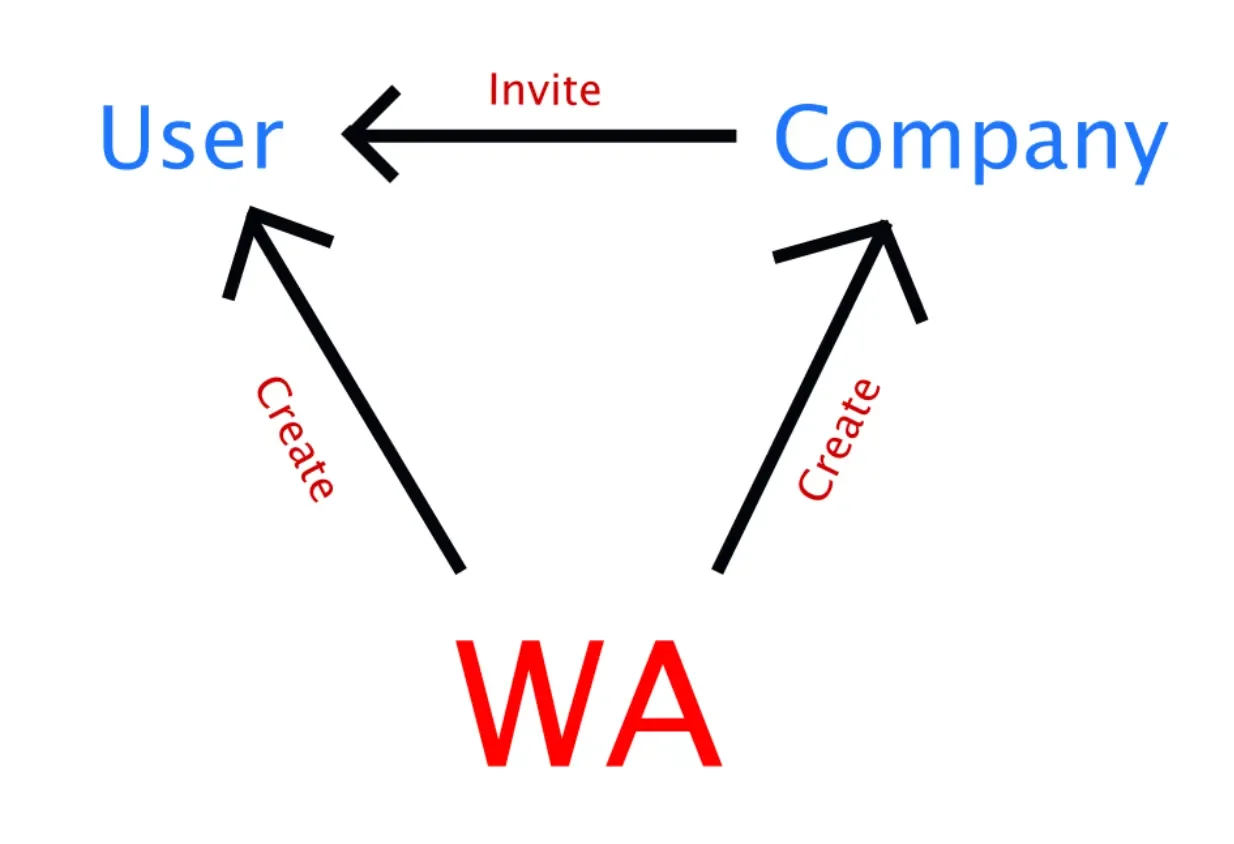
So, let’s imagine that we have a Web Application “WA”, that allows you to create users, companies and invite users to the company.
The full write-up lives on its author's site
It belongs to its author, so we link to it rather than copy it. The other two tabs are our own rewrites, checked against it.
Context
The target described here is a web application, referred to in the report simply as "WA", that lets users create users, create companies and invite users to a company. The invitation feature is the interesting part: when someone is invited, the application sends them an email saying that they have been invited to join a company, with a link to accept the invitation. The same invitation also produces an internal notification inside the application, which the invited user sees on the notification page as a popup window describing the invitation.
The report was published on 14 August 2019 by Oleksandr Opanasiuk (@Lekssik2). The weakness is stored cross-site scripting. The report does not name the application, the program or the bounty amount (the reward is only described as "a good xxxx reward").
Setup
No special tooling is described. The researcher worked with ordinary accounts on the application: the ability to create a company, the ability to invite users to that company, and access to the invited user's mailbox and notification page. The precondition for the whole attack is that the application lets the person creating a company choose its name, and that this name is later rendered in the invitation email and in the in-app notification without HTML filtering.
Finding it
The researcher's own framing is that the bug came from paying attention to minor features. The invitation flow is a small feature, but it takes a value controlled by one user (the company name) and reflects it into content shown to other users (the invite email and the notification).
The first observation was that the site allowed the company name to contain characters such as < and >. That alone is suspicious in a value that ends up in an email body, because the email is generated and sent on behalf of the web application.

Exploitation
Step 1: Put markup in the company name
The normal invitation email reads: "You were invited to join company Hackerman. Accept invite[link]". Because the company name accepted angle brackets, the researcher set the company name to contain HTML markup.

Step 2: Observe the injected HTML in the email
The invitation email that arrived contained the injected markup rather than the literal characters. This means the application can be made to generate HTML messages and send them on behalf of the web application to any invited address.
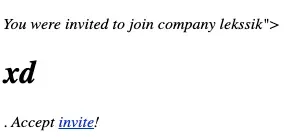
The researcher notes that this alone is reportable, and mentions having previously found a similar issue on the site of a mobile company, where parameters in the registration POST request could be changed so that the account confirmation link arrived with broken HTML.
Step 3: Check the internal notification
Rather than stopping at the email, the researcher explored the site further and found that the application also has internal notifications telling a user they were invited. Opening the notification page shows a window about the invitation, and that page did not filter HTML either.
Step 4: Register the company with an XSS payload
The company was registered with the following name:
a"><svg\onload=alert(1)>
The report gives the payload without explaining which context it breaks out of. The backslash before onload is part of the exact string used in the report.
Step 5: Trigger it through invitations
Every user who is invited to that company receives a notification about the invitation. When the notification is rendered, the payload executes, which makes this a stored XSS affecting all invited users rather than only the researcher.

Root cause
The company name is user-controlled input that is stored and later rendered in two output contexts: the invitation email body and the in-app notification window. Neither output encoded or filtered HTML, so markup in the name was interpreted by the mail client and by the browser. The report does not describe the server-side code, so the exact place where output encoding was missing is not shown; The report does not describe the server-side code or where encoding was missing.
Impact
An attacker who can create a company and invite users can execute JavaScript in the context of the application for every invited user who opens the notification. The same input also lets the attacker generate HTML content in emails sent by the application to arbitrary invited addresses. The report does not demonstrate any further escalation such as session theft or account takeover; the researcher explicitly reflects that more could have been done with the stored XSS, up to P1, and encourages readers to take the maximum impact from any vulnerability.
Fix
Disclosure note
After the report was confirmed, a team member told the researcher that the email issue was a duplicate, but that the previous hacker had not mentioned the stored XSS. The researcher notes that the earlier reporter had not mentioned the stored XSS.
Variants to test
- Invite flows in other applications: create an organisation, team or workspace whose name is attacker-controlled, invite a second account, and check the invitation email source. A positive result is markup from the name appearing unencoded in the email body.
- In-app notification centres: after the same invitation, open the notification list and the notification detail popup. A positive result is the payload executing when the notification is rendered.
- Other stored name fields that are echoed to different users (display names, project names, group names): set a benign marker such as
<b>x</b>and look for bold rendering in every place the value appears. - Different output contexts: attribute values, JavaScript strings and URLs need different break-out syntax. A positive result is execution with a payload shaped for that specific context, as with the
">break-out used here. - Email templates generally: any field that reaches a transactional email (registration confirmation, password reset, sharing notice) is worth testing, since HTML injection there can be used for phishing from a trusted sender.
What happened, in plain words
A security researcher found a bug in a website that lets people create accounts, create companies, and invite other people to join those companies. The bug is called stored cross-site scripting, or stored XSS for short. The word "stored" matters: the harmful text the attacker types is saved by the website and later shown to other people, so the attacker does not need to be present when it fires.
Here is the everyday comparison. Imagine a noticeboard in an office where anyone can pin a note. If the office manager reads every note and copies it neatly onto official letterhead, nothing bad happens. But if the manager just pins your note straight onto the official board without reading it, you can write something that looks like an official instruction, and everyone who walks past will believe it. A website that stores text and shows it to other users without checking it is that careless manager.
The researcher noticed that the company name could contain the characters < and >. In a web page, those characters are not ordinary text: they are the punctuation of HTML, the language browsers use to describe pages. If a website puts your text into a page without neutralising those characters, the browser treats your text as instructions rather than as words. The researcher put a small instruction into the company name, and invited users received notifications about the invitation.
The report was published on 14 August 2019 by Oleksandr Opanasiuk (@Lekssik2). The report does not name the application, the bug bounty program, or the amount paid; the reward is only described as "a good xxxx reward".
The pieces of the application you need to know
Before the steps make sense, here are the parts of the application involved, explained from scratch.
- Web application: a program that runs on a server somewhere and that you use through your browser. When you click a button, your browser sends a request over the internet, the server does some work, and it sends back a page. You never see the server itself, only what it sends.
- User account: a record on the server that represents one person, with a username and a password so the server can tell people apart.
- Company (in this application): a group that a user can create, with a name chosen by that user. Other users can then be invited into the group.
- Invitation: the action of asking another user to join a company. The application handles this in two ways at once: it sends an email to the invited person, and it creates an internal notification inside the application.
- Notification: a message shown inside the application itself, not by email. The invited user sees a popup window on the notification page describing the invitation.
- HTML: the language browsers use to lay out pages. Ordinary words are text; anything between
<and>is a tag, an instruction to the browser such as "draw an image" or "make this bold". - Attribute: a setting written inside a tag, such as the address of an image. Attributes are usually written in quotes, for example
src="picture.png". - JavaScript: the programming language browsers run inside pages. It is what makes pages interactive, and it is also what an attacker wants to run, because JavaScript in a page can read and change what the page shows.
- Cross-site scripting (XSS): a bug where an attacker gets their own text treated as HTML or JavaScript by someone else's browser. "Stored" means the text was saved on the server first, so it reaches many victims later.
- Stored XSS: the specific kind where the harmful text is saved, for example in a company name, and then displayed to other users whenever they view the place where it appears.
- Payload: the exact piece of text an attacker types to make the bug happen. It is crafted to fit the place where it will land.
- Output encoding (escaping): the defence. Before showing user text in a page, the application replaces characters like
<with a safe code such as<, so the browser displays them as literal characters instead of treating them as tags. - Filtering / validation: checking input when it arrives and rejecting or cleaning anything that should not be allowed, such as angle brackets in a name.
- Duplicate report: a bug bounty term for a report describing a problem that someone else already reported. Duplicates usually earn little or nothing.
- P1: the highest severity level in many bug bounty programs, meaning the most serious kind of bug.
The setup
The report describes no special tools. The researcher used ordinary accounts on the application: the ability to create a company, the ability to invite users to that company, and access to the invited user's mailbox and notification page. In other words, everything was done through the normal website, the way any user would.
The one precondition for the whole attack is that the application lets the person creating a company choose its name freely, and that this name is later shown in the invitation email and in the in-app notification without HTML filtering. If either of those were not true, the attack would not work.
Finding it
The researcher's own framing is that the bug came from paying attention to minor features. The invitation flow is a small feature, but it does something dangerous: it takes a value controlled by one user (the company name) and shows it to other users (in the invite email and in the notification). Any time a value travels from one user to another, it is worth asking whether the second user's browser or mail client will treat it as text or as instructions.
The first observation was that the site allowed the company name to contain characters such as < and >. That alone is suspicious in a value that ends up in an email body, because the email is generated and sent on behalf of the web application. If the application builds that email as HTML, then markup in the name becomes markup in the email.
Exploitation
Step 1: Put markup in the company name
The normal invitation email reads: "You were invited to join company Hackerman. Accept invite[link]". Because the company name accepted angle brackets, the researcher set the company name to contain HTML markup. The idea is simple: wherever the application later writes the company name into a page or an email, the browser or mail client will see the markup and act on it.
Step 2: Observe the injected HTML in the email
The invitation email that arrived contained the injected markup rather than the literal characters. This means the application can be made to generate HTML messages and send them on behalf of the web application to any invited address. That is already a problem: an email from a trusted sender that contains attacker-chosen HTML can be used to mislead the recipient, for example by showing a fake link or fake wording.
The researcher notes that this alone is reportable, and mentions having previously found a similar issue on the site of a mobile company, where parameters in the registration POST request could be changed so that the account confirmation link arrived with broken HTML. A POST request is simply the kind of request a browser sends when you submit a form; the point of the comparison is that user-controlled values reaching an email template are a recurring pattern.
Step 3: Check the internal notification
Rather than stopping at the email, the researcher explored the site further and found that the application also has internal notifications telling a user they were invited. Opening the notification page shows a window about the invitation, and that page did not filter HTML either. This is the finding the researcher went on to exploit as stored XSS.
Step 4: Register the company with an XSS payload
The company was registered with the following name:
a"><svg\onload=alert(1)>
Line by line, in plain words:
ais ordinary text. It is there so the name still looks like a name at the start."is a double quote, part of the exact payload string from the report.>is part of the exact payload string from the report.<svgstarts a new tag, an SVG element. SVG is a way to draw graphics in a page, and browsers treat it as a real element with real behaviour.\onloadis part of the exact payload string used in the report.=alert(1)is the value of that attribute: a tiny piece of JavaScript that makes the browser show a popup box containing the number 1. It is the classic harmless proof that JavaScript is running.>closes the SVG tag.
The payload closes the attribute or string context with "> and then introduces an svg element whose onload handler runs alert(1). The backslash before onload is part of the exact string used in the report.
The report gives the payload without explaining the context it targets. The rest is the instruction you want the browser to run.
Step 5: Trigger it through invitations
Every user who is invited to that company receives a notification about the invitation. When the notification is rendered, the payload executes, which makes this a stored XSS affecting all invited users rather than only the researcher. The researcher does not have to do anything at the moment of the attack: the harmful name is already saved on the server, and the server hands it to each invited user's browser.
Root cause
The company name is user-controlled input that is stored and later rendered in two output contexts: the invitation email body and the in-app notification window. The report shows the company name reached the email and the notification page without HTML filtering. The report does not describe the server-side code, so the exact place where output encoding was missing is not shown; The report does not describe the server-side code or where encoding was missing.
"Contextual" is the key word. The same text needs different treatment depending on where it lands: inside a paragraph, inside a quoted attribute, inside a URL, or inside a JavaScript string. A defence that works in one place may not work in another, which is why the payload here is shaped for an attribute context.
Impact
An attacker who can create a company and invite users can execute JavaScript in the context of the application for every invited user who opens the notification. "In the context of the application" means the script runs as if it came from the application itself, so the browser trusts it with the same access the application has, including whatever the logged-in user can see and do.
The same input also lets the attacker generate HTML content in emails sent by the application to arbitrary invited addresses. The report does not demonstrate any further escalation such as session theft or account takeover; the researcher explicitly reflects that more could have been done with the stored XSS, up to P1, and encourages readers to take the maximum impact from any vulnerability.
Fix
In everyday terms: either neutralise the angle brackets so they show up as plain characters, or refuse to accept them in a name in the first place.
Disclosure note
After the report was confirmed, a team member told the researcher that the email issue was a duplicate, but that the previous hacker had not mentioned the stored XSS. The researcher notes that the earlier reporter had not mentioned the stored XSS. The lesson is that the same input often reaches several places, and the first place you find is not always the most serious one.
Variants to test
If you want to look for similar bugs yourself, here are the same ideas written as things to try. Only do this on systems where you have permission, such as a bug bounty program's in-scope targets.
- Invite flows in other applications: create an organisation, team or workspace whose name is attacker-controlled, invite a second account, and check the invitation email source. A positive result is markup from the name appearing unencoded in the email body.
- In-app notification centres: after the same invitation, open the notification list and the notification detail popup. A positive result is the payload executing when the notification is rendered.
- Other stored name fields that are echoed to different users (display names, project names, group names): set a benign marker such as
<b>x</b>and look for bold rendering in every place the value appears. - Different output contexts: attribute values, JavaScript strings and URLs need different break-out syntax. A positive result is execution with a payload shaped for that specific context, as with the
">break-out used here. - Email templates generally: any field that reaches a transactional email (registration confirmation, password reset, sharing notice) is worth testing, since HTML injection there can be used for phishing from a trusted sender.
Glossary
- Web application: a program on a server that you use through your browser.
- Server: the computer that stores the application's data and answers your browser's requests.
- Browser: the program you use to view web pages, such as Chrome or Firefox.
- HTML: the language that describes the structure of a web page, using tags in angle brackets.
- Tag: an instruction in HTML, written between
<and>. - Attribute: a setting inside a tag, often written in quotes, such as an image address.
- JavaScript: the programming language browsers run inside pages to make them interactive.
- XSS (cross-site scripting): a bug where an attacker's text is treated as HTML or JavaScript by another user's browser.
- Stored XSS: XSS where the harmful text is saved on the server and shown to other users later.
- Payload: the exact text an attacker types to trigger a bug.
- Output encoding (escaping): replacing special characters with safe codes so they display as text instead of being interpreted.
- Filtering / validation: checking input and rejecting or cleaning anything that should not be allowed.
- POST request: the kind of request a browser sends when you submit a form.
- Notification: a message shown inside an application rather than by email.
- Duplicate report: a report of a bug that someone else already reported.
- P1: the highest severity level in many bug bounty programs.
- Bug bounty program: a scheme where an organisation pays researchers for reporting security bugs responsibly.
- Phishing: tricking someone into trusting a message or link that is not genuine.
- Account takeover: an attack where someone gains control of another person's account.



