XSS will never die
The article describes five cross-site scripting (XSS) vulnerabilities found in different applications of a large shop-company. An attacker could execute arbitrary JavaScript in victims' browsers, potentially stealing data or performing actions on their behalf.
 Published on medium.com
Got some unusual XSS vulnerabilities for last months, but today I want to discuss the general idea of explanation, since the writeup for each of these vulnerabilities is small. So let’s go!👨💻
The full write-up lives on its author's site
It belongs to its author, so we link to it rather than copy it. The other two tabs are our own rewrites, checked against it.
Context
This is a collection of five XSS findings against one large shop-company that runs many sub-domains and different applications on them. The author presents them together because each individual write-up would be short, and the interesting part is the pattern: five different protection schemes, each broken in a different way.
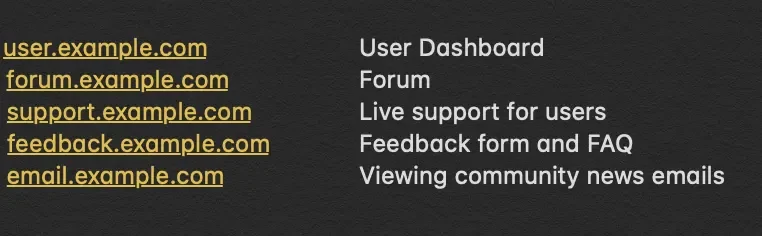
The five targets are a forum, an email preview service, a live support chat, a user dashboard and a feedback form. Each section below covers one of them: what the feature normally does, what the researcher noticed, the payloads used, and why the defence failed.
Setup
No special tooling is described. The work is manual testing in a browser against the five applications. Two preconditions matter and are called out in the report:
- The live support chat can only be tested while managers are online, which is limited to 6 hours a day, and starting a conversation with an online manager takes about half an hour of waiting.
- The feedback form in Part 5 forwards to a non-scope service, and there is no direct request that injects the XSS.
Finding it
Part 1: Stored XSS for mobile on the forum
The forum at forum.example.com/post?id=123 has a File Upload via URL feature. The researcher noticed that the file name is inserted twice on the page: once inside an <img> tag and once in the description of the file.
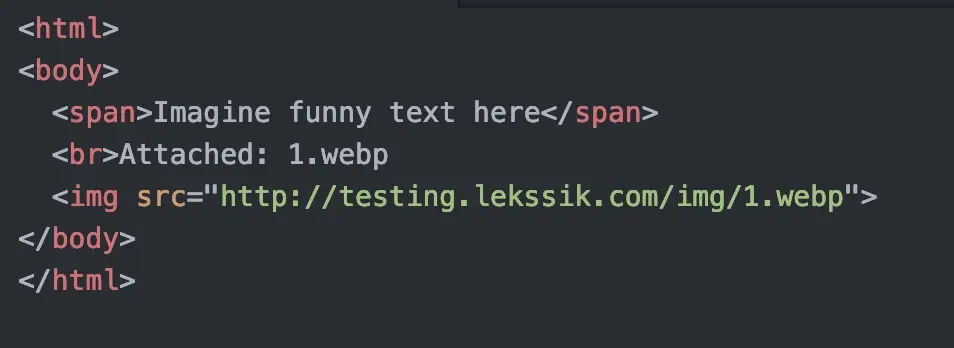
That double insertion is the clue. A file name is attacker-controlled text, and it is being written into HTML in two places.
Part 2: Reflected XSS on email preview
The researcher received an email from the shop, and the domain email.example.com is used to view emails, with URLs of the form email.example.com/view?id=123&key=abc&statname=DiscountEmail. The statname parameter is placed inside an <input type="hidden">. It did not filter the " character, but it did filter <>.
Part 3: Stored XSS in live support chat
On support.example.com there is documentation about the service and an online chat with a manager. The researcher opened a chat and inserted a payload into the message.
Part 4: Reflected XSS in User Dashboard
The dashboard has a feature for filtering activities by date, using a time_from value. The researcher describes this as the longest vulnerability in the set, counting from the first clue to the final exploit, and notes that he records interesting findings and returns to them later when new ideas appear. The vulnerable URL is user.example.com/activities?time_from=777&acc=submit.
Part 5: Self XSS plus Clickjacking
On feedback.example.com/feedback a user can leave feedback. The form forwards to another, non-scope service, but the origin page inserts a confirmation reading "Thanks [username]", and the username is inserted into the HTML source without any filtering.
Exploitation
Part 1: breaking the file name insertion
Step 1. Confirm that a quote reaches the HTML. The researcher uploaded a file whose name ended with a quote, using a URL such as http://…/1.webp", and the quote appeared in the page source.
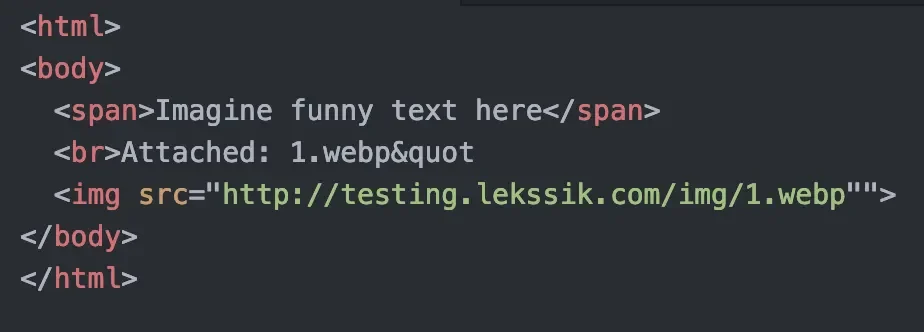
Step 2. Try an event handler. The obvious next move is onerror, but the site removes all DOM events: <img/src=x/onerror=a> becomes <img/src=x>. The blacklist covers the standard event handlers.
Step 3. Use a mobile event handler. The blacklist had not been updated with the DOM events that exist for mobile devices, so a mobile event handler survived and produced a stored XSS that fires on mobile devices. The report does not name the specific handler used.
The report also notes that alert\1`can be used instead ofalert(1), because the service blocked everything inside ()`.
Part 2: escaping a hidden input
Step 1. Confirm the quote is not filtered in statname, while <> are. Without angle brackets you cannot open a new tag, so the payload has to live inside the existing <input type="hidden">.
Step 2. Look up how to get script execution inside a hidden input. The technique found was accesskey='X' onclick='alert(1)', which worked and gave a reflected XSS.
The report's advice here is to subscribe to the target's newsletters: you learn about service updates early, and emails may contain vulnerable links to minor functionality that receives less security attention.
Part 3: a payload straight into the chat
Step 1. Start a chat with a manager and send the following as the message:
<img src="x" onerror="alert(1)">
Step 2. The payload was injected into the HTML source unfiltered.
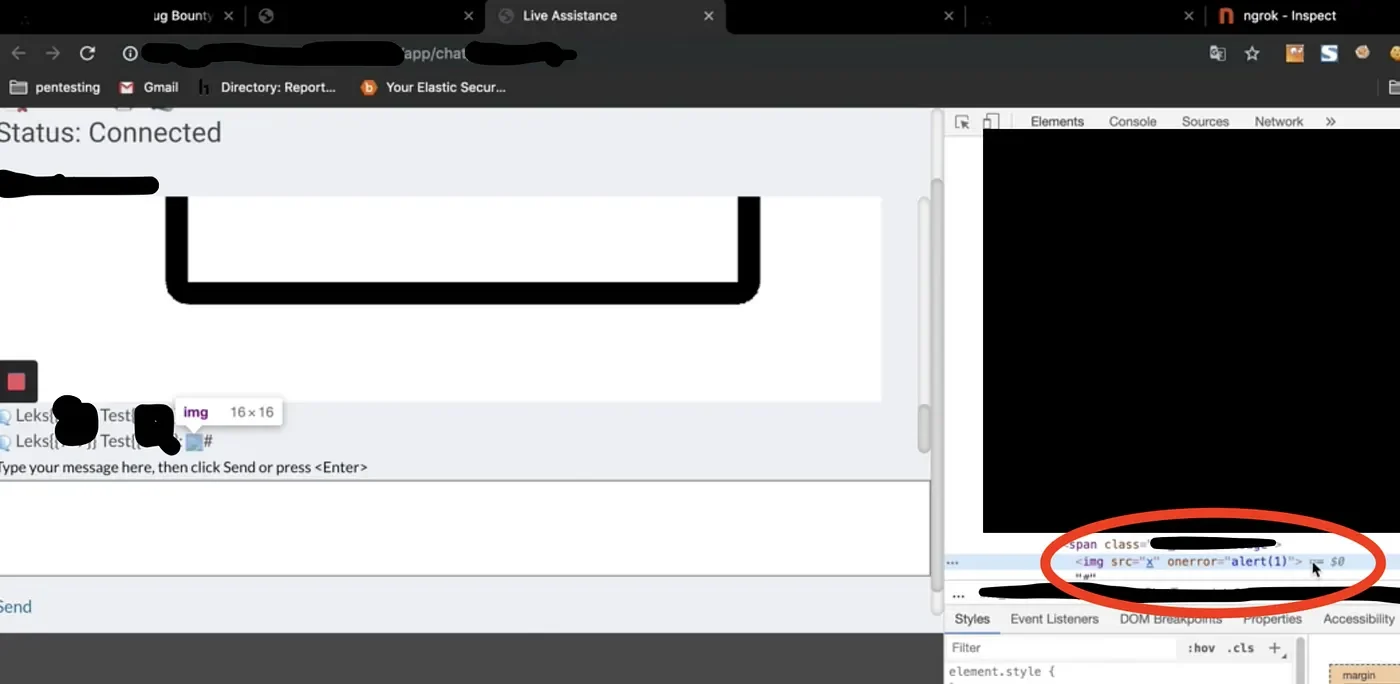
The researcher's explanation for why this had not been reported before is access: you have to reach the site while managers are online (6 hours a day), and you have to wait about half an hour for a conversation to start. It took him until the third attempt to test the functionality and the fifth to get into a chat. The service was probably created a long time ago and never updated from a security point of view, since no one could get to test it.
Part 4: from a quote to a script tag
Step 1. Confirm that time_from does not filter quotes. Inserting a quote showed it reflected into the page.

Step 2. Check whether <> are filtered. They are, so the researcher moved to an input element with DOM events, submitting:
time_from="777" onfocus="alert(1)"
The result showed that DOM events are removed here too, as in Part 1.

The mechanism is different from a blacklist, though: the application blocks all parameters in a tag that start with on.
Step 3. Notice the logger. On the page with the entered data there was a strange field, something like a broken-links logger.

In that field, <> were not filtered.

The chain is: the time_from parameter is vulnerable, the application removes events (the WAF finds everything inside a tag that starts with on), and when that happens the logger fires, captures the broken link and inserts it into the page source without filtering " and <>.
Step 4. Find a tag that survives. Tags are cut out just like events, but the researcher noticed that an unclosed tag is not removed: only a closed tag is cut out. So an unclosed tag turns into something usable.

Step 5. Close the script tag elsewhere. With a src on the script tag, everything inside the tag is ignored, so any </script> later on the page will close it. The final source looked like this:
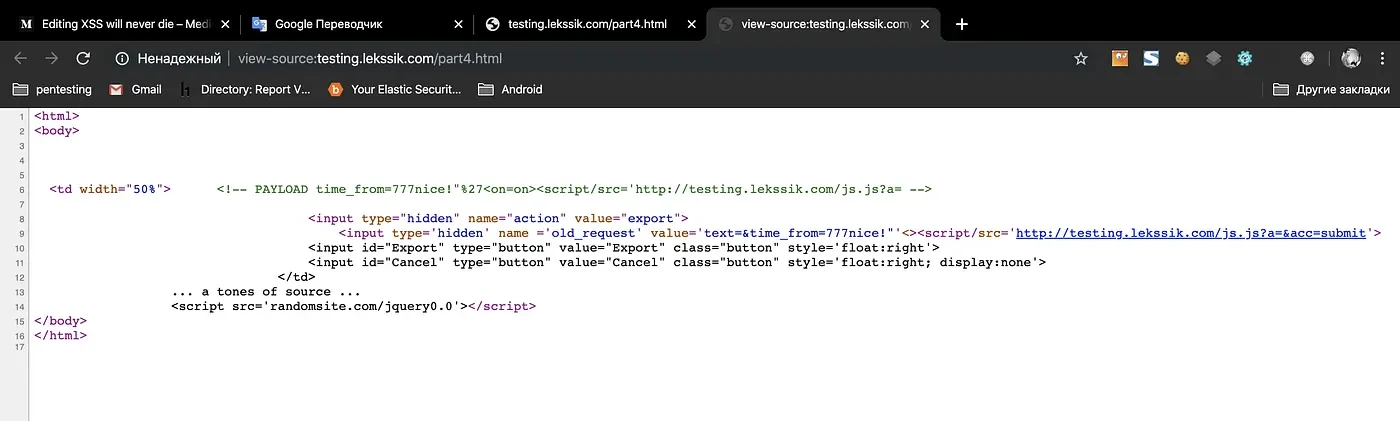
Step 6. Understand the full logic. The broken value old_request is created when something potentially dangerous (a DOM event) is added to the URL. In that value <>" can be inserted into the source, but tags and DOM events still cannot. Because the input tag was closing itself, the payload "<script/src=//url is not seen by the WAF as dangerous input and is not removed. Everything after it that is passed as GET parameters is discarded. Then JavaScript logic helps: since the script has a src, everything inside the tag is ignored and the browser waits for a closing tag, which it finds further down the source, for example where jQuery is called.

Part 5: Self-XSS made deliverable with Clickjacking
Step 1. Confirm the Self-XSS. The username is inserted into the "Thanks [username]" message without filtering any HTML source, so a payload in the username executes. Because there is no direct request that injects the XSS, this class of bug is normally considered N/A: it requires the victim's own actions.
Step 2. Check X-FRAME. The site turned out to be vulnerable to clickjacking, so the researcher created an HTML and CSS form that demonstrated the attack. The idea is that the site can be embedded in an <iframe>, the attacker overlays it invisibly and positions forms so that the victim's clicks and input land on the functionality of the attacked site. The report links to the OWASP Clickjacking page for the general explanation and to a search for clickjacking reports on HackerOne for examples.
Root cause
Each part fails for a different reason:
- Part 1: a blacklist of DOM event handlers that was not updated for mobile events. The quote was never filtered, so the file name could break out of the attribute.
- Part 2: the quote was not filtered inside a hidden input, and filtering
<>was assumed to be enough. It is not, because event attributes such asaccesskeyandonclickcan be added to the existing input element. - Part 3: no output encoding at all in the chat, on a service that had apparently never been security tested.
- Part 4: a chain of partial defences. The WAF removes anything inside a tag starting with
on, but the broken-links logger then writes the broken value into the source without filtering"and<>, and the tag removal only catches closed tags. The combination of an unclosed tag, asrcscript and a later</script>in the page defeats the filter. - Part 5: unfiltered username output (Self-XSS) combined with a missing frame protection header, which turns a bug that needs user action into a deliverable attack.
The recurring lesson in the report is that blacklists do not keep up with technology, while filtering quotes is a realistic measure.
Impact
- Part 1: stored XSS in a forum post, executing on mobile devices.
- Part 2: reflected XSS in the email preview page.
- Part 3: stored XSS in the live support chat.
- Part 4: reflected XSS in the user dashboard through the
time_fromparameter. - Part 5: Self-XSS in the feedback confirmation, which on its own requires the victim's actions and is normally N/A, but becomes a real attack when combined with clickjacking.
The report does not describe what data or actions were reachable from any of these contexts, and gives no bounty or severity figures.
Fix
- Filter quotes in every context where user-controlled text is written into HTML, as the report repeatedly recommends.
- Do not rely on blacklists of DOM events; encode output instead, and keep any blacklist current if one is kept at all.
- Encode the file name in both places it is inserted (the
<img>tag and the description). - Encode
statnameinside the hidden input rather than relying on<>filtering. - Encode chat messages on output.
- Fix the broken-links logger so that it does not write unfiltered
"and<>into the page, and make tag removal handle unclosed tags. - Encode the username in the feedback confirmation, and send frame protection headers so the page cannot be embedded.
Variants to test
- Mobile event handlers. Wherever a standard event blacklist is in place, try the mobile equivalents. A positive result is a handler that survives filtering and fires on a mobile browser.
alert\1`instead ofalert(1)`. Where parentheses are blocked, the tagged-template form may pass. A positive result is an alert without parentheses.- Hidden inputs. When
<>are filtered but quotes are not, tryaccesskey='X' onclick='alert(1)'on the existing input. A positive result is execution after the access key is pressed. - Unclosed tags. Where a filter removes closed tags, submit an unclosed one and see whether it survives. A positive result is a tag fragment left in the source.
- Script with
srcand a later</script>. If asrcscript tag can be injected, look for any</script>further down the page, for example in a jQuery include. A positive result is the injected script loading and executing. - Logger or error fields. Look for fields that record broken links or rejected input and write them back to the page. A positive result is unfiltered
"and<>in that field. - Self-XSS plus framing. Where a Self-XSS exists, check
X-FRAMEand frameability. A positive result is the page rendering inside an attacker-controlled iframe, which makes the Self-XSS deliverable through clickjacking.
What happened, in plain words
A security researcher found several XSS bugs over the last months while testing one large online shop company. That company runs many websites on many sub-domains, all under one brand. He found five separate cross-site scripting (XSS) bugs, one on each of five different applications: a forum, an email preview page, a live support chat, a user dashboard and a feedback form. Each one was protected in a different way, and each protection failed for a different reason. The write-up is short for each bug, so he put them together to show the pattern.
XSS is a bug where a website takes text that a user can control and puts it into a page as if it were part of the website's own code. If that text contains HTML or JavaScript, the browser runs it. The attacker's code then runs with the same trust as the site itself. A simple example: if a site shows your name on a page and you set your name to <b>hello</b>, the browser shows a bold hello instead of the literal text. That is harmless. If you set it to a script, the browser runs the script.
There are two main flavours. Stored XSS means the bad text is saved on the server (in a post, a chat message, a profile) and shown to everyone who views it later. Reflected XSS means the bad text comes in with a link and is echoed back on the page immediately; the victim has to click the crafted link. A third flavour, Self-XSS, only fires when the victim types the payload into their own browser, so on its own it is usually considered not a real bug.
The image above shows the company's many sub-domains and applications, the landscape the researcher was working against.
The five targets at a glance
| Part | Application | Type of XSS | What the defence did |
|---|---|---|---|
| 1 | Forum (forum.example.com) |
Stored | Removed standard event handlers, missed mobile ones |
| 2 | Email preview (email.example.com) |
Reflected | Filtered <> but not " |
| 3 | Live support chat (support.example.com) |
Stored | No filtering at all |
| 4 | User dashboard (user.example.com) |
Reflected | WAF plus a broken-links logger, both bypassed |
| 5 | Feedback form (feedback.example.com) |
Self-XSS plus clickjacking | No filtering, no frame protection |
Before we start: a few words you will need
A sub-domain is a prefix on a domain name. forum.example.com and email.example.com are two sub-domains of example.com. Companies often run a separate application on each one, sometimes built by different teams at different times, which is why the security quality varies.
HTML is the language browsers use to describe a page. It is made of tags like <img> (an image) or <input> (a form field). A tag can have attributes, which are extra settings written inside the tag, like src="x" (the image source) or onerror="..." (what to do if the image fails to load).
JavaScript is the programming language browsers run. When a page includes JavaScript, the browser executes it. alert(1) is the classic harmless test: it pops up a box with the number 1. If you can make a site run your alert(1), you can usually make it run anything.
A DOM event is something that happens in the page that JavaScript can react to: a click, a key press, an image failing to load. Attributes starting with on are event handlers: onclick, onerror, onfocus, and so on. They are a favourite way to get JavaScript to run from injected HTML.
A blacklist is a list of things a filter refuses. A WAF (Web Application Firewall) is a filter that sits in front of a site and inspects requests, blocking ones that look dangerous. Blacklists and WAFs are the recurring theme here: they try to block known bad patterns, and they keep missing new ones.
Output encoding is the correct fix. Instead of trying to block bad characters, the site converts user text so the browser treats it as plain text, never as code. If < becomes <, the browser shows a literal < and never opens a tag.
jQuery is a popular JavaScript library that many sites load. It is mentioned in Part 4 because its own <script> tag gives the attacker a closing tag to borrow.
Setup
No special tools are described. The work is manual testing in a browser against the five applications. Two practical points matter:
- The live support chat can only be tested while managers are online, which is limited to 6 hours a day, and starting a conversation with an online manager takes about half an hour of waiting.
- The feedback form in Part 5 forwards to a non-scope service, and there is no direct request that injects the XSS.
Part 1: Stored XSS for mobile on the forum
What the feature does
The forum at forum.example.com/post?id=123 lets users attach a file by giving a URL instead of uploading it. The site shows the file's name on the page. It also shows the file's name on the page.
The clue
The researcher noticed that the file name is inserted twice on the page: once inside an <img> tag and once in the description of the file.
That double insertion is the clue. A file name is text the attacker controls, and it is being written into HTML in two places. If either place does not escape the name properly, the attacker can break out of the tag and add their own HTML.
Step 1: does a quote reach the HTML?
The first test is always the same: put a " in the input and see whether it appears in the page source. A quote is the character that ends an attribute value in HTML. If the site does not filter it, the attacker can close the attribute and add new ones.
The researcher uploaded a file whose name ended with a quote, using a URL such as http://…/1.webp", and the quote appeared in the page source.
This confirms the site is not escaping the file name, so the next step is to add an event handler.
Step 2: try an event handler
The obvious next move is onerror. If the image source is broken, the browser fires onerror, and if the attacker put JavaScript there, it runs. The site removes all DOM events: <img/src=x/onerror=a> becomes <img/src=x>. The blacklist covers the standard event handlers.
Step 3: use a mobile event handler
The blacklist had not been updated with the DOM events that exist for mobile devices, so a mobile event handler survived and produced a stored XSS that fires on mobile devices. The report does not name the specific handler used.
The report also notes that alert\1`can be used instead ofalert(1), because the service blocked everything inside (). This is a small trick: JavaScript lets you call a function with a template literal (backticks) instead of parentheses, so a filter that only looks for (and)` misses it.
Why it worked
A blacklist of event handlers is a list of names. When new event handlers appear (as they did for mobile), the list is out of date. The quote was never filtered, so the file name could break out of the attribute in the first place. The lesson: blacklists do not keep up with technology, but filtering quotes is a realistic measure.
Part 2: Reflected XSS on email preview
What the feature does
The researcher received an email from the shop. The domain email.example.com is used to view emails in a browser, with URLs of the form email.example.com/view?id=123&key=abc&statname=DiscountEmail. The statname parameter is placed inside an <input type="hidden">.
The clue
A hidden input is a form field the user cannot see; it carries data the page needs to submit later. It did not filter the " character, but it did filter <>.
Step 1: confirm the quote is not filtered
Without angle brackets you cannot open a new tag, so the payload has to live inside the existing <input type="hidden">. The quote is enough to close the attribute and add new ones to the same input.
Step 2: look up how to get script execution inside a hidden input
The technique found was accesskey='X' onclick='alert(1)', which worked and gave a reflected XSS.
accesskey='X' onclick='alert(1)'
Line by line:
accesskey='X'gives the input a keyboard shortcut. When the user presses the access key (often Alt or Ctrl plus the letter, depending on the browser), the field is focused.onclick='alert(1)'says: when this element is clicked, runalert(1).- Together, they turn a hidden input into something the victim can trigger with a key press, which then runs the attacker's JavaScript.
The report's advice here is to subscribe to the target's newsletters: you learn about service updates early, and emails often contain links to minor functionality that receives less security attention.
Why it worked
Filtering <> was assumed to be enough. It is not, because event attributes such as accesskey and onclick can be added to the existing input element without ever opening a new tag. The quote was the door.
Part 3: Stored XSS in live support chat
What the feature does
On support.example.com there is documentation about the service and an online chat with a manager. The chat is a small window where you type a message and a human replies.
Step 1: send the payload
The researcher opened a chat and sent the following as the message:
<img src="x" onerror="alert(1)">
Line by line:
<img ...>opens an image tag.src="x"tells the browser to load an image from the addressx, which does not exist.onerror="alert(1)"says: when the image fails to load, runalert(1). Sincexnever loads, the error fires immediately.
Step 2: the payload was injected into the HTML source unfiltered
The image shows the payload sitting in the page source.
Why it had not been reported before
The researcher's explanation is access: you have to reach the site while managers are online (6 hours a day), and you have to wait about half an hour for a conversation to start. It took him until the third attempt to test the functionality and the fifth to get into a chat. The service was probably created a long time ago and never updated from a security point of view, since no one could get to test it.
Part 4: Reflected XSS in User Dashboard
What the feature does
The dashboard has a feature for filtering activities by date, using a time_from value. The vulnerable URL is user.example.com/activities?time_from=777&acc=submit.
The researcher describes this as the longest vulnerability in the set, counting from the first clue to the final exploit. He records interesting findings and returns to them later when new ideas appear.
Step 1: does time_from filter quotes?
Inserting a quote showed it reflected into the page.
That is the first clue: the value is written into HTML without escaping.
Step 2: are <> filtered?
They are, so the researcher moved to an input element with DOM events, submitting:
time_from="777" onfocus="alert(1)"
Line by line:
time_from="777"closes the existing attribute and sets a new value.onfocus="alert(1)"adds an event handler: when the element receives focus, runalert(1).
The result showed that DOM events are removed here too, as in Part 1.
The mechanism is different from a blacklist, though: the application blocks all parameters in a tag that start with on.
Step 3: notice the logger
On the page with the entered data there was a strange field, something like a broken-links logger.
The report describes it as something like a broken-links logger. In that field, <> were not filtered.
The chain is: the time_from parameter is vulnerable, the application removes events (the WAF finds everything inside a tag that starts with on), and when that happens the logger fires, captures the broken link and inserts it into the page source without filtering " and <>.
Step 4: find a tag that survives
Tags are cut out just like events, but the researcher noticed that an unclosed tag is not removed: only a closed tag is cut out. So an unclosed tag turns into something usable.
This is the key observation: the filter looks for complete tags, so a fragment slips through.
Step 5: close the script tag elsewhere
With a src on the script tag, everything inside the tag is ignored, so any </script> later on the page will close it. The final source looked like this:
Step 6: understand the full logic
The broken value old_request is created when something potentially dangerous (a DOM event) is added to the URL. In that value <>" can be inserted into the source, but tags and DOM events still cannot. Because the input tag was closing itself, the payload "<script/src=//url is not seen by the WAF as dangerous input and is not removed. Everything after it that is passed as GET parameters is discarded. Then JavaScript logic helps: since the script has a src, everything inside the tag is ignored and the browser waits for a closing tag, which it finds further down the source, for example where jQuery is called.
Why it worked
This is a chain of partial defences. The WAF removes anything inside a tag starting with on, but the broken-links logger then writes the broken value into the source without filtering " and <>, and the tag removal only catches closed tags. The combination of an unclosed tag, a src script and a later </script> in the page defeats the filter.
Part 5: Self-XSS made deliverable with Clickjacking
What the feature does
On feedback.example.com/feedback a user can leave feedback. The form forwards to another, non-scope service, but the origin page inserts a confirmation reading "Thanks [username]", and the username is inserted into the HTML source without any filtering.
Step 1: confirm the Self-XSS
The username is inserted into the "Thanks [username]" message without filtering any HTML source, so a payload in the username executes. Because there is no direct request that injects the XSS, this class of bug is normally considered N/A: it requires the victim's own actions.
Step 2: check X-FRAME
X-FRAME-OPTIONS is an HTTP response header that tells the browser whether the page may be shown inside an <iframe>. An <iframe> is a window inside a page that loads another page. If a site allows framing, an attacker can put the victim's site inside their own page and overlay it with invisible elements.
The site turned out to be vulnerable to clickjacking, so the researcher created an HTML and CSS form that demonstrated the attack. The idea is that the site can be embedded in an <iframe>, the attacker overlays it invisibly and positions forms so that the victim's clicks and input land on the functionality of the attacked site. The report links to the OWASP Clickjacking page for the general explanation and to a search for clickjacking reports on HackerOne for examples.
Why it worked
Unfiltered username output (Self-XSS) combined with a missing frame protection header turns a bug that needs user action into a deliverable attack. The victim thinks they are clicking on the attacker's page, but their clicks land on the real site.
Root cause
Each part fails for a different reason:
- Part 1: a blacklist of DOM event handlers that was not updated for mobile events. The quote was never filtered, so the file name could break out of the attribute.
- Part 2: the quote was not filtered inside a hidden input, and filtering
<>was assumed to be enough. It is not, because event attributes such asaccesskeyandonclickcan be added to the existing input element. - Part 3: no output encoding at all in the chat, on a service that had apparently never been security tested.
- Part 4: a chain of partial defences.
- Part 5: unfiltered username output (Self-XSS) combined with a missing frame protection header, which turns a bug that needs user action into a deliverable attack.
The recurring lesson in the report is that blacklists do not keep up with technology, while filtering quotes is a realistic measure.
Impact
- Part 1: stored XSS in a forum post, executing on mobile devices.
- Part 2: reflected XSS in the email preview page.
- Part 3: stored XSS in the live support chat.
- Part 4: reflected XSS in the user dashboard through the
time_fromparameter. - Part 5: Self-XSS in the feedback confirmation, which on its own requires the victim's actions and is normally N/A, but becomes a real attack when combined with clickjacking.
The report does not describe what data or actions were reachable from any of these contexts, and gives no bounty or severity figures.
Fix
- Filter quotes in every context where user-controlled text is written into HTML, as the report repeatedly recommends.
- Do not rely on blacklists of DOM events; encode output instead, and keep any blacklist current if one is kept at all.
- Encode the file name in both places it is inserted (the
<img>tag and the description). - Encode
statnameinside the hidden input rather than relying on<>filtering. - Encode chat messages on output.
- Fix the broken-links logger so that it does not write unfiltered
"and<>into the page, and make tag removal handle unclosed tags. - Encode the username in the feedback confirmation, and send frame protection headers so the page cannot be embedded.
Variants to test
- Mobile event handlers. Wherever a standard event blacklist is in place, try the mobile equivalents. A positive result is a handler that survives filtering and fires on a mobile browser.
alert\1`instead ofalert(1)`. Where parentheses are blocked, the tagged-template form may pass. A positive result is an alert without parentheses.- Hidden inputs. When
<>are filtered but quotes are not, tryaccesskey='X' onclick='alert(1)'on the existing input. A positive result is execution after the access key is pressed. - Unclosed tags. Where a filter removes closed tags, submit an unclosed one and see whether it survives. A positive result is a tag fragment left in the source.
- Script with
srcand a later</script>. If asrcscript tag can be injected, look for any</script>further down the page, for example in a jQuery include. A positive result is the injected script loading and executing. - Logger or error fields. Look for fields that record broken links or rejected input and write them back to the page. A positive result is unfiltered
"and<>in that field. - Self-XSS plus framing. Where a Self-XSS exists, check
X-FRAMEand frameability. A positive result is the page rendering inside an attacker-controlled iframe, which makes the Self-XSS deliverable through clickjacking.
Glossary
- XSS (Cross-Site Scripting): a bug where a site puts user-controlled text into a page as code, so the browser runs the attacker's JavaScript.
- Stored XSS: XSS where the bad text is saved on the server and shown to everyone who views it later.
- Reflected XSS: XSS where the bad text comes in with a link and is echoed back immediately; the victim must click the link.
- Self-XSS: XSS that only fires when the victim types the payload into their own browser; usually considered not a real bug on its own.
- Sub-domain: a prefix on a domain name, like
forum.example.comunderexample.com. - HTML: the language browsers use to describe a page, made of tags and attributes.
- Tag: an HTML element like
<img>or<input>. - Attribute: an extra setting inside a tag, like
src="x"oronclick="...". - JavaScript: the programming language browsers run.
alert(1): the classic harmless test that pops up a box with the number 1.- DOM event: something that happens in the page (click, key press, image error) that JavaScript can react to.
- Event handler: an attribute starting with
onthat runs JavaScript when an event fires, likeonclickoronerror. - Blacklist: a list of things a filter refuses.
- WAF (Web Application Firewall): a filter in front of a site that inspects requests and blocks ones that look dangerous.
- Output encoding: converting user text so the browser treats it as plain text, never as code; the correct fix.
- Quote (
"): the character that ends an attribute value in HTML; if unfiltered, it lets an attacker add new attributes. - Angle brackets (
<>): the characters that open and close HTML tags; filtering them stops new tags but not new attributes. - Hidden input: a form field the user cannot see, used to carry data the page needs to submit later.
accesskey: an attribute that gives an element a keyboard shortcut.onfocus: an event handler that fires when an element receives focus.onerror: an event handler that fires when an image or other resource fails to load.- Broken-links logger: a small piece of a page that records links that failed or requests that were rejected, for debugging.
old_request: the broken value the logger writes back into the page in Part 4.src: an attribute that gives the address of a resource, like an image or a script.</script>: the closing tag of a script element; the browser waits for it before running the script.- jQuery: a popular JavaScript library many sites load; its own
<script>tag can provide a closing tag for an injected script. - GET parameters: the
?name=value&name=valuepart of a URL. X-FRAME-OPTIONS: an HTTP response header that tells the browser whether the page may be shown inside an iframe.<iframe>: a window inside a page that loads another page.- Clickjacking: an attack where the victim's site is embedded in an iframe and overlaid so the victim's clicks land on the real site.
- N/A: "not applicable", the status given to a report that is not considered a real vulnerability.
- OWASP: an organisation that publishes free security guidance, including a page on clickjacking.
- HackerOne: a bug bounty platform where researchers report vulnerabilities and public reports can be searched.



