Business Logic Errors - A Logic Destruction
The invite feature accepted an array of email addresses in the email parameter, sending invitations to multiple users while the application counted it as a single invite. An attacker could therefore send unlimited invitations without consuming the limited quota for non-premium users.
 Published on shahjerry33.medium.com
Business logic errors will allow you to manipulate the business logic of an application. Sometimes business logic errors can have devastating effects on the applications.
The full write-up lives on its author's site
It belongs to its author, so we link to it rather than copy it. The other two tabs are our own rewrites, checked against it.
Context
The target here is an invite feature in a private project of the researcher's. The feature lets a user invite team members by email. Non-premium users get a limited number of invitations: four. The report does not name the product or the vendor; it describes the feature as part of the researcher's private project.
The feature also has a withdraw (cancel) option for an invitation that has already been sent. That option turns out to matter as much as the invite itself.
The weakness class is a business logic flaw: the application processes a legitimate request in a way that produces a result the business rules did not intend. The report's own framing is that such flaws are hard to find because they use the application's normal functionality rather than breaking it.
Setup
- A non-premium account with the standard allowance of four invitations.
- Burp Suite as an intercepting proxy, used to capture and modify the invite request.
- The addresses used in the test are shown as
[redacted],[redacted]and, in the array example,[redacted]and[redacted]. The report shows them as[redacted],[redacted]and, in the array example,[redacted]and[redacted]. - No versions, endpoints or parameter names other than
emailare given.
The precondition is simply that the account is on the free tier and therefore subject to the invitation cap.
Finding it
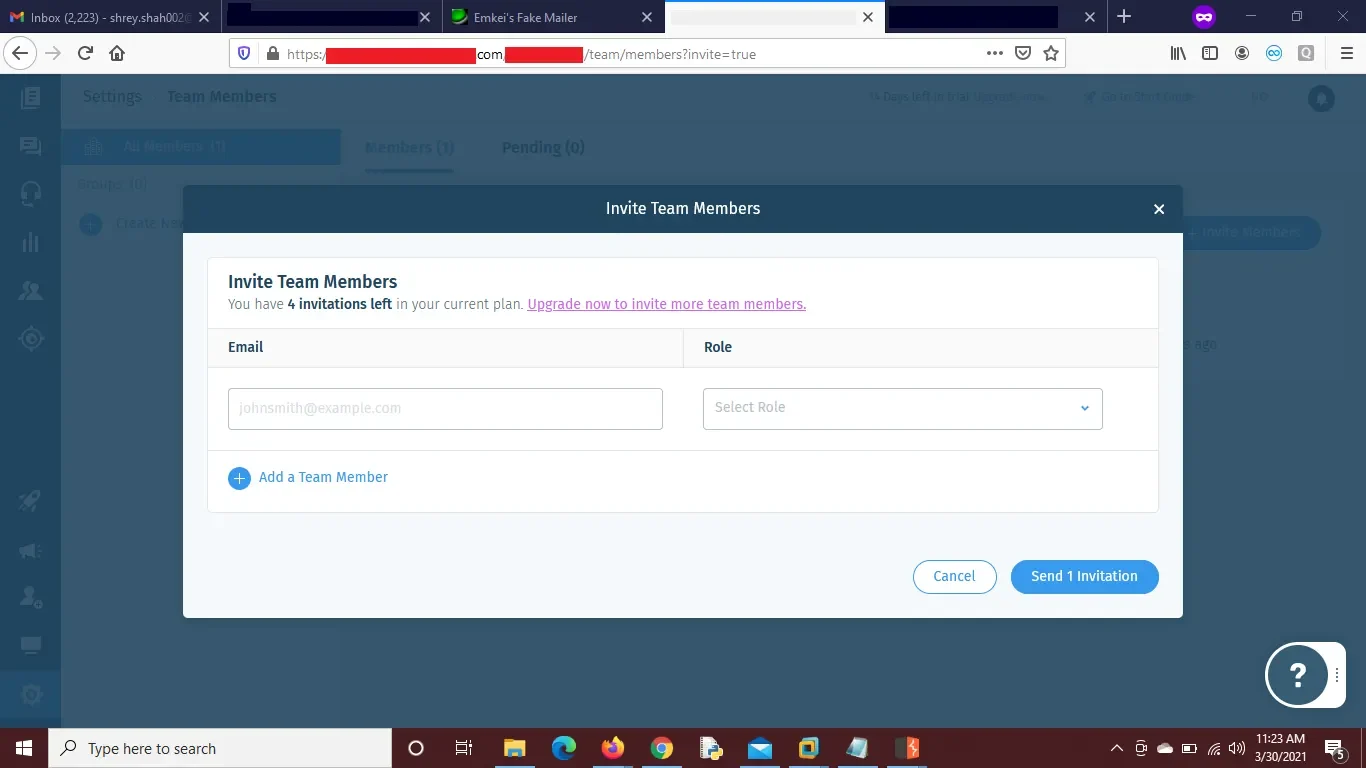
The researcher started from the normal flow. The invite team member screen is where an address is entered:
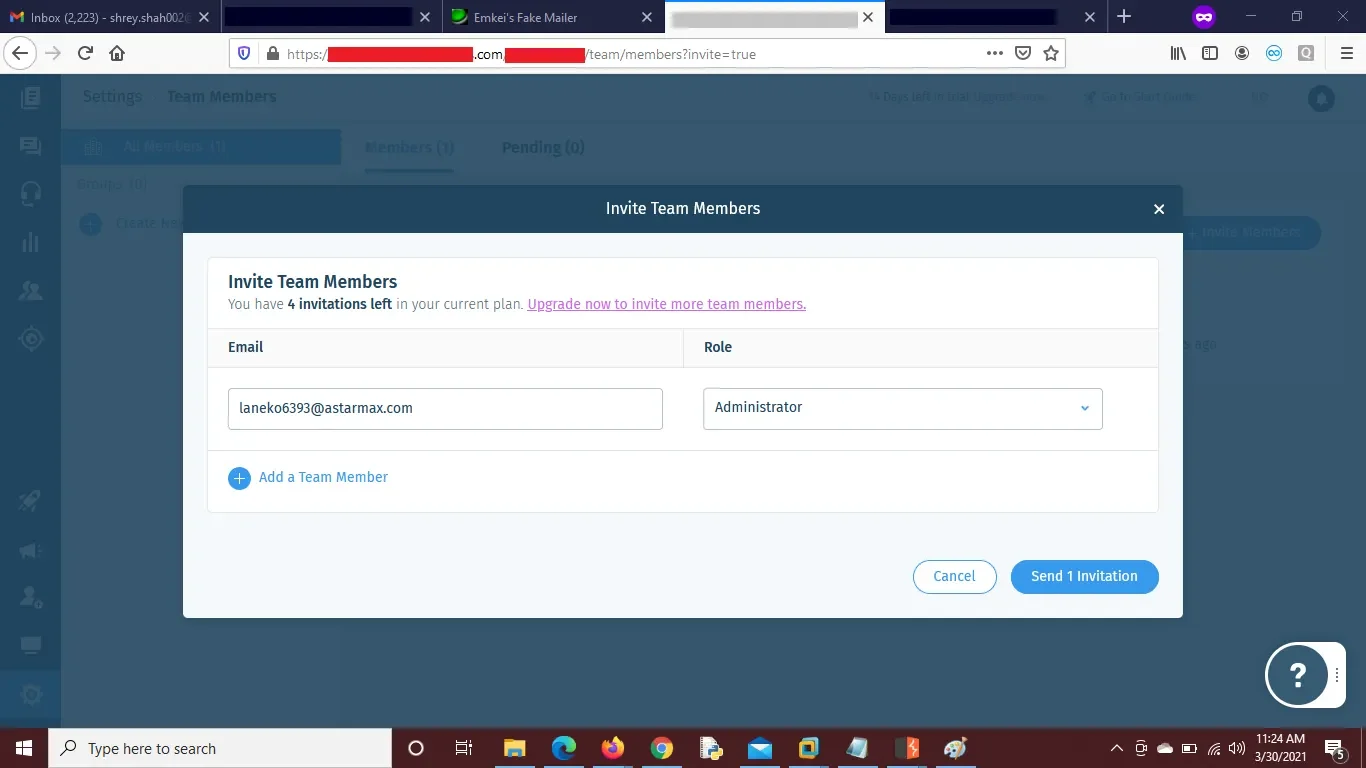
Sending an invitation through that form:
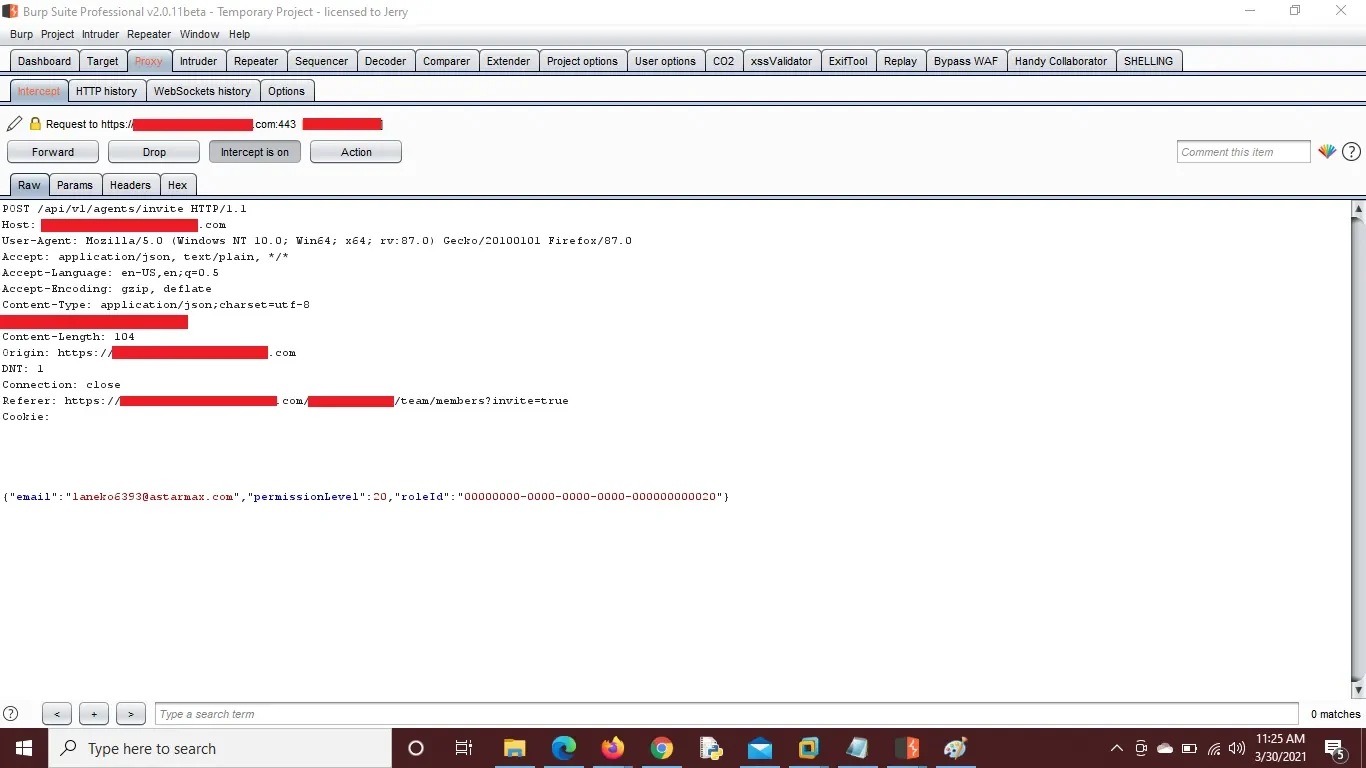
After sending one invite, the account was left with three invitations. The captured request showed the feature behaving normally:
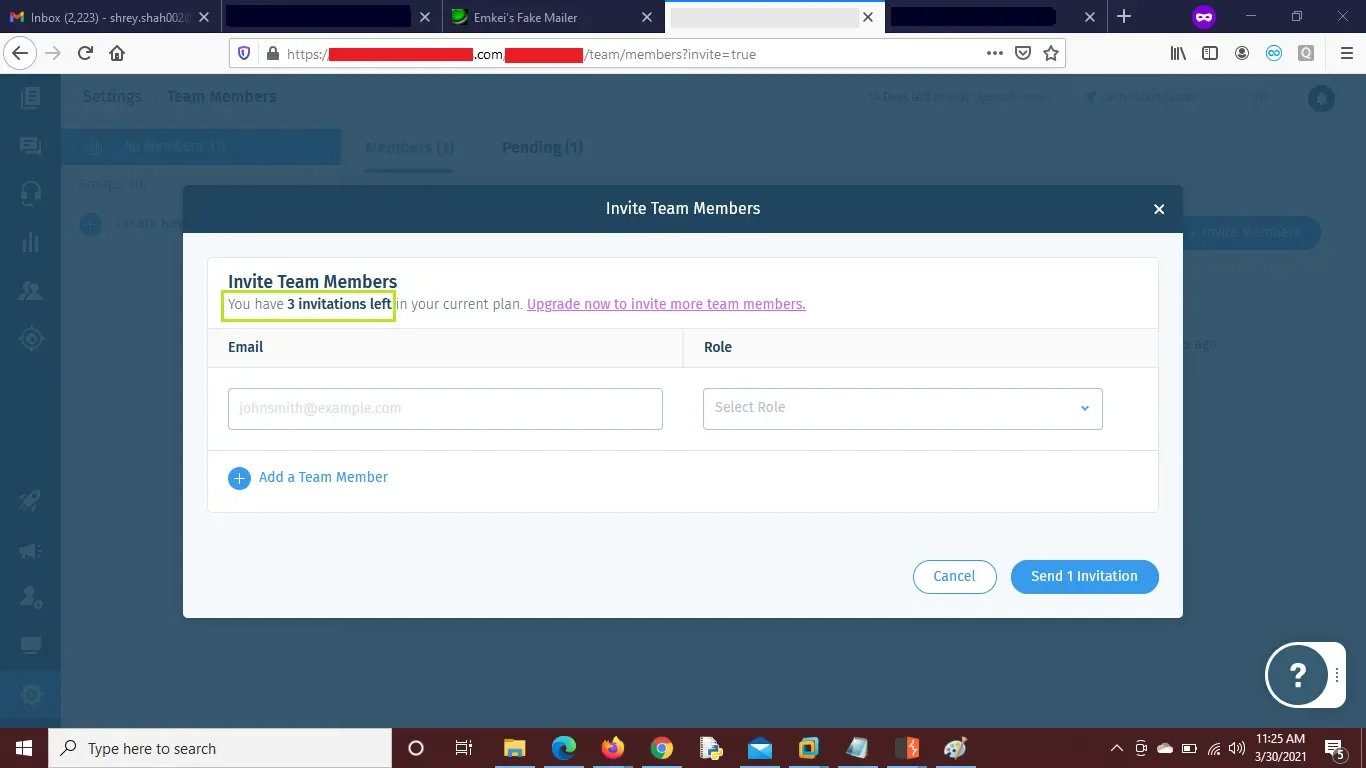
The interesting observation was the withdraw option. Withdrawing the invitation that had just been sent restored the count to four. That is the behaviour the rest of the attack leans on.
Exploitation
Step 1: send and capture a normal invitation
The first invite was sent through the invite team member functionality and the request was captured in Burp. The report shows the captured request and the normal response but does not reproduce their contents, so the exact endpoint, method, headers and body are not available here. What matters is that the address travels in a parameter named email.
Step 2: withdraw the invitation
The invitation sent to [redacted] was withdrawn, which brought the allowance back to four:
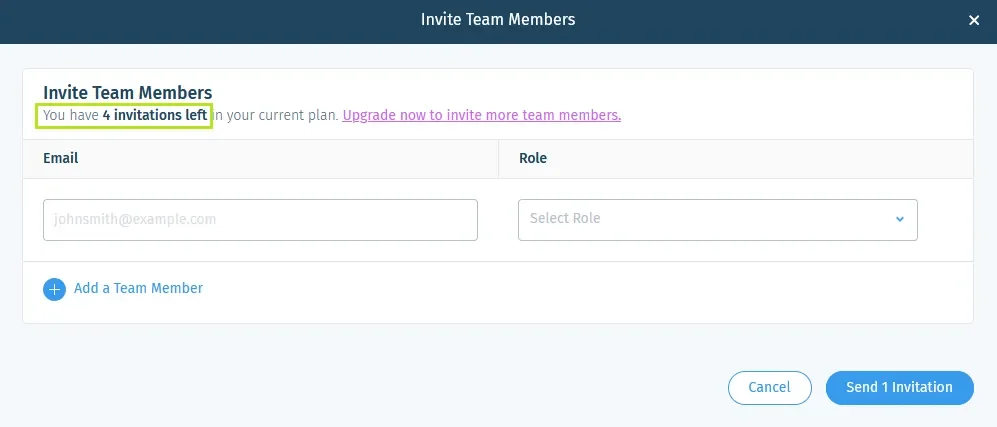
This confirms that the limit is computed from outstanding invitations, not from a historical total.
Step 3: turn the email parameter into an array
The invitation to [redacted] was sent again, the request was captured, and the email parameter was changed from a single string into an array with a second address appended, [redacted]:
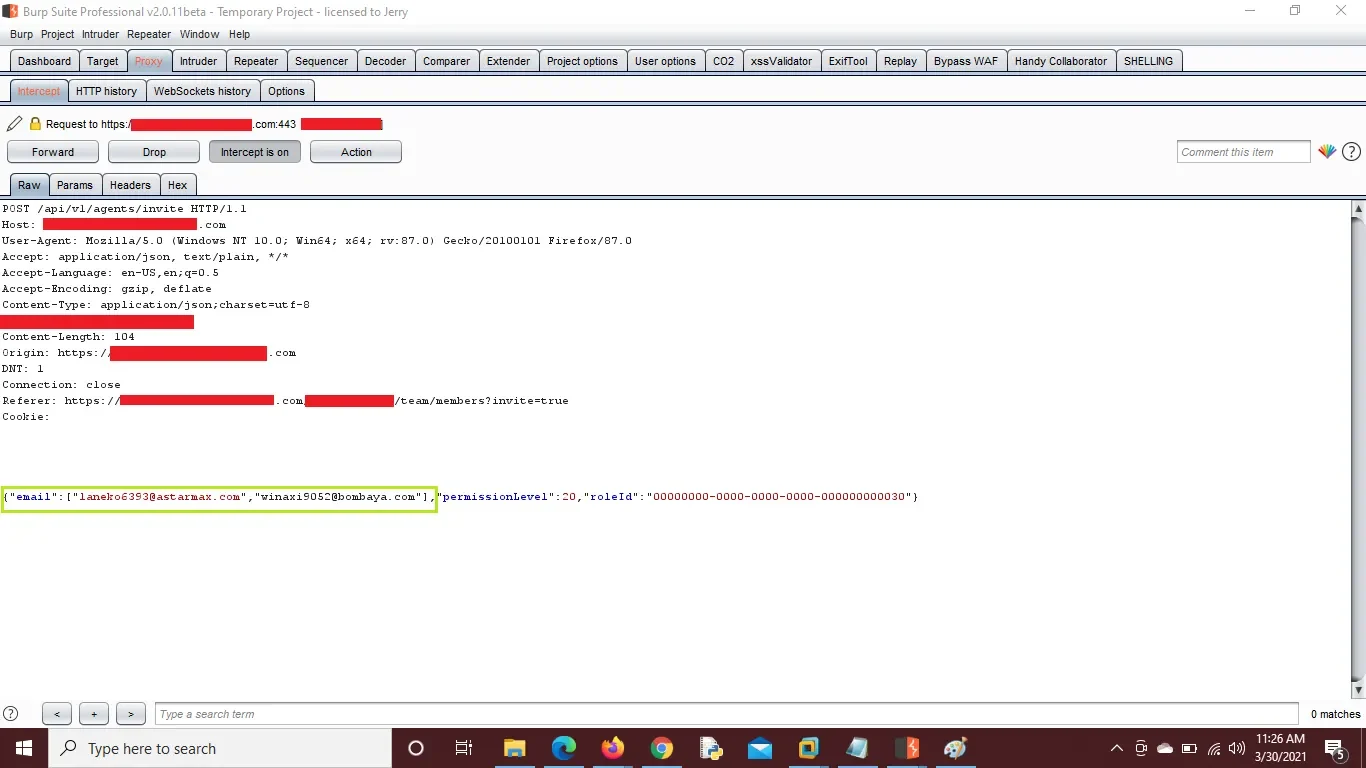
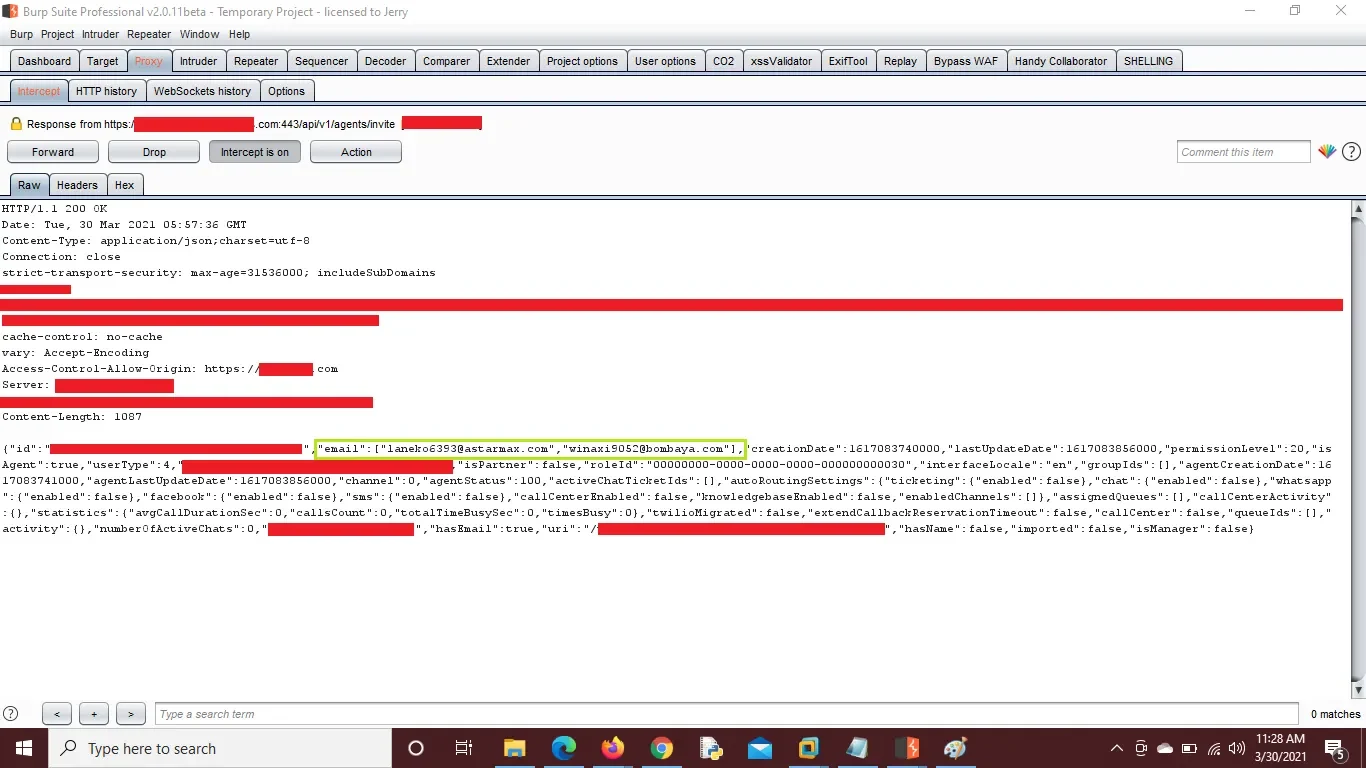
The manipulated response reflected both addresses, and both mailboxes received an invitation:
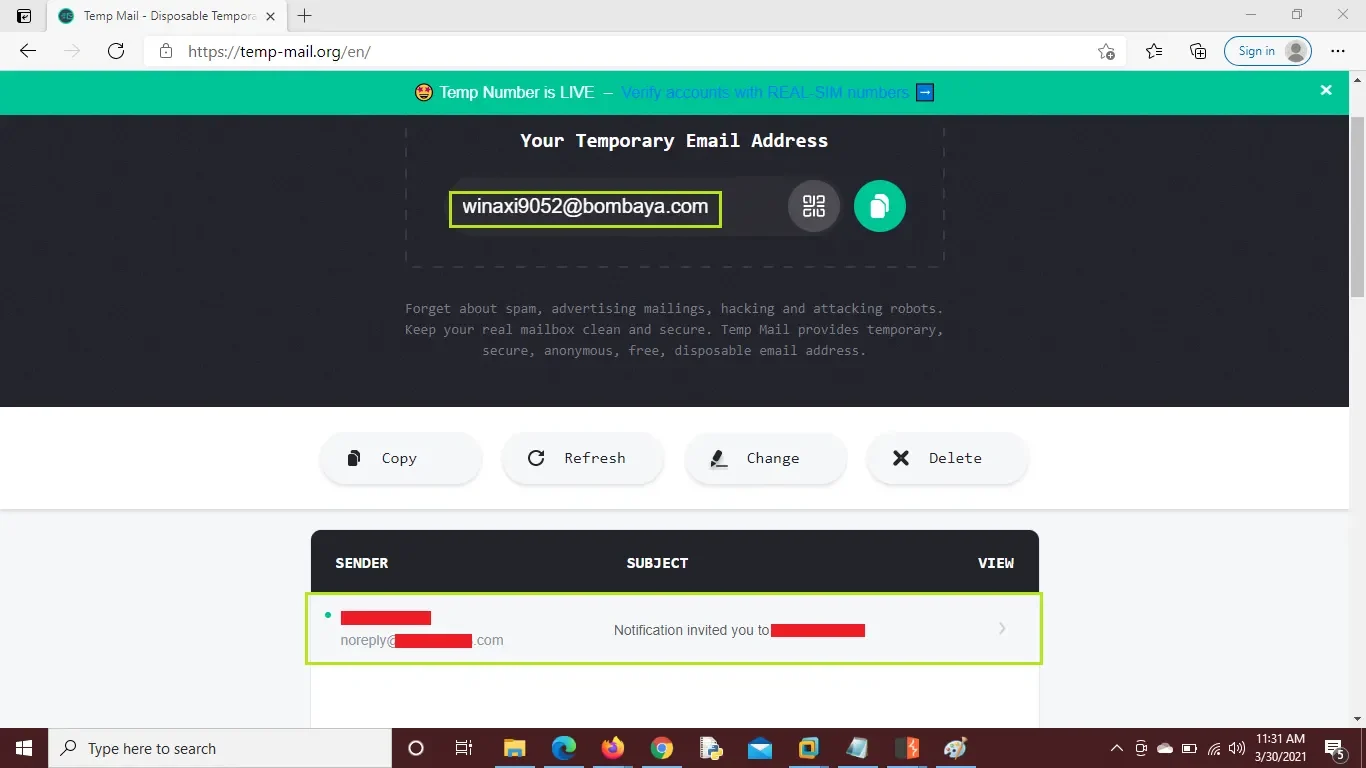
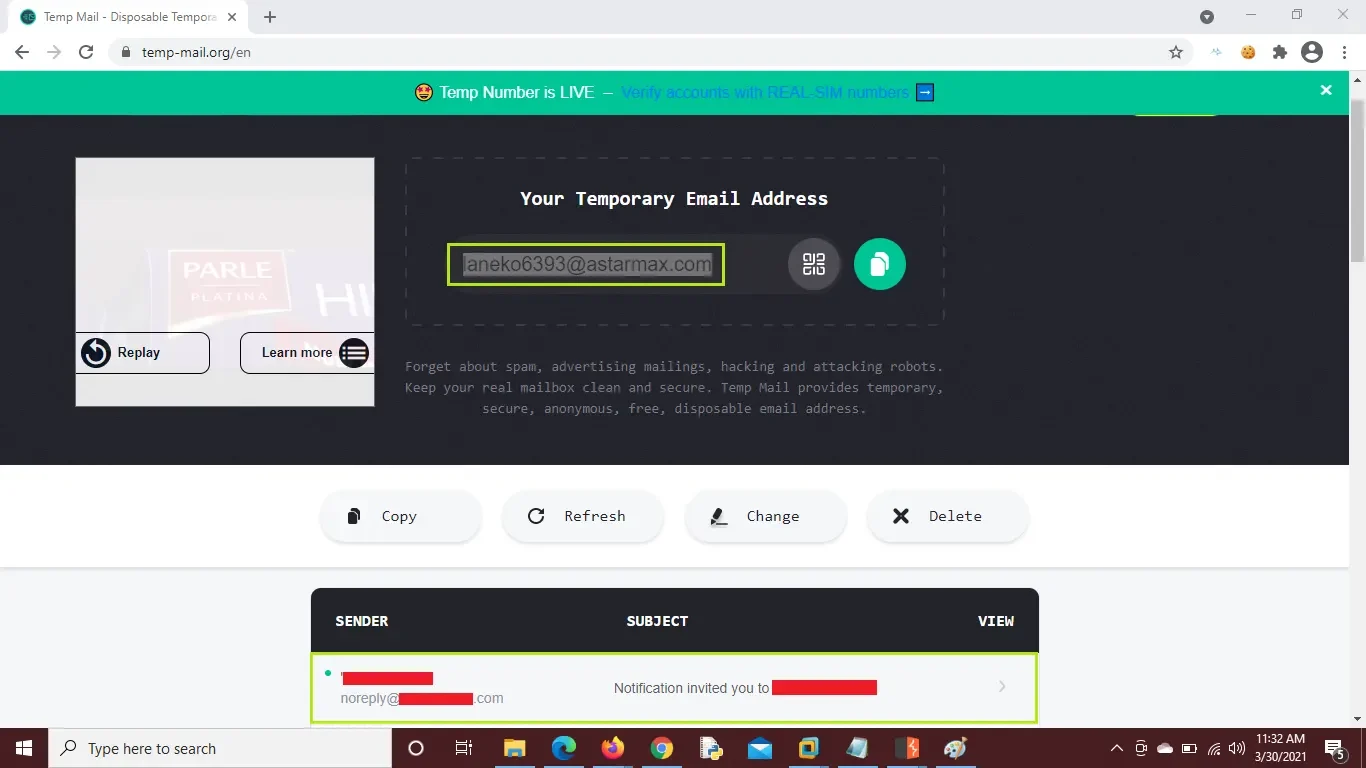
The application, however, counted the operation as one invite. Two people were invited and only one invitation was deducted, leaving three.
Step 4: scale to three addresses
The invitation was withdrawn again and the same request was sent with three addresses in the array. It succeeded:
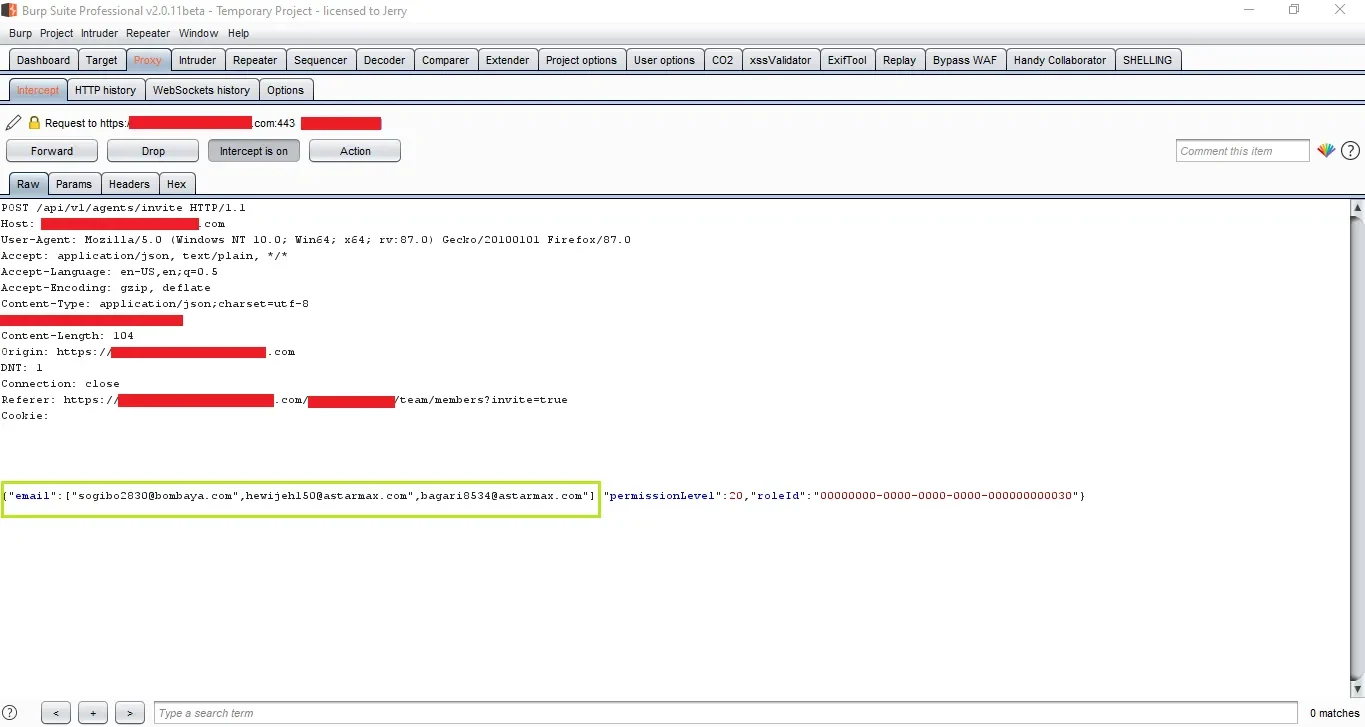
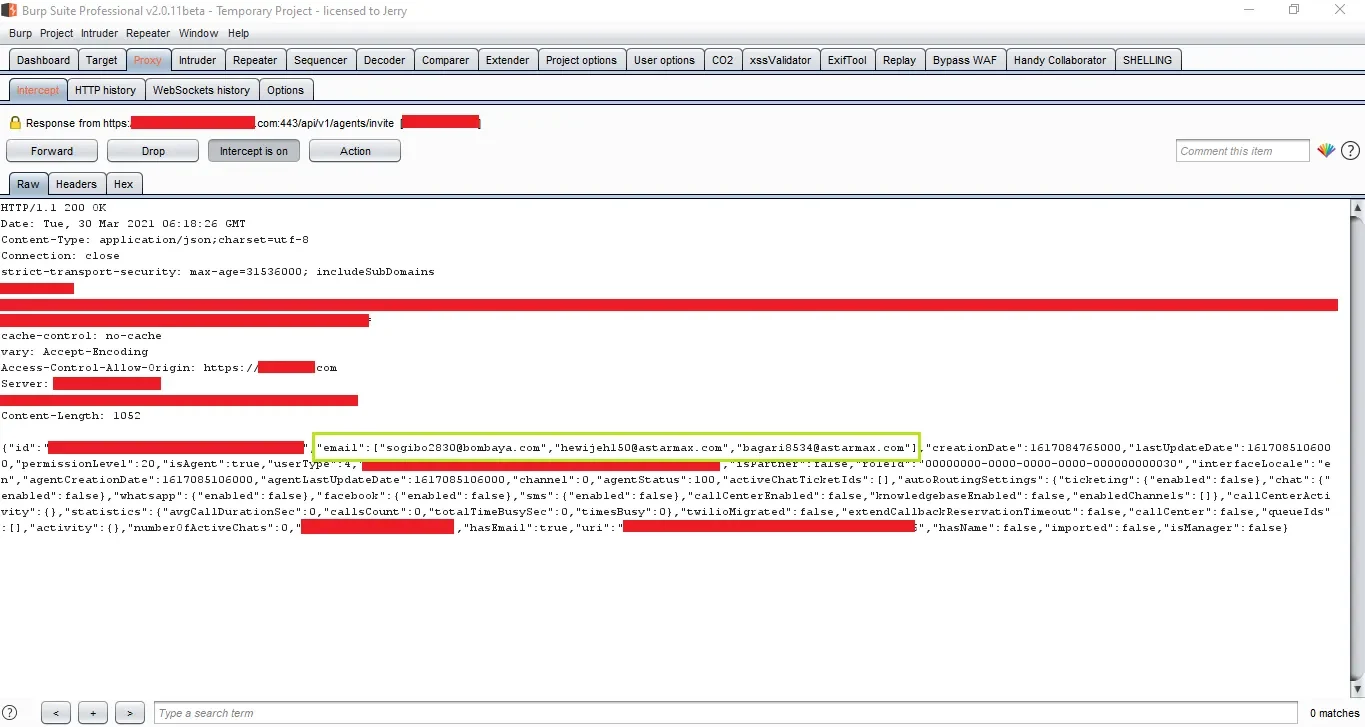
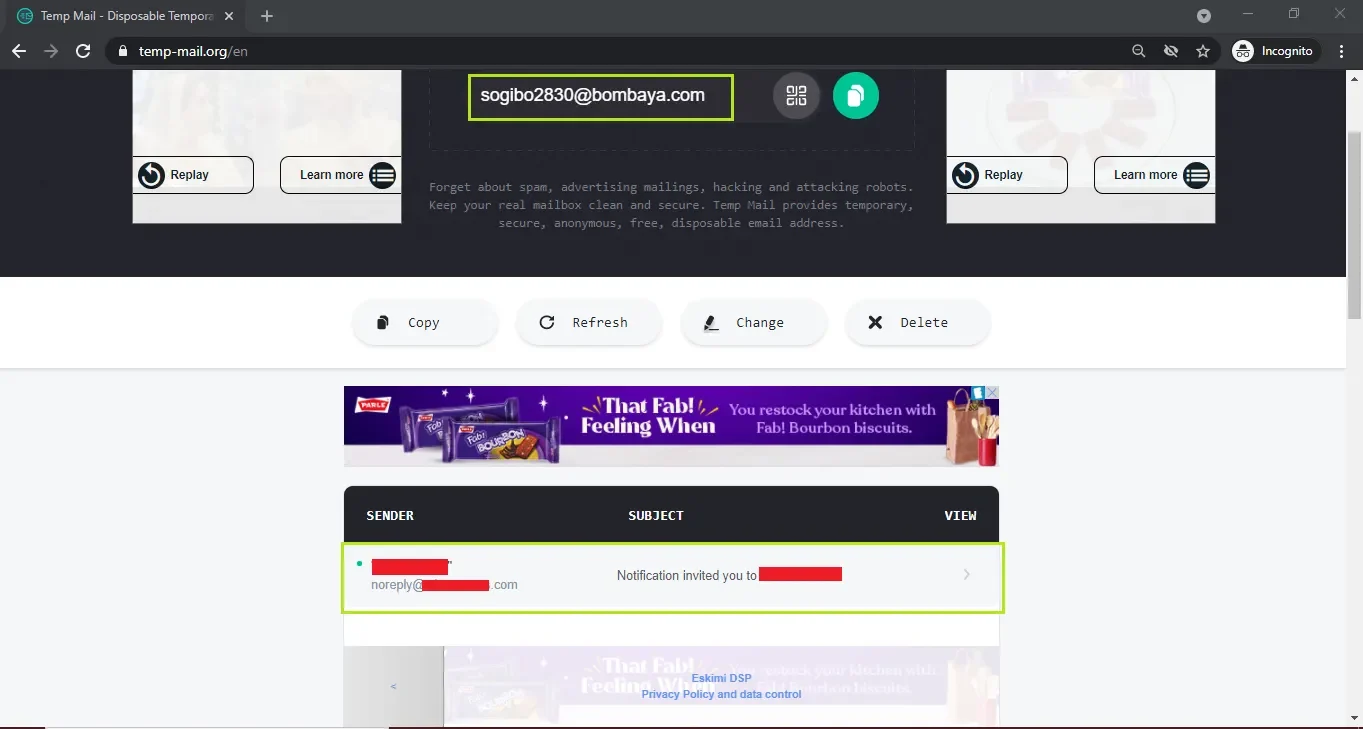
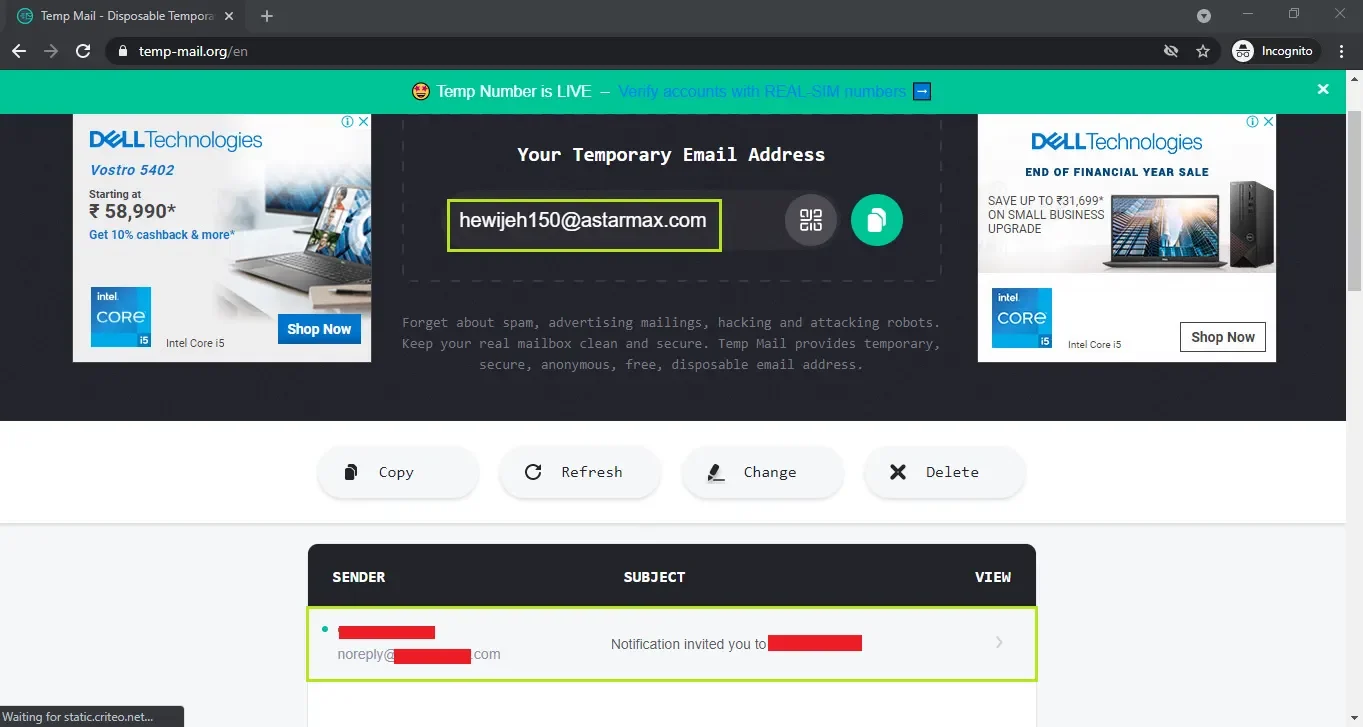
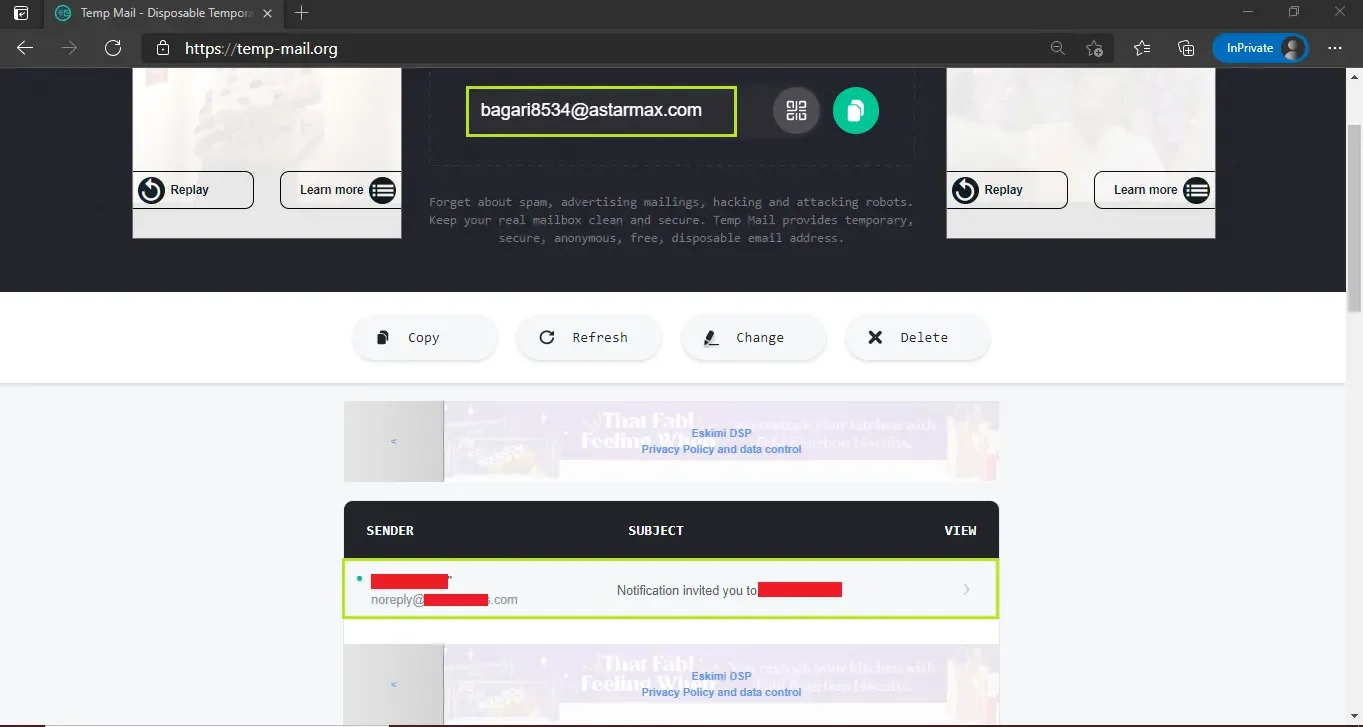
All three recipients received their invitation:
Step 5: check the deduction
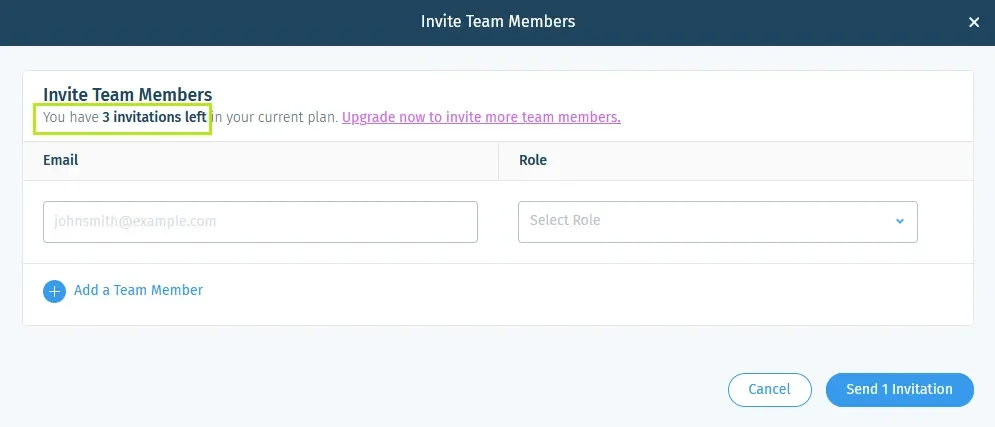
After reloading the page, the account still showed three invitations remaining. All three invitations sent in the array were counted as one:
The report does not show the exact JSON body used in steps 3 and 4. The only payload it writes out is the illustrative array from its explanation of the datatype:
{"email":["[redacted]","[redacted]"]}
In that form, the value of email is a JSON array rather than a string. In the tested request, the server accepted the array and sent an invitation to each address, while the quota logic counted the request as one invitation.
Root cause
The report attributes the behaviour to improper assignment of a datatype to the email parameter: the code expects a string but accepts an array, and the two code paths disagree about what one invitation is. The sending path processes every element of the array, so every address gets an email. The counting path treats the request as one invite, so only one is deducted.
The withdraw behaviour compounds this. Because withdrawing an outstanding invitation restored the allowance, the researcher could reset the counter and then send an array of several addresses for the cost of one invitation. The report attributes the behaviour to improper assignment of a datatype to the email parameter.
Impact
An attacker can abuse the invite functionality to send as many invitations as they want without paying for the premium feature. The report frames the consequence as business loss to the company: the paid tier exists to raise the invitation limit, and this flaw removes that limit for free accounts. The report does not quantify the loss, does not state whether the invitations grant any further access, and does not describe any other effect beyond the invitation emails themselves.
Fix
The recommendation is to assign a proper datatype to the parameters and to perform input validation, so that an array where a string is expected is rejected rather than processed. Enforcing the declared type on email and validating the input before it reaches the invite logic would close the discrepancy between the sending path and the counting path.
Variants to test
- Array in any single-value parameter. Take any endpoint that accepts one identifier or address and submit a JSON array instead. A positive result is a response that reflects every element and performs the action for each, while the quota, counter or audit record shows one operation.
- Quota reset through cancellation. Where a feature has a limited allowance and a cancel or withdraw action, check whether cancelling restores the allowance. If it does, combine it with any batching trick to spend one unit on many actions.
- Type confusion on numeric fields. Send a string, an array or an object where an integer is expected (quantity, seats, credits). A positive result is the action succeeding with a count that does not match the deduction.
- Bulk endpoints versus per-item limits. If the application has both a single-invite and a bulk-invite path, compare how each one charges the allowance. A positive result is the bulk path charging once for many recipients.
- Duplicate and nested arrays. Submit the same address twice, or an array inside an array, and watch both the emails sent and the counter. A positive result is more emails than the counter reflects, or a server error that reveals how the value is parsed.
What happened, in plain words
A website had a feature for inviting people to a team by email. Free accounts could only send four invitations. The researcher found that by changing one small part of the captured invite request, they could send an invitation to several people at once while the site only counted it as one. So four invitations could become many more, without paying for the premium plan.
To follow this, you need a few ideas first.
What a request is. When you fill in a form on a website and press a button, your browser sends a message to the website's server (the computer that runs the site). That message is called a request. The server reads it, does what you asked, and sends back a reply, called a response. Most of the time you never see either one; the browser shows you the result as a page.
What an API is. An API is the part of a website that accepts these requests and answers them with data rather than a finished web page. Think of a restaurant: the dining room is the website you see, the kitchen is the server, and the waiter who takes your order and brings your food is the API. You do not walk into the kitchen yourself; you tell the waiter what you want in a form the kitchen understands.
What a parameter is. A parameter is one named piece of information inside a request. If you order a coffee, the order has parameters like size and milk. In this report the important parameter is called email: it carries the address of the person you want to invite.
What a datatype is. A datatype is the kind of value something holds. A single email address is text, also called a string: one value, like a word. A list of several values is a different datatype, called an array. In everyday terms, a string is one name written on a line, and an array is a shopping list with several lines. The site expected one name and got a shopping list.
What a business logic flaw is. Most security bugs come from something breaking: a crash, a leak, a door left open. A business logic flaw is different. The application works exactly as designed, but the design has a gap, and someone uses the normal features in an order or shape the designers did not think about. It is like a car park that charges per exit: the barrier works perfectly, but if you drive two cars out nose to tail on one ticket, the barrier only counts one. Nothing is broken; the rule is simply being used in a way nobody planned for. These flaws are hard to spot because every individual request looks legitimate.
What Burp Suite is. Burp Suite is a program that sits between your browser and the website and lets you look at, and change, the requests your browser sends before they reach the server. Normally the browser sends a request and you see only the result. With Burp, you can pause the request, edit it, and then let it continue. The report calls this an intercepting proxy. A proxy is a middleman; intercepting means it stops the message so you can read and alter it.
What the feature does. The site lets you invite team members by email. A free account gets four invitations. There is also a withdraw (cancel) option for an invitation you have already sent. That cancel option turns out to be just as important as the invite itself, as you will see.
The report does not name the product or the company; it describes the feature as part of the researcher's private project.
The setup
- A free (non-premium) account, which comes with the standard allowance of four invitations.
- Burp Suite, to capture and modify the invite request.
- Email addresses used in the test: the report shows
[redacted]and[redacted], and in its array example[redacted]and[redacted]. The report shows[redacted]and[redacted], and in its array example[redacted]and[redacted]. - No software versions, no endpoint addresses and no parameter names other than
emailare given.
The only precondition is that the account is on the free tier and therefore subject to the four-invitation cap.
Finding it
The researcher started from the normal flow, the way any ordinary user would. The invite team member screen is where you type an address:
Sending an invitation through that form:
After sending one invite, the account was left with three invitations. The captured request showed the feature behaving normally:
The interesting observation was the withdraw option. Withdrawing the invitation that had just been sent brought the count back to four. That behaviour is what the rest of the attack leans on.
Exploitation
Step 1: send and capture a normal invitation
The first invite was sent through the invite team member functionality and the request was captured in Burp. The report shows the captured request and the normal response but does not reproduce their contents, so the exact endpoint, method, headers and body are not available here. What matters is that the address travels in a parameter named email.
Why this step: before changing anything, you need to see what a normal, working request looks like. You cannot spot what is unusual until you know what usual is.
Step 2: withdraw the invitation
The invitation sent to [redacted] was withdrawn, which brought the allowance back to four:
This confirms that the limit is computed from outstanding invitations, not from a historical total.
Why this step: it tests a theory. If cancelling an invitation gives the invitation back, then the counter can be reset at will, and any trick that makes one invitation do the work of many can be repeated indefinitely.
Step 3: turn the email parameter into an array
The invitation to [redacted] was sent again, the request was captured, and the email parameter was changed from a single string into an array with a second address appended, [redacted]:
The manipulated response reflected both addresses, and both mailboxes received an invitation:
The application, however, counted the operation as one invite. Two people were invited and only one invitation was deducted, leaving three.
Why this step: the researcher wanted to know whether the server would accept a list where it expected a single value. Here they do not: every address in the list received an invitation, while the whole list was counted as one invitation.
Step 4: scale to three addresses
The invitation was withdrawn again and the same request was sent with three addresses in the array. It succeeded:
All three recipients received their invitation:
Why this step: if two works, the obvious question is whether more will. The same request with three addresses went through, and all three emails arrived.
Step 5: check the deduction
After reloading the page, the account still showed three invitations remaining. All three invitations sent in the array were counted as one:
The report does not show the exact request body used in steps 3 and 4. The only payload it writes out is the illustrative array from its explanation of the datatype:
{"email":["[redacted]","[redacted]"]}
Line by line, in plain words:
- The outer curly braces
{and}mark a JSON object, which is a collection of named values. Think of it as a form with labelled fields. "email"is the name of the field, the parameter. The quotes are part of the JSON format and just mark where the name starts and ends.- The colon
:separates the name from its value, like the equals sign on a form. [and]mark an array, a list. Everything between them is one value made of several items."[redacted]"and"[redacted]"are the items in the list, separated by a comma. Each is a string, a single piece of text.- So the whole line says: the field called
emailholds a list of two addresses, not one address.
In that form, the value of email is a JSON array rather than a string. In the tested request, the server accepted the array and sent an invitation to each address, while the quota logic counted the request as one invitation.
Why it happened
The report puts the behaviour down to improper assignment of a datatype to the email parameter: the code expects a string but accepts an array, and the two code paths disagree about what one invitation is. The sending path processes every element of the array, so every address gets an email. The counting path treats the request as one invite, so only one is deducted.
The withdraw behaviour makes it worse. Because withdrawing an outstanding invitation restored the allowance, the researcher could reset the counter and then send an array of several addresses for the cost of one invitation. The report attributes the behaviour to improper assignment of a datatype to the email parameter.
Impact
An attacker can abuse the invite functionality to send as many invitations as they want without paying for the premium feature. The report frames the consequence as business loss to the company: the paid tier exists to raise the invitation limit, and this flaw removes that limit for free accounts. The report does not put a figure on the loss, does not say whether the invitations grant any further access, and does not describe any effect beyond the invitation emails themselves.
Fix
The recommendation is to assign a proper datatype to the parameters and to perform input validation, so that an array where a string is expected is rejected rather than processed. Enforcing the declared type on email and validating the input before it reaches the invite logic would close the gap between the sending path and the counting path.
Variants to test
- Array in any single-value parameter. Take any request that accepts one identifier or address and submit a JSON array instead. A positive result is a response that reflects every element and performs the action for each, while the quota, counter or audit record shows one operation.
- Quota reset through cancellation. Where a feature has a limited allowance and a cancel or withdraw action, check whether cancelling restores the allowance. If it does, combine it with any batching trick to spend one unit on many actions.
- Type confusion on numeric fields. Send a string, an array or an object where an integer is expected (quantity, seats, credits). A positive result is the action succeeding with a count that does not match the deduction.
- Bulk endpoints versus per-item limits. If the application has both a single-invite and a bulk-invite path, compare how each one charges the allowance. A positive result is the bulk path charging once for many recipients.
- Duplicate and nested arrays. Submit the same address twice, or an array inside an array, and watch both the emails sent and the counter. A positive result is more emails than the counter reflects, or a server error that reveals how the value is parsed.
Glossary
- API: the part of a website that receives requests and answers with data, rather than with a finished web page.
- Array: a datatype that holds a list of several values together, written between square brackets in JSON.
- Burp Suite: a program that sits between your browser and a website so you can read and change requests before they are sent.
- Business logic flaw: a weakness where the application works as designed but the design can be used in an unintended way, producing a result the business rules did not allow.
- Datatype: the kind of value something holds, such as text (string), a whole number (integer) or a list (array).
- Endpoint: the specific address on a server that a request is sent to.
- Input validation: checking the data a user submits to make sure it is the right kind, shape and size before the application uses it.
- Intercepting proxy: a middleman program that pauses messages travelling between your browser and a server so you can inspect and edit them.
- JSON: a text format for structured data, built from objects in curly braces and arrays in square brackets.
- Parameter: one named piece of information inside a request, such as the
emailfield. - Premium tier: the paid level of an account, which here raises the invitation limit.
- Request: the message your browser sends to a server when you do something on a website.
- Response: the message the server sends back after processing a request.
- Server: the computer that runs a website and handles its requests.
- String: a datatype holding a single piece of text, such as one email address.
- Type confusion: a flaw where the application accepts a value of a different datatype than it expected and handles it inconsistently.
- Withdraw (cancel): the feature that cancels an invitation already sent, which here restores the invitation allowance.





