Business Logic Errors - Art of Testing Cards
The payment gateway was left in test mode, so a test card number was accepted as real payment for a premium subscription. An attacker could upgrade their account without paying.
 Published on shahjerry33.medium.com
Business logic errors will allow you to manipulate the business logic of an application. Sometimes business logic errors can have devastating effects on the applications.
The full write-up lives on its author's site
It belongs to its author, so we link to it rather than copy it. The other two tabs are our own rewrites, checked against it.
Context
This write-up is about a business logic error in a payment flow: a membership upgrade from basic to premium on a website that accepted a test credit card and processed the payment successfully. The feature under test is the ordinary subscription checkout, where a user picks a plan, enters card and billing details, and places an order. In a correctly configured production checkout, a test card should be rejected; here it was not, and the premium membership was granted without any real money being paid.
The author frames business logic errors as flaws that come from legitimate use of an application's functionality, which is what makes them hard to spot, and notes that they can have a negative consequence for the organisation.
Setup
The report describes no special tooling, accounts or versions. The precondition is simply a user account with a basic membership and access to the dashboard, from which the upgrade can be started. The card details used were a test card number, an expiry date and a CVV, together with a billing address.
Finding it
The researcher went to the dashboard to upgrade the membership from basic to premium.
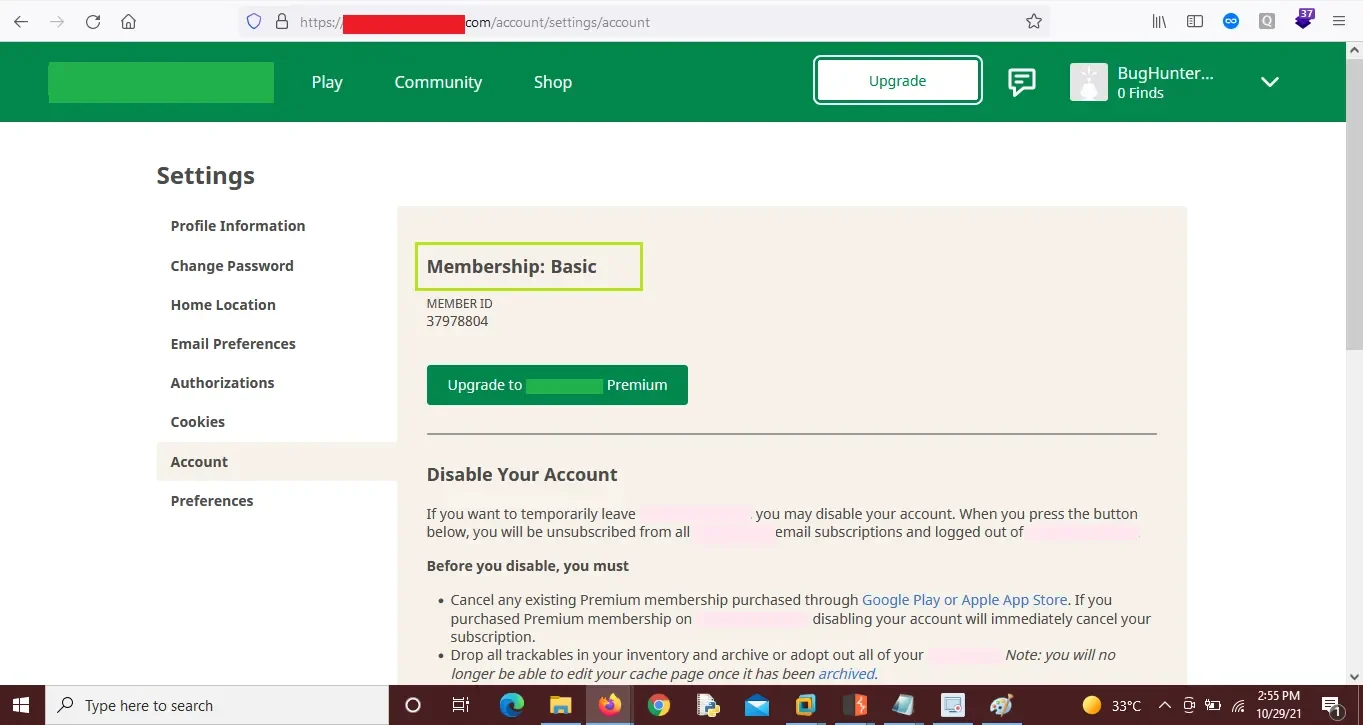
The basic membership as shown on the dashboard.
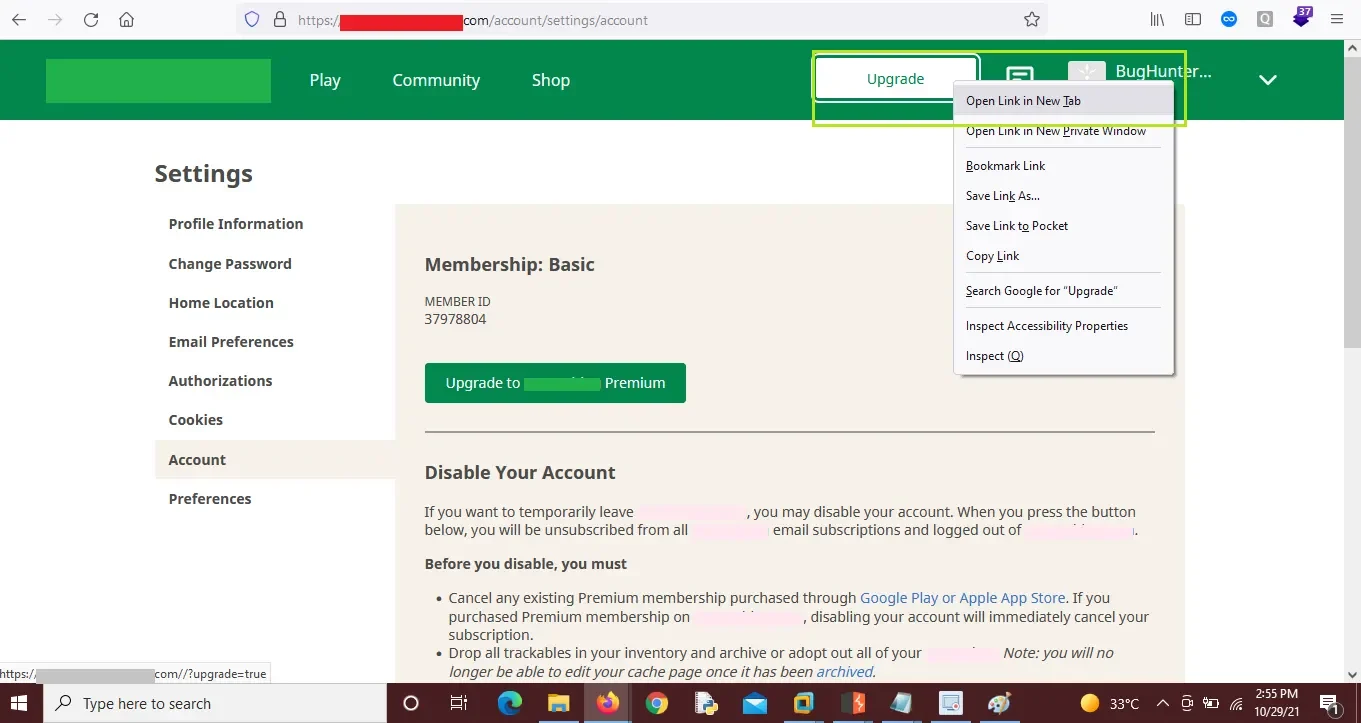
The upgrade flow opened in a new tab.
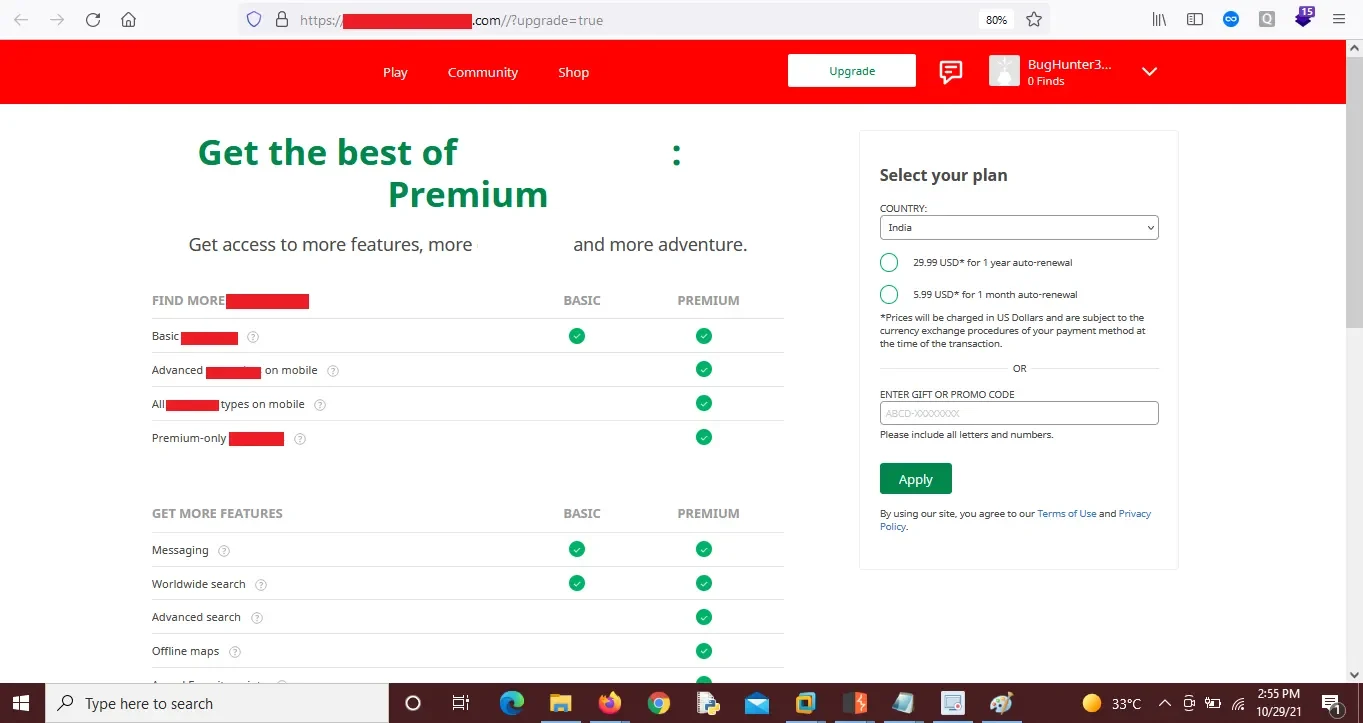
The upgrade page itself.
The checkout accepted a card that is publicly documented as a test card. Many sites have closed this by checking the card against the list of test cards published by Stripe at https://stripe.com/docs/testing#cards, but the author had found a small bypass for sites that implement only that limited fix: instead of using random numbers or the cards from Stripe's list, pick test cards from https://www.fakenamegenerator.com/ and see whether they work. The technique, the author notes, applies to only a few websites.
Exploitation
Step 1: open the upgrade page
From the dashboard, the membership upgrade from basic to premium was opened (screenshots above).
Step 2: select the yearly plan
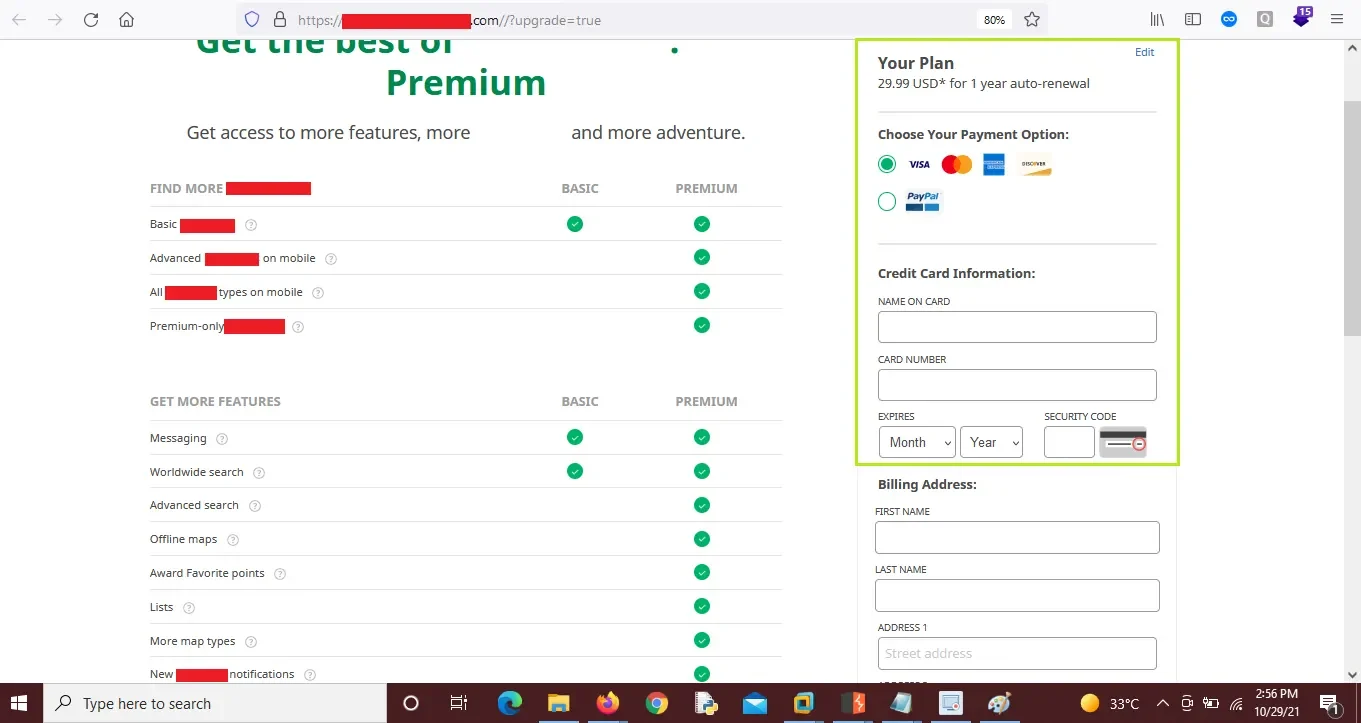
The yearly plan selected on the upgrade page.
Step 3: enter test card and billing details
The card number used was 4242 4242 4242 4242, the date 10/23 and a random CVV 333, with a billing address.
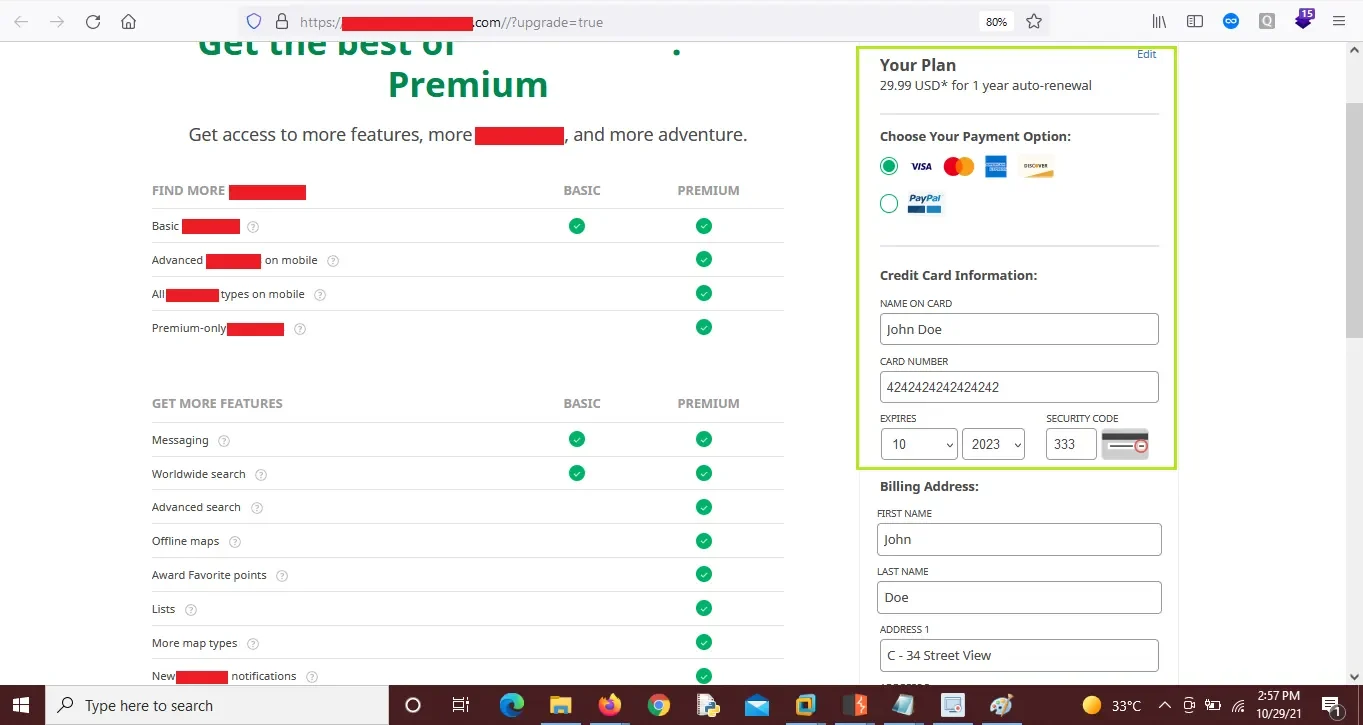
The test card details entered in the checkout form.
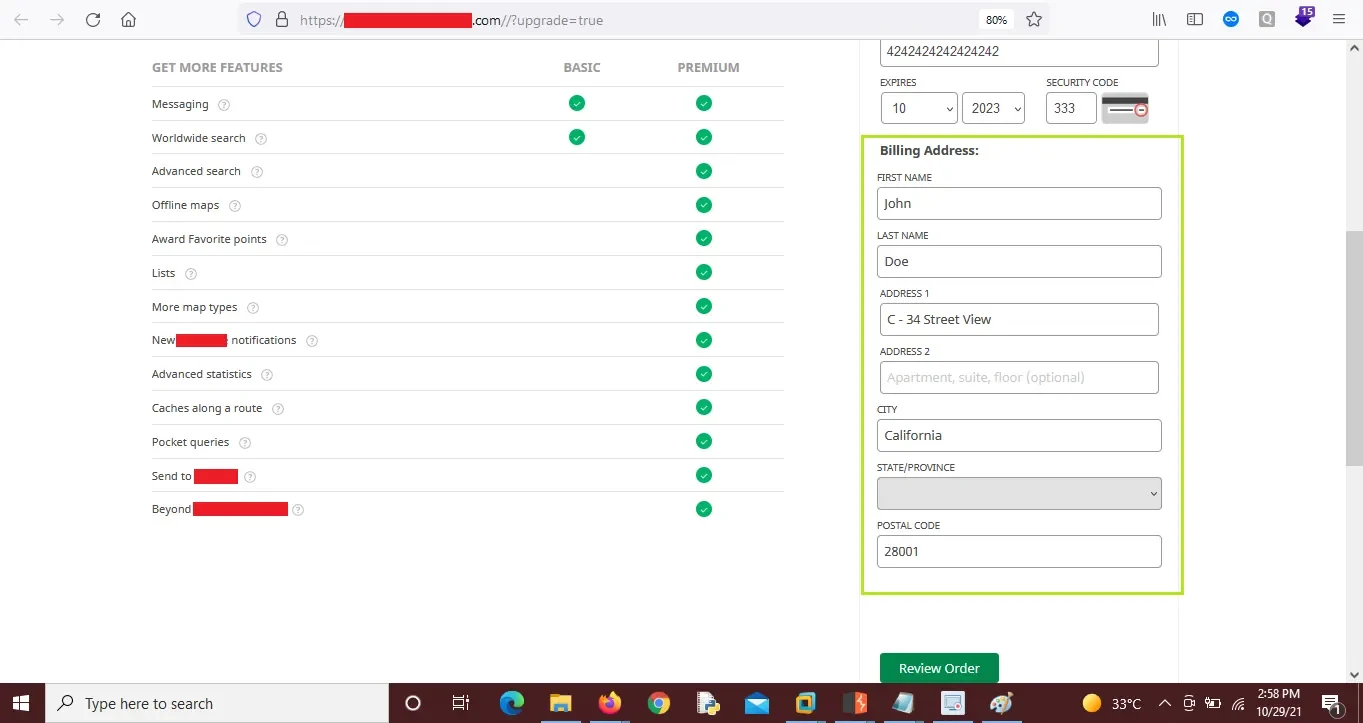
The billing address entered alongside the card.
Step 4: place the order
The Place Order button was clicked and the payment was processed successfully.
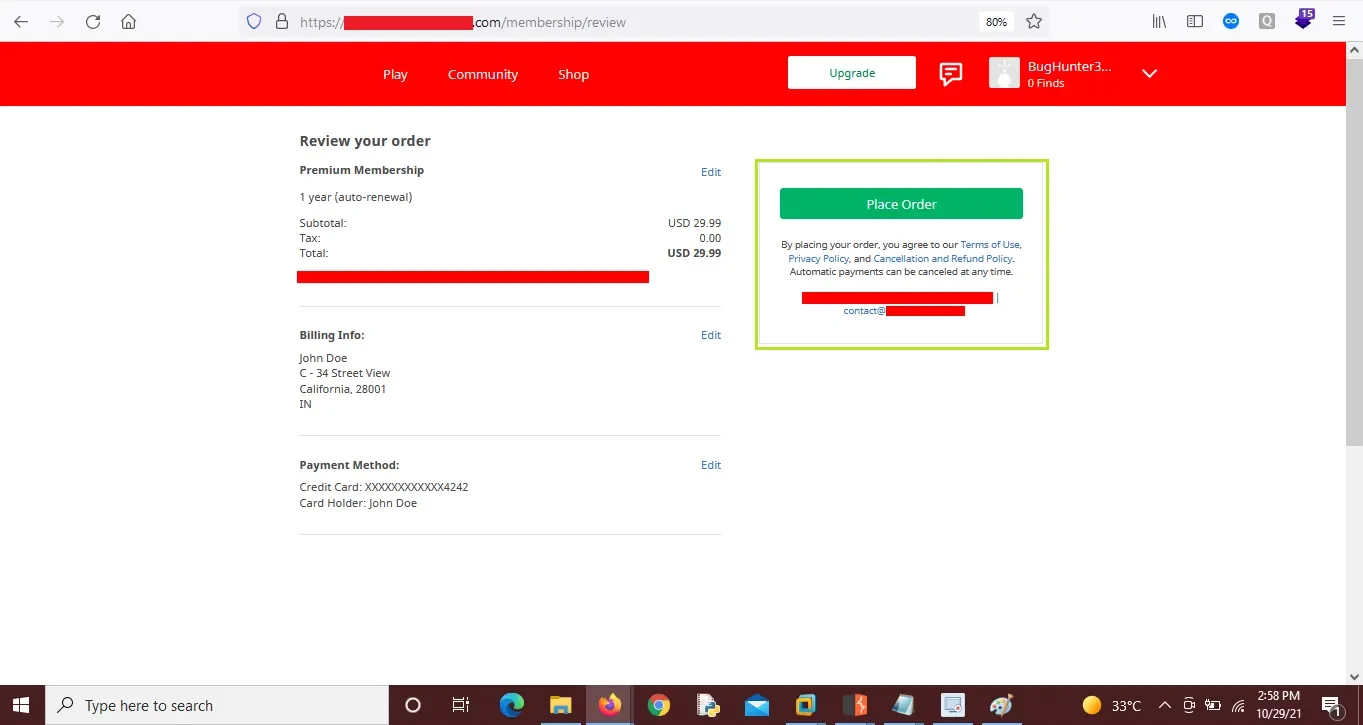
The Place Order button on the checkout.
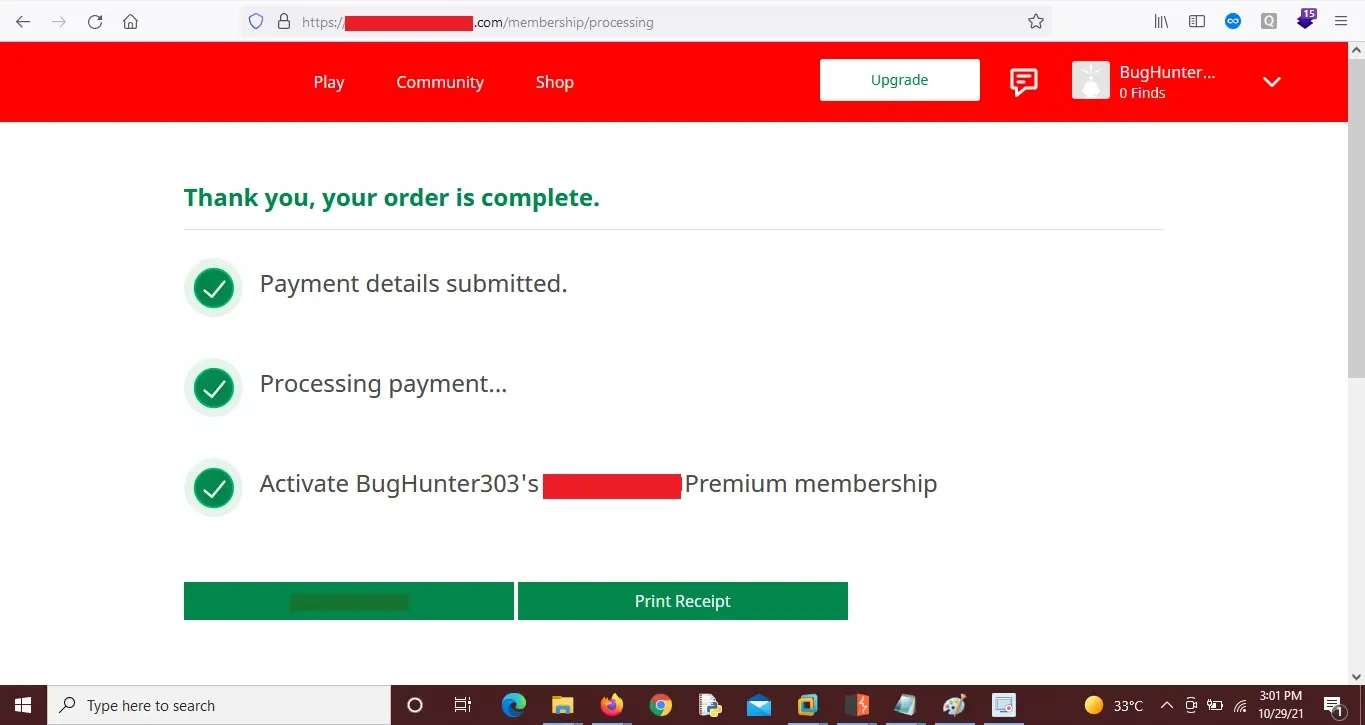
The payment processed successfully.
Step 5: confirm the membership
Returning to the dashboard, the premium membership had been purchased.
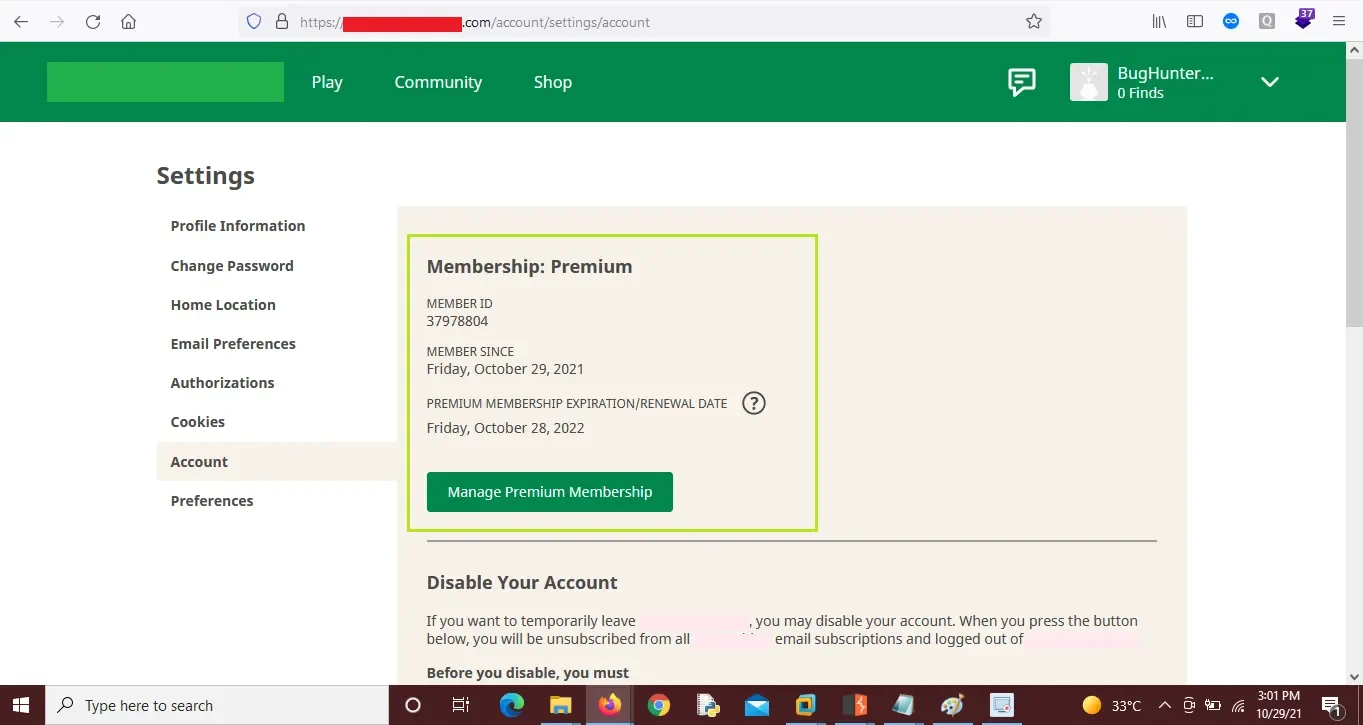
The account now shown as a premium member.
Root cause
In the author's opinion, the payment gateway was in test mode in the back end while the website itself was in production mode.
The distinction the report draws is between two modes:
- Staging, pre-production or test mode. The payment gateway checks its own local, whitelisted database of cards. Because it is in test mode, that local database contains test cards, so a test card found there results in a successful payment. The local database provides no check against the test cards a user supplies.
- Production or live mode. The gateway checks the integrated databases of the card networks. A Visa test card is checked against Visa's database, a Mastercard test card against Mastercard's, because those databases are integrated with the site being tested. Here the test card is rejected.
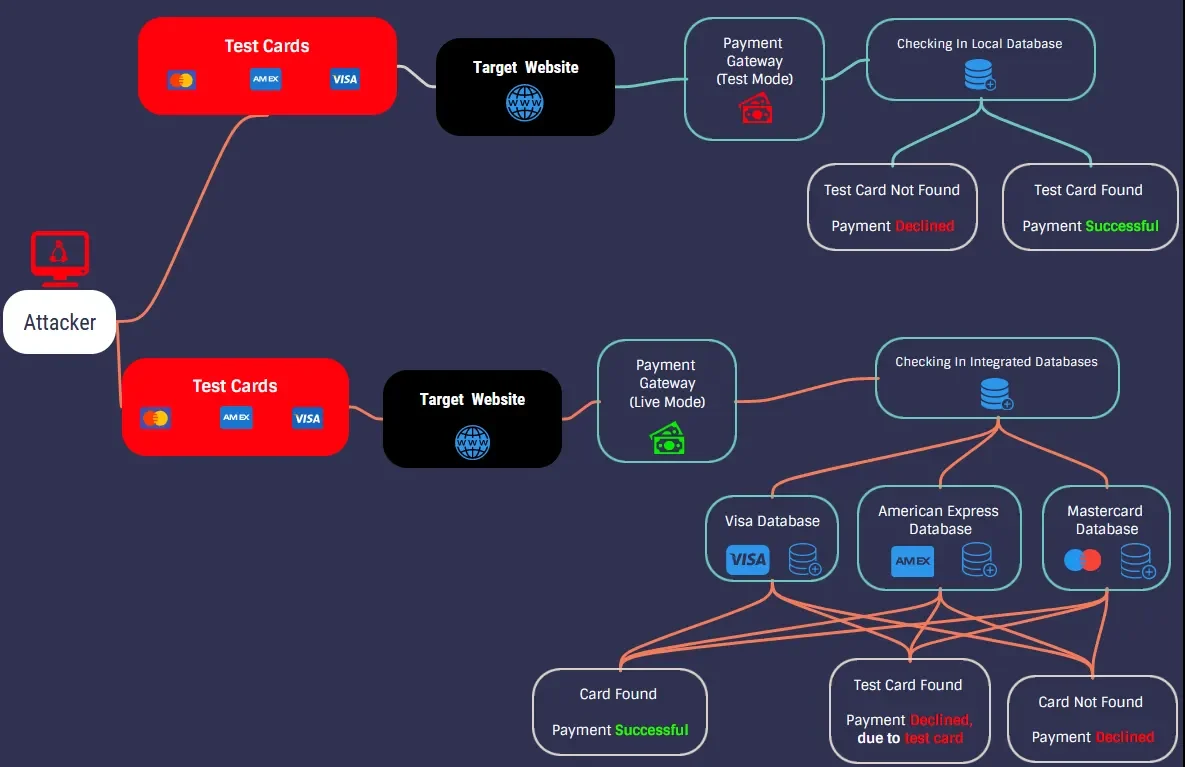
The payment flow compared between test mode and live mode.
In live mode the report shows these error messages being generated:
Processing Error: Your card number is incorrect.
Processing Error: Your card was declined. Your request was in live mode, but used a known test card
The author also analyses the common limited mitigation, a blacklist of known test cards, with demo Python code:
print("***Fake Card Testing***")
print("\n")

fake_cards=(4242424242424242,4000056655665556,5555555555554444,2223003122003222 ,2223003122003222,5200828282828210,5105105105105100,378282246310005,371449635398431,6011111111111117,3056930009020004,3566002020360505,6200000000000005,4000002500001001)

card=int(input("Enter Card Number : "))

if card in fake_cards:
 print("Payment Decline due to test card.")
else:
 print("Payment Successful.")
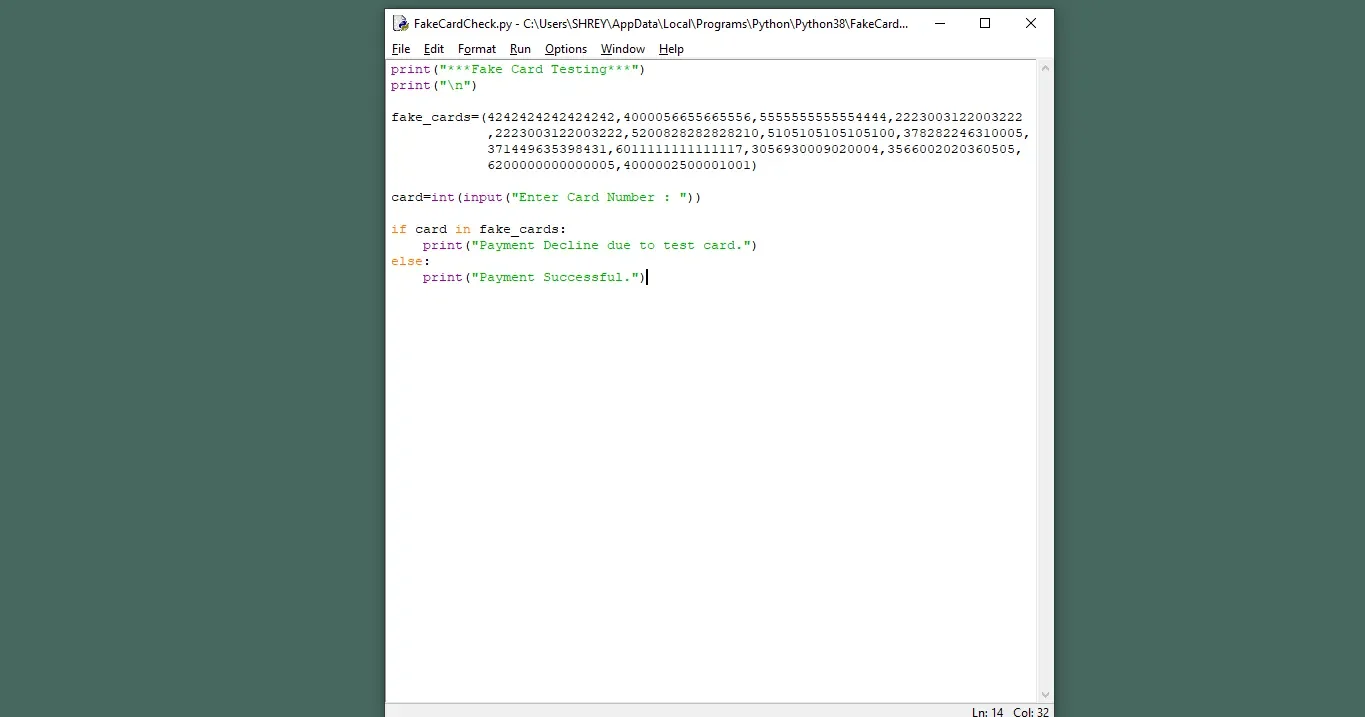
The limited fix code.
A tuple (an array) holds some fake card numbers for identification, so a payment using any of those numbers is declined.
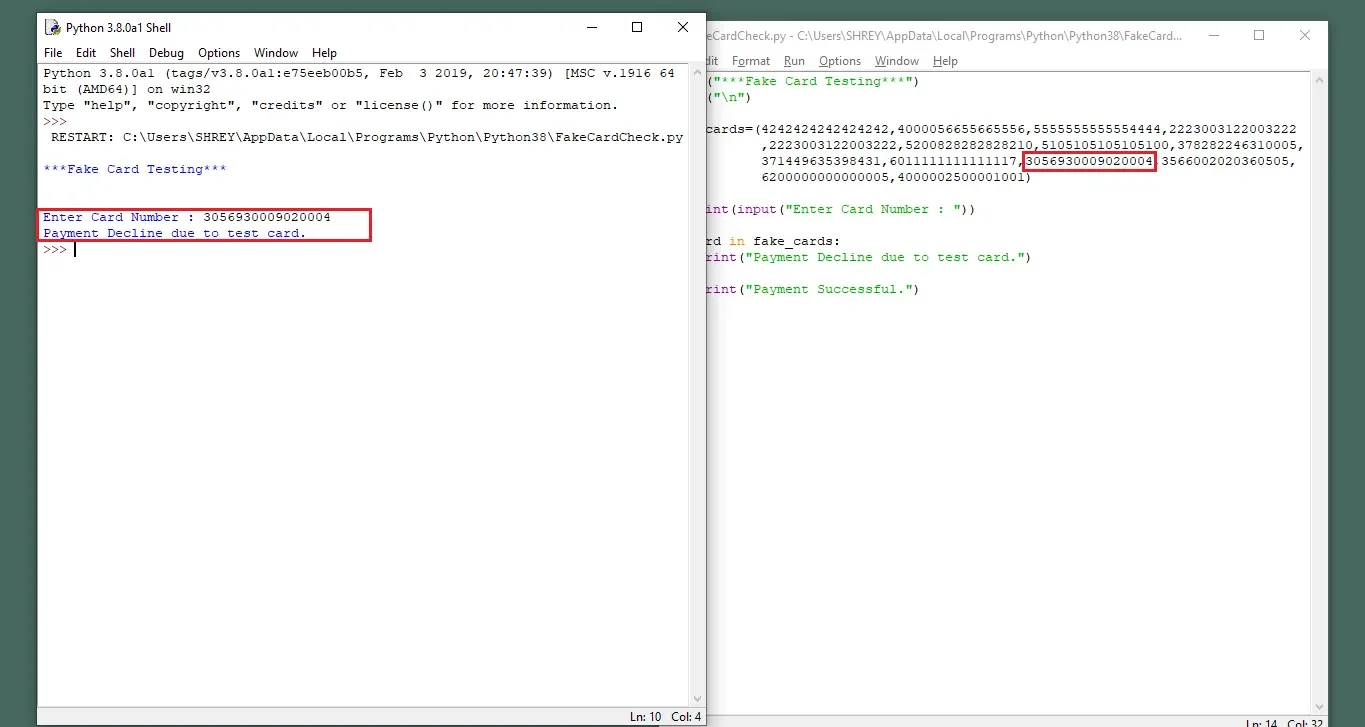
Payment declined when the card is in the tuple.
But if the card number is not in the tuple, the user can still use a test card and process the payment successfully.
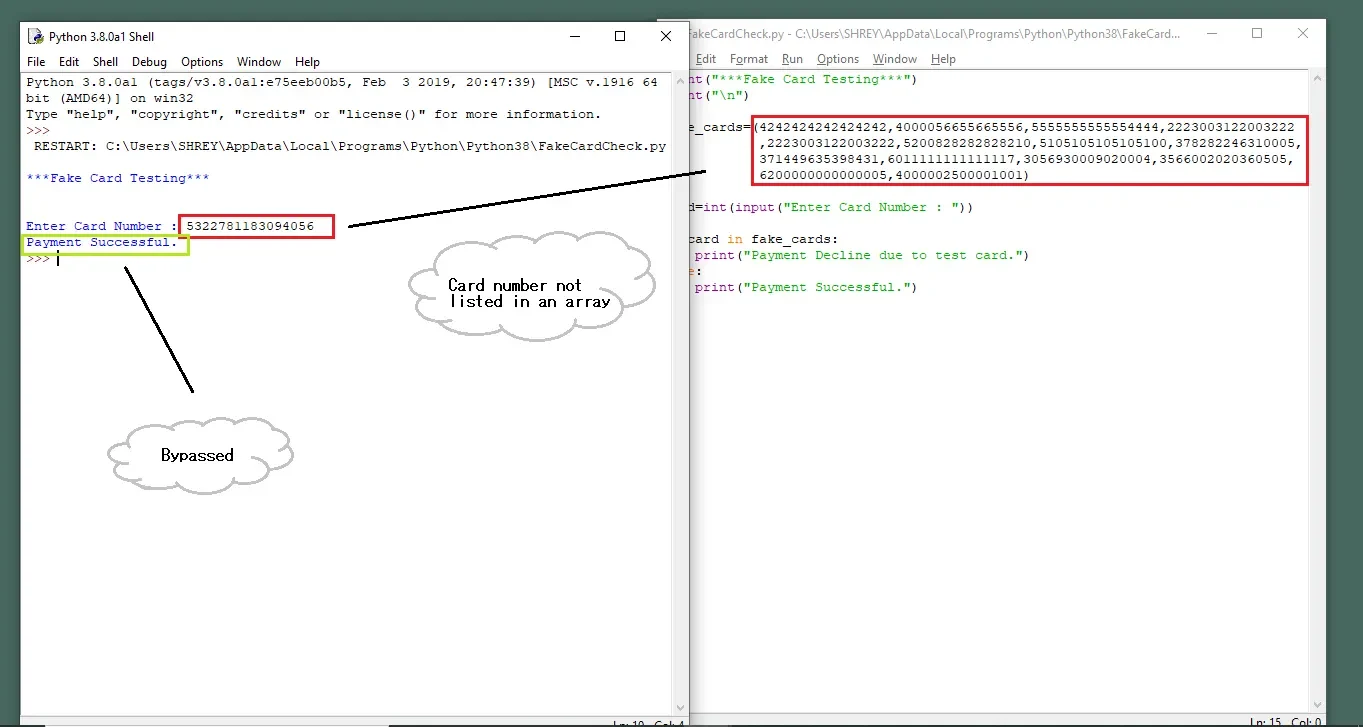
Payment success with a test card that is not on the list.
The report's screenshot used a test card number from https://www.fakenamegenerator.com/ to bypass the logic. The author calls this mitigation blacklisting and argues it does not make sense here, because there are n number of cards and you cannot blacklist all of them; the same reasoning applies to whitelisting. Blacklisting and whitelisting alone are not enough and need to be chained with other techniques, including integrating the card databases with the system to check whether a card is fake.
Impact
Issues of this kind can lead to loss in business, because payments complete successfully without any money being paid. The author's calculated CVSS is:
| Field | Value |
|---|---|
| Vector string | CVSS:3.0/AV:N/AC:L/PR:N/UI:N/S:U/C:N/I:L/A:L |
| Score | 6.5 (Medium) |
Fix
The report lists five mitigations:
- Avoid test modes in the payment gateway. Test modes do not perform security checks against test cards, and even where they do there are ways to bypass them, such as the cards from
https://www.fakenamegenerator.com/. - Implement rate limiting. This mitigates the issue up to a point by blocking card testing after a set number of tries. For example, an attacker uses a test card and it is detected, then uses another and it is detected too; with rate limiting in place the attacker cannot keep trying n cards and is blocked after 3 unsuccessful tries.
- Update the database (limited fix). Regularly update the database of test cards used for the checks.
- Token-based check (the author's opinion). Every original card should have its own token to check authenticity, for example
tok_visafor original Visa cards,tok_mstcrdfor original Mastercards andtok_amexfor original American Express cards. If an attacker tries a test card, the back end should check whether the entered card has the token and reject it if not. - Balance and payment checks (the author's opinion). Check whether the payment went through, and if it failed, check the card balance and reject the card if that also fails. The report notes that checking against card balance requires integrated databases with the respective card companies.
The author credits Ashutosh Kumar for helping them understand the back-end logic of test mode and live mode.

Variants to test
- Checkout with a documented test card. Submit a card from the gateway's published test list on a live-looking checkout.
- Checkout with a test card from a generator. If the first card is rejected, try numbers from a fake-data generator that are not on the gateway's published list.
- Compare test and live behaviour. Run the same card against a checkout known to be in live mode.
- Repeat attempts against rate limiting. Submit several failing test cards in sequence.
- Verify entitlement after payment. After any accepted test payment, reload the dashboard and confirm the premium state persists.
What happened, in plain words
A website sold memberships. You could be a basic member, or pay to become a premium member. The payment step was supposed to take real money from a real credit card. Instead, the researcher typed in a card number that is published on the internet as a fake, test card, and the site said the payment went through. The account was upgraded to premium without a single penny being paid.
This is not a case of breaking into a server or guessing a password. Every click the researcher made was a normal, allowed click: open the dashboard, choose a plan, fill in the checkout form, press the order button. The site simply did not check properly whether the card was real. Security people call this kind of problem a business logic error: the application does exactly what it was built to do, but the rules it follows are wrong, so a normal user can walk through the front door and get something for free.
Why does that matter? Because the site gives away a paid product. If enough people do this, the business loses money on every fake purchase. The report also explains why the site let it happen (the payment system was left in a testing mode) and what could be done about it.
A quick comparison: think of a cinema where the ticket desk accepts a photocopied voucher because the staff only glance at the logo. Nobody forced the door or climbed through a window. The voucher was accepted by the normal process, and the cinema lost a seat. That is the shape of this bug.
The feature being tested
The feature is an ordinary subscription checkout. A subscription is a recurring payment for access to something, here a membership level. The site had at least two levels: basic and premium. A logged-in user could go to their dashboard (the private home page of their account) and start an upgrade from basic to premium. The upgrade page asked them to pick a plan (for example monthly or yearly), then to type card details and a billing address, then to press a button to place the order. In a correctly configured live shop, a card that is publicly known to be a test card should be refused at that last step. Here it was not.
A payment bypass means getting the result of a payment (the product, the upgrade) without the payment itself. A logic flaw means the mistake is in the rules the software follows, not in a broken lock or a leaked password.
Before you start
The report does not describe any special tools, software, accounts or version numbers. You do not need to install anything. The only precondition is what any customer would have: a user account with a basic membership, and the ability to open the dashboard and start an upgrade. The researcher used a test card number, an expiry date, a CVV and a billing address. A CVV is the three or four digit security code printed on a payment card. A billing address is the address the card is registered to, which shops ask for as an extra check.
How the researcher found it
The researcher went to the dashboard and started the upgrade from basic to premium.
The dashboard showing the account on the basic membership. This is the starting point: an ordinary customer view, nothing unusual.
The upgrade flow opened in a new browser tab.
The upgrade page itself, where the plans and the checkout form live.
The checkout accepted a card that is publicly documented as a test card. Many sites have already closed this hole by comparing the card number the customer types against the list of test cards that the payment company Stripe publishes at https://stripe.com/docs/testing#cards. If the number is on that list, the site refuses it. The researcher had found a small way around sites that do only that: instead of using random numbers or the cards from Stripe's list, take test card numbers from https://www.fakenamegenerator.com/, a site that generates fake names and fake personal details, and see whether the checkout accepts them. The researcher notes that this trick works on only a few websites, so it is not universal.
Why does that matter? Because a list of known bad numbers only stops the numbers on the list. A different fake number that is not on the list sails straight through. We will come back to this idea, called blacklisting, later.
Doing it, step by step
Step 1: open the upgrade page
From the dashboard, the membership upgrade from basic to premium was opened. The screenshots are the three above. The reason for starting here is that this is the only place a normal customer can begin a purchase, so it is the natural place to test whether the purchase rules hold.
Step 2: select the yearly plan
The yearly plan selected on the upgrade page. The researcher picked the yearly plan.
Step 3: enter test card and billing details
The card number used was 4242 4242 4242 4242, the date 10/23 and a random CVV 333, together with a billing address.
The test card details typed into the checkout form.
The billing address entered alongside the card.
It is not a real person's card and cannot be charged. If a live shop accepts it, the shop is not really checking the card. The expiry date and CVV are filled in because the form requires them; they do not make the card real.
Step 4: place the order
The Place Order button was clicked, and the payment was processed successfully.
The Place Order button on the checkout, the final click of the purchase.
The confirmation that the payment was processed successfully. This is the moment the bug shows itself: a fake card produced a successful payment.
Step 5: confirm the membership
Back on the dashboard, the premium membership had been purchased.
The account now shown as a premium member. This step matters because a success message on a checkout page can be misleading. The real proof is that the paid feature is actually switched on for the account, and it was.
Why it happened
In the researcher's opinion, the payment system behind the site was in test mode while the website itself was in production mode. Production mode (also called live mode) is the real, money-taking setting. Test mode is a practice setting that payment companies provide so developers can try things without moving real money.
The report draws a clear line between the two:
- Staging, pre-production or test mode. The payment system checks its own local, whitelisted database of cards. Because it is in test mode, that local database contains test cards, so a test card found there produces a successful payment. That local database does not check the test cards a customer supplies.
- Production or live mode. The payment system checks the integrated databases of the card networks. A Visa test card is checked against Visa's database, a Mastercard test card against Mastercard's, because those databases are connected to the site being tested. Here the test card is rejected.
The payment flow compared side by side between test mode and live mode. The picture is there to make the difference visible: in one path the check stays inside the shop's own little list, in the other it goes out to the card company.
In live mode the report shows these error messages being produced:
Processing Error: Your card number is incorrect.
This message means the card company looked at the number and said it is not a valid card. The shop passes that refusal back to the customer.
Processing Error: Your card was declined. Your request was in live mode, but used a known test card
This message is even more explicit: the payment system recognised the number as a known test card and refused it because the request was in live mode. Seeing messages like these on a live checkout is what a correct setup looks like.
Why a simple blocklist is not enough
The researcher also examines the common limited fix, a blacklist of known test cards, using demo Python code. Python is a programming language; you do not need to know it to follow along, because each line is explained below.
print("***Fake Card Testing***")
print("\n")

fake_cards=(4242424242424242,4000056655665556,5555555555554444,2223003122003222 ,2223003122003222,5200828282828210,5105105105105100,378282246310005,371449635398431,6011111111111117,3056930009020004,3566002020360505,6200000000000005,4000002500001001)

card=int(input("Enter Card Number : "))

if card in fake_cards:
 print("Payment Decline due to test card.")
else:
 print("Payment Successful.")
Line by line, in plain words:
print("***Fake Card Testing***")shows the title***Fake Card Testing***on the screen. It is just a heading for the demo.print("\n")prints an empty line, so the output is easier to read.\nmeans "new line".fake_cards=(...)creates a list of card numbers that the program treats as fake. In Python this kind of list is called a tuple, which is simply an ordered collection of values. The numbers inside are the test card numbers the shop has decided to refuse. Note that one number appears twice in the list; that is harmless, it just means the same number is listed twice.card=int(input("Enter Card Number : "))asks the person at the keyboard to type a card number, shows the promptEnter Card Number :, and stores what they typed in a variable calledcard.int(...)turns the typed text into a whole number, because card numbers are digits.if card in fake_cards:asks one question: is the typed number one of the numbers in the list?print("Payment Decline due to test card.")runs only if the answer is yes. The payment is refused.else:covers every other case, meaning the number was not in the list.print("Payment Successful.")runs in that case. The payment is accepted.
The limited fix code as shown in the report.
So the whole defence is: keep a list of bad numbers, and refuse anything on the list. A tuple (an array) holds some fake card numbers for identification, so a payment using any of those numbers is declined.
Payment declined when the card is in the tuple. The typed number matched the list, so the program refused it.
But what if the card number is not in the tuple? Then the user can still use a test card and process the payment successfully.
Payment success with a test card that is not on the list. The typed number did not match any entry, so the program accepted it, even though the card is still fake.
The report's screenshot used a test card number from https://www.fakenamegenerator.com/ to get around the logic. The researcher calls this mitigation blacklisting: keeping a list of things you refuse. The argument against it here is simple arithmetic. There are n number of cards, meaning an unlimited supply, and you cannot blacklist all of them. The same reasoning applies to whitelisting, which is the opposite approach: keeping a list of things you allow. A list of allowed cards would have to contain every real card in the world, which is just as impossible. Blacklisting and whitelisting alone are not enough; they need to be combined with other techniques, including connecting the card databases to the system so it can check whether a card is fake.
What the impact is
Issues of this kind can lead to loss in business, because payments complete successfully without any money being paid. The researcher's calculated CVSS is:
| Field | Value |
|---|---|
| Vector string | CVSS:3.0/AV:N/AC:L/PR:N/UI:N/S:U/C:N/I:L/A:L |
| Score | 6.5 (Medium) |
CVSS is a standard scoring system for security problems. The vector string is a compact code describing the conditions, and the score turns that into a number out of ten. You do not need to decode every letter to follow the report; the headline is 6.5, labelled Medium, which means a real but not catastrophic problem.
How to fix it
The report lists five mitigations:
- Avoid test modes in the payment gateway. A payment gateway is the service that actually moves the money between the customer's card and the shop. Test modes do not perform security checks against test cards, and even where they do there are ways around them, such as the cards from
https://www.fakenamegenerator.com/. - Implement rate limiting. Rate limiting means capping how many times someone can do something in a period, like a door that only opens three times a minute. This mitigates the issue up to a point by blocking card testing after a set number of tries. For example, an attacker uses a test card and it is detected, then uses another and it is detected too; with rate limiting in place the attacker cannot keep trying n cards and is blocked after 3 unsuccessful tries.
- Update the database (limited fix). Regularly update the database of test cards used for the checks. This keeps the blacklist fresh, but as we saw, it is still only a blacklist.
- Token-based check (the researcher's opinion). Every original card should have its own token to check authenticity. A token here is a short code that stands in for a real card, issued by the payment company. For example
tok_visafor original Visa cards,tok_mstcrdfor original Mastercards andtok_amexfor original American Express cards. If an attacker tries a test card, the back end should check whether the entered card has the token and reject it if not. The back end is the part of the site the customer never sees, where the real decisions are made. - Balance and payment checks (the researcher's opinion). Check whether the payment went through, and if it failed, check the card balance and reject the card if that also fails. The report notes that checking against card balance requires integrated databases with the respective card companies.
The researcher credits Ashutosh Kumar for helping them understand the back-end logic of test mode and live mode.
Other ways to test the same idea
- Checkout with a documented test card. Submit a card from the payment company's published test list on a checkout that looks live.
- Checkout with a test card from a generator. If the first card is rejected, try numbers from a fake-data generator that are not on the published list.
- Compare test and live behaviour. Run the same card against a checkout known to be in live mode.
- Repeat attempts against rate limiting. Submit several failing test cards in sequence.
- Verify the upgrade after payment. After any accepted test payment, reload the dashboard and confirm the premium state persists.
Glossary
- Business logic error: a flaw where the software follows its own rules correctly, but the rules are wrong, so normal use produces a bad outcome.
- Payment bypass: getting the result of a payment without actually paying.
- Logic flaw: a mistake in the rules or decisions the software makes, rather than in a lock, password or encryption.
- Subscription: a recurring payment that keeps access to something switched on.
- Dashboard: the private home page of a logged-in account, where its settings and status are shown.
- Checkout: the pages where a customer picks a plan, enters payment details and confirms an order.
- CVV: the short security code printed on a payment card.
- Billing address: the address a card is registered to, used by shops as an extra check.
- Test card: a card number published for testing payment systems, which cannot be charged.
- Payment gateway: the service that moves money between a customer's card and a shop.
- Test mode: a practice setting on a payment gateway where no real money moves.
- Production mode (live mode): the real setting where actual money is charged.
- Staging / pre-production: a practice copy of a system used before the real one.
- Blacklisting: keeping a list of things you refuse, and allowing everything else.
- Whitelisting: keeping a list of things you allow, and refusing everything else.
- Tuple / array: an ordered collection of values in programming; here, a list of card numbers.
- Python: a programming language, used in the report for a small demo.
- Variable: a named place in a program that holds a value, such as the typed card number.
- CVSS: a standard scoring system for security problems, giving a vector string and a score out of ten.
- Vector string: the compact code in CVSS that describes the conditions of a problem.
- Rate limiting: capping how many times an action can be attempted in a period.
- Token: a short code issued by a payment company that stands in for a real card.
- Back end: the part of a website the customer never sees, where the real decisions are made.
- Integrated database: a card company's database connected to the shop's system so real checks can be made.





