Product: eGain Chat (Version 15.0.3)
The eGain Chat file upload feature only validated file extensions on the client side, allowing an attacker to bypass restrictions and upload malicious files with any extension. When an agent downloaded these files, they retained the malicious extensions, enabling potential code execution or other attacks.

medium.com
Published on medium.com
eGain chat is the product developed by company eGain. The targeted customers of this company are small or large size organization which provides the customer support to their customers.
The full write-up lives on its author's site
It belongs to its author, so we link to it rather than copy it. The other two tabs are our own rewrites, checked against it.
Context
eGain Chat (version 15.0.3) is a live chat product from eGain, aimed at organisations that provide customer support through chat agents. The feature under review is the customer-to-agent file sharing option inside a chat session. The product is supposed to restrict what a customer can send: according to the report, only text or PDF files were meant to be shareable. The researcher tested it during a penetration test for a client in France, described as one of the largest banks in France, an environment where no business risk is accepted and where inbound email attachments are heavily filtered.
The bug is a bypass of the file upload restrictions, tracked as CVE-2019-13976. The report was submitted on 11 October 2018 and the vendor fixed the issue on 21 November 2018.
Setup
- Product: eGain Chat, version 15.0.3.
- Two roles are involved: a customer using the chat window to send files, and a chat agent receiving them.
- The web application was using JSP, which shaped the choice of payload in the first exploit.
- A proxy tool was used to intercept and modify the upload request.
- The exploits were written and demonstrated in closed environments as grey box penetration testing.
- The Metasploit multi-handler was run on the local system for the JSP payload.
Finding it
The researcher started from the intended behaviour: a customer can share only text or PDF files. As an adversary, the restriction was bypassed and files with the extension types that organisations normally block were uploaded. The decisive observation came on the agent side: after logging in as an agent, the same files could be downloaded with the same malicious extensions that had been uploaded as a customer.
That asymmetry is the finding. If the server had validated the file, the upload would have been rejected; if the server had validated before serving, the agent would not have received the file with its original extension. The conclusion in the report is that only client-side validation was implemented, and no check was performed on the server side or before serving the file in the chat agent's window.
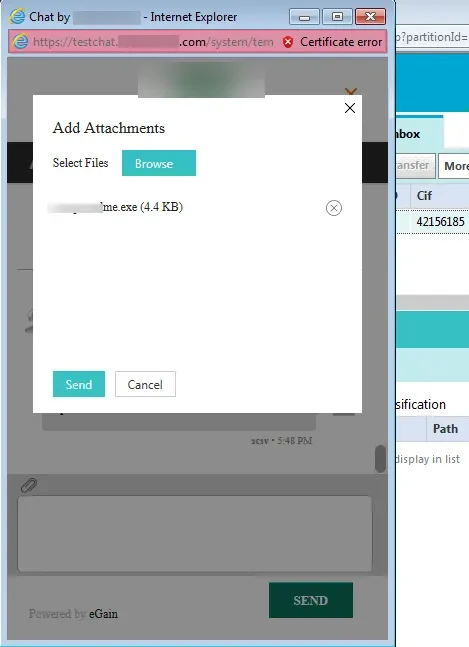
The screenshot shows a malicious file that was uploaded after bypassing the restrictions.
Exploitation
The general bypass is short and does not depend on a particular payload:
- Create a malicious file with an extension that is accepted by the application.
- Upload that file and click on send.
- Capture the request in any proxy tool, edit the file extension to the malicious extension that you want. In some cases, you might need to change the content type of a file.
- Forward the request to the server.
The accepted extension gets the file past the client-side check; the proxy edit changes the name (and sometimes the content type) to what the attacker actually wants to deliver, and the server accepts it. The report does not include the raw intercepted request, so the exact multipart body, parameter names and headers are not reproduced here.
Exploit: Try 1, JSP reverse shell
Because the web application was using JSP, the researcher created a JSP file using the Metasploit module.
- Send the
test.jspfile to an agent chatting with you. - Run the Metasploit multi-handler on the local system.
- Open the
test.jspfile in the browser. - Obtain a shell, or in the case of Windows a meterpreter shell.
The report's steps are to open the test.jsp file in the browser and obtain a shell, or a meterpreter shell on Windows.
Exploit: Try 2, worm
- Write code for a worm. The report notes that many references exist online for writing an invisible worm.
- Send the worm to the agent using the customer chat window.
- Considering the WAF did not detect it, as this was grey box testing, the worm was delivered to a chat agent.
- Log in as a chat agent and download the file. As soon as the agent executes it, the malicious code runs.
This variant relies on the agent executing the downloaded file; delivery alone is not enough.
Exploit: Try 3, CSV formula injection
- Create a file with a malicious formula in it.
- Send the file to the agent as a
.csvextension. - The user opens the file after download and gets redirected to the malicious website.
Here the payload is the spreadsheet formula rather than executable code, and the trigger is the agent opening the CSV in a spreadsheet application.
Root cause
The report's conclusion is that validation existed only on the client side. The report's conclusion is that only client-side validation existed, with no server-side check and no check before serving the file. The agent's download therefore carried the original malicious extension.
Why the surrounding defences did not help, as argued in the report:
- A WAF works on signatures, and it is often observed in monitoring mode. It commonly checks the content type in the request and lets a malicious file through when the content type is whitelisted.
- The bank's email filtering and endpoint policies did not cover this channel: the file arrived through the chat product, inside the premises, not through email.
- The report cites the OWASP guidance on unrestricted file upload: the application should implement whitelisting and blacklisting of file extension types as per the requirements.
Impact
The report lists three business risks:
- Direct access to the agent's local machine using a reverse shell.
- Infected computer systems of chat agents.
- Remote command execution using the CSV injection method.
The report lists three business risks: reverse shell access to the agent's machine, infected agent systems, and remote command execution via CSV injection. The researcher frames the core problem as a policy violation: a product used by customer support could not guarantee a secure medium of communication, which undermined the controls the organisation had put in place everywhere else.
Fix
The report states the vendor fixed the issue on 21 November 2018 and lists the solutions offered and implemented by the vendor:
- Whitelist and blacklist extension types as per the business requirement, and disable all malicious extension types.
- Implement client-side as well as server-side validation on file types and content type.
- Change the file extension types once the file is uploaded.
Variants to test
- Extension swap with the same content type: upload an allowed file, change only the filename extension in the intercepted request. A positive result is the server accepting the file and the recipient downloading it with the new extension.
- Content type mismatch: keep an allowed extension but change the declared content type, or the reverse. A positive result is acceptance where the pair (extension, content type) should have been rejected.
- Double extensions and trailing characters: names such as
file.pdf.jspor names with trailing dots and spaces. A positive result is the stored file being served or executed under the dangerous extension. - Download-side check: after a successful upload, log in as the receiving role and download. A positive result is the file arriving with the malicious extension intact, which shows the validation was only at upload time.
- JSP execution context: if the application is JSP-based, deliver a JSP payload and open it in a browser while a handler listens. A positive result is an inbound connection to the handler.
- Spreadsheet formula payload: deliver a
.csvcontaining a formula. A positive result is the recipient's spreadsheet application following the formula's external reference. - WAF behaviour: repeat the accepted upload with a whitelisted content type. A positive result is the request passing the WAF, consistent with the report's observation that content-type-based inspection can be bypassed.
What happened, in plain words
A bank in France used a chat product called eGain Chat to let its customers talk to its support staff. The product had a file sharing feature: a customer could attach a file in the chat window and send it to the support agent on the other side. The product was supposed to allow only text files and PDF files. A security tester was performing a penetration test for the bank and found that the restriction could be dodged. He could send files of any type, including types that organisations normally block because they can carry malicious software. When he then logged in as a support agent, he could download those same files with their dangerous extensions intact. That told him the check was happening only in the customer's browser, not on the server that stores and delivers the files.
The bug is tracked as CVE-2019-13976. The report was submitted on 11 October 2018 and the vendor fixed it on 21 November 2018.
Before going further, a few words on the pieces involved.
The product. eGain Chat is software that organisations install so that their customer support staff, called agents, can hold live text conversations with customers. Version 15.0.3 is the specific release that was tested.
The feature. Inside a chat session, a customer can attach a file and send it. The agent receives it in the chat window and can download it. The product's rule, as the report describes it, was that only text or PDF files could be shared.
Client side and server side. When you pick a file in a web page, your own browser can look at it before anything is sent. That is client-side checking, and it runs on your computer, under your control. Server-side checking happens on the machine that receives the upload, after the file has travelled over the network. A check that exists only in the browser is easy to get around, because the attacker controls the browser and the network traffic.
A proxy tool. A proxy sits between your browser and the website and lets you see and edit every request before it is sent. Think of it as intercepting a letter at the post office, opening it, changing a word, and sealing it again. Security testers use proxies to change what the browser sends after the browser has done its checks.
Extensions and content types. A file's extension is the part after the dot in its name, such as .pdf or .txt. It is just a label; it does not control what is inside the file. A content type is a label the browser attaches to the upload saying what kind of data it believes the file is. Both are labels that can be edited in transit.
JSP. JSP stands for JavaServer Pages. It is a way of writing web pages where the page contains code that the web server runs when someone opens the page. If an attacker can get a JSP file onto a server and then make the server open it, the attacker's code runs on the server. That is why the type of the underlying web application mattered for the first exploit.
Metasploit and the multi-handler. Metasploit is a well-known collection of tools for security testing. One of its modules can generate a small JSP file that, when opened by a server, connects back to the tester's machine. The multi-handler is the part on the tester's machine that waits for that connection. The connection back is called a reverse shell: instead of the attacker connecting in, the victim machine connects out to the attacker, which often slips past network defences.
WAF. A Web Application Firewall is a filter placed in front of a website that inspects incoming requests and blocks ones that look malicious. It usually works by matching known bad patterns, called signatures, and it is often run in monitoring mode, where it only records suspicious traffic instead of blocking it.
CSV and formulas. CSV is a plain text format for tables, where values are separated by commas. Spreadsheet programs open CSV files, and spreadsheet cells can contain formulas, which are instructions the program calculates. Some formulas can make the spreadsheet fetch something from an external address, which is how a harmless-looking table file can send a user to a malicious website.
Grey box testing. In a grey box test, the tester has some information about the system, such as the technology it is built on, but not full access. The report notes that the exploits were written and demonstrated in closed environments under this kind of testing.
The setup
The test involved two roles: a customer using the chat window to send files, and a chat agent receiving them. The web application was built with JSP, which is why the first exploit used a JSP file. A proxy tool was used to intercept and modify the upload request, and the Metasploit multi-handler was run on the tester's local system to catch the connection from the JSP payload.
Finding it
The tester started from what the product was supposed to do: a customer can share only text or PDF files. Acting as an attacker, he got around that rule and uploaded files with the extension types that organisations normally block. The important moment came on the agent side. After logging in as an agent, he could download the same files with the same dangerous extensions he had uploaded as a customer.
That gap between the two sides is the finding. If the server had checked the file when it arrived, the upload would have been rejected. If the server had checked before handing the file to the agent, the agent would not have received it with its original extension. The report's conclusion is that only client-side validation was in place, and no check was performed on the server side or before serving the file in the chat agent's window.
The screenshot shows a malicious file that was uploaded after bypassing the restrictions.
How the bypass worked
The general method is short and does not depend on any particular payload:
- Create a malicious file with an extension that is accepted by the application.
- Upload that file and click on send.
- Capture the request in any proxy tool, edit the file extension to the malicious extension that you want. In some cases, you might need to change the content type of a file.
- Forward the request to the server.
Step by step, in plain words:
- The attacker first makes a file that does the harm he wants, but gives it a harmless name, such as a
.pdfor.txtending. The browser's check looks at that name and lets it through, because the name is on the allowed list. - He selects the file in the chat window and presses send, exactly as a normal customer would.
- Before the request leaves his machine, the proxy tool pauses it. The attacker changes the extension in the request to the dangerous one he actually wants to deliver, and sometimes also changes the content type label. The browser's check has already happened, so it cannot object.
- He lets the request continue to the server. Because the server does not re-check, it accepts and stores the file.
The accepted extension is what gets the file past the browser-side check. The proxy edit changes the name, and sometimes the content type, to what the attacker really wants to deliver, and the server takes it. The report does not include the raw intercepted request, so the exact body of the upload, its parameter names and its headers are not shown here.
Exploit: Try 1, a JSP reverse shell
Because the web application was using JSP, the tester created a JSP file using the Metasploit module.
- Send the
test.jspfile to an agent chatting with you. - Run the Metasploit multi-handler on the local system.
- Open the
test.jspfile in the browser. - Obtain a shell, or in the case of Windows a meterpreter shell.
What each step is for:
- The JSP file is the payload. It is delivered through the chat window using the bypass above, so the agent receives a file that the product would normally never allow.
- The multi-handler is set up on the tester's machine before anything else happens. It listens for the connection that the payload will make, like leaving a phone off the hook and waiting for a call.
- The report's steps are to open the test.jsp file in the browser and obtain a shell, or a meterpreter shell on Windows.
- Once the code runs, it connects back to the waiting handler, and the tester gets a shell, which is a command line on the affected machine. On Windows the result is described as a meterpreter shell, a Metasploit session that gives control of the machine.
Exploit: Try 2, a worm
- Write code for a worm. The report notes that many references exist online for writing an invisible worm.
- Send the worm to the agent using the customer chat window.
- Considering the WAF did not detect it, as this was grey box testing, the worm was delivered to a chat agent.
- Log in as a chat agent and download the file. As soon as the agent executes it, the malicious code runs.
A worm is a piece of malicious software that spreads by itself. Here the point is delivery: the file travels through the chat window, which the organisation's email filters never see. The WAF did not detect it in this test. The last step is the trigger: the file has to be executed by the agent, so delivery alone is not enough.
Exploit: Try 3, a formula in a CSV file
- Create a file with a malicious formula in it.
- Send the file to the agent as a
.csvextension. - The user opens the file after download and gets redirected to the malicious website.
Here the payload is not executable code but a spreadsheet formula. The file looks like an ordinary table, and the trigger is the agent opening it in a spreadsheet program. The formula then makes the program reach out to an external address, and the user ends up redirected to a malicious website.
Why the defences around it did not help
The report's conclusion is that validation existed only on the client side. The report's conclusion is that only client-side validation existed, with no server-side check and no check before serving the file in the chat agent's window.
The report argues that the surrounding defences did not cover this path:
- A WAF works on signatures, and it is often run in monitoring mode. It commonly checks the content type declared in the request and lets a malicious file through when that content type is on the allowed list.
- The bank's email filtering and endpoint policies did not apply to this channel. The file arrived through the chat product, inside the organisation, not through email.
- The report cites the OWASP guidance on unrestricted file upload: the application should implement whitelisting and blacklisting of file extension types as per the requirements.
Whitelisting means allowing only a known list of good values. Blacklisting means blocking a known list of bad ones. The report's point is that a proper upload feature needs one or both of these enforced where the attacker cannot edit them, which is the server.
Impact
The report lists three business risks:
- Direct access to the agent's local machine using a reverse shell.
- Infected computer systems of chat agents.
- Remote command execution using the CSV injection method.
The report lists three business risks: reverse shell access to the agent's machine, infected agent systems, and remote command execution via CSV injection. The tester frames the core problem as a policy violation: a product used by customer support could not guarantee a secure medium of communication, which undermined the controls the organisation had put in place everywhere else.
The fix
The report states the vendor fixed the issue on 21 November 2018 and lists the solutions offered and implemented by the vendor:
- Whitelist and blacklist extension types as per the business requirement, and disable all malicious extension types.
- Implement client-side as well as server-side validation on file types and content type.
- Change the file extension types once the file is uploaded.
In plain words: decide which file types are allowed and which are forbidden, and enforce that on the server, not only in the browser. Then, once a file is stored, give it a new extension so that even if something dangerous got through, it cannot be opened or run under its original name.
Variants to test
These are the checks a tester would repeat on a similar product, each with a clear sign of success:
- Extension swap with the same content type: upload an allowed file and change only the filename extension in the intercepted request. Success is the server accepting the file and the recipient downloading it with the new extension.
- Content type mismatch: keep an allowed extension but change the declared content type, or the reverse. Success is acceptance where the pair of extension and content type should have been rejected.
- Double extensions and trailing characters: names such as
file.pdf.jsp, or names with trailing dots and spaces. Success is the stored file being served or executed under the dangerous extension. - Download-side check: after a successful upload, log in as the receiving role and download. Success is the file arriving with the dangerous extension intact, which shows the validation happened only at upload time.
- JSP execution context: if the application is JSP-based, deliver a JSP payload and open it in a browser while a handler listens. Success is an inbound connection to the handler.
- Spreadsheet formula payload: deliver a
.csvcontaining a formula. Success is the recipient's spreadsheet program following the formula's external reference. - WAF behaviour: repeat the accepted upload with an allowed content type. Success is the request passing the WAF, consistent with the report's observation that content-type-based inspection can be bypassed.
Glossary
- Agent: a customer support employee who chats with customers through the product.
- Blacklisting: blocking a known list of bad values, such as forbidden file extensions.
- Client side: work done on the user's own computer, here inside the browser, which the attacker controls.
- Content type: a label attached to a file or request saying what kind of data it is believed to contain.
- CSV: a plain text table format where values are separated by commas.
- CVE: a public identifier for a known security vulnerability, here CVE-2019-13976.
- Extension: the part of a filename after the dot, such as
.pdf, used as a label for the file type. - Formula injection: putting a spreadsheet formula into a file so that it runs when the file is opened in a spreadsheet program.
- Grey box testing: a security test where the tester has partial knowledge of the system, such as the technology it uses.
- JSP: JavaServer Pages, a way of writing web pages that contain code the web server runs when the page is opened.
- Meterpreter: a Metasploit session that gives the tester control of a compromised machine.
- Metasploit: a collection of tools used for security testing, including payload generators and handlers.
- Multi-handler: the Metasploit component that waits for a connection from a payload.
- OWASP: an organisation that publishes guidance on web application security, including on file uploads.
- Payload: the part of an attack that does the harm, such as a JSP file or a formula.
- Penetration test: an authorised attempt to break into a system to find weaknesses before real attackers do.
- Proxy tool: software that sits between the browser and the website and lets the tester view and edit requests.
- Reverse shell: a connection where the victim machine connects out to the attacker, giving the attacker a command line.
- Server side: work done on the machine that receives and stores the data, which the attacker cannot edit directly.
- Signature: a known pattern a WAF matches against to spot malicious traffic.
- WAF: Web Application Firewall, a filter in front of a website that inspects requests and can block suspicious ones.
- Whitelisting: allowing only a known list of good values, such as permitted file extensions.
- Worm: malicious software that spreads by itself from machine to machine.


