Bypassing E2E encryption leads to multiple high vulnerabilities.
The application encrypted request bodies client-side, but the encryption key was hardcoded in an obfuscated JavaScript file. By analysing the file and intercepting the encrypt function, the researcher could edit request bodies before encryption, leading to IDOR and SSRF vulnerabilities.
 Published on melotover.medium.com
In today’s blog, I’m going to show you how I was able to bypass the E2E encryption of an application by analyzing an obfuscated javascript file that was imported to that application, and how this helped me to better understand the internals of this application and get to find other multiple high vulnerabilities.
The full write-up lives on its author's site
It belongs to its author, so we link to it rather than copy it. The other two tabs are our own rewrites, checked against it.
Context
The target was a web application whose API traffic was protected with end-to-end encryption: every request body sent from the browser to the API arrived as an encrypted blob, so the real parameters were not visible in a proxy. The author describes this as an extra security layer intended to protect the communication between client and server against middle attacks. Because all requests originate in the browser, any encryption applied to the body has to happen on the client side, which makes the JavaScript files the natural place to look.
The goal of the research was to bypass that encryption, understand the internals of the application, and then use that understanding to look for other vulnerabilities. The write-up reports an IDOR and an SSRF found this way, plus multiple further IDORs that allowed editing other users' information such as email and phone number.
Setup
The tools used were a browser with developer tools (Sources panel, pretty print, breakpoints, the Scope and Console sections, and Event Listener Breakpoints), apktool to decompile the Android application, a js-beautifier tool, Burp Suite with a Collaborator, and a local PHP file served from localhost as a proxy. No account details, roles or versions are given in the report.
Finding it
Starting from the login panel and sending requests to explore the application, the author found that almost all requests went to an API and that their bodies were encrypted. No parameters were visible in the proxy.
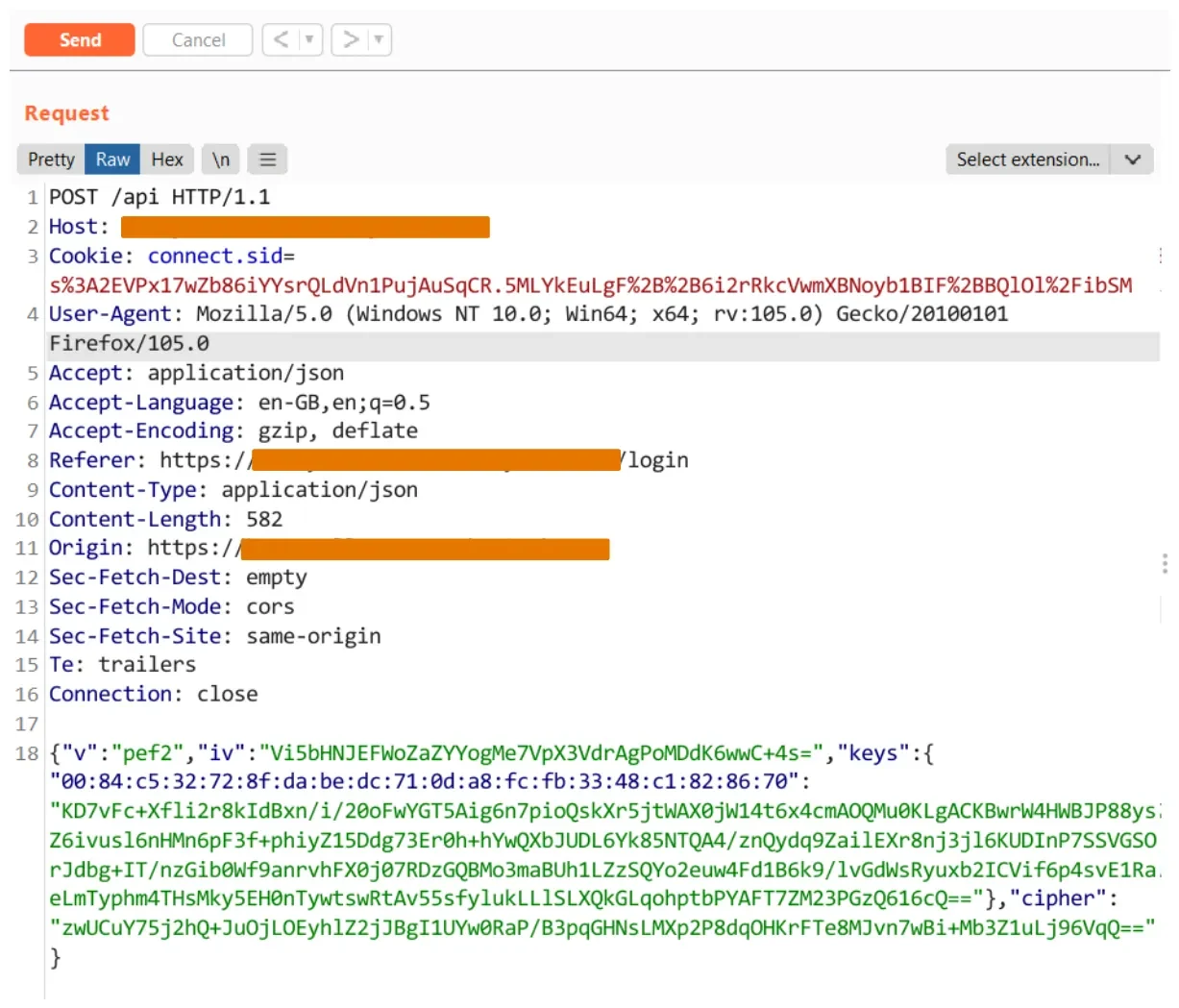
The encrypted body is a JSON object with the keys v, iv, keys and cipher. All of these change on every request except v, whose value is always pef2.
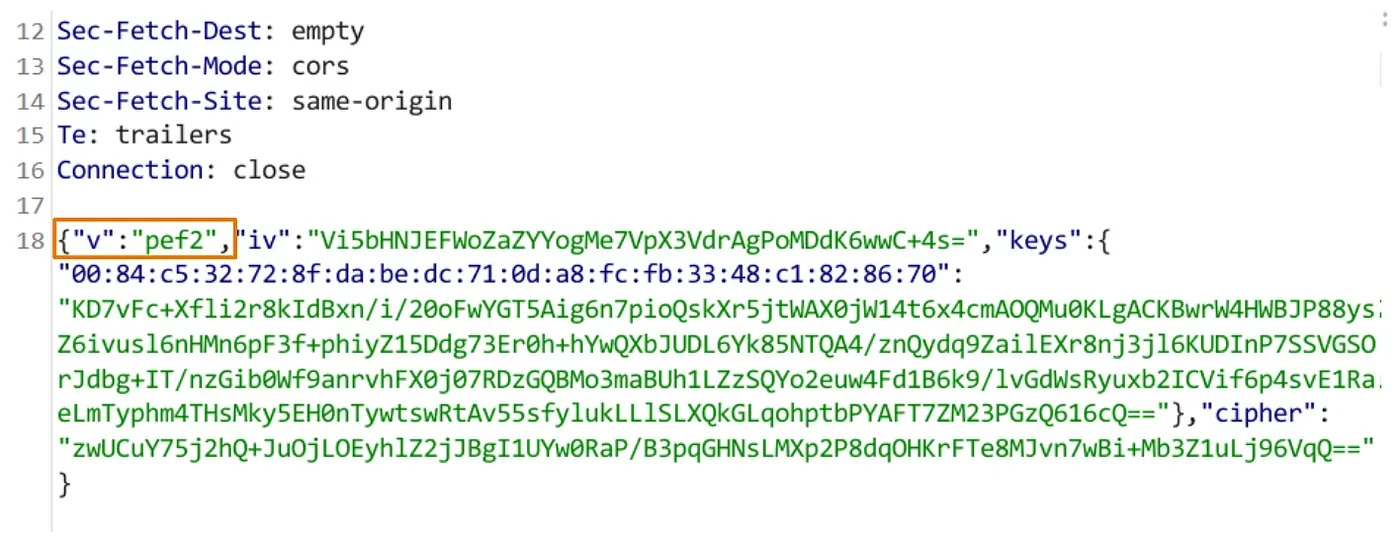
Because v is fixed, it must be defined somewhere in the JavaScript, and finding it might lead to the function that performs the encryption.
First round: the obfuscated bundle
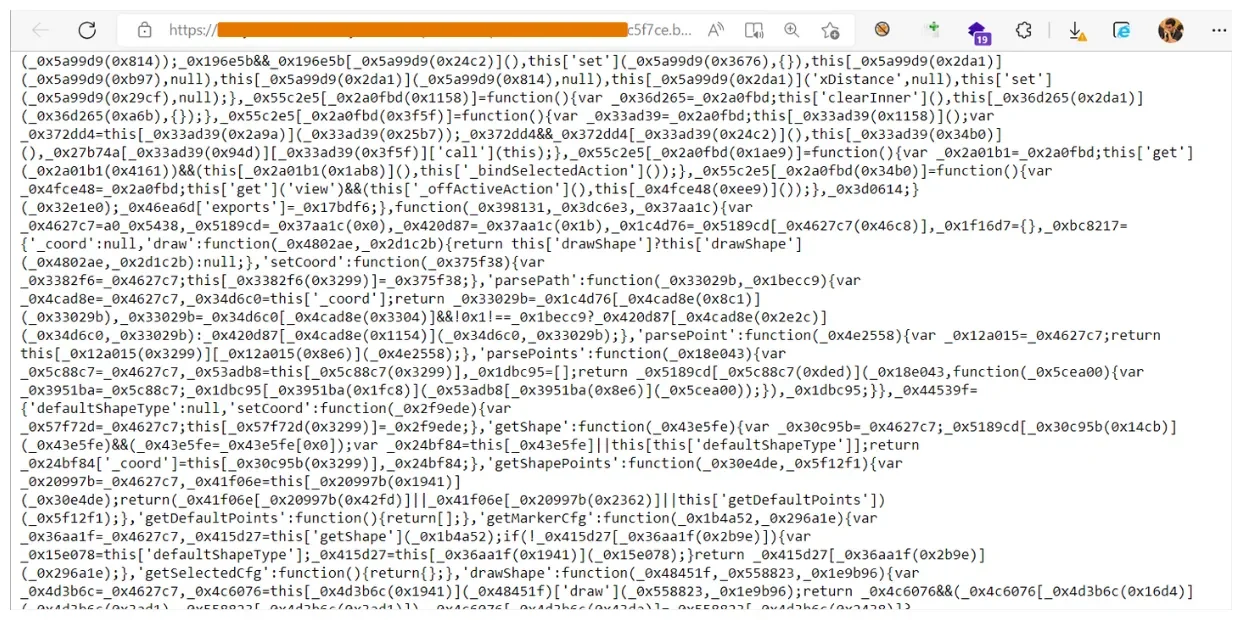
Only one large JavaScript file was imported by the whole application, and it was obfuscated, minimised and messy.
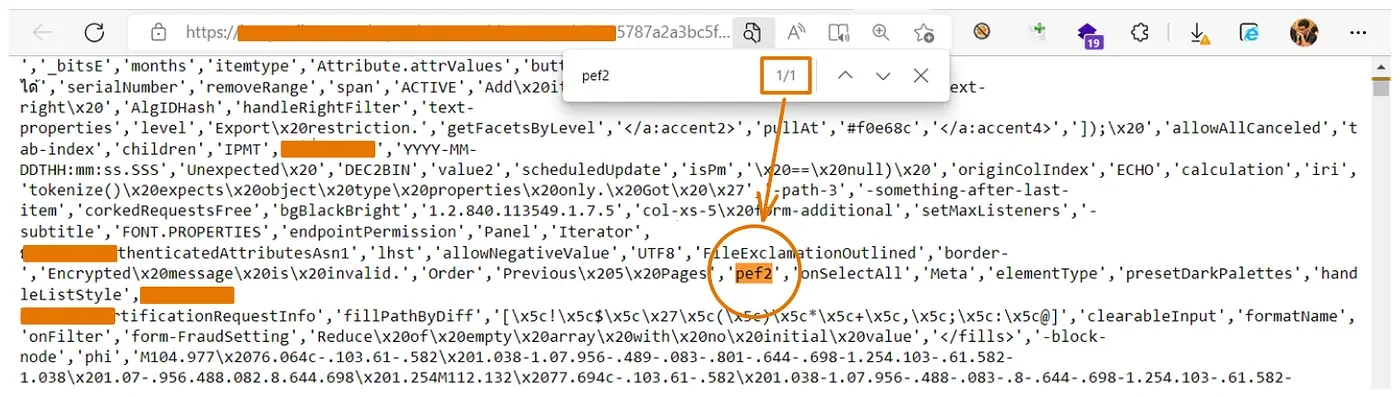
Searching the file for pef2 returned a single mention, but following the initiators (more than 55 called functions) and debugging for a while did not reveal where the encryption or decryption happens. An attempt to find an older, unobfuscated version of the file in the internet archive was unsuccessful.
Pivoting to the Android application
The author reasoned that the Android application uses the same API, so decompiling it and inspecting its resources might reveal the same encryption implementation, possibly unobfuscated. The APK was decompiled with apktool and searched for the same word, pef2.
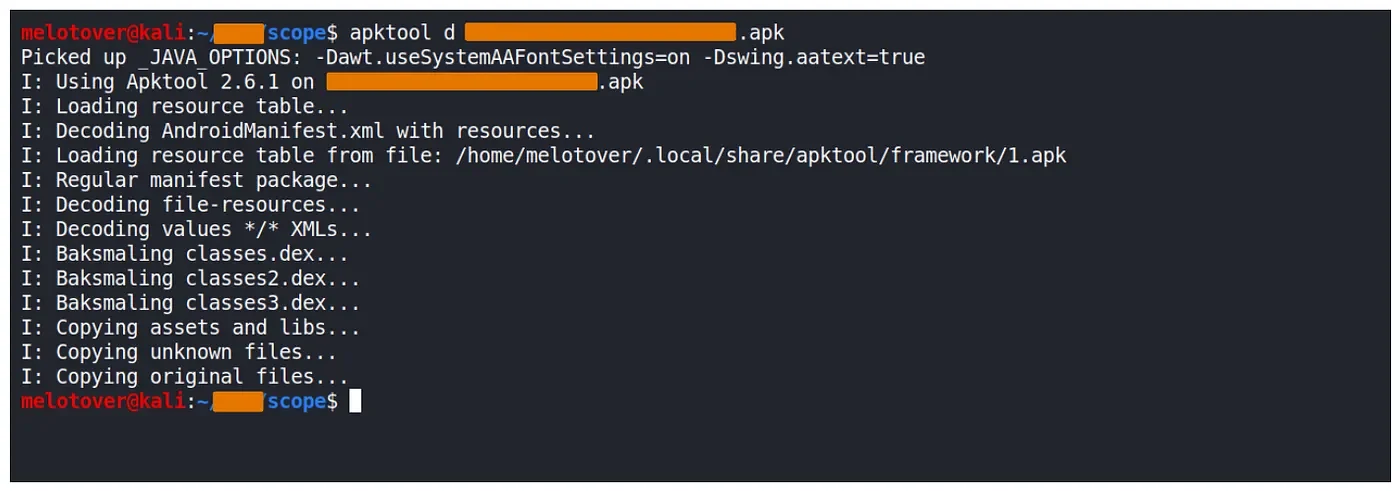
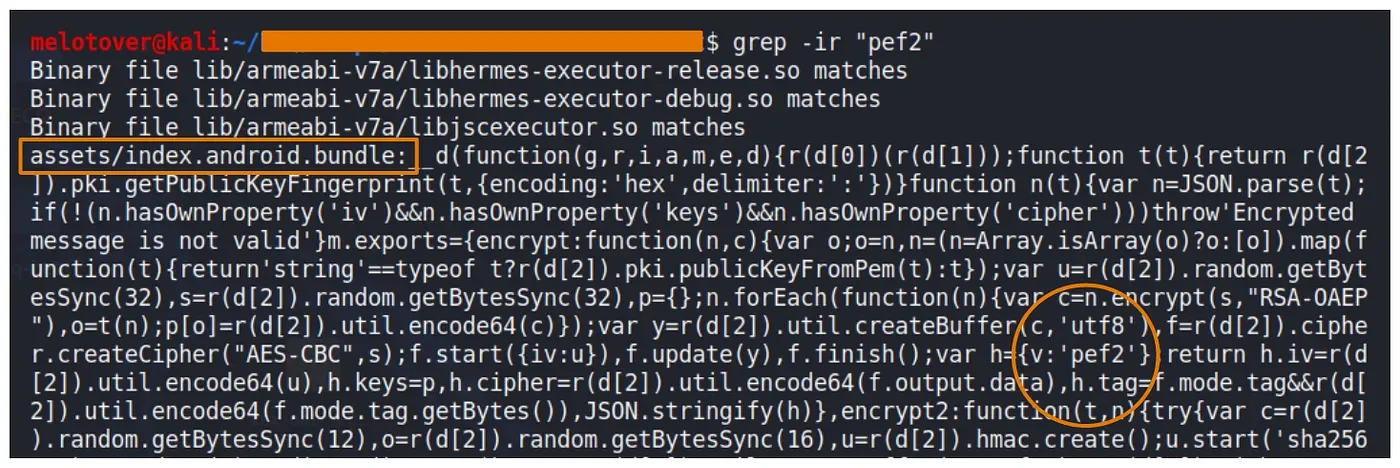
This turned up a file called index.android.bundle containing the word. Opened with a js-beautifier tool, the file was not obfuscated. In it, pef2 appears on line 106568 inside a function called encrypt.
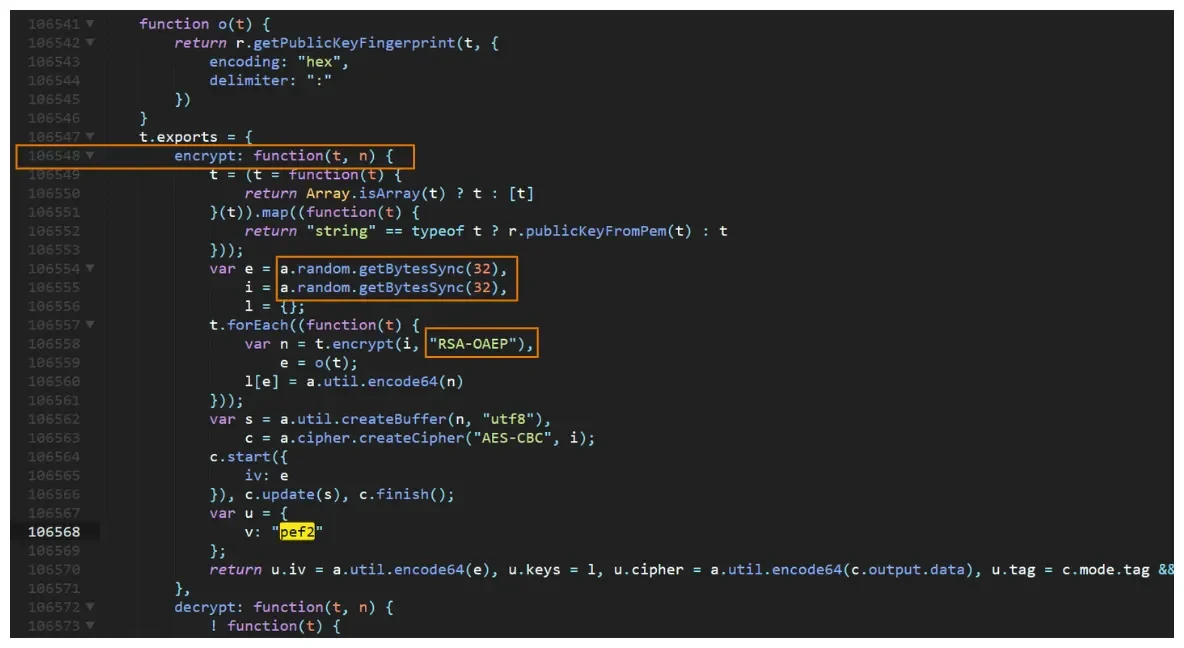
Words from that function, such as getBytesSync, RSA-OAEP and encrypt, were then used as search terms in the web application's JavaScript.
Second round: back to the web application
In the Sources window of the developer tools, searching for getBytesSync returned results. Because the file was minimised, the pretty print feature was used to make it readable.
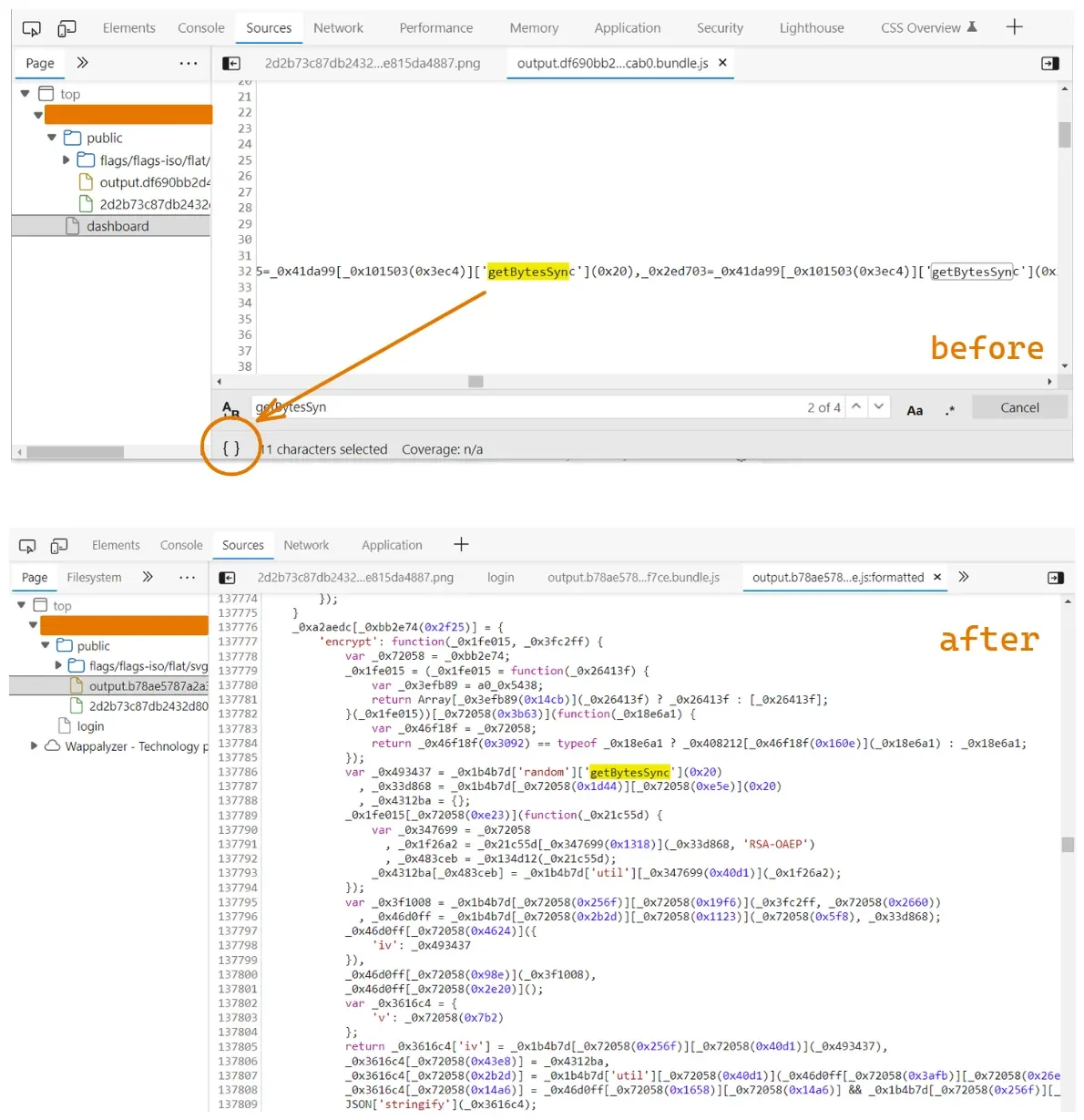
This led to a function called encrypt on line 137777, which takes two arguments. A breakpoint was added to pause execution and inspect it.
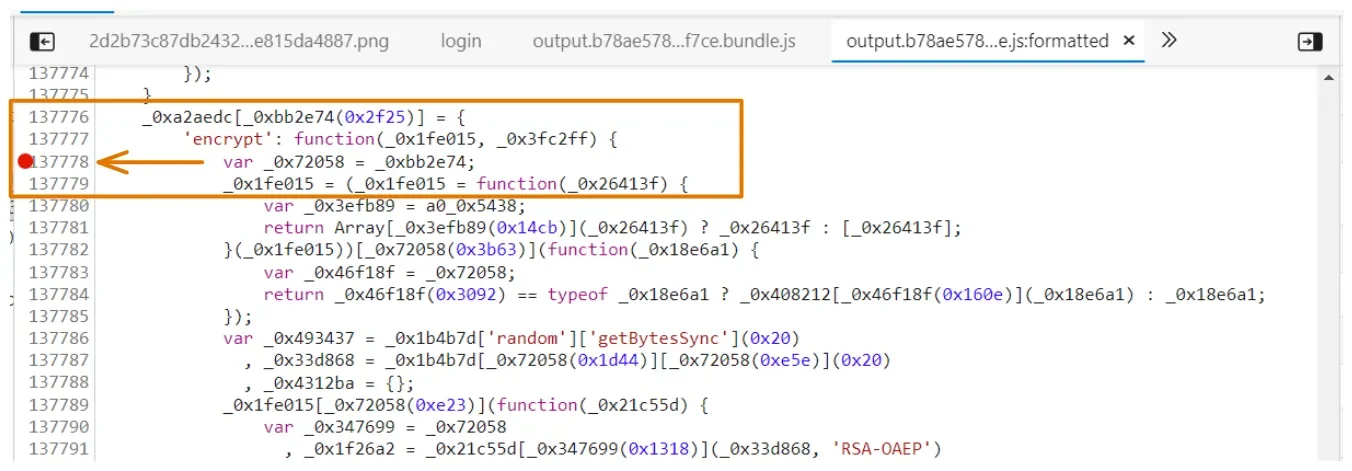
After a random request was initiated to hit the breakpoint, one of the arguments, _0x3fc2ff, was shown in the Scope section as a JSON object. With execution paused, the Console was used to inspect its components.
Exploitation
Step 1: read the plaintext request body
Inspecting the argument passed to encrypt revealed the original request body before encryption: a JSON object with the keys and values the API uses to handle requests.
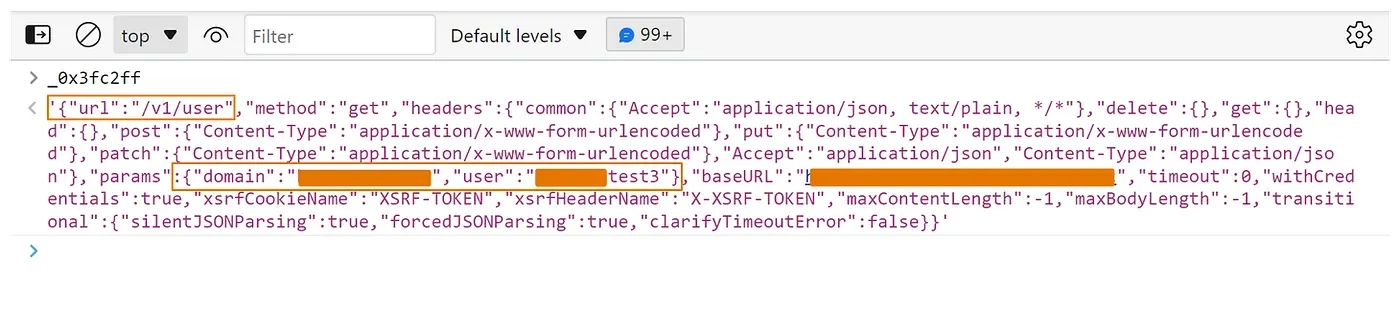
The request goes to the /v1/user API endpoint with two parameters, domain and user, and returns all information about that user.
Step 2: IDOR in the user parameter
Changing the user parameter to another username and checking the response confirmed the issue.
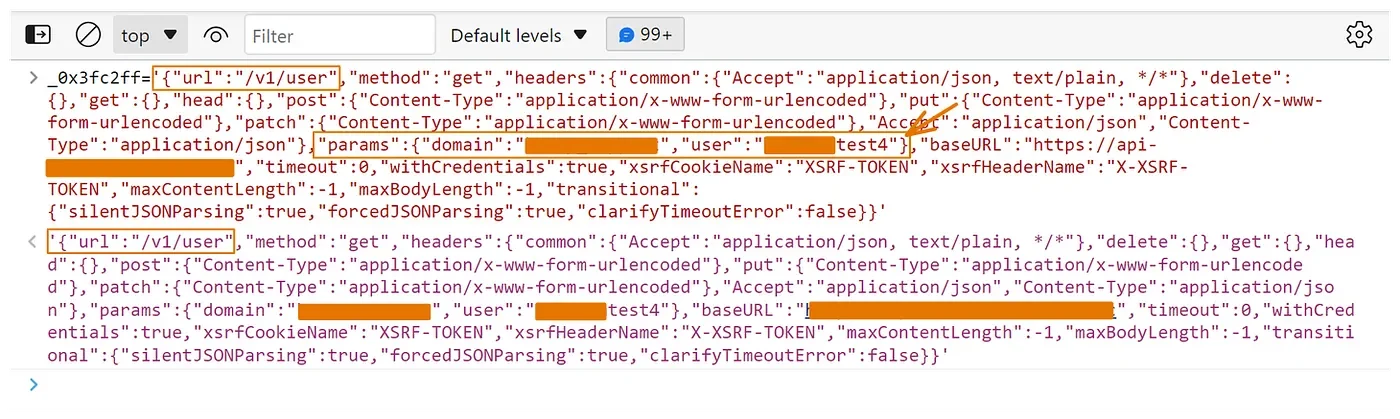
A valid IDOR was confirmed. Digging further, the author found multiple other IDORs that allowed editing any user's information, such as email and phone number.
Step 3: SSRF in the url parameter
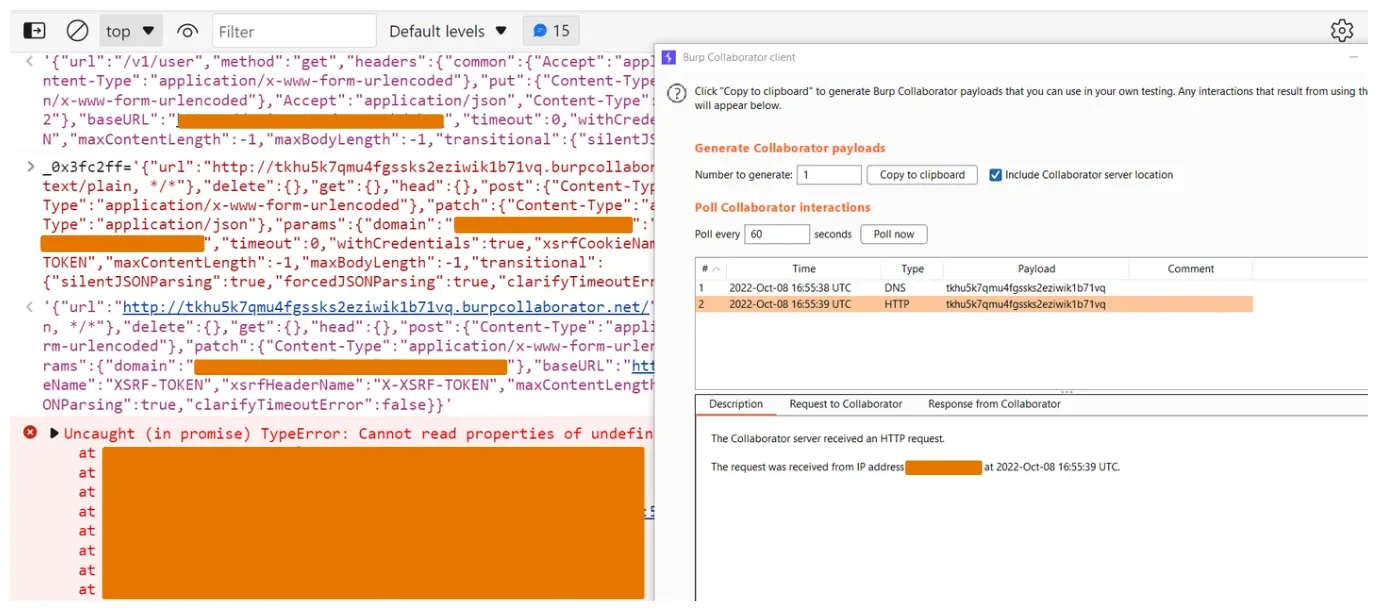
The next parameter considered was url. The value was changed to a Burp Collaborator address to see whether an internal interaction could be obtained. The original body looked like this:
{"url":"/v1/user","method":"get","headers":{"common":{"Accept":"application/json, text/plain, */*"},"delete":{},"get":{},"head":{},"post":{"Content-Type":"application/x-www-form-urlencoded"},"put":........}
Changed to:
{"url":"http://mycollab.burpcollaborator.net","method":"get","headers":{"common":{"Accept":"application/json, text/plain, */*"},"delete":{},"get":{},"head":{},"post":{"Content-Type":"application/x-www-form-urlencoded"},"put":........}
After forwarding the request, an interaction was received, confirming SSRF.
Step 4: when the original JavaScript cannot be reached
The search-with-known-words method only works if the original JavaScript file, or some piece of code leading to the encrypting function, is available. The author then assumes there is no Android application and no original JavaScript file at all.
In that case, the Event Listener Breakpoints tab in the browser's developer tools can be used. It pauses the application when event listeners fire, and specific events such as load and error can be selected. The useful event here is click: clicking any button that initiates an API request pauses execution, and the Sources panel shows the highlighted line next to be executed with the surrounding code, plus buttons to step over the line or resume.
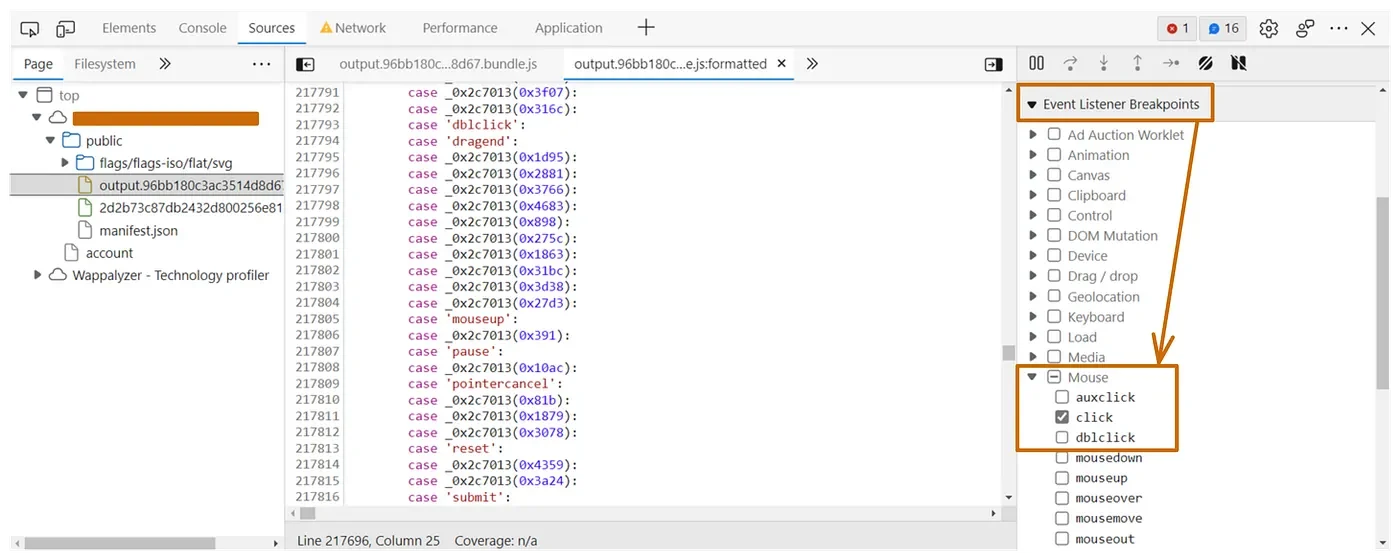
With the click event selected, a button that initiates an API request was clicked, execution paused, and the step-over buttons were used until reaching a function that takes the full request body.
As expected, reaching it takes a bit of time. Once there, the request can again be edited before it is encrypted.
Step 5: intercepting every request instead of one at a time
The application has many functions and many API calls, so intercepting every request this way wastes time. Two options exist: understand how the application encrypts the body and find a way to decrypt it, or edit the JavaScript file and run your own. The first would take a long time, especially with an obfuscated file, so the second was chosen.
The override feature takes a resource from the current page and stores it locally. On refresh, the browser does not load the resource from the server but replaces it with the local copy.
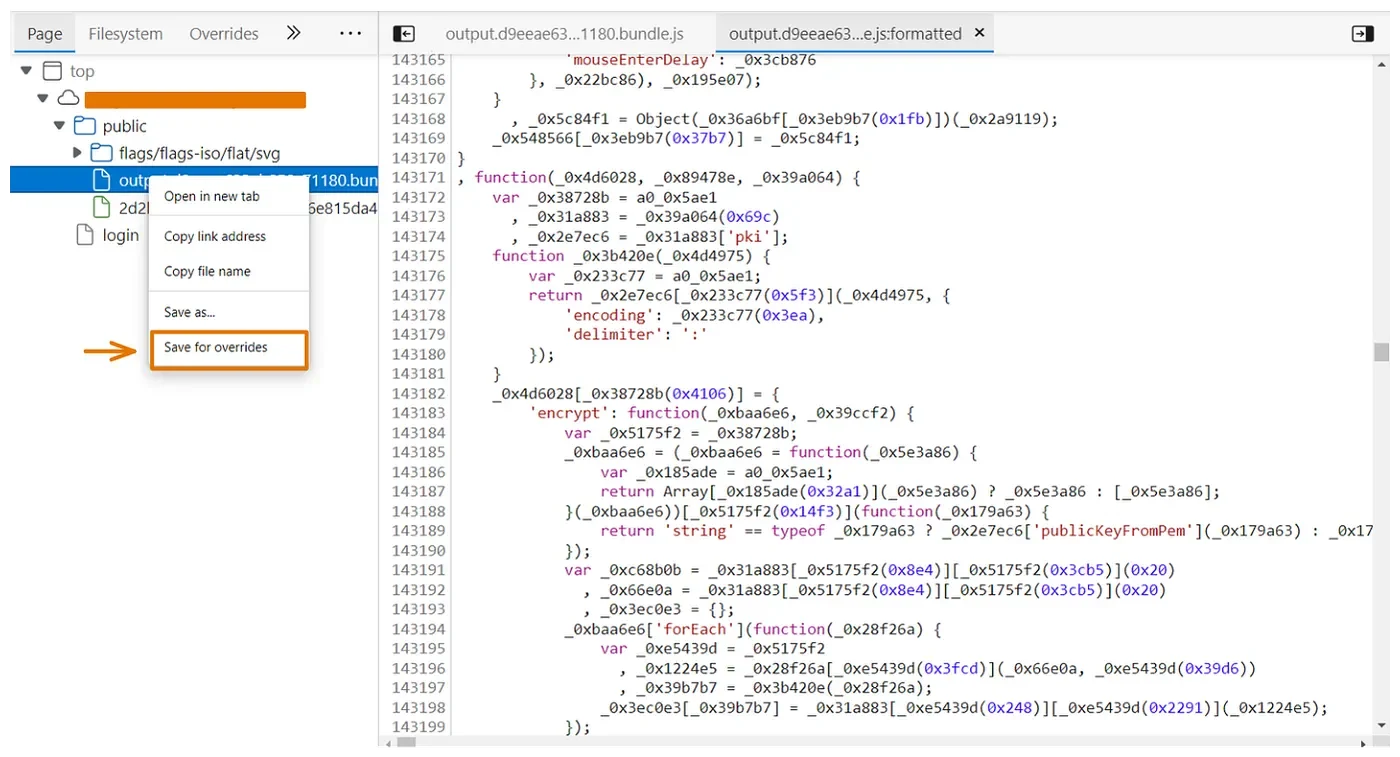
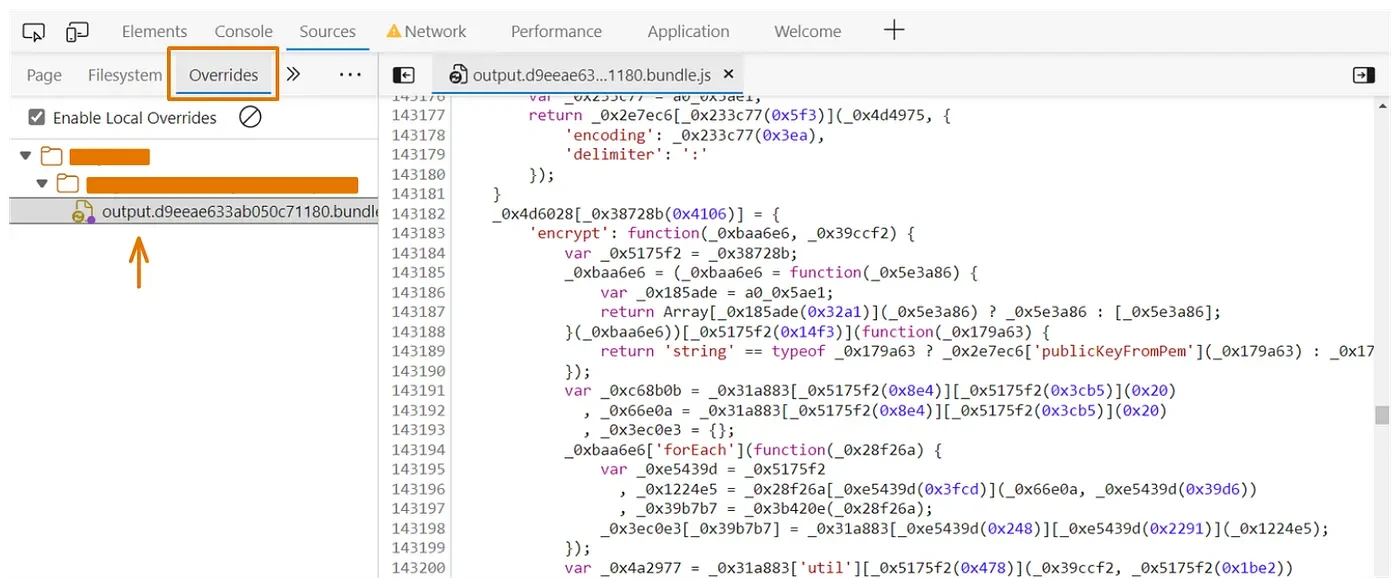
With the file editable, the next step is to add a middle layer, such as a proxy, inside the encrypt function so that it encrypts the edited input rather than the value the application passes in. A simple PHP file was created on localhost that maps the request body to the response:
<?php# to allow cross origin requests.header("Access-Control-Allow-Origin: https://█████████████");header("Access-Control-Allow-Credentials: true");header("Content-Type: application/json; charset=UTF-8");header("Access-Control-Allow-Methods: POST");# get the request body as it is$data = file_get_contents("php://input");# return it backecho $data; ?>
The idea is:
- When the application calls
encrypt, it passes two arguments, one of which is the original body. - A request is sent to the PHP file with the original body, so it can be edited via Burp. Cross-origin requests must be allowed.
- The PHP file returns the edited body.
- The response is passed to the next step in the
encryptfunction.
The following asynchronous function sends the request to the proxy and returns the edited response:
async function editBeforeSend(originalBody) { const req = await fetch("http://proxy.[redacted]/editBeforeSend.php", { method: "POST", body: originalBody, credentials: 'include' }); let editedBody = await req.text(); return editedBody;}
It was added to the JavaScript file and called inside the encrypt function.
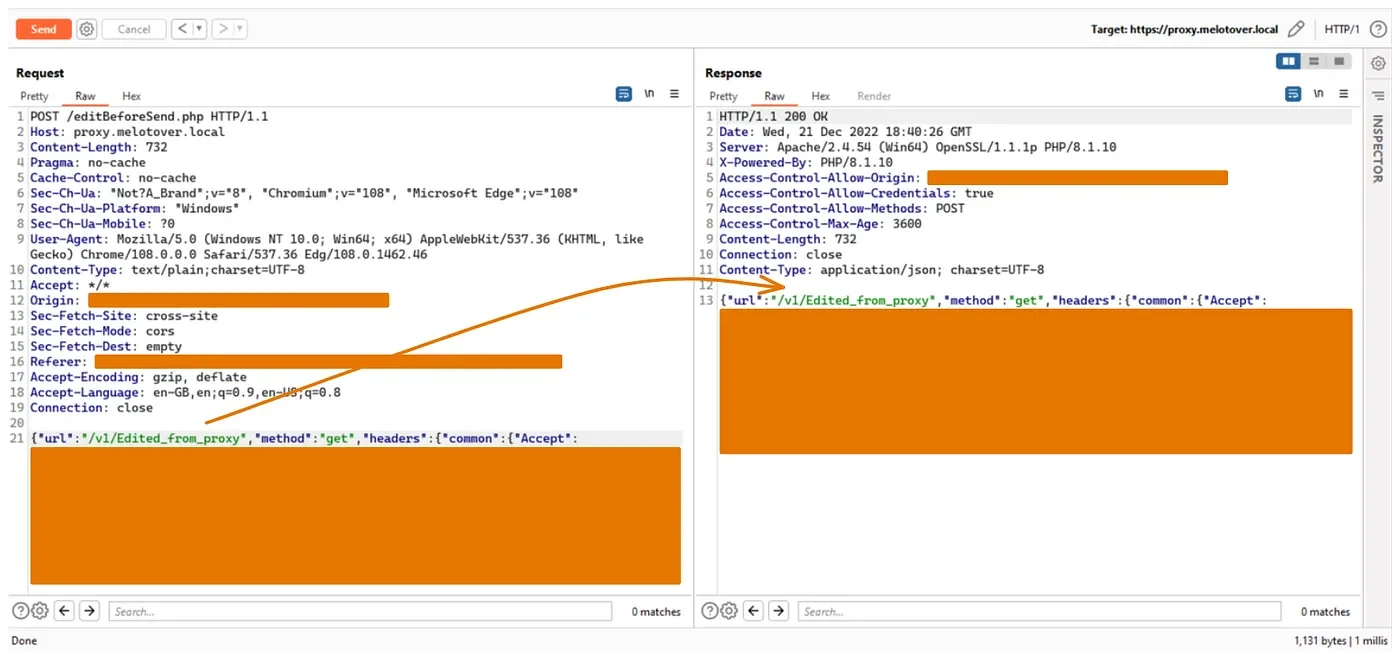
After saving the file, refreshing the page and invoking any request to the API, the request body could be controlled by editing it in Burp.
Root cause
Because all requests start in the browser, the encryption is performed on the client side, so the plaintext body and the encrypting function are available in the browser. Obfuscation of the JavaScript was the main obstacle; an unobfuscated copy of the same logic in the Android bundle and developer tools breakpoints helped get past it. Once the plaintext body was visible, the user parameter could be changed to another username and returned that user's data, and the url parameter could be pointed at a Collaborator address, which produced an interaction.
Impact
An attacker who can reach the API can read and, through the further IDORs, edit other users' information such as email and phone number. The author changed the url value to a Burp Collaborator address and received an interaction, which he took as confirmation of SSRF. The report does not state which internal systems were reachable or how many users were affected.
Fix
The report does not describe any fix applied by the vendor. Based on the findings, the API should authorise the user parameter against the authenticated caller and restrict the url parameter to an allowlist of permitted destinations rather than fetching arbitrary addresses.
Variants to test
- Look for a fixed key in an encrypted request body (like
vhere) and search the JavaScript for it. A single hit that leads to an encrypt or decrypt function is a positive result. - Decompile the mobile application and search its bundle for the same key. An unobfuscated copy of the encryption logic is a positive result.
- Set an Event Listener Breakpoint on
click, step over until a function receives the full request body, and inspect the arguments. Seeing the plaintext body is a positive result. - Use the override feature to replace the JavaScript file locally and insert a proxy call inside the encrypt function. Seeing edited bodies reach the server is a positive result.
- Change an identifier parameter such as
userto another account's value. Data belonging to that account in the response confirms IDOR. - Change a URL parameter to a Collaborator address. An interaction confirms SSRF.
What happened, in plain words
A website was sending every message between your browser and its servers in a scrambled form, so that anyone watching the traffic could not read it. The author of this write-up wanted to see what was inside those messages. To do that, they had to work out how the scrambling was done, which meant reading the website's own code. Once they could read the messages, they found that the website trusted what was inside them far too much: one field let them look at other people's accounts, and another field let them make the website's server fetch a web address of their choosing. This article walks through the whole story slowly, explaining each idea as it appears.
Some background ideas first
Before the steps make sense, here are a few everyday ideas.
A website and its API. When you use a website, your browser loads pages made of text and pictures. But many modern websites also talk to a separate service behind the scenes, called an API (Application Programming Interface). Think of the API as a waiter in a restaurant: your browser tells the waiter what it wants, the waiter goes to the kitchen (the server) and brings back the dish (the data). The browser never enters the kitchen itself. The messages your browser sends to the waiter are called requests, and the waiter's replies are called responses.
The request body. A request can carry information, much like an envelope can carry a letter. The part that carries the actual data is called the body. If you send a login form, the body holds your username and password. If you ask for a user's profile, the body might hold that user's name.
JSON. The data inside these bodies is often written in a format called JSON (JavaScript Object Notation). It looks like a shopping list with labels: {"name": "Alice", "age": 30}. Each label is called a key, and the value next to it is the value. Keys and values are paired together, which is why people say key/value pairs.
Encryption. Encryption is the process of scrambling information so that only someone with the right secret can unscramble it. Think of a locked box: you can hand it to a courier, but only the person with the key can open it. The scrambled text is called ciphertext, and the original readable text is called plaintext.
End-to-end encryption (E2E). When two parties scramble everything they send to each other, and only the two ends can read it, that is called end-to-end encryption. In this story, the two ends are your browser and the website's server. The author describes it as an extra security layer meant to protect the conversation against middle attacks.
Client side and server side. The client is your browser, the program running on your own computer. The server is the computer far away that stores the data. Anything that happens in your browser is client side; anything that happens on the far-away computer is server side. This distinction matters enormously here: if the scrambling happens in your browser, then the instructions for scrambling are also in your browser, and you can read them.
JavaScript. Websites are built with a language called JavaScript. It is the code that runs inside your browser and makes pages interactive. When a website needs to scramble a request before sending it, the JavaScript in your browser does the scrambling. So the JavaScript files are where the secret lives.
Obfuscation and minification. Because JavaScript is readable by anyone, some websites try to make it hard to understand. Minification squashes the code onto very few lines by removing spaces and shortening names. Obfuscation goes further and deliberately scrambles names and structure so that a human cannot follow it. It does not change what the code does; it only makes it unpleasant to read. Think of it as writing a recipe in tiny handwriting with all the ingredient names replaced by random letters. The cake still bakes, but you cannot follow the recipe.
A proxy. A proxy is a program that sits between your browser and the server and lets you look at, and change, the messages passing through. The author uses Burp Suite, a well-known proxy tool for security testing. A Burp Collaborator is a special address provided by Burp that you can put into a request; if the server ever contacts that address, Burp tells you, which proves the server made a request you asked for.
Developer tools. Every modern browser has built-in developer tools, usually opened with F12. They let you inspect the page, read the JavaScript, pause the code while it runs, and look at the values inside it. The author uses several parts of these tools, explained as they come up.
IDOR. IDOR stands for Insecure Direct Object Reference. It means the website lets you ask for something by its name or number, and it does not check whether you are allowed to have it. Imagine a hotel where room keys are numbered 1 to 100 and the receptionist hands you any key you ask for, without checking that the room is yours. That is an IDOR.
SSRF. SSRF stands for Server-Side Request Forgery. It means you can trick the website's server into fetching a web address of your choosing. Imagine a librarian who will fetch any book you name, even from a private shelf in the back room that visitors are not allowed to enter. If you can name a private shelf, the librarian brings it to you. That is an SSRF.
The exploration begins
The author started at the login panel and sent requests here and there to explore the application. They found that almost all requests went to an API, and that the body of each request was scrambled. Here is what that looked like in the proxy:
In the proxy, the author could not see the real body, could not see any parameters, and everything was encrypted. This is the end-to-end encryption described above. The author notes that because all requests start in the browser, any scrambling of the body must happen on the client side, which makes the JavaScript files the natural place to look.
First round: reading the JavaScript
Only one large JavaScript file was loaded by the whole application, and it was obfuscated, minimised and messy.
The caption calls it a messy JavaScript file. The author compares searching it to finding a needle in a haystack, but decides to try anyway.
Looking at the encrypted body, the author could see a JSON object with four keys: v, iv, keys and cipher. All of these change from one request to the next, except v, whose value is always pef2.
Why does this matter? Because a value that never changes has to be written down somewhere in the code. If the author could find pef2 in the JavaScript file, that spot might be right next to the function that does the scrambling. It is like finding a shop by looking for its unchanging sign rather than by wandering every street.
The caption describes this as searching in JavaScript to guide us to the function that encrypts the request body. The search returned a single mention of pef2. The author then spent time debugging, following what the developer tools call initiators (the chain of functions that led to a particular call, more than 55 called functions in total), and worked out how a couple of functions behaved. It was not enough to find where the encryption or decryption actually happens.
The author needed a word or function name to search for, to speed up the reversing process. They tried to find an older version of the file in the internet archive, hoping it might not be obfuscated, but had no luck.
Who else is using the same API?
The Android application. The author reasoned that the mobile app talks to the same API, so decompiling it and looking at its resources might reveal the same encryption code, possibly without obfuscation. Decompiling means taking a finished program and turning it back into something closer to readable source code, like unpacking a flat-pack wardrobe to see the instructions again.
The caption says decompiling the APK. An APK is the file format used to install an app on Android. The author decompiled it with a tool called apktool and then searched the whole set of application files for the same word, pef2.
The search turned up a file called index.android.bundle containing the word. Opened with a js-beautifier tool (a tool that re-indents squashed code so a human can read it), the file turned out not to be obfuscated. In it, pef2 appears on line 106568, inside a function called encrypt.
Now the author had useful words to search for in the web application's JavaScript: getBytesSync, RSA-OAEP and, of course, encrypt. These are names taken from the mobile app's version of the same code, so they are likely to appear in the web version too.
Second round: back to the web application
The author opened the Sources window in the developer tools. The Sources panel is where the browser lists every file the page has loaded, including JavaScript. Searching for getBytesSync returned some results. Because the file was minimised, the author used the pretty print feature, which reformats squashed code into readable lines.
The caption says making the code more readable. This led to a function called encrypt on line 137777. The function takes two arguments. An argument is a piece of information handed to a function when it is called, like ingredients handed to a cook. The author added a breakpoint, which is a marker that tells the browser to pause the code at that exact line so you can look around.
The caption says adding breakpoints. After sending a random request to trigger the breakpoint, the author looked at the paused state.
The caption describes checking the DOM after invoking the breakpoint. One of the arguments to encrypt is named _0x3fc2ff, and in the Scope section (the panel that lists the current values of all variables) it is shown as a JSON object. With the code paused, the Console (a panel where you can type commands and print values) can be used to inspect what is inside that object.
Analysing the data passed to the encrypt function
The caption says original request body. Inspecting the argument revealed the original request body before any encryption: a JSON object with the keys and values the API uses to handle requests. In other words, the plaintext was sitting right there in the browser's memory, waiting to be read.
The request goes to the /v1/user API endpoint with two parameters, domain and user, and returns all information about that user.
The caption says returned data from the request. An endpoint is a specific address on the API, like a particular counter in a large office. /v1/user is the counter that hands out user information.
Step 1: read the plaintext request body
This step is simply the one above: by pausing the code and inspecting the argument, the author could see the request body before it was scrambled. That is the whole point of the exercise. Once you can see the plaintext, you can start asking what the API does with each field.
Step 2: IDOR in the user parameter
The user parameter is the name of the account being asked about. The author changed it to another username and checked the response.
The result was promising.
The caption says IDOR confirmed. A valid IDOR was confirmed. Digging further, the author found multiple other IDORs that allowed editing any user's information, such as email and phone number. In plain terms: the API returned another user's information when the user parameter was changed, and further IDORs allowed editing other users' information.
Step 3: SSRF in the url parameter
The next parameter the author considered was url. The idea was to change its value to a Burp Collaborator address and see whether the server would make a request to it. If the server does, the Collaborator records an interaction, which proves the server fetched an address the attacker chose.
The original body looked like this:
{"url":"/v1/user","method":"get","headers":{"common":{"Accept":"application/json, text/plain, */*"},"delete":{},"get":{},"head":{},"post":{"Content-Type":"application/x-www-form-urlencoded"},"put":........}
Line by line, in plain words:
"url":"/v1/user"says which address the server should fetch. Here it is the API's own user endpoint."method":"get"says how to ask for it. A GET request is the ordinary way of asking for a page or a piece of data, as opposed to sending data with a POST."headers"is a section of extra instructions attached to the request. Headers are like the address and handling notes on an envelope: they tell the recipient things about the message rather than being the message itself."common","delete","get","head","post","put"are groups of headers for different kinds of request. TheAcceptheader says what kind of answer the caller will accept. TheContent-Typeheader says what kind of data is being sent.- The
........at the end is the author's shorthand for the rest of the object, which is not shown.
Changed to:
{"url":"http://mycollab.burpcollaborator.net","method":"get","headers":{"common":{"Accept":"application/json, text/plain, */*"},"delete":{},"get":{},"head":{},"post":{"Content-Type":"application/x-www-form-urlencoded"},"put":........}
Line by line:
- The only change is the
urlvalue, which now points athttp://mycollab.burpcollaborator.net, an address controlled by the author through Burp Collaborator. - Everything else is identical, so the request is otherwise the same one the application would normally send.
After forwarding the request, an interaction was received, confirming SSRF.
The caption says SSRF confirmed. In plain words: pointing the url parameter at a Collaborator address produced an interaction, which the author took as confirmation of SSRF. That is the librarian fetching from the private shelf.
Step 4: when the original JavaScript cannot be reached
The search-with-known-words method only works if the original JavaScript file, or some piece of code leading to the encrypting function, is available. The author then imagines a harder situation: no Android application and no original JavaScript file at all.
In that case, the Event Listener Breakpoints tab in the browser's developer tools can be used. An event listener is a piece of code that waits for something to happen, such as a click or a page load, and then runs. The tab lets you pause the application whenever a chosen event fires. Specific events such as load and error can be selected. The useful event here is click: when you click any button that starts an API request, execution pauses, and the Sources panel shows the highlighted line next to be executed, with the surrounding code for context. There are also buttons to step over the line or resume execution.
The caption says setting up Event Listener Breakpoints. The author selected the click event and then clicked a button that starts an API request. Execution paused, and the author used the step-over buttons until reaching a function that takes the full request body.
As expected, reaching it takes a bit of time. Once there, the request can again be edited before it is encrypted. The reason this works is the same as before: the plaintext body exists in the browser just before the scrambling happens, so pausing at the right moment exposes it.
Step 5: intercepting every request instead of one at a time
The application has many functions and many API calls, so intercepting every request this way wastes time. There are two options: understand how the application encrypts the body and find a way to decrypt it, or edit the JavaScript file and run your own version. The first would take a long time, especially with an obfuscated file, so the second was chosen.
The override feature takes a resource from the current page and stores it locally. On refresh, the browser does not load the resource from the server but replaces it with the local copy. Think of it as photocopying a page of a manual, editing your photocopy, and then putting your photocopy back in the binder so that everyone reads your version.
With the file editable, the next step is to add a middle layer, such as a proxy, inside the encrypt function so that it encrypts the edited input rather than the value the application passes in. A simple PHP file was created on localhost that maps the request body to the response. PHP is a programming language commonly used for web servers, and localhost means the author's own computer acting as a server.
<?php# to allow cross origin requests.header("Access-Control-Allow-Origin: https://█████████████");header("Access-Control-Allow-Credentials: true");header("Content-Type: application/json; charset=UTF-8");header("Access-Control-Allow-Methods: POST");# get the request body as it is$data = file_get_contents("php://input");# return it backecho $data; ?>
Line by line, in plain words:
<?phpstarts the PHP code.# to allow cross origin requests.is a comment explaining the next lines.header("Access-Control-Allow-Origin: https://█████████████");tells the browser that a page from that origin is allowed to talk to this PHP file. An origin is the combination of scheme, host and port, roughly the website's address. Cross-origin means a page from one origin talking to a server at another origin, which browsers normally block unless the server explicitly allows it.header("Access-Control-Allow-Credentials: true");says that the cross-origin request may include credentials such as cookies. A cookie is a small piece of data the browser stores for a website, often used to remember that you are logged in.header("Content-Type: application/json; charset=UTF-8");says the reply will be JSON text encoded in UTF-8.header("Access-Control-Allow-Methods: POST");says the only allowed kind of request is POST, the kind used to send data.# get the request body as it isis a comment.$data = file_get_contents("php://input");reads whatever was sent in the request body and stores it in a variable called$data.# return it backis a comment.echo $data;sends the same data back as the reply.?>ends the PHP code.
So the PHP file is a mirror: whatever you send it, it sends back. That sounds useless, but it is exactly what is needed, because it lets the author put Burp in the middle and edit the body on the way through.
The idea is:
- When the application calls
encrypt, it passes two arguments, one of which is the original body. - A request is sent to the PHP file with the original body, so it can be edited via Burp. Cross-origin requests must be allowed.
- The PHP file returns the edited body.
- The response is passed to the next step in the
encryptfunction.
The following asynchronous function sends the request to the proxy and returns the edited response:
async function editBeforeSend(originalBody) { const req = await fetch("http://proxy.[redacted]/editBeforeSend.php", { method: "POST", body: originalBody, credentials: 'include' }); let editedBody = await req.text(); return editedBody;}
Line by line, in plain words:
async function editBeforeSend(originalBody) {defines a function callededitBeforeSendthat takes one argument, the original body. The wordasyncmeans the function can wait for slow things, such as a network request, without freezing the page.const req = await fetch("http://proxy.[redacted]/editBeforeSend.php", {sends a request to the PHP file.fetchis the browser's built-in way of making network requests.awaitmeans wait here until the reply arrives. The result is stored inreq.method: "POST",says this is a POST request, the kind that carries data.body: originalBody,puts the original body into the request, so the PHP file receives it.credentials: 'include'tells the browser to include cookies with the request, which matters when the server checks who you are.});closes the request options.let editedBody = await req.text();reads the reply as plain text and stores it ineditedBody.return editedBody;hands the edited body back to whoever called the function.}closes the function.
This function was added to the JavaScript file and called inside the encrypt function.
After saving the file, refreshing the page and invoking any request to the API, the request body could be controlled by editing it in Burp.
The caption for the last image describes adding the function to the JavaScript file and calling it inside the encrypt function. That is it: save the file, refresh the page, and every request to the API now passes through the author's proxy, where it can be edited.
Why this worked
Because all requests start in the browser, the encryption is performed on the client side, so the plaintext body and the encrypting function are available in the browser. Obfuscation of the JavaScript was the main obstacle; an unobfuscated copy of the same logic in the Android bundle and developer tools breakpoints helped get past it. Once the plaintext body was visible, the user parameter could be changed to another username and returned that user's data, and the url parameter could be pointed at a Collaborator address, which produced an interaction.
What an attacker could do
An attacker who can reach the API can read and, through the further IDORs, edit other users' information such as email and phone number. The author changed the url value to a Burp Collaborator address and received an interaction, which he took as confirmation of SSRF. The report does not state which internal systems were reachable or how many users were affected.
How it should be fixed
The report does not describe any fix applied by the vendor. Based on the findings, the API should authorise the user parameter against the authenticated caller and restrict the url parameter to an allowlist of permitted destinations rather than fetching arbitrary addresses. An allowlist is a list of things that are explicitly permitted, with everything else refused, the opposite of a blocklist.
Variants to test
- Look for a fixed key in an encrypted request body (like
vhere) and search the JavaScript for it. A single hit that leads to an encrypt or decrypt function is a positive result. - Decompile the mobile application and search its bundle for the same key. An unobfuscated copy of the encryption logic is a positive result.
- Set an Event Listener Breakpoint on
click, step over until a function receives the full request body, and inspect the arguments. Seeing the plaintext body is a positive result. - Use the override feature to replace the JavaScript file locally and insert a proxy call inside the encrypt function. Seeing edited bodies reach the server is a positive result.
- Change an identifier parameter such as
userto another account's value. Data belonging to that account in the response confirms IDOR. - Change a URL parameter to a Collaborator address. An interaction confirms SSRF.
Glossary
- API: a service that a website's pages talk to behind the scenes to fetch and change data, like a waiter between you and the kitchen.
- APK: the file format used to install an app on Android.
- Argument: a piece of information handed to a function when it is called.
- Async: a way of writing code that can wait for slow operations, such as network requests, without freezing the page.
- Breakpoint: a marker that tells the browser to pause the code at a specific line so you can inspect what is happening.
- Burp Collaborator: an address provided by Burp Suite that records any contact made to it, used to prove that a server fetched an address you chose.
- Burp Suite: a well-known proxy tool used by security testers to inspect and change traffic between a browser and a server.
- Ciphertext: scrambled text that cannot be read without the right key.
- Client side: anything that happens in your own browser, on your own computer.
- Console: a panel in the developer tools where you can type commands and print values.
- Cookie: a small piece of data the browser stores for a website, often used to remember that you are logged in.
- Cross-origin: a page from one website address talking to a server at a different address, which browsers normally block unless the server allows it.
- Decompiling: turning a finished program back into something closer to readable source code.
- Developer tools: the built-in inspection tools in every modern browser, usually opened with F12.
- E2E (end-to-end encryption): scrambling of everything sent between two parties so that only those two ends can read it.
- Encryption: the process of scrambling information so that only someone with the right secret can unscramble it.
- Endpoint: a specific address on an API, like a particular counter in a large office.
- Event listener: a piece of code that waits for something to happen, such as a click, and then runs.
- Event Listener Breakpoints: a developer tools feature that pauses the code whenever a chosen event fires.
- GET: the ordinary kind of request used to ask for a page or a piece of data.
- Headers: extra instructions attached to a request, like handling notes on an envelope.
- IDOR (Insecure Direct Object Reference): a flaw where a website lets you ask for something by its name or number without checking that it belongs to you.
- Initiators: the chain of functions that led to a particular call, shown in the developer tools.
- JavaScript: the language that runs inside your browser and makes pages interactive.
- JSON (JavaScript Object Notation): a text format for data, written as labelled key/value pairs.
- js-beautifier: a tool that re-indents squashed code so a human can read it.
- Key/value pair: a label and the value next to it in a JSON object.
- localhost: your own computer acting as a server.
- Minification: squashing code onto few lines by removing spaces and shortening names.
- Obfuscation: deliberately scrambling code so that a human cannot follow it, without changing what it does.
- Origin: the combination of scheme, host and port that identifies a website address.
- PHP: a programming language commonly used for web servers.
- Plaintext: the original readable text before encryption.
- POST: the kind of request used to send data to a server.
- Pretty print: a developer tools feature that reformats squashed code into readable lines.
- Proxy: a program that sits between your browser and the server and lets you look at, and change, the messages passing through.
- Request: a message your browser sends to a server asking for something or sending data.
- Response: the server's reply to a request.
- Scope: the developer tools panel that lists the current values of all variables while the code is paused.
- Server side: anything that happens on the far-away computer that stores the data.
- Sources panel: the developer tools window that lists every file the page has loaded.
- SSRF (Server-Side Request Forgery): a flaw where you can trick a server into fetching a web address of your choosing.
- Step-over: a developer tools button that runs the current line of code and pauses at the next one.
- UTF-8: a common way of encoding text so computers can store it.
- Value: the data next to a key in a JSON object.



