Finding the endpoint
The application had an unrestricted file upload endpoint that allowed uploading files with any extension, and a rename function that could change the extension to an executable one, leading to remote code execution. Additionally, a zip extraction feature allowed uploading a zip file containing a web shell, which was extracted without filtering.
 Published on melotover.medium.com
In today’s blog, I’m going to show you how analyzing javascript files can lead to access unrestricted endpoints and to understand how the application deals with it. I’m also gonna show you how I bypassed 2 file upload endpoints to get RCE in an ASP.NET application.
The full write-up lives on its author's site
It belongs to its author, so we link to it rather than copy it. The other two tabs are our own rewrites, checked against it.
Context
The target was a private bug bounty program, so the application is referred to here as target.com. During recon the researcher found a subdomain that returned a "Taking a Short Break" message, which suggested the host was worth fuzzing for directories. The interesting feature turned out to be a file upload and file management component of an ASP.NET application, reachable through a login panel at /tools that appeared to be intended for administrators. The upload code lives in JavaScript files served to the browser, and the whole chain depends on understanding those files before touching the server.
Setup
No accounts were available: the login panel rejected default credentials, and the researcher never obtained valid admin credentials. The login panel rejected default credentials, and no valid admin credentials were obtained. The work used a browser, directory fuzzing, Burp Suite for replaying and editing requests, an online JavaScript beautifier (beautifier.io), and a small Python script for the final upload. The only precondition was network access to the subdomain and the ability to reach /tools and the endpoints referenced by the JavaScript.
Finding it
After a few hours on the application, the researcher found a subdomain showing the "Taking a Short Break" message and started fuzzing directories. Most endpoints returned 403 Forbidden, except /tools, which served a login page. Default credentials did not work.
When a login panel cannot be entered, the next step was to read the JavaScript files, looking for credential leaks, API keys and hidden endpoints. Most applications obfuscate these files, so rather than reading them line by line the researcher used the browser's search feature for strings such as api, secret, token and admin, and also searched for Ajax and XML requests. That search surfaced endpoints confirming the panel was for admins.
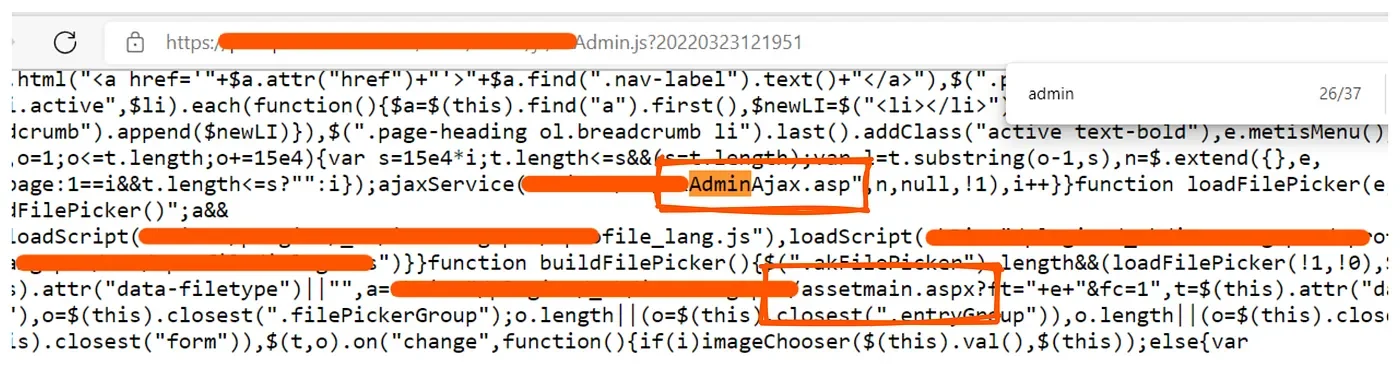
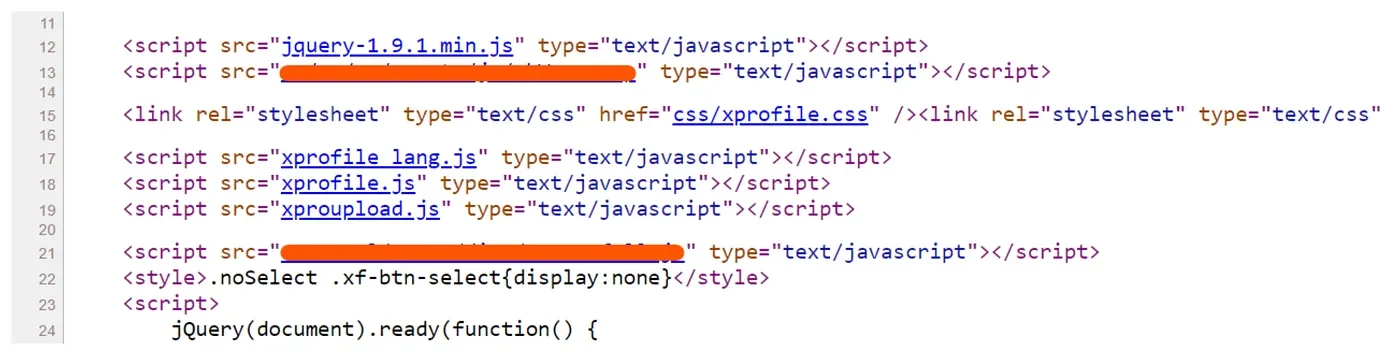
All of those endpoints returned empty responses except /path/to/assetmain.aspx, which returned a white page plus imported CSS and JavaScript files. The names of the JavaScript files suggested something related to uploading, so they became the focus.
Exploitation
Step 1: Read xproupload.js
The first file, xproupload.js, was unreadable as served.
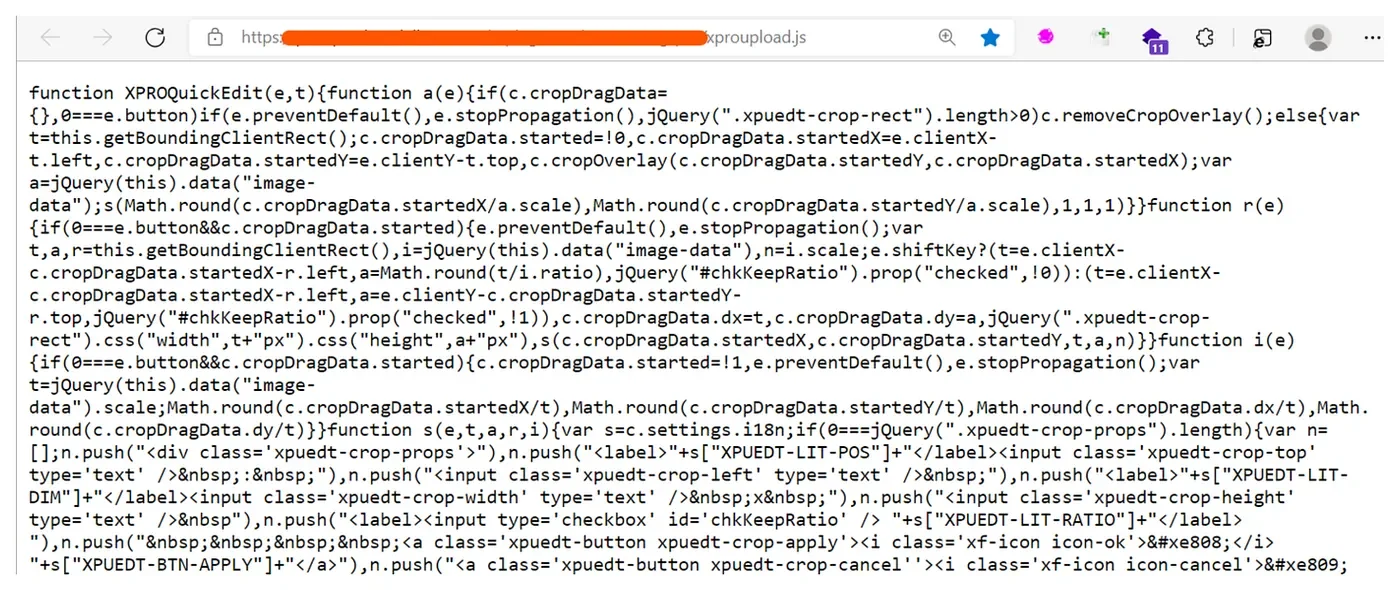
After beautifying it, the file was over 550 lines, so only the important objects and functions were reviewed.
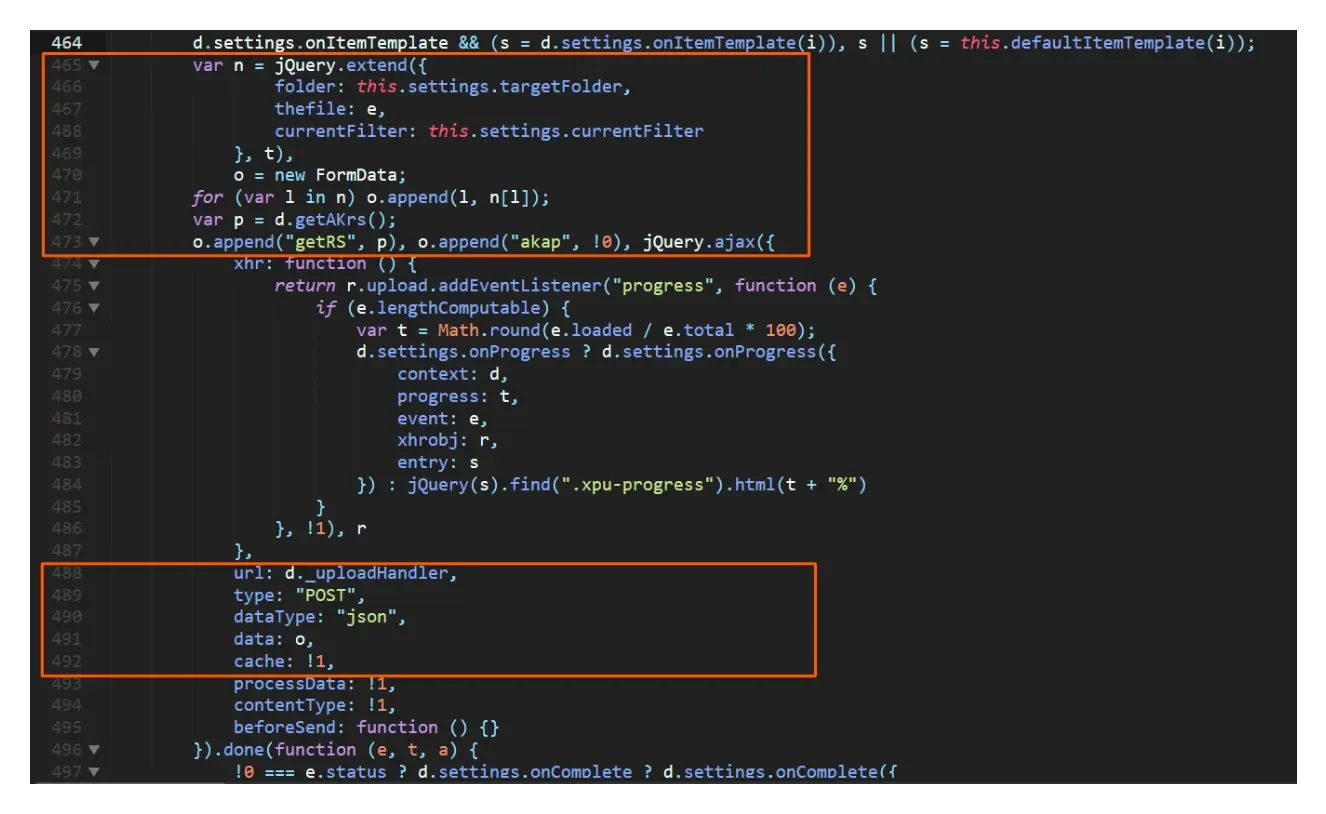
Around line 465 an object named o is declared and prepared as the request body of an Ajax request initiated at line 473. It contains three elements:
- folder: the directory to upload to.
- thefile: the parameter carrying the file name and its content.
- currentFilter: an empty string; later analysis showed it is not needed.
Lines 472 and 473 add two more parameters:
- getRS: the value returned by a function called getAKrs. That function is not defined in this file, so it had to be located elsewhere.
- akap: in JavaScript the value
!0means true.
The upload destination is declared at line 488 as _uploadHander, a variable first mentioned at line 377.
Line 379 also contains upload rules, one of which is the list of allowed file extensions.
Step 2: Read xprofile.js and find getAKrs
The second file, xprofile.js, has many functions, so again only the important ones were reviewed.
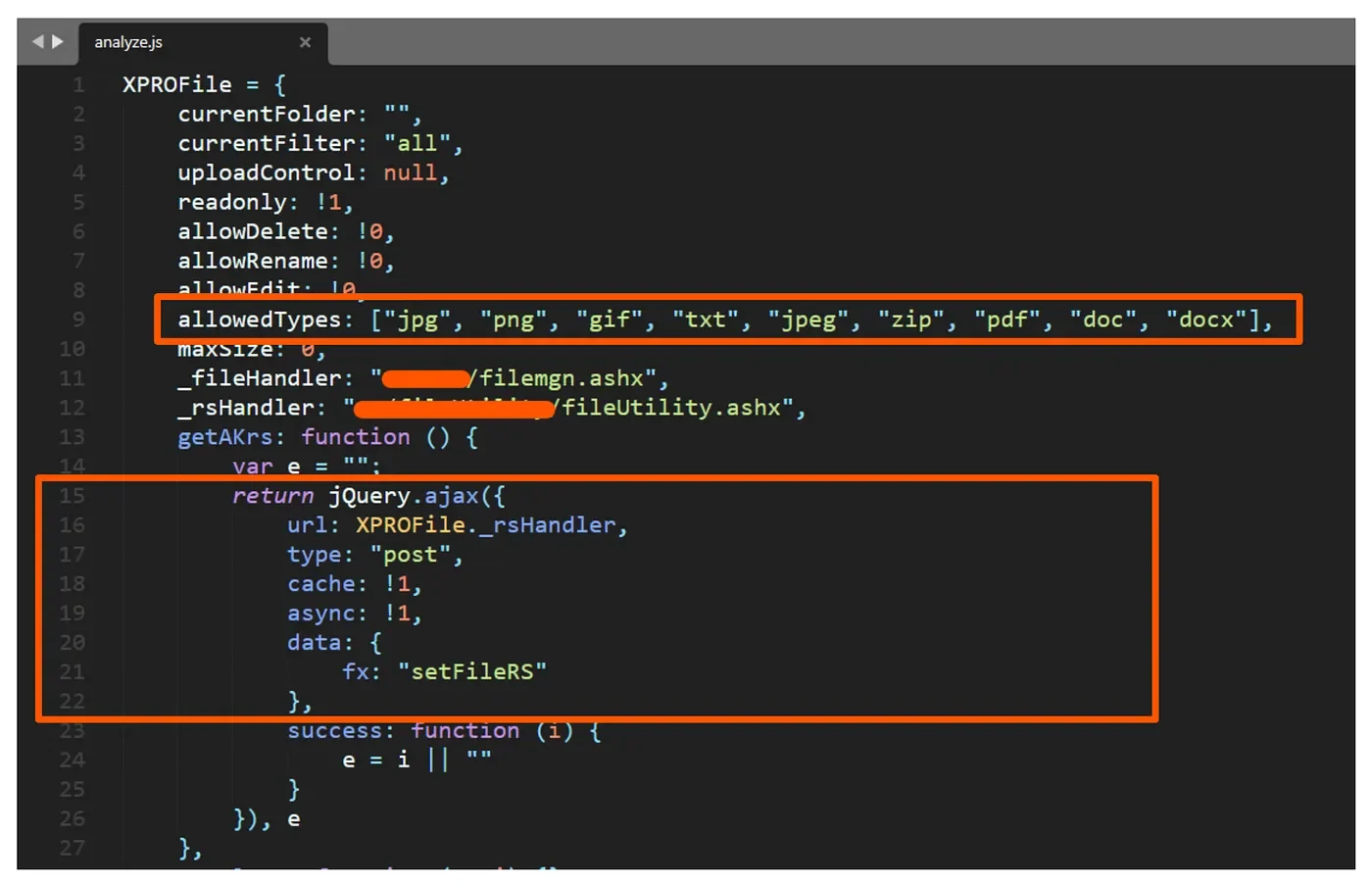
The same upload rules appear here, plus new handlers properties called from different endpoints:
- _fileHandler:
filemgn.ashx - _rsHandler:
fileUtility.ashx
Line 13 defines getAKrs, the missing function. It returns the result of an Ajax POST to _rsHandler (fileUtility.ashx), and the only parameter it needs is fx with the value setFileRS. Sending that request from Burp Suite returned a random string per request, which the researcher suspected was a per-request validation value, similar to a dynamic CSRF token.
Step 3: Upload a text file
With every required parameter and value known, the next test was whether an unauthenticated user could upload at all, or whether an admin session was required. The request body encoding was changed to multipart/form-data; so the server would treat it as a file upload.
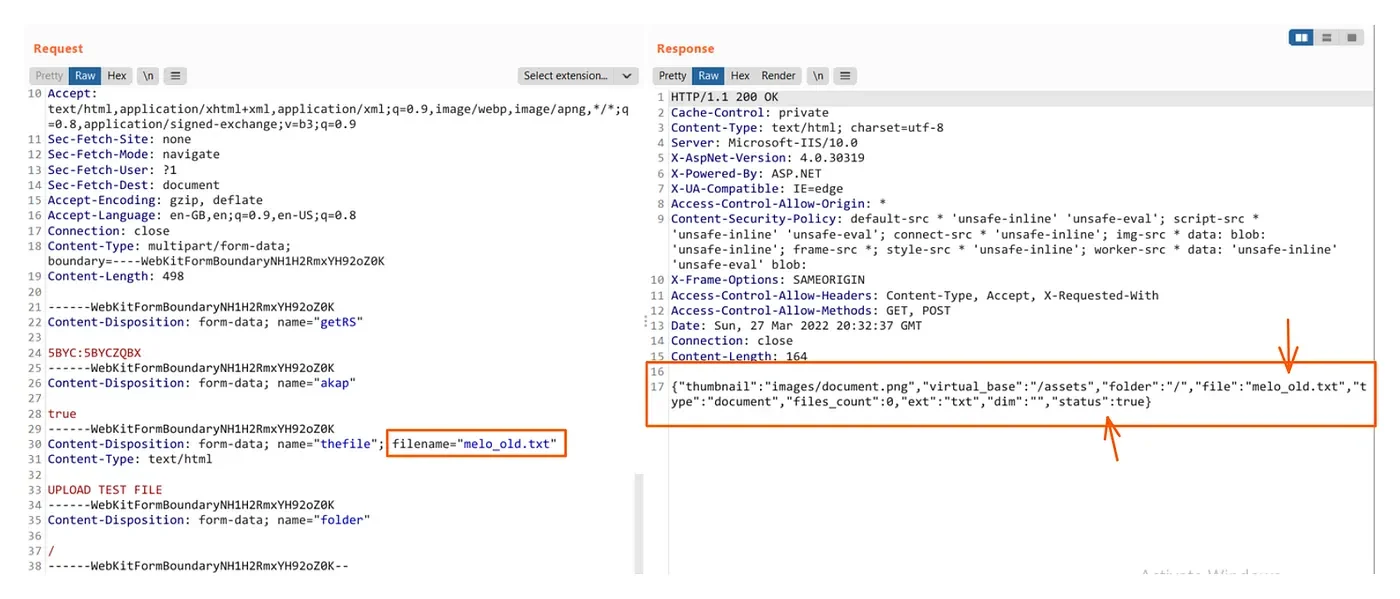
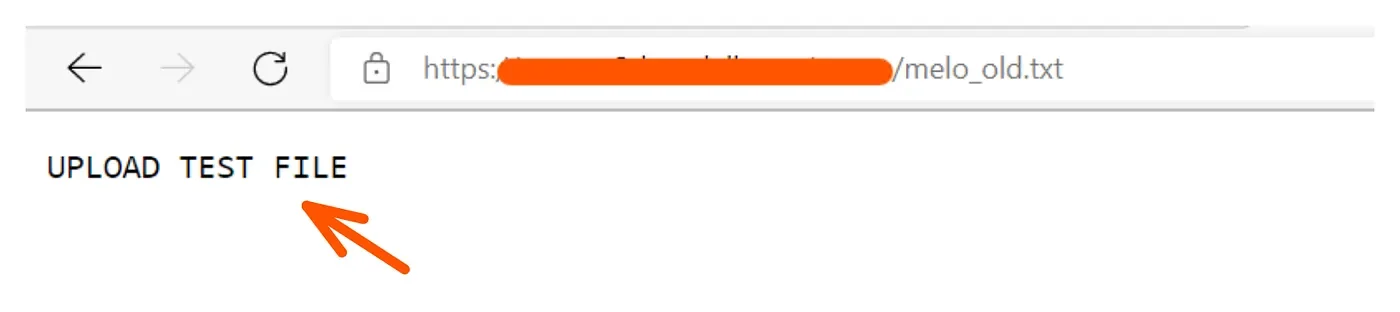
The upload succeeded. The response also disclosed the directory the file was written to, under /assets.
Step 4: Try to bypass the extension whitelist
Because this is an ASP.NET application, the goal was to upload a shell. Known bypasses were tried: double extension, null byte and similar techniques, plus every executable and configuration extension that works on ASP.NET and Microsoft server applications, such as exe, bat and config. None worked.
Step 5: Find renameFile in xprofile.js
Back in xprofile.js, the number of Ajax requests stood out. Several deal with a file manager: functions such as getFiles, deleteFile, createFolder and, importantly, renameFile. Renaming is exactly what is needed to turn an uploaded text file into an executable one.
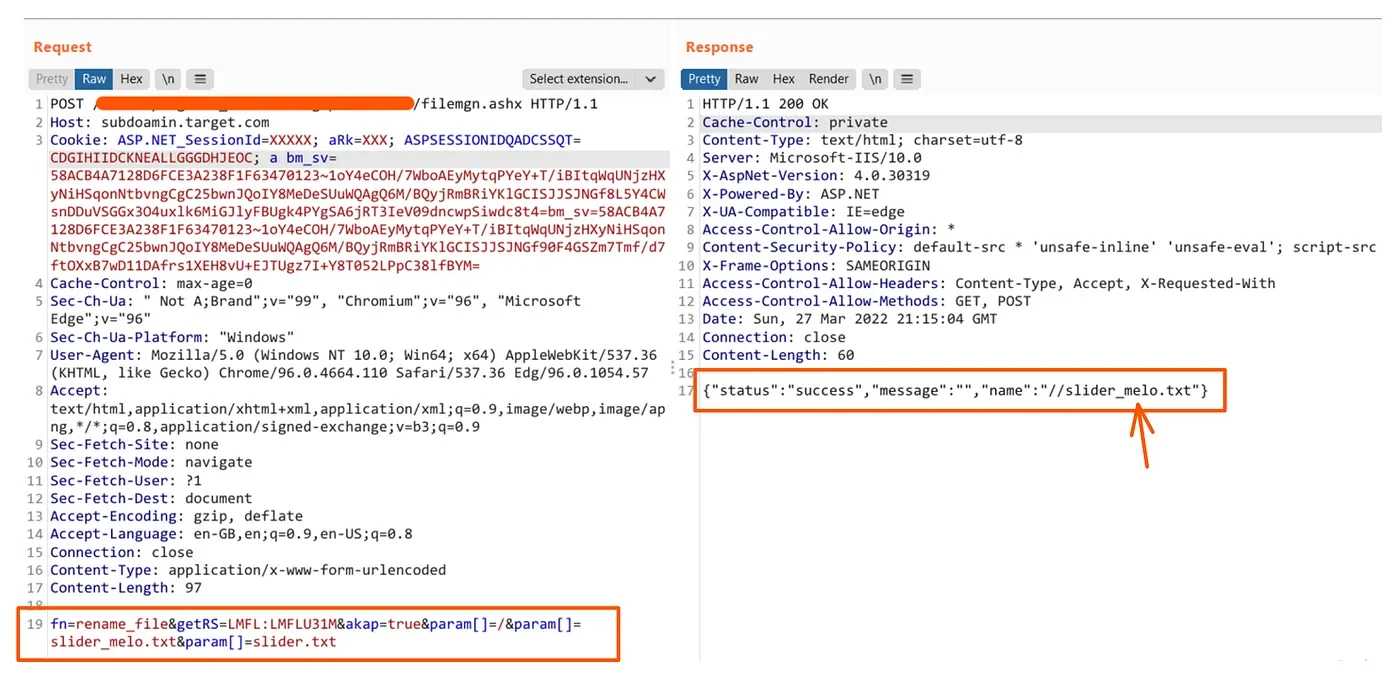
The renameFile function sends an Ajax request to _fileHandler (filemgn.ashx) with 4 parameters:
- fn: the string value
rename_file. - getRS: the value returned by getAKrs.
- akap: the literal true value, as before.
- param: the value of a variable t, declared as an array at line 131 and assigned three values at line 132.
The purpose of param was unclear, so it was fuzzed. Because it is sent as an array of three elements, the meaning was found to be:
- The directory containing the file to rename.
- The new name.
- The current file name.
A second text file, slider.txt, was uploaded and renamed to slider_melo.txt to confirm.
Step 6: Rename to an executable extension
The rename was then tried with a not allowed extension, aspx, and it worked. The plan became: upload a malicious file under an allowed extension, then rename it to .aspx.
The shell used was cmd.aspx, renamed to cmd.txt before upload, then renamed to testshell.aspx, and finally opened in the browser.
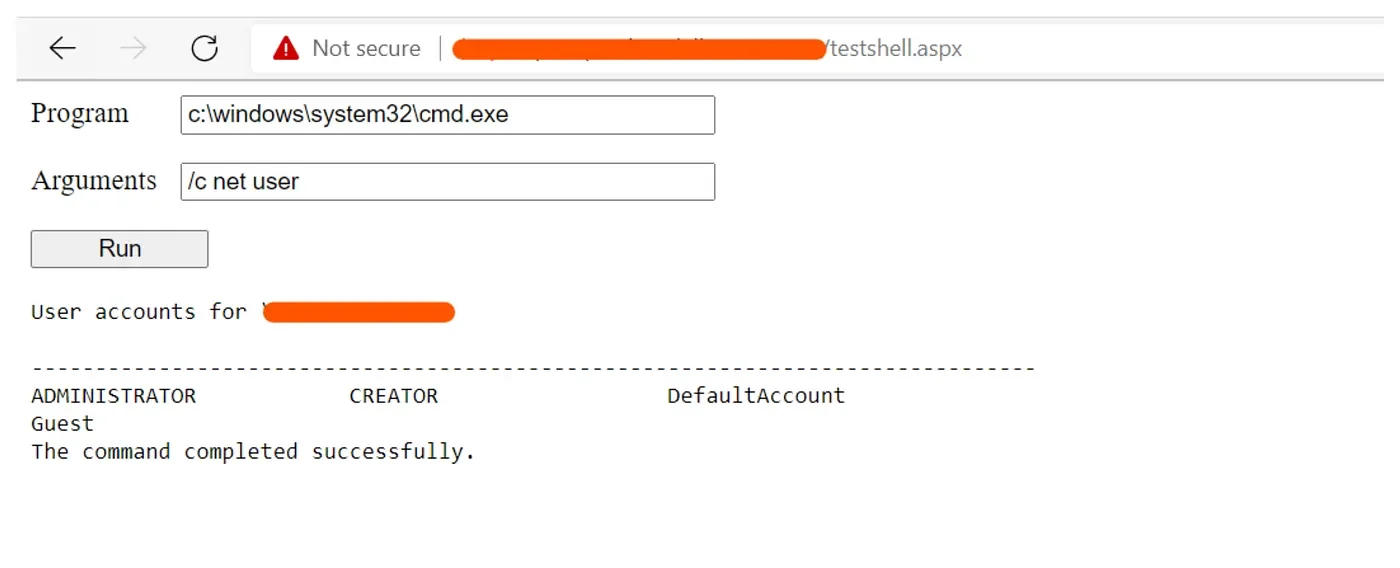
The shell was uploaded and commands could be run on the system.
Step 7: Report timeline
- 25 Mar: Submitted.
- 28 Mar: Triaged.
- 29 Mar: Bounty rewarded.
Step 8: Read the server-side filter
With command execution available, the researcher read the filtering code in fileUtility.aspx. The report notes that permission must be requested before exploiting further, especially when accessing internal data, and that this was communicated and agreed with the program team in this case.
The application converts the file extension to lowercase and then filters all executable files. Without the rename function the upload would not have been exploitable. In the same file, however, something related to uploading a zip file stood out.
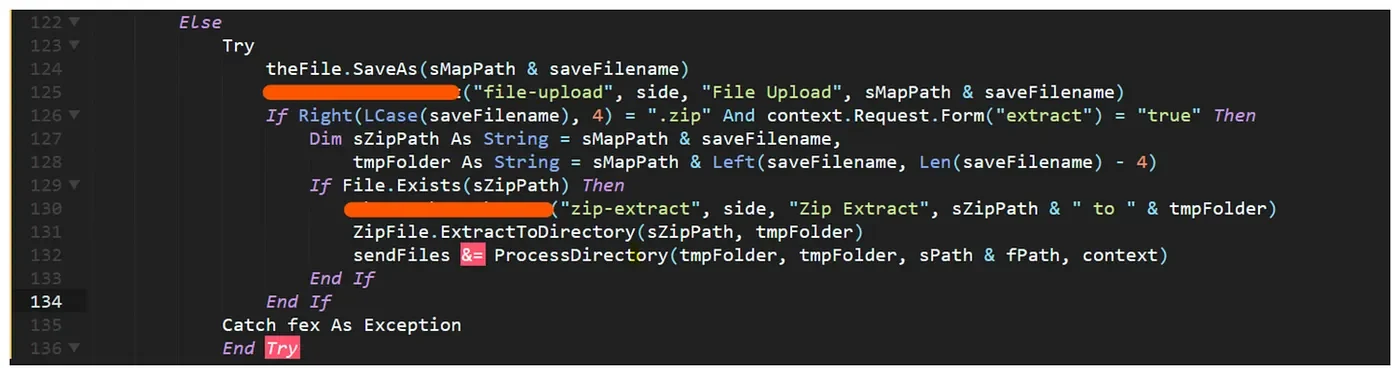
At line 126 the code checks two things:
- Whether the last 4 characters of the filename are
.zip. - The value of the extract request parameter.
If both are true, the file is unzipped into the same directory it was uploaded to.
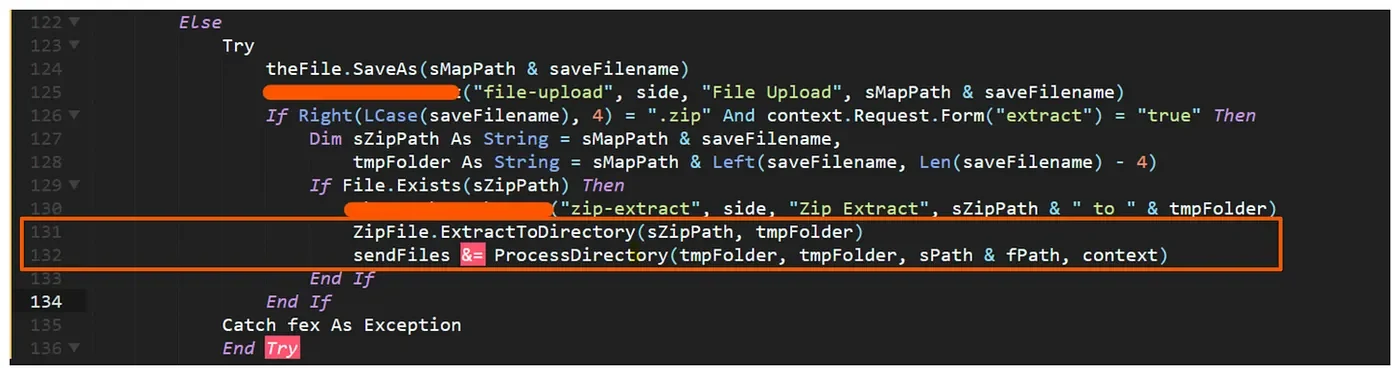
The extraction applies no filtering, so the same shell was placed inside a Zip archive and a simple Python script uploaded it with the extract parameter set to a true value. The result was checked in the browser.
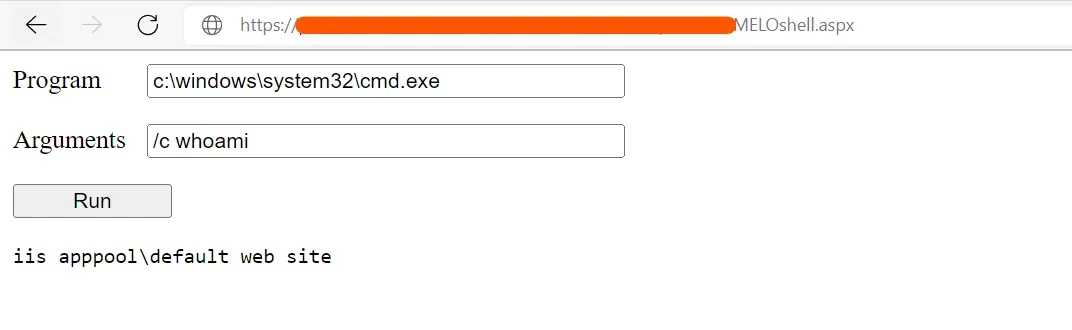
The second shell was uploaded successfully.

A second report was intended, but the server was closed before it could be submitted.
Root cause
The upload endpoint enforces an extension whitelist, and the server-side code lowercases the extension and filters executable files. That defence is undermined by a separate rename function in the file manager, which accepts a new name without re-applying the same whitelist, so a file uploaded with an allowed extension can be given an executable one afterwards. The second path is the extract handling: when the filename ends in .zip and the extract parameter is true, the archive is unpacked into the upload directory with no filtering of the extracted contents, so the whitelist only ever sees the .zip name. The per-request value from getAKrs (fx=setFileRS) is required by the requests; the researcher suspected it was a per-request validation value similar to a dynamic CSRF token.
Impact
An attacker who can reach the upload endpoints can write files to a web-served directory under /assets and then obtain remote code execution on the ASP.NET server, either by renaming an uploaded file to an executable extension or by uploading a Zip archive with the extract parameter. From there, commands can be run on the system and server-side files such as fileUtility.aspx can be read. The report does not state which data or systems beyond the web server were reachable.
Fix
The report does not describe a fix applied by the program. Based on what was found, the rename function should apply the same extension whitelist as the upload, and the Zip extraction should validate every extracted entry against that whitelist before writing it to disk, or extraction should be removed. The upload directory should also not serve executable content.
Variants to test
- Rename after upload: upload a benign extension, then call the file manager's rename function with an executable extension. A positive result is a file served and executed under the new name.
- Zip extraction: upload an archive whose name ends in
.zipwith the extract flag set, containing a shell. A positive result is the extracted file appearing in the upload directory and executing. - Case handling: try mixed-case extensions against the lowercase filter, since the code lowercases before comparing. A positive result is an executable file that survives the filter.
- Token reuse: replay the value returned by the
fx=setFileRSrequest across sessions or after logout. A positive result is the upload or rename succeeding without a valid session. - Other file manager functions: test getFiles, deleteFile and createFolder for missing authorisation. A positive result is listing, deleting or creating files without admin rights.
What happened, in plain words
A security researcher was looking at a website (a private bug bounty program, so it is called target.com here) and found a way to upload files to its server. At first the site only let him upload harmless file types, like text files. But by reading the website's own JavaScript code, he discovered two extra features: a function that renames files, and a function that unzips archives. Using those, he turned a harmless text file into a program that runs commands on the server. That is called remote code execution (RCE): the attacker can make the server do things it was never meant to do.
This article walks through the whole story from zero. You only need to know how to use a browser. Every technical word is explained the first time it appears, and there is a glossary at the end.
Some background words first
Before the steps, a few ideas that come up again and again.
- Server: the computer somewhere else that stores a website and answers when your browser asks for a page. Your browser is the client; the server is the other side.
- Endpoint: one specific address (URL) on a server that does one specific job, like
/toolsor/login. Think of a big office building: the building is the server, and each endpoint is a different desk you can walk up to. - API: a way for one piece of software to talk to another, usually by sending a request to an endpoint and getting data back, rather than a whole web page. Like a restaurant menu: you ask for a specific dish by name and the kitchen sends it back.
- JavaScript: the programming language that runs inside your browser to make web pages interactive. Websites send JavaScript files to your browser, and your browser runs them. Because the browser must be able to read them, anyone can also read them.
- Obfuscation: deliberately making code hard for humans to read (short meaningless names, no spaces, no line breaks) while the computer still understands it. Like writing a note in tiny handwriting with no punctuation.
- Ajax request: a request a web page sends to the server in the background, without reloading the page. When you type in a search box and suggestions appear without the page blinking, that is Ajax.
- Parameter: a named value you send along with a request, like
folder=/assetsorfn=rename_file. Think of a form with labelled boxes: the label is the parameter name, what you write is its value. - Token: a short value, often a random string, that a server gives you and expects back on later requests to prove the request is legitimate. Like a cloakroom ticket: you hand in your coat, get a ticket, and must show the ticket to get the coat back.
- CSRF token: a token whose only purpose is to prove a request really came from the site's own pages and not from some other site tricking your browser. It is usually different every time.
- File upload: a feature that lets you send a file from your computer to the server, like attaching a photo to an email.
- Whitelist: a list of things that are allowed. Here, a list of file extensions the server will accept.
- Extension: the part of a filename after the last dot, like
.txtinnotes.txtor.aspxinpage.aspx. It tells the server what kind of file it is. - Shell / webshell: a small program uploaded to a server that lets the attacker run commands on it. Like leaving a remote-controlled door in the building.
- ASP.NET: Microsoft's framework for building websites. Files ending in
.aspxare pages that the server executes as programs, not just sends to you. - Burp Suite: a tool that sits between your browser and the server so you can see, pause, edit and resend requests. Like an interceptor at the post office who lets you open, rewrite and re-post letters.
- Fuzzing: trying many variations automatically to see which one gets a different, interesting response. Like trying every key on a keyring to see which one opens a door.
- 403 Forbidden: the server's way of saying "I understood your request, but you are not allowed."
- multipart/form-data: the format a browser uses when it sends a file in a form. It wraps the file's bytes with boundaries so the server knows where the file starts and ends.
Finding the endpoint
After a few hours of exploring the application, the researcher found a subdomain (a sub-part of the main site, like shop.example.com under example.com) that showed the message "Taking a Short Break". A page like that often means the site is unfinished or in maintenance, which is a good place to look for forgotten files and folders. So he started fuzzing directories: asking the server for many possible folder names in a row and watching which ones answer differently.
Most of the folders he tried answered with 403 Forbidden. One, /tools, answered with a login page instead. That looked like an admin login, so he tried to sign in with default credentials (common usernames and passwords like admin/admin). It did not work.
When you cannot get past a login page, a useful next step is to read the JavaScript files the page loads. They sometimes contain leaked credentials, API keys (secret strings that let software talk to a service) or hidden endpoints. Most sites obfuscate their JavaScript, so reading it line by line is often a waste of time. Instead, the researcher used the browser's built-in search (Ctrl+F) inside each file to look for interesting words: api, secret, token, admin, and also for Ajax and XML requests. That search turned up endpoints which confirmed the login panel was for admins.
He checked each of those endpoints. All returned empty responses except /path/to/assetmain.aspx, which returned a white page plus some imported CSS (the files that style a page) and JavaScript files. The names of the JavaScript files suggested something to do with uploading, so those files became the focus.
Analysing the first file (xproupload.js)
The first file, xproupload.js, was unreadable as served: no spaces, no line breaks, short meaningless names.
He ran it through an online JavaScript beautifier (beautifier.io), a free tool that re-adds spaces and line breaks so a human can read the code. The file was over 550 lines, so he focused only on the important objects and functions. (An object in JavaScript is a bundle of named values, like a form with labelled boxes; a function is a named block of code that does something when called.)
Around line 465, an object named o is declared and prepared to be the body of an Ajax request started at line 473. It holds three elements:
- folder: the directory to upload to.
- thefile: the parameter that carries the file name and its content.
- currentFilter: an empty string; later analysis showed it is not needed.
Lines 472 and 473 add two more parameters:
- getRS: the value returned by a function called getAKrs. That function is not defined in this file, so it had to be found elsewhere.
- akap: in JavaScript the value
!0means true (the!flips a value, and!0flips false into true).
The upload destination is declared at line 488 as _uploadHander, a variable first mentioned at line 377.
Line 379 also contains upload rules, one of which is the list of allowed file extensions. In other words, the browser-side code already knows which file types the server will accept.
Analysing the second file (xprofile.js) and finding getAKrs
The second file, xprofile.js, has many functions, so again only the important ones were reviewed.
The same upload rules appear here, plus new handlers (named destinations for requests) called from different endpoints:
- _fileHandler:
filemgn.ashx - _rsHandler:
fileUtility.ashx
Line 13 defines getAKrs, the missing function. It returns the result of an Ajax POST to _rsHandler (fileUtility.ashx), and the only parameter it needs is fx with the value setFileRS. Sending that request from Burp Suite returned a random string per request. The researcher suspected this was a per-request validation value, similar to a dynamic CSRF token: a fresh ticket each time, so you cannot reuse an old one.
Uploading a text file
Now every required parameter and value was known. The next question: does the server require an admin session to upload a file? To test, he changed the request body encoding to multipart/form-data; so the server would treat the request as a file upload.
The upload succeeded. The response also told him the directory the file was written to, under /assets. That is useful: it means the uploaded file can be reached in a browser at a known address.
Trying to bypass the extension whitelist
Because this is an ASP.NET application, the goal was to upload a shell: a file the server would execute as a program. He tried the well-known tricks:
- Double extension: a name like
shell.txt.aspx, hoping one check sees.txtand another sees.aspx. - Null byte: putting a special invisible character in the name so different parts of the software read different extensions.
- Every executable and configuration extension that works on ASP.NET and Microsoft server applications, such as exe, bat and config.
None worked. The whitelist held.
Finding renameFile in xprofile.js
Back in xprofile.js, the number of Ajax requests stood out. Several deal with a file manager: functions such as getFiles, deleteFile, createFolder and, importantly, renameFile. Renaming is exactly what is needed: upload a harmless .txt file, then rename it to .aspx.
The renameFile function sends an Ajax request to _fileHandler (filemgn.ashx) with 4 parameters:
- fn: the string value
rename_file. - getRS: the value returned by getAKrs.
- akap: the literal true value, as before.
- param: the value of a variable t, declared as an array at line 131 and given three values at line 132. (An array is an ordered list of values, like a shopping list with numbered lines.)
The purpose of param was unclear, so he fuzzed it: tried different values and watched what changed. Because it is sent as an array of three elements, the meaning turned out to be:
- The directory containing the file to rename.
- The new name.
- The current file name.
To confirm, he uploaded a second text file, slider.txt, and renamed it to slider_melo.txt.
Renaming to an executable extension
Then he tried renaming to a not allowed extension, aspx, and it worked. The plan became: upload a malicious file under an allowed extension, then rename it to .aspx.
The shell used was cmd.aspx, renamed to cmd.txt before upload, then renamed to testshell.aspx, and finally opened in the browser.
The shell was uploaded and commands could be run on the system.
Report timeline
- 25 Mar: Submitted.
- 28 Mar: Triaged (the program team confirmed the report was valid and started working on it).
- 29 Mar: Bounty rewarded (he was paid).
Digging more: reading the server-side filter
With command execution available, the researcher read the filtering code in fileUtility.aspx. The report notes that you must ask for permission before exploiting further, especially when accessing internal data, and that this was communicated and agreed with the program team in this case.
The application converts the file extension to lowercase and then filters all executable files. Without the rename function, the upload would not have been exploitable. In the same file, however, something related to uploading a zip file stood out.
At line 126 the code checks two things:
- Whether the last 4 characters of the filename are
.zip. - The value of the extract request parameter.
If both are true, the file is unzipped into the same directory it was uploaded to.
The extraction applies no filtering, so the same shell was placed inside a Zip archive and a simple Python script uploaded it with the extract parameter set to a true value. The result was checked in the browser.
The second shell was uploaded successfully.
A second report was intended, but the server was closed before it could be submitted.
Why it worked
The upload endpoint enforces an extension whitelist, and the server-side code lowercases the extension and filters executable files. That defence is undermined by a separate rename function in the file manager, which accepts a new name without re-applying the same whitelist, so a file uploaded with an allowed extension can be given an executable one afterwards. The second path is the extract handling: when the filename ends in .zip and the extract parameter is true, the archive is unpacked into the upload directory with no filtering of the extracted contents, so the whitelist only ever sees the .zip name. The per-request value from getAKrs (fx=setFileRS) is required by the requests; the researcher suspected it was a per-request validation value similar to a dynamic CSRF token.
What an attacker could do
An attacker who can reach the upload endpoints can write files to a web-served directory under /assets and then obtain remote code execution on the ASP.NET server, either by renaming an uploaded file to an executable extension or by uploading a Zip archive with the extract parameter. From there, commands can be run on the system and server-side files such as fileUtility.aspx can be read. The report does not state which data or systems beyond the web server were reachable.
How to fix it
The report does not describe a fix applied by the program. Based on what was found, the rename function should apply the same extension whitelist as the upload, and the Zip extraction should validate every extracted entry against that whitelist before writing it to disk, or extraction should be removed. The upload directory should also not serve executable content.
Variants to test
- Rename after upload: upload a benign extension, then call the file manager's rename function with an executable extension. A positive result is a file served and executed under the new name.
- Zip extraction: upload an archive whose name ends in
.zipwith the extract flag set, containing a shell. A positive result is the extracted file appearing in the upload directory and executing. - Case handling: try mixed-case extensions against the lowercase filter, since the code lowercases before comparing. A positive result is an executable file that survives the filter.
- Token reuse: replay the value returned by the
fx=setFileRSrequest across sessions or after logout. A positive result is the upload or rename succeeding without a valid session. - Other file manager functions: test getFiles, deleteFile and createFolder for missing authorisation. A positive result is listing, deleting or creating files without admin rights.
Glossary
- API: a way for one piece of software to talk to another, usually by sending a request to an endpoint and getting data back.
- Array: an ordered list of values, like a shopping list with numbered lines.
- ASP.NET: Microsoft's framework for building websites;
.aspxfiles are pages the server executes as programs. - Client: the program on your side (usually your browser) that asks the server for things.
- CSS: the files that style a web page (colours, layout, fonts).
- Endpoint: one specific address (URL) on a server that does one specific job.
- Extension: the part of a filename after the last dot, like
.txtinnotes.txt. - File upload: a feature that lets you send a file from your computer to the server.
- Function: a named block of code that does something when called.
- Handler: a named destination in code that a request is sent to.
- Object: a bundle of named values in JavaScript, like a form with labelled boxes.
- Obfuscation: deliberately making code hard for humans to read while the computer still understands it.
- Parameter: a named value you send along with a request.
- Remote code execution (RCE): making a server run commands or programs it was never meant to run.
- Subdomain: a sub-part of a main site, like
shop.example.comunderexample.com. - Triaged: the program team confirmed a report was valid and started working on it.
- Whitelist: a list of things that are allowed, here a list of file extensions the server will accept.
- Zip archive: a single file that contains other files packed together, like a box with several items inside.
- Unzip / extract: unpacking a Zip archive so its contents become separate files again.



