Chained Bug: XML File Upload to XSS to CSRF to Full Account Take Over (ATO)
The upload feature allowed XML files containing SVG tags, which executed JavaScript when viewed, enabling stored XSS. The attacker could then use leaked session and merchant IDs to perform CSRF attacks that changed the victim's username and email, leading to full account takeover.
 Published on systemweakness.com
Bug Bounty
The full write-up lives on its author's site
It belongs to its author, so we link to it rather than copy it. The other two tabs are our own rewrites, checked against it.
Context
The target is the same site the author had written about in a previous article, referred to throughout as example.com. It offers a file upload feature that accepts a range of extensions, including .xml files. The site also has an invite a friend feature, a ViewCart URL, and account pages named BillingInfo and OwnerDetails, which are used to change a user's email address and username.
The chain described here runs from an XML file upload to XSS, then to token disclosure, then to CSRF against the account pages, ending in full account takeover. The author assumes the reader already knows what file upload, XSS, CSRF and ATO are, and only briefly quotes Wikipedia's definition of XML as a markup language and file format for storing, transmitting and reconstructing arbitrary data, human-readable and machine-readable, with the example:
<note> <to>Tove</to> <from>Jani</from> <heading>Reminder</heading> <body>Don't forget me this weekend!</body></note>
Setup
Two accounts are needed, one for the victim and one for the attacker. On the victim's account the author creates a store and a product to sell. On the attacker's account the author gathers the victim's merchantId and sid, customises the final XML exploit, uploads it, copies the uploaded file link and sends that link to the victim. The victim must be logged in when they visit the link, and the attacker must already hold the victim's merchantId and sid.
Finding it
Defeating the XML upload
The author first tried every basic to advanced payload they knew to get XXE through the .xml upload, and none worked. The idea that followed was SVG: Scalable Vector Graphic is an XML-style format, its header is <?xml?>, so an SVG is effectively just another XML document. The site blacklists the .svg extension, but the author reasoned that renaming .svg to .xml gives the same file with the same behaviour. The report includes a picture to demonstrate the equivalence.
XSS through the uploaded file
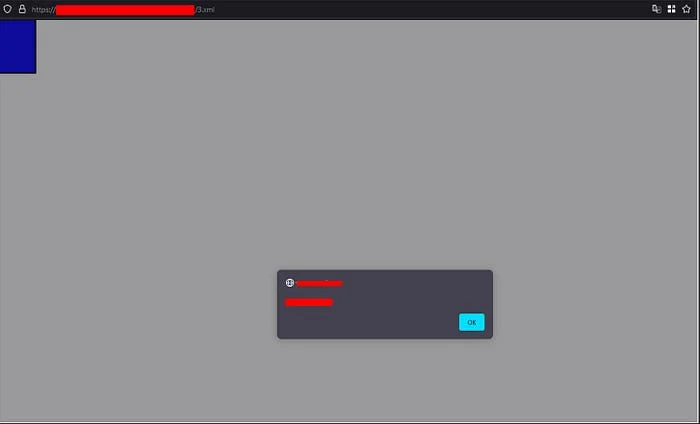
With the upload restriction bypassed, the author uploaded an XML file containing an SVG tag and used an XML payload to trigger XSS. Visiting the uploaded file link produced a pop-up.
Token leak in invite a friend and ViewCart
Looking for higher impact, the author found a sensitive token leak in the invite a friend feature and in the ViewCart URL.
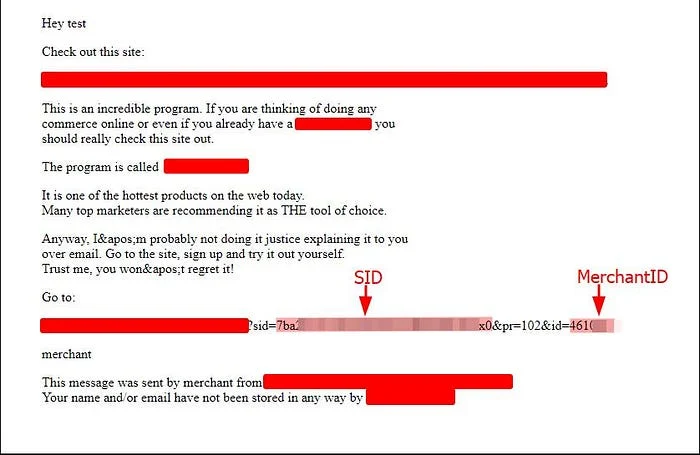
The ViewCart URL has the form:
https://www.example.com/ViewCart.asp?mid=7BA2xxxxxxx
and the merchantId is also leaked in the image link of the cart, the product picture.
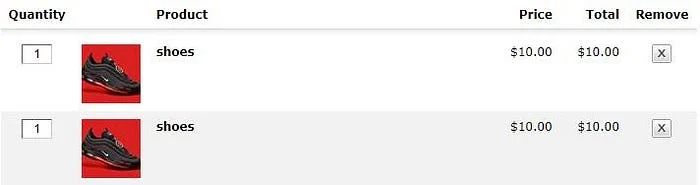
Opening that picture in another tab gives a URL of the form:
https://www.example.com/assets/46/461xxx/shoes.jpg
where 461XXX is the merchantId. The author thus obtained the SID and MerchantID tokens, which other users should not be able to see.
Exploitation
Step 1: identify the CSRF surface
CSRF was the first idea, because some pages can only be accessed with the SID and MerchantId, in addition to the cookie. Visiting such a page with an invalid token, or with another user's token, logs you out automatically and sends you back to the login page; the author suspects the site matches the SID and MerchantId against the cookie somehow. BillingInfo and OwnerDetails are pages of this kind, and they are the pages used to change email and username.
Step 2: intercept the OwnerDetails request
Intercepting the request that changes the username on OwnerDetails showed that the page uses no csrf_token at all.
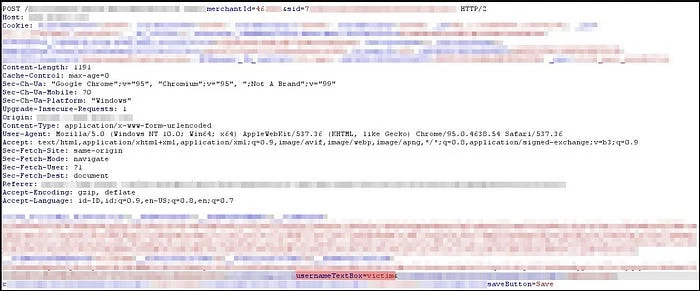
BillingInfo, by contrast, uses a RequestVerificationToken whose value acts like a CSRF token, and the value changes every time a user changes their email address.
Step 3: script the username change
The author wrote JavaScript that changes the victim's username on the OwnerDetails page to that of the attacker.
Step 4: script the email change
On the BillingInfo page the author wrote a script that grabs the RequestVerificationToken and passes it to the POST data. The trick of grabbing the token and putting it into the POST body was learned from the Ippsec video solving the HackTheBox Crossfit machine. That script changes the victim's email address to [redacted]
Step 5: combine into the final XML exploit
The two scripts were combined into a single XML exploit file, which is the file uploaded and delivered to the victim.
Step 6: run the takeover
- Create the victim account and the attacker account.
- On the victim's account, create a store and a product to sell.
- On the attacker's account, go to the victim's store and gather the merchantId and sid.
- Customise the final XML exploit script.
- Upload the script and copy the uploaded file link.
- Send the link to the victim.
When the victim visits the link while logged in, their username and email address are changed automatically to attacker and [redacted] The attacker then requests a password reset for the victim's account using the new username and email address, and the victim's account becomes the attacker's.
Root cause
The site blacklisted the .svg extension but accepted .xml, so an SVG document, which is XML, passed as an XML file and was served back, where its script executed. OwnerDetails had no csrf_token at all, and BillingInfo's RequestVerificationToken could be read by the injected script and passed into the POST data. The token leak in the invite a friend feature and the ViewCart URL, including the merchantId embedded in product image paths, exposed identifiers other users should not see. The report does not show the server-side code, so the exact matching logic between SID, MerchantId and cookie is inferred rather than demonstrated.
Impact
An attacker who can get a logged-in victim to open the uploaded file link can change that victim's username and email address, then reset the password and take over the account. The attack requires the victim to be logged in and to visit the link, and it requires the attacker to know the victim's merchantId and sid, which the author gathered from the victim's store and cart pages. The author describes the result as full account takeover.
Fix
Variants to test
- Upload an SVG document renamed to another XML-family extension the blacklist misses, such as
.xml. A positive result is the uploaded file being served back and its script executing when the link is opened. - Check whether other upload types accept content that the extension does not imply, for example HTML or script content in a file with an image extension. A positive result is the browser rendering the content as active rather than as a download.
- Look for state-changing pages that accept a token from the URL or body without binding it to the session, as with OwnerDetails. A positive result is a cross-site request that changes account data.
- Look for pages that expose a CSRF token in a response readable by an injected script, as with BillingInfo's RequestVerificationToken. A positive result is a script that reads the token and submits it in the same request.
- Check invite a friend and cart URLs for identifiers that should not be visible to other users, such as merchantId in image paths. A positive result is another user's identifier appearing in a URL or asset path.
Outcome
The submission was marked as a duplicate of a report on another endpoint, although this one was on the file upload feature. The author contacted Bugcrowd's support team without a helpful result. This was the author's first account takeover.

The author also mentions a small Python HTTP server, hserv, that logs incoming requests and can replace Burp Collaborator when Burp Pro is not available, since it logs all incoming request headers.
What happened, in plain words
A security researcher found a way to take over another person's account on a shopping website, without ever learning that person's password. The trick was a chain: several small weaknesses that, on their own, look harmless, but that fit together like dominoes.
First, the site let people upload files. It blocked one kind of file, called .svg, but forgot that the same content can be saved with a different name, .xml. So the researcher uploaded an XML file containing an SVG tag and an XML payload. When anyone opened that uploaded file in their browser, the program ran. That is the first domino.
Second, the site leaked secret identifiers (think of them as membership numbers) in places other users could see, such as a shopping cart link and a product picture link. Those identifiers are needed, along with the cookie, to access some account pages. That is the second domino.
Third, the pages where you change your username and email address did not properly protect against a trick called CSRF, where one website makes your browser send a request to another website on your behalf. One of those pages had no protection token at all, and the other used a RequestVerificationToken whose value changes when a user changes their email address. That is the third domino.
Put together: the uploaded file ran a script in the victim's browser, the script used the leaked identifiers, and it silently changed the victim's username and email to the attacker's. The attacker then asked the site to reset the password, and the reset went to the attacker's email. The author describes this as turning the victim's account into the attacker's.
The researcher reported it, and the report was closed as a duplicate of a report about a different part of the site, even though this one was about the file upload feature. It was the researcher's first account takeover.
Background: what XML is
The report starts with a short definition, quoted from Wikipedia: XML (Extensible Markup Language) is a markup language and file format for storing, transmitting, and reconstructing arbitrary data. It defines a set of rules for encoding documents in a format that is both human-readable and machine-readable. The design goals of XML emphasise simplicity, generality, and usability across the Internet. It is a textual data format with strong support via Unicode for different human languages. Although the design of XML focuses on documents, the language is widely used for the representation of arbitrary data structures such as those used in web services.
In everyday terms: XML is a way of writing data as text, using pairs of labels called tags, so that both a person and a computer can read it. It looks a bit like a form where every answer is wrapped in its own labelled box.
Here is the example from the report:
<note> <to>Tove</to> <from>Jani</from> <heading>Reminder</heading> <body>Don't forget me this weekend!</body></note>
Line by line, in plain words:
<note>opens a box called "note". Everything until the matching closing tag belongs inside it.<to>Tove</to>is a box called "to" containing the textTove. The opening tag<to>and the closing tag</to>wrap the value.<from>Jani</from>is the same idea for the sender's name.<heading>Reminder</heading>holds the subject line.<body>Don't forget me this weekend!</body>holds the message itself.</note>closes the outer box, so the whole document is one note containing four smaller boxes.
That is all XML is: nested labelled boxes of text. Keep that picture in mind, because the whole first vulnerability comes from the fact that another file format, SVG, is secretly built the same way.
The target and the first vulnerability: getting past the XML upload check
The target is the same site the researcher had written about in an earlier article, referred to throughout as example.com. It has a feature that lets users upload files of various kinds, including .xml files. It also has an invite a friend feature, a ViewCart page, and account pages named BillingInfo and OwnerDetails, which are used to change a user's email address and username.
A file upload feature is simply a form on a website that lets you send a file from your computer to the server, for example a profile picture or a document. The server is the computer that runs the website and stores what users send.
The researcher first tried every payload they knew, from basic to advanced, to get something called XXE through the .xml upload. A payload is the piece of input you craft to test whether a weakness exists. XXE stands for XML External Entity: a way of abusing XML so that the server, while reading the file, is tricked into fetching or revealing something it should not. None of those attempts worked.
Then the researcher thought of SVG. SVG stands for Scalable Vector Graphic: a picture format used for logos and icons that stay sharp at any size. The key insight is that an SVG file is written in XML style, and its header is <?xml?>. In other words, an SVG is just another XML document that happens to describe a drawing.
But SVG files normally have the .svg extension, and the site had blacklisted that extension, meaning it refused to accept files whose name ended in .svg. A blacklist is a list of things you are not allowed to do; anything not on the list is allowed. The researcher's question was: what happens if .svg is changed to .xml? The content is the same and behaves the same, only the name at the end changes. The report includes a picture to show the two are equivalent.
Why this step matters: the site refused the .svg extension but accepted the same content as .xml. Renaming a file is something anyone can do on their own computer in a second, so a check based on the name alone is easy to walk around. This is the first domino.
The second vulnerability: XSS through the uploaded file
With the upload restriction bypassed, the researcher uploaded an XML file containing an SVG tag, and used an XML payload to trigger XSS. Visiting the uploaded file link produced a pop-up.
XSS stands for Cross-Site Scripting. A website is built from pages that your browser turns into what you see, and those pages can include small programs written in a language called JavaScript. XSS means getting your own JavaScript into a page that other people will view, so that it runs in their browser, under that website's name. A simple way to prove it worked is to make the browser show a pop-up box: if the box appears, your code ran.
Why this step matters: visiting the uploaded file link produced a pop-up, so the attacker's code ran in the browser of whoever opened it. That means the attacker's program now runs in the victim's browser, on the victim's session. This is the second domino, and it is the one that gives the attacker a foothold inside the victim's browser.
The token leak in invite a friend and ViewCart
Wanting a higher impact than a pop-up, the researcher looked deeper into the website and found another sensitive token leak, this time in the invite a friend feature and in the ViewCart URL.
A token here means a short string of characters that the site uses to identify you or your account, a bit like the number on a membership card. If someone else learns your number, they may be able to act as if they were you. The invite a friend feature is a page that gives you a link to share so a friend can join; the ViewCart page is the shopping cart page that lists what you intend to buy.
The ViewCart URL has this form:
https://www.example.com/ViewCart.asp?mid=7BA2xxxxxxx
Line by line, in plain words:
https://is the secure version of the protocol your browser uses to talk to websites.www.example.comis the site's address, the equivalent of a street address for a building on the internet./ViewCart.aspis the path, which tells the server which page you want. The.aspending hints at the technology used to build the page.?marks the start of the query string, the part of a URL that carries extra information.mid=7BA2xxxxxxxis one item in that query string: a name,mid, an equals sign, and a value.midis short for merchantId, the identifier of the merchant, that is, the shop owner's account. Thexxxxxxxstands for characters the report has hidden.
So the cart page address itself carries the shop owner's identifier, visible to anyone who sees the link. The merchantId is also leaked in the image link of the cart, the product picture.
Opening that picture in another tab gives a URL of this form:
https://www.example.com/assets/46/461xxx/shoes.jpg
Line by line, in plain words:
https://www.example.comis again the site's address./assets/46/461xxx/is a folder path on the server. The461xxxpart is the merchantId, with the last characters hidden in the report.shoes.jpgis the file name of the picture itself, a JPEG image.
So the picture's own address contains the shop owner's identifier. Anyone who right-clicks the image and copies its address, or simply opens it in a new tab, can read it.
Through these leaks the researcher obtained the SID and MerchantID tokens, which other users should not be able to see. SID stands for session ID: the value that ties your browser to your logged-in session on the server, like the wristband you get at an event that proves you are allowed in. MerchantID is the shop owner's account identifier.
Why this step matters: the attacker now holds the two identifiers that some account pages require, along with the cookie. Without them, the later steps would not know which account to act on. This is the third domino.
Exploitation
Step 1: identify the CSRF surface
CSRF stands for Cross-Site Request Forgery. It is a trick where a page on one site causes your browser to send a request to another site where you are logged in. Because your browser automatically attaches your login cookie to requests for that site, the second site believes the request came from you. A cookie is a small piece of data a site stores in your browser so it can remember you between page loads; it is what keeps you logged in.
The researcher's first idea was CSRF, because some pages can only be accessed with the SID and MerchantId, in addition to the cookie. Visiting such a page with an invalid token, or with another user's token, logs you out automatically and sends you back to the login page. The researcher suspects the site matches the SID and MerchantId against the cookie somehow. BillingInfo and OwnerDetails are pages of this kind, and they are the pages used to change email and username.
Why this step matters: the attacker needs pages that change account details, because those are the pages worth forging requests to. Finding that these pages are guarded by the leaked identifiers, rather than by something the attacker cannot obtain, is what makes the attack possible.
Step 2: intercept the OwnerDetails request
The researcher intercepted the request that changes the username on OwnerDetails. Intercepting means pausing a request between your browser and the server so you can read exactly what is being sent, which is what tools like Burp Suite are for. What the researcher saw was that the page uses no csrf_token at all.
A csrf_token is a secret value that a page includes in a form so the server can check that the request really came from that page and not from somewhere else. Without one, the server has no way to tell a genuine request from a forged one.
BillingInfo, by contrast, uses a RequestVerificationToken whose value acts like a CSRF token, and the value changes every time a user changes their email address. So BillingInfo is protected, at least in principle.
Why this step matters: this is the difference between a page that can be forged freely and a page that needs a little more work. OwnerDetails is the easy one; BillingInfo needs its token handled.
Step 3: script the username change
The researcher wrote JavaScript that changes the victim's username on the OwnerDetails page to that of the attacker. JavaScript is the programming language that browsers run, and it is the same language the XSS payload is written in.
Why this step matters: the script is the hand that turns the leaked identifiers into an actual change on the victim's account. It runs inside the victim's browser, so it carries the victim's cookie automatically.
Step 4: script the email change
On the BillingInfo page the researcher wrote a script that grabs the RequestVerificationToken and passes it to the POST data. POST data is the part of a request that carries the information being submitted, for example the new email address in a form. The trick of grabbing the token and putting it into the POST body was learned from the Ippsec video solving the HackTheBox Crossfit machine. That script changes the victim's email address to [redacted]
Why this step matters: the script grabs the RequestVerificationToken and passes it to the POST data, so the token is included in the forged request.
Step 5: combine into the final XML exploit
The two scripts were combined into a single XML exploit file, which is the file uploaded and delivered to the victim. One file now does both jobs: change the username and change the email address.
Step 6: run the takeover
- Create the victim account and the attacker account.
- On the victim's account, create a store and a product to sell.
- On the attacker's account, go to the victim's store and gather the merchantId and sid.
- Customise the final XML exploit script.
- Upload the script and copy the uploaded file link.
- Send the link to the victim.
When the victim visits the link while logged in, their username and email address are changed automatically to attacker and [redacted] The attacker then requests a password reset for the victim's account using the new username and email address, and the victim's account becomes the attacker's.
Why each step is needed: the victim account is the target and the attacker account is the one that will end up owning it. The store and product give the attacker a place to gather the victim's merchantId and sid. Customising the script means filling in those identifiers so the forged requests point at the right account. Uploading and sending the link is how the script reaches the victim's browser. The password reset is the final move: once the email on the account is the attacker's, the reset link goes to the attacker, and the old password no longer matters.
Root cause
The site blacklisted the .svg extension but accepted .xml, so an SVG document, which is XML, passed as an XML file and was served back, where its script executed. OwnerDetails had no csrf_token at all, and BillingInfo's RequestVerificationToken could be read by the injected script and passed into the POST data. The token leak in the invite a friend feature and the ViewCart URL, including the merchantId embedded in product image paths, exposed identifiers other users should not see. The report does not show the server-side code, so the exact matching logic between SID, MerchantId and cookie is inferred rather than demonstrated.
Impact
An attacker who can get a logged-in victim to open the uploaded file link can change that victim's username and email address, then reset the password and take over the account. The attack requires the victim to be logged in and to visit the link, and it requires the attacker to know the victim's merchantId and sid, which the author gathered from the victim's store and cart pages. The result is full account takeover.
Fix
Variants to test
- Upload an SVG document renamed to another XML-family extension the blacklist misses, such as
.xml. A positive result is the uploaded file being served back and its script executing when the link is opened. - Check whether other upload types accept content that the extension does not imply, for example HTML or script content in a file with an image extension. A positive result is the browser rendering the content as active rather than as a download.
- Look for state-changing pages that accept a token from the URL or body without binding it to the session, as with OwnerDetails. A positive result is a cross-site request that changes account data.
- Look for pages that expose a CSRF token in a response readable by an injected script, as with BillingInfo's RequestVerificationToken. A positive result is a script that reads the token and submits it in the same request.
- Check invite a friend and cart URLs for identifiers that should not be visible to other users, such as merchantId in image paths. A positive result is another user's identifier appearing in a URL or asset path.
Outcome
The submission was marked as a duplicate of a report on another endpoint, although this one was on the file upload feature. The researcher contacted Bugcrowd's support team without a helpful result. This was the researcher's first account takeover.
The researcher also mentions a small Python HTTP server, hserv, that logs incoming requests and can replace Burp Collaborator when Burp Pro is not available, since it logs all incoming request headers.
Glossary
- Account takeover (ATO): when an attacker gains control of someone else's account, for example by changing its email and resetting the password.
- Blacklist: a list of things that are forbidden; anything not on the list is allowed. Easy to bypass when the list is incomplete.
- BillingInfo: the account page used to change a user's email address.
- Burp Collaborator: a service that gives you a unique address so you can see whether a server made a request to it, useful for detecting blind vulnerabilities.
- Burp Suite / Burp Pro: a tool for intercepting and editing the requests your browser sends. The Pro version includes Collaborator.
- Cookie: a small piece of data a site stores in your browser so it can remember you between page loads, such as keeping you logged in.
- Cross-Site Request Forgery (CSRF): a trick where a page on one site makes your browser send a request to another site where you are logged in, so the second site thinks the request came from you.
- Cross-Site Scripting (XSS): getting your own JavaScript into a page other people view, so it runs in their browser under that site's name.
- CSRF token: a secret value included in a form so the server can check the request really came from that page and not from somewhere else.
- Endpoint: a specific address on a server that handles a particular kind of request, such as a page or an upload handler.
- Extension: the part of a file name after the last dot, such as
.xmlor.svg, which hints at the file's type. - File upload: a form on a website that lets you send a file from your computer to the server.
- hserv: a small Python HTTP server mentioned by the researcher that logs incoming requests and can stand in for Burp Collaborator.
- HTTP / HTTPS: the protocol browsers use to talk to websites; HTTPS is the secure, encrypted version.
- Intercept: to pause a request between browser and server so you can read or change it.
- Invite a friend: a feature that gives you a link to share so a friend can join.
- JavaScript: the programming language browsers run to make pages interactive; also the language used in XSS payloads.
- JPEG: a common image file format, usually with the
.jpgextension. - MerchantId: the identifier of a shop owner's account on the site.
- OwnerDetails: the account page used to change a user's username.
- Payload: the crafted piece of input used to test or exploit a weakness.
- POST data: the part of a request that carries information being submitted, such as a new email address in a form.
- Query string: the part of a URL after the
?, carrying extra information as name and value pairs. - RequestVerificationToken: the name of the CSRF token used on the BillingInfo page.
- Session ID (SID): the value that ties your browser to your logged-in session on the server.
- SVG (Scalable Vector Graphic): a picture format written in XML style, used for logos and icons that stay sharp at any size.
- Tag: a label in XML or HTML, written between angle brackets, that marks the start or end of a piece of content.
- Token: a short string of characters a site uses to identify you or your account, like the number on a membership card.
- URL: the address of a page or file on the internet.
- ViewCart: the shopping cart page that lists what you intend to buy.
- XML (Extensible Markup Language): a text format for storing and transmitting data as nested labelled boxes, readable by both people and computers.
- XXE (XML External Entity): a way of abusing XML so the server, while reading a file, is tricked into fetching or revealing something it should not.




