Chaining password reset link poisoning, IDOR, and information leakage to achieve account takeover at api.redacted.com
A password reset endpoint accepted a parameter that let an attacker set the domain prefix of the reset link, so the victim's reset token was sent to the attacker in the Referer header when the link was clicked. The attacker could then use the token to set a new password and take over the account.
 Published on medium.com
While assessing a target web application for impactful vulnerabilities, a useful check to conduct might be looking through the waybackmachine to discover URLs that have existed on the target over time. These might expose critcal functionality that could then be tested for bugs.
The full write-up lives on its author's site
It belongs to its author, so we link to it rather than copy it. The other two tabs are our own rewrites, checked against it.
Context
The target was a bug bounty program's web application, reachable through api.redacted.com and accounts.redacted.com. The feature in question is the account password reset flow. Normally a user triggers a reset through the following endpoint, passing their email address:
https://api.redacted.com/v3/users/resetToken?email=[redacted]
The application then sends the user a password reset link. The /v3/users/ endpoint also served user records, and the report notes that it had no access controls: any user could retrieve information belonging to another by changing the email address or handle parameters in the request, the two parameters being interchangeable.
Setup
The work was done during reconnaissance on a bug bounty target, using two tools:
- waybackmachine, to look through URLs that had existed on the target over time and might expose critical functionality worth testing.
- waybackurls, to automate collecting those URLs.
For the proof of concept the researcher registered two accounts on the program, one of which acted as the victim, and used a Burp Collaborator payload to observe out-of-band DNS and HTTP interactions.
Finding it
Searching through the waybackurls results revealed an alternative version of the password reset endpoint that carried an extra parameter, resetPasswordUrlPrefix:
https://api.redacted.com/v3/users/resetToken?email=[redacted]&resetPasswordUrlPrefix=https%3A%2F%web.archive.org%2Fsave%2F_embed%2Fhttps%3A%2F%2Faccounts.redacted.com%2Fmember%2Freset-password
The parameter appeared to control the prefix of the reset link that would be sent to the user.
The second observation was the missing access control on /v3/users/, which let any user read another user's handle, email, ID, firstName and LastName by swapping the email address or handle in the request.

API endpoint leaking user handle, email, ID, firstName, LastName
Exploitation
Step 1: Test the prefix with a Collaborator payload
The idea was to supply a Burp Collaborator payload as the resetPasswordUrlPrefix while resetting the researcher's own account password:
This produced DNS and HTTP interactions in the Collaborator client, indicating that the password reset token was leaked in the Referer header. That was enough for a proof of concept.
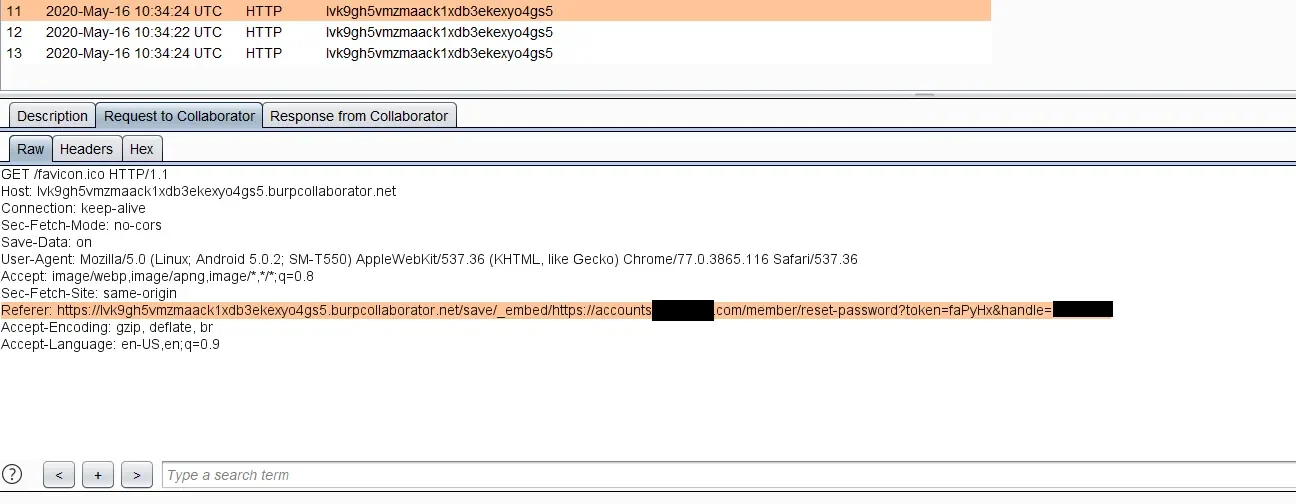
Password reset token is leaked in referer header
Step 2: Register two accounts
Register for two accounts on the program for testing purposes and log in to one of them.
Step 3: Trigger a reset for the victim
Make a request to the affected endpoint, replacing the email address or handle with one belonging to the victim account:
The victim account then receives a password reset link prefixed with the attacker's domain.
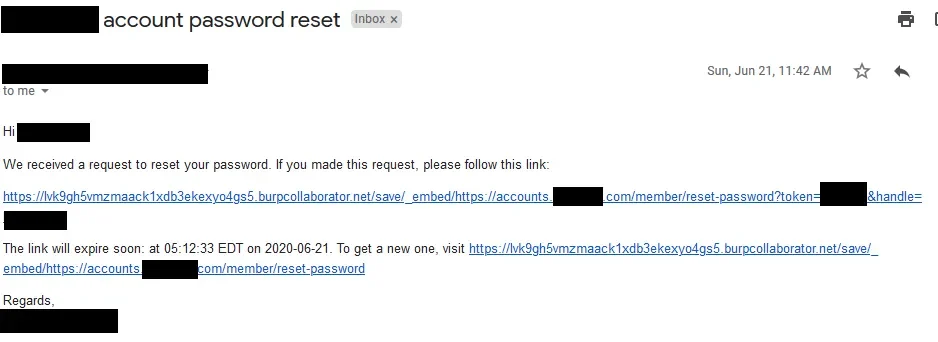
Victim account receives poisoned link embedded with attacker-controlled domain
Step 4: Capture the token
Once the victim clicks the poisoned link, the attacker receives a request to their domain with the victim's password reset token visible in the Referer header.
Step 5: Complete the takeover
The attacker loads the password reset link in a web browser and sets a new password for the victim account, completing the account takeover.
The report notes that this turned out to be a duplicate issue, meaning somebody else had already reported it to the program.
Root cause
The resetPasswordUrlPrefix parameter let the caller control the prefix of the reset link that the application sent to the user. The link therefore pointed at an attacker-controlled host while still carrying the reset token, and the token was exposed in the Referer header when the victim followed the link. The report does not describe any validation or allowlist that was in place.
Impact
An attacker could take over another user's account: trigger a reset for the victim with a poisoned prefix, wait for the victim to click the link, read the token from the Referer header on their own server, and set a new password. The attack requires the victim to click the poisoned link. The report does not state which accounts or roles were affected beyond the two test accounts used.
Fix
A reasonable fix would be to stop accepting an arbitrary resetPasswordUrlPrefix from the caller, or to validate it against an allowlist of the application's own domains, and to add access controls to /v3/users/ so that users cannot read each other's records.
Variants to test
- Look for other parameters that control link prefixes or redirect targets in reset, invitation and verification emails, and supply a Collaborator host as the value. A positive result is an out-of-band DNS or HTTP interaction, or a token appearing in a
Refererheader. - Check whether the reset endpoint accepts an email or handle belonging to another user without authorisation. A positive result is a reset email being sent to a victim account you do not control.
- Test
/v3/users/style endpoints for missing access controls by swapping email and handle parameters. A positive result is another user's handle, email, ID, firstName or LastName being returned. - Run waybackurls against the target and look for archived variants of known endpoints with extra parameters. A positive result is a parameter that changes behaviour in a way the current UI does not expose.
What happened, in plain words
A security researcher was testing a company's website as part of a bug bounty programme. In a bug bounty programme, a company invites outside people to look for security mistakes in its systems and report them, often for a reward. The researcher found a way to take over another person's account without ever knowing their password. The trick was to make the website send the victim a password reset link that pointed at a server the researcher controlled. When the victim clicked it, the victim's secret reset code was handed straight to the researcher, who then used it to set a new password on the victim's account.
The report also describes a second, related mistake: an interface that let anyone look up other people's personal details just by changing an email address in a request.
This report is written for someone who has never done security testing. Every technical idea is explained from scratch as it comes up, and the end of the article has a glossary of all the terms used.
The pieces involved
The website and its API
The target was a web application reachable at two addresses: api.redacted.com and accounts.redacted.com. Think of a website as a shop front and an API as the serving hatch behind it. The shop front is what you see in your browser: pages, buttons, forms. The API is a separate computer program that the shop front talks to in order to get things done, such as checking a password or sending an email. When you fill in a form on a website, your browser usually sends a request to an API behind the scenes, and the API sends back an answer.
An API request is just a web address (a URL) with some extra information attached, often in the form of parameters. A parameter is a named value added to the end of a URL after a question mark, written as name=value. If you have ever seen a web address ending in ?search=shoes, you have seen a parameter: here the parameter is called search and its value is shoes. Multiple parameters are joined with an ampersand (&).
The password reset feature
The feature under examination is the account password reset flow. Every website with logins needs a way for people who have forgotten their password to get back in. The usual design works like this:
- You type your email address into a "forgot password" form.
- The website looks up your account and creates a one-time secret code, called a token.
- The website emails you a link containing that token.
- You click the link, the website checks the token, and lets you choose a new password.
The token is the important part. It is a long random string that proves you are the person who owns the email address. Anyone who has the token can set a new password, so the token must be kept secret. Think of it as a temporary key posted to your house: whoever holds the key can open the door, so you do not want it lying in the street.
Normally a user triggers a reset through the following endpoint, passing their email address:
https://api.redacted.com/v3/users/resetToken?email=[redacted]
Line by line:
https://is the protocol, the set of rules browsers and servers use to exchange web pages securely.api.redacted.comis the address of the API server./v3/users/resetTokenis the path, which tells the server which operation you want. Here it means "reset token for a user". Thev3is simply a version label chosen by the developers.?email=[redacted]is the parameter carrying the email address of the account whose password should be reset.
The application then sends the user a password reset link by email.
The user records endpoint
The /v3/users/ endpoint also served user records. In other words, the same part of the API that handled password resets could also return information about user accounts. The report notes that it had no access controls: any user could retrieve information belonging to another by changing the email address or handle parameters in the request, the two parameters being interchangeable.
Access control means the server checking whether the person making a request is allowed to see what they are asking for. Without it, the server answers anyone who asks. A handle is a public username, the name a person chooses to be known by on a site. Interchangeable here means the endpoint accepted either an email address or a handle to identify the account, so an attacker could look someone up by either one.
Setting up the investigation
The work was done during reconnaissance on a bug bounty target. Reconnaissance (often shortened to recon) is the information-gathering phase: before attacking anything, a tester maps out what exists, what it does and what it is built from. It is the equivalent of walking around a building and noting the doors and windows before trying any of them.
Two tools were used:
- waybackmachine, to look through URLs that had existed on the target over time and might expose critical functionality worth testing.
- waybackurls, to automate collecting those URLs.
The Wayback Machine is a public archive run by the Internet Archive that stores copies of web pages from years past. If a company once had a page or an API address that it has since removed or hidden, the archive may still have a record of it. Old addresses are interesting to testers because they often belong to features that are no longer linked from the current site but may still work on the server.
waybackurls is a small command-line program that queries that archive and prints out every URL it can find for a given domain. Doing this by hand would take days; the tool does it in seconds. A command-line program is one you run by typing its name in a terminal window rather than clicking an icon.
For the proof of concept the researcher registered two accounts on the programme, one of which acted as the victim, and used a Burp Collaborator payload to observe out-of-band DNS and HTTP interactions.
A proof of concept (PoC) is a small, safe demonstration that a suspected bug really works, without causing harm. Registering two accounts gives you a controlled pair: one you attack from and one you attack, so you can watch what happens to the victim without involving a real person.
Burp Collaborator is a service that gives you a unique, throwaway domain name and records any traffic that arrives at it. You plant that domain name somewhere in a request, and if the target server later contacts it, the Collaborator records the contact. This is called out-of-band because the signal comes back through a different channel than the one you sent the request on. DNS is the internet's address book: it translates names like example.com into the numeric addresses computers use. HTTP is the protocol used to fetch web pages. If either a DNS lookup or an HTTP request shows up at your Collaborator domain, you know the target server was made to reach out to a place of your choosing.
Finding it
Searching through the waybackurls results revealed an alternative version of the password reset endpoint that carried an extra parameter, resetPasswordUrlPrefix:
https://api.redacted.com/v3/users/resetToken?email=[redacted]&resetPasswordUrlPrefix=https%3A%2F%web.archive.org%2Fsave%2F_embed%2Fhttps%3A%2F%2Faccounts.redacted.com%2Fmember%2Freset-password
Line by line:
- The first part, up to
&, is the same reset endpoint as before, with the email parameter. &resetPasswordUrlPrefix=introduces a second parameter. A prefix is the beginning of something; here it appears to be the beginning of the reset link that will be emailed to the user.- The value is heavily encoded.
%3Astands for a colon (:) and%2Fstands for a slash (/). This encoding exists because certain characters have special meanings in a URL, so they are written in a coded form when they are meant literally. Decoded, the value readshttps://web.archive.org/save/_embed/https://accounts.redacted.com/member/reset-password.
The parameter appeared to control the prefix of the reset link that would be sent to the user. The archived value pointed at the Wayback Machine's save endpoint, and it showed that the prefix was user-controllable.
The important lesson is that the value of the parameter came from whoever made the request, not from the server. If a user can put anything they like into a value that ends up in an email, that is worth investigating.
The second observation was the missing access control on /v3/users/, which let any user read another user's handle, email, ID, firstName and LastName by swapping the email address or handle in the request.
API endpoint leaking user handle, email, ID, firstName, LastName
The screenshot shows the API returning a user's handle, email address, ID, first name and last name.
Exploitation
Exploitation means actually using a weakness to show what an attacker could do with it. The researcher did this in careful steps, starting with their own account so that no real user was affected.
Step 1: Test the prefix with a Collaborator payload
The idea was to supply a Burp Collaborator payload as the resetPasswordUrlPrefix while resetting the researcher's own account password:
Line by line:
https://api.redacted.com/v3/users/resetTokenis the same reset endpoint as before.?email=[redacted]identifies the account to reset. Here it is the researcher's own test account, which is why this test is safe.&resetPasswordUrlPrefix=is the parameter that controls the start of the emailed link.https://lvk9gh5vmzmaack1xdb3ekexyo4gs5.burpcollaborator.netis the unique throwaway domain supplied by Burp Collaborator. The random-looking part makes it impossible for anyone else to guess, so any traffic arriving there can only have come from this test./save/_embed/https://accounts.redacted.com/member/reset-passwordis appended after the Collaborator domain. It copies the shape of the archived value, so the resulting link still looks like a plausible reset link, just with a different host at the front.
Why do this? The researcher wanted to know two things: whether the server would accept an arbitrary domain in this parameter, and whether the resulting link would carry the secret token to that domain. Using their own account means the only token at risk is one they own.
This produced DNS and HTTP interactions in the Collaborator client, indicating that the password reset token was leaked in the Referer header. That was enough for a proof of concept.
The Referer header is a small piece of information that browsers attach to many requests, telling the destination page which page the user came from. It exists so that sites can see where their visitors arrived from. The catch is that if the previous page's address contains a secret, such as a reset token, that secret travels along in the header to whatever site is being visited. When the victim clicked a link whose address contained the token, the browser followed the link to the Collaborator domain and helpfully announced the full previous address, token included. The Collaborator recorded that request, and the token was in it.
Password reset token is leaked in referer header
The screenshot shows the password reset token leaked in the referer header.
Step 2: Register two accounts
Register for two accounts on the programme for testing purposes and log in to one of them.
Two accounts are needed because the attack involves one person's actions affecting another person's account. One account plays the attacker and one plays the victim. Logging in to the attacker account is how the researcher would make requests as a normal signed-in user, which is the realistic position an attacker would be in.
Step 3: Trigger a reset for the victim
Make a request to the affected endpoint, replacing the email address or handle with one belonging to the victim account:
Line by line:
- The address is identical to the test in Step 1. The difference is not in the request itself but in whose account it targets: the email parameter is replaced with the victim's address, so the server generates a reset for the victim rather than for the researcher.
- The
resetPasswordUrlPrefixvalue is still the Collaborator domain, so the link the victim receives will begin with the attacker's host. - The trailing path keeps the link looking like a normal reset link to the victim.
The victim account then receives a password reset link prefixed with the attacker's domain.
Victim account receives poisoned link embedded with attacker-controlled domain
The screenshot shows the victim account receiving a poisoned link embedded with the attacker-controlled domain.
Step 4: Capture the token
Once the victim clicks the poisoned link, the attacker receives a request to their domain with the victim's reset token visible in the Referer header.
This is the same mechanism as in Step 1, now applied to someone else's account. The victim's browser visits the attacker's domain because that is where the link points, and the browser includes the full previous address, token and all, in the Referer header. The attacker does not need to trick the victim into typing anything or installing anything; a single click is enough.
Step 5: Complete the takeover
The attacker loads the password reset link in a web browser and sets a new password for the victim account, completing the account takeover.
Account takeover means gaining full control of someone else's account, in this case by changing its password so the original owner can no longer log in. The attacker now holds the token, and the token is the proof the reset page asks for. Pasting the link into a browser and choosing a new password finishes the job.
The report notes that this turned out to be a duplicate issue, meaning somebody else had already reported it to the programme. Duplicates are common in bug bounties: many researchers look at the same targets, and the first report of a given bug is the one that counts.
Root cause
The resetPasswordUrlPrefix parameter let the caller control the prefix of the reset link that the application sent to the user. The link therefore pointed at an attacker-controlled host while still carrying the reset token, and the token was exposed in the Referer header when the victim followed the link. The report does not describe any validation or allowlist that was in place.
Validation means checking that a value meets expected rules before using it. An allowlist is a list of values that are explicitly permitted, with everything else rejected. If the reset link prefix had been checked against a list containing only the company's own domains, an attacker's domain would have been refused and the attack would not have worked. The report does not say what checks, if any, existed.
Impact
An attacker could take over another user's account: trigger a reset for the victim with a poisoned prefix, wait for the victim to click the link, read the token from the Referer header on their own server, and set a new password. The attack requires the victim to click the poisoned link.
Requiring a click is a real limitation: the attacker cannot do this silently. But password reset emails are expected and trusted, so a victim who has just asked for a reset, or who receives a convincing one, is quite likely to click.
Fix
A reasonable fix would be to stop accepting an arbitrary resetPasswordUrlPrefix from the caller, or to validate it against an allowlist of the application's own domains, and to add access controls to /v3/users/ so that users cannot read each other's records.
In plain terms: the server should decide where reset links point, not the person making the request. If the parameter must stay for some reason, it should only accept values from a short list of trusted domains. Separately, the user records endpoint should check who is asking and refuse to return someone else's details.
Variants to test
These are the same ideas applied more widely, useful for anyone learning to test:
- Look for other parameters that control link prefixes or redirect targets in reset, invitation and verification emails, and supply a Collaborator host as the value. A positive result is an out-of-band DNS or HTTP interaction, or a token appearing in a
Refererheader. - Check whether the reset endpoint accepts an email or handle belonging to another user without authorisation. A positive result is a reset email being sent to a victim account you do not control.
- Test
/v3/users/style endpoints for missing access controls by swapping email and handle parameters. A positive result is another user's handle, email, ID, firstName or LastName being returned. - Run waybackurls against the target and look for archived variants of known endpoints with extra parameters. A positive result is a parameter that changes behaviour in a way the current UI does not expose.
A redirect target is an address the server sends the user to after some action, and it is a close cousin of the prefix parameter here: if the user can choose it, the user can choose where the victim ends up. Invitation and verification emails work much like password resets, in that they contain a link with a secret in it, so the same mistake can appear there.
Glossary
- Access control: a check by a server that the person making a request is allowed to do or see what they are asking for.
- Account takeover: gaining full control of someone else's account, typically by changing its password.
- Allowlist: a list of values that are explicitly permitted, with everything else rejected.
- API: a program behind a website that carries out actions and returns data when the website asks it to.
- Artefact: a side effect of a process, such as archiving, rather than something the developers intended.
- Bug bounty programme: a scheme in which a company invites outside researchers to find and report security mistakes, often for a reward.
- Burp Collaborator: a service that provides a unique throwaway domain and records any DNS or HTTP traffic that reaches it.
- Command-line program: a program run by typing its name in a terminal window rather than clicking an icon.
- DNS: the internet's address book, translating names like
example.cominto numeric addresses. - Duplicate: a bug report that describes an issue someone else has already reported.
- Endpoint: a specific address on a server that performs a particular operation, such as resetting a password.
- Exploitation: actually using a weakness to demonstrate what an attacker could do with it.
- Handle: a public username chosen by a person on a site.
- HTTP: the protocol used to request and deliver web pages and API responses.
- Out-of-band: a signal that comes back through a different channel than the one the request was sent on, such as a DNS lookup to a separate server.
- Parameter: a named value attached to a URL after a question mark, written as
name=value. - Path: the part of a URL that tells the server which operation is wanted, such as
/v3/users/resetToken. - Prefix: the beginning of a piece of text, here the start of the reset link that gets emailed.
- Proof of concept (PoC): a small, safe demonstration that a suspected bug really works.
- Protocol: a set of rules that computers follow to communicate.
- Reconnaissance (recon): the information-gathering phase of testing, mapping out what exists before trying anything.
Refererheader: information a browser attaches to many requests saying which page the user came from; it can carry secrets if the previous address contained one.- Token: a long random one-time code that proves ownership of an account or email address, used here to authorise a password reset.
- URL encoding: writing special characters in a coded form, such as
%3Afor a colon and%2Ffor a slash, so they are treated literally. - Validation: checking that a value meets expected rules before using it.
- Wayback Machine: a public archive of past web pages, run by the Internet Archive.
- waybackurls: a command-line tool that collects URLs for a domain from the Wayback Machine.