Exploiting Unrestricted File Upload to achieve Remote Code Execution on a bug bounty program
 Published on mase289.medium.com
My story began with a typical assessment of the program's scope. Luckily all of the in-scope subdomains were listed on the program’s page which eliminated the need for subdomain enumeration.
The full write-up lives on its author's site
It belongs to its author, so we link to it rather than copy it. The other two tabs are our own rewrites, checked against it.
Context
This write-up covers an assessment of a bug bounty program whose in-scope subdomains were all listed on the program page, so no subdomain enumeration was needed. The researcher picked one subdomain of interest and refers to it as https://asdfasdf.redacted.com. The program relied heavily on Microsoft IIS, which the researcher had already established by fingerprinting the site's technologies with the Wappalyzer Chrome extension.
Visiting the subdomain showed a login form with a user id and password field. Users had to supply those values to authenticate to the web application. There was no registration form for provisioning credentials, so the researcher turned to bugs that could be tested unauthenticated and to finding other endpoints on the subdomain that might be of interest.
Setup
No account was available: the login form had no self-registration path, so everything described here was done without credentials. The tools used were:
- Wappalyzer, for technology fingerprinting (which identified Microsoft IIS).
- ffuf, for content discovery.
- Wordlists from the SecLists GitHub repository.
- Notepad, for creating a test file.
- Web shells from the
tennc/webshellrepository.
Finding it
The researcher performed content discovery to reveal hidden paths, running ffuf with SecLists wordlists against the subdomain. The tool returned interesting results quickly.
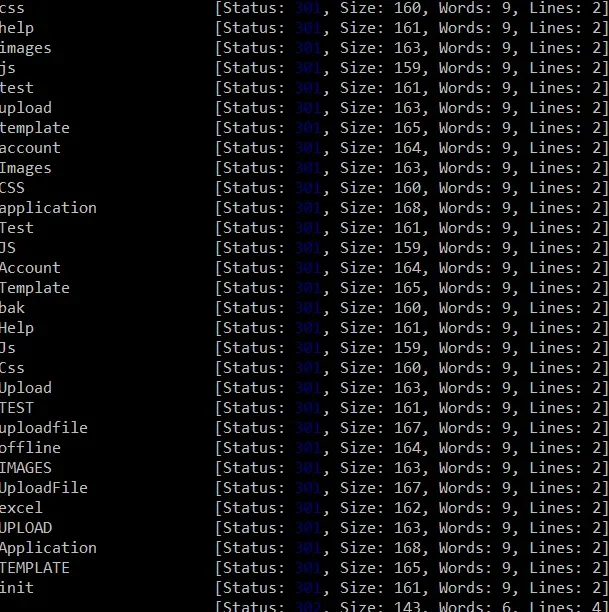
The output shows the ffuf run against the subdomain.
At first the researcher was sceptical about whether the discovered directories could actually be accessed, given the 301 HTTP response code and the fact that access to such folders was often properly restricted on targets encountered before. Visiting each endpoint found through directory brute-force, however, allowed direct access to all the available content underneath those directories. The following paths were of particular interest because they contained uploaded files, backup files and web application source files:
/upload/UploadFile/Application/Bak/init/offline
Exploitation
Step 1: Confirm the directory listing exposure
Browsing the various directories confirmed that the content underneath them was directly accessible. Because of the sensitive nature of what was found in those directories, the researcher reported the directory listing vulnerability to the program before going further.
Step 2: Find the upload endpoint
While browsing the directories, the researcher came across an aspx endpoint that could be used to upload an Excel sheet containing sales order data to the web application. The report does not give the endpoint's path or parameters.
Step 3: Test whether the extension is restricted
The researcher quickly discovered that files with a different extension could be uploaded. Uploaded files were accessible in the /upload folder found earlier. To test the upload functionality, the researcher created a file in Notepad, added some text to it, and saved it with a txt extension. Uploading that file to the web application succeeded, and the file could then be accessed in the upload folder.
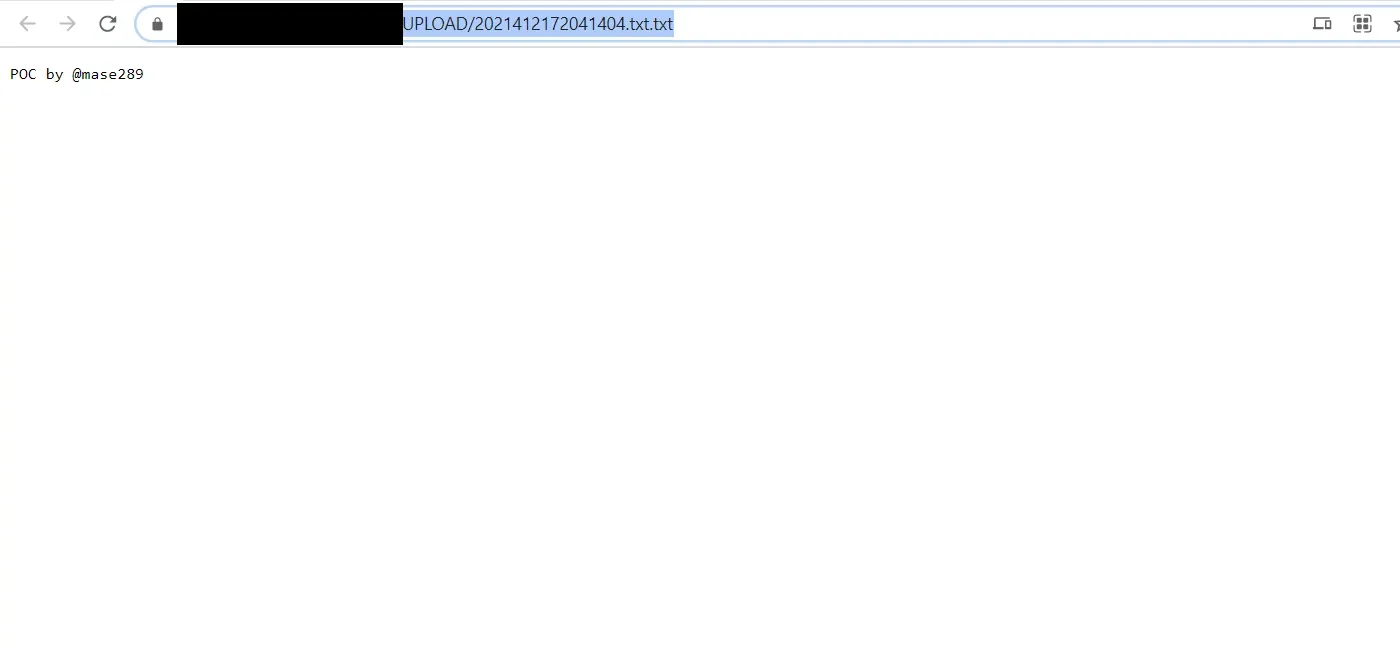
The screenshot shows the txt file successfully uploaded and accessible in the uploads folder.
Step 4: Upload a server-side handler and execute code
The next step was uploading an ashx file to the web application. This too was successfully uploaded to the relevant folder. With an ashx file in place, the researcher could use web shells from the tennc/webshell repository to execute code on the vulnerable server. After confirming code execution, a separate report for RCE was submitted to the program.
Root cause
The upload endpoint accepted files whose extension was not restricted to the intended type (an Excel sheet with sales order data), and the uploaded files were stored in a web-accessible folder (/upload) from which they were served. The uploaded .ashx handler was processed server-side, turning a file upload into code execution. The directory listing exposure found earlier compounded the problem by making uploaded files, backups and source files directly browsable. The report does not describe the server-side validation logic, so the exact check that was missing is not stated.
Impact
An attacker could upload arbitrary files, including an ashx handler, and execute code on the vulnerable server. The same directories exposed uploaded files, backup files and web application source files to anyone who could reach them. The researcher submitted the directory listing and the RCE as two separate reports.
Fix
Based on the findings, the upload endpoint should restrict accepted extensions to the intended document types, store uploads outside the web root or serve them without server-side execution, and the exposed directories should no longer be browsable.
Variants to test
- Run content discovery against in-scope hosts with ffuf and SecLists wordlists, then request every hit that returns a 301 to see whether the directory contents are actually reachable. A positive result is a browsable listing containing uploads, backups or source files.
- On any upload endpoint, submit a harmless file with an unexpected extension (for example
.txt) and then request it from the upload folder. A positive result is the file being stored and served back. - On IIS targets, upload a
.ashxhandler and request it. A positive result is the handler being processed by the server rather than served as static content. - Where an upload is accepted, try the web shells from the
tennc/webshellrepository to confirm code execution before reporting.
What happened, in plain words
A security researcher was taking part in a bug bounty program. A bug bounty program is a scheme run by an organisation that invites independent researchers to look for security weaknesses in its systems and pays or thanks them for reporting what they find, instead of punishing them. The researcher was allowed to test a set of websites listed on the program's page, and one of those websites turned out to have a serious flaw: it let anyone upload files to it, including files that the server would then run as programs. That last part is called remote code execution, or RCE: an attacker can make the server run their own code, which is about as bad as it gets.
This article walks through the whole story slowly, assuming you know how to use a browser and a computer and nothing more. Every technical word is explained the first time it appears, and there is a glossary at the end.

The picture at the top is a stock photo by Luca Bravo from Unsplash, used as the article's header image. It has nothing to do with the technical content.
The starting point: a list of websites to test
The researcher began with a typical assessment of the program's scope. The scope is the list of systems a researcher is allowed to test; testing anything outside it is off limits. In this case, all of the in-scope subdomains were listed on the program's page.
A subdomain is a website that sits under a larger domain name. If the main domain is example.com, then shop.example.com and mail.example.com are subdomains of it. Because the full list was already published, the researcher did not need to do subdomain enumeration, which is the process of guessing or discovering subdomains that are not listed. Think of it like being handed a list of doors to try instead of walking down a corridor rattling every handle.
After browsing the available subdomains, the researcher settled on one that looked interesting. In the write-up it is referred to as https://asdfasdf.redacted.com. The odd name and the word "redacted" are deliberate: the real address has been hidden so that the report does not point the public at a live system.
The researcher already knew that the program relied heavily on Microsoft IIS. IIS, short for Internet Information Services, is Microsoft's web server software: the program on a Windows machine that receives requests from browsers and sends back web pages. The researcher knew this because they had fingerprinted the website's technologies using the Wappalyzer Chrome extension. Fingerprinting means working out what software a site is built on from clues it gives off, and Wappalyzer is a browser add-on that automates that guesswork. Knowing the server is IIS matters later, because IIS has particular ways of handling certain file types.
The login wall
Visiting https://asdfasdf.redacted.com revealed a login form with a user id and password field. A user had to supply those values to authenticate themselves to the web application. Authenticate simply means proving who you are, usually with a username and password, so that the site will let you in.
There was no registration form for provisioning credentials. In other words, there was no "sign up" button: you could not create your own account. That is a common situation on internal or business-facing systems, where accounts are handed out by an administrator.
This mattered a lot for the researcher's plan. Without an account, every test had to be done while unauthenticated, meaning without logging in. So the researcher shifted focus to bugs that could be tested while unauthenticated, and to finding other endpoints on the subdomain that might be of interest.
An endpoint is a specific address on a website that does a particular job, like a counter in a shop: one counter takes orders, another handles refunds. On the web these are usually paths such as /login or /upload. If the front door is locked, the next question is whether there are side doors that nobody thought to lock.
Finding hidden paths with content discovery
The researcher decided to perform content discovery, which would hopefully reveal some hidden paths. Content discovery means asking a web server for lots of possible addresses in a row and watching which ones answer differently, in the hope of finding pages that are not linked from anywhere visible. It is like trying every key on a big bunch in a lock, quickly, to see which one turns.
For this purpose the researcher used ffuf and wordlists taken from the SecLists GitHub repository.
- ffuf is a command-line tool that sends a huge number of web requests very quickly, substituting each word from a list into a URL, and reports which ones produced interesting responses.
- SecLists is a well-known public collection of such wordlists: text files full of common file and folder names, so that the tool has sensible guesses to try.
It did not take long for the tool to return some interesting results.
The screenshot shows the output from running ffuf against the subdomain. Each line is one address the tool tried that came back with a response worth looking at.
The directories that should have been locked
At first the researcher was sceptical about whether the discovered directories could actually be accessed. Two things made them doubt it: the 301 HTTP response code, and the fact that access to such folders was often properly restricted on targets they had encountered before.
A response code is a short number a web server sends back with every reply to say what happened. 301 specifically means "this thing has moved permanently", and the server usually adds a forwarding address so the browser follows it automatically. A directory is simply a folder on the server, and a directory listing is what you see when a server has no home page for that folder and instead shows you a plain list of the files inside it, like opening a filing cabinet and finding every folder labelled.
On well-run sites, folders like that are usually blocked: you get an error instead of a list. So a 301 on its own proves little. The researcher had to actually visit each address.
To their surprise, visiting each endpoint discovered through directory brute-force allowed direct access to all the available content underneath those directories. Directory brute-force is the technique of trying many names from a wordlist until something answers, which is exactly what ffuf had just done.
The following paths were of particular interest, because they contained everything from uploaded files, backup files and web application source files:
/upload/UploadFile/Application/Bak/init/offline
This is a list of folder paths on the server, written one after another. Reading it from left to right:
/uploadis the folder where files uploaded by users end up./UploadFileand/Applicationare further folders nested inside it./Baklooks like a shortened form of "backup", a folder where copies of files are kept./initand/offlineare further folders underneath.
Why does this matter? Uploaded files, backups and source files are exactly the things that should never be publicly browsable. Backups often contain old copies of configuration with passwords in them, and source files are the actual code the site is built from, which can reveal how it works and where its weak points are. Finding them open to anyone is like finding the office's photocopier room unlocked, with every document inside.
Step 1: Report the open directories first
While browsing through the various directories, the researcher confirmed that the content underneath them was directly accessible. Because of the sensitive nature of what was found in those directories, the researcher reported the directory listing vulnerability to the program before going any further.
This is an important habit in bug bounty work. A directory listing vulnerability is the flaw of letting anyone browse a folder's contents. It is serious on its own, and it is worth reporting immediately rather than sitting on it while you chase something bigger, because the exposed data is at risk right now.
Step 2: Find the upload feature
While browsing through the various directories, the researcher came across an aspx endpoint that could be used to upload an excel sheet with sales order data to the web application.
Let us unpack that. ASPX is a file extension used by web pages built on Microsoft's ASP.NET framework, which is the programming platform that runs on top of IIS. An aspx endpoint is therefore a page on the site that is generated by server-side code rather than being a plain fixed document. This one had a job: accept an Excel spreadsheet containing sales order data and store it on the server.
A file upload feature is any part of a website that lets you send a file from your computer to the server, like attaching a document to an email. It is extremely common and usually harmless, but it is also a classic place to look for trouble, because the server has to decide what it will and will not accept.
The report does not give the endpoint's path or parameters, so we cannot see the exact address or the form fields it used.
Step 3: Test whether the file type is actually restricted
The researcher quickly discovered that files with a different extension could be uploaded. An extension is the part of a filename after the final dot, such as .txt or .jpg, and it is how computers and servers decide what kind of file something is. A well-built upload feature checks the extension and refuses anything that is not on its allowed list. This one accepted other extensions.
The uploaded files were accessible in the /upload folder that had been discovered earlier. That is the second half of the problem: the server not only accepted the file, it also served it back to anyone who asked for it at a predictable address.
To test the upload functionality, the researcher created a file in Notepad, added some text to it, and saved it with a txt extension. Notepad is the simple text editor that comes with Windows, and .txt is the extension for a plain text file. The researcher then uploaded the file to the web application and was able to access it in the upload folder.
The screenshot shows the txt file successfully uploaded and accessible in the uploads folder: the browser is displaying the file that was just sent to the server, fetched back from the upload location.
Why start with a harmless text file? Because it proves the mechanism works without doing anything dangerous. If a plain text file goes up and comes back, you know the upload accepts files, you know where they land, and you know they are reachable over the web. Only then is it worth asking what else the server will accept.
Step 4: Upload a file the server will run
The next step involved uploading an ashx file to the web application, and yet again this got successfully uploaded to the relevant folder.
An ashx file is a special kind of file on Microsoft IIS and ASP.NET: it is a handler, meaning a small program that the server runs when someone requests it, rather than a document it simply hands back. This is the crucial difference. A .txt file is inert: the server reads it out and sends the text. An .ashx file is instructions: the server executes it.
So the upload feature was not just accepting the wrong file types, it was accepting a file type that the server would treat as code. That is the definition of an unrestricted file upload vulnerability: the site lets you put a file on the server without properly limiting what kind of file it is, and the server then treats that file according to its type.
Finally, the researcher could use the web shells from this repository to execute code on the vulnerable server. A web shell is a small program, uploaded to a server, that lets an attacker send commands to that server through ordinary web requests and see the results in a browser. The repository linked in the report is a public collection of such shells. Executing code means getting the server to run instructions of your choosing, on the server itself, rather than merely displaying a file.
After confirming this, the researcher submitted a separate report for RCE to the program. Confirming means actually demonstrating that the code ran, not just assuming it would. Submitting a separate report makes sense because this is a different and far more severe issue from the open directories: one exposes information, the other hands over control of the machine.
Why it worked
Three things lined up:
- The upload endpoint accepted files whose extension was not restricted to the intended type, which was an Excel sheet with sales order data.
- The uploaded files were stored in a web-accessible folder,
/upload, from which they were served. - The uploaded
.ashxhandler was processed server-side, turning a file upload into code execution.
The directory listing exposure found earlier made things worse, because it let anyone browse uploaded files, backups and source files directly. The report does not describe the server-side validation logic, so the exact check that was missing is not stated.
What an attacker could have done
An attacker could upload arbitrary files, including an ashx handler, and execute code on the vulnerable server. The same directories exposed uploaded files, backup files and web application source files to anyone who could reach them. The researcher submitted the directory listing and the RCE as two separate reports.
How it should be fixed
Based on the findings, the upload endpoint should restrict accepted extensions to the intended document types, store uploads outside the web root or serve them without server-side execution, and the exposed directories should no longer be browsable.
In plain terms: only allow the file types you actually need, keep uploaded files somewhere the web server will never run them, and switch off the automatic folder listings.
Things to try on your own authorised targets
These are the same checks the researcher performed, written as a checklist. Only ever do this on systems you are explicitly allowed to test.
- Run content discovery against in-scope hosts with ffuf and SecLists wordlists, then request every hit that returns a 301 to see whether the directory contents are actually reachable. A positive result is a browsable listing containing uploads, backups or source files.
- On any upload endpoint, submit a harmless file with an unexpected extension, for example
.txt, and then request it from the upload folder. A positive result is the file being stored and served back. - On IIS targets, upload a
.ashxhandler and request it. A positive result is the handler being processed by the server rather than served as static content. - Where an upload is accepted, try the web shells from the
tennc/webshellrepository to confirm code execution before reporting.
Glossary
- Bug bounty program: a scheme where an organisation invites independent researchers to find and report security weaknesses in its systems, usually with a reward.
- Scope: the list of systems a researcher is allowed to test.
- Subdomain: a website under a larger domain name, such as
shop.example.comunderexample.com. - Subdomain enumeration: discovering subdomains that are not publicly listed.
- Microsoft IIS: Microsoft's web server software, which receives browser requests and sends back web pages.
- Fingerprinting: working out what software a site runs on from clues it gives off.
- Wappalyzer: a browser extension that automates technology fingerprinting.
- Login form: the page with username and password fields used to sign in.
- Authenticate: prove who you are, usually with a username and password.
- Credentials: the username and password pair used to log in.
- Unauthenticated: without logging in, with no account.
- Endpoint: a specific address on a website that performs a particular job.
- Content discovery: requesting many possible addresses in a row to find pages that are not linked anywhere visible.
- ffuf: a command-line tool that sends many web requests quickly, substituting words from a list into a URL.
- Wordlist: a text file of common names used as guesses by tools like ffuf.
- SecLists: a public collection of such wordlists.
- Response code: a short number a web server returns with each reply to say what happened.
- 301: a response code meaning the requested thing has moved permanently, usually with a forwarding address.
- Directory: a folder on a server.
- Directory listing: a plain list of the files in a folder, shown when the server has no page for that folder.
- Directory brute-force: trying many folder names from a wordlist until one answers.
- Directory listing vulnerability: the flaw of letting anyone browse a folder's contents.
- Backup files: copies of files kept on the server, which can contain sensitive old data.
- Source files: the actual code a web application is built from.
- ASPX: a file extension for web pages built on Microsoft's ASP.NET framework.
- ASP.NET: Microsoft's framework for building web applications, running on IIS.
- File upload feature: any part of a website that lets you send a file from your computer to the server.
- Extension: the part of a filename after the final dot, such as
.txt, which tells computers what kind of file it is. - Notepad: the simple text editor included with Windows.
- ASHX: a file type on IIS and ASP.NET that the server runs as a program when requested, rather than serving as a document.
- Handler: a small program the server runs when a particular address is requested.
- Unrestricted file upload: a flaw where a site accepts files without properly limiting their type, and the server then treats them according to that type.
- Web shell: a small program uploaded to a server that lets an attacker send commands through web requests and see the results.
- Remote code execution (RCE): a flaw that lets an attacker make a server run code of their choosing.
- Web root: the folder on a server whose contents are publicly served over the web.
- Static content: a file the server simply hands back as-is, without running it.