Finding the first XSS
The report describes two reflected XSS vulnerabilities: one on the index page and another in a JavaScript file (countdown.php). Both were blocked by Content Security Policy (CSP), but by combining them—using the first XSS to load the second as a script—the attacker bypassed CSP via MIME sniffing and executed JavaScript.
 Published on kurtikleiton.medium.com
Recently, I performed a Cross Site Scripting vulnerability, however a normal XSS payload wasn’t being triggered because CSP was blocking external Javascript code (XSS) being executed. By finding another XSS vulnerability in another endpoint (which again is being blocked by CSP), I managed to combine them together…
The full write-up lives on its author's site
It belongs to its author, so we link to it rather than copy it. The other two tabs are our own rewrites, checked against it.
Context
This write-up describes a chain of two Cross Site Scripting findings on a single website, where the first payload was silently neutralised by a Content-Security-Policy header. The site reflects a parameter value from its index page into the body of the page, and it also ships a PHP script under /js/ that reflects a parameter into JavaScript source. Neither reflection could execute script on its own because of the CSP, but combining them allowed the researcher to bypass the policy and run alert(1) through MIME sniffing.
The report does not name the product or the organisation behind the site; the examples use the placeholder host website.com.
Setup
The work was done from a browser, using the page itself and the browser's Developer Tools. The two things the researcher needed were the ability to view the page source and the ability to read the Console and the HTTP response headers. No accounts, roles or special tooling are described.
Finding it
The reflected parameter on the index
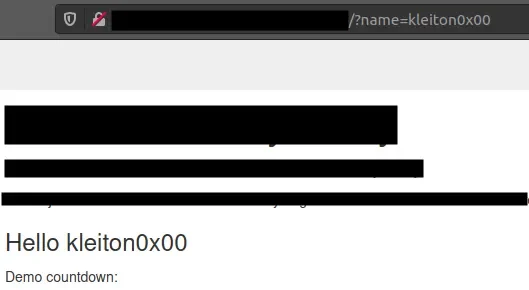
The index page takes a parameter whose value is reflected into the body of the website. The report shows the endpoint in the page and the reflection:
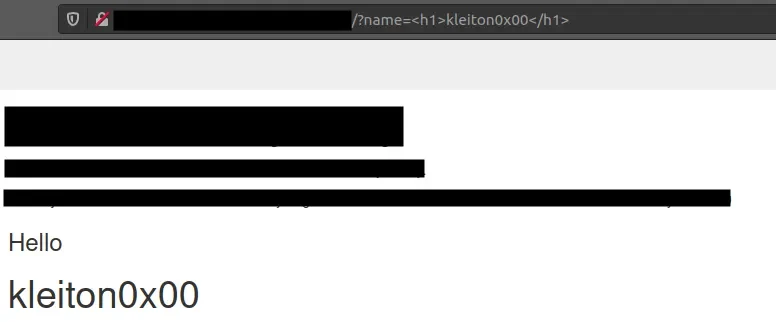
To see whether the reflection was escaped, the researcher replaced the string value with a small HTML payload:
<h1>kleiton0x00</h1>
The payload was reflected and rendered as HTML content, which confirmed HTML injection:
With HTML injection confirmed, the next step was the simplest XSS payload:
<script>alert(1)</script>
If nothing filtered or blocked it, the JavaScript would run:
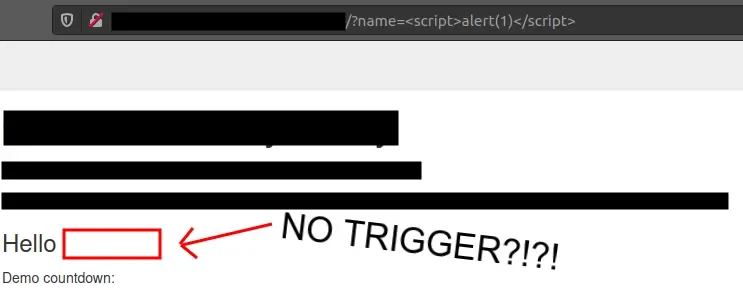
The script was injected into the page, but no alert appeared. Looking at the page source, nothing had been filtered or removed:

Detecting the CSP
The browser Console showed why the script did not run: it was being blocked by Content-Security-Policy.
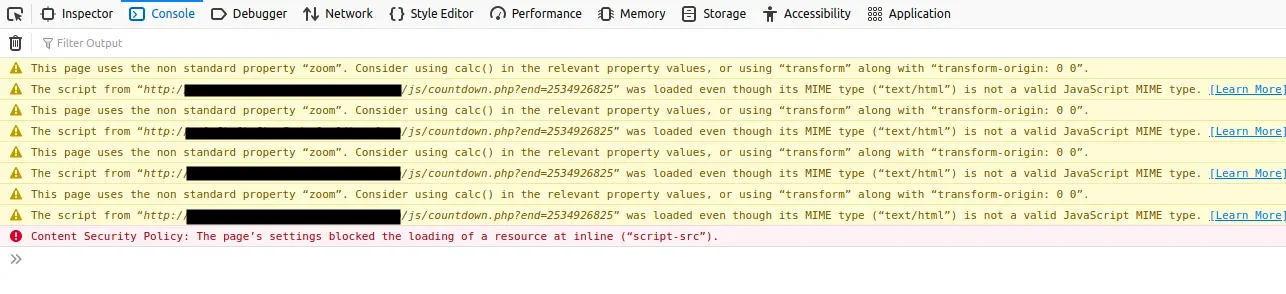
CSP is an added layer of security, delivered as an HTTP header, that restricts which external code may be injected into a website. A well-implemented policy typically allows scripts only from internal entities, meaning the domain itself. The next step was therefore to work out how the policy was configured and which sources it permitted for scripts:
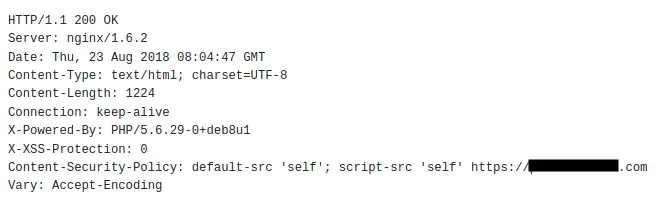
Reading the HTTP headers, specifically Content-Security-Policy:, the researcher found a rule that accepts scripts from the website itself, its directories and its subdomains. That is a narrow allowance: injecting the researcher's own malicious JavaScript from an external origin was not possible.
A second reflection under /js/
Since the policy could not be bypassed directly, the researcher looked for more XSS. Scrolling through the page source of the index revealed a PHP file referenced with a parameter:

The file was /js/countdown.php. Requesting it with a simple string in the end parameter showed how the site behaves:

The string kleiton0x00 was reflected into the source code of the response. That made the endpoint a candidate for injecting JavaScript.
Exploitation
Step 1: break out of the JavaScript string
Based on the code, the reflected input is placed right after the numbers in the script. To break out, the researcher added ); to close the current JavaScript code on the second line: the ) closes the variable value and the ; closes the statement. With the code closed, a new statement can be added, in this case alert(1);.
Some code remains on the same line after the injection point:
*1000).getTime();
To neutralise it, the researcher commented it out by appending // at the end of the input. The final payload was:
);alert(1);//
With that input, the source code showed the JavaScript successfully injected into the file's directory, giving a second XSS:

The full URL was:
http://website.com/js/countdown.php?end=2534926825);alert(1);//
Visiting that URL did not reflect the XSS, because this payload was again blocked by CSP.
Step 2: combine both reflections with MIME sniffing
The two findings were then combined: the HTML injection on the index page and the JavaScript injection in countdown.php.
For MIME sniffing to lead to XSS, the report lists two preconditions, both on the client side:
- The attacker must be able to control content in the server's response so that malicious JavaScript can be injected. This is the second XSS, in
countdown.php. - The attacker must be able to introduce an executable context through HTML injection or JavaScript injection. This is the first XSS, on the index page.
The payload is based on the first XSS, <script>alert(1)</script>, but instead of inline JavaScript it loads the URL of countdown.php as the script source. Combining the two gives:
<script src=’http://website.com/js/countdown.php?end=2534926825);alert(1);//></script>
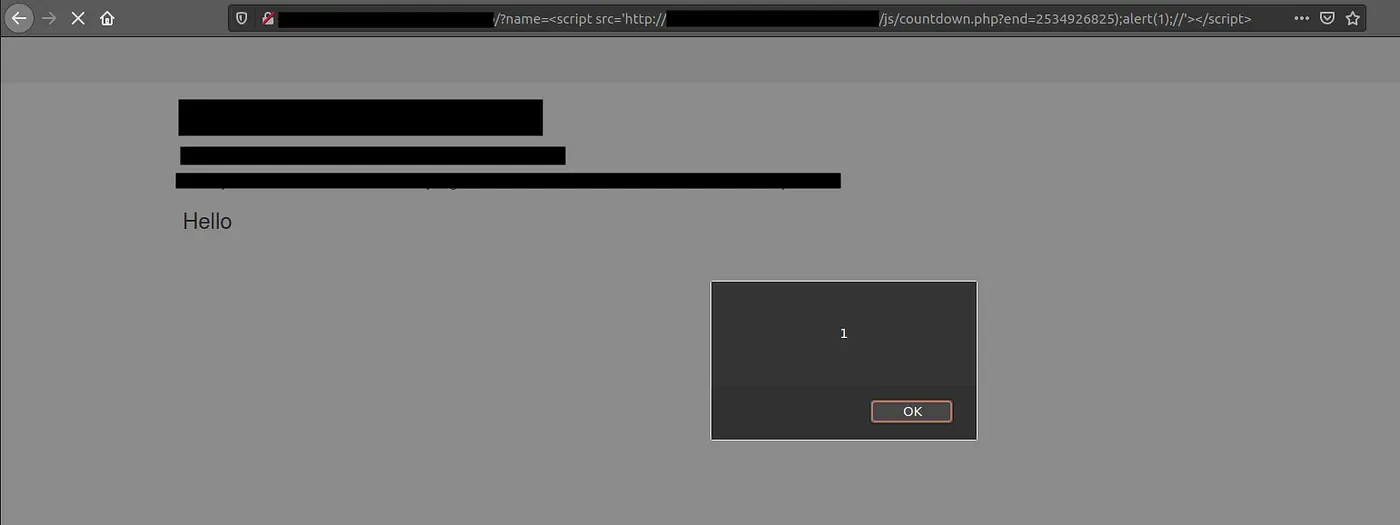
The browser sniffs the response as script and executes the injected alert(1).
With that, the CSP was bypassed and the alert(1) code executed using MIME sniffing.
Root cause
Two separate mistakes combine here. First, the index page reflects a parameter into the HTML body without preventing HTML injection, so an attacker can introduce a <script> element. Second, /js/countdown.php reflects the end parameter into JavaScript source without escaping it, so an attacker can close the existing statement and add their own code.
The CSP was intended to stop exactly this by allowing scripts only from the site itself, its directories and its subdomains. That defence assumes a same-origin script URL returns JavaScript. Because countdown.php returns attacker-controlled content that the browser sniffs and executes as script, a same-origin URL becomes a delivery vehicle for the injected code, and the policy's source restriction no longer helps. The report does not name the browser used; the mechanism it relies on is the browser treating the response as executable script.
Impact
The chain turns an HTML injection that CSP blocks into working script execution, demonstrated with alert(1). The report demonstrates the bypass with alert(1) and does not describe any further actions taken with the executed script. The report demonstrates this with alert(1) and does not describe any further actions taken with the executed script.
Exploitation depends on both reflections remaining reachable and on the browser sniffing the countdown.php response as script.
Fix
Based on the two root causes, the changes needed are: stop reflecting the index parameter into HTML without encoding it, so the <script> element cannot be introduced; and stop reflecting the end parameter into JavaScript source without escaping it, so the statement cannot be broken out of. On the response side, serving countdown.php with a Content-Type that browsers will not execute as script, and sending X-Content-Type-Options: nosniff so browsers do not sniff it into an executable type, removes the delivery mechanism the chain relies on. A CSP that does not depend solely on same-origin script URLs, for example one using nonces or hashes, would also have prevented this particular bypass.
Variants to test
- Look for parameters reflected into HTML on pages protected by a same-origin CSP, and separately for same-origin endpoints that reflect input into JavaScript, JSON or other text. A positive result is a
<script src=...>pointing at the second endpoint that executes when loaded from the first page. - Check whether same-origin script-like endpoints return a sniffable
Content-Typeand omitX-Content-Type-Options: nosniff. A positive result is the browser executing content from a response that is not served as JavaScript. - Test JavaScript reflections for statement breakouts: try closing the surrounding expression with
);and commenting the remainder with//, as in this report. A positive result is the injected statement appearing in the response source and executing. - Test HTML reflections with a harmless tag such as
<h1>before attempting script. A positive result is the tag rendering as HTML rather than appearing as text. - Review the CSP for source expressions that include the site's own directories and subdomains, since any same-origin endpoint that returns attacker-controlled content becomes a candidate script source. A positive result is a policy that permits the site itself while an endpoint on that site reflects input.
What happened, in plain words
A security researcher found a way to make a website run code that the site's own defences were supposed to block. The site had a protection called Content-Security-Policy (CSP), which is a rule the server sends to your browser saying "only run scripts that come from this website, not from anywhere else". That rule is a good idea, but it can be worked around if the website itself has a page that echoes back whatever you type into it.
The researcher found two such pages. The first one, the site's front page, echoed text into the visible part of the page. The second one, a small file called countdown.php, echoed text into a piece of JavaScript code. On their own, neither could run a script, because the CSP blocked it. But by putting the second page's address inside a <script> tag on the first page, the researcher made the browser load the second page as if it were a script file. The browser then ran the code hidden inside that response. This trick is called MIME sniffing: the browser looks at the content and decides it is JavaScript even though the server never said it was.
The result was that alert(1) ran, which is the standard harmless proof that script execution is possible. The report does not name the website or the organisation; it uses website.com as a placeholder.
Setting up
Everything here was done from an ordinary browser. No special tools, no accounts, no server access. The researcher used two features that every browser has:
- View page source: right-click on a page and choose "View Page Source", or press Ctrl+U (Cmd+U on a Mac). This shows the raw HTML the server sent, before the browser draws anything on screen.
- Developer Tools: press F12, or right-click and choose "Inspect". The Console tab shows messages from the browser, including errors and warnings. The Network tab shows the requests the browser made and the responses it got back, including the HTTP headers.
An HTTP header is a small line of text that travels with every request and response, separate from the page content. Think of it like the label on a parcel: the parcel contains the page, and the label says things like what type of content it is and what rules apply to it. The CSP is one of those labels.
Finding the first problem
The front page of the site took a value from the address bar (a parameter, the part after the ? in a URL) and printed it into the body of the page. The report shows the endpoint and the reflection:
A parameter is just a named value in a URL. In example.com/page?name=hello, the parameter is name and its value is hello. The server reads that value and does something with it. Here, it put the value straight into the page.
To test whether the site was cleaning the value before printing it, the researcher typed a small piece of HTML instead of a plain word:
<h1>kleiton0x00</h1>
Line by line: <h1> is the HTML tag for a large heading. kleiton0x00 is just text. </h1> closes the heading. If the site prints this as-is, the browser will draw a big heading. If the site escapes it (turns < into < and so on), the browser will show the literal characters instead. The payload was reflected and rendered as a real heading, which confirmed HTML injection: the site lets you add your own HTML to the page.
HTML injection is interesting but not yet dangerous on its own. The next step was to try the simplest script payload there is:
<script>alert(1)</script>
Line by line: <script> tells the browser "everything until </script> is JavaScript, run it". alert(1) is a built-in browser function that pops up a small dialog box showing the number 1. </script> closes the script. If the site does not filter or block this, the dialog should appear.
The script was injected into the page, but no dialog appeared. Looking at the page source, nothing had been filtered or removed: the <script> tag was sitting there in the HTML exactly as typed.
So the site was not cleaning the input, yet the script still did not run. Something else was stopping it.
Finding out why: the CSP
The browser Console showed the reason: the script was being blocked by Content-Security-Policy.
CSP is an extra layer of security. It is delivered as an HTTP header, and it tells the browser which sources of code are allowed on the page. A well-written policy usually says "only run scripts that come from this website itself". The idea is that even if an attacker manages to inject a <script> tag, the browser will refuse to run it because it did not come from an approved place. It is like a nightclub with a guest list: your name might be on the list of people who got in, but the bouncer still checks where you came from.
The next step was to read the policy and see exactly what it allowed:
Looking at the HTTP headers, specifically the one starting Content-Security-Policy:, the researcher found a rule that accepts scripts from the website itself, its directories and its subdomains. That is a narrow allowance: you cannot load your own JavaScript from some other server you control, because that server is not on the guest list. The only scripts that will run are ones served from the site's own address.
Looking for a second weak spot
Since the policy could not be bypassed head-on, the researcher went looking for more places where input gets echoed back. Scrolling through the page source of the front page revealed a reference to a PHP file that took a parameter:
PHP is a programming language commonly used on web servers to build pages. A .php file is a script that runs on the server and produces a response. The file in question was /js/countdown.php. The /js/ part of the path suggests it lives in a folder meant for JavaScript files, which will matter later.
The researcher requested that file with a simple word in the end parameter to see what the site did with it:
The word kleiton0x00 came back inside the source code of the response. That means the file takes whatever you put in end and pastes it into the code it sends back. That is exactly the kind of behaviour that can be turned into script execution.
Turning the second reflection into working JavaScript
Step 1: break out of the surrounding code
From reading the code, the reflected input lands right after some numbers inside a JavaScript expression. To make the browser treat the input as new code rather than as part of the existing expression, the researcher added );. The ) closes the surrounding bracket, and the ; ends the current statement. Once the statement is closed, anything typed next becomes a fresh statement, in this case alert(1);.
There was a problem: some code remained on the same line after the injection point:
*1000).getTime();
Line by line: *1000 multiplies something by a thousand, ) closes a bracket, .getTime() is a JavaScript method that reads a time value, and ; ends the statement. If this leftover code stayed, it would cause a syntax error and the injected alert(1) might not run.
The fix was to comment it out. In JavaScript, // means "ignore the rest of this line". So the researcher appended // at the end of the input. The final payload was:
);alert(1);//
Line by line: ) closes the bracket that was open in the original code. ; ends that statement. alert(1); is the new statement that pops the dialog. // comments out everything after it on the same line, including the leftover *1000).getTime();.
With that input, the page source showed the JavaScript successfully injected into the file's response, giving a second XSS:
XSS, short for Cross Site Scripting, is the general name for this class of bug: a site lets an attacker's input become code that runs in a victim's browser. It is dangerous because that code runs as if it came from the site itself, so it can act as the logged-in user or change what the page shows.
The full URL was:
http://website.com/js/countdown.php?end=2534926825);alert(1);//
Line by line: http://website.com/js/countdown.php is the address of the file. ? starts the parameters. end= is the parameter name. 2534926825);alert(1);// is the value being sent, which contains the breakout and the payload.
Visiting that URL did not pop the dialog, because this payload was again blocked by CSP.
Step 2: combine both reflections with MIME sniffing
The two findings were then combined: the HTML injection on the front page, and the JavaScript injection in countdown.php.
For MIME sniffing to lead to XSS, the report lists two preconditions, both on the client side:
- The attacker must be able to control content in the server's response so that malicious JavaScript can be injected. This is the second XSS, in
countdown.php. - The attacker must be able to introduce an executable context through HTML injection or JavaScript injection. This is the first XSS, on the front page.
MIME sniffing is what a browser does when a server does not clearly say what type of content it is sending. The browser peeks at the content and guesses. If it looks like JavaScript, the browser may treat it as JavaScript. That guess is helpful for broken servers, but it is also a way to smuggle code past rules that only check where a file came from.
The payload is based on the first XSS, <script>alert(1)</script>, but instead of inline JavaScript it loads the URL of countdown.php as the script source. Combining the two gives:
<script src=’http://website.com/js/countdown.php?end=2534926825);alert(1);//></script>
Line by line: <script opens a script tag. src=’...’ tells the browser to fetch the code from that address instead of reading it inline. The address is the vulnerable countdown.php with the breakout payload in the end parameter. ></script> closes the tag.
The browser sniffs the response as script and executes the injected alert(1).
With that, the CSP was bypassed and the alert(1) code executed using MIME sniffing.
Why it worked
Two separate mistakes combine here. First, the front page reflects a parameter into the HTML body without preventing HTML injection, so an attacker can introduce a <script> element. Second, /js/countdown.php reflects the end parameter into JavaScript source without escaping it, so an attacker can close the existing statement and add their own code.
The CSP was intended to stop exactly this by allowing scripts only from the site itself, its directories and its subdomains. That defence assumes a same-origin script URL returns JavaScript. Because countdown.php returns attacker-controlled content that the browser sniffs and executes as script, a same-origin URL becomes a delivery vehicle for the injected code, and the policy's source restriction no longer helps. The report does not name the browser used; the mechanism it relies on is the browser treating the response as executable script.
What an attacker could do with it
The chain turns an HTML injection that CSP blocks into working script execution, demonstrated with alert(1). The report demonstrates the bypass with alert(1) and does not describe any further actions taken with the executed script. The report demonstrates this with alert(1) and does not describe any further actions taken with the executed script.
Exploitation depends on both reflections remaining reachable and on the browser sniffing the countdown.php response as script.
How to fix it
Based on the two root causes, the changes needed are: stop reflecting the front-page parameter into HTML without encoding it, so the <script> element cannot be introduced; and stop reflecting the end parameter into JavaScript source without escaping it, so the statement cannot be broken out of. On the response side, serving countdown.php with a Content-Type that browsers will not execute as script, and sending X-Content-Type-Options: nosniff so browsers do not sniff it into an executable type, removes the delivery mechanism the chain relies on. A CSP that does not depend solely on same-origin script URLs, for example one using nonces or hashes, would also have prevented this particular bypass.
Things to try yourself
- Look for parameters reflected into HTML on pages protected by a same-origin CSP, and separately for same-origin endpoints that reflect input into JavaScript, JSON or other text. A positive result is a
<script src=...>pointing at the second endpoint that executes when loaded from the first page. - Check whether same-origin script-like endpoints return a sniffable
Content-Typeand omitX-Content-Type-Options: nosniff. A positive result is the browser executing content from a response that is not served as JavaScript. - Test JavaScript reflections for statement breakouts: try closing the surrounding expression with
);and commenting the remainder with//, as in this report. A positive result is the injected statement appearing in the response source and executing. - Test HTML reflections with a harmless tag such as
<h1>before attempting script. A positive result is the tag rendering as HTML rather than appearing as text. - Review the CSP for source expressions that include the site's own directories and subdomains, since any same-origin endpoint that returns attacker-controlled content becomes a candidate script source. A positive result is a policy that permits the site itself while an endpoint on that site reflects input.
Glossary
- Parameter: a named value in a URL, after the
?, such asnamein?name=hello. - HTTP header: a line of text sent with a request or response that carries metadata, such as the content type or security rules.
- HTML: the language that describes the structure of a web page, using tags like
<h1>and<script>. - HTML injection: when a site lets an attacker's input become real HTML on the page instead of plain text.
- XSS (Cross Site Scripting): a bug where an attacker's input becomes code that runs in a victim's browser as if it came from the site.
- CSP (Content-Security-Policy): an HTTP header that tells the browser which sources of code are allowed on a page.
- Same origin: the same scheme, host and port, for example
http://website.comandhttp://website.com/js/. - PHP: a programming language used on web servers to generate pages.
- JavaScript: the programming language that browsers run to make pages interactive.
- Statement: a single instruction in JavaScript, usually ending with
;. - Comment: text in code that the browser ignores, such as everything after
//on a line. - MIME sniffing: when a browser guesses the type of content by looking at it, because the server did not clearly say what it was.
- Content-Type: an HTTP header that says what type of content a response contains, such as
text/htmlorapplication/javascript. X-Content-Type-Options: nosniff: a header that tells the browser not to guess the content type, so it will not treat a non-script response as a script.- Nonce / hash (in CSP): a way for a CSP to allow specific scripts by a one-time value or a fingerprint, instead of trusting a whole domain.
alert(1): a built-in browser function that shows a dialog with the value 1, used as harmless proof that script execution works.- Developer Tools: the built-in browser panel (F12) with the Console, Network tab and page inspector.
- Console: the Developer Tools tab that shows browser messages, including CSP errors.
- View page source: a browser feature that shows the raw HTML the server sent.